
Cyber Security Risk Management (CSRM)
Overview:
Cyber Security Risk Management (CSRM) is a structured process organizations use to identify, assess, mitigate, and monitor cyber threats and vulnerabilities that could impact their assets, operations, or reputation. It integrates cybersecurity into broader enterprise risk management, treating cyber risks like financial or operational ones. CSRM helps prioritize resources, comply with regulations, and build resilience against evolving threats like ransomware, data breaches, and supply chain attacks.
Key Features:
- Dashboard
-
Delivers a centralized, real-time view of critical risk metrics and statuses, providing a comprehensive overview of ongoing risks, a concise summary of findings, and a detailed impact breakdown (pending integration into CRAM™). This empowers security teams with the insights needed for swift, informed decision-making.
-
- Asset Identification
-
Experience your tailored Cyber Risk Assessment and Management™ (CRAM™), where this module meticulously maps out the assets requiring safeguarding, establishing a robust foundation for risk assessment by laying the essential groundwork for your CRAM™ building blocks.
-
- Asset Inventory
- Maintains a comprehensive, up-to-date catalog of all assets, including hardware, software, and data. It tracks ownership, location, and vulnerabilities, ensuring nothing is overlooked during risk evaluations.
- Assessed Asset
- Focuses on evaluating the security posture of identified assets. This module assesses vulnerabilities, threats, and potential impacts, providing data to prioritize risk mitigation efforts.
- Risk Register
- Serves as a repository for documenting identified risks, including their likelihood, impact, and status. It acts as a single source of truth for tracking and reporting risks across the organization.
- Risk Management
- Enables the development and implementation of strategies to address risks (e.g., avoidance, mitigation, transfer, acceptance). This module supports planning, executing, and monitoring risk treatment plans.
- Task Management
- Assigns, tracks, and manages tasks related to risk mitigation, such as patch updates or employee training. It ensures accountability and timely completion of security actions.
- Geo Location
- Tracks the geographic distribution of assets and risks, identifying location-specific threats (e.g., market cyber resiliency or market vulnerability level). This aids in tailoring security measures to specific areas.
Pre-requisites:
- Access to CyTech - AQUILA
-
Only users assigned the "Owner" or "Admin" role can access the Log Collector installation resources within the platform.
-
Step 1: Log in to CyTech - AQUILA. click here --> AQUILACYBER.ai
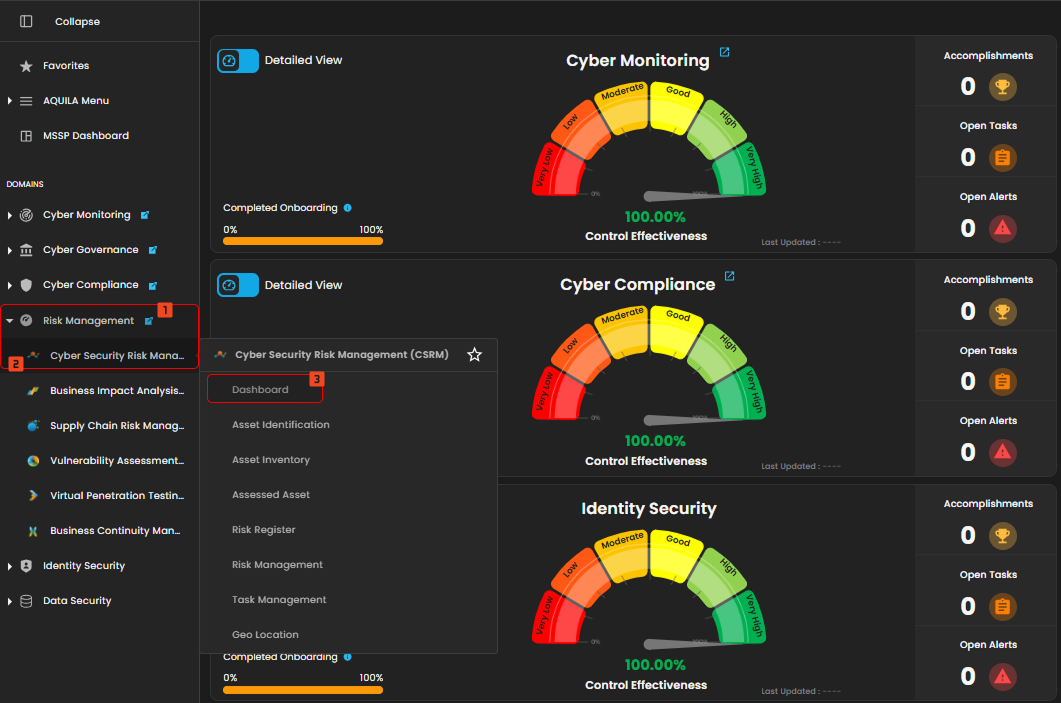
Step 2: In the left column click Risk Management -> Cyber Security Risk Management (CSRM) -> Dashboard
Cyber Security Risk Management (CSRM): Dashboard
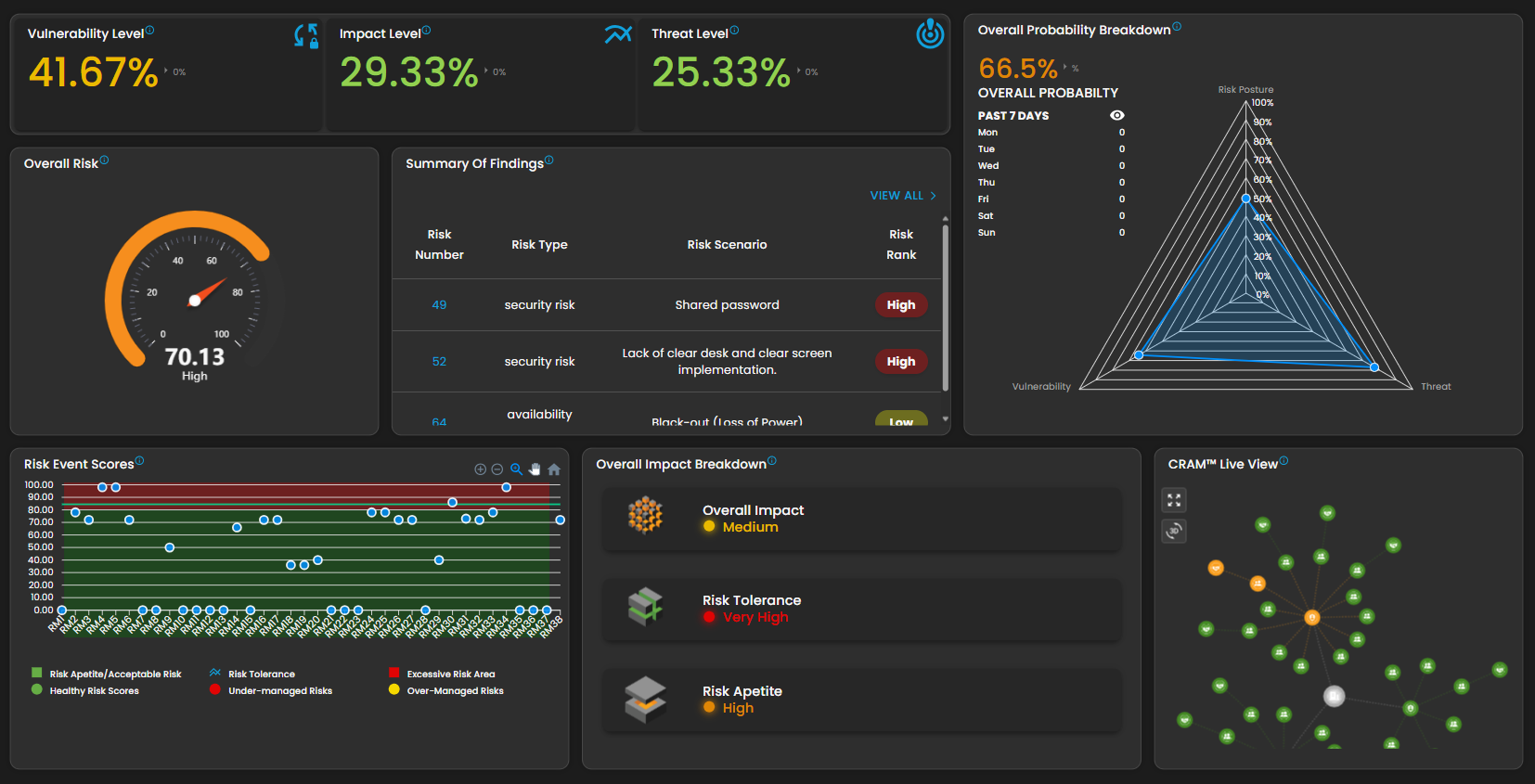
The Dashboard page serves as the central hub for visualizing cybersecurity risk metrics and insights within a Cyber Risk Assessment and Management (CRAM™) system. It provides real-time overviews of risk levels, breakdowns, and trends through interactive widgets, charts, and summaries. This interface appears tailored for security teams to monitor risks, identify issues, and facilitate quick decision-making.
Vulnerability Level
-
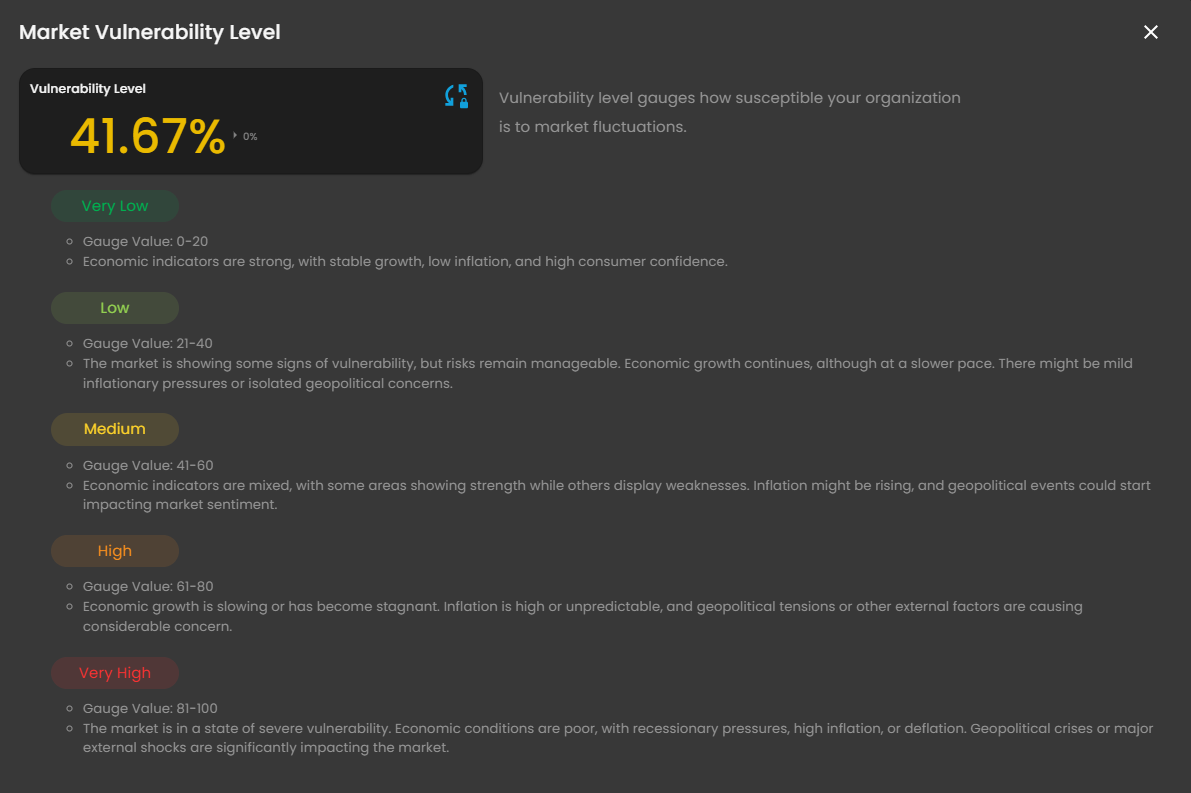
Represents the overall vulnerability exposure, meticulously calculated from asset scans and assessments. This metric elegantly gauges the susceptibility of your organization to market fluctuations, providing a refined understanding of potential risks.
- Clicking it will open the Market Vulnerability Level pop up box that emphasizes economic factors like growth, inflation, consumer confidence, and geopolitical risks, rather than cybersecurity specifics, indicating a holistic risk management perspective.
Impact Level
-
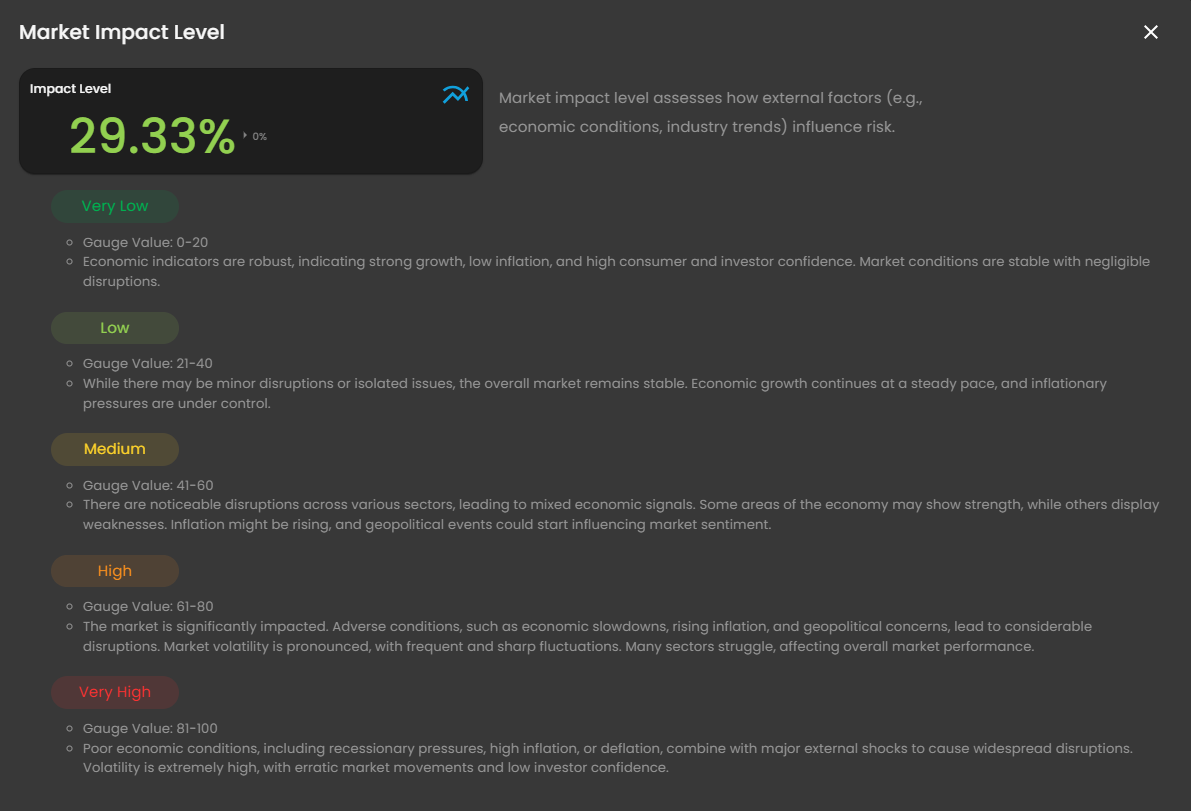
Measures the potential business or operational impact of identified risks. This metric elegantly assesses how external factors, such as economic conditions and industry trends, influence the overall risk landscape.
- Clicking it will open the Market Impact Level pop up box that focuses on external economic and market influences, including growth, inflation, geopolitical events, and investor confidence, rather than cybersecurity-specific risks.
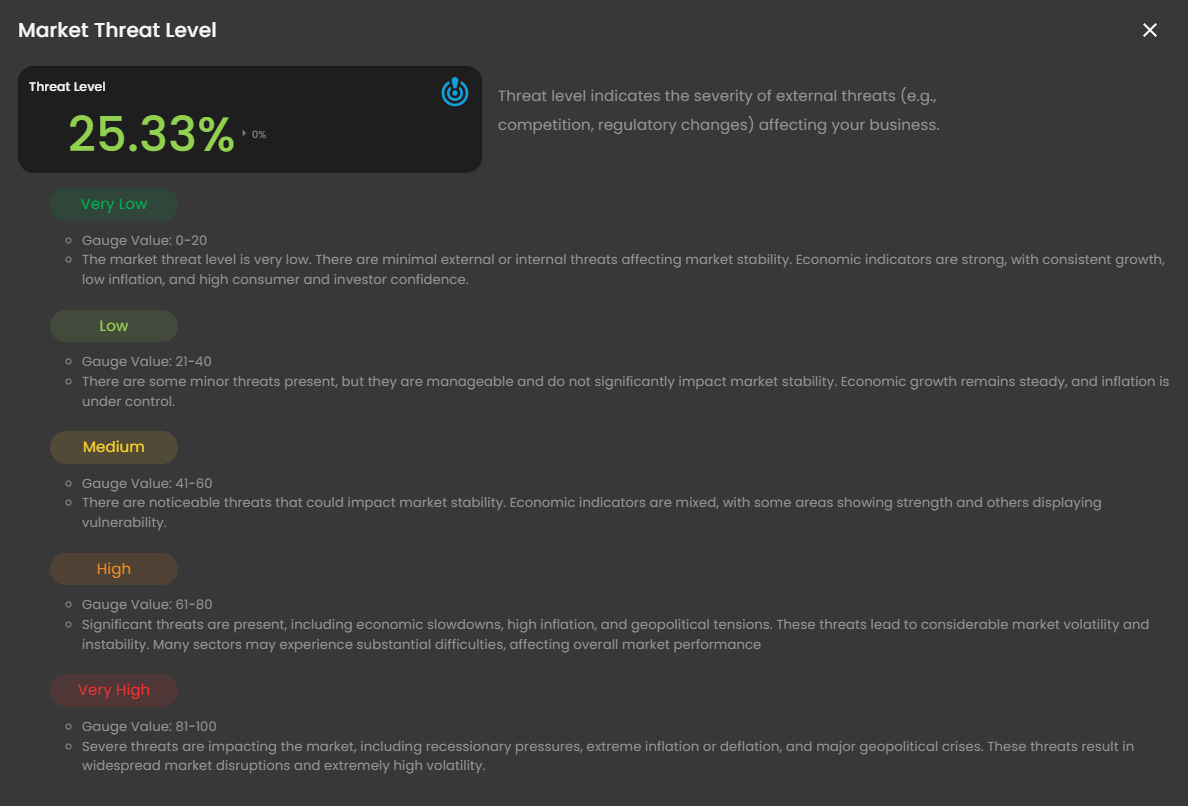
Threat Level
-
Indicates the severity or likelihood of external threats. This metric elegantly assesses the intensity of external threats, including competition and regulatory changes, that may impact your business.
- Clicking it will open the Market Threat Level pop up box that centers on assessing the severity of external threats affecting market stability, incorporating economic indicators such as growth, inflation, consumer/investor confidence, and geopolitical factors.
Overall Probability Breakdown
-
This component, integral to a risk management dashboard such as the CRAM™ system, focuses on probabilistic risk metrics over time. The probability breakdown elegantly illustrates the likelihood of a risk event occurring, empowering stakeholders to prioritize mitigation efforts effectively.
Overall Risk
-
Provides a holistic score aggregating vulnerability, impact, and threat levels. This metric formally represents the combined impact and probability of a risk event, offering a comprehensive assessment of the organization's overall risk exposure.
-
Clicking this element unveils a popup window, a pivotal component of a risk management dashboard such as the CRAM™ system, meticulously crafted to provide a comprehensive assessment of an organization's risk posture. It delivers a holistic score that elegantly aggregates vulnerability, impact, and threat levels, empowering security teams and decision-makers to monitor and prioritize risk mitigation efforts with precision.
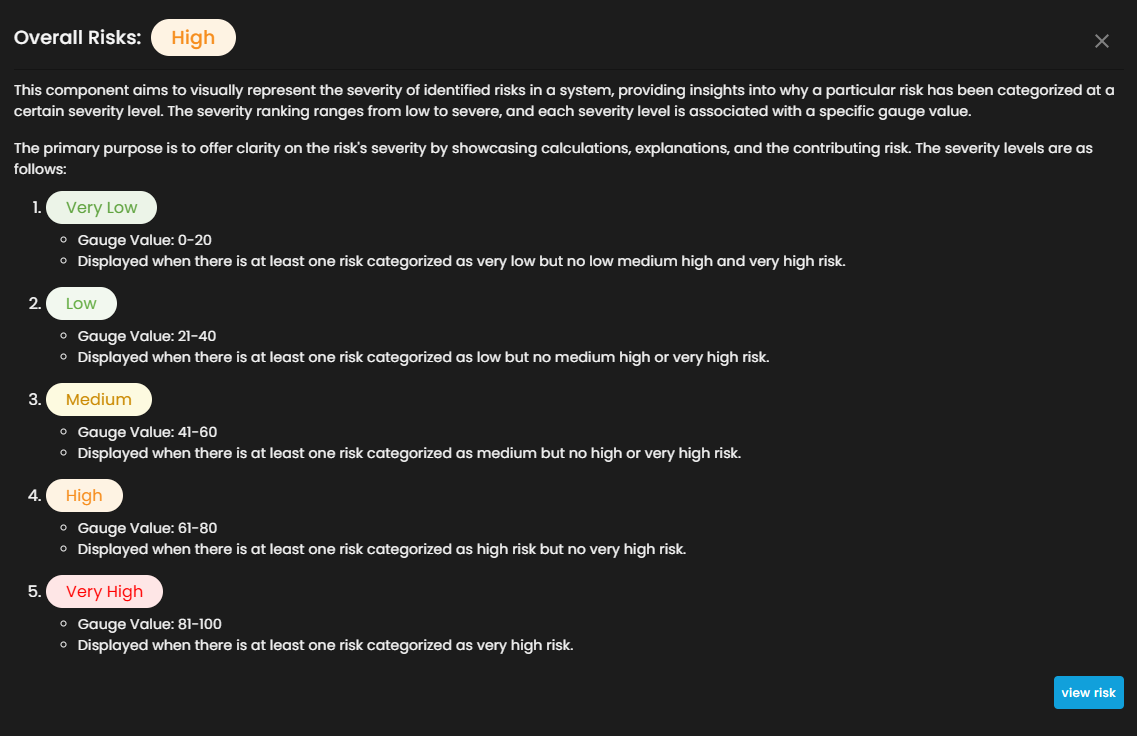
- Clicking the view risk button will redirect you to its risk assessment.
-
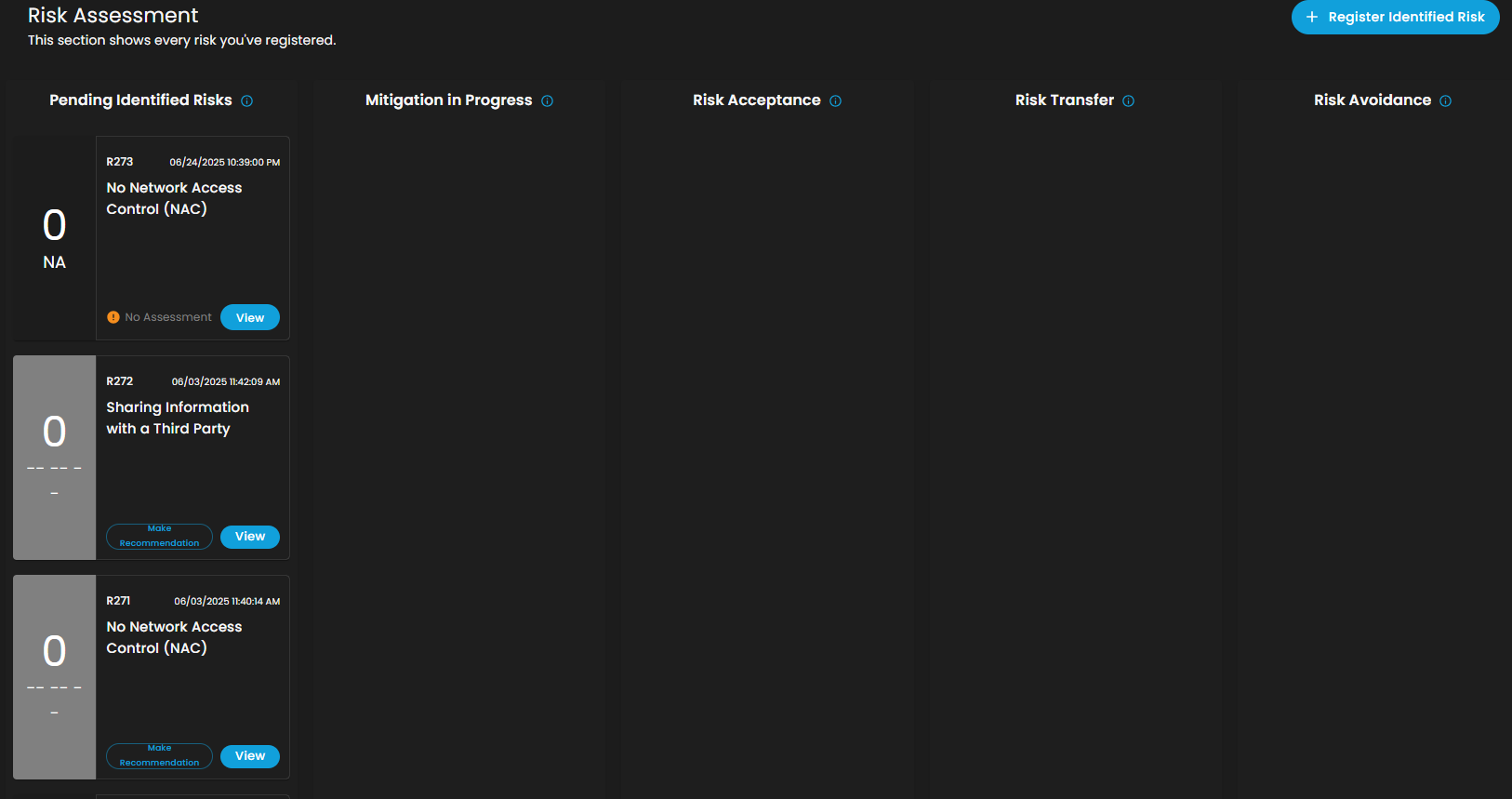
This page offers comprehensive visibility into pending identified risks, ongoing mitigation efforts, risk acceptance, risk transfer, and risk avoidance strategies. Additionally, it enables client to seamlessly register newly identified risks with ease.
Summary of Findings
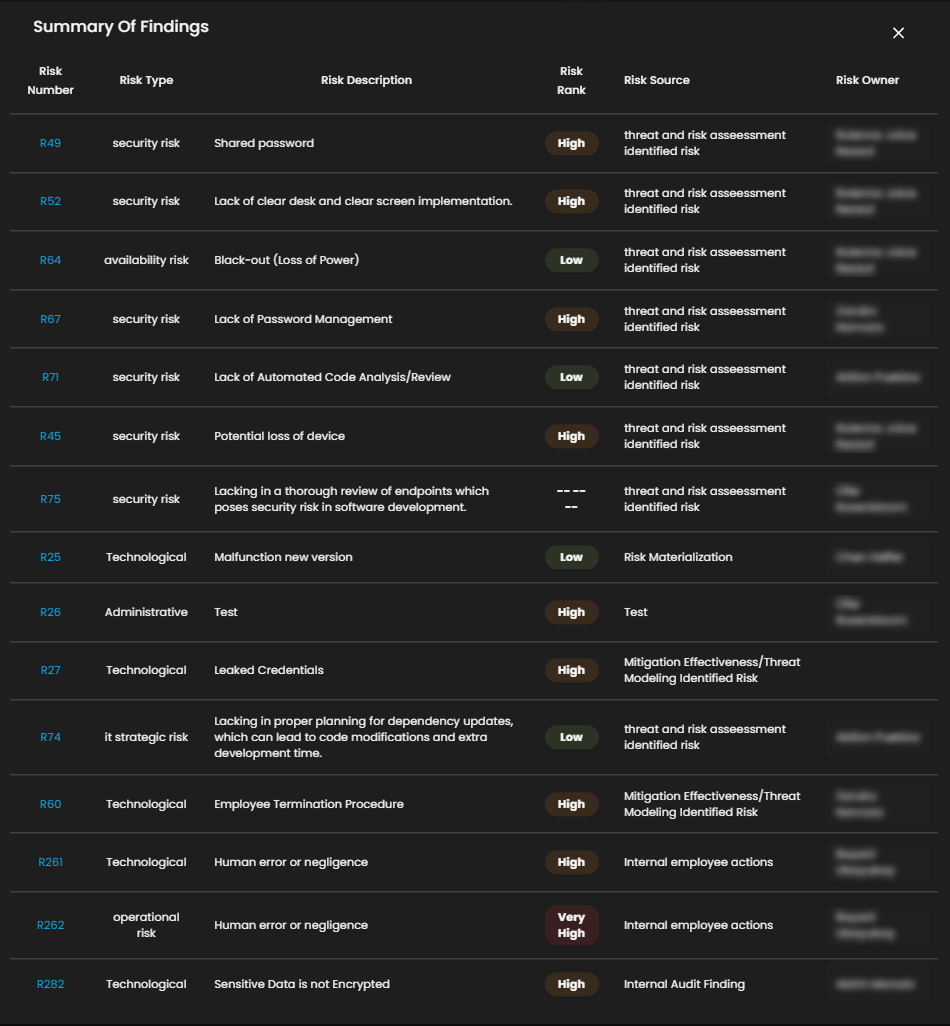
- The summary of findings provides a concise overview of identified risk and their implications.
-
Upon selecting the View All link, a sophisticated popup will be revealed, presenting a comprehensive overview of all risk scenarios.
-
Selecting a risk scenario will unveil a sophisticated Risk Breakdown popup, an integral visualization component within a risk management dashboard such as the CRAM™ system, meticulously crafted to dissect a specific identified risk for comprehensive in-depth analysis. This feature is thoughtfully designed for security teams and risk managers, providing profound insights into the composition of a risk event and empowering informed mitigation strategies with precision.
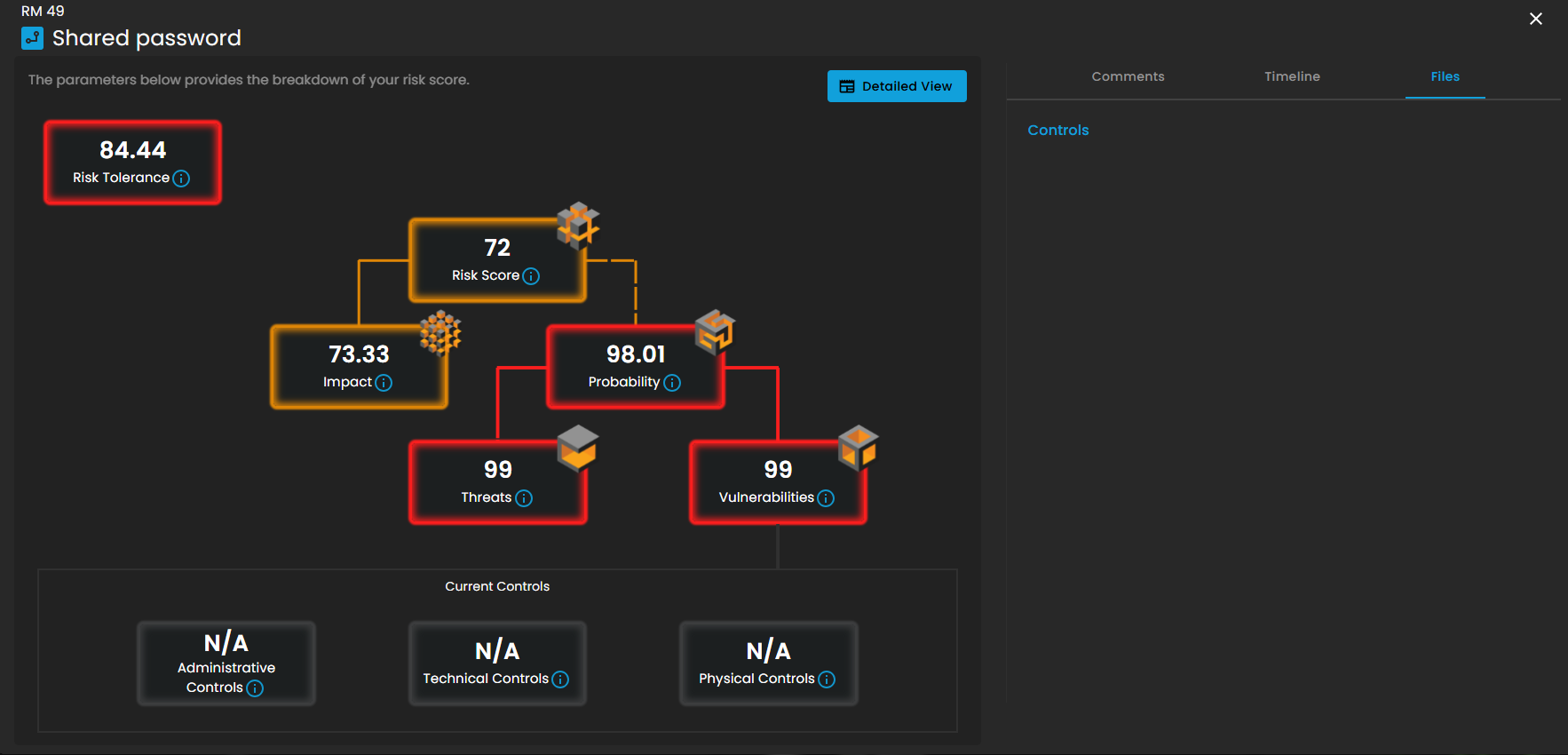
-
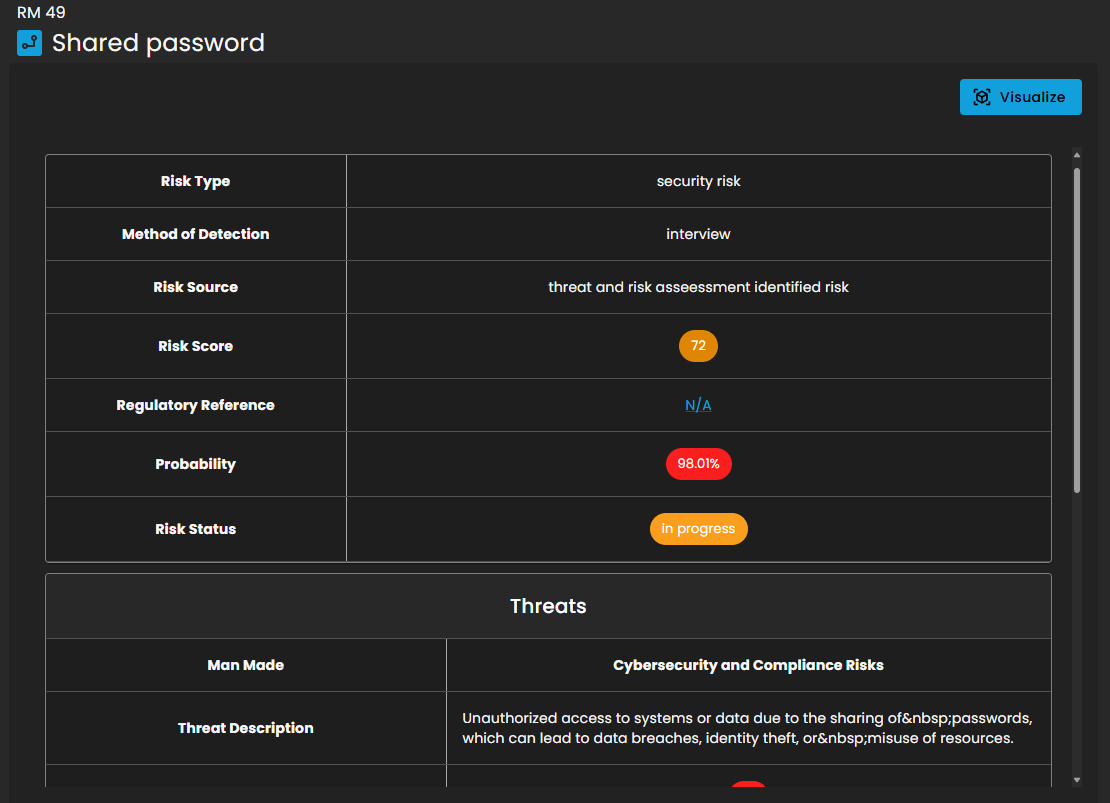
Upon clicking the Detailed View button, you will be presented with an intricate and comprehensive breakdown of information, encompassing Threats, Vulnerabilities, and additional critical factors.
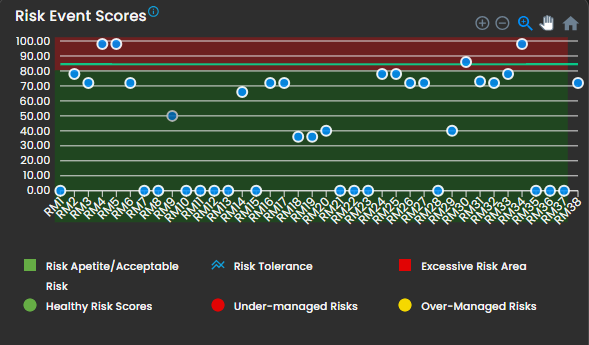
Risk Event Scores
- Risk event scores combine probability and impact to quantify individual risks. Higher scores indicate greater risk.
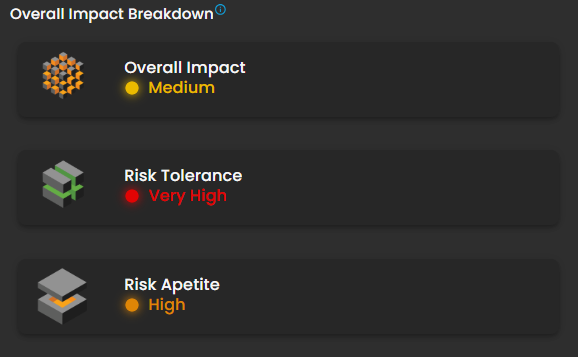
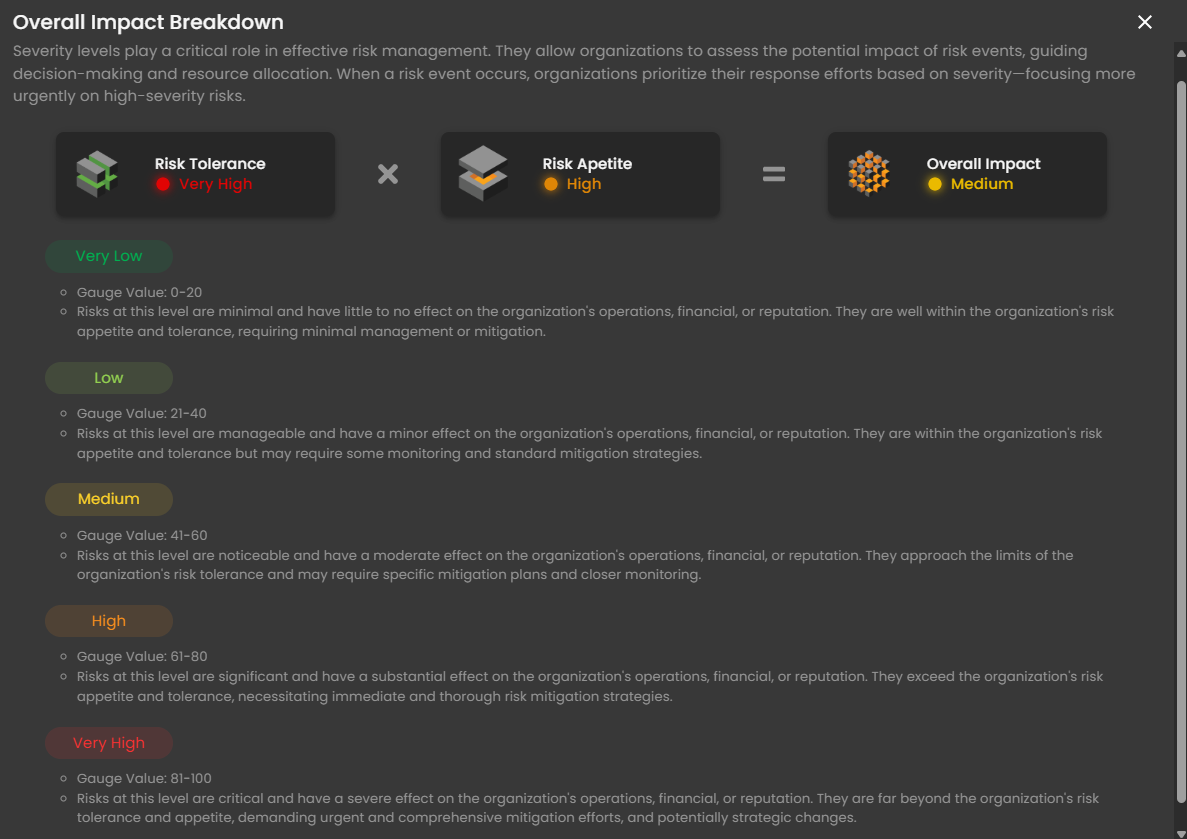
Overall Impact Breakdown
- Impact breakdown illustrates the potential consequences of a risk event.
-
Upon selecting Overall Impact, a sophisticated popup emerges, serving as an educational and analytical component within a risk management dashboard such as the CRAM™ system, meticulously crafted to illuminate the dynamic interplay between an organization's risk tolerance, appetite, and overall impact severity. This interface delivers a structured explanation of risk severity levels, expertly guiding users in evaluating potential impacts on operations, finances, and reputation. It empowers security teams and executives to prioritize responses based on severity, ensuring optimal resource allocation and strategic mitigation planning.
-
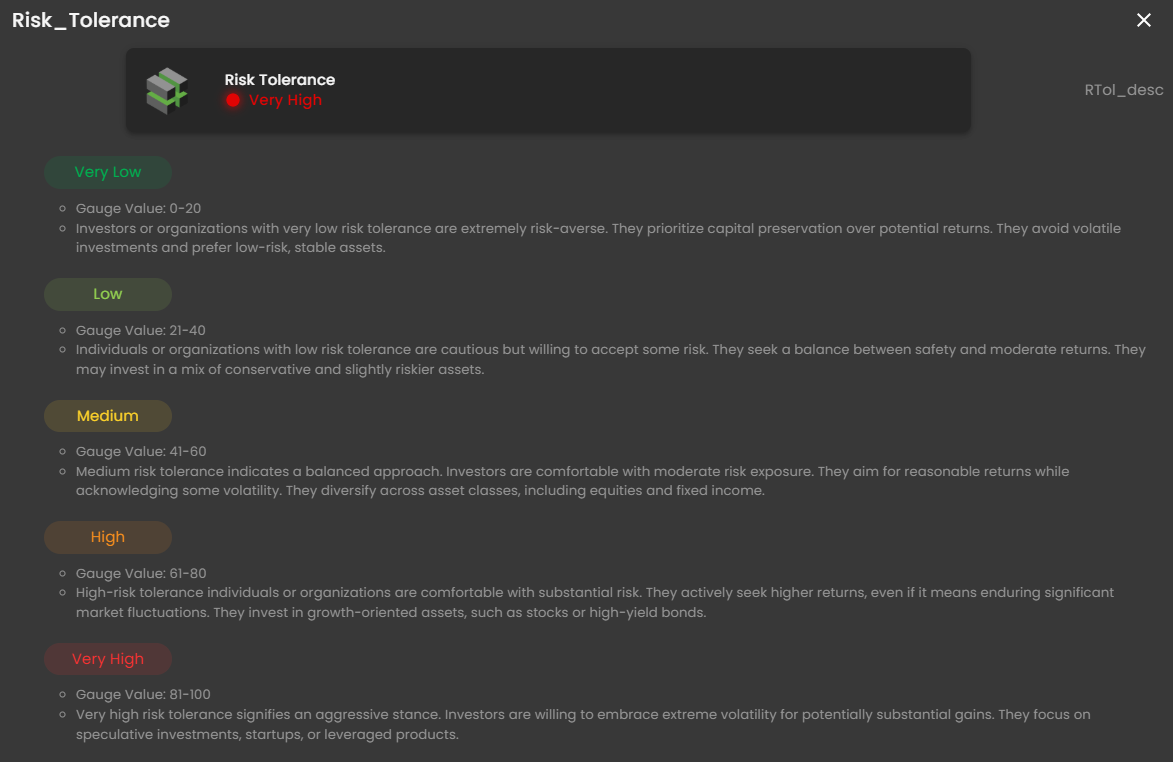
Upon selecting Risk Tolerance, a refined popup unveils itself, serving as an insightful informational component within a risk management dashboard such as the CRAM™ system, meticulously crafted to deliver a comprehensive explanation of risk tolerance levels for individuals or organizations. It elegantly outlines how risk tolerance shapes investment and decision-making strategies, accentuating preferences for stability versus potential returns. This interface empowers users, including financial advisors, security teams, and executives, to assess and align risk profiles with organizational objectives, fostering balanced and strategic portfolio management.
-
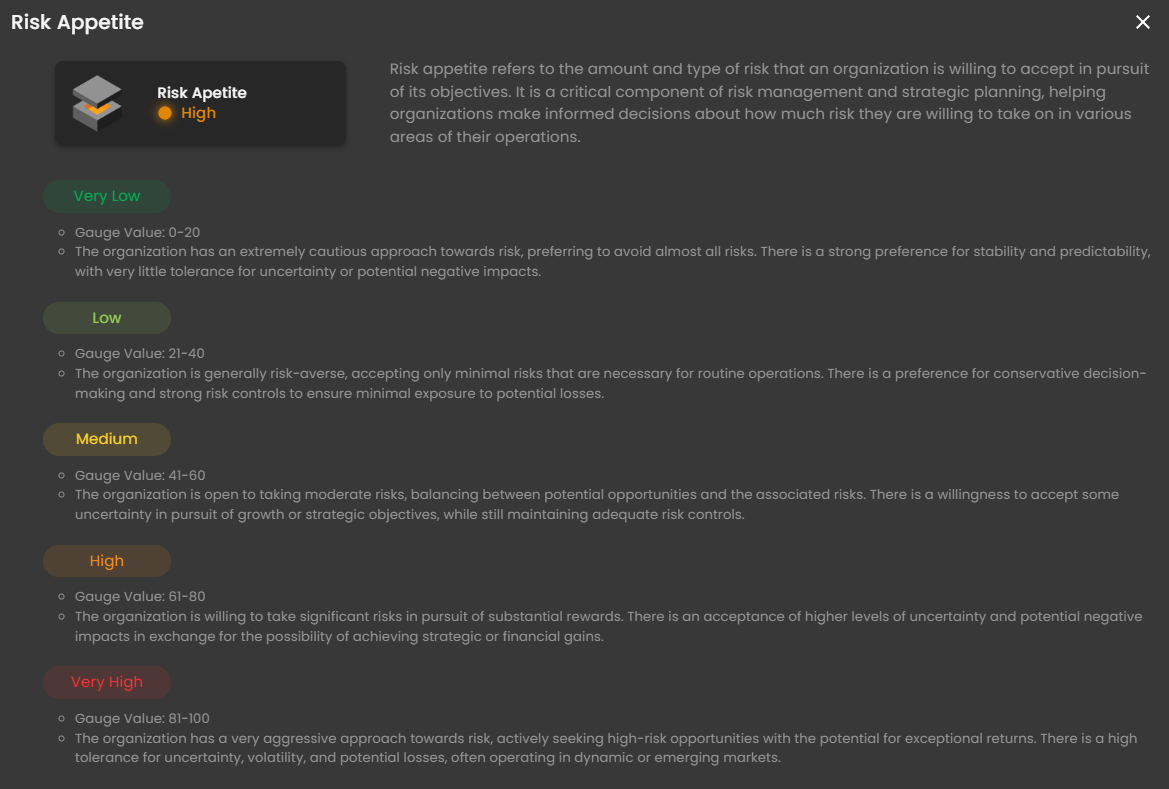
Upon selecting Risk Appetite, a refined popup unveils itself, elucidating that this term denotes the amount and type of risk an organization is prepared to embrace in pursuit of its objectives. As a pivotal component of risk management and strategic planning, it empowers organizations to make well-informed decisions regarding the level of risk they are willing to undertake across diverse operational domains.
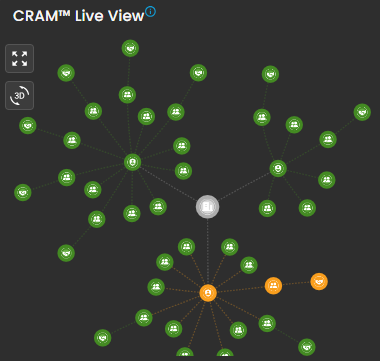
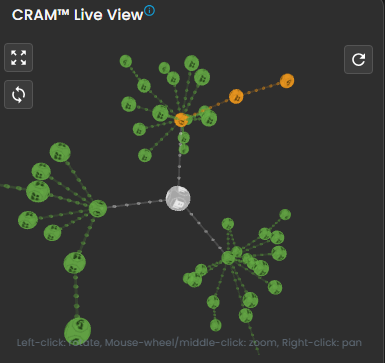
CRAM™ Live View
- This will display all your Critical Business Process and Critical Business Functions in 3D view. Click the switch icon to change the view.
________________________________________________________________________________________________________________________________________________
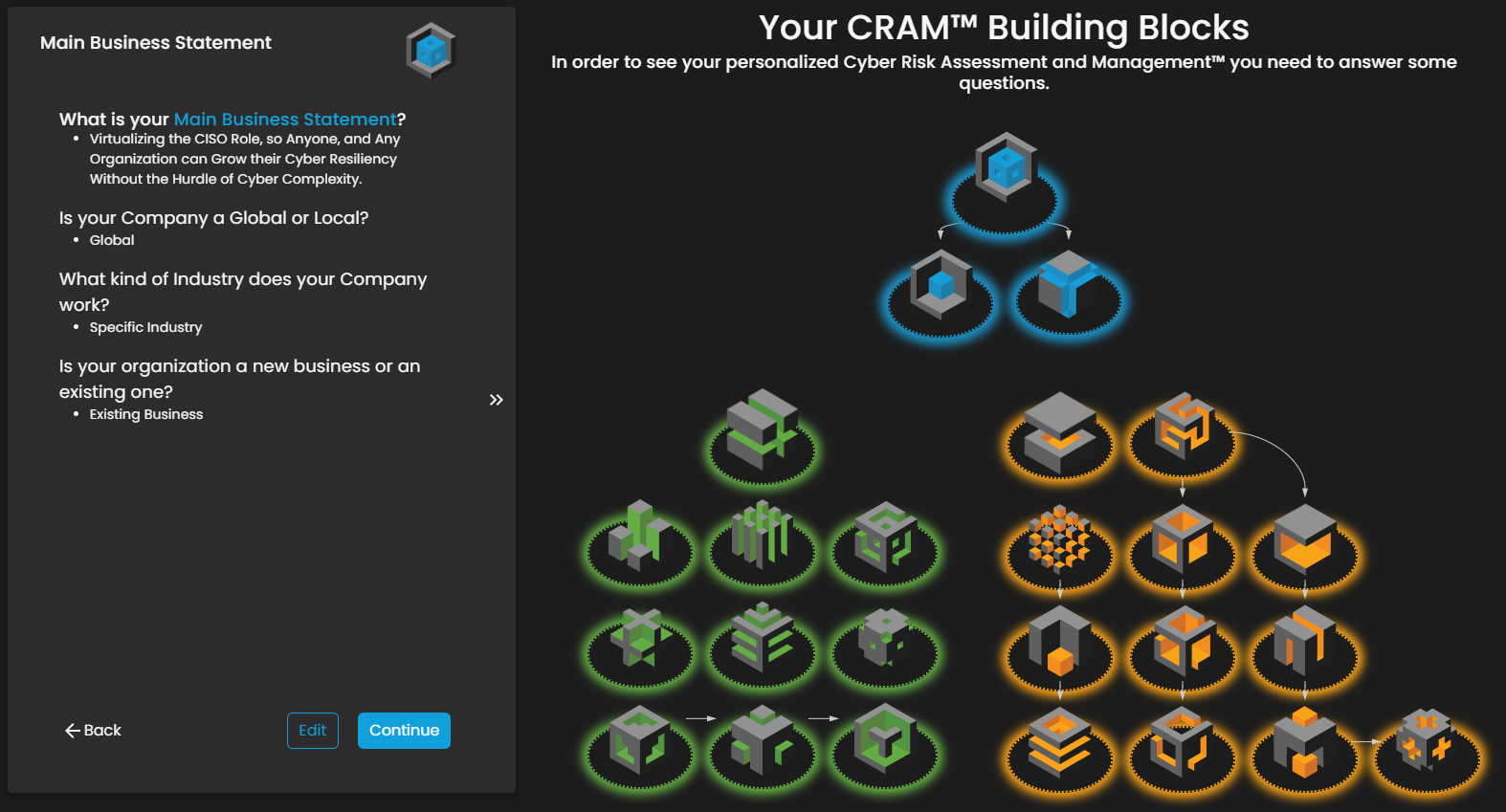
Cyber Security Risk Management (CSRM): Asset Identification
The CRAM™ Building Blocks page serves as an onboarding or configuration interface within the Cyber Risk Assessment and Management (CRAM™) system, designed to collect foundational business information for generating a personalized cybersecurity risk profile. This page emphasizes simplicity in input to demystify cyber complexity, targeting users like CISOs, organizations, or individuals seeking to enhance cyber resiliency.
________________________________________________________________________________________________________________________________________________
Cyber Security Risk Management (CSRM): Asset Inventory
The Asset Inventory page is a central management interface within the Cyber Risk Assessment and Management (CRAM™) system, designed to centralize, categorize, and visualize organizational assets for enhanced risk visibility. This interface supports risk managers, IT teams, and security professionals in tracking assets like hardware, software, and data, enabling proactive identification of vulnerabilities and exposures.
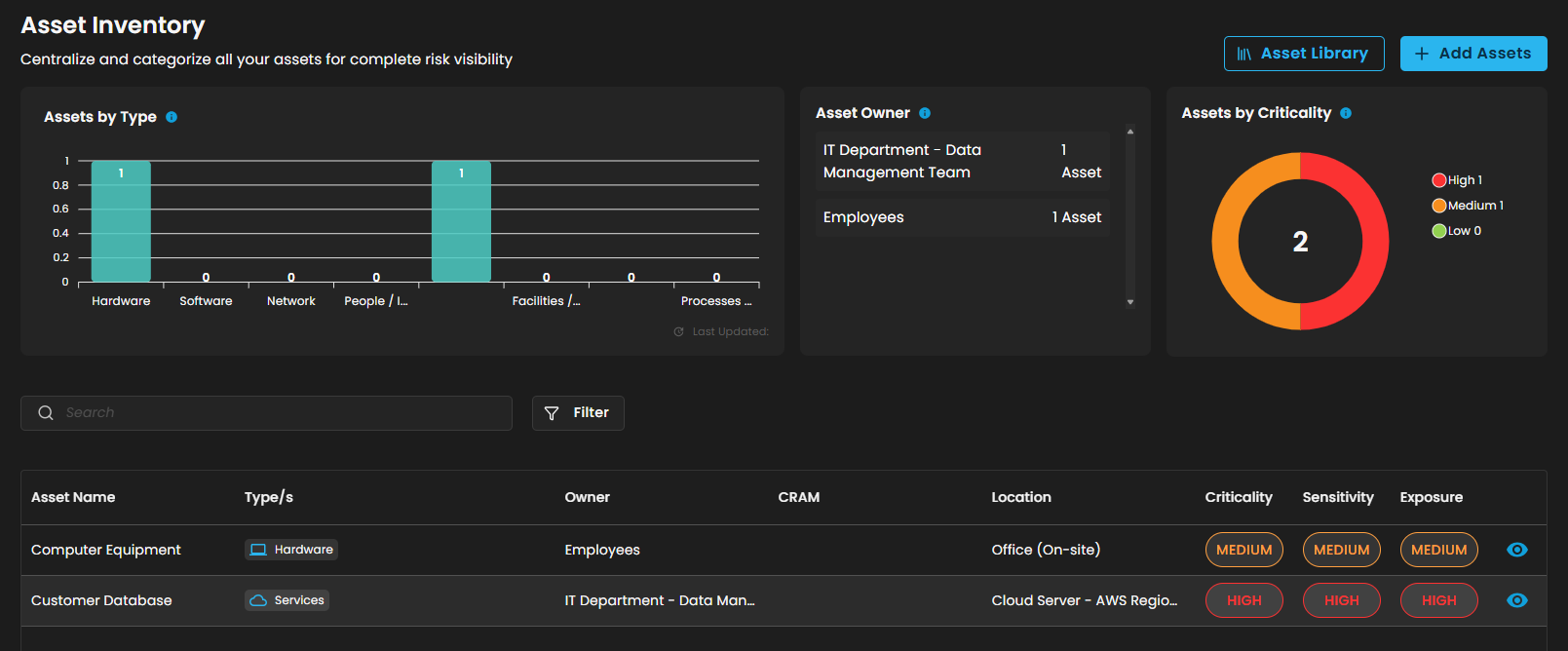
Assets by Type
-
This visualization elegantly presents the distribution of registered assets, meticulously grouped by their type, including hardware, software, networks, people, and more.
Asset Owner
-
Highlights the user with the highest number of registered assets, offering a valuable tool for identifying key owners across the organization.
Assets by Criticality
-
Elegantly visualizes assets according to their assigned criticality levels—High, Medium, or Low—serving as a vital tool to prioritize which assets require the utmost protection.
Search and Filter Section
-
Search Bar
-
Allows text-based querying of the asset table for quick navigation.
-
-
Filter Button
-
Opens advanced filtering options for refining the asset list by criteria like type, owner, or criticality.
-
Table Section
- This section contains a tabular display of individual assets, organized in rows with sortable columns.
-
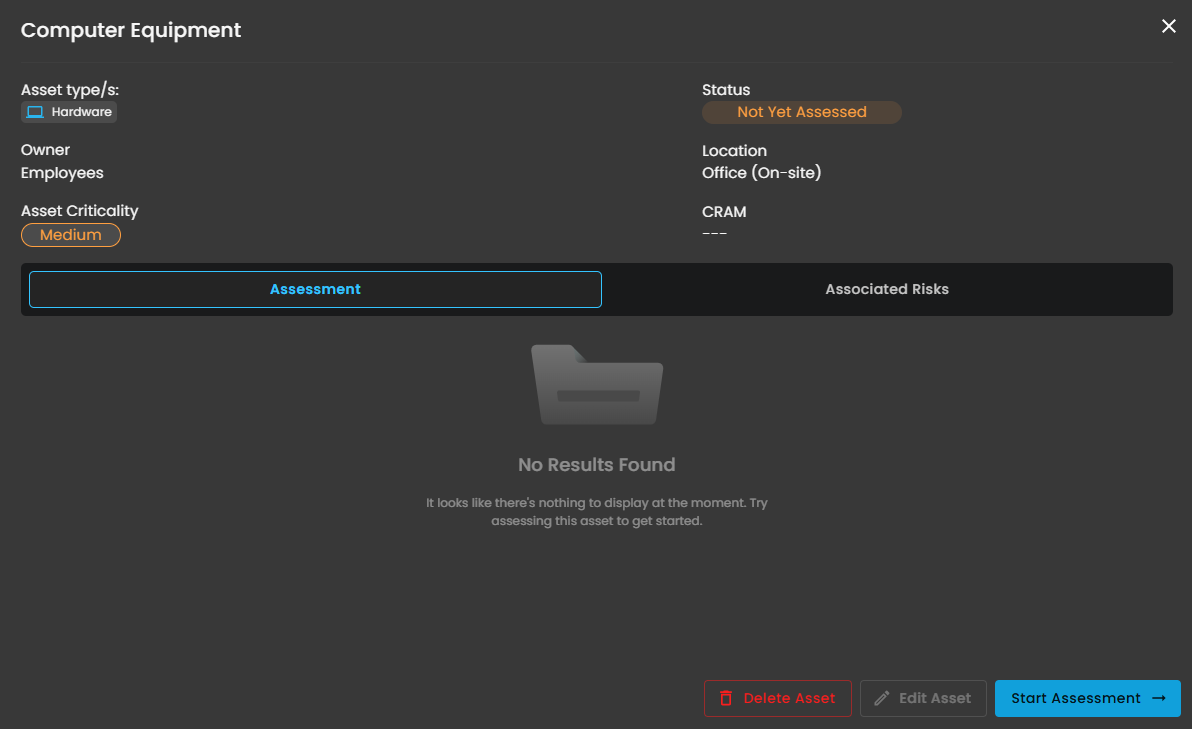
Selecting the eye icon gracefully expands to reveal comprehensive and detailed information.
-
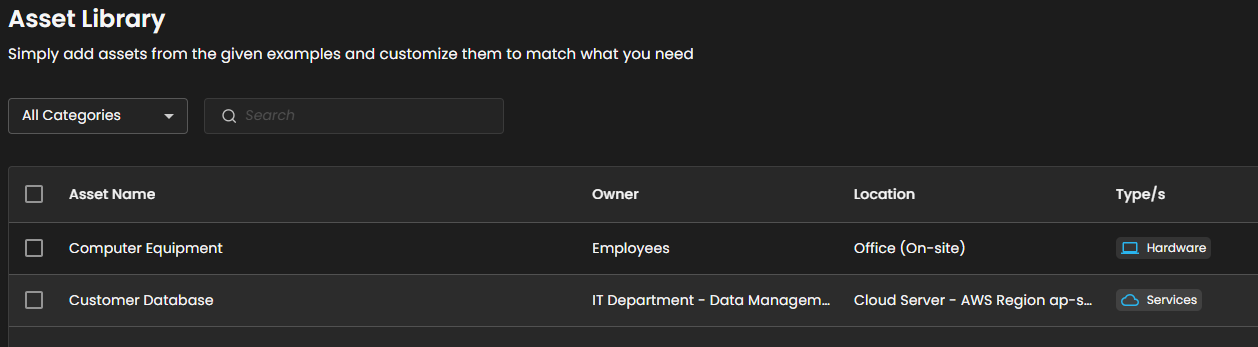
Asset Library
-
It serves as a customizable template repository for users to import and adapt pre-defined asset examples, streamlining the process of populating the asset inventory for risk assessment. This design facilitates quick onboarding by allowing users to select, edit, and integrate example assets like hardware and services, ensuring comprehensive coverage without starting from scratch.
-
-
Add Assets
-
A dedicated input interface within the Asset Inventory module of the Cyber Risk Assessment and Management (CRAM™) system, focused on registering and categorizing new assets to build a comprehensive risk inventory. This interface empowers IT/security teams to systematically document assets, assigning attributes like criticality and sensitivity to facilitate risk analysis.
-
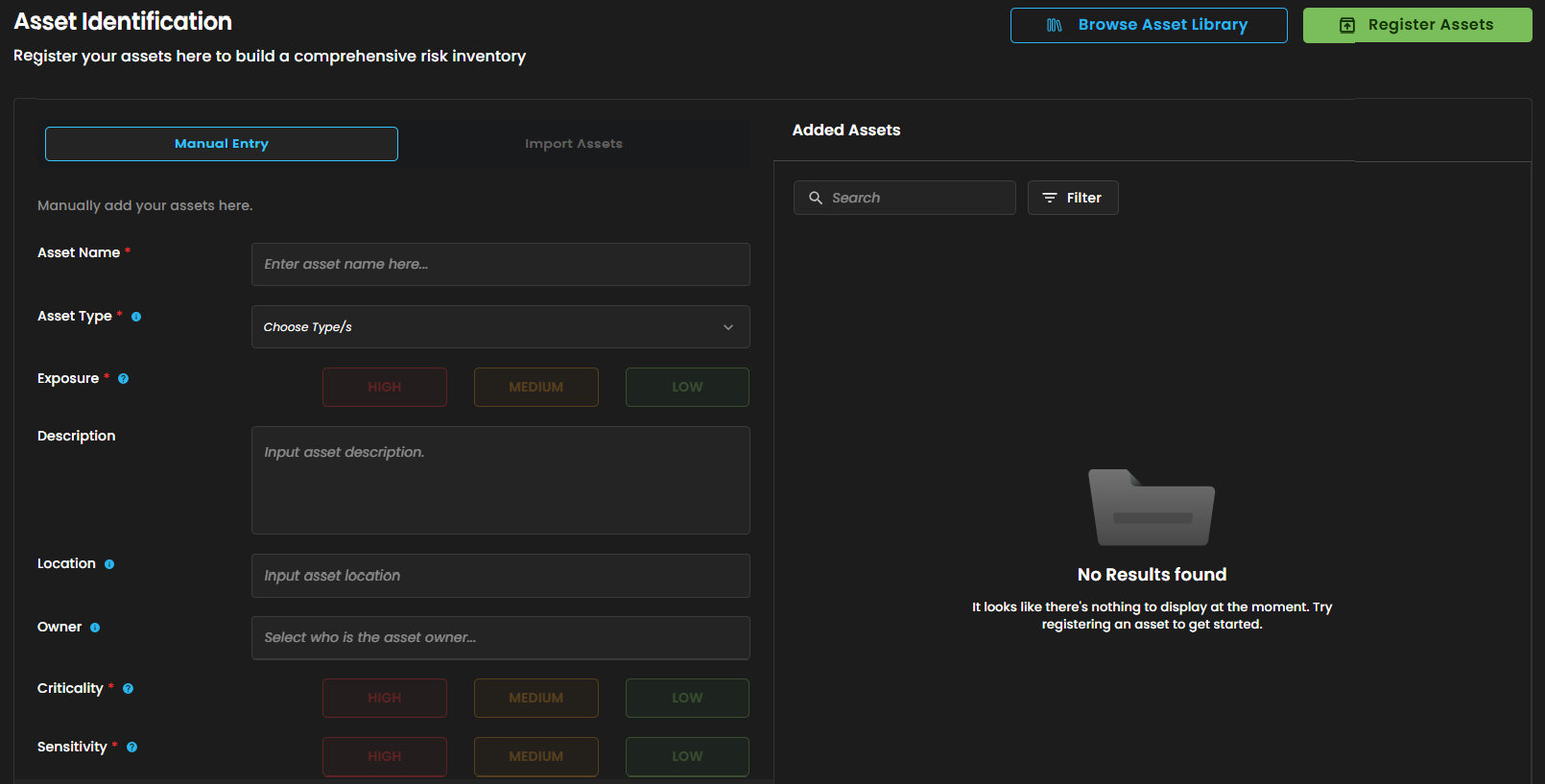
- It has 2 action buttons:
-
Browse Asset Library - Enables users to access pre-defined asset templates for quick import or inspiration.
-
Register Assets - Submits the form to add the entered asset to the inventory.
-
________________________________________________________________________________________________________________________________________________
Cyber Security Risk Management (CSRM): Assessed Asset
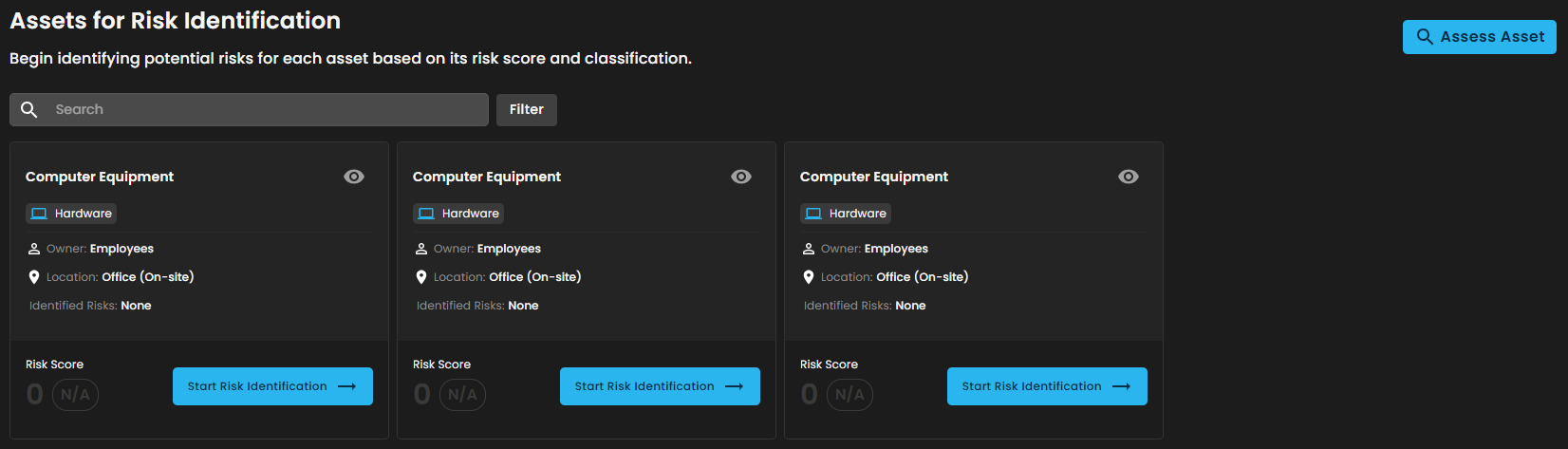
Designed to facilitate the identification, assessment, and classification of potential risks associated with organizational assets (e.g., hardware equipment).
Search and Filter Section
-
Search Bar
-
Allows text-based querying of the asset table for quick navigation.
-
-
Filter Button
-
Opens advanced filtering options for refining the asset list by criteria like type, owner, or criticality.
-
-
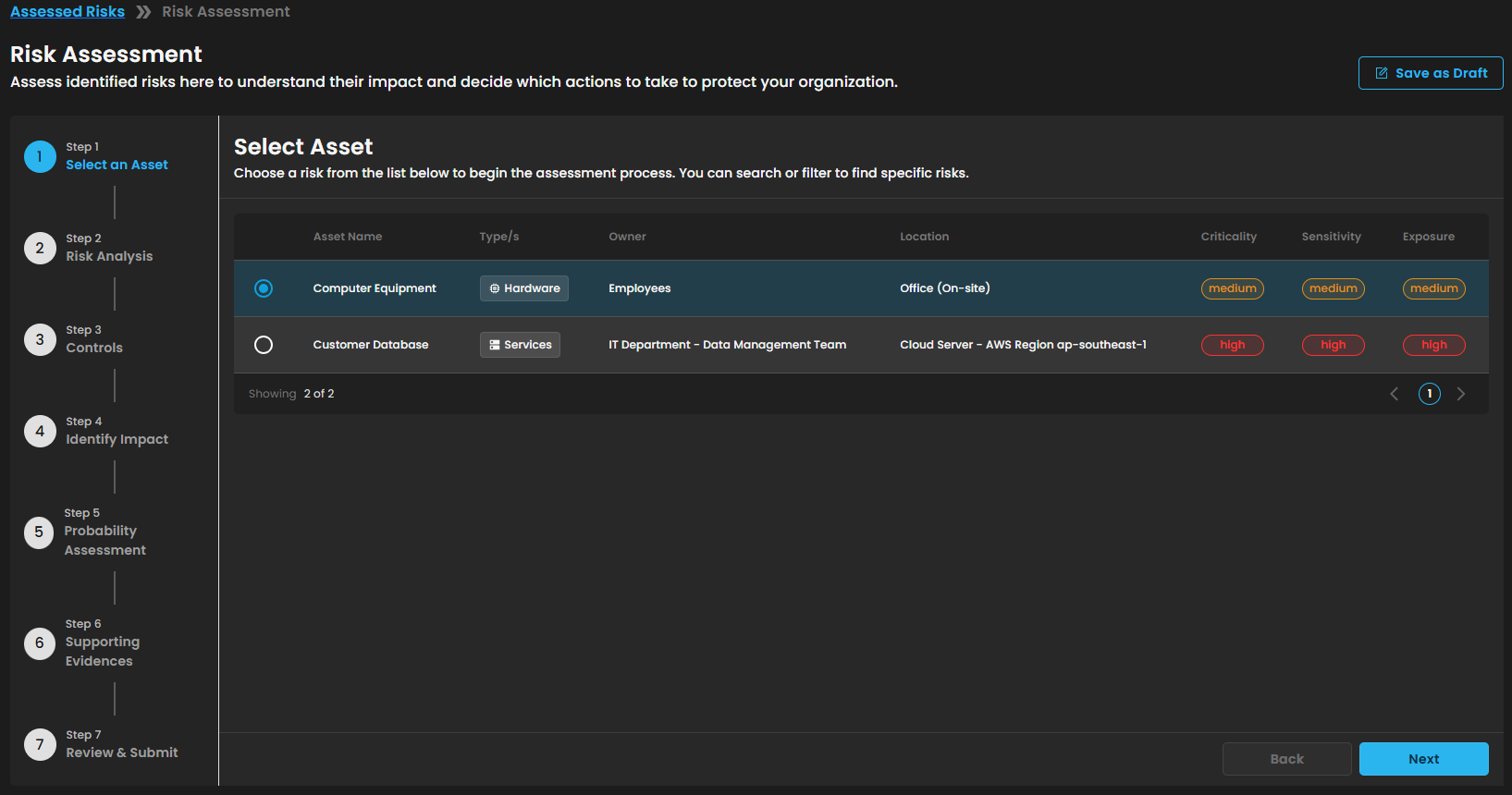
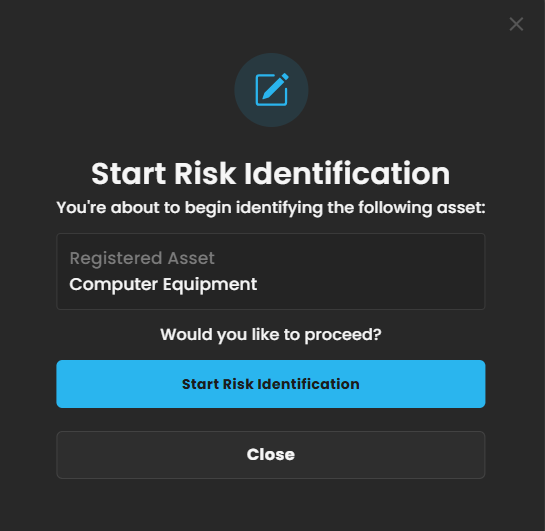
Start Risk Identification
-
This initiates the risk evaluation process for the specific asset.
-
________________________________________________________________________________________________________________________________________________