
CyTech AQUILA - Cyber Incident Management (CIM): Cases
Introduction
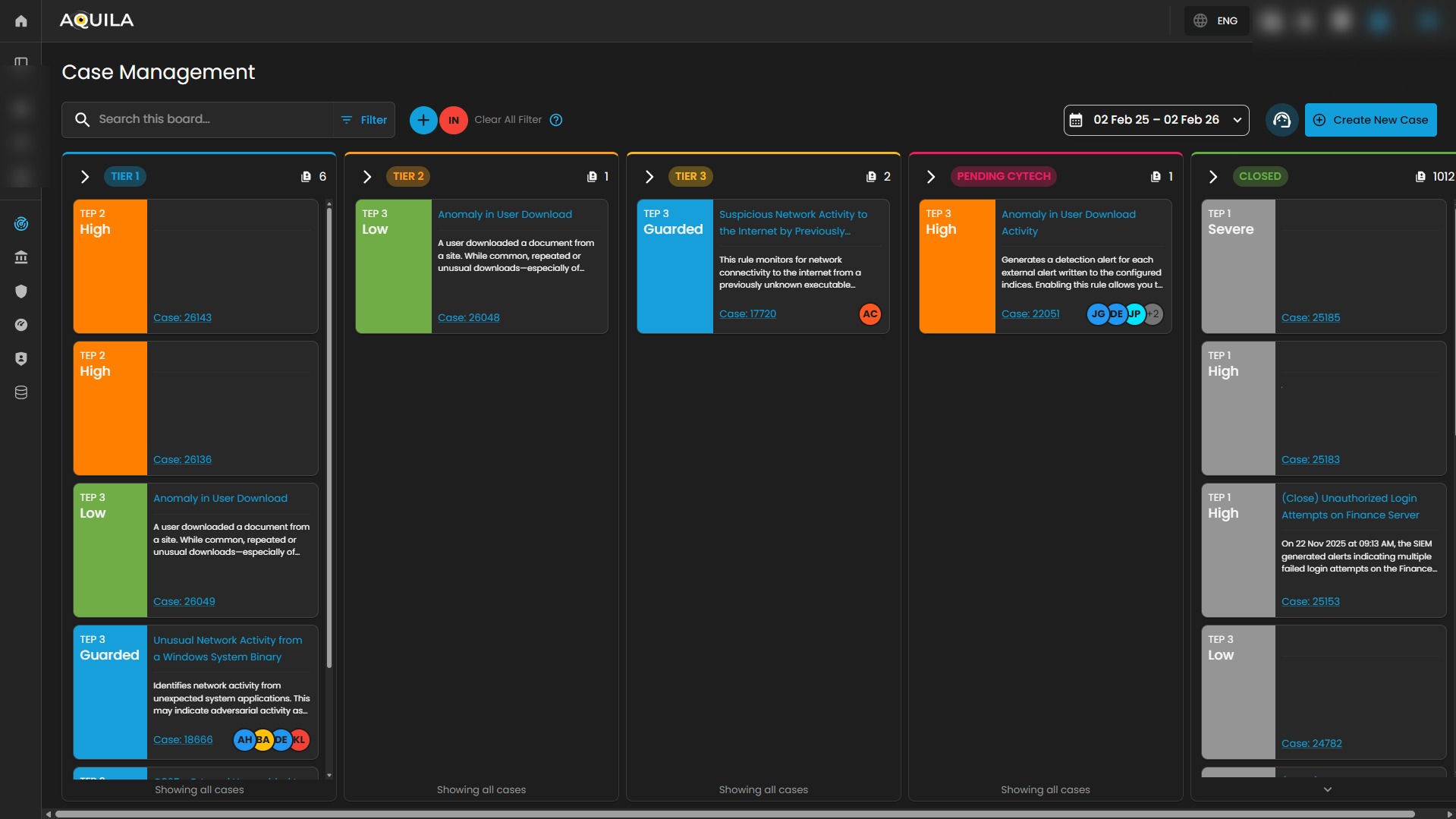
Case Management Dashboard is a tool that provides a comprehensive overview of security incidents. It offers detailed insights into active and past incidents, including their status, severity, and timeline. The dashboard facilitates investigation and response by integrating real-time alerts, threat intelligence, and collaboration features, while also tracking performance metrics and compliance. This centralized approach enhances the efficiency of managing and resolving security incidents, ensuring timely and effective responses to mitigate risks and improve overall security posture.
Workflow Stages
1. Tier 1 – Initial Triage Cases
-
-
SOC Role: Tier 1 Analyst (Junior Analyst / Alert Triage).
-
Purpose: These cases represent low-level alerts or first-line detections that require quick review and initial triage.
-
Activities:
-
Validate whether the alert is a false positive or true positive.
-
Collect basic context (e.g., user, host, timestamp, IP address).
-
Escalate to Tier 2 if suspicious behavior is confirmed.
-
-
Example from Dashboard:
-
O365 – Access Request Created (Low severity).
-
-
Outcome: Often resolved at Tier 1 if clearly benign, otherwise escalated.
-
2. Tier 2 – Investigation Cases
-
-
SOC Role: Tier 2 Analyst (Intermediate / Incident Responder).
-
Purpose: These are guarded alerts requiring deeper investigation and contextual analysis.
-
Activities:
-
Correlate the alert with other logs or events (threat hunting, SIEM searches).
-
Investigate user behavior, process execution, network activity.
-
Assess potential adversary techniques (e.g., MITRE ATT&CK mapping).
-
-
Example from Dashboard:
-
Unusual Network Activity from a Windows System Binary.
-
Attempts to Brute Force Microsoft 365 User Account.
-
-
Outcome: If confirmed malicious, escalated to Tier 3 for containment and response.
-
3. Tier 3 – Advanced Investigation / Threat Containment
-
-
SOC Role: Tier 3 Analyst (Senior Incident Responder / Threat Hunter).
-
Purpose: These are high-complexity or high-risk cases requiring advanced analysis and incident response expertise.
-
Activities:
-
Perform in-depth forensic analysis.
-
Identify persistence, lateral movement, or exfiltration attempts.
-
Contain compromised systems or accounts.
-
Recommend remediation actions (patching, isolating endpoints, resetting credentials).
-
-
Example from Dashboard:
-
Suspicious Network Activity to Internet by Unknown Executable.
-
System Network Connections Discovery.
-
-
Outcome: Leads to confirmed incident reports, escalation to management, or remediation workflows.
-
4. Pending – Escalated to Vendor/Support
-
-
SOC Role: Escalation Analysts / Vendor Support.
-
Purpose: Cases flagged here are awaiting validation or support from the vendor. This stage ensures:
-
Validation of unusual detections.
-
Vendor-side investigation (e.g., signature tuning, false positive confirmation).
-
Guidance from product experts.
-
-
Example from Dashboard:
-
Anomaly in User Download Activity (High severity) pending Client validation.
-
-
Outcome: Case is updated and either closed, tuned, or sent back to SOC for action.
-
5. Closed – Resolved or Dismissed Cases
-
-
SOC Role: Any Tier but validated and approved before closure.
-
Purpose: Contains all cases that are resolved, dismissed as false positives, or remediated.
-
Activities:
-
Document final analysis and resolution steps.
-
Mark case as False Positive, True Positive – Remediated, or Informational.
-
Archive for compliance, auditing, and reporting.
-
-
Outcome: Closes the incident lifecycle. Closed cases can still be reviewed for reporting and lessons learned.
-
Operational Workflow in SOC Terms
-
Detection → Tier 1 triages incoming alerts.
-
Validation → Tier 2 investigates and correlates data.
-
Escalation → Tier 3 performs deep analysis and containment.
-
External Escalation → Pending for vendor validation/support.
-
Closure → Closed with full documentation and resolution notes.
Search and Date Filtering
The Case Management interface provides filtering and search capabilities to streamline case navigation and improve analyst efficiency. These functions enable analysts to quickly locate specific cases or limit the view to a defined time range.
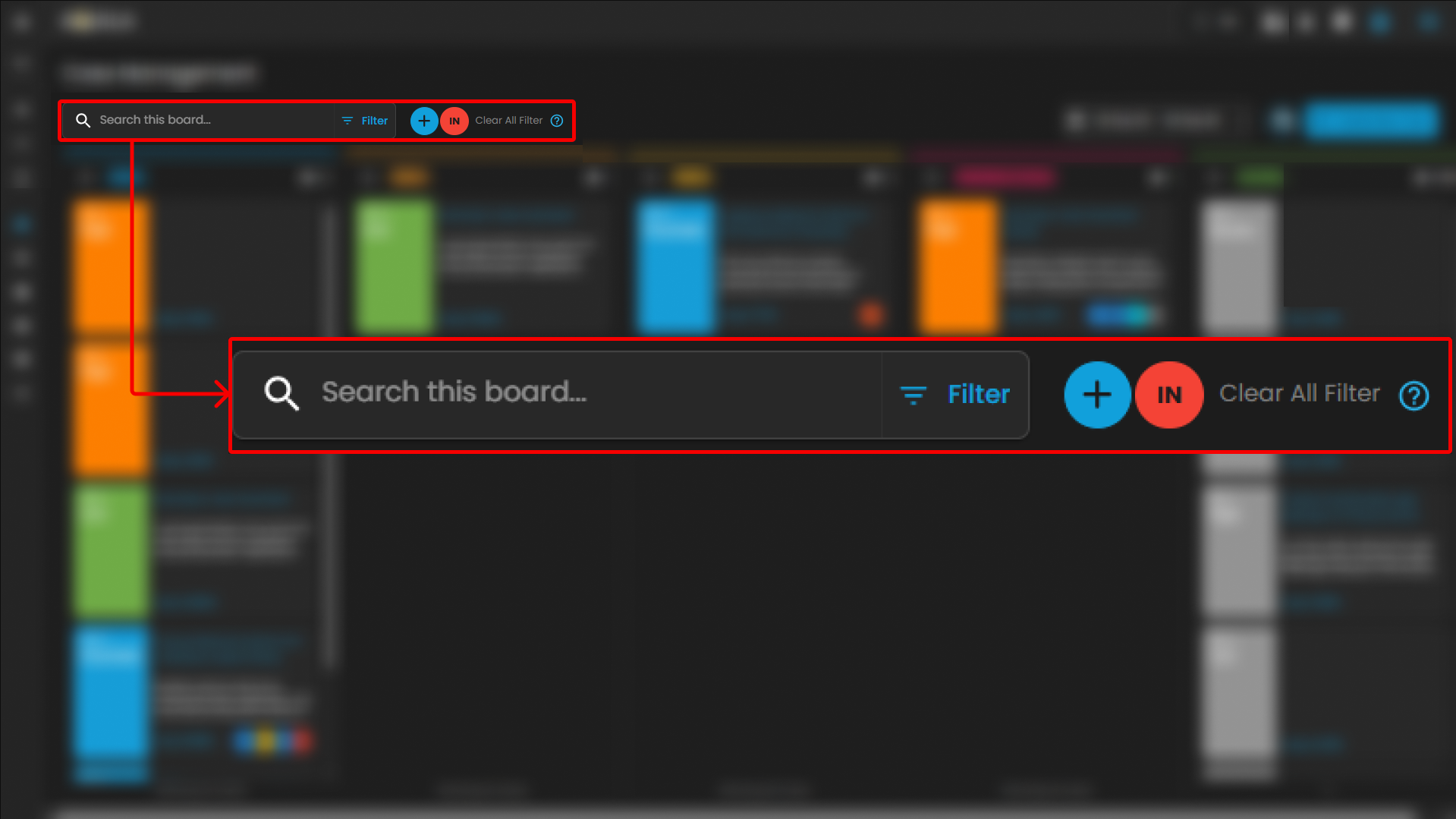
Search Bar
-
Location: Positioned at the top-left of the Case Management interface.
-
Purpose: Enables analysts to perform keyword-based searches across all available cases within the board.
-
Functionality:
-
Accepts free-text input such as case IDs, rule names, case titles, or descriptive terms.
-
Returns a filtered set of cases that match the entered criteria.
-
Supports rapid retrieval of specific cases without manual scrolling through case columns.
-
-
Use Case in SOC Operations:
-
Analysts can locate a case associated with a particular user or alert type during triage.
-
Facilitates targeted investigation by narrowing down large datasets to a manageable subset.
-
Date Filter
-
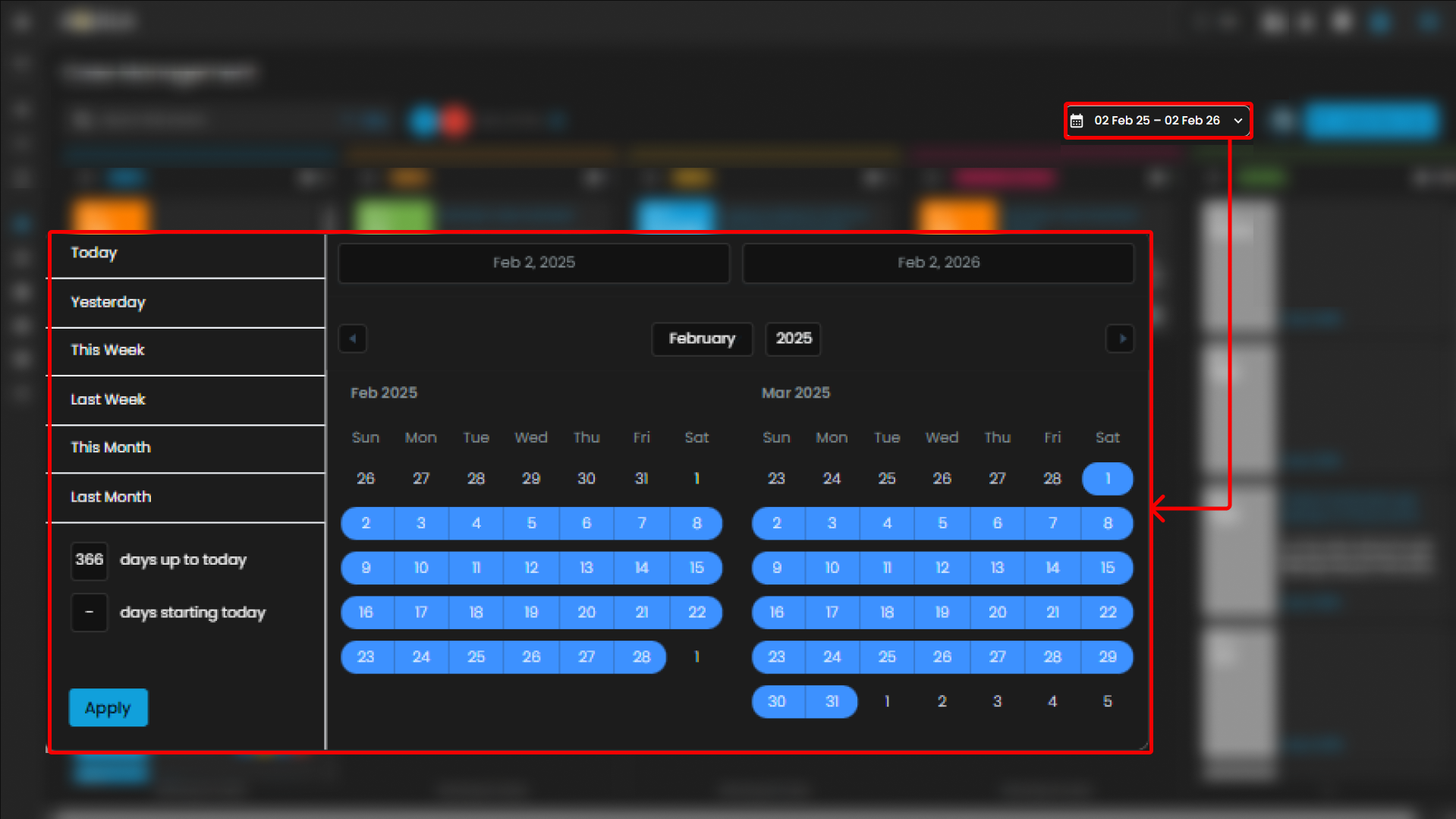
Location: Displayed in the top-right section of the Case Management interface, adjacent to the “Create New Case” button.
-
Purpose: Allows analysts to filter cases based on a specified date range.
-
Functionality:
-
Provides a selectable calendar input with predefined and custom ranges (e.g., “01 Jan 24 – 31 Dec 25”).
-
Adjusts the case board to display only cases that fall within the chosen timeframe.
-
Ensures time-specific investigations can be conducted efficiently.
-
-
Use Case in SOC Operations:
-
Supports incident review during a specified monitoring period (e.g., weekly/monthly threat activity reviews).
-
Enables correlation of cases to a known attack campaign or investigation window.
-
Assists with compliance reporting by extracting cases within regulatory audit timelines.
-
Create New Case and Support
The Case Management interface includes two primary action buttons located at the top-right of the screen: Create New Case and Support. These options enable analysts to initiate new investigations and provide clients with direct access to technical support resources when required.
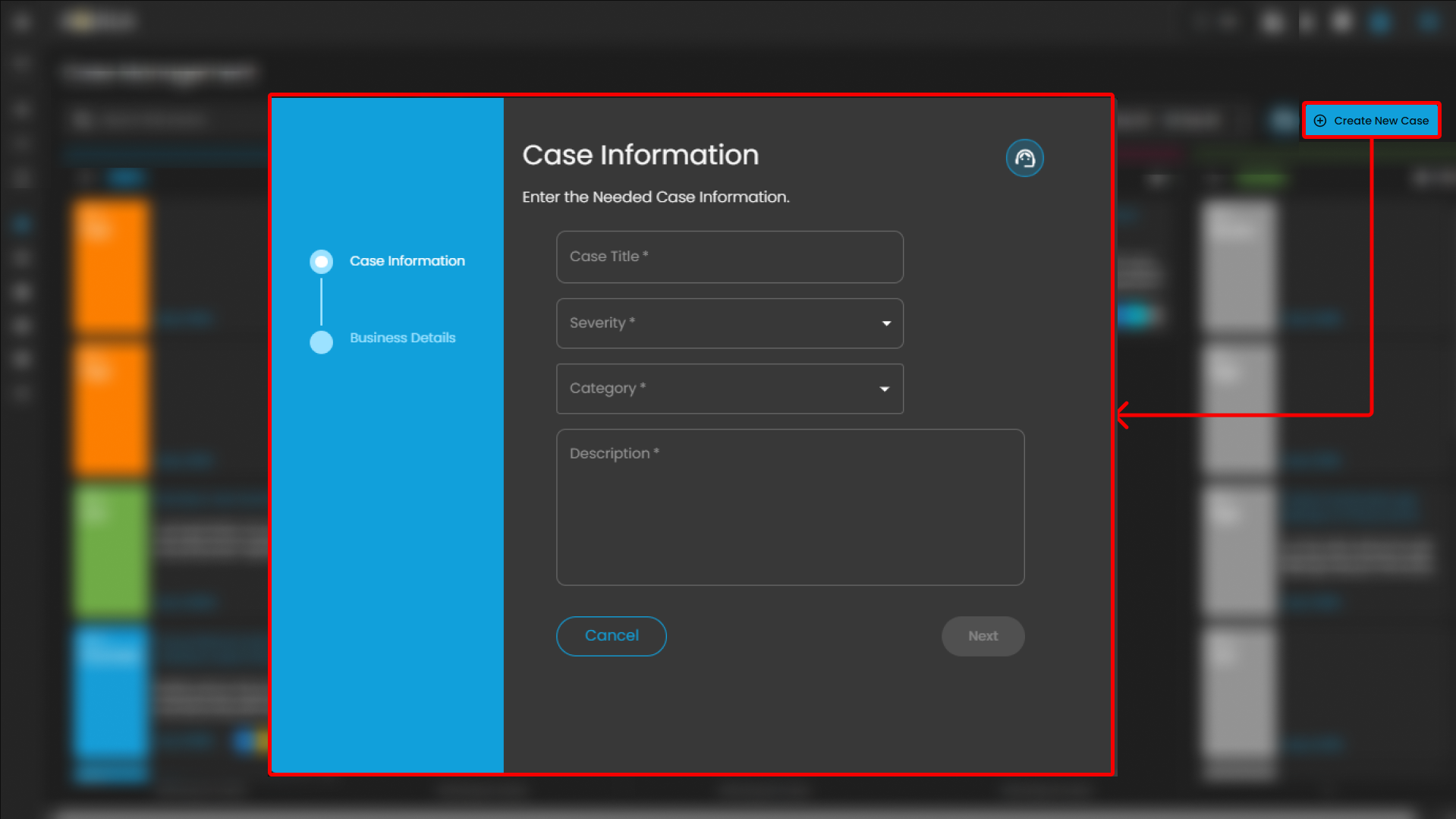
Create New Case
-
Purpose: Enables analysts to manually initiate and document a new security case.
-
Functionality:
-
When selected, the system displays a form where analysts can input case details, including title, description, severity, and assigned users.
-
Once submitted, the new case appears within the appropriate case column (e.g., Tier 1) for tracking and escalation.
-
-
Use Case in SOC Operations:
-
Allows analysts to proactively log incidents that may not have been automatically generated by alerts.
-
Facilitates documentation of investigations that originate from external intelligence sources, manual threat hunting, or analyst observations.
-
Support
-
Purpose: Provides clients with direct access to the support portal for issue resolution and ticket management.
-
Functionality:
-
When selected, the client is redirected to the Support page.
-
The Support page provides two primary options:
-
Submit a New Ticket – Allows clients to report errors, technical issues, or product-related concerns.
-
Search Existing Tickets – Enables clients to view and track the status of tickets they have previously submitted.
-
-
-
Use Case for Clients:
-
Allows clients to escalate platform issues or request assistance directly from support.
-
Provides visibility into both new and ongoing tickets for efficient follow-up.
-
Ensures that clients can maintain continuity of operations by receiving timely support when technical difficulties arise.
-
The Cyber Incident Management (CIM): Cases module serves as a centralized case management system that enables structured handling, tracking, and escalation of security incidents across operational tiers (Tier 1, Tier 2, and Tier 3). It facilitates seamless case transfer and collaboration between analysts, ensuring proper investigation workflows, accountability, and timely resolution.
In addition, the module functions as a comprehensive repository of historical cases, providing valuable reference data for recurring or similar incidents across different clients. This historical intelligence supports more accurate analysis, faster root cause identification, and improved response strategies.
By maintaining detailed case documentation, escalation records, and investigative findings, the CIM: Cases module enhances operational efficiency, standardizes incident response procedures, and strengthens the overall effectiveness of daily security investigations within the Security Operations Center (SOC).
Please refer to the document from the previous sub-module: CyTech AQUILA - Cyber Incident Management (CIM): Alerts
Please refer to the document for the next sub-module: CyTech AQUILA - Cyber Incident Management (CIM): Data Explorer
If you need further assistance, kindly contact our support at support@cytechint.com for prompt assistance and guidance.