
Information Security Steering Committee (ISSC)
Overview
The ISSC Meeting System is a centralized platform designed to help committees plan, manage, and track their meetings with ease. It provides users with a clear overview of upcoming sessions, assigned tasks, and important documents — all in one place. The Dashboard offers a snapshot of current activities, meetings, and action items, while the Meeting section allows users to schedule, view, and manage all session details efficiently. The Document Repository organizes and links relevant files for easy access, and the Member Management feature keeps committee information accurate and up to date. Together, these sections streamline meeting coordination, improve accountability, and support effective decision-making within the ISSC.
Key Features
-
Centralized Dashboard – Provides a real-time overview of upcoming meetings, action items, and committee activities, helping users stay informed and organized.
-
Meeting Management – Allows users to schedule, view, and manage meetings with details such as agenda, notes, attendees, documents, and action items.
-
Document Repository – Offers a dedicated space to upload, store, and access meeting-related documents. Files can be linked to specific meetings for easy tracking.
-
Member Management – Displays a complete list of committee members and their roles, with options to add new members or update existing ones manually or from the user list.
-
Action Item Tracking – Monitors progress on assigned tasks through visual indicators and summaries, ensuring accountability and timely completion.
-
Interactive Interface – Features pop-up windows, quick actions, and intuitive navigation to simplify workflows and reduce repetitive steps.
-
Transparency and Traceability – Keeps a detailed record of meeting updates, user activities, and file changes, supporting clear communication and audit readiness.
Step 1:1: Login to CyTech - AQUILA
Step 2:2: Click on Cyber Governance
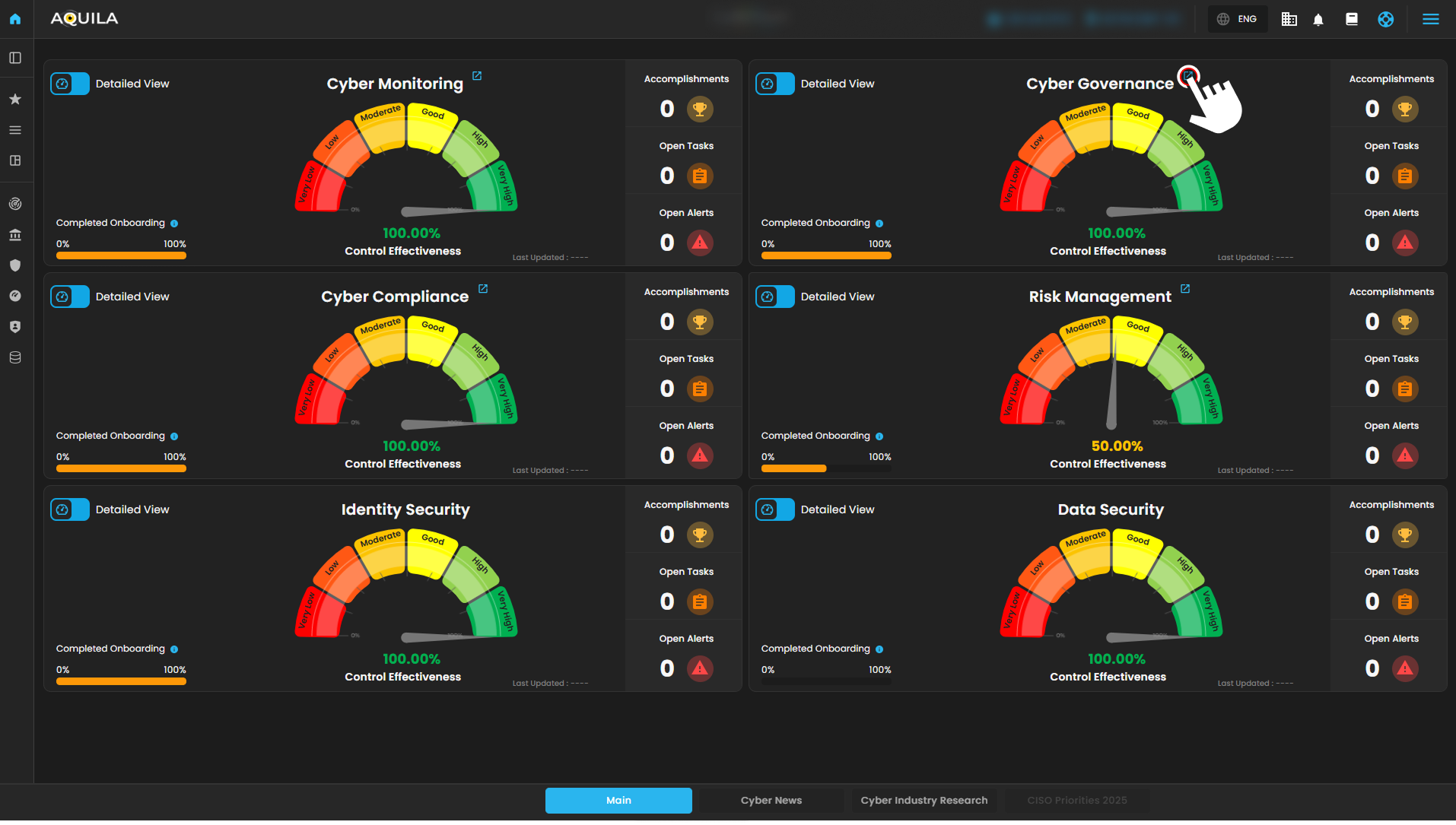
Figure 1 Overview
Step 3:3: Information Security Steering Committee (ISSC)
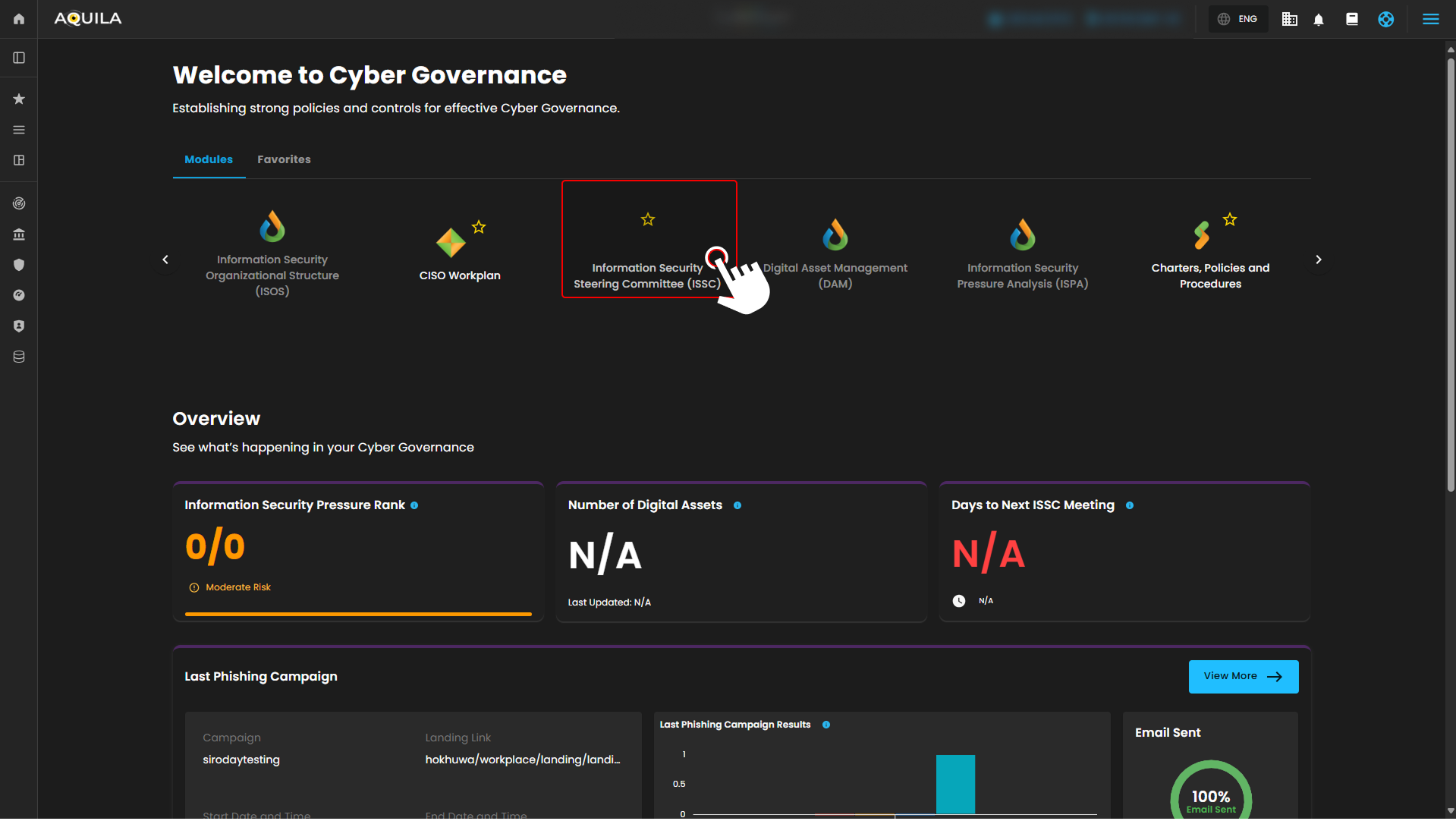
Figure 1.2 Cyber Governance
Step 4:4:
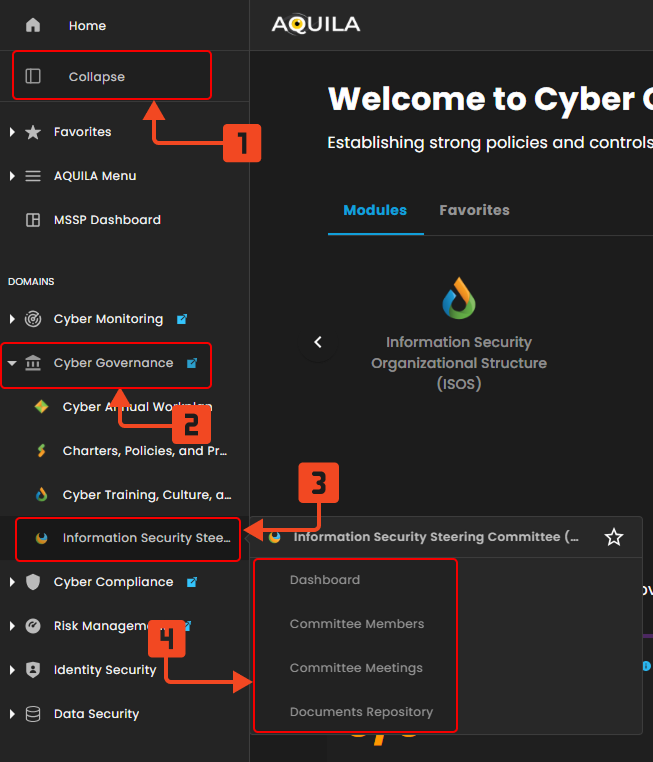
Figure 1.3 Cyber Governance Navigation
Dashboard
The ISSC Dashboard gives you a quick overview of all key committee activities. The Next ISSC Meeting shows the topic, date, time, and a live countdown, with a “Join” button available when it’s time. The Action Item Overview highlights your tasks and overall progress so you can stay on track. Use Quick Actions for easy access to common ISSC tools. Upcoming Meetings lists all scheduled sessions with details and a “Join now” option once they start. The Action Items Status Distribution shows how tasks are progressing over the past 15 days, while Top 5 Committee with Most Tasks highlights members with the most assignments. Finally, the Activity Feed keeps you updated on recent actions, such as new files, meeting changes, and task updates.
- Next ISSC Meeting - Displays key details of the upcoming ISSC meeting, including the topic, date, time, and a live countdown. A quick access “Join” button becomes available as the meeting approaches
- Action Item Overview - A summary of all ISSC-related action items, showing personal assignments, overall open items, and completed tasks to help track progress and accountability.
- Quick Actions - A shortcut panel for common ISSC operation
- Upcoming Meetings - Lists scheduled ISSC and governance meetings with date, time, recurrence (e.g. monthly, annually), and meeting mode (online, in-person, hybrid). Includes a “Join now” button for immediate access once the meeting starts.
- Action Items Status Distribution - Visualizes the total number of action items created or updated in the past 15 days, segmented by status (To-do, In Progress, Completed).
- Top 5 Committee with Most Task - Identifies the five committee members assigned the most action items. Each bar is segmented by task status, allowing you to see not just volume, but also progress. Useful for spotting workload concentration or top contributors.
- Activity Feed - A chronological feed of all recent committee-related actions. Includes file uploads, action item creation/updates, and meeting changes. Each entry displays the related meeting, responsible user, timestamp, and an arrow to view full context. Helps maintain transparency and traceability across the ISSC.
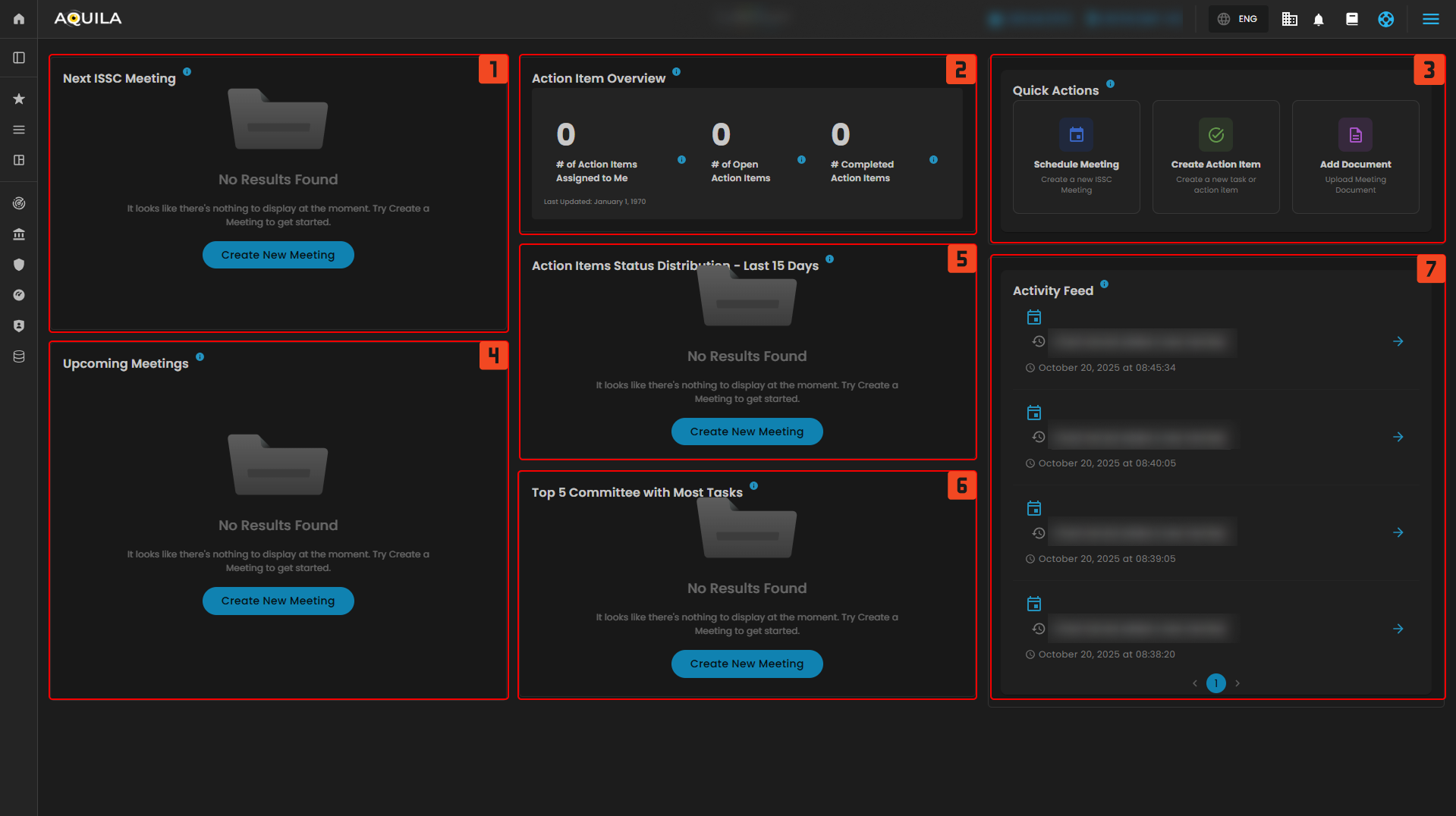
Figure 2 Cyber Governance Dashboard
Committee Members
This section provides an overview of all committee members and their respective roles within the system. To expand your team, use the Add Member button to include new participants.
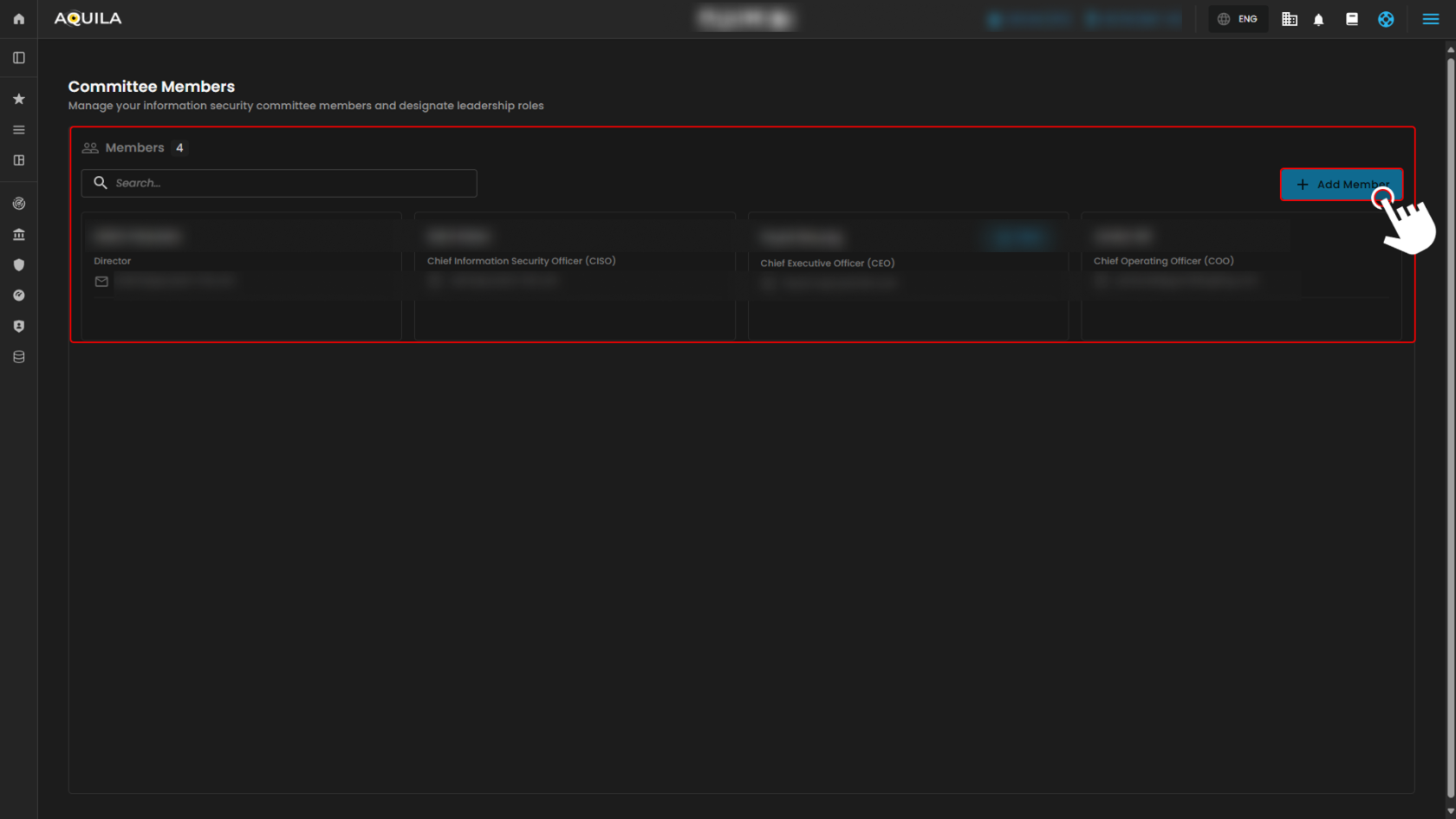
Figure 3 Cyber Governance - Committee Meetings
1. Add Committee Member - Existing User
The pop-up window lists existing users available in the system. From here, you can easily select and add them as members of the committee without creating new profiles.
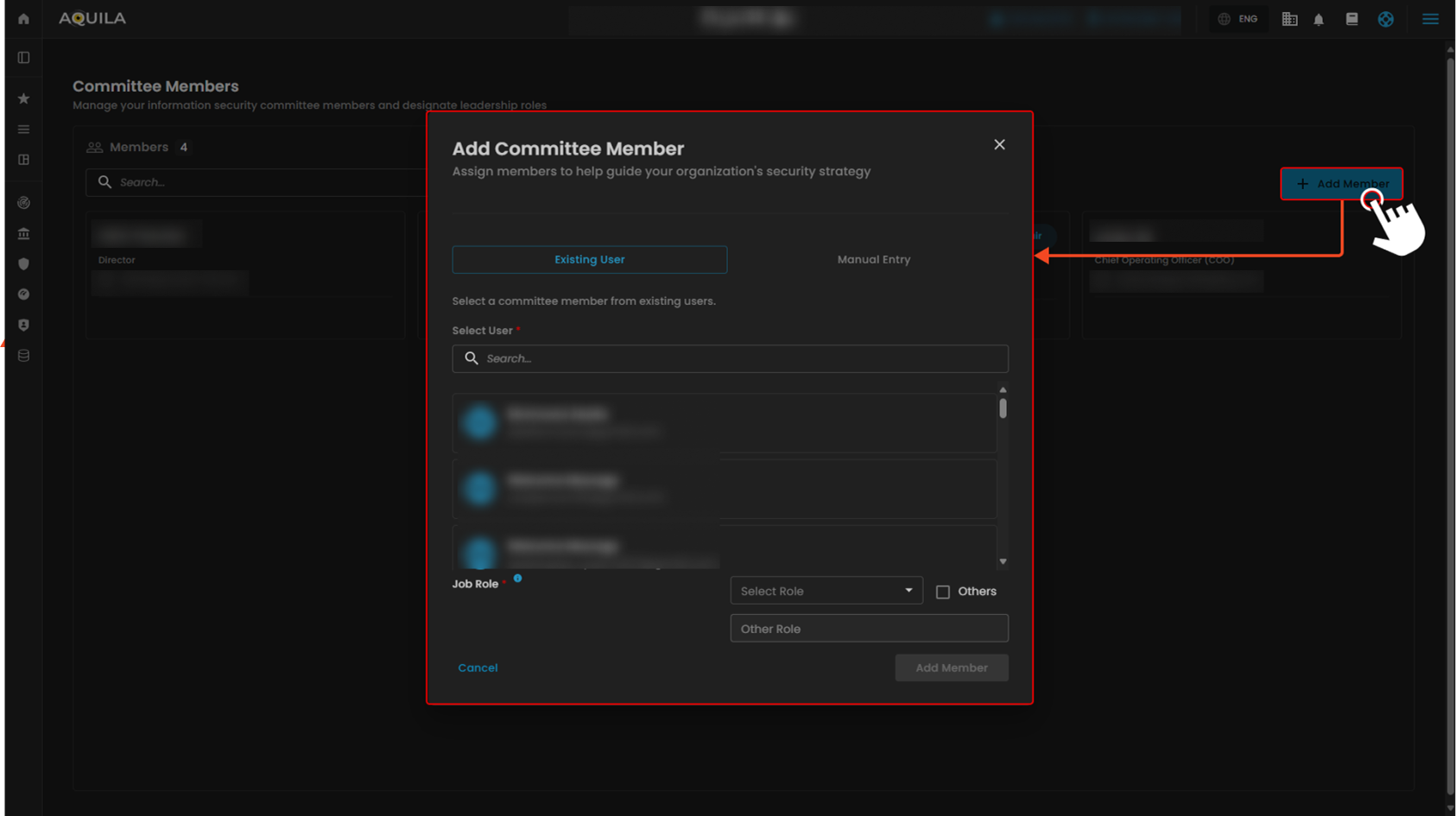
Figure 3 Cyber Governance - Committee Meetings / Add Member / Existing User
2. Add Committee Member - Manual Entry
The Manual Entry section allows you to manually add a new committee member. This is useful when the person’s name doesn’t appear in the existing user list, ensuring new members can still be added.
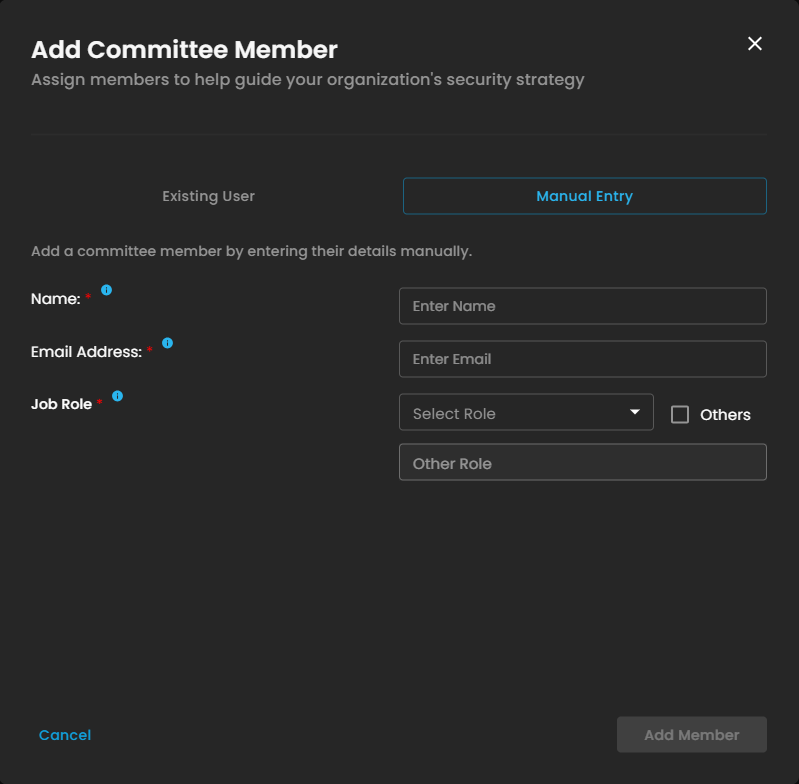
Figure 3 Cyber Governance - Committee Meetings / Add Member / Manual Entry
Committee Meetings
The Committee Meetings section helps you view, manage, and organize all ISSC meetings in one place. The Meeting List displays all scheduled meetings with key details at a glance. Selecting a meeting opens the Meeting Details view, where you can see the agenda, notes, related documents, and action items. To create a new session, click New Meeting and fill in the required information. Use Manage List to view or update attendees for each meeting, making it easy to keep participant information up to date.
- Meeting List - Displays all scheduled meetings with basic details such as date, time, and title. This allows users to quickly browse and select a meeting to view more information.
- Meeting Details - Provides complete information about the selected meeting, including its agenda, notes, related documents, and assigned action items.
- New Meeting - Click the New Meeting button to create and schedule a new meeting. Fill in the required details to add it to the meeting list.
- Manage List - Shows the list of meeting attendees. You can view, add, or update participants using the Manage List button.
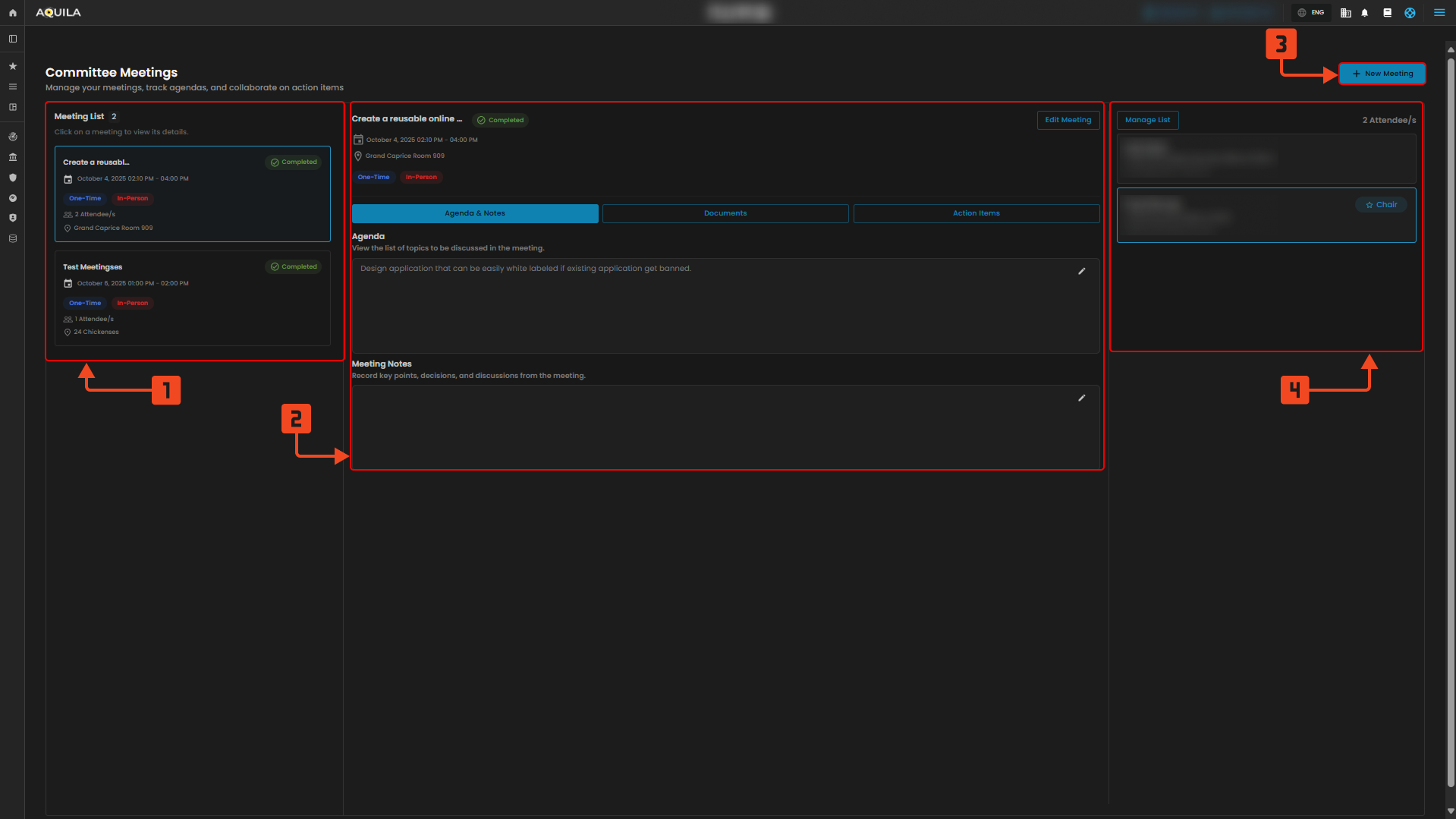
Figure 3 Cyber Governance - Committee Meetings
Schedule New Meeting - By Pressing the "New Meeting" button the client can schedule a new meeting. By inputting any necessary information regarding on the new meeting the client can now create a new meeting.
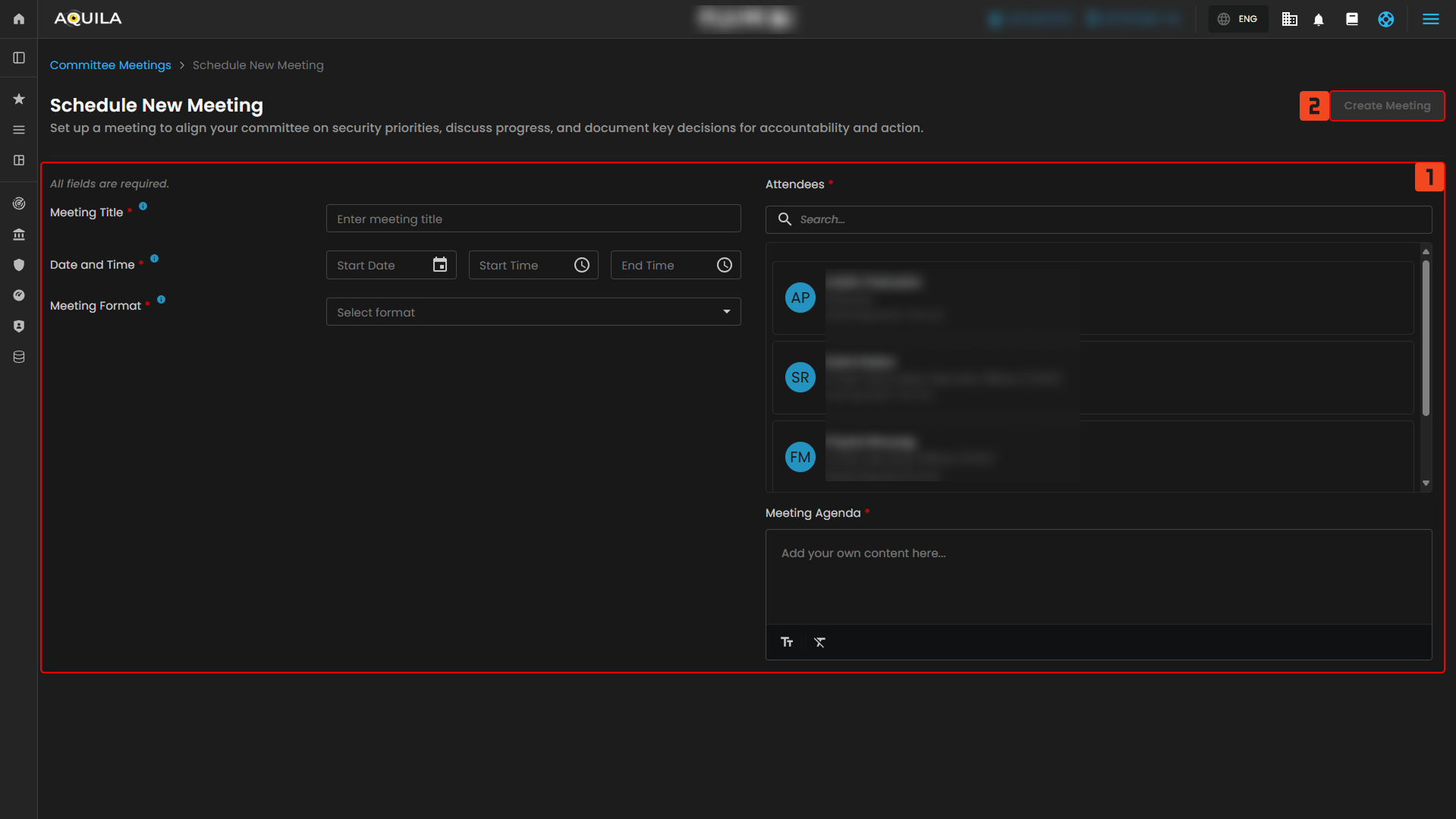
Figure 3.1 Cyber Governance - Committee Meetings / Schedule New Meeting
Documents Repository
The Document Repository is where you can store, organize, and access all meeting-related files in one place. Each document card displays the file name, upload date, uploader, and any linked meetings. You can click View to open or review a document directly. To add new files, use the Upload Document button at the top right corner of the screen. This allows you to quickly upload and manage files relevant to your ISSC meetings.
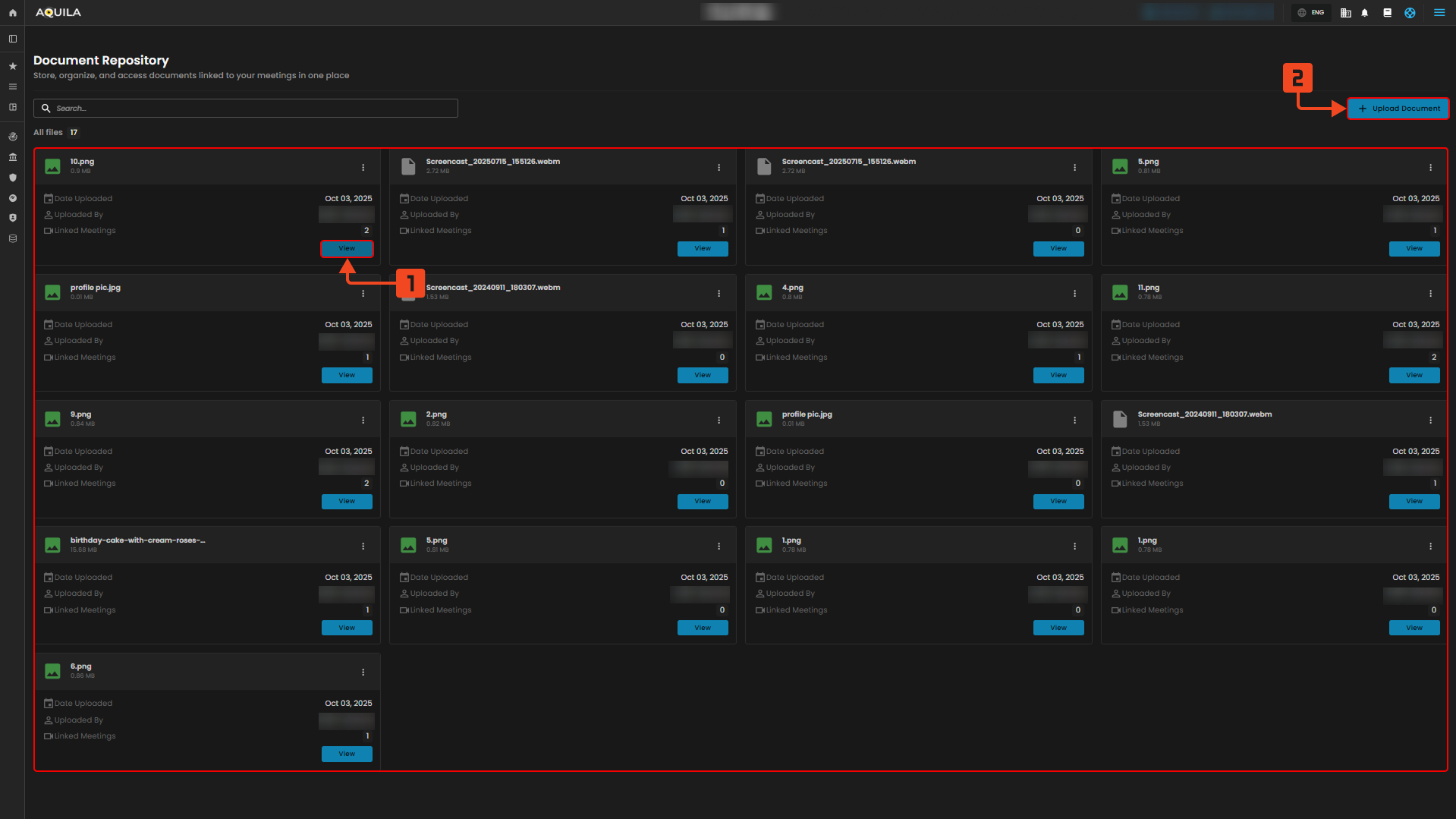
Figure 4 Cyber Governance - Documents Repository
1. Document Repository - View
When you click View on a file in the Document Repository, a document window opens in the center of the screen. This window displays the file’s details, including its name, upload date, uploader, and the linked meetings it’s associated with. On the right side, you can preview the document to review its contents without downloading it. This feature makes it easy to confirm files, check linked meetings, and access important materials directly within the workspace.
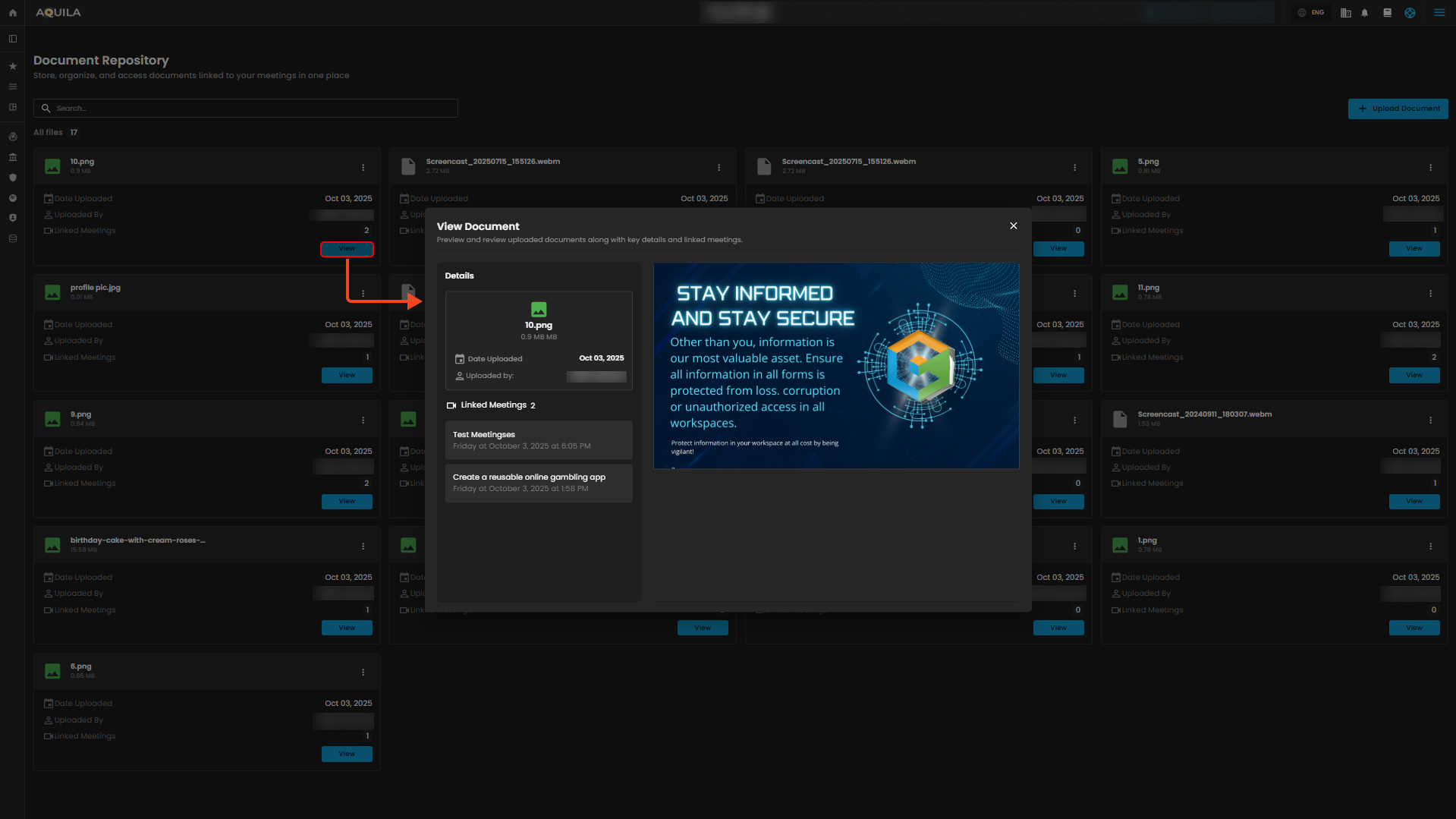
Figure 4.1 Cyber Governance - Documents Repository / View Document
2. Document Repository - Upload Documents
Click the Upload Document button at the top right to open the Upload Documents window. Here, you can drag and drop files or click to browse and select them from your device. Supported formats include PDF, DOCX, PPT, and other document types. You can also choose to link the uploaded files to specific meetings for easier tracking and access. Once you’ve selected your files and linked any meetings, click Upload Documents to add them to the repository.
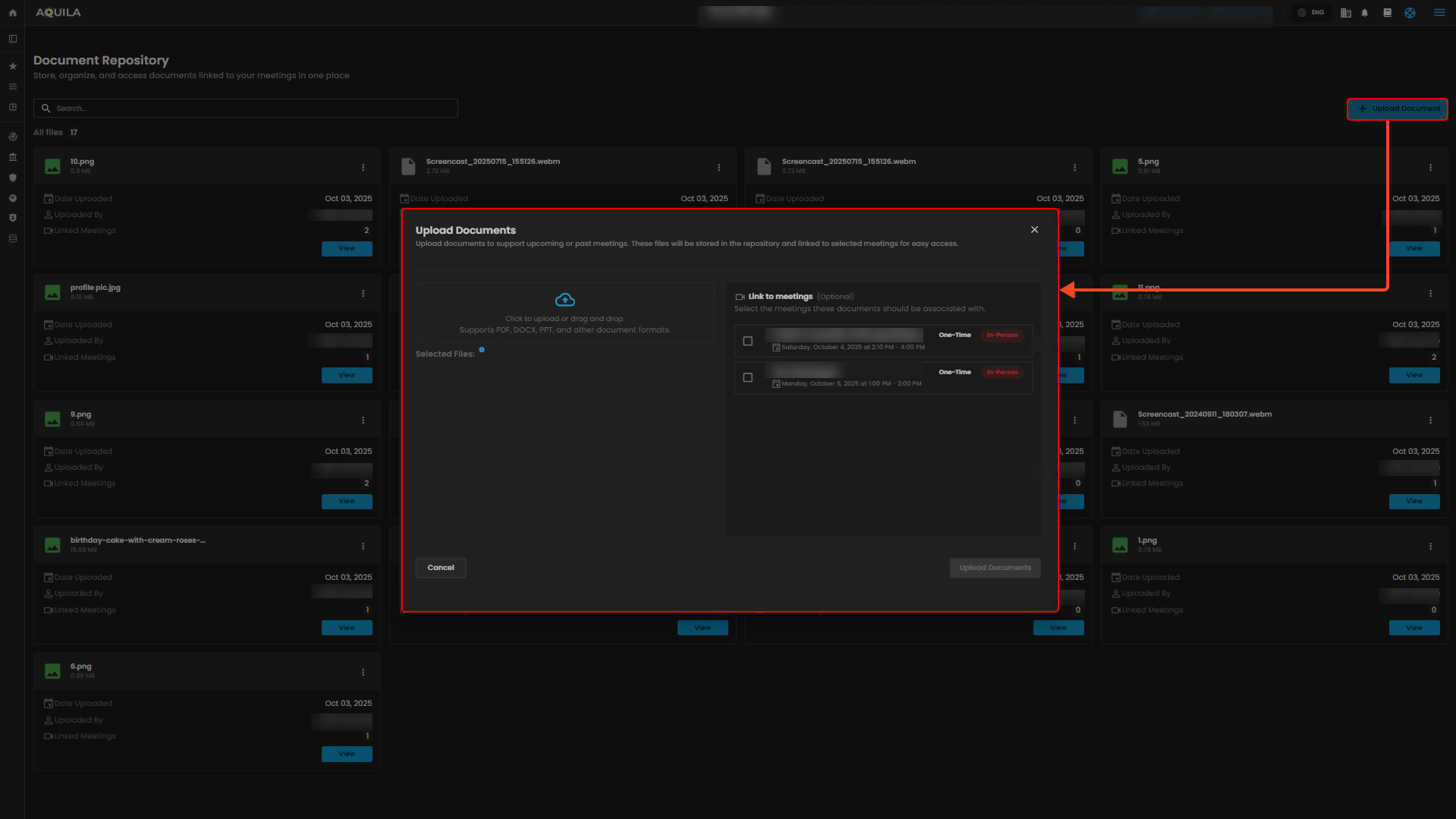
Figure 4.2 Cyber Governance - Documents Repository / Upload Documents
Conclusion
The ISSC Meeting System provides a complete and user-friendly platform for managing committee operations. From tracking meetings and action items on the Dashboard, to organizing sessions through the Meeting module, every feature is designed to improve efficiency and collaboration. The Document Repository ensures all meeting materials are stored, accessed, and linked with ease, while the Member Management section helps maintain an accurate list of participants and their roles. Together, these tools support transparent communication, streamlined workflows, and effective decision-making within the ISSC.
With these features, users can efficiently manage meetings, stay updated on tasks, and ensure smooth coordination across the committee.
If you need further assistance, kindly contact support@cytechint.com for prompt assistance and guidance.