# Google Cloud Platform (GCP) Audit Logs Integration - using Pub/Sub

##### <span style="color: rgb(0, 0, 0);">**<span class="TextRun SCXW124724174 BCX0" data-contrast="none" lang="EN-US" xml:lang="EN-US"><span class="NormalTextRun SCXW124724174 BCX0">Requirements </span></span><span class="EOP SCXW124724174 BCX0" data-ccp-props="{"134233117":false,"134233118":false,"335551550":0,"335551620":0,"335559738":0,"335559739":0}"> </span>**</span>

To integrate with Google Cloud Platform (GCP), you need to set up the following:

<div class="ListContainerWrapper SCXW124724174 BCX0" id="bkmrk-service-account-with">1. <span class="TextRun SCXW124724174 BCX0" data-contrast="none" lang="EN-US" xml:lang="EN-US"><span class="NormalTextRun SCXW124724174 BCX0">**Service Account with a Role.** </span></span>
2. **<span class="TextRun SCXW124724174 BCX0" data-contrast="none" lang="EN-US" xml:lang="EN-US"><span class="NormalTextRun SCXW124724174 BCX0">Service Account Key to access data on your GCP project.</span></span><span class="EOP SCXW124724174 BCX0" data-ccp-props="{"134233117":false,"134233118":false,"335551550":0,"335551620":0,"335559738":240,"335559739":240}"> </span>**

</div>##### **<span class="TextRun SCXW124724174 BCX0" data-contrast="none" lang="EN-US" xml:lang="EN-US"><span class="NormalTextRun SCXW124724174 BCX0">Service Accounts </span></span><span class="EOP SCXW124724174 BCX0" data-ccp-props="{"134233117":false,"134233118":false,"335551550":0,"335551620":0,"335559738":240,"335559739":240}"> </span>**

A **Service Account (SA)** is a special type of Google account intended for applications or services—not human users—that need access to GCP resources.

The **Log Collector** uses this SA to access GCP data via Google APIs.

##### <span class="TextRun SCXW124724174 BCX0" data-contrast="none" lang="EN-US" xml:lang="EN-US"><span class="NormalTextRun SCXW124724174 BCX0">**Service Account with a Role**  </span></span><span class="EOP SCXW124724174 BCX0" data-ccp-props="{"134233117":false,"134233118":false,"335551550":0,"335551620":0,"335559738":240,"335559739":240}"> </span>

Assign the necessary privileges by creating a **custom role** with minimal required permissions:

#### Required Permissions:

<div class="ListContainerWrapper SCXW124724174 BCX0" id="bkmrk-compute.instances.li">- <span class="TextRun SCXW124724174 BCX0" data-contrast="none" lang="EN-US" xml:lang="EN-US">**<span class="NormalTextRun SpellingErrorV2Themed SCXW124724174 BCX0">compute.instances.list</span>**<span class="NormalTextRun SCXW124724174 BCX0"> (</span><span class="NormalTextRun SCXW124724174 BCX0">required</span><span class="NormalTextRun SCXW124724174 BCX0"> for GCP Compute instance metadata collection) (</span></span><span class="TextRun SCXW124724174 BCX0" data-contrast="none" lang="EN-US" xml:lang="EN-US"><span class="NormalTextRun SCXW124724174 BCX0">\*\*2</span></span><span class="TextRun SCXW124724174 BCX0" data-contrast="none" lang="EN-US" xml:lang="EN-US"><span class="NormalTextRun SCXW124724174 BCX0">) </span></span>
- **<span class="TextRun SCXW124724174 BCX0" data-contrast="none" lang="EN-US" xml:lang="EN-US"><span class="NormalTextRun SpellingErrorV2Themed SCXW124724174 BCX0">monitoring.metricDescriptors.list</span><span class="NormalTextRun SCXW124724174 BCX0"> </span></span>**
- **<span class="TextRun SCXW124724174 BCX0" data-contrast="none" lang="EN-US" xml:lang="EN-US"><span class="NormalTextRun SpellingErrorV2Themed SCXW124724174 BCX0">monitoring.timeSeries.list</span><span class="NormalTextRun SCXW124724174 BCX0"> </span></span>**
- **<span class="TextRun SCXW124724174 BCX0" data-contrast="none" lang="EN-US" xml:lang="EN-US"><span class="NormalTextRun SpellingErrorV2Themed SCXW124724174 BCX0">pubsub.subscriptions.consume</span></span>**
- <span class="TextRun SCXW124724174 BCX0" data-contrast="none" lang="EN-US" xml:lang="EN-US">**<span class="NormalTextRun SpellingErrorV2Themed SCXW124724174 BCX0">pubsub.subscriptions.create</span>**<span class="NormalTextRun SCXW124724174 BCX0"> (</span></span><span class="TextRun SCXW124724174 BCX0" data-contrast="none" lang="EN-US" xml:lang="EN-US"><span class="NormalTextRun SCXW124724174 BCX0">\*1</span></span><span class="TextRun SCXW124724174 BCX0" data-contrast="none" lang="EN-US" xml:lang="EN-US"><span class="NormalTextRun SCXW124724174 BCX0">)</span></span>
- **<span class="TextRun SCXW124724174 BCX0" data-contrast="none" lang="EN-US" xml:lang="EN-US"><span class="NormalTextRun SpellingErrorV2Themed SCXW124724174 BCX0">pubsub.subscriptions.get</span></span>**
- <span class="TextRun SCXW124724174 BCX0" data-contrast="none" lang="EN-US" xml:lang="EN-US">**<span class="NormalTextRun SCXW124724174 BCX0">pubsub.topics.attachSubscription</span>**<span class="NormalTextRun SCXW124724174 BCX0"> (</span></span><span class="TextRun SCXW124724174 BCX0" data-contrast="none" lang="EN-US" xml:lang="EN-US"><span class="NormalTextRun SCXW124724174 BCX0">\*1</span></span><span class="TextRun SCXW124724174 BCX0" data-contrast="none" lang="EN-US" xml:lang="EN-US"><span class="NormalTextRun SCXW124724174 BCX0">) </span></span><span class="EOP SCXW124724174 BCX0" data-ccp-props="{"134233117":false,"134233118":false,"335551550":0,"335551620":0,"335559738":240,"335559739":240}"> </span>

</div><p class="callout info">*<span class="TextRun SCXW124724174 BCX0" data-contrast="none" lang="EN-US" xml:lang="EN-US"><span class="NormalTextRun SCXW124724174 BCX0">\*1</span></span><span class="TextRun SCXW124724174 BCX0" data-contrast="none" lang="EN-US" xml:lang="EN-US"><span class="NormalTextRun SCXW124724174 BCX0"> Only </span><span class="NormalTextRun SCXW124724174 BCX0">required</span><span class="NormalTextRun SCXW124724174 BCX0"> if Agent is expected to create a new subscription. If you create the subscriptions yourself, you may omit these privileges</span><span class="NormalTextRun SCXW124724174 BCX0">. </span></span><span class="EOP SCXW124724174 BCX0" data-ccp-props="{"134233117":false,"134233118":false,"335551550":0,"335551620":0,"335559738":240,"335559739":240}"> </span>*</p>

<p class="callout info">*<span class="TextRun SCXW124724174 BCX0" data-contrast="none" lang="EN-US" xml:lang="EN-US"><span class="NormalTextRun SCXW124724174 BCX0">\*\*2</span></span><span class="TextRun SCXW124724174 BCX0" data-contrast="none" lang="EN-US" xml:lang="EN-US"><span class="NormalTextRun SCXW124724174 BCX0"> Only </span><span class="NormalTextRun SCXW124724174 BCX0">required</span><span class="NormalTextRun SCXW124724174 BCX0"> if corresponding collection will be enabled. </span></span><span class="EOP SCXW124724174 BCX0" data-ccp-props="{"134233117":false,"134233118":false,"335551550":0,"335551620":0,"335559738":240,"335559739":240}"> </span>*</p>

<p class="callout success">**<span class="TextRun SCXW124724174 BCX0" data-contrast="none" lang="EN-US" xml:lang="EN-US"><span class="NormalTextRun SCXW124724174 BCX0">After you have created the custom role, assign the role to your service account. </span></span><span class="EOP SCXW124724174 BCX0" data-ccp-props="{"134233117":false,"134233118":false,"335551550":0,"335551620":0,"335559738":240,"335559739":240}"> </span>**</p>

##### **<span class="EOP SCXW124724174 BCX0" data-ccp-props="{"134233117":false,"134233118":false,"335551550":0,"335551620":0,"335559738":240,"335559739":240}"> </span><span class="TextRun SCXW124724174 BCX0" data-contrast="none" lang="EN-US" xml:lang="EN-US"><span class="NormalTextRun SCXW124724174 BCX0">Service Account Key </span></span><span class="EOP SCXW124724174 BCX0" data-ccp-props="{"134233117":false,"134233118":false,"335551550":0,"335551620":0,"335559738":240,"335559739":240}"> </span>**

<span class="TextRun SCXW124724174 BCX0" data-contrast="none" lang="EN-US" xml:lang="EN-US"><span class="NormalTextRun SCXW124724174 BCX0">Next, with the Service Account (SA) with access to Google Cloud Platform (GCP) resources setup, you need some credentials to associate with it: a Service Account Key. </span></span><span class="EOP SCXW124724174 BCX0" data-ccp-props="{"134233117":false,"134233118":false,"335551550":0,"335551620":0,"335559738":240,"335559739":240}"> </span>

<span class="TextRun SCXW124724174 BCX0" data-contrast="none" lang="EN-US" xml:lang="EN-US"><span class="NormalTextRun SCXW124724174 BCX0">From the list of SA (Service Accounts): </span></span><span class="EOP SCXW124724174 BCX0" data-ccp-props="{"134233117":false,"134233118":false,"335551550":0,"335551620":0,"335559738":240,"335559739":240}"> </span>

<div class="ListContainerWrapper SCXW124724174 BCX0" id="bkmrk-go-to-iam-%26-admin-%3E-">1. Go to **IAM &amp; Admin &gt; Service Accounts** in the GCP Console.
2. Click the service account you created.
3. Under the **"Keys"** section, click **"Add Key" &gt; "Create new key"**.
4. Choose **JSON** as the key type.
5. **Download and securely store** the generated private key (it cannot be retrieved again from GCP if lost).

</div>##### **<span class="TextRun SCXW124724174 BCX0" data-contrast="none" lang="EN-US" xml:lang="EN-US"><span class="NormalTextRun SCXW124724174 BCX0">GCP Integrations Procedures - GCP Audit Logs </span></span><span class="EOP SCXW124724174 BCX0" data-ccp-props="{"134233117":false,"134233118":false,"335551550":0,"335551620":0,"335559738":0,"335559739":0}"> </span>**

<span class="TextRun SCXW124724174 BCX0" data-contrast="none" lang="EN-US" xml:lang="EN-US"><span class="NormalTextRun SCXW124724174 BCX0">The audit dataset collects audit logs of administrative activities and accesses within your Google Cloud resources. </span></span><span class="EOP SCXW124724174 BCX0" data-ccp-props="{"134233117":false,"134233118":false,"335551550":0,"335551620":0,"335559738":240,"335559739":240}"> </span>

<span style="color: rgb(0, 0, 0);"><span class="TextRun SCXW124724174 BCX0" data-contrast="none" lang="EN-US" xml:lang="EN-US"><span class="NormalTextRun SCXW124724174 BCX0"> </span></span>**<span class="TextRun SCXW124724174 BCX0" data-contrast="none" lang="EN-US" xml:lang="EN-US"><span class="NormalTextRun SCXW124724174 BCX0">Procedures</span></span><span class="TextRun SCXW124724174 BCX0" data-contrast="none" lang="EN-US" xml:lang="EN-US"><span class="NormalTextRun SCXW124724174 BCX0"> </span></span><span class="EOP SCXW124724174 BCX0" data-ccp-props="{"134233117":false,"134233118":false,"335551550":0,"335551620":0,"335559738":240,"335559739":240}"> </span>**</span>

<span class="TextRun SCXW124724174 BCX0" data-contrast="none" lang="EN-US" xml:lang="EN-US"><span class="NormalTextRun SCXW124724174 BCX0">The "Project Id" and the "Credentials File" will need to be provided in the integration UI when adding the Google Cloud Platform integration. </span></span><span class="EOP SCXW124724174 BCX0" data-ccp-props="{"134233117":false,"134233118":false,"335551550":0,"335551620":0,"335559738":240,"335559739":240}"> </span>

##### **<span class="TextRun SCXW124724174 BCX0" data-contrast="none" lang="EN-US" xml:lang="EN-US"><span class="NormalTextRun SCXW124724174 BCX0">Logs Collection Configuration</span></span>**<span class="EOP SCXW124724174 BCX0" data-ccp-props="{"134233117":false,"134233118":false,"335551550":1,"335551620":1,"335559738":300,"335559739":300}"> </span>

<span class="TextRun SCXW124724174 BCX0" data-contrast="none" lang="EN-US" xml:lang="EN-US"><span class="NormalTextRun SCXW124724174 BCX0">With a properly configured Service Account and the integration setting in place, </span><span class="NormalTextRun SCXW124724174 BCX0">it’s</span><span class="NormalTextRun SCXW124724174 BCX0"> time to start collecting some logs.</span></span><span class="EOP SCXW124724174 BCX0" data-ccp-props="{"134233117":false,"134233118":false,"335551550":1,"335551620":1,"335559738":0,"335559739":276}"> </span>

**<span class="TextRun SCXW124724174 BCX0" data-contrast="none" lang="EN-US" style="color: rgb(0, 0, 0);" xml:lang="EN-US"><span class="NormalTextRun SCXW124724174 BCX0">Requirements</span></span><span class="EOP SCXW124724174 BCX0" data-ccp-props="{"134233117":false,"134233118":false,"335551550":1,"335551620":1,"335559738":0,"335559739":276}"> </span>**

<span class="TextRun SCXW124724174 BCX0" data-contrast="none" lang="EN-US" xml:lang="EN-US"><span class="NormalTextRun SCXW124724174 BCX0">You need to create a few dedicated Google Cloud resources before starting, in detail:</span></span><span class="EOP SCXW124724174 BCX0" data-ccp-props="{"134233117":false,"134233118":false,"335551550":1,"335551620":1,"335559738":0,"335559739":276}"> </span>

<div class="ListContainerWrapper SCXW124724174 BCX0" id="bkmrk-log-sink%C2%A0">1. **<span class="TextRun SCXW124724174 BCX0" data-contrast="none" lang="EN-US" xml:lang="EN-US"><span class="NormalTextRun SCXW124724174 BCX0">Log Sink</span></span>**
2. **<span class="TextRun SCXW124724174 BCX0" data-contrast="none" lang="EN-US" xml:lang="EN-US"><span class="NormalTextRun SCXW124724174 BCX0">Pub/</span><span class="NormalTextRun SCXW124724174 BCX0">Sub Topic</span></span>**
3. **<span class="TextRun SCXW124724174 BCX0" data-contrast="none" lang="EN-US" xml:lang="EN-US"><span class="NormalTextRun SCXW124724174 BCX0">Subscription</span></span><span class="EOP SCXW124724174 BCX0" data-ccp-props="{"134233117":false,"134233118":false,"335551550":1,"335551620":1,"335559738":0,"335559739":0}"> </span>**

</div><p class="callout info"><span class="EOP SCXW124724174 BCX0" data-ccp-props="{"134233117":false,"134233118":false,"335551550":1,"335551620":1,"335559685":0,"335559738":0,"335559739":0}"> </span><span class="TextRun SCXW124724174 BCX0" data-contrast="none" lang="EN-US" xml:lang="EN-US"><span class="NormalTextRun SCXW124724174 BCX0">It’s</span><span class="NormalTextRun SCXW124724174 BCX0"> </span><span class="NormalTextRun ContextualSpellingAndGrammarErrorV2Themed SCXW124724174 BCX0">recommend</span><span class="NormalTextRun ContextualSpellingAndGrammarErrorV2Themed SCXW124724174 BCX0">ed</span> <span class="NormalTextRun SCXW124724174 BCX0">to have </span><span class="NormalTextRun ContextualSpellingAndGrammarErrorV2Themed SCXW124724174 BCX0">a </span><span class="NormalTextRun ContextualSpellingAndGrammarErrorV2Themed SCXW124724174 BCX0">separate</span><span class="NormalTextRun SCXW124724174 BCX0"> Pub/</span><span class="NormalTextRun ContextualSpellingAndGrammarErrorV2Themed SCXW124724174 BCX0">Sub topics</span><span class="NormalTextRun SCXW124724174 BCX0"> for each of the log types so that they can be parsed and stored in a specific data stream.</span></span><span class="EOP SCXW124724174 BCX0" data-ccp-props="{"134233117":false,"134233118":false,"335551550":1,"335551620":1,"335559685":0,"335559738":0,"335559739":0}"> </span></p>

<span class="TextRun SCXW124724174 BCX0" data-contrast="none" lang="EN-US" xml:lang="EN-US"><span class="NormalTextRun SCXW124724174 BCX0">Here’s</span><span class="NormalTextRun SCXW124724174 BCX0"> an example of collecting Audit Logs using a Pub/</span><span class="NormalTextRun ContextualSpellingAndGrammarErrorV2Themed SCXW124724174 BCX0">Sub topic</span><span class="NormalTextRun SCXW124724174 BCX0">, a subscription, and a Log Router. We will create the resources in the Google Cloud Console and then configure the Google Cloud Platform integration.</span></span><span class="EOP SCXW124724174 BCX0" data-ccp-props="{"134233117":false,"134233118":false,"335551550":1,"335551620":1,"335559738":0,"335559739":276}"> </span>

##### **Example Setup Using Google Cloud Console**

1. Navigate to **"Logging" &gt; "Log Router" &gt; "Create Sink"**.
2. Provide a **Sink name** and description.
3. For **Sink destination**, select **"Cloud Pub/Sub topic"**. Choose an existing topic or create a new one.
4. If a new topic is created, you must also **create a subscription** for it.
5. Under **"Choose logs to include in sink"**, use a filter like: logName:"cloudaudit.googleapis.com"

<p class="callout danger">**<span class="TextRun SCXW124724174 BCX0" data-contrast="none" lang="EN-US" xml:lang="EN-US"><span class="NormalTextRun SCXW124724174 BCX0">Please provide the following information to </span><span class="NormalTextRun SpellingErrorV2Themed SCXW124724174 BCX0">CyTech</span><span class="NormalTextRun SCXW124724174 BCX0">:</span></span><span class="EOP SCXW124724174 BCX0" data-ccp-props="{"134233117":false,"134233118":false,"335551550":0,"335551620":0,"335559738":240,"335559739":240}"> </span>**</p>

<div class="ListContainerWrapper SCXW124724174 BCX0" id="bkmrk-project-id%C2%A0---the-pr">- <span class="TextRun SCXW124724174 BCX0" data-contrast="none" lang="EN-US" xml:lang="EN-US">**<span class="NormalTextRun SCXW124724174 BCX0">Project </span>**<span class="NormalTextRun ContextualSpellingAndGrammarErrorV2Themed SCXW124724174 BCX0">**ID** -</span> </span><span class="TextRun SCXW124724174 BCX0" data-contrast="none" lang="EN-US" xml:lang="EN-US"><span class="NormalTextRun SCXW124724174 BCX0">The Project ID is the Google Cloud project ID where your resources exist. </span></span>
- <span class="TextRun SCXW124724174 BCX0" data-contrast="none" lang="EN-US" xml:lang="EN-US"><span class="NormalTextRun SCXW124724174 BCX0">**Credentials File** - </span></span><span class="TextRun SCXW124724174 BCX0" data-contrast="none" lang="EN-US" xml:lang="EN-US"><span class="NormalTextRun SCXW124724174 BCX0">Save the JSON file with the private key in a secure location of the file system, and make sure that the Log Collector Agent has at least read-only privileges to this file.</span><span class="NormalTextRun SCXW124724174 BCX0"> </span></span><span class="TextRun SCXW124724174 BCX0" data-contrast="none" lang="EN-US" xml:lang="EN-US"><span class="NormalTextRun SCXW124724174 BCX0">Specify the file path in the Log Collector Agent integration UI in the "Credentials File" field. For example: /home/ubuntu/</span><span class="NormalTextRun SpellingErrorV2Themed SCXW124724174 BCX0">credentials.json</span><span class="NormalTextRun SCXW124724174 BCX0">.</span></span>
- <span class="TextRun SCXW124724174 BCX0" data-contrast="none" lang="EN-US" xml:lang="EN-US">**<span class="NormalTextRun SCXW124724174 BCX0">Pub/</span><span class="NormalTextRun SCXW124724174 BCX0">Sub Topic</span>**<span class="NormalTextRun SCXW124724174 BCX0"> </span><span class="NormalTextRun SCXW124724174 BCX0">- </span></span><span class="TextRun SCXW124724174 BCX0" data-contrast="none" lang="EN-US" xml:lang="EN-US"><span class="NormalTextRun SCXW124724174 BCX0">Name of the topic where the logs are written to.</span></span>
- <span class="TextRun SCXW124724174 BCX0" data-contrast="none" lang="EN-US" xml:lang="EN-US">**<span class="NormalTextRun SCXW124724174 BCX0">Subscription</span>**<span class="NormalTextRun SCXW124724174 BCX0"> - </span></span><span class="TextRun SCXW124724174 BCX0" data-contrast="none" lang="EN-US" xml:lang="EN-US"><span class="NormalTextRun SCXW124724174 BCX0">Use the short subscription name here, not the full-blown path with the project ID. You can find it as "Subscription ID" on the Google Cloud Console.</span></span><span class="EOP SCXW124724174 BCX0" data-ccp-props="{"134233117":false,"134233118":false,"335551550":0,"335551620":0,"335559738":240,"335559739":240}"> </span>

</div>##### **<span class="EOP SCXW124724174 BCX0" data-ccp-props="{"134233117":false,"134233118":false,"335551550":0,"335551620":0,"335559738":240,"335559739":240}"> </span><span class="TextRun SCXW124724174 BCX0" data-contrast="auto" lang="EN-US" xml:lang="EN-US"><span class="NormalTextRun SCXW124724174 BCX0">After setting up GCP. Go to&gt; CISO Workplace</span><span class="NormalTextRun SCXW124724174 BCX0"> to integrate your log source. Please follow the </span><span class="NormalTextRun SCXW124724174 BCX0">instructions</span><span class="NormalTextRun SCXW124724174 BCX0"> below:</span></span><span class="EOP SCXW124724174 BCX0" data-ccp-props="{"134233117":false,"134233118":false,"335551550":0,"335551620":0,"335559738":240,"335559739":240}"> </span>**

<p class="callout info">**<span class="TextRun SCXW124724174 BCX0" data-contrast="auto" lang="EN-US" xml:lang="EN-US"><span class="NormalTextRun SCXW124724174 BCX0">Step1</span><span class="NormalTextRun SCXW124724174 BCX0">: </span></span><span class="TextRun SCXW124724174 BCX0" data-contrast="auto" lang="EN-US" xml:lang="EN-US"><span class="NormalTextRun SCXW124724174 BCX0">Log in CISO Workplace</span></span><span class="TextRun SCXW124724174 BCX0" data-contrast="auto" lang="EN-US" xml:lang="EN-US"><span class="NormalTextRun SCXW124724174 BCX0">&gt;</span></span><span class="TextRun SCXW124724174 BCX0" data-contrast="auto" lang="EN-US" xml:lang="EN-US"><span class="NormalTextRun SCXW124724174 BCX0">CISO Workplace Modules</span></span><span class="TextRun SCXW124724174 BCX0" data-contrast="auto" lang="EN-US" xml:lang="EN-US"><span class="NormalTextRun SCXW124724174 BCX0">&gt;</span></span><span class="TextRun SCXW124724174 BCX0" data-contrast="auto" lang="EN-US" xml:lang="EN-US"><span class="NormalTextRun SCXW124724174 BCX0">Cyber Monitoring</span></span><span class="TextRun SCXW124724174 BCX0" data-contrast="auto" lang="EN-US" xml:lang="EN-US"><span class="NormalTextRun SCXW124724174 BCX0">&gt;</span></span><span class="TextRun SCXW124724174 BCX0" data-contrast="auto" lang="EN-US" xml:lang="EN-US"><span class="NormalTextRun SCXW124724174 BCX0">Cyber Incident Management</span></span><span class="EOP SCXW124724174 BCX0" data-ccp-props="{"134233117":false,"134233118":false,"335551550":0,"335551620":0,"335559738":240,"335559739":240}"> </span>**</p>

<span class="SCXW124724174 BCX0"><span class="WACImageContainer NoPadding DragDrop BlobObject SCXW124724174 BCX0" role="presentation">![Picture](https://cytechint-docs-bookstack.s3.amazonaws.com/uploads/images/gallery/2025-04/R668pieExu37BVcK-embedded-image-z8el5nom.png)</span></span><span class="EOP SCXW124724174 BCX0" data-ccp-props="{"134233117":false,"134233118":false,"335551550":0,"335551620":0,"335559738":240,"335559739":240}"> </span>

<p class="callout info">**<span class="TextRun SCXW124724174 BCX0" data-contrast="auto" lang="EN-US" xml:lang="EN-US"><span class="NormalTextRun SCXW124724174 BCX0">Step2: </span></span><span class="TextRun SCXW124724174 BCX0" data-contrast="auto" lang="EN-US" xml:lang="EN-US"><span class="NormalTextRun SCXW124724174 BCX0">Navigate through Settings</span></span><span class="TextRun SCXW124724174 BCX0" data-contrast="auto" lang="EN-US" xml:lang="EN-US"><span class="NormalTextRun SCXW124724174 BCX0">&gt;</span></span><span class="TextRun SCXW124724174 BCX0" data-contrast="auto" lang="EN-US" xml:lang="EN-US"><span class="NormalTextRun SCXW124724174 BCX0">L</span><span class="NormalTextRun SCXW124724174 BCX0">og Sourc</span></span><span class="TextRun SCXW124724174 BCX0" data-contrast="auto" lang="EN-US" xml:lang="EN-US"><span class="NormalTextRun SCXW124724174 BCX0">e&gt;</span></span><span class="TextRun SCXW124724174 BCX0" data-contrast="auto" lang="EN-US" xml:lang="EN-US"><span class="NormalTextRun SCXW124724174 BCX0">Search </span><span class="NormalTextRun ContextualSpellingAndGrammarErrorV2Themed SCXW124724174 BCX0">Bar</span></span><span class="TextRun SCXW124724174 BCX0" data-contrast="auto" lang="EN-US" xml:lang="EN-US"><span class="NormalTextRun ContextualSpellingAndGrammarErrorV2Themed SCXW124724174 BCX0">(</span><span class="NormalTextRun SCXW124724174 BCX0">type GCP)&gt;Choose the type of GCP</span></span>*<span class="TextRun SCXW124724174 BCX0" data-contrast="auto" lang="EN-US" xml:lang="EN-US"><span class="NormalTextRun ContextualSpellingAndGrammarErrorV2Themed SCXW124724174 BCX0">(for example- </span><span class="NormalTextRun SCXW124724174 BCX0">Google Cloud Platform (GCP) Audit Logs - </span></span><span class="TextRun SCXW124724174 BCX0" data-contrast="auto" lang="EN-US" xml:lang="EN-US"><span class="NormalTextRun SCXW124724174 BCX0">Collect audit logs from Google Cloud Platform (GCP) with Elastic Agent</span></span><span class="TextRun SCXW124724174 BCX0" data-contrast="auto" lang="EN-US" xml:lang="EN-US"><span class="NormalTextRun SCXW124724174 BCX0">)&gt;Click "<span style="color: rgb(224, 62, 45);">Add to Agent</span>".</span></span>***</p>

<span class="SCXW124724174 BCX0"><span class="WACImageContainer NoPadding DragDrop BlobObject SCXW124724174 BCX0" role="presentation">![Picture](https://cytechint-docs-bookstack.s3.amazonaws.com/uploads/images/gallery/2025-04/BC6keXNAQdiLtK68-embedded-image-e4gabd3l.png)</span></span>

<p class="callout info">**<span class="TextRun SCXW124724174 BCX0" data-contrast="auto" lang="EN-US" xml:lang="EN-US"><span class="NormalTextRun SCXW124724174 BCX0">Step3: </span></span><span class="TextRun SCXW124724174 BCX0" data-contrast="auto" lang="EN-US" xml:lang="EN-US"><span class="NormalTextRun SCXW124724174 BCX0">Choose your "Log Collector".</span></span>**</p>

<span class="SCXW124724174 BCX0"><span class="WACImageContainer NoPadding DragDrop BlobObject SCXW124724174 BCX0" role="presentation">![Picture](https://cytechint-docs-bookstack.s3.amazonaws.com/uploads/images/gallery/2025-04/nCCYNXNsOITDNndQ-embedded-image-tmeivq60.png)</span></span><span class="TextRun SCXW124724174 BCX0" data-contrast="none" lang="EN-US" xml:lang="EN-US"><span class="NormalTextRun SCXW124724174 BCX0"> </span></span>

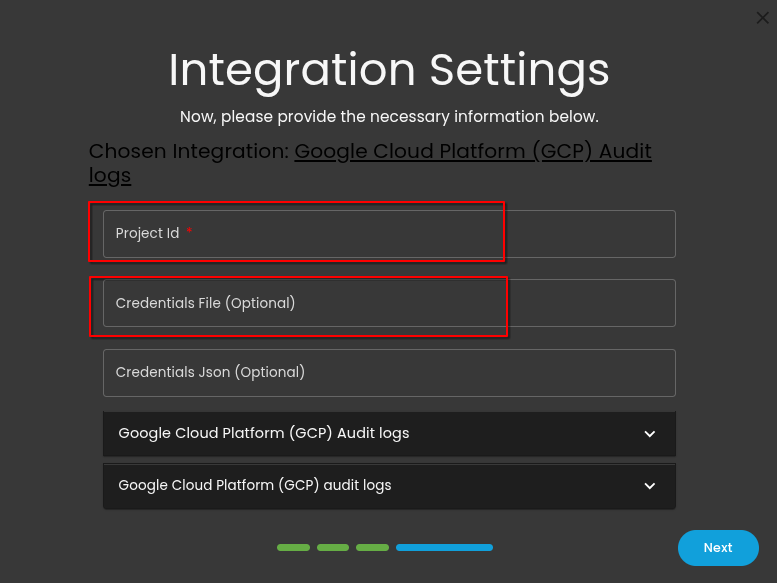
<p class="callout info">**<span class="TextRun SCXW124724174 BCX0" data-contrast="none" lang="EN-US" xml:lang="EN-US"><span class="NormalTextRun SCXW124724174 BCX0">Step4: Provide the "Project ID" and "Credentials File".</span></span>**</p>

<span class="WACImageContainer NoPadding DragDrop BlobObject SCXW124724174 BCX0" role="presentation">![Picture](https://cytechint-docs-bookstack.s3.amazonaws.com/uploads/images/gallery/2025-04/ayZ8wwmJA4A4Jf7d-embedded-image-icvuhbsm.png)</span><span class="EOP SCXW124724174 BCX0" data-ccp-props="{"134233117":false,"134233118":false,"335551550":0,"335551620":0,"335559738":0,"335559739":0}"> </span>

<p class="callout info"><span class="EOP SCXW124724174 BCX0" data-ccp-props="{"134233117":false,"134233118":false,"335551550":0,"335551620":0,"335559738":0,"335559739":0}"> **Step5: Click down the arrow button and make sure to "enable" Collect Google Cloud Platform (GCP) audit logs.**</span></p>

<span class="SCXW124724174 BCX0"><span class="WACImageContainer NoPadding DragDrop BlobObject SCXW124724174 BCX0" role="presentation">![Picture](https://cytechint-docs-bookstack.s3.amazonaws.com/uploads/images/gallery/2025-04/Xo91ZADr4w9ElDmO-embedded-image-qfqzjrej.png)</span></span><span class="TextRun SCXW124724174 BCX0" data-contrast="none" lang="EN-US" xml:lang="EN-US"><span class="NormalTextRun SCXW124724174 BCX0"> </span></span>

<p class="callout info">**<span class="TextRun SCXW124724174 BCX0" data-contrast="none" lang="EN-US" xml:lang="EN-US"><span class="NormalTextRun SCXW124724174 BCX0">Step6: In the Google Cloud Platform (GCP) Audit logs. Provide the "Topic" and "Subscription Name". Additionally, make sure to enable "Subscription Create" and enter "Tags"*(<span style="color: rgb(224, 62, 45);">forwarded and gcp-audit</span>)* by clicking the box. Click "Next" to proceed.</span></span>**</p>

<span class="WACImageContainer NoPadding DragDrop BlobObject SCXW124724174 BCX0" role="presentation">![Picture](https://cytechint-docs-bookstack.s3.amazonaws.com/uploads/images/gallery/2025-04/OLgqdnxBoOwYvh4f-embedded-image-gydi4wfz.png)</span><span class="EOP SCXW124724174 BCX0" data-ccp-props="{"134233117":false,"134233118":false,"335551550":0,"335551620":0,"335559738":0,"335559739":0}"> </span>

<p class="callout info">**<span class="EOP SCXW124724174 BCX0" data-ccp-props="{"134233117":false,"134233118":false,"335551550":0,"335551620":0,"335559738":0,"335559739":0}"> Step7: Wait for a couple of moment to finalize your integration.</span>**</p>

<span class="SCXW124724174 BCX0"><span class="WACImageContainer NoPadding DragDrop BlobObject SCXW124724174 BCX0" role="presentation">![Picture](https://cytechint-docs-bookstack.s3.amazonaws.com/uploads/images/gallery/2025-04/jMOVBHOgyKmY50wR-embedded-image-8nt4gkgx.png)</span></span><span class="TextRun SCXW124724174 BCX0" data-contrast="none" lang="EN-US" xml:lang="EN-US"><span class="NormalTextRun SCXW124724174 BCX0"> </span></span>

<p class="callout info">**Step8: A confirmation that the integration is finish installing.**</p>

<span class="WACImageContainer NoPadding DragDrop BlobObject SCXW124724174 BCX0" role="presentation">![Picture](https://cytechint-docs-bookstack.s3.amazonaws.com/uploads/images/gallery/2025-04/Dlajfyp478X8NxvT-embedded-image-qmqfjnyc.png)</span><span class="EOP SCXW124724174 BCX0" data-ccp-props="{"134233117":false,"134233118":false,"335551550":0,"335551620":0,"335559738":0,"335559739":0}"> </span>

<span class="EOP SCXW124724174 BCX0" data-ccp-props="{}">Documentation reference: <span style="color: rgb(53, 152, 219);">*[https://www.elastic.co/guide/en/integrations/current/gcp.html](https://www.elastic.co/guide/en/integrations/current/gcp.html)*</span></span>

<span class="EOP SCXW124724174 BCX0" data-ccp-props="{}" style="color: rgb(0, 0, 0);">*<span class="TextRun SCXW71272603 BCX0" data-contrast="auto" lang="EN-US" xml:lang="EN-US"><span class="NormalTextRun SCXW71272603 BCX0">If you need further </span><span class="NormalTextRun SCXW71272603 BCX0">assistance</span><span class="NormalTextRun SCXW71272603 BCX0">, kindly contact our support at </span></span><span style="color: rgb(53, 152, 219);">**<span class="TextRun SCXW71272603 BCX0" data-contrast="none" lang="EN-US" xml:lang="EN-US"><span class="NormalTextRun SCXW71272603 BCX0">support@cytechint.com</span></span>**</span><span class="TextRun SCXW71272603 BCX0" data-contrast="auto" lang="EN-US" xml:lang="EN-US"><span class="NormalTextRun SCXW71272603 BCX0"><span style="color: rgb(53, 152, 219);"> </span>for prompt </span><span class="NormalTextRun SCXW71272603 BCX0">assistance</span><span class="NormalTextRun SCXW71272603 BCX0"> and guidance.</span></span><span class="EOP SCXW71272603 BCX0" data-ccp-props="{}"></span>*</span>