# AQUILA - PostgreSQL Integration

##### <span style="color: rgb(53, 152, 219);">**Please find below the instructions required to set up this integration:**</span>

<div data-ogsc="black" id="bkmrk-to-configure%C2%A0postgre"><span style="color: rgb(0, 0, 0);">To configure <span class="markgiltepduu" data-markjs="true" data-ogab="" data-ogac="" data-ogsb="" data-ogsc=""><span class="markdbxmv250o" data-markjs="true" data-ogab="" data-ogac="" data-ogsb="" data-ogsc="">PostgreS</span>QL</span> with the specified logging settings, you need to modify the **<span class="markgiltepduu" data-markjs="true" data-ogab="" data-ogac="" data-ogsb="" data-ogsc=""><span class="markdbxmv250o" data-markjs="true" data-ogab="" data-ogac="" data-ogsb="" data-ogsc="">postgres</span>ql</span>.conf file**, which is typically located in the <span class="markgiltepduu" data-markjs="true" data-ogab="" data-ogac="" data-ogsb="" data-ogsc=""><span class="markdbxmv250o" data-markjs="true" data-ogab="" data-ogac="" data-ogsb="" data-ogsc="">PostgreS</span>QL</span> data directory. Here are the steps to configure these settings:</span></div><div data-ogsc="black" id="bkmrk-"></div><div data-ogsc="black" id="bkmrk-step-1%3A%C2%A0locate-the%C2%A0p"><span style="color: rgb(0, 0, 0);"><span data-ogsc="rgb(200, 38, 19)" style="color: rgb(53, 152, 219);">**Step 1:**</span> Locate the **<span class="markgiltepduu" data-markjs="true" data-ogab="" data-ogac="" data-ogsb="" data-ogsc=""><span class="markdbxmv250o" data-markjs="true" data-ogab="" data-ogac="" data-ogsb="" data-ogsc="">postgres</span>ql</span>.conf file**. This file is usually found in the **data directory of your <span class="markgiltepduu" data-markjs="true" data-ogab="" data-ogac="" data-ogsb="" data-ogsc=""><span class="markdbxmv250o" data-markjs="true" data-ogab="" data-ogac="" data-ogsb="" data-ogsc="">PostgreS</span>QL</span> installation**. The exact path can vary depending on your operating system and installation method.</span></div><div data-ogsc="black" id="bkmrk--1">  
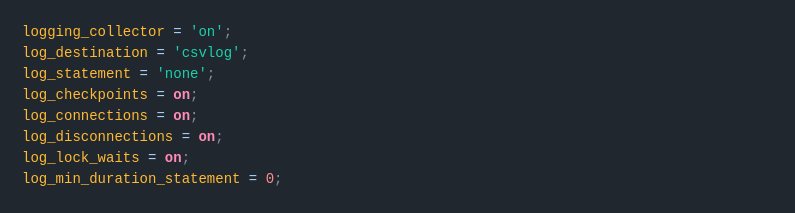
</div><div data-ogsc="black" id="bkmrk-step-2%3A%C2%A0edit-the%C2%A0pos"><span style="color: rgb(0, 0, 0);"><span data-ogsc="rgb(200, 38, 19)" style="color: rgb(53, 152, 219);">**Step 2:**</span> **Edit the <span class="markgiltepduu" data-markjs="true" data-ogab="" data-ogac="" data-ogsb="" data-ogsc=""><span class="markdbxmv250o" data-markjs="true" data-ogab="" data-ogac="" data-ogsb="" data-ogsc="">postgres</span>ql</span>.conf file**. Open the file in a text editor with appropriate permissions (you might need superuser privileges).</span></div><div data-ogsc="black" id="bkmrk-add-or-modify-the-fo"><span style="color: rgb(0, 0, 0);">Add or modify the following settings:</span></div>- <div data-ogsc=""><span style="color: rgb(0, 0, 0);">**logging\_collector = 'on'**: Enables the logging collector, which is responsible for capturing log messages sent to stderr and redirecting them into log files.</span></div>
- <div data-ogsc=""><span style="color: rgb(0, 0, 0);">**log\_destination = 'csvlog'**: Sets the log output format to CSV, which is useful for structured logging.</span></div>
- <div data-ogsc=""><span style="color: rgb(0, 0, 0);">**log\_statement = 'none'**: Disables logging of all SQL statements.</span></div>
- <div data-ogsc=""><span style="color: rgb(0, 0, 0);">**log\_checkpoints = 'on'**: Logs each checkpoint.</span></div>
- <div data-ogsc=""><span style="color: rgb(0, 0, 0);">**log\_connections = 'on'**: Logs each successful connection.</span></div>
- <div data-ogsc=""><span style="color: rgb(0, 0, 0);">**log\_disconnections = 'on'**: Logs each disconnection.</span></div>
- <div data-ogsc=""><span style="color: rgb(0, 0, 0);">**log\_lock\_waits = 'on'**: Logs lock waits that exceed the deadlock\_timeout.</span></div>
- <div data-ogsc=""><span style="color: rgb(0, 0, 0);">**log\_min\_duration\_statement = 0**: Logs all statements with their durations. Setting this to 0 logs all statements regardless of their execution time.</span></div>

<div data-ogsc="rgb(36, 36, 36)" id="bkmrk--2"><span data-ogsb="white" data-ogsc="" style="color: rgb(0, 0, 0);">![](https://cytechint-docs-bookstack.s3.amazonaws.com/uploads/images/gallery/2025-09/3ghvIgyg3snBxO4t-embedded-image-kia6gqmh.png)</span></div><div data-ogsc="black" id="bkmrk-step-3%3A%C2%A0save-the-cha"><span style="color: rgb(0, 0, 0);"><span style="color: rgb(53, 152, 219);"><span data-ogsc="rgb(200, 38, 19)">**Step 3:**</span> </span>Save the changes. After editing the file, save your changes.</span></div><div data-ogsc="black" id="bkmrk--4">  
</div><div data-ogsc="black" id="bkmrk-step-4%3A%C2%A0restart%C2%A0post"><span style="color: rgb(0, 0, 0);"><span data-ogsc="rgb(200, 38, 19)">**<span style="color: rgb(53, 152, 219);">Step 4:</span>** </span>Restart <span class="markgiltepduu" data-markjs="true" data-ogab="" data-ogac="" data-ogsb="" data-ogsc=""><span class="markdbxmv250o" data-markjs="true" data-ogab="" data-ogac="" data-ogsb="" data-ogsc="">PostgreS</span>QL</span>: For the changes to take effect, you need to restart the <span class="markgiltepduu" data-markjs="true" data-ogab="" data-ogac="" data-ogsb="" data-ogsc=""><span class="markdbxmv250o" data-markjs="true" data-ogab="" data-ogac="" data-ogsb="" data-ogsc="">PostgreS</span>QL</span> service. The command to restart <span class="markgiltepduu" data-markjs="true" data-ogab="" data-ogac="" data-ogsb="" data-ogsc=""><span class="markdbxmv250o" data-markjs="true" data-ogab="" data-ogac="" data-ogsb="" data-ogsc="">PostgreS</span>QL</span> can vary depending on your system. Here are some common commands:</span></div>- <span style="color: rgb(0, 0, 0);">On Linux systems using systemd:</span>
- <table data-editing-info="{"topBorderColor":"#ABABAB","bottomBorderColor":"#ABABAB","verticalBorderColor":"#ABABAB","hasHeaderRow":false,"hasFirstColumn":false,"hasBandedRows":false,"hasBandedColumns":false,"bgColorEven":null,"bgColorOdd":"#EEEEEE","headerRowColor":"#ABABAB","tableBorderFormat":0,"verticalAlign":null}"><tbody><tr><td><div data-ogsc="black"><span style="color: rgb(0, 0, 0);">sudo systemctl restart <span class="markgiltepduu" data-markjs="true" data-ogab="" data-ogac="" data-ogsb="" data-ogsc=""><span class="markdbxmv250o" data-markjs="true" data-ogab="" data-ogac="" data-ogsb="" data-ogsc="">postgres</span>ql</span></span></div></td></tr></tbody></table>
- <div data-ogsc=""><span style="color: rgb(0, 0, 0);">On systems using init.d:</span></div>
- <table data-editing-info="{"topBorderColor":"#ABABAB","bottomBorderColor":"#ABABAB","verticalBorderColor":"#ABABAB","hasHeaderRow":false,"hasFirstColumn":false,"hasBandedRows":false,"hasBandedColumns":false,"bgColorEven":null,"bgColorOdd":"#EEEEEE","headerRowColor":"#ABABAB","tableBorderFormat":0,"verticalAlign":null}"><tbody><tr><td><div data-ogsc="black"><span style="color: rgb(0, 0, 0);">sudo /etc/init.d/<span class="markgiltepduu" data-markjs="true" data-ogab="" data-ogac="" data-ogsb="" data-ogsc=""><span class="markdbxmv250o" data-markjs="true" data-ogab="" data-ogac="" data-ogsb="" data-ogsc="">postgres</span>ql</span> restart</span></div></td></tr></tbody></table>

<div data-ogsc="black" id="bkmrk-on-windows%2C-you-can-"><span style="color: rgb(0, 0, 0);">On Windows, you can restart the <span class="markgiltepduu" data-markjs="true" data-ogab="" data-ogac="" data-ogsb="" data-ogsc=""><span class="markdbxmv250o" data-markjs="true" data-ogab="" data-ogac="" data-ogsb="" data-ogsc="">PostgreS</span>QL</span> service from the Services management console.</span></div><div data-ogsc="black" id="bkmrk-after-completing-the"><span style="color: rgb(0, 0, 0);">After completing these steps, <span class="markgiltepduu" data-markjs="true" data-ogab="" data-ogac="" data-ogsb="" data-ogsc=""><span class="markdbxmv250o" data-markjs="true" data-ogab="" data-ogac="" data-ogsb="" data-ogsc="">PostgreS</span>QL</span> will be configured to log according to the specified settings.</span></div><div data-ogsc="black" id="bkmrk-for-more-detailed-in"><span style="color: rgb(0, 0, 0);">For more detailed information, you can refer to these documentations:</span></div>- <div data-ogsc=""><span style="color: rgb(132, 63, 161);">[Runtime-config-logging](https://www.postgresql.org/docs/current/runtime-config-logging.html "https://www.postgresql.org/docs/current/runtime-config-logging.html")</span></div>
- <div data-ogsc=""><span style="color: rgb(132, 63, 161);">[<span class="markgiltepduu" data-markjs="true" data-ogab="" data-ogac="" data-ogsb="" data-ogsc=""><span class="markdbxmv250o" data-markjs="true" data-ogab="" data-ogac="" data-ogsb="" data-ogsc="">PostgreS</span>QL</span> Elastic Integration](https://www.elastic.co/docs/reference/integrations/postgresql "https://www.elastic.co/docs/reference/integrations/postgresql")</span></div>

<p class="callout warning"><span style="color: rgb(0, 0, 0);">**Required credentials for PostgreSQL Integration access:**</span></p>

**<span style="color: rgb(0, 0, 0);">Log file paths:</span>**

- **<span style="color: rgb(0, 0, 0);">/var/log/postgresql/postgresql-\*-*.log*  
    </span>**
- **<span style="color: rgb(0, 0, 0);">/var/log/postgresql/postgresql-\*-*.csv*</span>**

<span style="color: rgb(0, 0, 0);">*If you need further assistance, kindly contact our support at* <span style="color: rgb(53, 152, 219);">***support@cytechint.com***</span> *for prompt assistance and guidance.*</span>