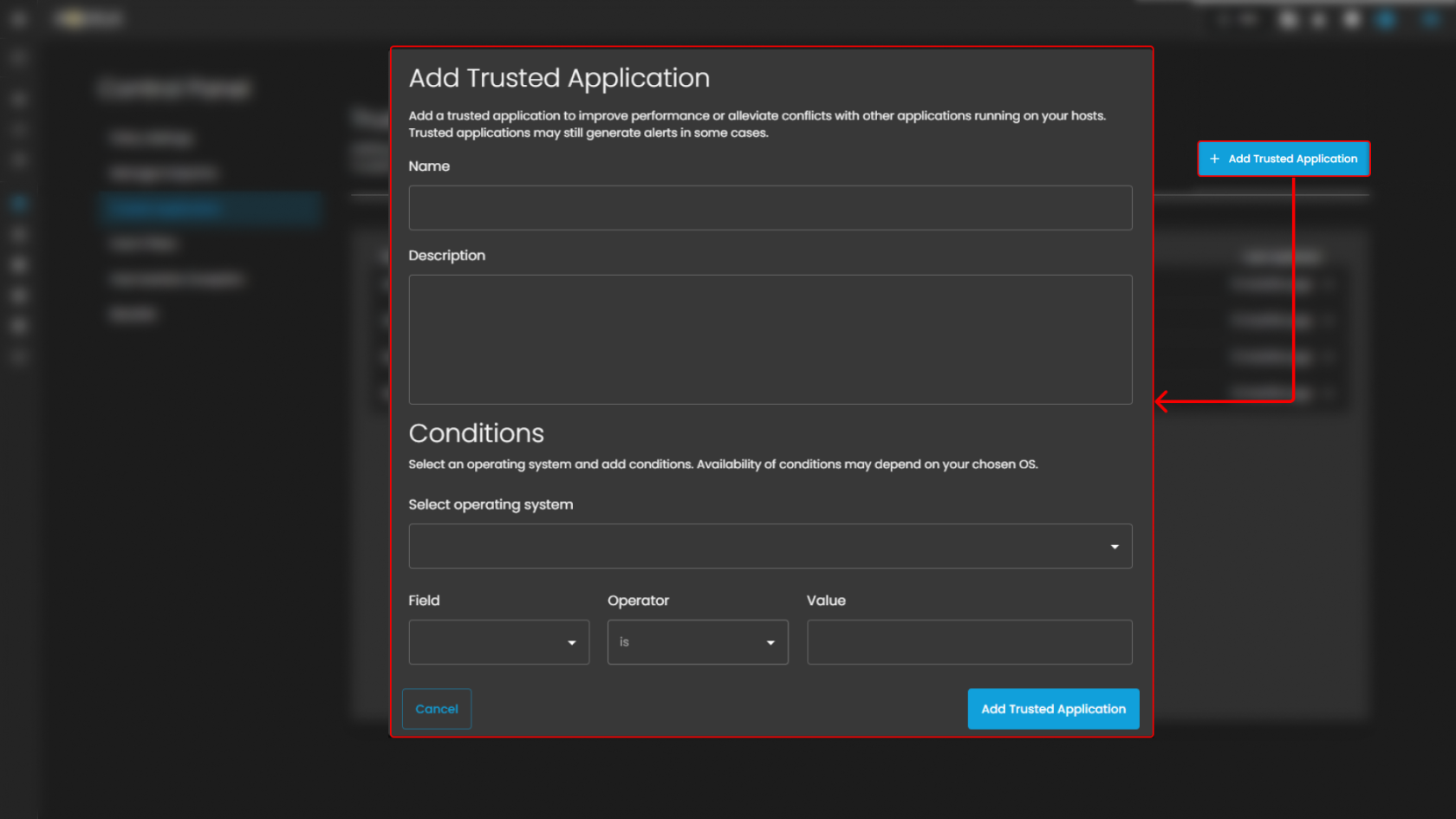
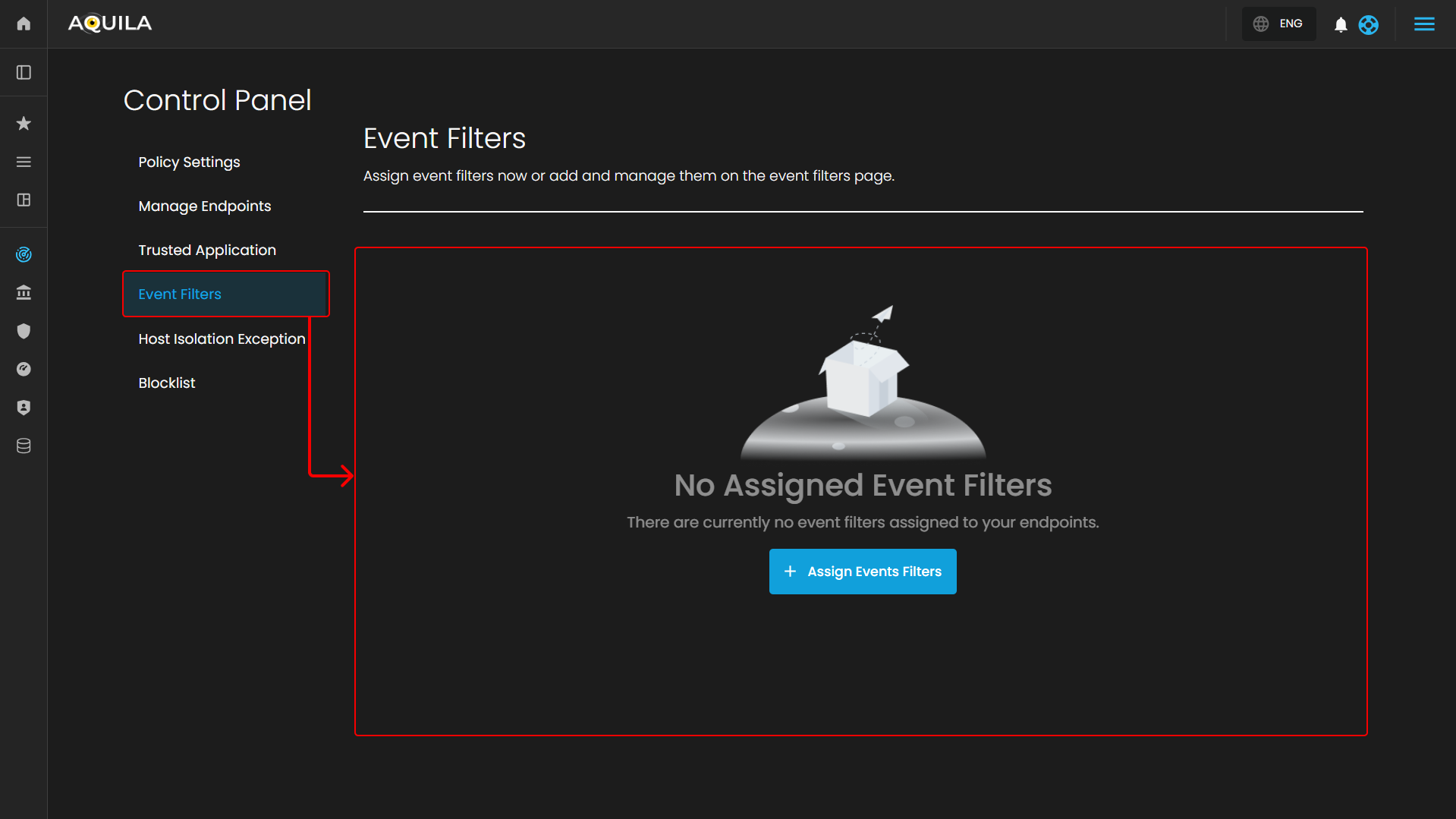
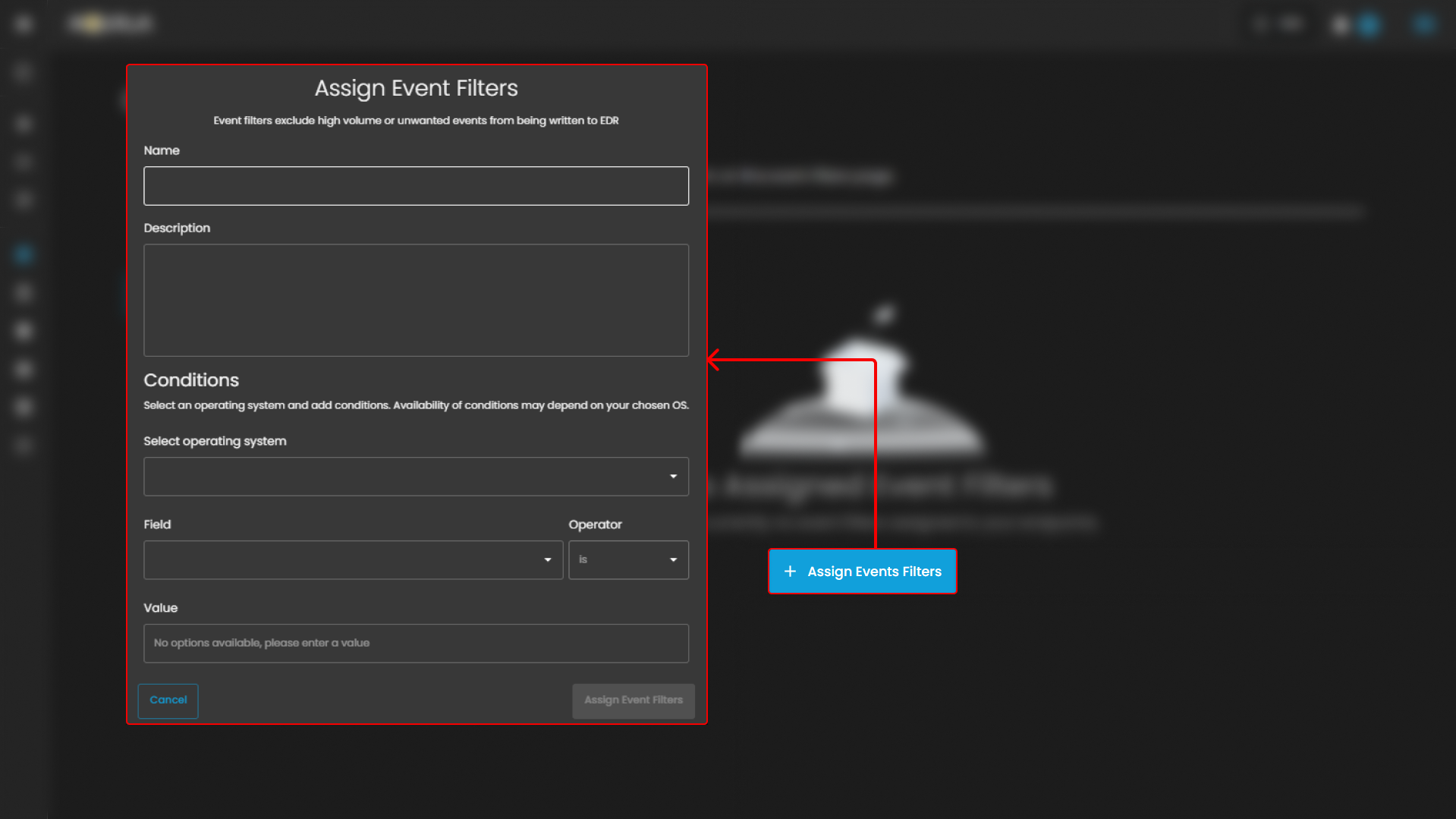
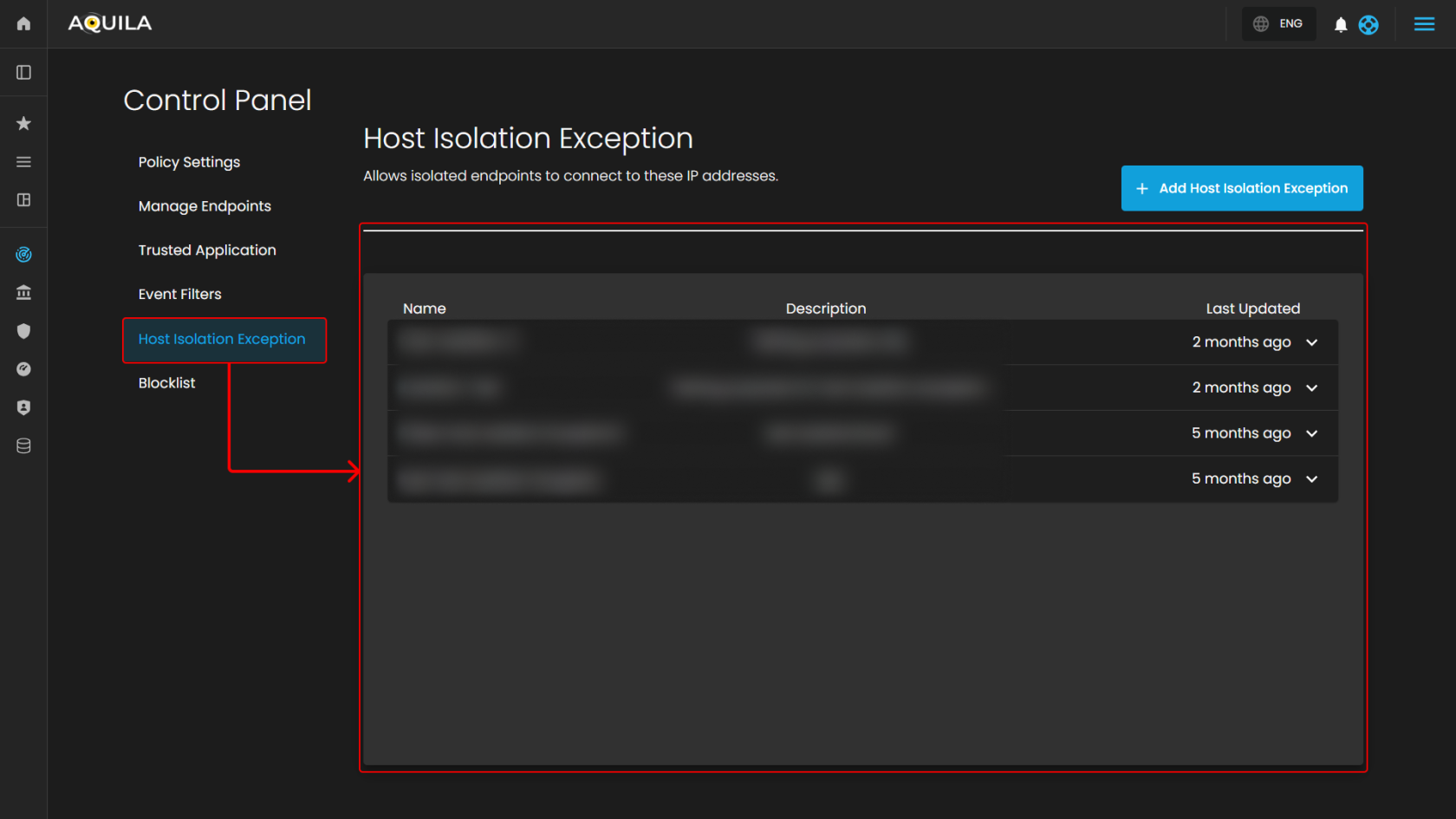
# CyTech AQUILA - Endpoint Detection and Response (EDR)

##### <span style="color: rgb(53, 152, 219);">**Overview:**</span>

<span style="color: rgb(0, 0, 0);"><span class="TextRun SCXW169441868 BCX0" data-contrast="auto" lang="EN-US" xml:lang="EN-US"><span class="NormalTextRun SCXW169441868 BCX0">AQUILA EDR provides organizations with prevention, detection, and response capabilities with deep visibility for EPP, EDR, SIEM, and Security Analytics use cases across Windows, macOS, and Linux operating systems running on both traditional endpoints and public cloud environments.</span></span><span class="EOP SCXW169441868 BCX0" data-ccp-props="{}"> </span></span>

---

##### <span style="color: rgb(53, 152, 219);"><span class="TextRun SCXW169441868 BCX0" data-contrast="none" lang="EN-US" xml:lang="EN-US"><span class="NormalTextRun SCXW169441868 BCX0" data-ccp-parastyle="heading 2">🔒 </span></span>**<span class="TextRun SCXW169441868 BCX0" data-contrast="none" lang="EN-US" xml:lang="EN-US"><span class="NormalTextRun SCXW169441868 BCX0" data-ccp-parastyle="heading 2">Core Capabilities</span></span><span class="EOP SCXW169441868 BCX0" data-ccp-props="{"134233117":false,"134233118":false,"134245418":true,"134245529":true,"335559738":299,"335559739":299}"> </span>**</span>

<div class="SCXW169441868 BCX0" id="bkmrk-prevent-complex-atta"><div class="ListContainerWrapper SCXW169441868 BCX0">1. <span style="color: rgb(0, 0, 0);">**<span class="TextRun SCXW169441868 BCX0" data-contrast="none" lang="EN-US" xml:lang="EN-US"><span class="NormalTextRun SCXW169441868 BCX0">Prevent complex attacks</span></span>** <span class="TextRun SCXW169441868 BCX0" data-contrast="auto" lang="EN-US" xml:lang="EN-US"><span class="NormalTextRun SCXW169441868 BCX0">- Prevent malware (Windows, macOS, Linux) and ransomware (Windows) from executing, and stop advanced threats with malicious behavior (Windows, macOS, Linux), memory threat (Windows, macOS, Linux), and credential hardening (Windows) protections.</span></span></span>

</div></div><div class="SCXW169441868 BCX0" id="bkmrk-alert-in-high-fideli"><div class="ListContainerWrapper SCXW169441868 BCX0">2. <span style="color: rgb(0, 0, 0);"><span class="TextRun SCXW169441868 BCX0" data-contrast="none" lang="EN-US" xml:lang="EN-US"><span class="NormalTextRun SCXW169441868 BCX0">**Alert in high fidelity** </span></span><span class="TextRun SCXW169441868 BCX0" data-contrast="auto" lang="EN-US" xml:lang="EN-US"><span class="NormalTextRun SCXW169441868 BCX0">- Bolster team efficacy by detecting threats centrally and minimizing false positives via extensive corroboration.</span></span><span class="EOP SCXW169441868 BCX0" data-ccp-props="{}"> </span></span>

</div></div><div class="SCXW169441868 BCX0" id="bkmrk-detect-threats-in-hi"><div class="ListContainerWrapper SCXW169441868 BCX0">3. <span style="color: rgb(0, 0, 0);">**<span class="TextRun SCXW169441868 BCX0" data-contrast="none" lang="EN-US" xml:lang="EN-US"><span class="NormalTextRun SCXW169441868 BCX0">Detect threats in high fidelity</span></span>** <span class="TextRun SCXW169441868 BCX0" data-contrast="auto" lang="EN-US" xml:lang="EN-US"><span class="NormalTextRun SCXW169441868 BCX0">- </span><span class="NormalTextRun SCXW169441868 BCX0">facilitates</span><span class="NormalTextRun SCXW169441868 BCX0"> deep visibility by instrumenting the process, file, and network data in your </span><span class="NormalTextRun ContextualSpellingAndGrammarErrorV2Themed SCXW169441868 BCX0">environments</span><span class="NormalTextRun SCXW169441868 BCX0"> with minimal data collection overhead.</span></span><span class="EOP SCXW169441868 BCX0" data-ccp-props="{}"> </span></span>

</div></div><div class="SCXW169441868 BCX0" id="bkmrk-triage-and-respond-r"><div class="ListContainerWrapper SCXW169441868 BCX0">4. <span style="color: rgb(0, 0, 0);">**<span class="TextRun SCXW169441868 BCX0" data-contrast="none" lang="EN-US" xml:lang="EN-US"><span class="NormalTextRun SCXW169441868 BCX0">Triage and respond rapidly</span></span>**<span class="TextRun SCXW169441868 BCX0" data-contrast="auto" lang="EN-US" xml:lang="EN-US"><span class="NormalTextRun SCXW169441868 BCX0"> - Quickly analyze detailed data from across your hosts. Examine host-based </span><span class="NormalTextRun ContextualSpellingAndGrammarErrorV2Themed SCXW169441868 BCX0">activity</span><span class="NormalTextRun SCXW169441868 BCX0"> with interactive visualizations. Invoke remote response actions across distributed endpoints. Extend investigation capabilities even further with the </span><span class="NormalTextRun SpellingErrorV2Themed SCXW169441868 BCX0">Osquery</span><span class="NormalTextRun SCXW169441868 BCX0"> integration, fully integrated into Security workflows.</span></span><span class="EOP SCXW169441868 BCX0" data-ccp-props="{}"> </span></span>

</div></div><div class="SCXW169441868 BCX0" id="bkmrk-secure-your-cloud-wo"><div class="ListContainerWrapper SCXW169441868 BCX0">5. <span style="color: rgb(0, 0, 0);">**<span class="TextRun SCXW169441868 BCX0" data-contrast="none" lang="EN-US" xml:lang="EN-US"><span class="NormalTextRun SCXW169441868 BCX0">Secure your cloud workloads</span></span>** <span class="TextRun SCXW169441868 BCX0" data-contrast="auto" lang="EN-US" xml:lang="EN-US"><span class="NormalTextRun SCXW169441868 BCX0">- Stop threats targeting cloud workloads and cloud-native applications. Gain real-time visibility and control with a lightweight user-space agent, powered by </span><span class="NormalTextRun SpellingErrorV2Themed SCXW169441868 BCX0">eBPF</span><span class="NormalTextRun SCXW169441868 BCX0">. Automate the identification of cloud threats with detection rules and machine learning (ML). Achieve rapid time-to-value with MITRE ATT&amp;CK-aligned detections.</span></span></span>

</div></div><div class="SCXW169441868 BCX0" id="bkmrk-view-terminal-sessio"><div class="ListContainerWrapper SCXW169441868 BCX0">6. <span style="color: rgb(0, 0, 0);">**<span class="TextRun SCXW169441868 BCX0" data-contrast="none" lang="EN-US" xml:lang="EN-US"><span class="NormalTextRun SCXW169441868 BCX0">View terminal sessions</span></span>** <span class="TextRun SCXW169441868 BCX0" data-contrast="auto" lang="EN-US" xml:lang="EN-US"><span class="NormalTextRun SCXW169441868 BCX0">- Give your security team a unique and powerful investigative tool for digital forensics and incident response (DFIR), reducing the mean time to respond (MTTR). </span><span class="NormalTextRun SCXW169441868 BCX0">Session view provides a time-ordered series of process executions in your Linux workloads in the form of a terminal shell, as well as the ability to replay the terminal session.</span></span><span class="EOP SCXW169441868 BCX0" data-ccp-props="{}"> </span></span>

</div></div>---

##### <span style="color: rgb(53, 152, 219);">**<span class="TextRun SCXW169441868 BCX0" data-contrast="none" lang="EN-US" xml:lang="EN-US"><span class="NormalTextRun SCXW169441868 BCX0" data-ccp-parastyle="heading 2">🛡️ Protections Matrix</span></span><span class="EOP SCXW169441868 BCX0" data-ccp-props="{"134233117":false,"134233118":false,"134245418":true,"134245529":true,"335559738":299,"335559739":299}"> </span>**</span>

<div class="OutlineElement Ltr SCXW169441868 BCX0" id="bkmrk-protection-type%C2%A0-os-"><div class="TableContainer Ltr SCXW169441868 BCX0"><div aria-hidden="true" class="WACAltTextDescribedBy SCXW169441868 BCX0" id="bkmrk--2"></div><table aria-rowcount="6" border="1" class="Table Ltr TableWordWrap SCXW169441868 BCX0" data-tablelook="1696" data-tablestyle="MsoNormalTable" dir="ltr" style="width: 100%;"><tbody class="SCXW169441868 BCX0"><tr aria-rowindex="1" class="TableRow SCXW169441868 BCX0" role="row"><td class="FirstRow FirstCol SCXW169441868 BCX0" data-celllook="0" role="rowheader" style="width: 16.2146%;">**<span style="color: rgb(0, 0, 0);"><span class="TextRun SCXW169441868 BCX0" data-contrast="none" lang="EN-US" xml:lang="EN-US"><span class="NormalTextRun SCXW169441868 BCX0">Protection Type</span></span><span class="EOP SCXW169441868 BCX0" data-ccp-props="{"134233117":false,"134233118":false,"335551550":2,"335551620":2,"335559738":0,"335559739":0}"> </span></span>**

</td><td class="FirstRow SCXW169441868 BCX0" data-celllook="0" role="columnheader" style="width: 17.8838%;">**<span style="color: rgb(0, 0, 0);"><span class="TextRun SCXW169441868 BCX0" data-contrast="none" lang="EN-US" xml:lang="EN-US"><span class="NormalTextRun SCXW169441868 BCX0">OS Support</span></span><span class="EOP SCXW169441868 BCX0" data-ccp-props="{"134233117":false,"134233118":false,"335551550":2,"335551620":2,"335559738":0,"335559739":0}"> </span></span>**

</td><td class="FirstRow SCXW169441868 BCX0" data-celllook="0" role="columnheader" style="width: 8.94188%;">**<span style="color: rgb(0, 0, 0);"><span class="TextRun SCXW169441868 BCX0" data-contrast="none" lang="EN-US" xml:lang="EN-US"><span class="NormalTextRun SCXW169441868 BCX0">Detect</span></span><span class="EOP SCXW169441868 BCX0" data-ccp-props="{"134233117":false,"134233118":false,"335551550":2,"335551620":2,"335559738":0,"335559739":0}"> </span></span>**

</td><td class="FirstRow SCXW169441868 BCX0" data-celllook="0" role="columnheader" style="width: 9.89248%;"><span style="color: rgb(0, 0, 0);">**<span class="TextRun SCXW169441868 BCX0" data-contrast="none" lang="EN-US" xml:lang="EN-US"><span class="NormalTextRun SCXW169441868 BCX0">Prevent</span></span>**<span class="EOP SCXW169441868 BCX0" data-ccp-props="{"134233117":false,"134233118":false,"335551550":2,"335551620":2,"335559738":0,"335559739":0}"> </span></span>

</td><td class="FirstRow LastCol SCXW169441868 BCX0" data-celllook="0" role="columnheader" style="width: 47.0971%;">**<span style="color: rgb(0, 0, 0);"><span class="TextRun SCXW169441868 BCX0" data-contrast="none" lang="EN-US" xml:lang="EN-US"><span class="NormalTextRun SCXW169441868 BCX0">Description</span></span><span class="EOP SCXW169441868 BCX0" data-ccp-props="{"134233117":false,"134233118":false,"335551550":2,"335551620":2,"335559738":0,"335559739":0}"> </span></span>**

</td></tr><tr aria-rowindex="2" class="TableRow SCXW169441868 BCX0" role="row"><td class="FirstCol SCXW169441868 BCX0" data-celllook="0" role="rowheader" style="width: 16.2146%;">**<span style="color: rgb(0, 0, 0);"><span class="TextRun SCXW169441868 BCX0" data-contrast="auto" lang="EN-US" xml:lang="EN-US"><span class="NormalTextRun SCXW169441868 BCX0">Malware</span></span><span class="EOP SCXW169441868 BCX0" data-ccp-props="{"134233117":false,"134233118":false,"335559738":0,"335559739":0}"> </span></span>**

</td><td class="SCXW169441868 BCX0" data-celllook="0" style="width: 17.8838%;"><span style="color: rgb(0, 0, 0);"><span class="TextRun SCXW169441868 BCX0" data-contrast="auto" lang="EN-US" xml:lang="EN-US"><span class="NormalTextRun SCXW169441868 BCX0">Windows, macOS, Linux</span></span><span class="EOP SCXW169441868 BCX0" data-ccp-props="{"134233117":false,"134233118":false,"335559738":0,"335559739":0}"> </span></span>

</td><td class="SCXW169441868 BCX0" data-celllook="0" style="width: 8.94188%;"><span class="EOP SCXW169441868 BCX0" data-ccp-props="{}"> </span>

</td><td class="SCXW169441868 BCX0" data-celllook="0" style="width: 9.89248%;"><span class="TextRun SCXW169441868 BCX0" data-contrast="auto" lang="EN-US" xml:lang="EN-US"><span class="NormalTextRun SCXW169441868 BCX0"> </span><span class="NormalTextRun SCXW169441868 BCX0">✅</span></span><span class="EOP SCXW169441868 BCX0" data-ccp-props="{"134233117":false,"134233118":false,"335559738":0,"335559739":0}"> </span>

</td><td class="LastCol SCXW169441868 BCX0" data-celllook="0" style="width: 47.0971%;"><span style="color: rgb(0, 0, 0);"><span class="TextRun SCXW169441868 BCX0" data-contrast="auto" lang="EN-US" xml:lang="EN-US"><span class="NormalTextRun SCXW169441868 BCX0">Blocks </span><span class="NormalTextRun ContextualSpellingAndGrammarErrorV2Themed SCXW169441868 BCX0">known</span><span class="NormalTextRun SCXW169441868 BCX0"> malicious executables and scripts at runtime.</span></span><span class="EOP SCXW169441868 BCX0" data-ccp-props="{"134233117":false,"134233118":false,"335559738":0,"335559739":0}"> </span></span>

</td></tr><tr aria-rowindex="3" class="TableRow SCXW169441868 BCX0" role="row"><td class="FirstCol SCXW169441868 BCX0" data-celllook="0" role="rowheader" style="width: 16.2146%;">**<span style="color: rgb(0, 0, 0);"><span class="TextRun SCXW169441868 BCX0" data-contrast="auto" lang="EN-US" xml:lang="EN-US"><span class="NormalTextRun SCXW169441868 BCX0">Ransomware</span></span><span class="EOP SCXW169441868 BCX0" data-ccp-props="{"134233117":false,"134233118":false,"335559738":0,"335559739":0}"> </span></span>**

</td><td class="SCXW169441868 BCX0" data-celllook="0" style="width: 17.8838%;"><span style="color: rgb(0, 0, 0);"><span class="TextRun SCXW169441868 BCX0" data-contrast="auto" lang="EN-US" xml:lang="EN-US"><span class="NormalTextRun SCXW169441868 BCX0">Windows</span></span><span class="EOP SCXW169441868 BCX0" data-ccp-props="{"134233117":false,"134233118":false,"335559738":0,"335559739":0}"> </span></span>

</td><td class="SCXW169441868 BCX0" data-celllook="0" style="width: 8.94188%;"><span class="EOP SCXW169441868 BCX0" data-ccp-props="{}"> </span>

</td><td class="SCXW169441868 BCX0" data-celllook="0" style="width: 9.89248%;"><span class="TextRun SCXW169441868 BCX0" data-contrast="auto" lang="EN-US" xml:lang="EN-US"><span class="NormalTextRun SCXW169441868 BCX0"> </span><span class="NormalTextRun SCXW169441868 BCX0">✅</span></span><span class="EOP SCXW169441868 BCX0" data-ccp-props="{"134233117":false,"134233118":false,"335559738":0,"335559739":0}"> </span>

</td><td class="LastCol SCXW169441868 BCX0" data-celllook="0" style="width: 47.0971%;"><span style="color: rgb(0, 0, 0);"><span class="TextRun SCXW169441868 BCX0" data-contrast="auto" lang="EN-US" xml:lang="EN-US"><span class="NormalTextRun SCXW169441868 BCX0">Detects rapid file changes and unauthorized encryption activity.</span></span><span class="EOP SCXW169441868 BCX0" data-ccp-props="{"134233117":false,"134233118":false,"335559738":0,"335559739":0}"> </span></span>

</td></tr><tr aria-rowindex="4" class="TableRow SCXW169441868 BCX0" role="row"><td class="FirstCol SCXW169441868 BCX0" data-celllook="0" role="rowheader" style="width: 16.2146%;">**<span style="color: rgb(0, 0, 0);"><span class="TextRun SCXW169441868 BCX0" data-contrast="auto" lang="EN-US" xml:lang="EN-US"><span class="NormalTextRun SCXW169441868 BCX0">Memory Threats</span></span><span class="EOP SCXW169441868 BCX0" data-ccp-props="{"134233117":false,"134233118":false,"335559738":0,"335559739":0}"> </span></span>**

</td><td class="SCXW169441868 BCX0" data-celllook="0" style="width: 17.8838%;"><span style="color: rgb(0, 0, 0);"><span class="TextRun SCXW169441868 BCX0" data-contrast="auto" lang="EN-US" xml:lang="EN-US"><span class="NormalTextRun SCXW169441868 BCX0">Windows, macOS, Linux</span></span><span class="EOP SCXW169441868 BCX0" data-ccp-props="{"134233117":false,"134233118":false,"335559738":0,"335559739":0}"> </span></span>

</td><td class="SCXW169441868 BCX0" data-celllook="0" style="width: 8.94188%;"><span class="EOP SCXW169441868 BCX0" data-ccp-props="{}"> </span>

</td><td class="SCXW169441868 BCX0" data-celllook="0" style="width: 9.89248%;"><span class="TextRun SCXW169441868 BCX0" data-contrast="auto" lang="EN-US" xml:lang="EN-US"><span class="NormalTextRun SCXW169441868 BCX0"> </span><span class="NormalTextRun SCXW169441868 BCX0">✅</span></span><span class="EOP SCXW169441868 BCX0" data-ccp-props="{"134233117":false,"134233118":false,"335559738":0,"335559739":0}"> </span>

</td><td class="LastCol SCXW169441868 BCX0" data-celllook="0" style="width: 47.0971%;"><span style="color: rgb(0, 0, 0);"><span class="TextRun SCXW169441868 BCX0" data-contrast="auto" lang="EN-US" xml:lang="EN-US"><span class="NormalTextRun SCXW169441868 BCX0">Prevents memory-based attacks like process injection or ROP chains.</span></span><span class="EOP SCXW169441868 BCX0" data-ccp-props="{"134233117":false,"134233118":false,"335559738":0,"335559739":0}"> </span></span>

</td></tr><tr aria-rowindex="5" class="TableRow SCXW169441868 BCX0" role="row"><td class="FirstCol SCXW169441868 BCX0" data-celllook="0" role="rowheader" style="width: 16.2146%;">**<span style="color: rgb(0, 0, 0);"><span class="TextRun SCXW169441868 BCX0" data-contrast="auto" lang="EN-US" xml:lang="EN-US"><span class="NormalTextRun SCXW169441868 BCX0">Malicious Behavior</span></span><span class="EOP SCXW169441868 BCX0" data-ccp-props="{"134233117":false,"134233118":false,"335559738":0,"335559739":0}"> </span></span>**

</td><td class="SCXW169441868 BCX0" data-celllook="0" style="width: 17.8838%;"><span style="color: rgb(0, 0, 0);"><span class="TextRun SCXW169441868 BCX0" data-contrast="auto" lang="EN-US" xml:lang="EN-US"><span class="NormalTextRun SCXW169441868 BCX0">Windows, macOS, Linux</span></span><span class="EOP SCXW169441868 BCX0" data-ccp-props="{"134233117":false,"134233118":false,"335559738":0,"335559739":0}"> </span></span>

</td><td class="SCXW169441868 BCX0" data-celllook="0" style="width: 8.94188%;"><span class="EOP SCXW169441868 BCX0" data-ccp-props="{}"> </span>

</td><td class="SCXW169441868 BCX0" data-celllook="0" style="width: 9.89248%;"><span class="TextRun SCXW169441868 BCX0" data-contrast="auto" lang="EN-US" xml:lang="EN-US"><span class="NormalTextRun SCXW169441868 BCX0"> </span><span class="NormalTextRun SCXW169441868 BCX0">✅</span></span><span class="EOP SCXW169441868 BCX0" data-ccp-props="{"134233117":false,"134233118":false,"335559738":0,"335559739":0}"> </span>

</td><td class="LastCol SCXW169441868 BCX0" data-celllook="0" style="width: 47.0971%;"><span style="color: rgb(0, 0, 0);"><span class="TextRun SCXW169441868 BCX0" data-contrast="auto" lang="EN-US" xml:lang="EN-US"><span class="NormalTextRun SCXW169441868 BCX0">Stops suspicious techniques such as abnormal child processes or </span><span class="NormalTextRun SpellingErrorV2Themed SCXW169441868 BCX0">LOLBins</span><span class="NormalTextRun SCXW169441868 BCX0">.</span></span><span class="EOP SCXW169441868 BCX0" data-ccp-props="{"134233117":false,"134233118":false,"335559738":0,"335559739":0}"> </span></span>

</td></tr><tr aria-rowindex="6" class="TableRow SCXW169441868 BCX0" role="row"><td class="FirstCol LastRow SCXW169441868 BCX0" data-celllook="0" role="rowheader" style="width: 16.2146%;">**<span style="color: rgb(0, 0, 0);"><span class="TextRun SCXW169441868 BCX0" data-contrast="auto" lang="EN-US" xml:lang="EN-US"><span class="NormalTextRun SCXW169441868 BCX0">Credential Hardening</span></span><span class="EOP SCXW169441868 BCX0" data-ccp-props="{"134233117":false,"134233118":false,"335559738":0,"335559739":0}"> </span></span>**

</td><td class="LastRow SCXW169441868 BCX0" data-celllook="0" style="width: 17.8838%;"><span style="color: rgb(0, 0, 0);"><span class="TextRun SCXW169441868 BCX0" data-contrast="auto" lang="EN-US" xml:lang="EN-US"><span class="NormalTextRun SCXW169441868 BCX0">Windows</span></span><span class="EOP SCXW169441868 BCX0" data-ccp-props="{"134233117":false,"134233118":false,"335559738":0,"335559739":0}"> </span></span>

</td><td class="LastRow SCXW169441868 BCX0" data-celllook="0" style="width: 8.94188%;"><span class="EOP SCXW169441868 BCX0" data-ccp-props="{}"> </span>

</td><td class="LastRow SCXW169441868 BCX0" data-celllook="0" style="width: 9.89248%;"><span class="TextRun SCXW169441868 BCX0" data-contrast="auto" lang="EN-US" xml:lang="EN-US"><span class="NormalTextRun SCXW169441868 BCX0"> </span></span> <span style="color: rgb(0, 0, 0);"><span class="TextRun SCXW169441868 BCX0" data-contrast="none" lang="EN-US" xml:lang="EN-US"><span class="NormalTextRun SCXW169441868 BCX0">Enabled</span></span><span class="EOP SCXW169441868 BCX0" data-ccp-props="{"134233117":false,"134233118":false,"335559738":0,"335559739":0}"> </span></span>

</td><td class="LastCol LastRow SCXW169441868 BCX0" data-celllook="0" style="width: 47.0971%;"><span style="color: rgb(0, 0, 0);"><span class="TextRun SCXW169441868 BCX0" data-contrast="auto" lang="EN-US" xml:lang="EN-US"><span class="NormalTextRun SCXW169441868 BCX0">Protects credentials by preventing unauthorized LSASS access.</span></span><span class="EOP SCXW169441868 BCX0" data-ccp-props="{"134233117":false,"134233118":false,"335559738":0,"335559739":0}"> </span></span>

</td></tr></tbody></table>

</div></div>---

##### <span style="color: rgb(53, 152, 219);">**<span class="TextRun SCXW169441868 BCX0" data-contrast="none" lang="EN-US" xml:lang="EN-US"><span class="NormalTextRun SCXW169441868 BCX0" data-ccp-parastyle="heading 2">📊 Event Collection</span></span><span class="EOP SCXW169441868 BCX0" data-ccp-props="{"134233117":false,"134233118":false,"134245418":true,"134245529":true,"335559738":299,"335559739":299}"> </span>**</span>

<div class="OutlineElement Ltr SCXW169441868 BCX0" id="bkmrk-event-type%C2%A0-windows%C2%A0"><div class="TableContainer Ltr SCXW169441868 BCX0"><div aria-hidden="true" class="WACAltTextDescribedBy SCXW169441868 BCX0" id="bkmrk--4"></div><table aria-rowcount="9" border="1" class="Table Ltr TableWordWrap SCXW169441868 BCX0" data-tablelook="1696" data-tablestyle="MsoNormalTable" dir="ltr"><tbody class="SCXW169441868 BCX0"><tr aria-rowindex="1" class="TableRow SCXW169441868 BCX0" role="row"><td class="FirstRow FirstCol SCXW169441868 BCX0" data-celllook="0" role="rowheader">**<span style="color: rgb(0, 0, 0);"><span class="TextRun SCXW169441868 BCX0" data-contrast="none" lang="EN-US" xml:lang="EN-US"><span class="NormalTextRun SCXW169441868 BCX0">Event Type</span></span><span class="EOP SCXW169441868 BCX0" data-ccp-props="{"134233117":false,"134233118":false,"335551550":2,"335551620":2,"335559738":0,"335559739":0}"> </span></span>**

</td><td class="FirstRow SCXW169441868 BCX0" data-celllook="0" role="columnheader">**<span style="color: rgb(0, 0, 0);"><span class="TextRun SCXW169441868 BCX0" data-contrast="none" lang="EN-US" xml:lang="EN-US"><span class="NormalTextRun SCXW169441868 BCX0">Windows</span></span><span class="EOP SCXW169441868 BCX0" data-ccp-props="{"134233117":false,"134233118":false,"335551550":2,"335551620":2,"335559738":0,"335559739":0}"> </span></span>**

</td><td class="FirstRow SCXW169441868 BCX0" data-celllook="0" role="columnheader">**<span style="color: rgb(0, 0, 0);"><span class="TextRun SCXW169441868 BCX0" data-contrast="none" lang="EN-US" xml:lang="EN-US"><span class="NormalTextRun SCXW169441868 BCX0">macOS</span></span><span class="EOP SCXW169441868 BCX0" data-ccp-props="{"134233117":false,"134233118":false,"335551550":2,"335551620":2,"335559738":0,"335559739":0}"> </span></span>**

</td><td class="FirstRow SCXW169441868 BCX0" data-celllook="0" role="columnheader">**<span style="color: rgb(0, 0, 0);"><span class="TextRun SCXW169441868 BCX0" data-contrast="none" lang="EN-US" xml:lang="EN-US"><span class="NormalTextRun SCXW169441868 BCX0">Linux</span></span><span class="EOP SCXW169441868 BCX0" data-ccp-props="{"134233117":false,"134233118":false,"335551550":2,"335551620":2,"335559738":0,"335559739":0}"> </span></span>**

</td><td class="FirstRow LastCol SCXW169441868 BCX0" data-celllook="0" role="columnheader">**<span style="color: rgb(0, 0, 0);"><span class="TextRun SCXW169441868 BCX0" data-contrast="none" lang="EN-US" xml:lang="EN-US"><span class="NormalTextRun SCXW169441868 BCX0">Description</span></span><span class="EOP SCXW169441868 BCX0" data-ccp-props="{"134233117":false,"134233118":false,"335551550":2,"335551620":2,"335559738":0,"335559739":0}"> </span></span>**

</td></tr><tr aria-rowindex="2" class="TableRow SCXW169441868 BCX0" role="row"><td class="FirstCol SCXW169441868 BCX0" data-celllook="0" role="rowheader">**<span style="color: rgb(0, 0, 0);"><span class="TextRun SCXW169441868 BCX0" data-contrast="auto" lang="EN-US" xml:lang="EN-US"><span class="NormalTextRun SCXW169441868 BCX0">API</span></span><span class="EOP SCXW169441868 BCX0" data-ccp-props="{"134233117":false,"134233118":false,"335559738":0,"335559739":0}"> </span></span>**

</td><td class="SCXW169441868 BCX0" data-celllook="0"><span class="TextRun SCXW169441868 BCX0" data-contrast="auto" lang="EN-US" xml:lang="EN-US"><span class="NormalTextRun SCXW169441868 BCX0"> </span><span class="NormalTextRun SCXW169441868 BCX0">✅</span></span><span class="EOP SCXW169441868 BCX0" data-ccp-props="{"134233117":false,"134233118":false,"335559738":0,"335559739":0}"> </span>

</td><td class="SCXW169441868 BCX0" data-celllook="0"><span class="TextRun SCXW169441868 BCX0" data-contrast="auto" lang="EN-US" xml:lang="EN-US"><span class="NormalTextRun SCXW169441868 BCX0"> </span><span class="NormalTextRun SCXW169441868 BCX0">–</span></span><span class="EOP SCXW169441868 BCX0" data-ccp-props="{"134233117":false,"134233118":false,"335559738":0,"335559739":0}"> </span>

</td><td class="SCXW169441868 BCX0" data-celllook="0"><span class="TextRun SCXW169441868 BCX0" data-contrast="auto" lang="EN-US" xml:lang="EN-US"><span class="NormalTextRun SCXW169441868 BCX0"> </span><span class="NormalTextRun SCXW169441868 BCX0">–</span></span><span class="EOP SCXW169441868 BCX0" data-ccp-props="{"134233117":false,"134233118":false,"335559738":0,"335559739":0}"> </span>

</td><td class="LastCol SCXW169441868 BCX0" data-celllook="0"><span style="color: rgb(0, 0, 0);"><span class="TextRun SCXW169441868 BCX0" data-contrast="auto" lang="EN-US" xml:lang="EN-US"><span class="NormalTextRun ContextualSpellingAndGrammarErrorV2Themed SCXW169441868 BCX0">Logs</span><span class="NormalTextRun SCXW169441868 BCX0"> sensitive API calls that may </span><span class="NormalTextRun SCXW169441868 BCX0">indicate</span><span class="NormalTextRun SCXW169441868 BCX0"> injection or system tampering.</span></span><span class="EOP SCXW169441868 BCX0" data-ccp-props="{"134233117":false,"134233118":false,"335559738":0,"335559739":0}"> </span></span>

</td></tr><tr aria-rowindex="3" class="TableRow SCXW169441868 BCX0" role="row"><td class="FirstCol SCXW169441868 BCX0" data-celllook="0" role="rowheader">**<span style="color: rgb(0, 0, 0);"><span class="TextRun SCXW169441868 BCX0" data-contrast="auto" lang="EN-US" xml:lang="EN-US"><span class="NormalTextRun SCXW169441868 BCX0">DLL &amp; Driver Load</span></span><span class="EOP SCXW169441868 BCX0" data-ccp-props="{"134233117":false,"134233118":false,"335559738":0,"335559739":0}"> </span></span>**

</td><td class="SCXW169441868 BCX0" data-celllook="0"><span class="TextRun SCXW169441868 BCX0" data-contrast="auto" lang="EN-US" xml:lang="EN-US"><span class="NormalTextRun SCXW169441868 BCX0"> </span> <span class="NormalTextRun SCXW169441868 BCX0">✅</span></span><span class="EOP SCXW169441868 BCX0" data-ccp-props="{"134233117":false,"134233118":false,"335559738":0,"335559739":0}"> </span>

</td><td class="SCXW169441868 BCX0" data-celllook="0"><span class="TextRun SCXW169441868 BCX0" data-contrast="auto" lang="EN-US" xml:lang="EN-US"><span class="NormalTextRun SCXW169441868 BCX0"> </span> <span class="NormalTextRun SCXW169441868 BCX0">–</span></span><span class="EOP SCXW169441868 BCX0" data-ccp-props="{"134233117":false,"134233118":false,"335559738":0,"335559739":0}"> </span>

</td><td class="SCXW169441868 BCX0" data-celllook="0"><span class="TextRun SCXW169441868 BCX0" data-contrast="auto" lang="EN-US" xml:lang="EN-US"><span class="NormalTextRun SCXW169441868 BCX0"> </span><span class="NormalTextRun SCXW169441868 BCX0"> </span><span class="NormalTextRun SCXW169441868 BCX0">–</span></span><span class="EOP SCXW169441868 BCX0" data-ccp-props="{"134233117":false,"134233118":false,"335559738":0,"335559739":0}"> </span>

</td><td class="LastCol SCXW169441868 BCX0" data-celllook="0"><span style="color: rgb(0, 0, 0);"><span class="TextRun SCXW169441868 BCX0" data-contrast="auto" lang="EN-US" xml:lang="EN-US"><span class="NormalTextRun SCXW169441868 BCX0">Captures DLL/driver loading to detect unsigned or malicious code injection.</span></span><span class="EOP SCXW169441868 BCX0" data-ccp-props="{"134233117":false,"134233118":false,"335559738":0,"335559739":0}"> </span></span>

</td></tr><tr aria-rowindex="4" class="TableRow SCXW169441868 BCX0" role="row"><td class="FirstCol SCXW169441868 BCX0" data-celllook="0" role="rowheader">**<span style="color: rgb(0, 0, 0);"><span class="TextRun SCXW169441868 BCX0" data-contrast="auto" lang="EN-US" xml:lang="EN-US"><span class="NormalTextRun SCXW169441868 BCX0">DNS</span></span><span class="EOP SCXW169441868 BCX0" data-ccp-props="{"134233117":false,"134233118":false,"335559738":0,"335559739":0}"> </span></span>**

</td><td class="SCXW169441868 BCX0" data-celllook="0"><span class="TextRun SCXW169441868 BCX0" data-contrast="auto" lang="EN-US" xml:lang="EN-US"><span class="NormalTextRun SCXW169441868 BCX0"> </span><span class="NormalTextRun SCXW169441868 BCX0"> </span><span class="NormalTextRun SCXW169441868 BCX0"> </span> <span class="NormalTextRun SCXW169441868 BCX0">✅</span></span><span class="EOP SCXW169441868 BCX0" data-ccp-props="{"134233117":false,"134233118":false,"335559738":0,"335559739":0}"> </span>

</td><td class="SCXW169441868 BCX0" data-celllook="0"><span class="TextRun SCXW169441868 BCX0" data-contrast="auto" lang="EN-US" xml:lang="EN-US"><span class="NormalTextRun SCXW169441868 BCX0"> </span><span class="NormalTextRun SCXW169441868 BCX0">–</span></span><span class="EOP SCXW169441868 BCX0" data-ccp-props="{"134233117":false,"134233118":false,"335559738":0,"335559739":0}"> </span>

</td><td class="SCXW169441868 BCX0" data-celllook="0"><span class="TextRun SCXW169441868 BCX0" data-contrast="auto" lang="EN-US" xml:lang="EN-US"><span class="NormalTextRun SCXW169441868 BCX0"> </span><span class="NormalTextRun SCXW169441868 BCX0">–</span></span><span class="EOP SCXW169441868 BCX0" data-ccp-props="{"134233117":false,"134233118":false,"335559738":0,"335559739":0}"> </span>

</td><td class="LastCol SCXW169441868 BCX0" data-celllook="0"><span style="color: rgb(0, 0, 0);"><span class="TextRun SCXW169441868 BCX0" data-contrast="auto" lang="EN-US" xml:lang="EN-US"><span class="NormalTextRun ContextualSpellingAndGrammarErrorV2Themed SCXW169441868 BCX0">Records</span><span class="NormalTextRun SCXW169441868 BCX0"> DNS queries/responses to spot C2, tunneling, or data exfiltration.</span></span><span class="EOP SCXW169441868 BCX0" data-ccp-props="{"134233117":false,"134233118":false,"335559738":0,"335559739":0}"> </span></span>

</td></tr><tr aria-rowindex="5" class="TableRow SCXW169441868 BCX0" role="row"><td class="FirstCol SCXW169441868 BCX0" data-celllook="0" role="rowheader">**<span style="color: rgb(0, 0, 0);"><span class="TextRun SCXW169441868 BCX0" data-contrast="auto" lang="EN-US" xml:lang="EN-US"><span class="NormalTextRun SCXW169441868 BCX0">File</span></span><span class="EOP SCXW169441868 BCX0" data-ccp-props="{"134233117":false,"134233118":false,"335559738":0,"335559739":0}"> </span></span>**

</td><td class="SCXW169441868 BCX0" data-celllook="0"><span class="TextRun SCXW169441868 BCX0" data-contrast="auto" lang="EN-US" xml:lang="EN-US"><span class="NormalTextRun SCXW169441868 BCX0"> </span><span class="NormalTextRun SCXW169441868 BCX0"> </span> <span class="NormalTextRun SCXW169441868 BCX0">✅</span></span><span class="EOP SCXW169441868 BCX0" data-ccp-props="{"134233117":false,"134233118":false,"335559738":0,"335559739":0}"> </span>

</td><td class="SCXW169441868 BCX0" data-celllook="0"><span class="TextRun SCXW169441868 BCX0" data-contrast="auto" lang="EN-US" xml:lang="EN-US"><span class="NormalTextRun SCXW169441868 BCX0"> </span> <span class="NormalTextRun SCXW169441868 BCX0">✅</span></span><span class="EOP SCXW169441868 BCX0" data-ccp-props="{"134233117":false,"134233118":false,"335559738":0,"335559739":0}"> </span>

</td><td class="SCXW169441868 BCX0" data-celllook="0"><span class="TextRun SCXW169441868 BCX0" data-contrast="auto" lang="EN-US" xml:lang="EN-US"><span class="NormalTextRun SCXW169441868 BCX0"> </span><span class="NormalTextRun SCXW169441868 BCX0">✅</span></span><span class="EOP SCXW169441868 BCX0" data-ccp-props="{"134233117":false,"134233118":false,"335559738":0,"335559739":0}"> </span>

</td><td class="LastCol SCXW169441868 BCX0" data-celllook="0"><span style="color: rgb(0, 0, 0);"><span class="TextRun SCXW169441868 BCX0" data-contrast="auto" lang="EN-US" xml:lang="EN-US"><span class="NormalTextRun SCXW169441868 BCX0">Monitors file creation, deletion, and modification to detect malware or ransomware.</span></span><span class="EOP SCXW169441868 BCX0" data-ccp-props="{"134233117":false,"134233118":false,"335559738":0,"335559739":0}"> </span></span>

</td></tr><tr aria-rowindex="6" class="TableRow SCXW169441868 BCX0" role="row"><td class="FirstCol SCXW169441868 BCX0" data-celllook="0" role="rowheader">**<span style="color: rgb(0, 0, 0);"><span class="TextRun SCXW169441868 BCX0" data-contrast="auto" lang="EN-US" xml:lang="EN-US"><span class="NormalTextRun SCXW169441868 BCX0">Network</span></span><span class="EOP SCXW169441868 BCX0" data-ccp-props="{"134233117":false,"134233118":false,"335559738":0,"335559739":0}"> </span></span>**

</td><td class="SCXW169441868 BCX0" data-celllook="0"><span class="TextRun SCXW169441868 BCX0" data-contrast="auto" lang="EN-US" xml:lang="EN-US"><span class="NormalTextRun SCXW169441868 BCX0"> </span><span class="NormalTextRun SCXW169441868 BCX0"> </span> <span class="NormalTextRun SCXW169441868 BCX0">✅</span></span><span class="EOP SCXW169441868 BCX0" data-ccp-props="{"134233117":false,"134233118":false,"335559738":0,"335559739":0}"> </span>

</td><td class="SCXW169441868 BCX0" data-celllook="0"><span class="TextRun SCXW169441868 BCX0" data-contrast="auto" lang="EN-US" xml:lang="EN-US"><span class="NormalTextRun SCXW169441868 BCX0"> </span><span class="NormalTextRun SCXW169441868 BCX0"> </span> <span class="NormalTextRun SCXW169441868 BCX0">✅</span></span><span class="EOP SCXW169441868 BCX0" data-ccp-props="{"134233117":false,"134233118":false,"335559738":0,"335559739":0}"> </span>

</td><td class="SCXW169441868 BCX0" data-celllook="0"><span class="TextRun SCXW169441868 BCX0" data-contrast="auto" lang="EN-US" xml:lang="EN-US"><span class="NormalTextRun SCXW169441868 BCX0"> </span><span class="NormalTextRun SCXW169441868 BCX0">✅</span></span><span class="EOP SCXW169441868 BCX0" data-ccp-props="{"134233117":false,"134233118":false,"335559738":0,"335559739":0}"> </span>

</td><td class="LastCol SCXW169441868 BCX0" data-celllook="0"><span style="color: rgb(0, 0, 0);"><span class="TextRun SCXW169441868 BCX0" data-contrast="auto" lang="EN-US" xml:lang="EN-US"><span class="NormalTextRun ContextualSpellingAndGrammarErrorV2Themed SCXW169441868 BCX0">Logs</span><span class="NormalTextRun SCXW169441868 BCX0"> connections, ports, and protocols to uncover C2 traffic or lateral movement.</span></span><span class="EOP SCXW169441868 BCX0" data-ccp-props="{"134233117":false,"134233118":false,"335559738":0,"335559739":0}"> </span></span>

</td></tr><tr aria-rowindex="7" class="TableRow SCXW169441868 BCX0" role="row"><td class="FirstCol SCXW169441868 BCX0" data-celllook="0" role="rowheader">**<span style="color: rgb(0, 0, 0);"><span class="TextRun SCXW169441868 BCX0" data-contrast="auto" lang="EN-US" xml:lang="EN-US"><span class="NormalTextRun SCXW169441868 BCX0">Process</span></span><span class="EOP SCXW169441868 BCX0" data-ccp-props="{"134233117":false,"134233118":false,"335559738":0,"335559739":0}"> </span></span>**

</td><td class="SCXW169441868 BCX0" data-celllook="0"><span class="TextRun SCXW169441868 BCX0" data-contrast="auto" lang="EN-US" xml:lang="EN-US"><span class="NormalTextRun SCXW169441868 BCX0"> </span><span class="NormalTextRun SCXW169441868 BCX0"> </span> <span class="NormalTextRun SCXW169441868 BCX0">✅</span><span class="NormalTextRun SCXW169441868 BCX0"> </span></span><span class="EOP SCXW169441868 BCX0" data-ccp-props="{"134233117":false,"134233118":false,"335559738":0,"335559739":0}"> </span>

</td><td class="SCXW169441868 BCX0" data-celllook="0"><span class="TextRun SCXW169441868 BCX0" data-contrast="auto" lang="EN-US" xml:lang="EN-US"><span class="NormalTextRun SCXW169441868 BCX0"> </span><span class="NormalTextRun SCXW169441868 BCX0"> </span> <span class="NormalTextRun SCXW169441868 BCX0">✅</span></span><span class="EOP SCXW169441868 BCX0" data-ccp-props="{"134233117":false,"134233118":false,"335559738":0,"335559739":0}"> </span>

</td><td class="SCXW169441868 BCX0" data-celllook="0"><span class="TextRun SCXW169441868 BCX0" data-contrast="auto" lang="EN-US" xml:lang="EN-US"><span class="NormalTextRun SCXW169441868 BCX0"> </span><span class="NormalTextRun SCXW169441868 BCX0">✅</span></span><span class="EOP SCXW169441868 BCX0" data-ccp-props="{"134233117":false,"134233118":false,"335559738":0,"335559739":0}"> </span>

</td><td class="LastCol SCXW169441868 BCX0" data-celllook="0"><span style="color: rgb(0, 0, 0);"><span class="TextRun SCXW169441868 BCX0" data-contrast="auto" lang="EN-US" xml:lang="EN-US"><span class="NormalTextRun SCXW169441868 BCX0">Tracks process execution, parent/child relationships, and suspicious spawns.</span></span><span class="EOP SCXW169441868 BCX0" data-ccp-props="{"134233117":false,"134233118":false,"335559738":0,"335559739":0}"> </span></span>

</td></tr><tr aria-rowindex="8" class="TableRow SCXW169441868 BCX0" role="row"><td class="FirstCol SCXW169441868 BCX0" data-celllook="0" role="rowheader">**<span style="color: rgb(0, 0, 0);"><span class="TextRun SCXW169441868 BCX0" data-contrast="auto" lang="EN-US" xml:lang="EN-US"><span class="NormalTextRun SCXW169441868 BCX0">Registry</span></span><span class="EOP SCXW169441868 BCX0" data-ccp-props="{"134233117":false,"134233118":false,"335559738":0,"335559739":0}"> </span></span>**

</td><td class="SCXW169441868 BCX0" data-celllook="0"><span class="TextRun SCXW169441868 BCX0" data-contrast="auto" lang="EN-US" xml:lang="EN-US"><span class="NormalTextRun SCXW169441868 BCX0"> </span><span class="NormalTextRun SCXW169441868 BCX0"> </span> <span class="NormalTextRun SCXW169441868 BCX0">✅</span></span><span class="EOP SCXW169441868 BCX0" data-ccp-props="{"134233117":false,"134233118":false,"335559738":0,"335559739":0}"> </span>

</td><td class="SCXW169441868 BCX0" data-celllook="0"><span class="TextRun SCXW169441868 BCX0" data-contrast="auto" lang="EN-US" xml:lang="EN-US"><span class="NormalTextRun SCXW169441868 BCX0"> </span><span class="NormalTextRun SCXW169441868 BCX0"> </span> <span class="NormalTextRun SCXW169441868 BCX0">–</span></span><span class="EOP SCXW169441868 BCX0" data-ccp-props="{"134233117":false,"134233118":false,"335559738":0,"335559739":0}"> </span>

</td><td class="SCXW169441868 BCX0" data-celllook="0"><span class="TextRun SCXW169441868 BCX0" data-contrast="auto" lang="EN-US" xml:lang="EN-US"><span class="NormalTextRun SCXW169441868 BCX0"> </span><span class="NormalTextRun SCXW169441868 BCX0">–</span></span><span class="EOP SCXW169441868 BCX0" data-ccp-props="{"134233117":false,"134233118":false,"335559738":0,"335559739":0}"> </span>

</td><td class="LastCol SCXW169441868 BCX0" data-celllook="0"><span style="color: rgb(0, 0, 0);"><span class="TextRun SCXW169441868 BCX0" data-contrast="auto" lang="EN-US" xml:lang="EN-US"><span class="NormalTextRun ContextualSpellingAndGrammarErrorV2Themed SCXW169441868 BCX0">Detects</span><span class="NormalTextRun SCXW169441868 BCX0"> persistence or tampering with critical Windows registry keys.</span></span><span class="EOP SCXW169441868 BCX0" data-ccp-props="{"134233117":false,"134233118":false,"335559738":0,"335559739":0}"> </span></span>

</td></tr><tr aria-rowindex="9" class="TableRow SCXW169441868 BCX0" role="row"><td class="FirstCol LastRow SCXW169441868 BCX0" data-celllook="0" role="rowheader">**<span style="color: rgb(0, 0, 0);"><span class="TextRun SCXW169441868 BCX0" data-contrast="auto" lang="EN-US" xml:lang="EN-US"><span class="NormalTextRun SCXW169441868 BCX0">Security</span><span class="NormalTextRun SCXW169441868 BCX0"> </span></span><span class="EOP SCXW169441868 BCX0" data-ccp-props="{"134233117":false,"134233118":false,"335559738":0,"335559739":0}"> </span></span>**

</td><td class="LastRow SCXW169441868 BCX0" data-celllook="0"><span class="TextRun SCXW169441868 BCX0" data-contrast="auto" lang="EN-US" xml:lang="EN-US"><span class="NormalTextRun SCXW169441868 BCX0"> </span><span class="NormalTextRun SCXW169441868 BCX0"> </span><span class="NormalTextRun SCXW169441868 BCX0"> </span> <span class="NormalTextRun SCXW169441868 BCX0">✅</span></span><span class="EOP SCXW169441868 BCX0" data-ccp-props="{"134233117":false,"134233118":false,"335559738":0,"335559739":0}"> </span>

</td><td class="LastRow SCXW169441868 BCX0" data-celllook="0"><span class="TextRun SCXW169441868 BCX0" data-contrast="auto" lang="EN-US" xml:lang="EN-US"><span class="NormalTextRun SCXW169441868 BCX0"> </span><span class="NormalTextRun SCXW169441868 BCX0"> </span><span class="NormalTextRun SCXW169441868 BCX0"> </span> <span class="NormalTextRun SCXW169441868 BCX0">–</span></span><span class="EOP SCXW169441868 BCX0" data-ccp-props="{"134233117":false,"134233118":false,"335559738":0,"335559739":0}"> </span>

</td><td class="LastRow SCXW169441868 BCX0" data-celllook="0"><span class="TextRun SCXW169441868 BCX0" data-contrast="auto" lang="EN-US" xml:lang="EN-US"><span class="NormalTextRun SCXW169441868 BCX0"> </span><span class="NormalTextRun SCXW169441868 BCX0">–</span></span><span class="EOP SCXW169441868 BCX0" data-ccp-props="{"134233117":false,"134233118":false,"335559738":0,"335559739":0}"> </span>

</td><td class="LastCol LastRow SCXW169441868 BCX0" data-celllook="0"><span style="color: rgb(0, 0, 0);"><span class="TextRun SCXW169441868 BCX0" data-contrast="auto" lang="EN-US" xml:lang="EN-US"><span class="NormalTextRun SCXW169441868 BCX0">Captures login attempts, privilege changes, and policy modifications.</span></span><span class="EOP SCXW169441868 BCX0" data-ccp-props="{"134233117":false,"134233118":false,"335559738":0,"335559739":0}"> </span></span>

</td></tr></tbody></table>

</div></div>---

##### <span style="color: rgb(53, 152, 219);">**<span class="EOP SCXW169441868 BCX0" data-ccp-props="{}"> </span><span class="TextRun SCXW169441868 BCX0" data-contrast="none" lang="EN-US" xml:lang="EN-US"><span class="NormalTextRun SCXW169441868 BCX0" data-ccp-parastyle="heading 2">⚙️ Windows Antivirus Registration</span></span><span class="EOP SCXW169441868 BCX0" data-ccp-props="{"134233117":false,"134233118":false,"134245418":true,"134245529":true,"335559738":299,"335559739":299}"> </span>**</span>

<div class="SCXW169441868 BCX0" id="bkmrk-aquila-edr-can-regis"><div class="ListContainerWrapper SCXW169441868 BCX0">- <span style="color: rgb(0, 0, 0);"><span class="TextRun SCXW169441868 BCX0" data-contrast="auto" lang="EN-US" xml:lang="EN-US"><span class="NormalTextRun SCXW169441868 BCX0">AQUILA EDR can </span></span><span class="TextRun SCXW169441868 BCX0" data-contrast="auto" lang="EN-US" xml:lang="EN-US"><span class="NormalTextRun SCXW169441868 BCX0">register as the primary antivirus</span></span><span class="TextRun SCXW169441868 BCX0" data-contrast="auto" lang="EN-US" xml:lang="EN-US"><span class="NormalTextRun SCXW169441868 BCX0"> through Windows Security Center.</span></span><span class="EOP SCXW169441868 BCX0" data-ccp-props="{"134233117":false,"134233118":false,"335559738":240,"335559739":240}"> </span></span>

</div><div class="ListContainerWrapper SCXW169441868 BCX0">- <span style="color: rgb(0, 0, 0);"><span class="TextRun SCXW169441868 BCX0" data-contrast="auto" lang="EN-US" xml:lang="EN-US"><span class="NormalTextRun SCXW169441868 BCX0">Not supported on </span></span><span class="TextRun SCXW169441868 BCX0" data-contrast="auto" lang="EN-US" xml:lang="EN-US"><span class="NormalTextRun SCXW169441868 BCX0">Windows Server</span></span><span class="TextRun SCXW169441868 BCX0" data-contrast="auto" lang="EN-US" xml:lang="EN-US"><span class="NormalTextRun SCXW169441868 BCX0"> (no Security Center available).</span></span><span class="EOP SCXW169441868 BCX0" data-ccp-props="{"134233117":false,"134233118":false,"335559738":240,"335559739":240}"> </span></span>

</div><div class="ListContainerWrapper SCXW169441868 BCX0">- <span style="color: rgb(0, 0, 0);"><span class="TextRun SCXW169441868 BCX0" data-contrast="auto" lang="EN-US" xml:lang="EN-US"><span class="NormalTextRun SCXW169441868 BCX0">Enable</span><span class="NormalTextRun SCXW169441868 BCX0">d</span><span class="NormalTextRun SCXW169441868 BCX0"> to register </span><span class="NormalTextRun SCXW169441868 BCX0">AQUILA EDR</span><span class="NormalTextRun SCXW169441868 BCX0"> as an official Antivirus solution for Windows OS. This will also disable Windows Defender.</span></span><span class="EOP SCXW169441868 BCX0" data-ccp-props="{"134233117":false,"134233118":false,"335559738":240,"335559739":240}"> </span></span>

</div><div class="ListContainerWrapper SCXW169441868 BCX0">- <span style="color: rgb(0, 0, 0);"><span class="TextRun SCXW169441868 BCX0" data-contrast="auto" lang="EN-US" xml:lang="EN-US"><span class="NormalTextRun SCXW169441868 BCX0">Current configuration: </span></span><span class="TextRun SCXW169441868 BCX0" data-contrast="auto" lang="EN-US" xml:lang="EN-US"><span class="NormalTextRun SCXW169441868 BCX0">S</span><span class="NormalTextRun SCXW169441868 BCX0">ync with malware </span><span class="NormalTextRun SCXW169441868 BCX0">protectio</span><span class="NormalTextRun SCXW169441868 BCX0">n level</span><span class="NormalTextRun SCXW169441868 BCX0">.</span></span></span><span class="TextRun SCXW169441868 BCX0" data-contrast="auto" lang="EN-US" xml:lang="EN-US"><span class="NormalTextRun SCXW169441868 BCX0"> ✅</span></span><span class="EOP SCXW169441868 BCX0" data-ccp-props="{"134233117":false,"134233118":false,"335559738":240,"335559739":240}"> </span>

</div></div>---

##### <span style="color: rgb(53, 152, 219);">**<span class="TextRun SCXW169441868 BCX0" data-contrast="none" lang="EN-US" xml:lang="EN-US"><span class="NormalTextRun SCXW169441868 BCX0" data-ccp-parastyle="heading 1">Event Categories – Detailed Reference</span></span><span class="EOP SCXW169441868 BCX0" data-ccp-props="{"134233117":false,"134233118":false,"134245418":true,"134245529":true,"335559738":322,"335559739":322}"> </span>**</span>

<div class="OutlineElement Ltr SCXW169441868 BCX0" id="bkmrk-event-type%C2%A0-descript"><div class="TableContainer Ltr SCXW169441868 BCX0"><div aria-hidden="true" class="WACAltTextDescribedBy SCXW169441868 BCX0" id="bkmrk--7"></div><table aria-rowcount="16" border="1" class="Table Ltr TableWordWrap SCXW169441868 BCX0" data-tablelook="1696" data-tablestyle="MsoNormalTable" dir="ltr" style="width: 100%;"><tbody class="SCXW169441868 BCX0"><tr aria-rowindex="1" class="TableRow SCXW169441868 BCX0" role="row"><td class="FirstRow FirstCol SCXW169441868 BCX0" data-celllook="0" role="rowheader" style="width: 10.9648%;"><span style="color: rgb(0, 0, 0);">**<span class="TextRun SCXW169441868 BCX0" data-contrast="none" lang="EN-US" xml:lang="EN-US"><span class="NormalTextRun SCXW169441868 BCX0">Event Type</span></span><span class="EOP SCXW169441868 BCX0" data-ccp-props="{"134233117":false,"134233118":false,"335551550":2,"335551620":2,"335559738":0,"335559739":0}"> </span>**</span>

</td><td class="FirstRow SCXW169441868 BCX0" data-celllook="0" role="columnheader" style="width: 30.8832%;"><span style="color: rgb(0, 0, 0);">**<span class="TextRun SCXW169441868 BCX0" data-contrast="none" lang="EN-US" xml:lang="EN-US"><span class="NormalTextRun SCXW169441868 BCX0">Description</span></span><span class="EOP SCXW169441868 BCX0" data-ccp-props="{"134233117":false,"134233118":false,"335551550":2,"335551620":2,"335559738":0,"335559739":0}"> </span>**</span>

</td><td class="FirstRow SCXW169441868 BCX0" data-celllook="0" role="columnheader" style="width: 28.8525%;"><span style="color: rgb(0, 0, 0);">**<span class="TextRun SCXW169441868 BCX0" data-contrast="none" lang="EN-US" xml:lang="EN-US"><span class="NormalTextRun SCXW169441868 BCX0">Use Case</span></span><span class="EOP SCXW169441868 BCX0" data-ccp-props="{"134233117":false,"134233118":false,"335551550":2,"335551620":2,"335559738":0,"335559739":0}"> </span>**</span>

</td><td class="FirstRow LastCol SCXW169441868 BCX0" data-celllook="0" role="columnheader" style="width: 29.2101%;"><span style="color: rgb(0, 0, 0);">**<span class="TextRun SCXW169441868 BCX0" data-contrast="none" lang="EN-US" xml:lang="EN-US"><span class="NormalTextRun SCXW169441868 BCX0">Example</span></span><span class="EOP SCXW169441868 BCX0" data-ccp-props="{"134233117":false,"134233118":false,"335551550":2,"335551620":2,"335559738":0,"335559739":0}"> </span>**</span>

</td></tr><tr aria-rowindex="2" class="TableRow SCXW169441868 BCX0" role="row"><td class="FirstCol SCXW169441868 BCX0" data-celllook="0" role="rowheader" style="width: 10.9648%;"><span style="color: rgb(0, 0, 0);">**<span class="TextRun SCXW169441868 BCX0" data-contrast="auto" lang="EN-US" xml:lang="EN-US"><span class="NormalTextRun SCXW169441868 BCX0">API Events</span></span>**<span class="EOP SCXW169441868 BCX0" data-ccp-props="{"134233117":false,"134233118":false,"335559738":0,"335559739":0}"> </span></span>

</td><td class="SCXW169441868 BCX0" data-celllook="0" style="width: 30.8832%;"><span style="color: rgb(0, 0, 0);"><span class="TextRun SCXW169441868 BCX0" data-contrast="auto" lang="EN-US" xml:lang="EN-US"><span class="NormalTextRun SCXW169441868 BCX0">Capture system-level API calls made by processes. These events show how applications interact with the OS, libraries, and security-sensitive functions.</span></span><span class="EOP SCXW169441868 BCX0" data-ccp-props="{"134233117":false,"134233118":false,"335559738":0,"335559739":0}"> </span></span>

</td><td class="SCXW169441868 BCX0" data-celllook="0" style="width: 28.8525%;"><span style="color: rgb(0, 0, 0);"><span class="TextRun SCXW169441868 BCX0" data-contrast="auto" lang="EN-US" xml:lang="EN-US"><span class="NormalTextRun SCXW169441868 BCX0">Detect process injection, privilege escalation, exploitation attempts, or use of unusual APIs by non-standard processes.</span></span><span class="EOP SCXW169441868 BCX0" data-ccp-props="{"134233117":false,"134233118":false,"335559738":0,"335559739":0}"> </span></span>

</td><td class="LastCol SCXW169441868 BCX0" data-celllook="0" style="width: 29.2101%;"><span style="color: rgb(0, 0, 0);"><span class="TextRun SCXW169441868 BCX0" data-contrast="auto" lang="EN-US" xml:lang="EN-US"><span class="NormalTextRun SCXW169441868 BCX0">A Microsoft Office process (WINWORD.EXE) invokes </span><span class="NormalTextRun SpellingErrorV2Themed SCXW169441868 BCX0">VirtualAllocEx</span><span class="NormalTextRun SCXW169441868 BCX0"> and </span><span class="NormalTextRun SpellingErrorV2Themed SCXW169441868 BCX0">WriteProcessMemory</span><span class="NormalTextRun SCXW169441868 BCX0"> to inject code into another process.</span></span><span class="EOP SCXW169441868 BCX0" data-ccp-props="{"134233117":false,"134233118":false,"335559738":0,"335559739":0}"> </span></span>

</td></tr><tr aria-rowindex="3" class="TableRow SCXW169441868 BCX0" role="row"><td class="FirstCol SCXW169441868 BCX0" data-celllook="0" role="rowheader" style="width: 10.9648%;"><span class="EOP SCXW169441868 BCX0" data-ccp-props="{}" style="color: rgb(0, 0, 0);"> </span>

</td><td class="SCXW169441868 BCX0" data-celllook="0" style="width: 30.8832%;"><span class="EOP SCXW169441868 BCX0" data-ccp-props="{}" style="color: rgb(0, 0, 0);"> </span>

</td><td class="SCXW169441868 BCX0" data-celllook="0" style="width: 28.8525%;"><span class="EOP SCXW169441868 BCX0" data-ccp-props="{}" style="color: rgb(0, 0, 0);"> </span>

</td><td class="LastCol SCXW169441868 BCX0" data-celllook="0" style="width: 29.2101%;"><span class="EOP SCXW169441868 BCX0" data-ccp-props="{}" style="color: rgb(0, 0, 0);"> </span>

</td></tr><tr aria-rowindex="4" class="TableRow SCXW169441868 BCX0" role="row"><td class="FirstCol SCXW169441868 BCX0" data-celllook="0" role="rowheader" style="width: 10.9648%;"><span style="color: rgb(0, 0, 0);">**<span class="TextRun SCXW169441868 BCX0" data-contrast="auto" lang="EN-US" xml:lang="EN-US"><span class="NormalTextRun SCXW169441868 BCX0">DLL &amp; Driver Load Events</span></span>**<span class="EOP SCXW169441868 BCX0" data-ccp-props="{"134233117":false,"134233118":false,"335559738":0,"335559739":0}"> </span></span>

</td><td class="SCXW169441868 BCX0" data-celllook="0" style="width: 30.8832%;"><span style="color: rgb(0, 0, 0);"><span class="TextRun SCXW169441868 BCX0" data-contrast="auto" lang="EN-US" xml:lang="EN-US"><span class="NormalTextRun SCXW169441868 BCX0">Record the loading of DLLs into user processes and drivers into the OS kernel. Includes path, signature status, and process context.</span></span><span class="EOP SCXW169441868 BCX0" data-ccp-props="{"134233117":false,"134233118":false,"335559738":0,"335559739":0}"> </span></span>

</td><td class="SCXW169441868 BCX0" data-celllook="0" style="width: 28.8525%;"><span style="color: rgb(0, 0, 0);"><span class="TextRun SCXW169441868 BCX0" data-contrast="auto" lang="EN-US" xml:lang="EN-US"><span class="NormalTextRun SCXW169441868 BCX0">Detect unsigned or suspicious DLLs/drivers, DLL search order hijacking, and kernel-level rootkits.</span></span><span class="EOP SCXW169441868 BCX0" data-ccp-props="{"134233117":false,"134233118":false,"335559738":0,"335559739":0}"> </span></span>

</td><td class="LastCol SCXW169441868 BCX0" data-celllook="0" style="width: 29.2101%;"><span style="color: rgb(0, 0, 0);"><span class="TextRun SCXW169441868 BCX0" data-contrast="auto" lang="EN-US" xml:lang="EN-US"><span class="NormalTextRun SCXW169441868 BCX0">An unsigned driver is loaded during system boot, or a legitimate app loads a DLL from a non-standard directory.</span></span><span class="EOP SCXW169441868 BCX0" data-ccp-props="{"134233117":false,"134233118":false,"335559738":0,"335559739":0}"> </span></span>

</td></tr><tr aria-rowindex="5" class="TableRow SCXW169441868 BCX0" role="row"><td class="FirstCol SCXW169441868 BCX0" data-celllook="0" role="rowheader" style="width: 10.9648%;"><span class="EOP SCXW169441868 BCX0" data-ccp-props="{}" style="color: rgb(0, 0, 0);"> </span>

</td><td class="SCXW169441868 BCX0" data-celllook="0" style="width: 30.8832%;"><span class="EOP SCXW169441868 BCX0" data-ccp-props="{}" style="color: rgb(0, 0, 0);"> </span>

</td><td class="SCXW169441868 BCX0" data-celllook="0" style="width: 28.8525%;"><span class="EOP SCXW169441868 BCX0" data-ccp-props="{}" style="color: rgb(0, 0, 0);"> </span>

</td><td class="LastCol SCXW169441868 BCX0" data-celllook="0" style="width: 29.2101%;"><span class="EOP SCXW169441868 BCX0" data-ccp-props="{}" style="color: rgb(0, 0, 0);"> </span>

</td></tr><tr aria-rowindex="6" class="TableRow SCXW169441868 BCX0" role="row"><td class="FirstCol SCXW169441868 BCX0" data-celllook="0" role="rowheader" style="width: 10.9648%;"><span style="color: rgb(0, 0, 0);">**<span class="TextRun SCXW169441868 BCX0" data-contrast="auto" lang="EN-US" xml:lang="EN-US"><span class="NormalTextRun SCXW169441868 BCX0">DNS Events</span></span><span class="EOP SCXW169441868 BCX0" data-ccp-props="{"134233117":false,"134233118":false,"335559738":0,"335559739":0}"> </span>**</span>

</td><td class="SCXW169441868 BCX0" data-celllook="0" style="width: 30.8832%;"><span style="color: rgb(0, 0, 0);"><span class="TextRun SCXW169441868 BCX0" data-contrast="auto" lang="EN-US" xml:lang="EN-US"><span class="NormalTextRun SCXW169441868 BCX0">Log all DNS lookups and responses, showing which domains are queried and by which process.</span></span><span class="EOP SCXW169441868 BCX0" data-ccp-props="{"134233117":false,"134233118":false,"335559738":0,"335559739":0}"> </span></span>

</td><td class="SCXW169441868 BCX0" data-celllook="0" style="width: 28.8525%;"><span style="color: rgb(0, 0, 0);"><span class="TextRun SCXW169441868 BCX0" data-contrast="auto" lang="EN-US" xml:lang="EN-US"><span class="NormalTextRun SCXW169441868 BCX0">Detect C2 callbacks, malware beaconing, DNS tunneling, and suspicious domain resolution.</span></span><span class="EOP SCXW169441868 BCX0" data-ccp-props="{"134233117":false,"134233118":false,"335559738":0,"335559739":0}"> </span></span>

</td><td class="LastCol SCXW169441868 BCX0" data-celllook="0" style="width: 29.2101%;"><span style="color: rgb(0, 0, 0);"><span class="TextRun SCXW169441868 BCX0" data-contrast="auto" lang="EN-US" xml:lang="EN-US"><span class="NormalTextRun SCXW169441868 BCX0">A process repeatedly queries random subdomains of example\[.\]com, suggesting DGA (Domain Generation Algorithm) use.</span></span><span class="EOP SCXW169441868 BCX0" data-ccp-props="{"134233117":false,"134233118":false,"335559738":0,"335559739":0}"> </span></span>

</td></tr><tr aria-rowindex="7" class="TableRow SCXW169441868 BCX0" role="row"><td class="FirstCol SCXW169441868 BCX0" data-celllook="0" role="rowheader" style="width: 10.9648%;"><span class="EOP SCXW169441868 BCX0" data-ccp-props="{}" style="color: rgb(0, 0, 0);"> </span>

</td><td class="SCXW169441868 BCX0" data-celllook="0" style="width: 30.8832%;"><span class="EOP SCXW169441868 BCX0" data-ccp-props="{}" style="color: rgb(0, 0, 0);"> </span>

</td><td class="SCXW169441868 BCX0" data-celllook="0" style="width: 28.8525%;"><span class="EOP SCXW169441868 BCX0" data-ccp-props="{}" style="color: rgb(0, 0, 0);"> </span>

</td><td class="LastCol SCXW169441868 BCX0" data-celllook="0" style="width: 29.2101%;"><span class="EOP SCXW169441868 BCX0" data-ccp-props="{}" style="color: rgb(0, 0, 0);"> </span>

</td></tr><tr aria-rowindex="8" class="TableRow SCXW169441868 BCX0" role="row"><td class="FirstCol SCXW169441868 BCX0" data-celllook="0" role="rowheader" style="width: 10.9648%;"><span style="color: rgb(0, 0, 0);">**<span class="TextRun SCXW169441868 BCX0" data-contrast="auto" lang="EN-US" xml:lang="EN-US"><span class="NormalTextRun SCXW169441868 BCX0">File Events</span></span><span class="EOP SCXW169441868 BCX0" data-ccp-props="{"134233117":false,"134233118":false,"335559738":0,"335559739":0}"> </span>**</span>

</td><td class="SCXW169441868 BCX0" data-celllook="0" style="width: 30.8832%;"><span style="color: rgb(0, 0, 0);"><span class="TextRun SCXW169441868 BCX0" data-contrast="auto" lang="EN-US" xml:lang="EN-US"><span class="NormalTextRun SCXW169441868 BCX0">Monitor file activity: creation, modification, deletion, renaming, and read access. Includes metadata like file path, hash, and process context.</span></span><span class="EOP SCXW169441868 BCX0" data-ccp-props="{"134233117":false,"134233118":false,"335559738":0,"335559739":0}"> </span></span>

</td><td class="SCXW169441868 BCX0" data-celllook="0" style="width: 28.8525%;"><span style="color: rgb(0, 0, 0);"><span class="TextRun SCXW169441868 BCX0" data-contrast="auto" lang="EN-US" xml:lang="EN-US"><span class="NormalTextRun SCXW169441868 BCX0">Detect ransomware encryption, malware staging (dropping executables), </span><span class="NormalTextRun ContextualSpellingAndGrammarErrorV2Themed SCXW169441868 BCX0">tampering with</span><span class="NormalTextRun SCXW169441868 BCX0"> sensitive files, or unauthorized access.</span></span><span class="EOP SCXW169441868 BCX0" data-ccp-props="{"134233117":false,"134233118":false,"335559738":0,"335559739":0}"> </span></span>

</td><td class="LastCol SCXW169441868 BCX0" data-celllook="0" style="width: 29.2101%;"><span style="color: rgb(0, 0, 0);"><span class="TextRun SCXW169441868 BCX0" data-contrast="auto" lang="EN-US" xml:lang="EN-US"><span class="NormalTextRun SCXW169441868 BCX0">A process writes </span><span class="NormalTextRun ContextualSpellingAndGrammarErrorV2Themed SCXW169441868 BCX0">multiple .encrypted</span><span class="NormalTextRun SCXW169441868 BCX0"> files in rapid succession in a user’s documents folder.</span></span><span class="EOP SCXW169441868 BCX0" data-ccp-props="{"134233117":false,"134233118":false,"335559738":0,"335559739":0}"> </span></span>

</td></tr><tr aria-rowindex="9" class="TableRow SCXW169441868 BCX0" role="row"><td class="FirstCol SCXW169441868 BCX0" data-celllook="0" role="rowheader" style="width: 10.9648%;"><span class="EOP SCXW169441868 BCX0" data-ccp-props="{}" style="color: rgb(0, 0, 0);"> </span>

</td><td class="SCXW169441868 BCX0" data-celllook="0" style="width: 30.8832%;"><span class="EOP SCXW169441868 BCX0" data-ccp-props="{}" style="color: rgb(0, 0, 0);"> </span>

</td><td class="SCXW169441868 BCX0" data-celllook="0" style="width: 28.8525%;"><span class="EOP SCXW169441868 BCX0" data-ccp-props="{}" style="color: rgb(0, 0, 0);"> </span>

</td><td class="LastCol SCXW169441868 BCX0" data-celllook="0" style="width: 29.2101%;"><span class="EOP SCXW169441868 BCX0" data-ccp-props="{}" style="color: rgb(0, 0, 0);"> </span>

</td></tr><tr aria-rowindex="10" class="TableRow SCXW169441868 BCX0" role="row"><td class="FirstCol SCXW169441868 BCX0" data-celllook="0" role="rowheader" style="width: 10.9648%;"><span style="color: rgb(0, 0, 0);">**<span class="TextRun SCXW169441868 BCX0" data-contrast="auto" lang="EN-US" xml:lang="EN-US"><span class="NormalTextRun SCXW169441868 BCX0">Network Events</span></span>**<span class="EOP SCXW169441868 BCX0" data-ccp-props="{"134233117":false,"134233118":false,"335559738":0,"335559739":0}"> </span></span>

</td><td class="SCXW169441868 BCX0" data-celllook="0" style="width: 30.8832%;"><span style="color: rgb(0, 0, 0);"><span class="TextRun SCXW169441868 BCX0" data-contrast="auto" lang="EN-US" xml:lang="EN-US"><span class="NormalTextRun SCXW169441868 BCX0">Capture TCP/UDP connections, ports, IPs, protocols, and process </span><span class="NormalTextRun ContextualSpellingAndGrammarErrorV2Themed SCXW169441868 BCX0">responsible</span><span class="NormalTextRun SCXW169441868 BCX0">.</span></span><span class="EOP SCXW169441868 BCX0" data-ccp-props="{"134233117":false,"134233118":false,"335559738":0,"335559739":0}"> </span></span>

</td><td class="SCXW169441868 BCX0" data-celllook="0" style="width: 28.8525%;"><span style="color: rgb(0, 0, 0);"><span class="TextRun SCXW169441868 BCX0" data-contrast="auto" lang="EN-US" xml:lang="EN-US"><span class="NormalTextRun SCXW169441868 BCX0">Detect outbound connections to malicious infrastructure, lateral movement inside a network, or data exfiltration attempts.</span></span><span class="EOP SCXW169441868 BCX0" data-ccp-props="{"134233117":false,"134233118":false,"335559738":0,"335559739":0}"> </span></span>

</td><td class="LastCol SCXW169441868 BCX0" data-celllook="0" style="width: 29.2101%;"><span style="color: rgb(0, 0, 0);"><span class="TextRun SCXW169441868 BCX0" data-contrast="auto" lang="EN-US" xml:lang="EN-US"><span class="NormalTextRun SCXW169441868 BCX0">PowerShell </span><span class="NormalTextRun SCXW169441868 BCX0">initiates</span><span class="NormalTextRun SCXW169441868 BCX0"> a connection to a known malicious IP over port 443 with </span><span class="NormalTextRun ContextualSpellingAndGrammarErrorV2Themed SCXW169441868 BCX0">unusual</span><span class="NormalTextRun SCXW169441868 BCX0"> payload size.</span></span><span class="EOP SCXW169441868 BCX0" data-ccp-props="{"134233117":false,"134233118":false,"335559738":0,"335559739":0}"> </span></span>

</td></tr><tr aria-rowindex="11" class="TableRow SCXW169441868 BCX0" role="row"><td class="FirstCol SCXW169441868 BCX0" data-celllook="0" role="rowheader" style="width: 10.9648%;"><span class="EOP SCXW169441868 BCX0" data-ccp-props="{}" style="color: rgb(0, 0, 0);"> </span>

</td><td class="SCXW169441868 BCX0" data-celllook="0" style="width: 30.8832%;"><span class="EOP SCXW169441868 BCX0" data-ccp-props="{}" style="color: rgb(0, 0, 0);"> </span>

</td><td class="SCXW169441868 BCX0" data-celllook="0" style="width: 28.8525%;"><span class="EOP SCXW169441868 BCX0" data-ccp-props="{}" style="color: rgb(0, 0, 0);"> </span>

</td><td class="LastCol SCXW169441868 BCX0" data-celllook="0" style="width: 29.2101%;"><span class="EOP SCXW169441868 BCX0" data-ccp-props="{}" style="color: rgb(0, 0, 0);"> </span>

</td></tr><tr aria-rowindex="12" class="TableRow SCXW169441868 BCX0" role="row"><td class="FirstCol SCXW169441868 BCX0" data-celllook="0" role="rowheader" style="width: 10.9648%;"><span style="color: rgb(0, 0, 0);">**<span class="TextRun SCXW169441868 BCX0" data-contrast="auto" lang="EN-US" xml:lang="EN-US"><span class="NormalTextRun SCXW169441868 BCX0">Process Events</span></span>**<span class="EOP SCXW169441868 BCX0" data-ccp-props="{"134233117":false,"134233118":false,"335559738":0,"335559739":0}"> </span></span>

</td><td class="SCXW169441868 BCX0" data-celllook="0" style="width: 30.8832%;"><span style="color: rgb(0, 0, 0);"><span class="TextRun SCXW169441868 BCX0" data-contrast="auto" lang="EN-US" xml:lang="EN-US"><span class="NormalTextRun SCXW169441868 BCX0">Record process lifecycle: creation, termination, parent-child relationships, command-line arguments, and integrity info.</span></span><span class="EOP SCXW169441868 BCX0" data-ccp-props="{"134233117":false,"134233118":false,"335559738":0,"335559739":0}"> </span></span>

</td><td class="SCXW169441868 BCX0" data-celllook="0" style="width: 28.8525%;"><span style="color: rgb(0, 0, 0);"><span class="TextRun SCXW169441868 BCX0" data-contrast="auto" lang="EN-US" xml:lang="EN-US"><span class="NormalTextRun SCXW169441868 BCX0">Detect abnormal parent-child chains, privilege escalation, process hollowing/injection, and script-based attacks.</span></span><span class="EOP SCXW169441868 BCX0" data-ccp-props="{"134233117":false,"134233118":false,"335559738":0,"335559739":0}"> </span></span>

</td><td class="LastCol SCXW169441868 BCX0" data-celllook="0" style="width: 29.2101%;"><span style="color: rgb(0, 0, 0);"><span class="TextRun SCXW169441868 BCX0" data-contrast="auto" lang="EN-US" xml:lang="EN-US"><span class="NormalTextRun SCXW169441868 BCX0">explorer.exe launches powershell.exe with a Base64-encoded command to download a payload.</span></span><span class="EOP SCXW169441868 BCX0" data-ccp-props="{"134233117":false,"134233118":false,"335559738":0,"335559739":0}"> </span></span>

</td></tr><tr aria-rowindex="13" class="TableRow SCXW169441868 BCX0" role="row"><td class="FirstCol SCXW169441868 BCX0" data-celllook="0" role="rowheader" style="width: 10.9648%;"><span class="EOP SCXW169441868 BCX0" data-ccp-props="{}" style="color: rgb(0, 0, 0);"> </span>

</td><td class="SCXW169441868 BCX0" data-celllook="0" style="width: 30.8832%;"><span class="EOP SCXW169441868 BCX0" data-ccp-props="{}" style="color: rgb(0, 0, 0);"> </span>

</td><td class="SCXW169441868 BCX0" data-celllook="0" style="width: 28.8525%;"><span class="EOP SCXW169441868 BCX0" data-ccp-props="{}" style="color: rgb(0, 0, 0);"> </span>

</td><td class="LastCol SCXW169441868 BCX0" data-celllook="0" style="width: 29.2101%;"><span class="EOP SCXW169441868 BCX0" data-ccp-props="{}" style="color: rgb(0, 0, 0);"> </span>

</td></tr><tr aria-rowindex="14" class="TableRow SCXW169441868 BCX0" role="row"><td class="FirstCol SCXW169441868 BCX0" data-celllook="0" role="rowheader" style="width: 10.9648%;"><span style="color: rgb(0, 0, 0);">**<span class="TextRun SCXW169441868 BCX0" data-contrast="auto" lang="EN-US" xml:lang="EN-US"><span class="NormalTextRun SCXW169441868 BCX0">Registry Events</span></span>**<span class="EOP SCXW169441868 BCX0" data-ccp-props="{"134233117":false,"134233118":false,"335559738":0,"335559739":0}"> </span></span>

</td><td class="SCXW169441868 BCX0" data-celllook="0" style="width: 30.8832%;"><span style="color: rgb(0, 0, 0);"><span class="TextRun SCXW169441868 BCX0" data-contrast="auto" lang="EN-US" xml:lang="EN-US"><span class="NormalTextRun SCXW169441868 BCX0">Log modifications to Windows Registry, including key creation, deletion, and value changes.</span></span><span class="EOP SCXW169441868 BCX0" data-ccp-props="{"134233117":false,"134233118":false,"335559738":0,"335559739":0}"> </span></span>

</td><td class="SCXW169441868 BCX0" data-celllook="0" style="width: 28.8525%;"><span style="color: rgb(0, 0, 0);"><span class="TextRun SCXW169441868 BCX0" data-contrast="auto" lang="EN-US" xml:lang="EN-US"><span class="NormalTextRun SCXW169441868 BCX0">Detect persistence mechanisms, system tampering, and security feature bypasses.</span></span><span class="EOP SCXW169441868 BCX0" data-ccp-props="{"134233117":false,"134233118":false,"335559738":0,"335559739":0}"> </span></span>

</td><td class="LastCol SCXW169441868 BCX0" data-celllook="0" style="width: 29.2101%;"><span style="color: rgb(0, 0, 0);"><span class="TextRun SCXW169441868 BCX0" data-contrast="auto" lang="EN-US" xml:lang="EN-US"><span class="NormalTextRun SCXW169441868 BCX0">Malware creates HKCU\\Software\\Microsoft\\Windows\\CurrentVersion\\Run\\malware.exe for auto-start persistence.</span></span><span class="EOP SCXW169441868 BCX0" data-ccp-props="{"134233117":false,"134233118":false,"335559738":0,"335559739":0}"> </span></span>

</td></tr><tr aria-rowindex="15" class="TableRow SCXW169441868 BCX0" role="row"><td class="FirstCol SCXW169441868 BCX0" data-celllook="0" role="rowheader" style="width: 10.9648%;"><span class="EOP SCXW169441868 BCX0" data-ccp-props="{}" style="color: rgb(0, 0, 0);"> </span>

</td><td class="SCXW169441868 BCX0" data-celllook="0" style="width: 30.8832%;"><span class="EOP SCXW169441868 BCX0" data-ccp-props="{}" style="color: rgb(0, 0, 0);"> </span>

</td><td class="SCXW169441868 BCX0" data-celllook="0" style="width: 28.8525%;"><span class="EOP SCXW169441868 BCX0" data-ccp-props="{}" style="color: rgb(0, 0, 0);"> </span>

</td><td class="LastCol SCXW169441868 BCX0" data-celllook="0" style="width: 29.2101%;"><span class="EOP SCXW169441868 BCX0" data-ccp-props="{}" style="color: rgb(0, 0, 0);"> </span>

</td></tr><tr aria-rowindex="16" class="TableRow SCXW169441868 BCX0" role="row"><td class="FirstCol LastRow SCXW169441868 BCX0" data-celllook="0" role="rowheader" style="width: 10.9648%;"><span style="color: rgb(0, 0, 0);">**<span class="TextRun SCXW169441868 BCX0" data-contrast="auto" lang="EN-US" xml:lang="EN-US"><span class="NormalTextRun SCXW169441868 BCX0">Security Events</span></span><span class="EOP SCXW169441868 BCX0" data-ccp-props="{"134233117":false,"134233118":false,"335559738":0,"335559739":0}"> </span>**</span>

</td><td class="LastRow SCXW169441868 BCX0" data-celllook="0" style="width: 30.8832%;"><span style="color: rgb(0, 0, 0);"><span class="TextRun SCXW169441868 BCX0" data-contrast="auto" lang="EN-US" xml:lang="EN-US"><span class="NormalTextRun SCXW169441868 BCX0">Record security-related activity: authentication attempts, user/group changes, privilege assignments, and policy alterations.</span></span><span class="EOP SCXW169441868 BCX0" data-ccp-props="{"134233117":false,"134233118":false,"335559738":0,"335559739":0}"> </span></span>

</td><td class="LastRow SCXW169441868 BCX0" data-celllook="0" style="width: 28.8525%;"><span style="color: rgb(0, 0, 0);"><span class="TextRun SCXW169441868 BCX0" data-contrast="auto" lang="EN-US" xml:lang="EN-US"><span class="NormalTextRun SCXW169441868 BCX0">Detect brute force attacks, privilege abuse, unauthorized access, and security control disabling.</span></span><span class="EOP SCXW169441868 BCX0" data-ccp-props="{"134233117":false,"134233118":false,"335559738":0,"335559739":0}"> </span></span>

</td><td class="LastCol LastRow SCXW169441868 BCX0" data-celllook="0" style="width: 29.2101%;"><span style="color: rgb(0, 0, 0);"><span class="TextRun SCXW169441868 BCX0" data-contrast="auto" lang="EN-US" xml:lang="EN-US"><span class="NormalTextRun SCXW169441868 BCX0">Multiple failed login attempts followed by a successful login with a privileged account.</span></span><span class="EOP SCXW169441868 BCX0" data-ccp-props="{"134233117":false,"134233118":false,"335559738":0,"335559739":0}"> </span></span>

</td></tr></tbody></table>

</div></div>---

##### <span style="color: rgb(53, 152, 219);">**Pre-requisites**</span>

1. <span style="color: rgb(0, 0, 0);">**Access to CyTech - AQUILA**</span>
    - <span style="color: rgb(0, 0, 0);">Only users assigned the **"Owner"** or **"Admin"** role can access the Control Panel page within this module.</span>

<p class="callout success"><span style="color: rgb(53, 152, 219);">**To navigate to EDR Module please follow the instructions below:**</span></p>

<div class="x_elementToProof" id="bkmrk-step1%3A-log-in-to-cyt"><span style="color: rgb(0, 0, 0);">**Step 1: Log in to CyTech - AQUILA.** *click here --&gt;*<span style="color: rgb(132, 63, 161);"> **[usdc.cytechint.io](https://usdc.cytechint.io/)**</span></span></div><div class="x_elementToProof" id="bkmrk-step2%3A-click-on-cybe"><span style="color: rgb(0, 0, 0);">**Step 2: Click on SOC Optimization.**</span></div>[![HEHE-2 (7).png](https://cytechint-docs-bookstack.s3.amazonaws.com/uploads/images/gallery/2026-04/scaled-1680-/qRiHxam65fWMEdzc-hehe-2-7.png)](https://cytechint-docs-bookstack.s3.amazonaws.com/uploads/images/gallery/2026-04/qRiHxam65fWMEdzc-hehe-2-7.png)

<span style="color: rgb(0, 0, 0);">**Step 3: Choose Endpoint Detection and Response (EDR).**</span>

[![HEHE (21).png](https://cytechint-docs-bookstack.s3.amazonaws.com/uploads/images/gallery/2026-04/scaled-1680-/HK7nUdk0umNV4OeP-hehe-21.png)](https://cytechint-docs-bookstack.s3.amazonaws.com/uploads/images/gallery/2026-04/HK7nUdk0umNV4OeP-hehe-21.png)

<span style="color: rgb(0, 0, 0);">**Step 4: Hover into leftmost panel to view all the EDR sections. This Process is applicable in all navigating into a Module.**</span>

[![Hello (10).png](https://cytechint-docs-bookstack.s3.amazonaws.com/uploads/images/gallery/2026-04/scaled-1680-/3Ysz9JPU4TGHJzli-hello-10.png)](https://cytechint-docs-bookstack.s3.amazonaws.com/uploads/images/gallery/2026-04/3Ysz9JPU4TGHJzli-hello-10.png)

#### <span style="color: rgb(53, 152, 219);">**Dashboard**</span>

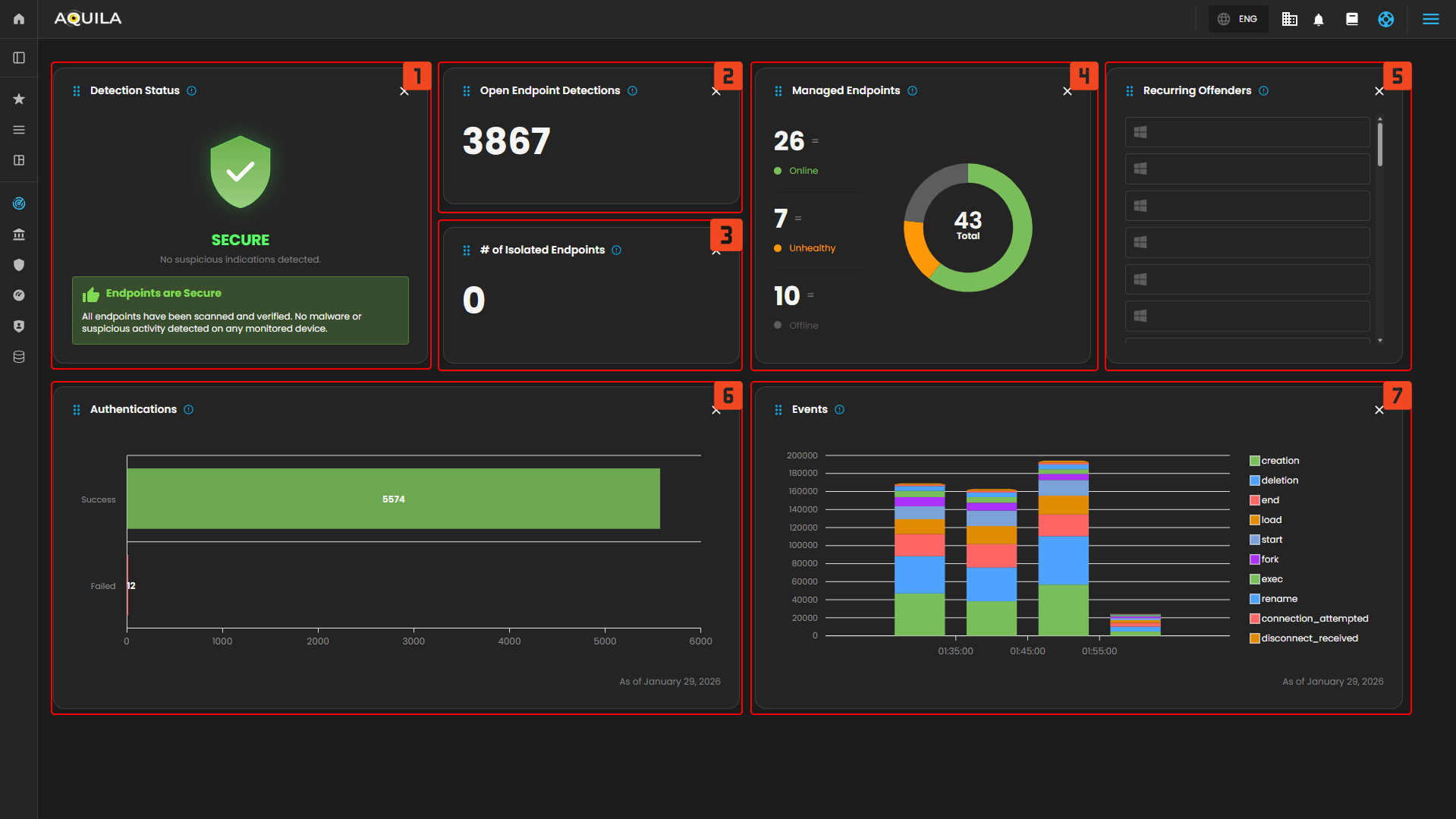
<p class="callout success">In the EDR Module Dashboard, you can monitor the security status of endpoints at a glance. This includes Detection Status, Endpoint Health, Authentication Attempts, Event Activity, and Recurring Offenders.</p>

[![HEHE (51).png](https://cytechint-docs-bookstack.s3.amazonaws.com/uploads/images/gallery/2026-01/scaled-1680-/oazahGNBXkspBwnx-hehe-51.png)](https://cytechint-docs-bookstack.s3.amazonaws.com/uploads/images/gallery/2026-01/oazahGNBXkspBwnx-hehe-51.png)

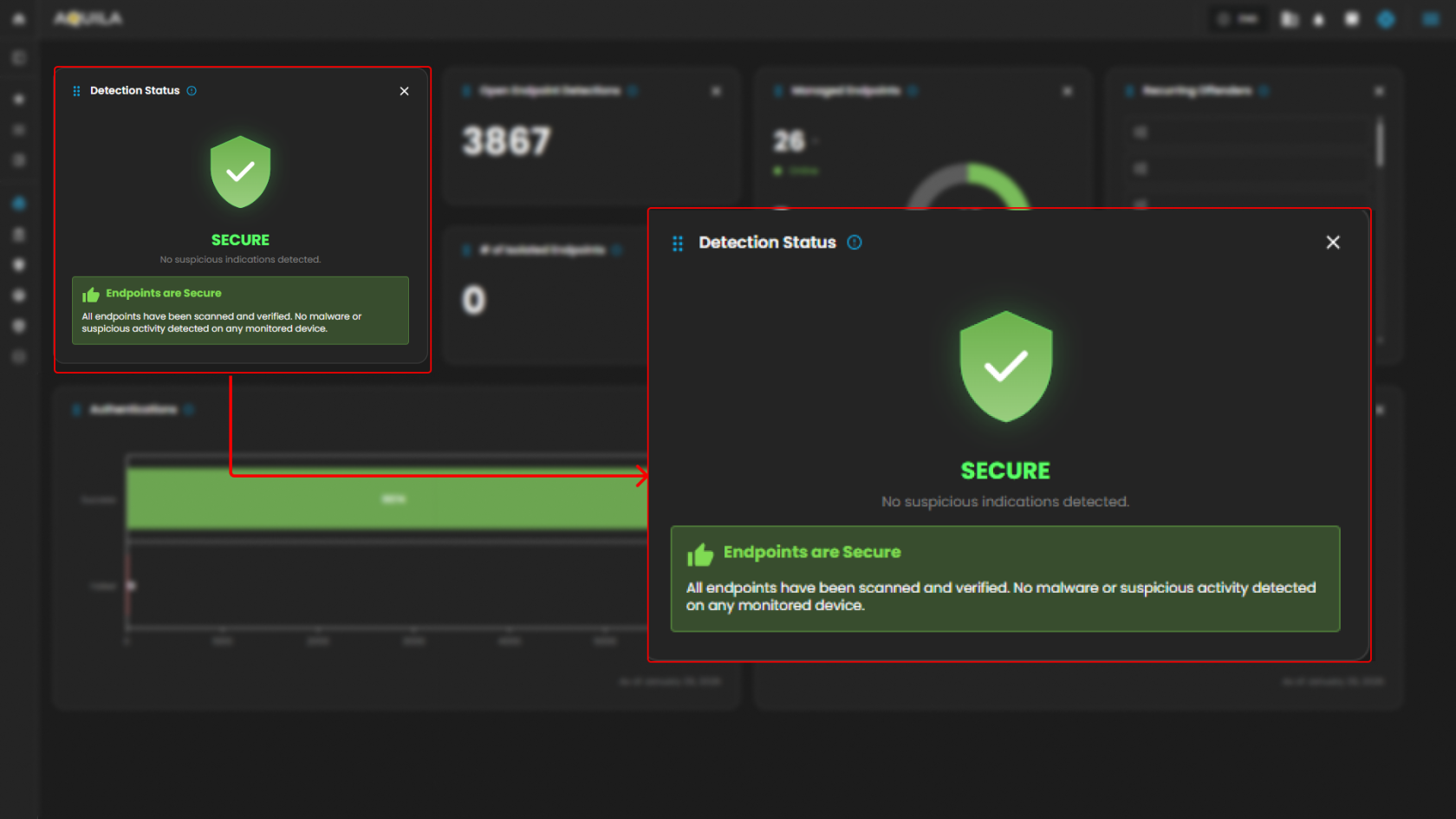
1. <span style="color: rgb(0, 0, 0);">**Detection Status:** </span>
    
    
    - <span style="color: rgb(0, 0, 0);">This widget shows the overall security status of the monitored endpoints. It indicates that there are no suspicious activities or malware detected. The green "SECURE" status confirms that the system is not facing any security issues at the moment.  
        </span>
        
        [![HEHE (52).png](https://cytechint-docs-bookstack.s3.amazonaws.com/uploads/images/gallery/2026-01/scaled-1680-/6NRz5IutG0QbZaBc-hehe-52.png)](https://cytechint-docs-bookstack.s3.amazonaws.com/uploads/images/gallery/2026-01/6NRz5IutG0QbZaBc-hehe-52.png)
        
        <span style="color: rgb(0, 0, 0);">  
        </span>
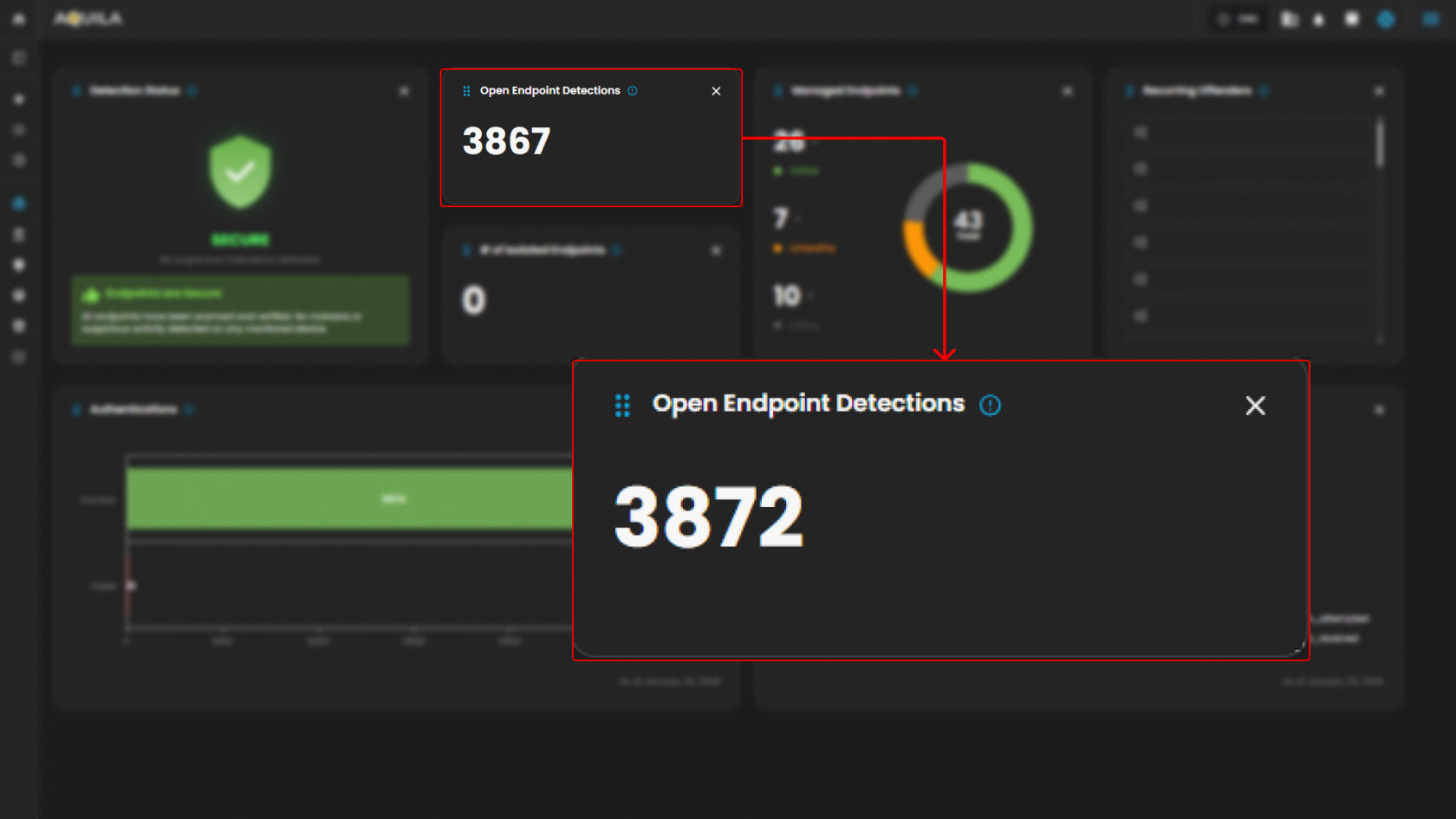
2. <span style="color: rgb(0, 0, 0);">**Open Endpoint Detections:**</span>
    
    
    - <span style="color: rgb(0, 0, 0);">Displays the number of currently active endpoint detections.   
        </span>
        
        [![HEHE (53).png](https://cytechint-docs-bookstack.s3.amazonaws.com/uploads/images/gallery/2026-01/scaled-1680-/ScOeAPJXTFcAdRFf-hehe-53.png)](https://cytechint-docs-bookstack.s3.amazonaws.com/uploads/images/gallery/2026-01/ScOeAPJXTFcAdRFf-hehe-53.png)
        
        <span style="color: rgb(0, 0, 0);">  
        </span>
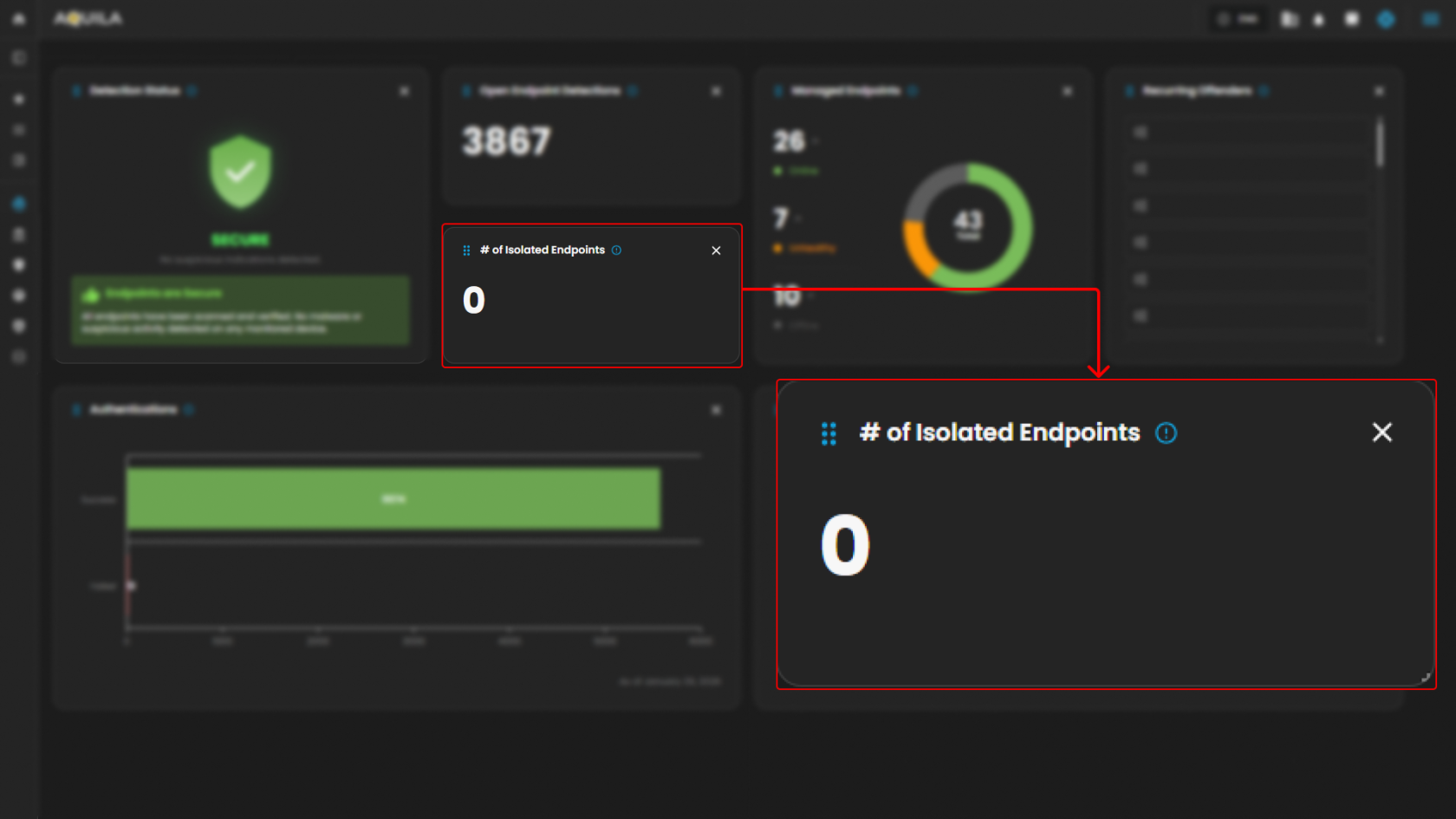
3. <span style="color: rgb(0, 0, 0);">**Number of Isolated Endpoints:**</span>
    
    
    - <span style="color: rgb(0, 0, 0);">Displays the number of endpoints that have been isolated due to detected threats or suspicious activities. The value is 0, indicating that no endpoints have been isolated.  
        </span>
        
        [![HEHE (54).png](https://cytechint-docs-bookstack.s3.amazonaws.com/uploads/images/gallery/2026-01/scaled-1680-/aTLfuoP8Jc1WifgK-hehe-54.png)](https://cytechint-docs-bookstack.s3.amazonaws.com/uploads/images/gallery/2026-01/aTLfuoP8Jc1WifgK-hehe-54.png)
        
        <span style="color: rgb(0, 0, 0);">  
          
        </span>
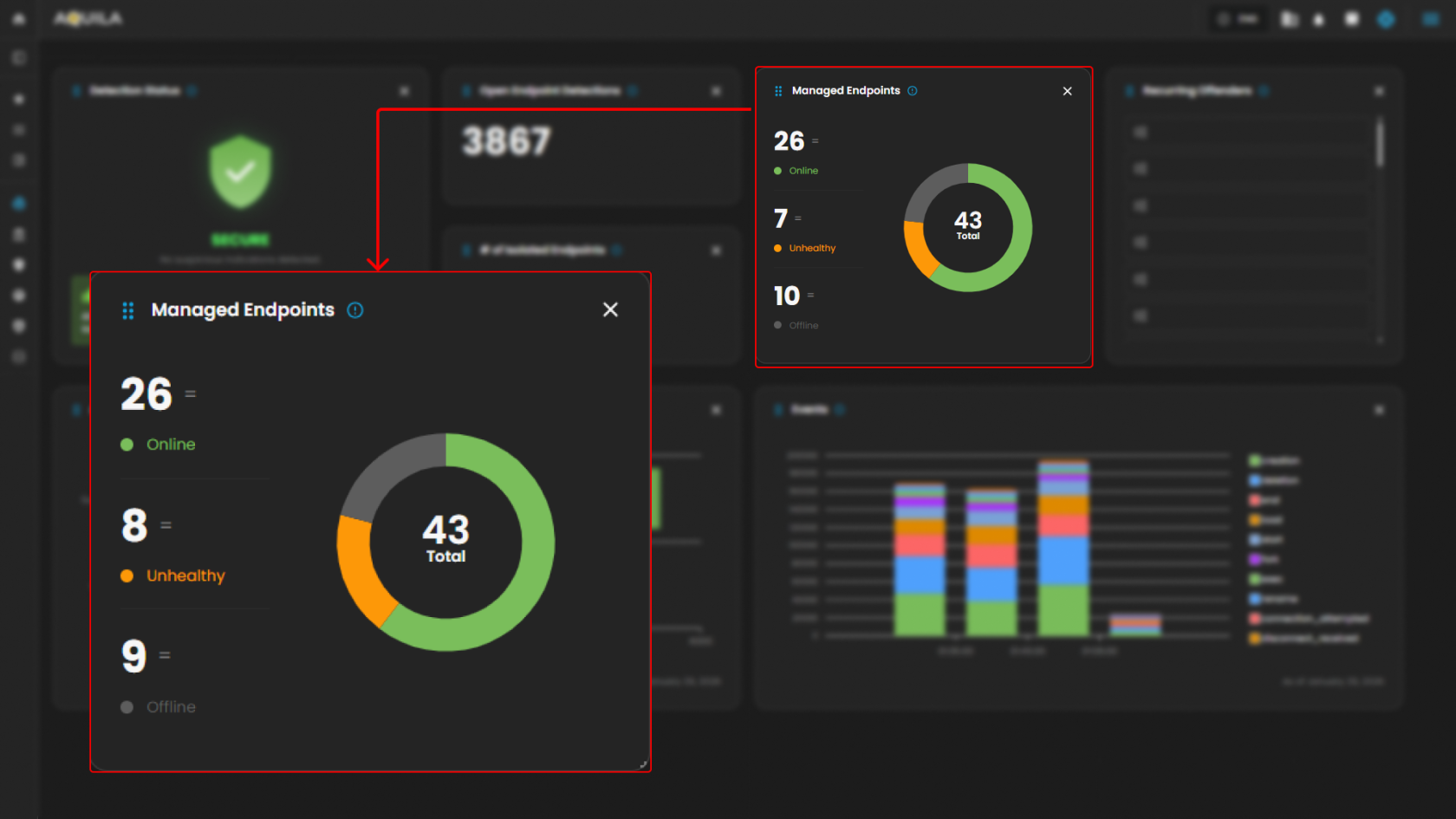
4. <span style="color: rgb(0, 0, 0);">**Managed Endpoints:**</span>
    
    
    - <span style="color: rgb(0, 0, 0);">Shows a breakdown of the endpoints under management. There is one endpoint marked as "Online" (green), and one is "Offline" (gray). The "Unhealthy" count is 0, which suggests no issues with endpoint health.  
        </span>
        
        [![HEHE (55).png](https://cytechint-docs-bookstack.s3.amazonaws.com/uploads/images/gallery/2026-01/scaled-1680-/KHMVz4UiZ5CNN75E-hehe-55.png)](https://cytechint-docs-bookstack.s3.amazonaws.com/uploads/images/gallery/2026-01/KHMVz4UiZ5CNN75E-hehe-55.png)
        
        <span style="color: rgb(0, 0, 0);">  
        </span>
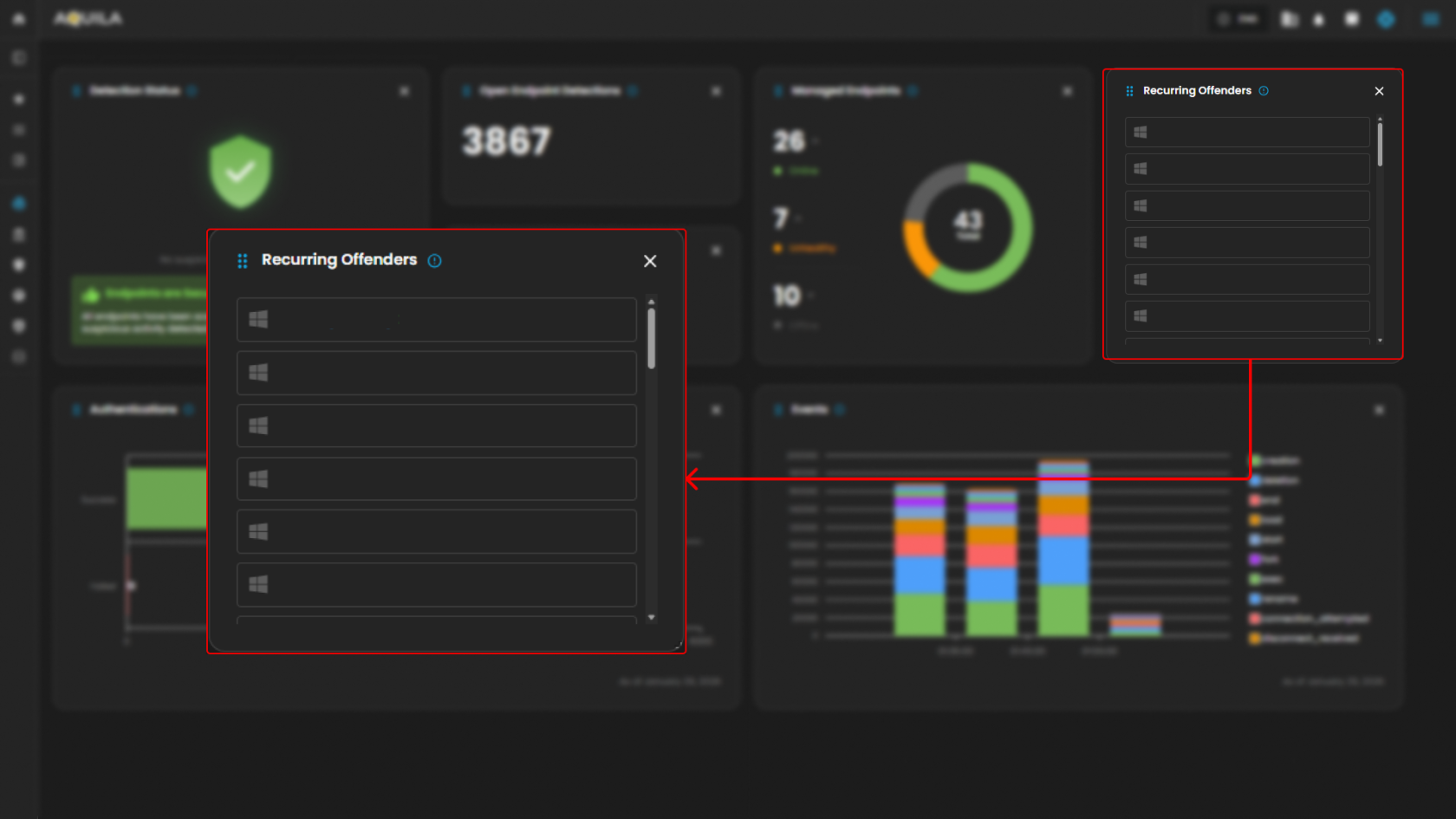
5. <span style="color: rgb(0, 0, 0);">**Recurring Offenders:**</span>
    
    
    - <span style="color: rgb(0, 0, 0);">This widget lists any repeated offenders or recurring threats detected across the endpoints. It shows "No Results Found," meaning there are no repeated malicious activities detected at the moment.  
        </span>
        
        [![HEHE (56).png](https://cytechint-docs-bookstack.s3.amazonaws.com/uploads/images/gallery/2026-01/scaled-1680-/I8YcQetTQmMScOB5-hehe-56.png)](https://cytechint-docs-bookstack.s3.amazonaws.com/uploads/images/gallery/2026-01/I8YcQetTQmMScOB5-hehe-56.png)
        
        <span style="color: rgb(0, 0, 0);">  
          
        </span>
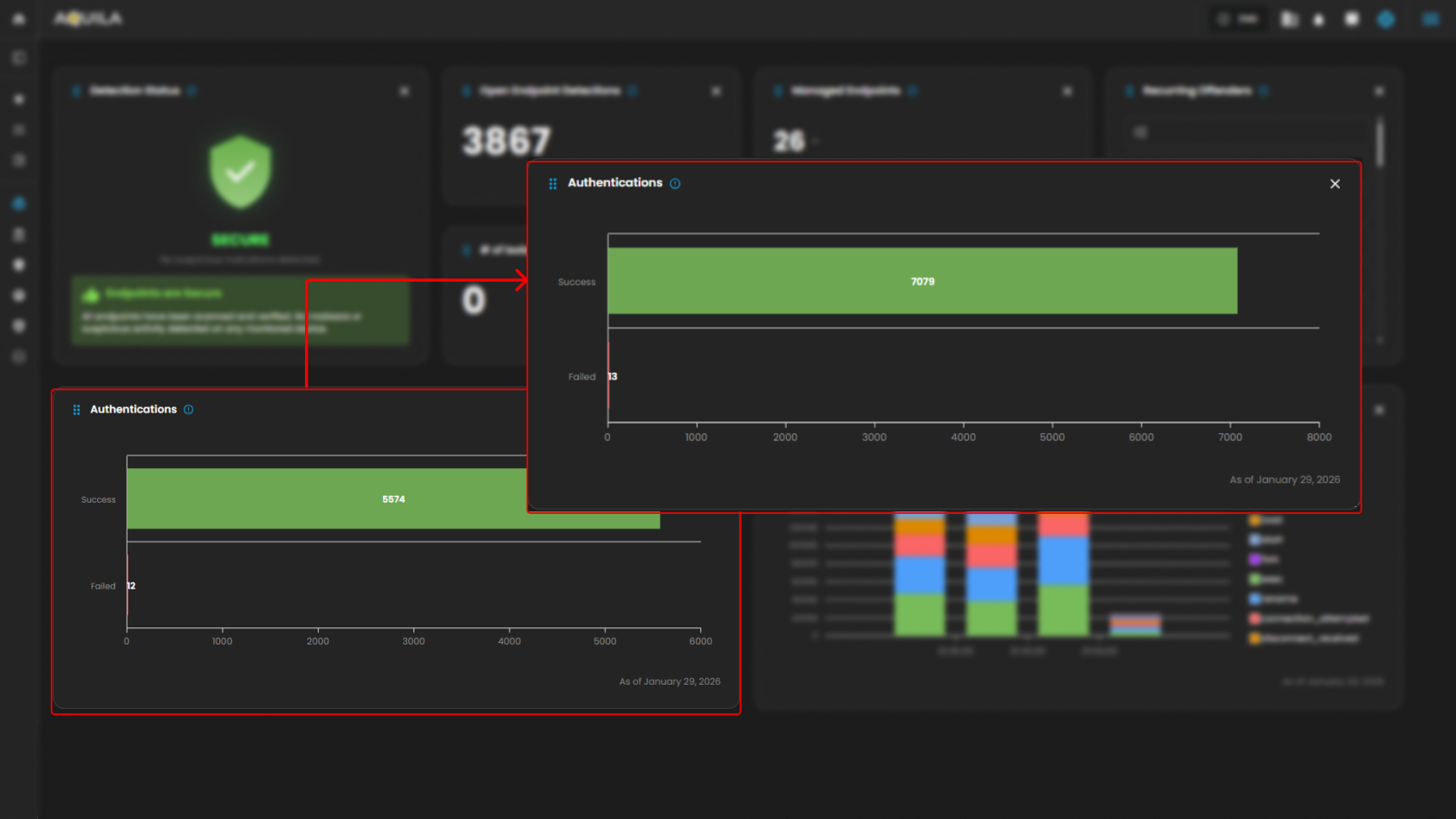
6. <span style="color: rgb(0, 0, 0);">**Authentication:**</span>
    
    
    - <span style="color: rgb(0, 0, 0);">Provides a graph showing the number of successful versus failed authentications. As of the latest data, there have been 397 successful authentications and 0 failed attempts, suggesting no authentication issues.  
        </span>
        
        [![HEHE (58).png](https://cytechint-docs-bookstack.s3.amazonaws.com/uploads/images/gallery/2026-01/scaled-1680-/lmykWRI02DIgYlpe-hehe-58.png)](https://cytechint-docs-bookstack.s3.amazonaws.com/uploads/images/gallery/2026-01/lmykWRI02DIgYlpe-hehe-58.png)
        
        <span style="color: rgb(0, 0, 0);">  
          
        </span>
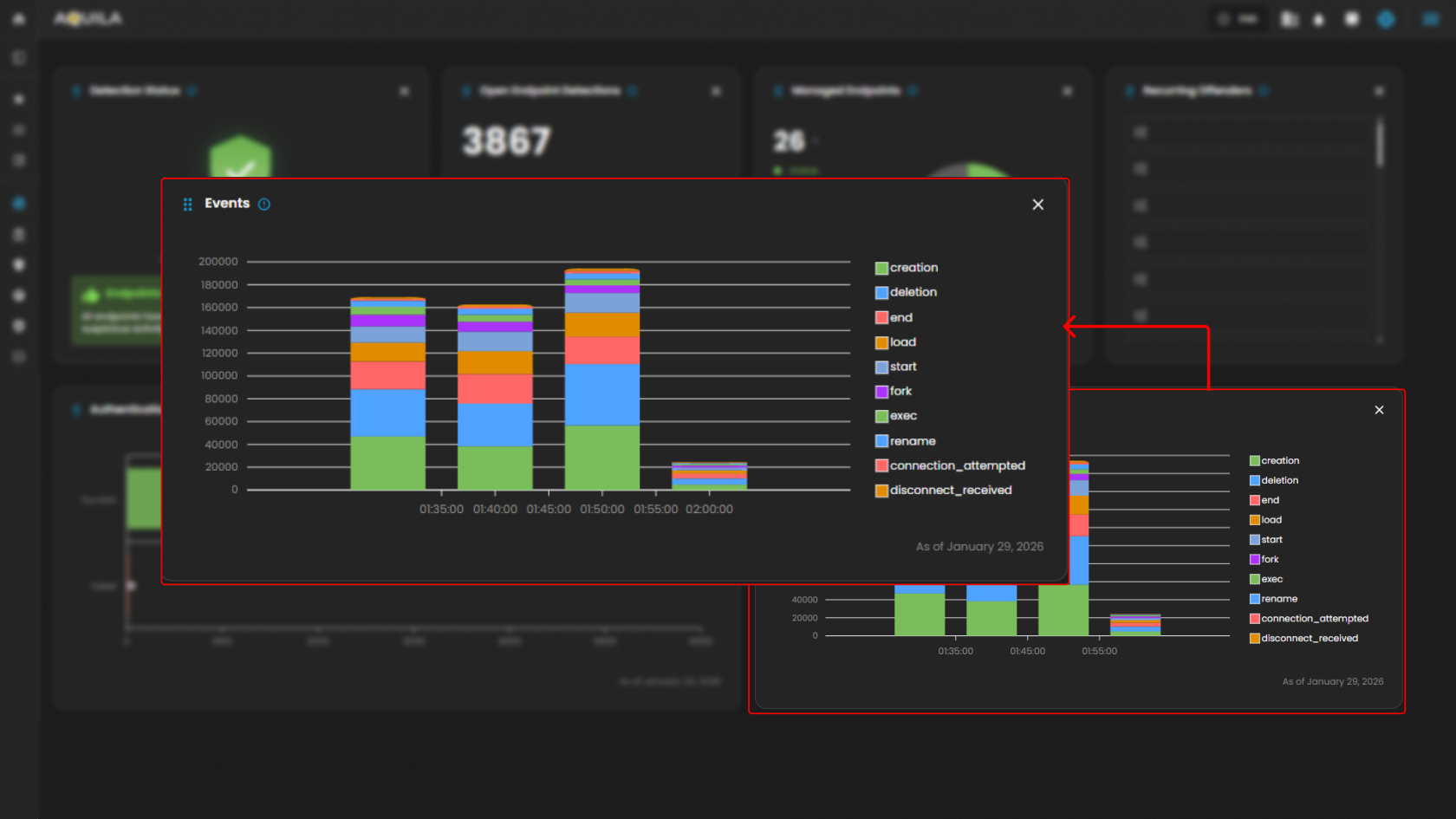
7. <span style="color: rgb(0, 0, 0);">**Events:**</span>
    
    
    - <span style="color: rgb(0, 0, 0);">Displays the graphical representation of various system events over time. The chart breaks down different types of events (e.g., "end", "fork", "exec", etc.) that occurred between 08:35 and 09:00. The graph shows how these events fluctuate over time, with certain actions peaking during specific periods.  
        </span>
        
        [![HEHE (59).png](https://cytechint-docs-bookstack.s3.amazonaws.com/uploads/images/gallery/2026-01/scaled-1680-/FqoB2wOO0FhCuv36-hehe-59.png)](https://cytechint-docs-bookstack.s3.amazonaws.com/uploads/images/gallery/2026-01/FqoB2wOO0FhCuv36-hehe-59.png)
        
        <span style="color: rgb(0, 0, 0);">  
        </span>


#### **<span style="color: rgb(53, 152, 219);">Detections</span>**

<p class="callout success">In the **Detections**, you can manage and analyze all detection and alert data. It includes an overview of open, closed, and acknowledged alerts, event activity trends, and detailed alerts with filtering capabilities.</p>

[![HEHE (61).png](https://cytechint-docs-bookstack.s3.amazonaws.com/uploads/images/gallery/2026-01/scaled-1680-/cqGoH4pGgNEptJZB-hehe-61.png)](https://cytechint-docs-bookstack.s3.amazonaws.com/uploads/images/gallery/2026-01/cqGoH4pGgNEptJZB-hehe-61.png)

1. <span style="color: rgb(0, 0, 0);">**Detections**</span>
    
    
    - <span style="color: rgb(0, 0, 0);">**Open Alerts** and **Acknowledged Alerts** give you a quick overview of the current alerts that are either unresolved or acknowledged by users. As of now, there are no open or acknowledged alerts.  
        </span>
        
        [![image.png](https://cytechint-docs-bookstack.s3.amazonaws.com/uploads/images/gallery/2026-01/scaled-1680-/2NsB40kBslT6XRRy-image.png)](https://cytechint-docs-bookstack.s3.amazonaws.com/uploads/images/gallery/2026-01/2NsB40kBslT6XRRy-image.png)
        
        <span style="color: rgb(0, 0, 0);">  
        </span>
2. <span style="color: rgb(0, 0, 0);">Alert Summary</span>
    - <span style="color: rgb(0, 0, 0);">The **Alerts Summary - 7 Days** section shows a historical overview of detections from the past week. At the moment, it shows no results, indicating no major alerts have been triggered recently.  
        </span>
        
        [![image.png](https://cytechint-docs-bookstack.s3.amazonaws.com/uploads/images/gallery/2026-01/scaled-1680-/QKelZ2j8RWWcDw0e-image.png)](https://cytechint-docs-bookstack.s3.amazonaws.com/uploads/images/gallery/2026-01/QKelZ2j8RWWcDw0e-image.png)
        
        <span style="color: rgb(0, 0, 0);">  
        </span>
3. <span style="color: rgb(0, 0, 0);">**Events Graph**</span>
    - <span style="color: rgb(0, 0, 0);">The **Events graph** visualizes system activity, with each color representing different types of events like “end,” “fork,” “exec,” and “creation.” This graph provides insights into endpoint activity over time, showing fluctuations between 09:00 and 09:45 AM. For example, we can see spikes in events at certain times, allowing you to quickly identify periods of increased activity.  
        </span>
        
        [![image.png](https://cytechint-docs-bookstack.s3.amazonaws.com/uploads/images/gallery/2026-01/scaled-1680-/7KoMlWHETUm7PnKo-image.png)](https://cytechint-docs-bookstack.s3.amazonaws.com/uploads/images/gallery/2026-01/7KoMlWHETUm7PnKo-image.png)
        
        <span style="color: rgb(0, 0, 0);">  
        </span>
4. <span style="color: rgb(0, 0, 0);">**Alerts Tab**</span>
    - <span style="color: rgb(0, 0, 0);">The **Alerts** section allows you to search for specific alerts using the search bar. This feature helps you quickly locate an alert by its ID, user, or rule name.  
        </span>
        
        [![Hello (1).png](https://cytechint-docs-bookstack.s3.amazonaws.com/uploads/images/gallery/2026-01/scaled-1680-/BVR8yYp9BgcItLxQ-hello-1.png)](https://cytechint-docs-bookstack.s3.amazonaws.com/uploads/images/gallery/2026-01/BVR8yYp9BgcItLxQ-hello-1.png)
        
          
        <span style="color: rgb(0, 0, 0);">  
        </span>
5. <span style="color: rgb(0, 0, 0);">**Events Tab**</span>
    - <span style="color: rgb(0, 0, 0);">The **Events tab** contains detailed logs of endpoint process events, including the user, event action, hostname, source and destination IPs, and timestamps. This tab enables you to investigate and track specific activities and behaviors occurring on endpoints.  
        </span>
        
        [![Hello.png](https://cytechint-docs-bookstack.s3.amazonaws.com/uploads/images/gallery/2026-01/scaled-1680-/cwzwpgEUDdAifjnW-hello.png)](https://cytechint-docs-bookstack.s3.amazonaws.com/uploads/images/gallery/2026-01/cwzwpgEUDdAifjnW-hello.png)
        
          
        <span style="color: rgb(0, 0, 0);">  
        </span>
6. <span style="color: rgb(0, 0, 0);">**Activity Filter**</span>
    - <span style="color: rgb(0, 0, 0);">The **Active Filters** allow you to filter the alerts by status (e.g., open, acknowledged, or closed) and endpoint. You can clear any applied filters with the “Clear Filters” button.  
        </span>[![image.png](https://cytechint-docs-bookstack.s3.amazonaws.com/uploads/images/gallery/2026-01/scaled-1680-/9b3PV7AQ66ZrlDt0-image.png)](https://cytechint-docs-bookstack.s3.amazonaws.com/uploads/images/gallery/2026-01/9b3PV7AQ66ZrlDt0-image.png)


#### <span style="color: rgb(53, 152, 219);">**Endpoints** </span>

<p class="callout success">In the **Endpoints Page**, you can view a general summary of organization’s endpoint security status. This includes metrics such as secured, infected, and isolated endpoints. As of now, there are no infected or isolated endpoints in the system.</p>

[![HEHE (63).png](https://cytechint-docs-bookstack.s3.amazonaws.com/uploads/images/gallery/2026-01/scaled-1680-/79U8G21huUhDDjUl-hehe-63.png)](https://cytechint-docs-bookstack.s3.amazonaws.com/uploads/images/gallery/2026-01/79U8G21huUhDDjUl-hehe-63.png)

1. <span style="color: rgb(0, 0, 0);">**Endpoint Security State**</span>
    - <span style="color: rgb(0, 0, 0);">This section provides a summary of the security state of endpoints. It displays the count of endpoints that are secured, infected, and isolated. At the moment, there are 2 secured endpoints, with no infected or isolated endpoints.  
        </span>[![image.png](https://cytechint-docs-bookstack.s3.amazonaws.com/uploads/images/gallery/2026-01/scaled-1680-/kQttd5LUbg8f8koT-image.png)](https://cytechint-docs-bookstack.s3.amazonaws.com/uploads/images/gallery/2026-01/kQttd5LUbg8f8koT-image.png)
        
        <span style="color: rgb(0, 0, 0);">  
        </span>
2. <span style="color: rgb(0, 0, 0);">**Endpoint Health Overview**</span>
    - <span style="color: rgb(0, 0, 0);">The **Endpoint Health** section gives a snapshot of the health status of organization’s endpoints. It shows whether an endpoint is healthy, unhealthy, or offline. Currently, 2 endpoints are listed, with 1 healthy and 1 offline.  
        </span>[![image.png](https://cytechint-docs-bookstack.s3.amazonaws.com/uploads/images/gallery/2026-01/scaled-1680-/PzndyJ0iXxQQPlUw-image.png)](https://cytechint-docs-bookstack.s3.amazonaws.com/uploads/images/gallery/2026-01/PzndyJ0iXxQQPlUw-image.png)
        
        <span style="color: rgb(0, 0, 0);">  
        </span>
3. <span style="color: rgb(0, 0, 0);">**Endpoint OS Type Distribution**</span>
    - <span style="color: rgb(0, 0, 0);">This section breaks down the operating system types of the endpoints across the network. It helps identify the diversity of operating systems in organization. For instance, 1 endpoint is running Windows, and another is using Linux.  
        </span>[![image.png](https://cytechint-docs-bookstack.s3.amazonaws.com/uploads/images/gallery/2026-01/scaled-1680-/yEzNtfl2VRjzgg1T-image.png)](https://cytechint-docs-bookstack.s3.amazonaws.com/uploads/images/gallery/2026-01/yEzNtfl2VRjzgg1T-image.png)
        
        <span style="color: rgb(0, 0, 0);">  
        </span>
4. <span style="color: rgb(0, 0, 0);">**Endpoint List**</span>
    - <span style="color: rgb(0, 0, 0);">The **Endpoint List** section shows detailed information about each endpoint within a network. This includes the endpoint name, security status, IP address, MAC address, version, health status, and when it was last seen. At the moment, there are no alerts for compromised or unhealthy endpoints.  
        </span>[![Hello (3).png](https://cytechint-docs-bookstack.s3.amazonaws.com/uploads/images/gallery/2026-01/scaled-1680-/SWz1iYBnAyuR7U7j-hello-3.png)](https://cytechint-docs-bookstack.s3.amazonaws.com/uploads/images/gallery/2026-01/SWz1iYBnAyuR7U7j-hello-3.png)  
          
        The client can also access further information if they press the eye icon, which is located at the right side of a specific endpoint on the list.
        
        [![HEHE (65).png](https://cytechint-docs-bookstack.s3.amazonaws.com/uploads/images/gallery/2026-01/scaled-1680-/tbh21MbApKyQaQEV-hehe-65.png)](https://cytechint-docs-bookstack.s3.amazonaws.com/uploads/images/gallery/2026-01/tbh21MbApKyQaQEV-hehe-65.png)  
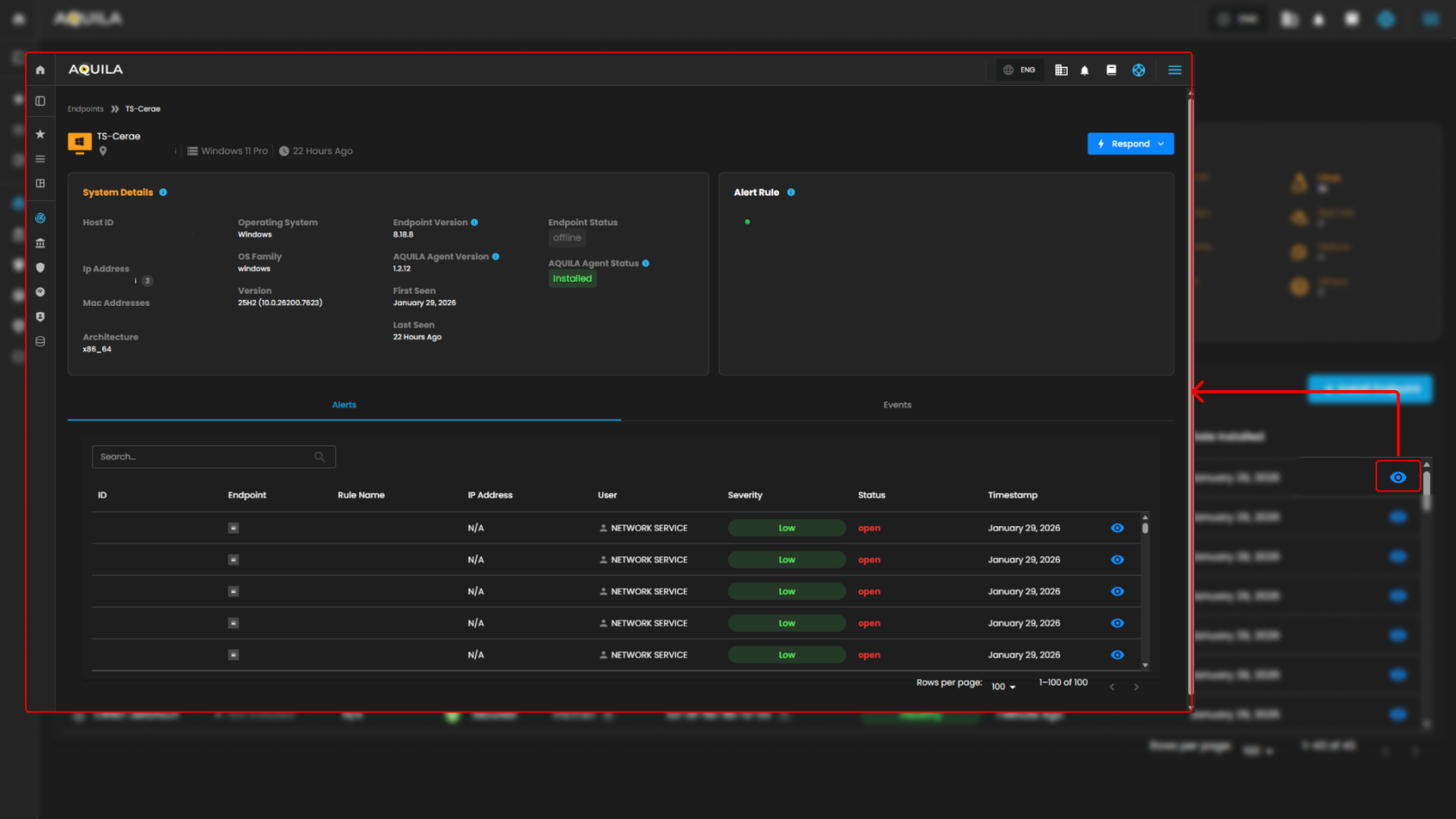
          
        The client can select **Respond** button to **isolate the host** or **initiate a command prompt**. In this section when pressing the **Isolate Host**, a window will pop up asking for a Reason for Isolation.
        
        [![HEHE (68).png](https://cytechint-docs-bookstack.s3.amazonaws.com/uploads/images/gallery/2026-01/scaled-1680-/GSC7aYhhqJ43rv9O-hehe-68.png)](https://cytechint-docs-bookstack.s3.amazonaws.com/uploads/images/gallery/2026-01/GSC7aYhhqJ43rv9O-hehe-68.png)
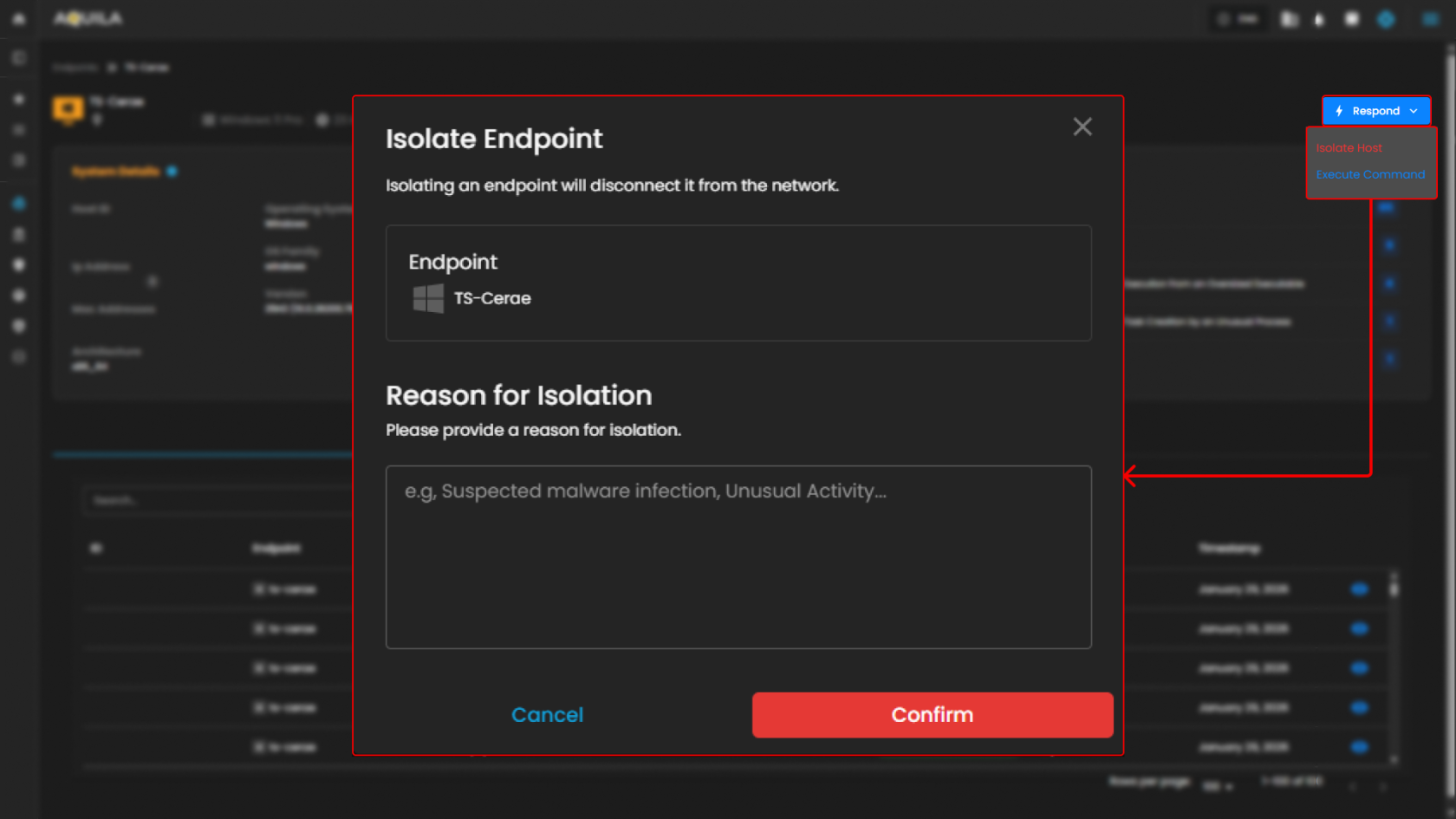
        
          
        In this section, the Administrator can execute a command. The main commands are Kill Process, Suspend Process, Running Process, Get File, Upload File, Scan.
        
        [![HEHE (67).png](https://cytechint-docs-bookstack.s3.amazonaws.com/uploads/images/gallery/2026-01/scaled-1680-/RBOjQzQopgJqaYmn-hehe-67.png)](https://cytechint-docs-bookstack.s3.amazonaws.com/uploads/images/gallery/2026-01/RBOjQzQopgJqaYmn-hehe-67.png)  
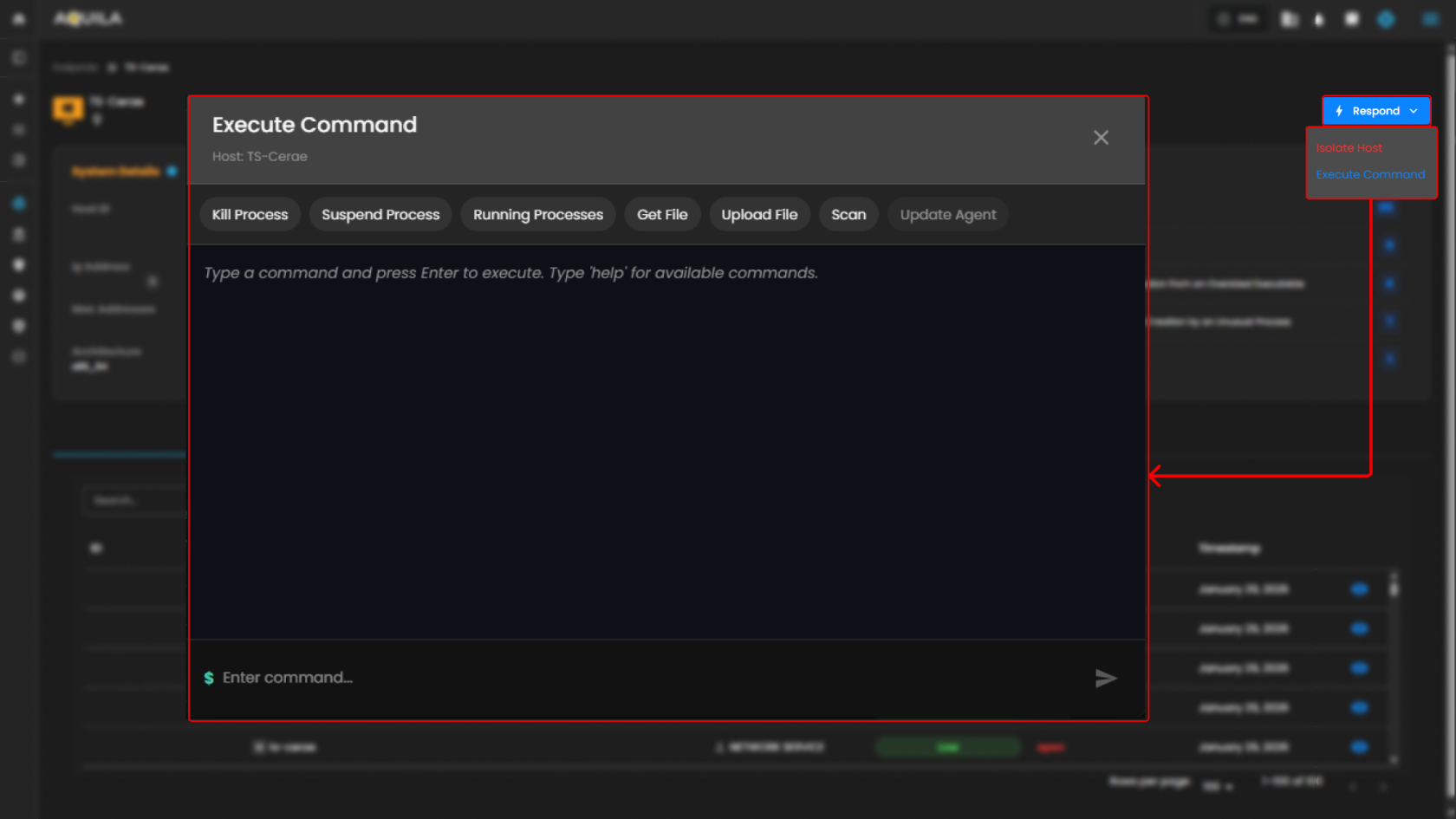
          
        **To learn more about Execute Commands, Please Refer to this Link: [AQUILA EDR - Execute C... | AQUILA Documentations](https://usdc-docs.cytechint.io/books/aquila-edr-installation/page/aquila-edr-execute-command-and-response-actions)**
5. <span style="color: rgb(0, 0, 0);">**Search Bar**</span>
    - <span style="color: rgb(0, 0, 0);">The **Search Bar** provides an easy way to quickly search for a specific endpoint by its name, IP address, security status, or health. This helps streamline navigation, especially when dealing with a large number of endpoints.  
        </span>[![image.png](https://cytechint-docs-bookstack.s3.amazonaws.com/uploads/images/gallery/2026-01/scaled-1680-/A0XKBs1eSewufcLh-image.png)](https://cytechint-docs-bookstack.s3.amazonaws.com/uploads/images/gallery/2026-01/A0XKBs1eSewufcLh-image.png)
        
        <span style="color: rgb(0, 0, 0);">  
          
        </span>
6. <span style="color: rgb(0, 0, 0);">**Install Endpoint**</span>
    - <span style="color: rgb(0, 0, 0);">To add new endpoints to the system, click the **Install Endpoint** button. This will start the process of onboarding new devices into a network, allowing them to be tracked and secured like the existing endpoints.  
        </span>[![HEHE (64).png](https://cytechint-docs-bookstack.s3.amazonaws.com/uploads/images/gallery/2026-01/scaled-1680-/EuzmxKPD01vg0BxP-hehe-64.png)](https://cytechint-docs-bookstack.s3.amazonaws.com/uploads/images/gallery/2026-01/EuzmxKPD01vg0BxP-hehe-64.png)


#### <span style="color: rgb(53, 152, 219);">**Control Panel**</span>

<span style="color: rgb(0, 0, 0);">In the **Control Panel**, you can manage various security settings and configurations for your organization’s endpoints. This section gives you access to several tools for managing **Policies, Manage Endpoints, Trusted Applications, Event Filters, Host Isolation Exception** and **Blocklist**. The control panel helps streamline the process of securing and monitoring endpoints, providing easy access to the most critical settings.  
</span>


##### <span style="color: rgb(53, 152, 219);">**Policy Settings**</span>

<p class="callout success">In the **Policy Settings Page**, you can view and manage organization’s security policies. This includes configuring protection levels for various types of threats, such as malware, ransomware, memory threats, and malicious behavior. Currently, all protection policies are enabled with options to either detect or prevent these security risks across supported operating systems (Windows, Mac, Linux).</p>

[![HEHE (69).png](https://cytechint-docs-bookstack.s3.amazonaws.com/uploads/images/gallery/2026-01/scaled-1680-/tGAWSr1MFGI6RKQf-hehe-69.png)](https://cytechint-docs-bookstack.s3.amazonaws.com/uploads/images/gallery/2026-01/tGAWSr1MFGI6RKQf-hehe-69.png)

[![image.png](https://cytechint-docs-bookstack.s3.amazonaws.com/uploads/images/gallery/2026-01/scaled-1680-/ls7Ohuq7wO6m5oVA-image.png)](https://cytechint-docs-bookstack.s3.amazonaws.com/uploads/images/gallery/2026-01/ls7Ohuq7wO6m5oVA-image.png)
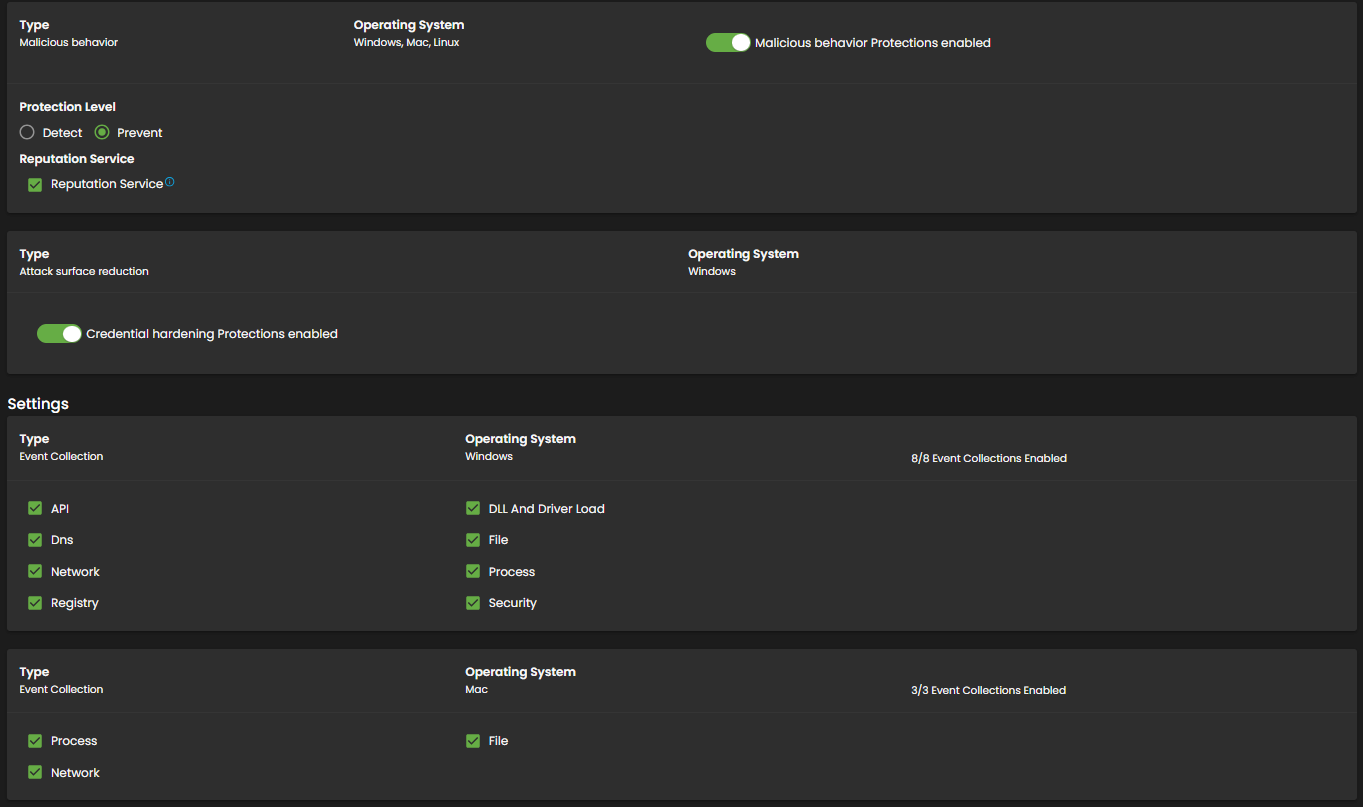
[![image.png](https://cytechint-docs-bookstack.s3.amazonaws.com/uploads/images/gallery/2026-01/scaled-1680-/RYK4glZBVov7nWmV-image.png)](https://cytechint-docs-bookstack.s3.amazonaws.com/uploads/images/gallery/2026-01/RYK4glZBVov7nWmV-image.png)
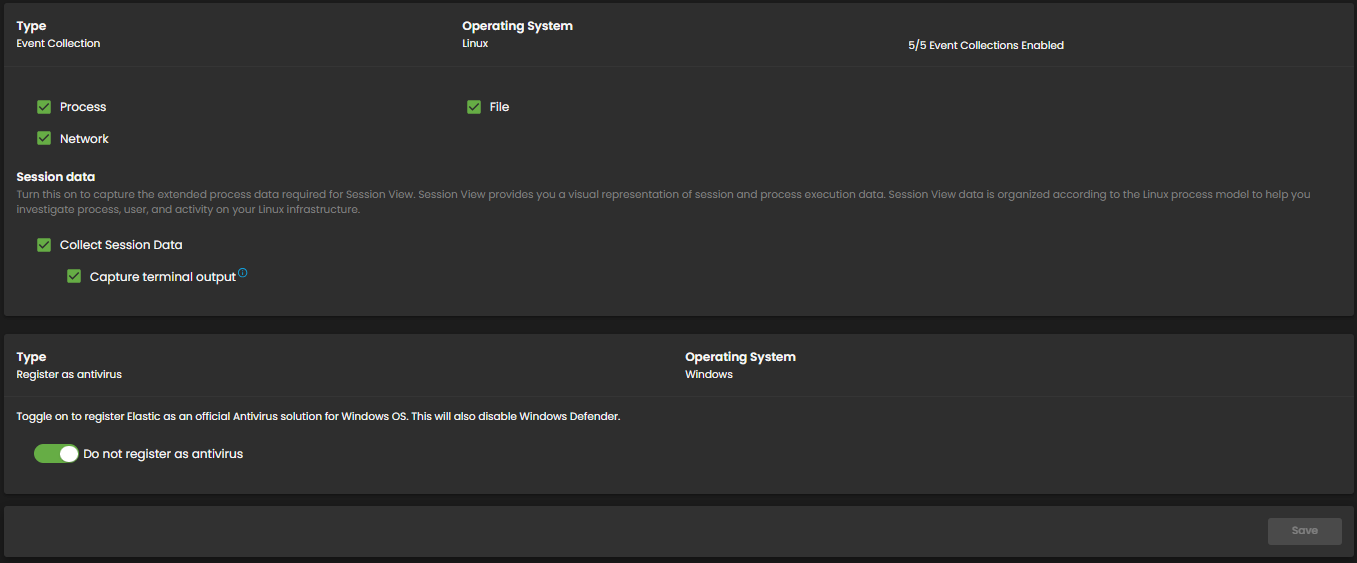
1. <span style="color: rgb(0, 0, 0);">**Policy Settings Overview**</span>
    - <span style="color: rgb(0, 0, 0);">In the **Policy Settings** section, you can manage and view all the security policies set for your organization's endpoints. This section allows you to control and configure various protection levels for different types of security threats. Policies can be applied to endpoints based on their operating system (Windows, Mac, Linux), and enabling these policies can trigger alerts for the respective security events.  
          
        </span>
2. <span style="color: rgb(0, 0, 0);">**Policy Settings Panel**</span>
    - <span style="color: rgb(0, 0, 0);">The **Policy Settings Panel** displays the different types of protection policies in place for your endpoints. Each policy corresponds to a specific security threat, such as malware, ransomware, memory threats, or malicious behavior. You can configure the protection level for each policy by toggling between **Detect** and **Prevent** options. Additionally, a blocklist feature can be enabled or disabled to provide further protection against unwanted software or threats.</span>

- - - <span style="color: rgb(0, 0, 0);">**Malware Protection**: Enabled with options to Detect or Prevent.</span>
        - <span style="color: rgb(0, 0, 0);">**Ransomware Protection**: Enabled for Windows endpoints with Detect or Prevent options.</span>
        - <span style="color: rgb(0, 0, 0);">**Memory Threat Protection**: Enabled for all operating systems (Windows, Mac, Linux) with Detect or Prevent options.</span>
        - <span style="color: rgb(0, 0, 0);">**Malicious Behavior Protection**: Enabled for all operating systems (Windows, Mac, Linux) with the same detection or prevention options.</span>
- <span style="color: rgb(0, 0, 0);">Each policy has a toggle switch to enable or disable protection for the corresponding threat, and these settings can be easily modified according to your needs.</span>


##### <span style="color: rgb(53, 152, 219);">**Manage Endpoints**</span>

<p class="callout success">In the **Manage Endpoints Page**, you can easily isolate, delete, or add new endpoints to your system. This section provides a quick overview of all your endpoints, including details like the endpoint name, last seen time, operating system, and status. Currently, all protection policies are enabled with options to either detect or prevent security risks across the endpoints in your system.</p>

[![HEHE (70).png](https://cytechint-docs-bookstack.s3.amazonaws.com/uploads/images/gallery/2026-01/scaled-1680-/umUHppm7GqHIwog0-hehe-70.png)](https://cytechint-docs-bookstack.s3.amazonaws.com/uploads/images/gallery/2026-01/umUHppm7GqHIwog0-hehe-70.png)

- <span style="color: rgb(0, 0, 0);">**Manage Endpoints Overview**</span>

- - <span style="color: rgb(0, 0, 0);">In the **Manage Endpoints Page**, you can easily isolate, delete, or add new endpoints to your system. This section provides a quick overview of all your endpoints, including details like the endpoint name, last seen time, operating system, and status.  
          
        </span>
- <span style="color: rgb(0, 0, 0);">**Endpoint List and Actions**</span>
    - <span style="color: rgb(0, 0, 0);">This section displays a list of all endpoints currently in your network. Each endpoint entry shows the following details:</span>
        - <span style="color: rgb(0, 0, 0);">**Endpoint Name**: Identifies the device in the system.</span>
        - <span style="color: rgb(0, 0, 0);">**Last Seen**: Indicates when the endpoint was last connected to the network.</span>
        - <span style="color: rgb(0, 0, 0);">**Operating System**: Displays the OS of the endpoint (e.g., Linux, Windows).</span>
        - <span style="color: rgb(0, 0, 0);">**Status**: Shows whether the endpoint is currently online or offline.</span>
        - <span style="color: rgb(0, 0, 0);">Each endpoint can be acted upon with available options, such as isolating the host (for security reasons) or uninstalling it from the system. Currently, all endpoints listed are marked as offline.</span>

- <span style="color: rgb(0, 0, 0);">**Search Endpoint**</span>
    - <span style="color: rgb(0, 0, 0);">The **Search Endpoint** bar at the top allows you to quickly locate specific endpoints in your system by searching for their names or other attributes. </span>[![image.png](https://cytechint-docs-bookstack.s3.amazonaws.com/uploads/images/gallery/2026-01/scaled-1680-/xXBHtNFkKk2aaQCO-image.png)](https://cytechint-docs-bookstack.s3.amazonaws.com/uploads/images/gallery/2026-01/xXBHtNFkKk2aaQCO-image.png)
        
        <span style="color: rgb(0, 0, 0);">  
          
        </span>
- <span style="color: rgb(0, 0, 0);">**Install Endpoint**</span>
    - <span style="color: rgb(0, 0, 0);">To add new endpoints to your network, click the **Install Endpoint** button. This will allow you to initiate the process of registering new devices to be tracked and managed within your system.  
        </span>[![HEHE (71).png](https://cytechint-docs-bookstack.s3.amazonaws.com/uploads/images/gallery/2026-01/scaled-1680-/XLHwJ8GL1ho8Urs2-hehe-71.png)](https://cytechint-docs-bookstack.s3.amazonaws.com/uploads/images/gallery/2026-01/XLHwJ8GL1ho8Urs2-hehe-71.png)

<p class="callout info">To update an Endpoint, please refer to this document: [CyTech AQUILA - Cyber ... | AQUILA Documentations](https://usdc-docs.cytechint.io/books/security-automation-soc-optimization-tOO/page/cytech-aquila-agent-mass-update-function) Thank you.</p>


##### <span style="color: rgb(53, 152, 219);">**Trusted Application Page**</span>

<p class="callout success">**In the Trusted Application Page**, you can see an overview of your organization's trusted applications. This section includes the names of the applications, their descriptions, and the last updated time. Currently, there are several trusted applications listed, such as "AQUILA Agent Exception" and "test app2."</p>

- <span style="color: rgb(0, 0, 0);">**The Trusted Application Overview**</span>
    - <span style="color: rgb(0, 0, 0);">This provides a list of the currently trusted applications along with their descriptions and the most recent updates. These applications are categorized by the name of the application and a brief description of their purpose.</span>

[![HEHE (72).png](https://cytechint-docs-bookstack.s3.amazonaws.com/uploads/images/gallery/2026-01/scaled-1680-/1uaJauHbx0tzgWvL-hehe-72.png)](https://cytechint-docs-bookstack.s3.amazonaws.com/uploads/images/gallery/2026-01/1uaJauHbx0tzgWvL-hehe-72.png)

- <span style="color: rgb(0, 0, 0);">**The Application Details Table** </span>
    - <span style="color: rgb(0, 0, 0);">It displays additional details, including the application name, description, and the timestamp of the last update. This table helps you track which applications are trusted and their associated descriptions. You can also update or remove any trusted application from this section.  
          
        </span>[![HEHE (74).png](https://cytechint-docs-bookstack.s3.amazonaws.com/uploads/images/gallery/2026-01/scaled-1680-/7liwdHOAaHIobh5x-hehe-74.png)](https://cytechint-docs-bookstack.s3.amazonaws.com/uploads/images/gallery/2026-01/7liwdHOAaHIobh5x-hehe-74.png)
        
        <span style="color: rgb(0, 0, 0);">  
          
        </span>
- <span style="color: rgb(0, 0, 0);">**Add Trusted Application**</span>
    - <span style="color: rgb(0, 0, 0);">This popup allows users to input the **Name** and **Description** of the trusted application. Additionally, it includes a **Conditions** section where you can select an operating system and specify conditions using fields, operators, and values. At the bottom, there are two buttons: **Add Trusted Application** to confirm the addition and **Cancel** to discard the action.  
          
        </span>[![HEHE (73).png](https://cytechint-docs-bookstack.s3.amazonaws.com/uploads/images/gallery/2026-01/scaled-1680-/mZsmLLWFOJtCf76l-hehe-73.png)](https://cytechint-docs-bookstack.s3.amazonaws.com/uploads/images/gallery/2026-01/mZsmLLWFOJtCf76l-hehe-73.png)


##### <span style="color: rgb(53, 152, 219);">**Event Filters Page**</span>

<p class="callout success">**In the Event Filters Page**, you can assign or manage event filters that define which events should be tracked for your endpoints. Currently, there are no event filters assigned to any of the endpoints, as the section shows the message "No Assigned Event Filters."</p>

[![HEHE (75).png](https://cytechint-docs-bookstack.s3.amazonaws.com/uploads/images/gallery/2026-01/scaled-1680-/Dz1zNZWT57JrYfbu-hehe-75.png)](https://cytechint-docs-bookstack.s3.amazonaws.com/uploads/images/gallery/2026-01/Dz1zNZWT57JrYfbu-hehe-75.png)

<span style="color: rgb(0, 0, 0);">**Event Filters**</span>

- - <span style="color: rgb(0, 0, 0);">**The Assign Events Filters Option** allows you to easily configure and apply filters to events, helping you focus on specific types of activities or behaviors across your endpoints. This will enable you to narrow down the event logs to show only relevant information.</span>

<span style="color: rgb(0, 0, 0);">**The Empty Event Filter Status**</span>

- - <span style="color: rgb(0, 0, 0);">It shows that no filters have been assigned yet, but it provides a clear call-to-action to add event filters.</span>

<span style="color: rgb(0, 0, 0);">**Assign Event Filters**</span>

- - <span style="color: rgb(0, 0, 0);">This section allows users to configure filters that exclude high volume or unwanted events from being written to the EDR (Endpoint Detection and Response) system. It includes fields for the **Name** and **Description** of the event filter, both of which can be filled out with relevant details. Below that, the **Conditions** section lets you select an operating system and apply specific conditions using **Field**, **Operator**, and **Value** to filter events based on certain criteria.  
        </span>[![HEHE (76).png](https://cytechint-docs-bookstack.s3.amazonaws.com/uploads/images/gallery/2026-01/scaled-1680-/YOwJd6qb6mgnOJVO-hehe-76.png)](https://cytechint-docs-bookstack.s3.amazonaws.com/uploads/images/gallery/2026-01/YOwJd6qb6mgnOJVO-hehe-76.png)


##### <span style="color: rgb(53, 152, 219);">**Host Isolation Exception Page**</span>

<p class="callout success">**In the Host Isolation Exception Page**, you can see the list of exceptions that allow isolated endpoints to connect to specific IP addresses. This section displays the names of the exceptions, their descriptions, and the most recent update times.</p>

- <span style="color: rgb(0, 0, 0);">**The Host Isolation Exception Overview**</span>
    - <span style="color: rgb(0, 0, 0);">This gives you the ability to manage exceptions made to the host isolation policy. Here, you can track any exceptions, that have been made to allow endpoints to access certain IPs.</span>

[![HEHE (77).png](https://cytechint-docs-bookstack.s3.amazonaws.com/uploads/images/gallery/2026-01/scaled-1680-/ksyMCZ5PbAjgVUd4-hehe-77.png)](https://cytechint-docs-bookstack.s3.amazonaws.com/uploads/images/gallery/2026-01/ksyMCZ5PbAjgVUd4-hehe-77.png)

- <span style="color: rgb(0, 0, 0);">**The Exception Details Table**</span>
    - <span style="color: rgb(0, 0, 0);">It lists the exception names, descriptions, and the timestamp of when they were last updated. You can use this table to manage and modify these exceptions, ensuring proper access while maintaining security policies.  
        </span>[![HEHE (78).png](https://cytechint-docs-bookstack.s3.amazonaws.com/uploads/images/gallery/2026-01/scaled-1680-/nCnZR8LO3Jyl1jkm-hehe-78.png)](https://cytechint-docs-bookstack.s3.amazonaws.com/uploads/images/gallery/2026-01/nCnZR8LO3Jyl1jkm-hehe-78.png)
        
        <span style="color: rgb(0, 0, 0);">  
          
        </span>
- <span style="color: rgb(0, 0, 0);">**Add Host Isolation Exception.**</span>
    - <span style="color: rgb(0, 0, 0);">This popup allows users to create exceptions for isolated hosts, enabling them to connect to specific IP addresses. It includes fields for the **Name** of the exception and an optional **Description** to provide additional details. Under **Conditions**, there is a field labeled **Enter IP Address**, where users can specify the IP addresses (IPv4, with optional CIDR) to which the isolated hosts are allowed to connect.  
        </span>[![HEHE (79).png](https://cytechint-docs-bookstack.s3.amazonaws.com/uploads/images/gallery/2026-01/scaled-1680-/a5WBYOcJwXxqZtO6-hehe-79.png)](https://cytechint-docs-bookstack.s3.amazonaws.com/uploads/images/gallery/2026-01/a5WBYOcJwXxqZtO6-hehe-79.png)
        
        <span style="color: rgb(0, 0, 0);">  
          
        </span>


##### <span style="color: rgb(53, 152, 219);">**Blocklist**</span>

<p class="callout success">The **Blocklist** page allows you to manage applications that are restricted from running on your endpoints, preventing specified applications from being executed. The page displays a list of blocklisted applications, including their names, descriptions, and the time when each blocklist entry was last updated.</p>

1. <span style="color: rgb(0, 0, 0);">**Blocklist Overview**</span>
    
    
    - <span style="color: rgb(0, 0, 0);">This section provides an overview of all the blocklist entries. For example, you can view blocklist entries like **Notepad Block - Test**, which prevent specific applications from running on isolated systems, ensuring security is maintained.</span>

  
[![HEHE (80).png](https://cytechint-docs-bookstack.s3.amazonaws.com/uploads/images/gallery/2026-01/scaled-1680-/MaVb7d7U7Ofvo3a4-hehe-80.png)](https://cytechint-docs-bookstack.s3.amazonaws.com/uploads/images/gallery/2026-01/MaVb7d7U7Ofvo3a4-hehe-80.png)

1. <span style="color: rgb(0, 0, 0);">**Blocklist Details Table**</span>
    1. <span style="color: rgb(0, 0, 0);">The **Blocklist Details Table** provides detailed information about each entry, displaying the name of the application, description for additional context, and the time it was last updated. This table allows you to view and manage the entries, ensuring they align with your security policies. You can track the status of each entry and modify them as necessary to maintain proper access control and prevent unwanted applications from running.  
          
        </span>
2. <span style="color: rgb(0, 0, 0);">**Add Blocklist Entry**</span>
    - <span style="color: rgb(0, 0, 0);">When adding a new blocklist entry, a popup window appears allowing you to set up the entry. In this window, you can enter the **Name** of the entry and an optional **Description**. You can also define the **Conditions** by specifying the application and other criteria that should be blocked on your endpoints.  
        </span>

[![HEHE (81).png](https://cytechint-docs-bookstack.s3.amazonaws.com/uploads/images/gallery/2026-01/scaled-1680-/7Q5V3XNWa1owLwHR-hehe-81.png)](https://cytechint-docs-bookstack.s3.amazonaws.com/uploads/images/gallery/2026-01/7Q5V3XNWa1owLwHR-hehe-81.png)

 *If you need further assistance, kindly contact our support at **[support@cytechint.com](mailto:info@cytechint.com)** for prompt assistance and guidance.*