# Security Automation & SOC Optimization

Security Automation &amp; SOC Optimization streamlines security processes through automation while optimizing SOC performance to improve visibility, reduce response times, and strengthen overall defense capabilities.

# CyTech AQUILA - Cyber Incident Management (CIM): Dashboard

##### **Overview:**

Cyber Incident Management (CIM) is the **end-to-end process of preparing for, detecting, analyzing, responding to, and recovering from cybersecurity incidents** (such as malware infections, data breaches, insider threats, or DDoS attacks).

The goal is to **minimize damage, reduce recovery time, and prevent future incidents**.

##### **Key Features:**

- **Dashboard** - Real-time view of alerts, cases, and overall security status.
- **Alerts** - Notifications when suspicious activity is detected.
- **Cases** - Track and manage incidents from start to finish.
- **Data Explorer** - Investigate logs and find root causes.
- **Reports** - Summaries for management, compliance, and lessons learned.
- **Alert Rules** - Define what should trigger an alert (custom detection logic).
- **Settings** - Configure integrations, access, and workflows.

##### **Pre-requisites:**

1. ****Access to CyTech - AQUILA****
    - Only users assigned the **"Owner"** or **"Admin"** role can access the Log Collector installation resources within the platform.

<p class="callout success">**To navigate to CIM Module please follow the instructions below:**</p>

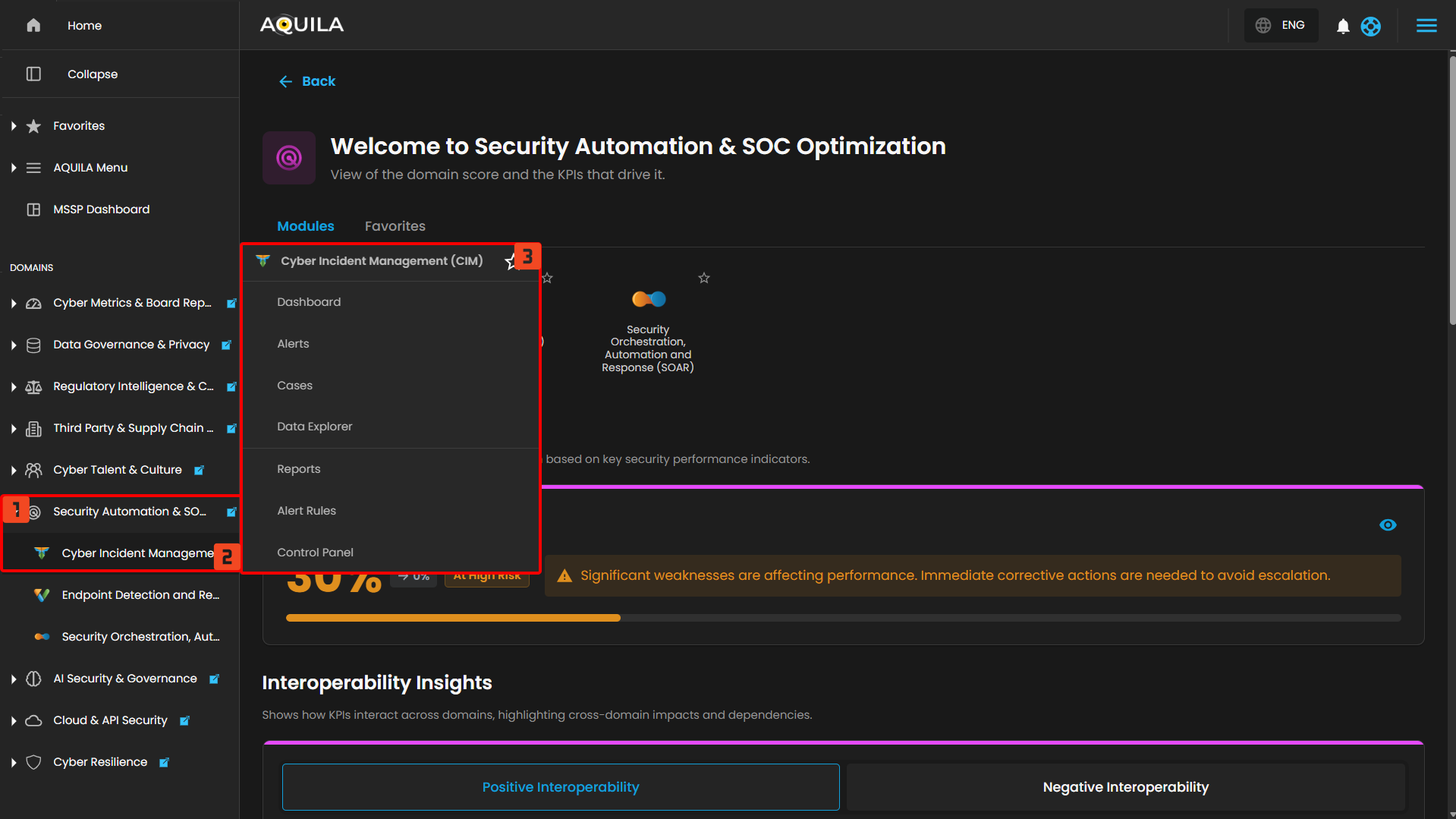
**Step 1: Log in to CyTech - AQUILA. *click here --&gt;* [usdc.cytechint.io](https://usdc.cytechint.io/)  
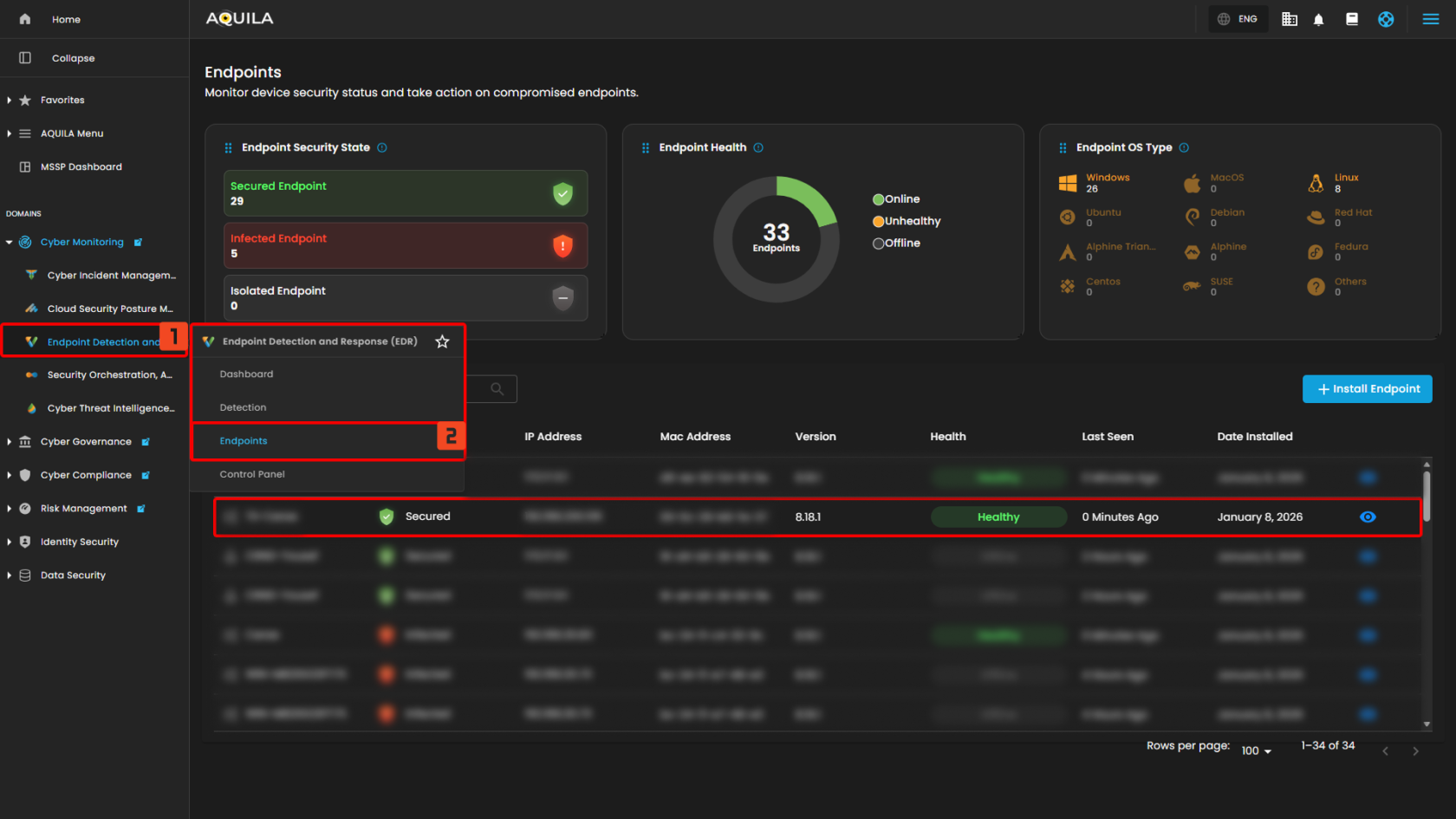
Step 2: In the left column click Security Automation &amp; SOC Optimization -&gt; Cyber Incident Management (CIM) -&gt; Dashboard**

[![HEHE (20).png](https://cytechint-docs-bookstack.s3.amazonaws.com/uploads/images/gallery/2026-04/scaled-1680-/zDtYwqk2yt6wigk4-hehe-20.png)](https://cytechint-docs-bookstack.s3.amazonaws.com/uploads/images/gallery/2026-04/zDtYwqk2yt6wigk4-hehe-20.png)

---

#### **Cyber Incident Management (CIM): Dashboard**

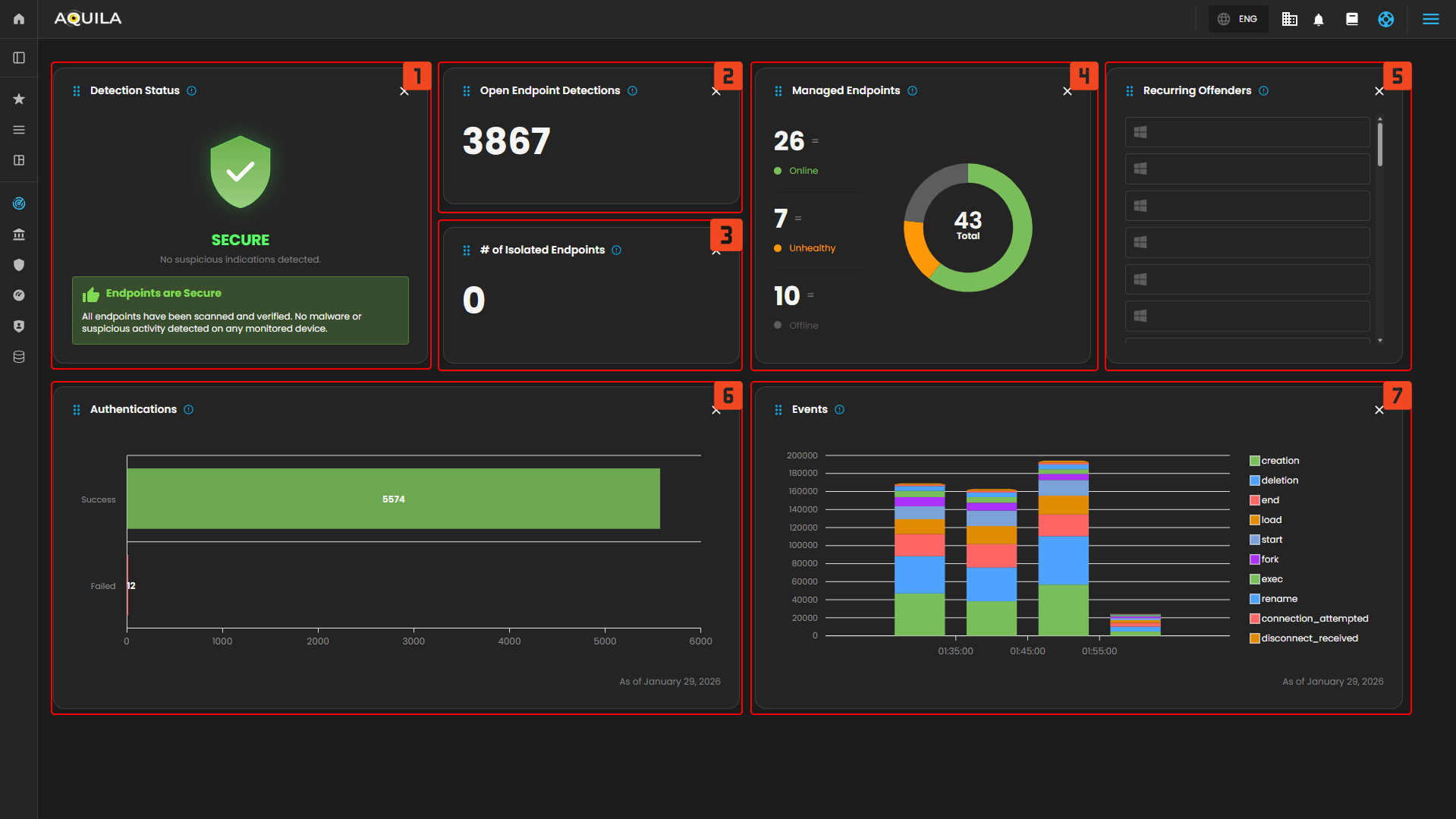
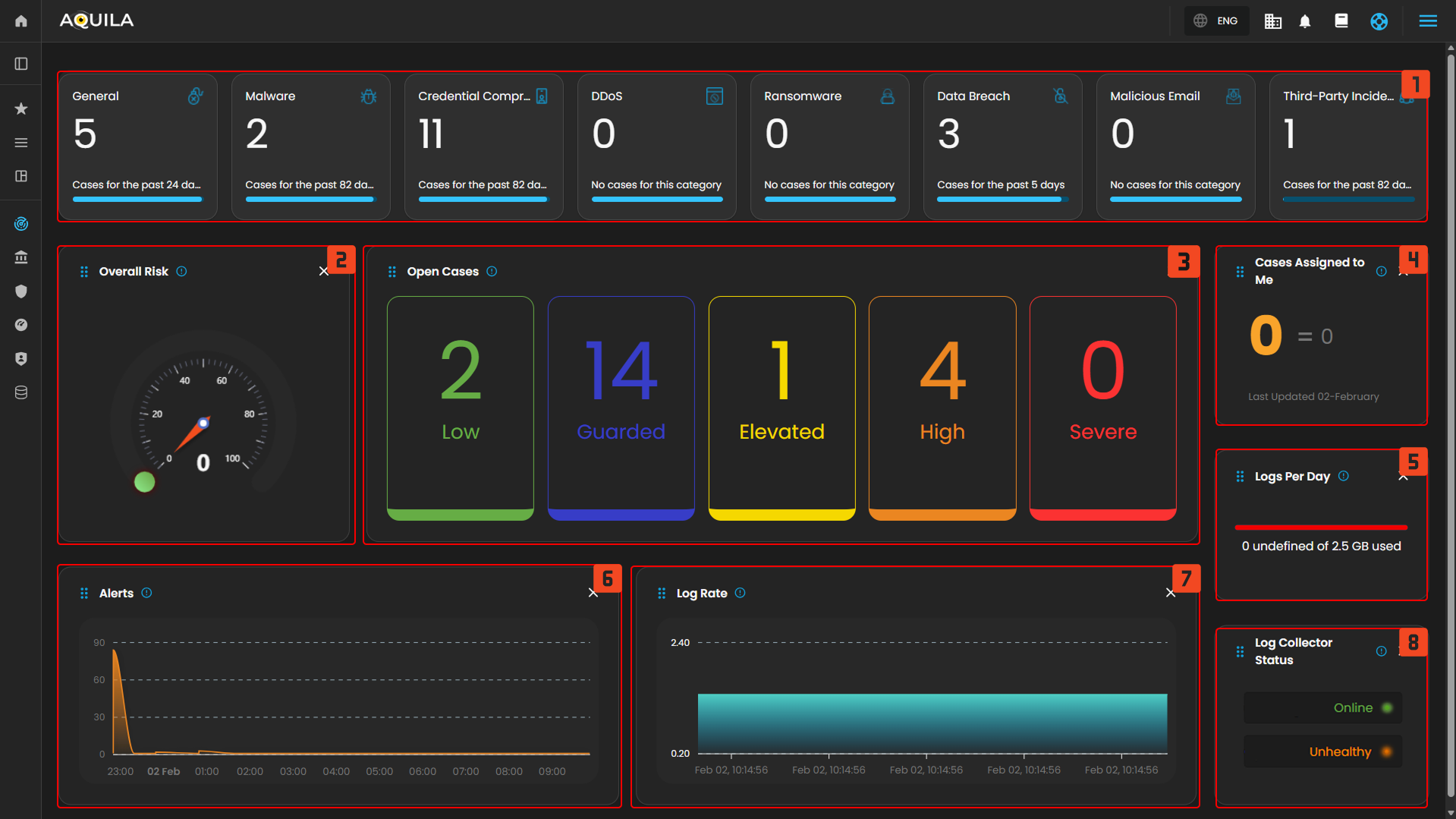
The **Main Dashboard** serves as the central hub for viewing all critical and relevant data associated with this module. It provides a consolidated interface where key **metrics**, **updates**, and **operational insights** are displayed for quick reference and effective monitoring.

[![HEHE (97).png](https://cytechint-docs-bookstack.s3.amazonaws.com/uploads/images/gallery/2026-02/scaled-1680-/u2XBERHt0Org1Ymy-hehe-97.png)](https://cytechint-docs-bookstack.s3.amazonaws.com/uploads/images/gallery/2026-02/u2XBERHt0Org1Ymy-hehe-97.png)
---

##### **Case Categories**

This panel displays and categorizes all cases within your environment that are currently open or in progress. It presents a structured view based on case categories, offering a clear summary of ongoing activity. This allows for efficient tracking, prioritization, and management of active investigations.

[![image.png](https://cytechint-docs-bookstack.s3.amazonaws.com/uploads/images/gallery/2025-10/scaled-1680-/UzO643vjZ0vzOK4n-image.png)](https://cytechint-docs-bookstack.s3.amazonaws.com/uploads/images/gallery/2025-10/UzO643vjZ0vzOK4n-image.png)

Upon selecting a category, a new window will automatically open, displaying all cases associated with the selected category.

[![HEHE (98).png](https://cytechint-docs-bookstack.s3.amazonaws.com/uploads/images/gallery/2026-02/scaled-1680-/3ugg757F9VdpwoxH-hehe-98.png)](https://cytechint-docs-bookstack.s3.amazonaws.com/uploads/images/gallery/2026-02/3ugg757F9VdpwoxH-hehe-98.png)
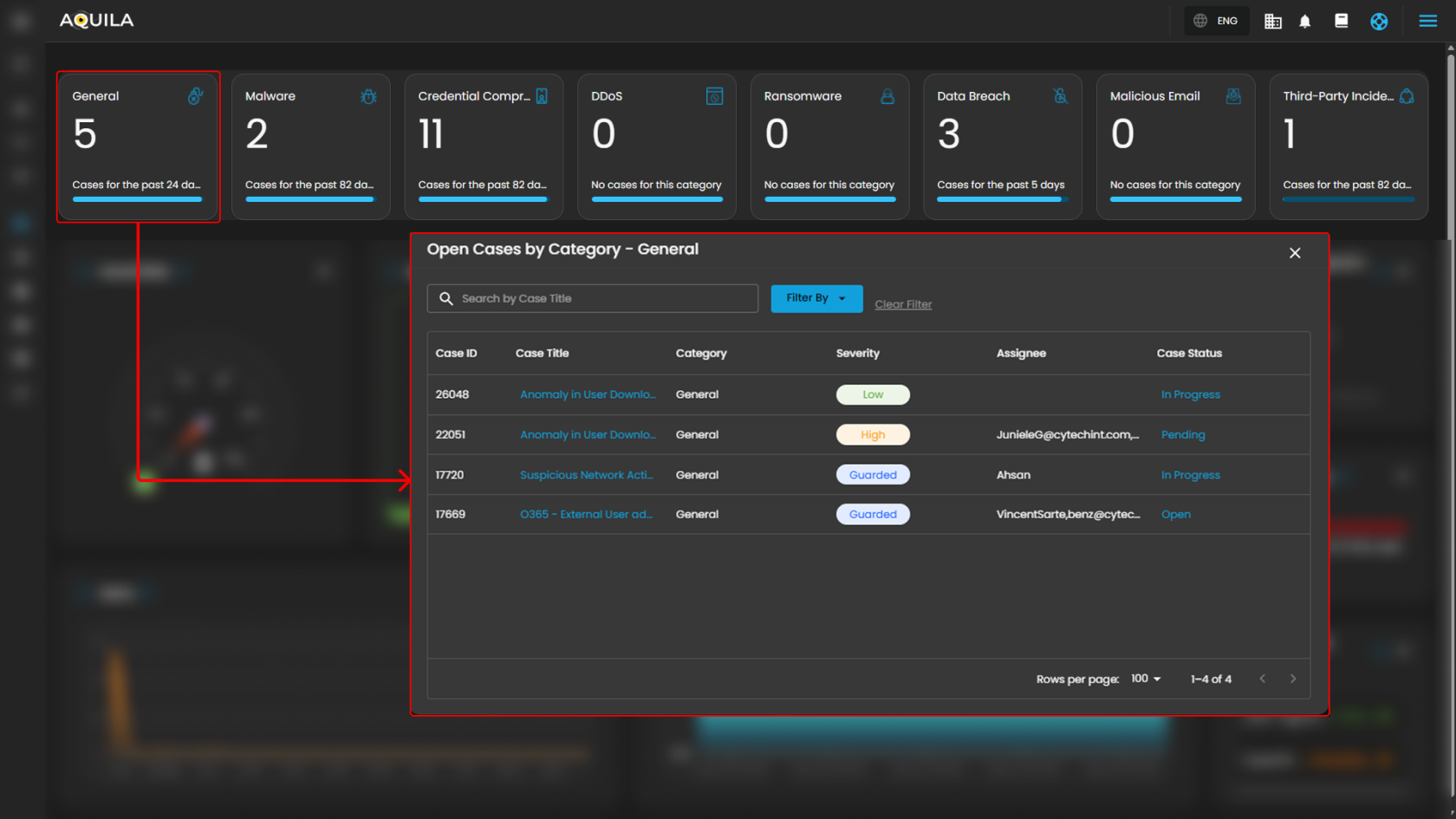
1. **Search Bar:** The search bar enables users to locate a specific case by entering the exact case title. Simply type the desired title into the search field to quickly retrieve relevant results.
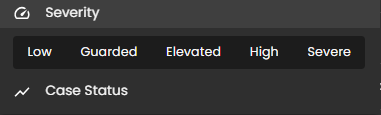
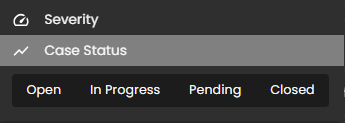
2. **Filter By &amp; Clear Filter:** This feature enables users to refine the list of cases by applying filters based on Severity and Case Status. Use the Filter By option to display only the cases that match specific criteria. To remove all applied filters and return to the full list of cases, use the Clear Filter option.  
    [![image.png](https://cytechint-docs-bookstack.s3.amazonaws.com/uploads/images/gallery/2025-09/scaled-1680-/LDC89jvHDWfO9aPX-image.png)](https://cytechint-docs-bookstack.s3.amazonaws.com/uploads/images/gallery/2025-09/LDC89jvHDWfO9aPX-image.png)[![image.png](https://cytechint-docs-bookstack.s3.amazonaws.com/uploads/images/gallery/2025-09/scaled-1680-/2PgOOTcPe9U77T8t-image.png)](https://cytechint-docs-bookstack.s3.amazonaws.com/uploads/images/gallery/2025-09/2PgOOTcPe9U77T8t-image.png)
3. **Case Details:** To access the investigation section of a case, double-click on the case entry. This action will automatically redirect you to the detailed investigation interface for further analysis and review.

---

##### **Overall Risk**

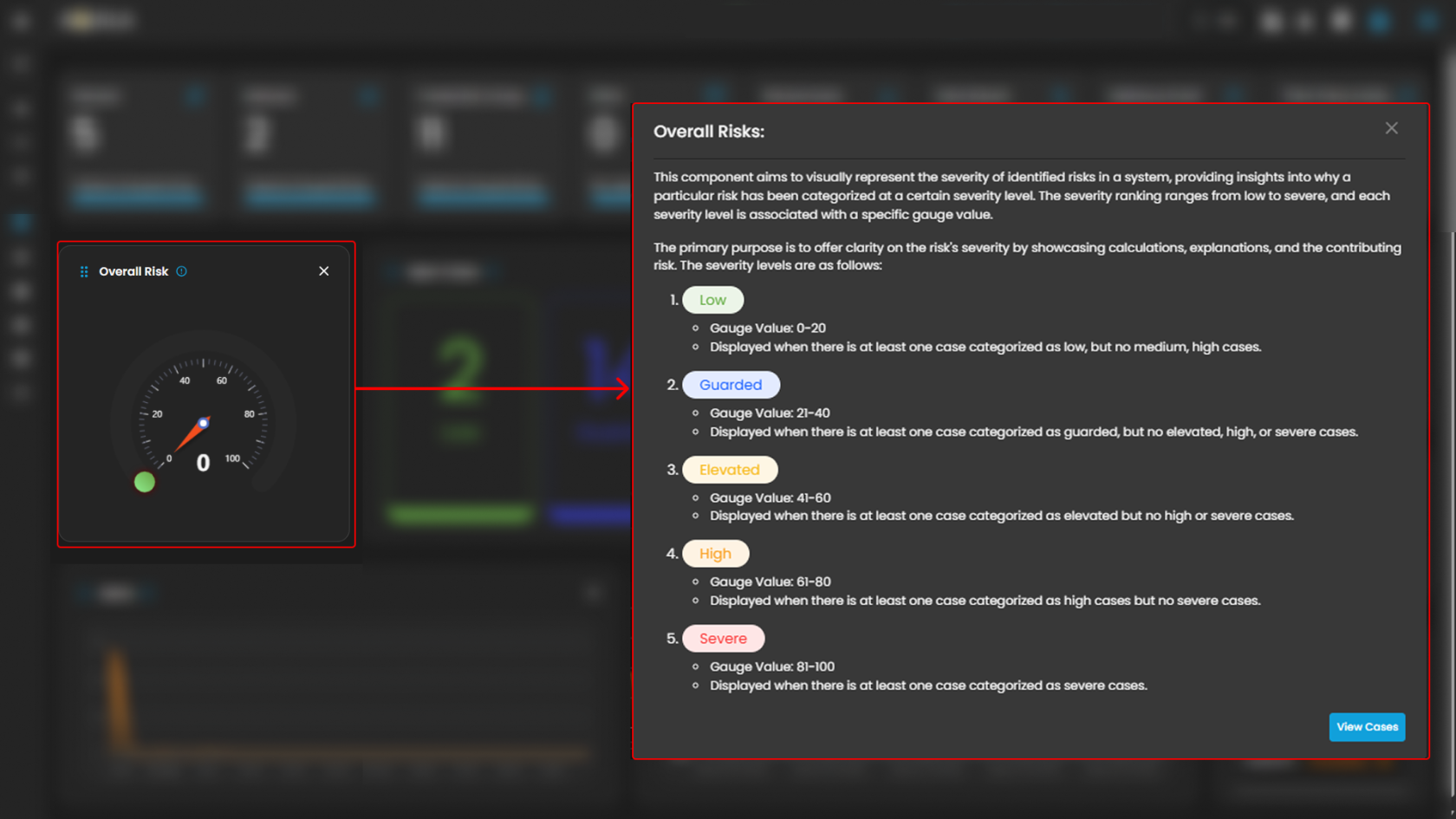
Displays system risk severity levels on a scale from **Low** to **Severe** (**0 - 100**), explaining the rationale behind risk classifications and showing the highest severity level present in the system. Clicking on the gauge allows you to view more details about.

[![HEHE (99).png](https://cytechint-docs-bookstack.s3.amazonaws.com/uploads/images/gallery/2026-02/scaled-1680-/61yPfg0UfIONO8Um-hehe-99.png)](https://cytechint-docs-bookstack.s3.amazonaws.com/uploads/images/gallery/2026-02/61yPfg0UfIONO8Um-hehe-99.png)
---

##### **Open Cases**

Displays the total number of open cyber incident cases, categorized by severity, that are currently being investigated.

[![HEHE (100).png](https://cytechint-docs-bookstack.s3.amazonaws.com/uploads/images/gallery/2026-02/scaled-1680-/KHjWviz5iNQuoRRa-hehe-100.png)](https://cytechint-docs-bookstack.s3.amazonaws.com/uploads/images/gallery/2026-02/KHjWviz5iNQuoRRa-hehe-100.png)
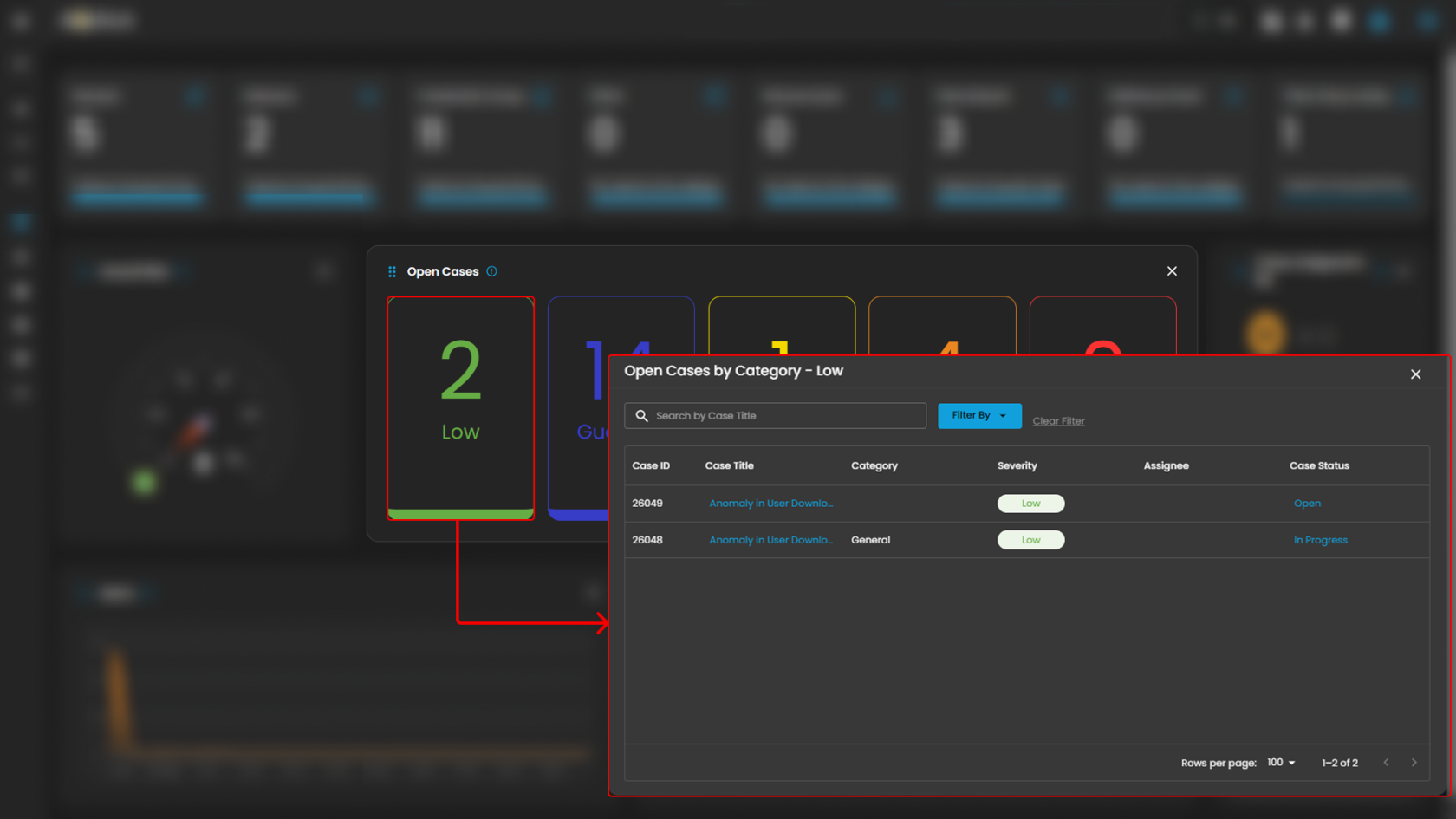
When you click on a category, you will see all the cases that fall under that severity level. For example, as shown in the image above, selecting the “**Guarded Severity**” category will display all cases labeled as guarded severity.

---

##### **Cases Assigned to Me**

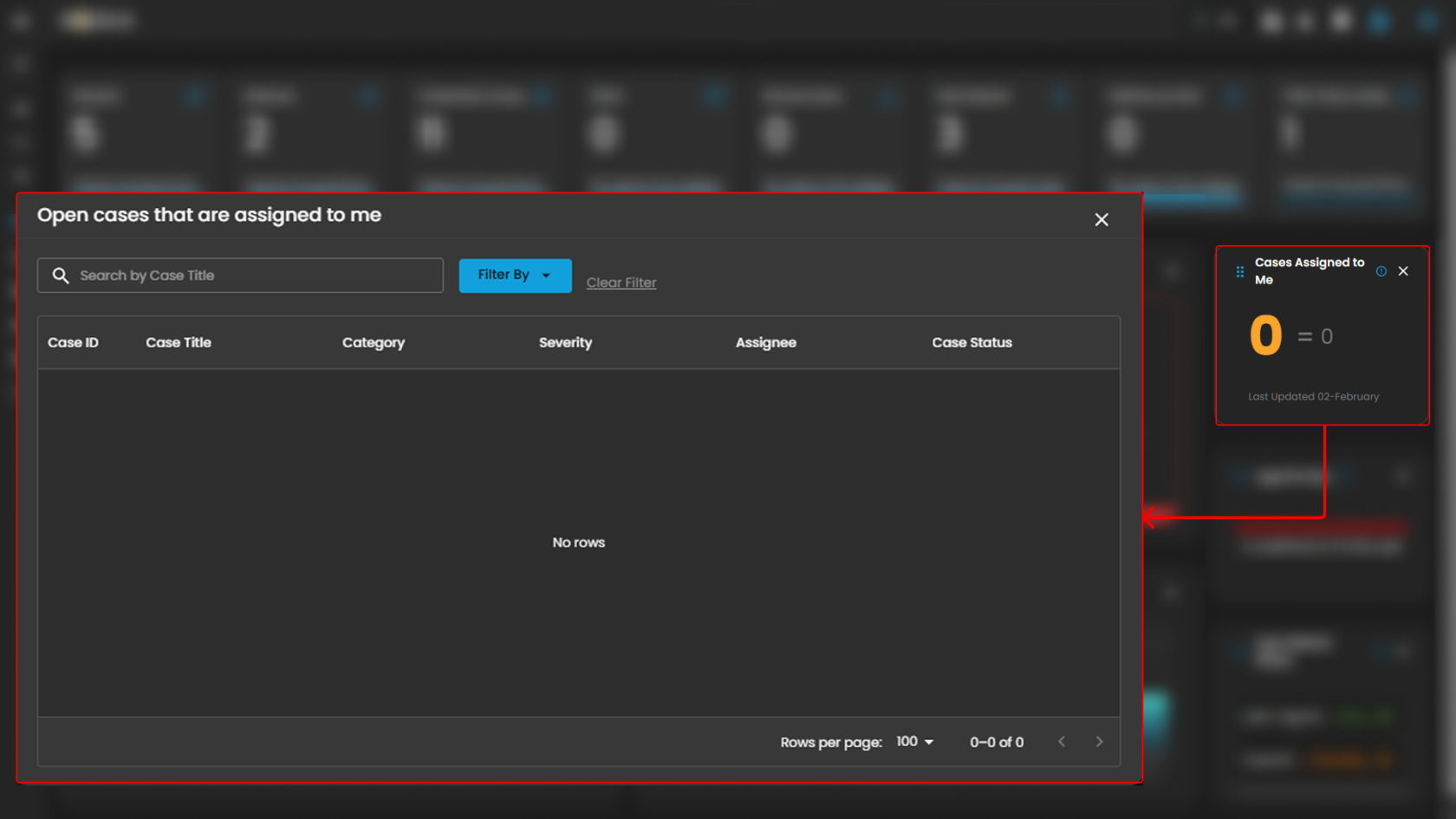
Shows the number of cyber incident cases specifically assigned to you for investigation and resolution. Clicking on it will open up a small window that will show all the cases assigned under you.

[![HEHE - 2026-02-02T104320.647.png](https://cytechint-docs-bookstack.s3.amazonaws.com/uploads/images/gallery/2026-02/scaled-1680-/jMYSzNAZGTH6dDDw-hehe-2026-02-02t104320-647.png)](https://cytechint-docs-bookstack.s3.amazonaws.com/uploads/images/gallery/2026-02/jMYSzNAZGTH6dDDw-hehe-2026-02-02t104320-647.png)


---

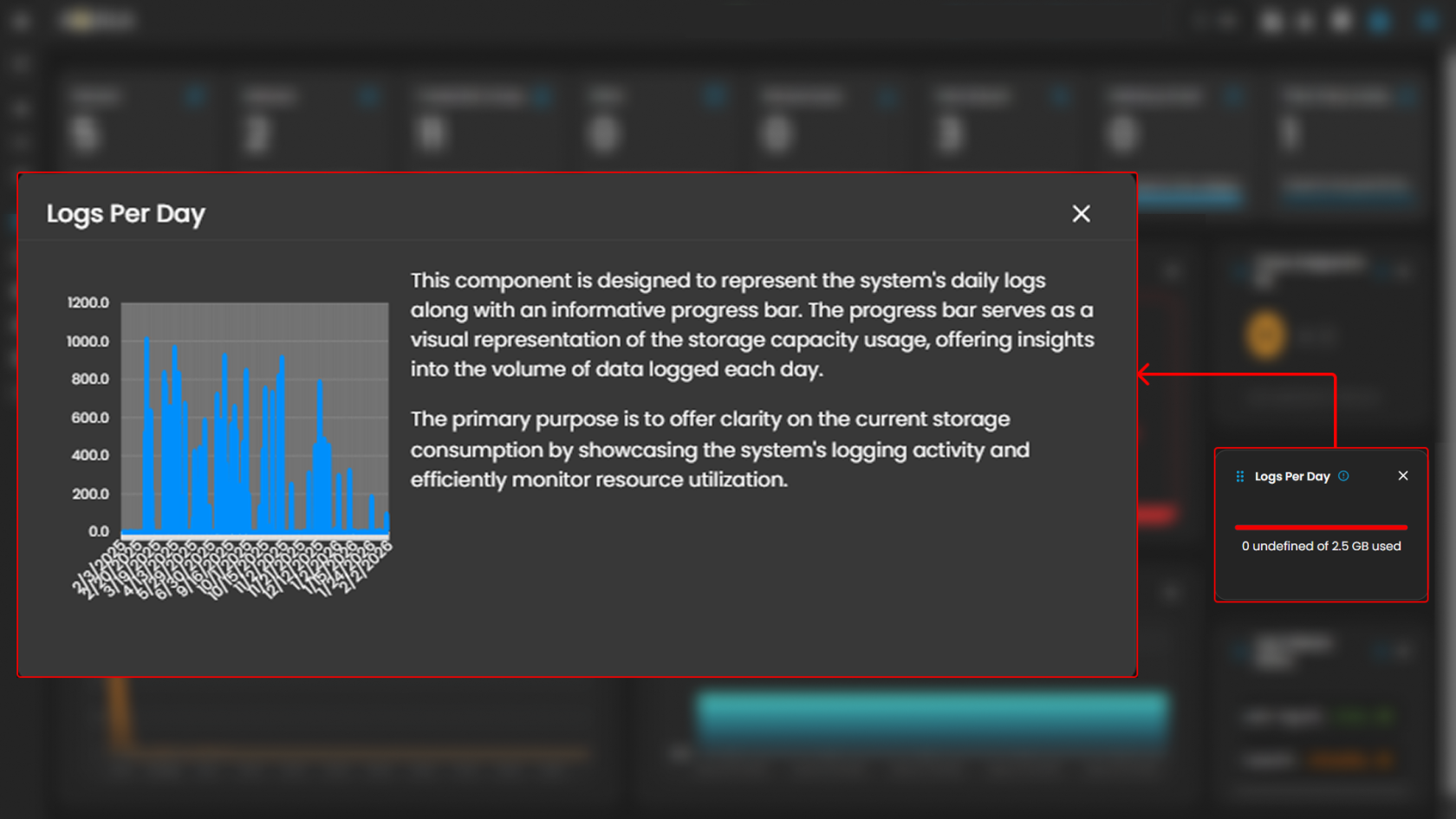
##### **Logs Per Day**

Displays daily system logs with a progress bar that tracks storage capacity usage, providing clear insights into daily logging volume and resource consumption.  
  
When you click on it, a small window will appear displaying a graph.

[![HEHE - 2026-02-02T110349.760.png](https://cytechint-docs-bookstack.s3.amazonaws.com/uploads/images/gallery/2026-02/scaled-1680-/jjunImHCShkCWRwd-hehe-2026-02-02t110349-760.png)](https://cytechint-docs-bookstack.s3.amazonaws.com/uploads/images/gallery/2026-02/jjunImHCShkCWRwd-hehe-2026-02-02t110349-760.png)
---

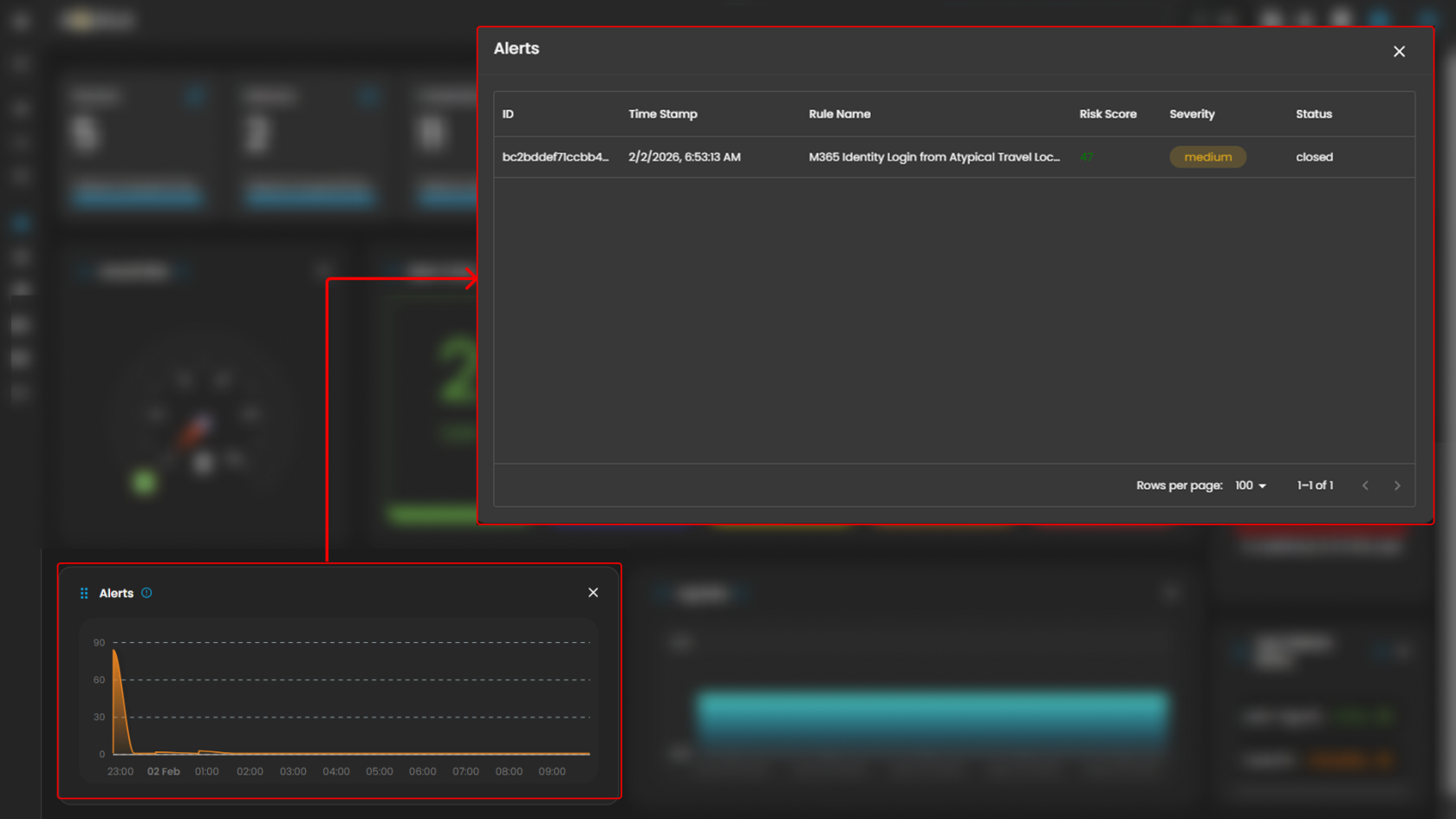
##### **Alerts**

Display the trends of the detections generated by the system, highlighting potential security incidents that require immediate attention. Clicking on a timeline will open up a small window that will show all the alerts that was recently triggered.

[![HEHE - 2026-02-02T111217.041.png](https://cytechint-docs-bookstack.s3.amazonaws.com/uploads/images/gallery/2026-02/scaled-1680-/SO6SBwlHPk3tJZXk-hehe-2026-02-02t111217-041.png)](https://cytechint-docs-bookstack.s3.amazonaws.com/uploads/images/gallery/2026-02/SO6SBwlHPk3tJZXk-hehe-2026-02-02t111217-041.png)
---

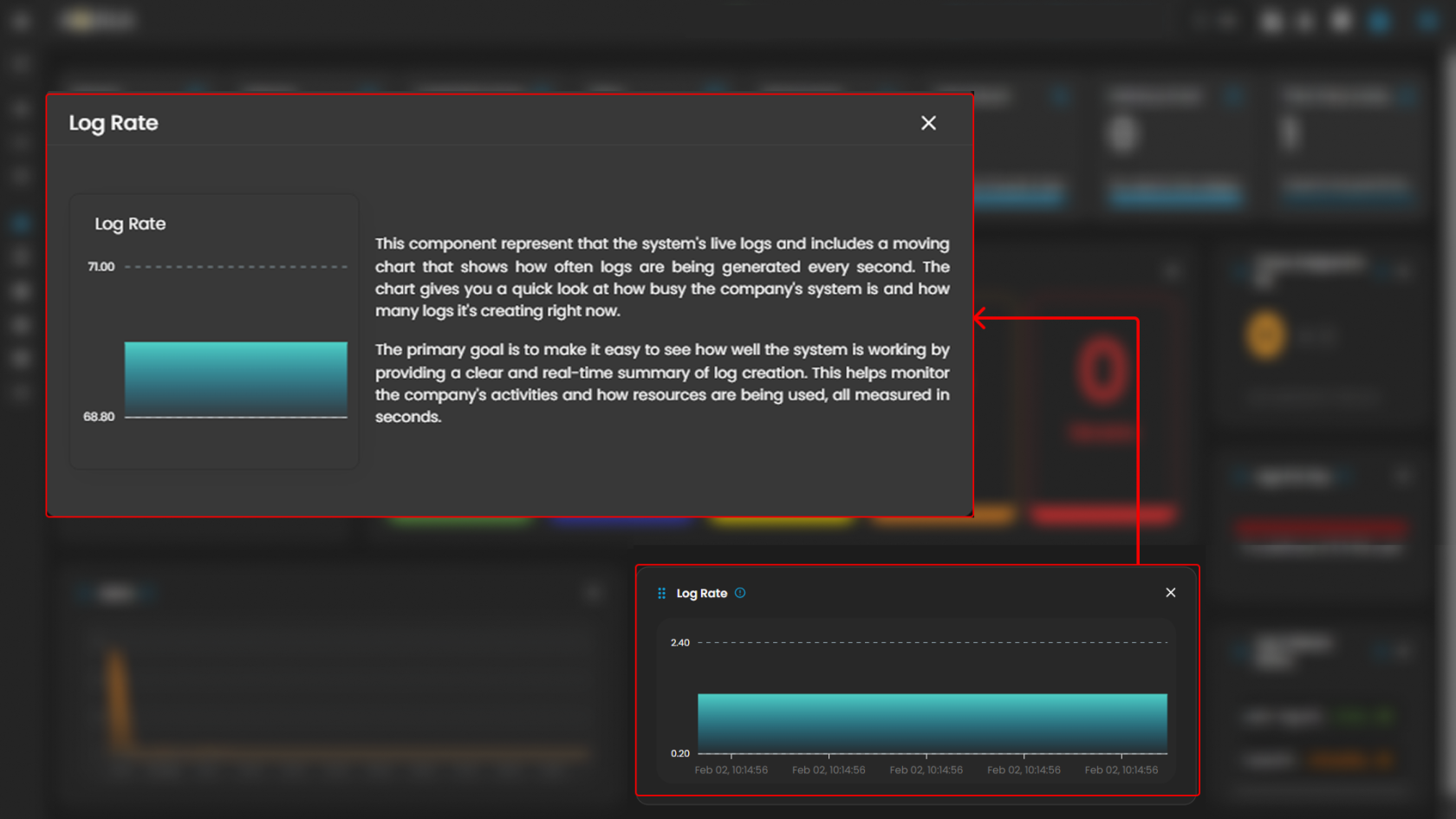
##### **Log Rate**

A real-time visualization to display system log generation frequency per second through a dynamic chart, enabling instant monitoring of system activity and resource utilization. Clicking on it will open up a small window that will show the detailed explanation.

[![HEHE - 2026-02-02T112141.802.png](https://cytechint-docs-bookstack.s3.amazonaws.com/uploads/images/gallery/2026-02/scaled-1680-/RFZKd6yTgHtERDdL-hehe-2026-02-02t112141-802.png)](https://cytechint-docs-bookstack.s3.amazonaws.com/uploads/images/gallery/2026-02/RFZKd6yTgHtERDdL-hehe-2026-02-02t112141-802.png)
---

##### **Log Collector Status**

Indicates the current status of the log collector, ensuring that logs are being collected and monitored for any suspicious activity.

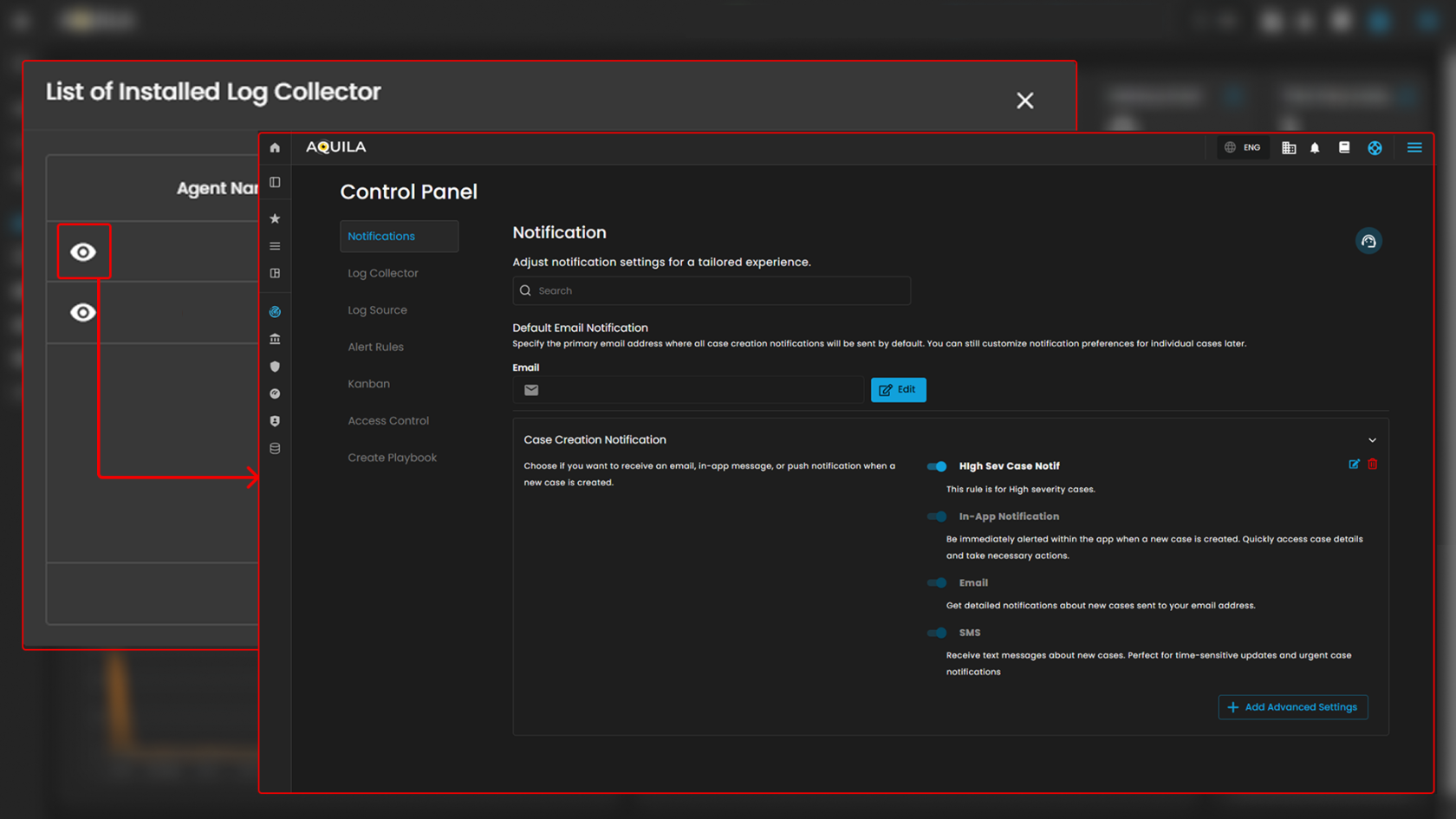
When you click on it, a small window will appear showing all installed **log collectors** along with their current **status**.

[![HEHE - 2026-02-02T114933.085.png](https://cytechint-docs-bookstack.s3.amazonaws.com/uploads/images/gallery/2026-02/scaled-1680-/2GmJDLpRySqg5zP4-hehe-2026-02-02t114933-085.png)](https://cytechint-docs-bookstack.s3.amazonaws.com/uploads/images/gallery/2026-02/2GmJDLpRySqg5zP4-hehe-2026-02-02t114933-085.png)
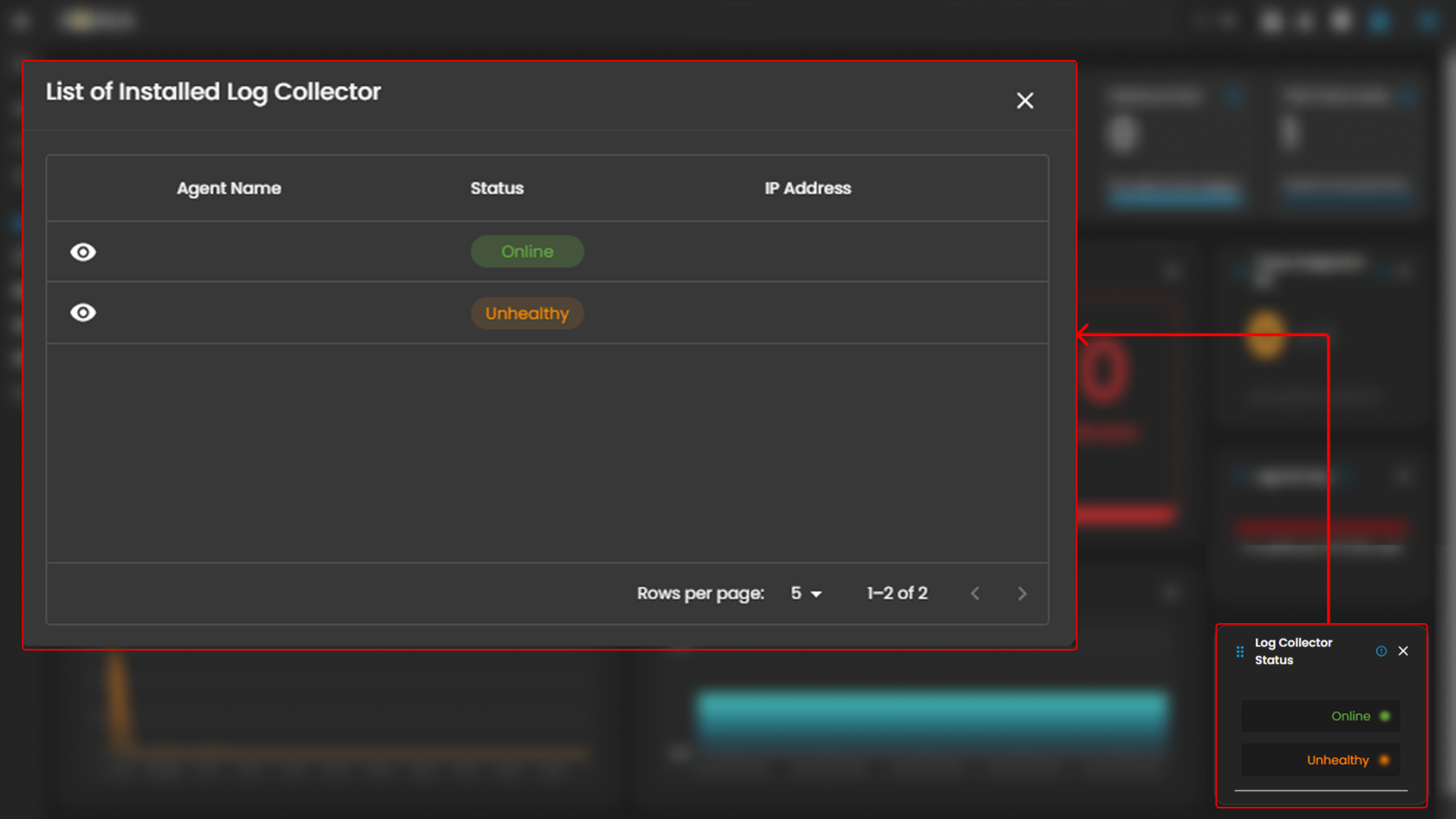
Click the **eye icon** next to the log collector name to go to the **Log Collector List** page.

[![HEHE - 2026-02-02T121530.202.png](https://cytechint-docs-bookstack.s3.amazonaws.com/uploads/images/gallery/2026-02/scaled-1680-/lepzI6jvY3kNKcg3-hehe-2026-02-02t121530-202.png)](https://cytechint-docs-bookstack.s3.amazonaws.com/uploads/images/gallery/2026-02/lepzI6jvY3kNKcg3-hehe-2026-02-02t121530-202.png)
In conclusion, this dashboard serves as a centralized operational interface that enhances cybersecurity case management by providing real-time visibility into alerts, active investigations, and unresolved cases. It enables security teams to systematically monitor alert statuses, track ongoing investigations, and identify open cases that have not yet been addressed. Through structured data visualization and status tracking, the dashboard improves workflow prioritization, reduces response time, and ensures that no critical alerts are overlooked. Overall, it strengthens operational oversight, accountability, and incident response efficiency within the security environment.

<p class="callout info">Please refer to the document for the next sub-module: **[CyTech AQUILA - Cyber Incident Management (CIM): Alerts](https://usdc-docs.cytechint.io/books/security-automation-soc-optimization-tOO/page/cytech-aquila-cyber-incident-management-cim-alerts/edit)**</p>

***If you need further assistance, kindly contact our support at [support@cytechint.com](mailto:info@cytechint.com) for prompt assistance and guidance.***

# CyTech AQUILA - Cyber Incident Management (CIM) : Alerts

#### <span style="color: rgb(53, 152, 219);">**Introduction**</span>

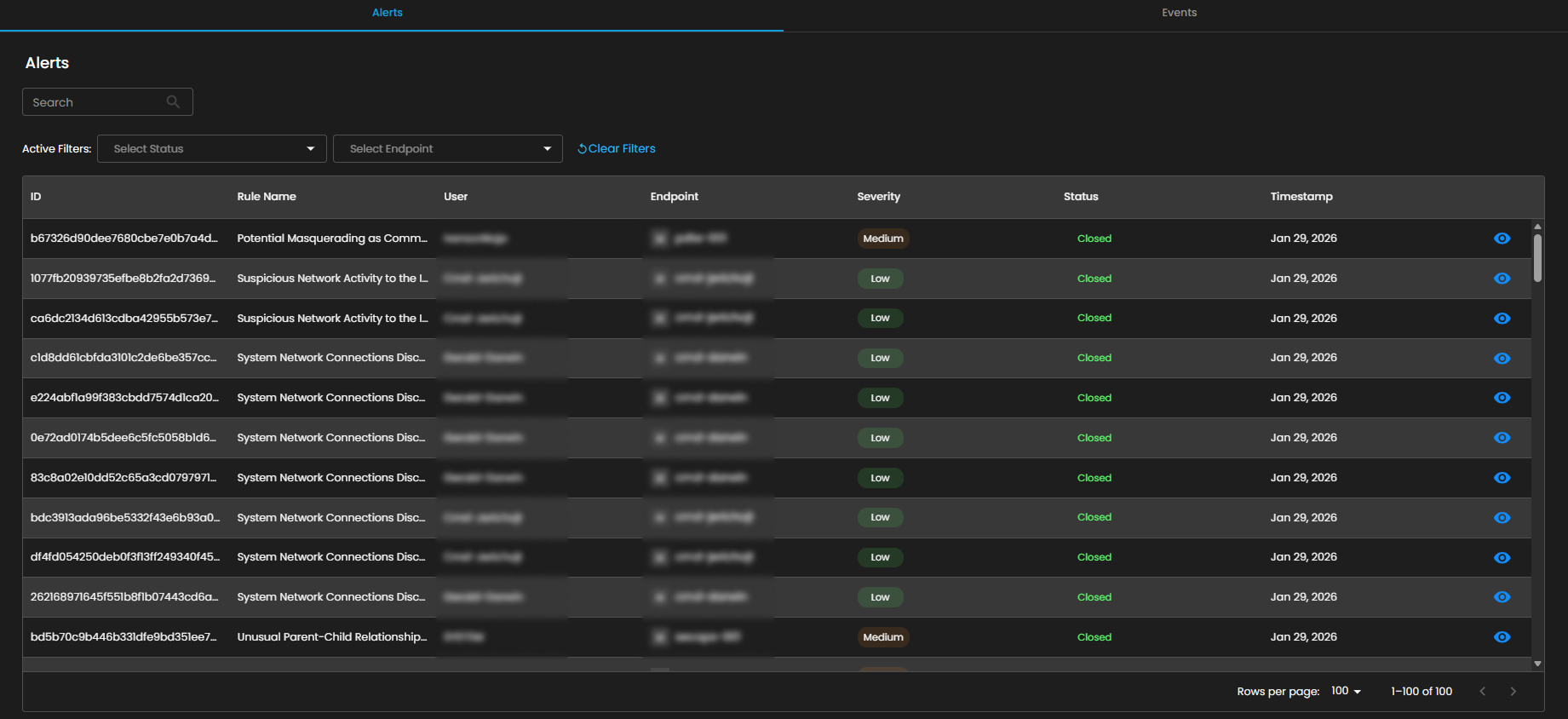
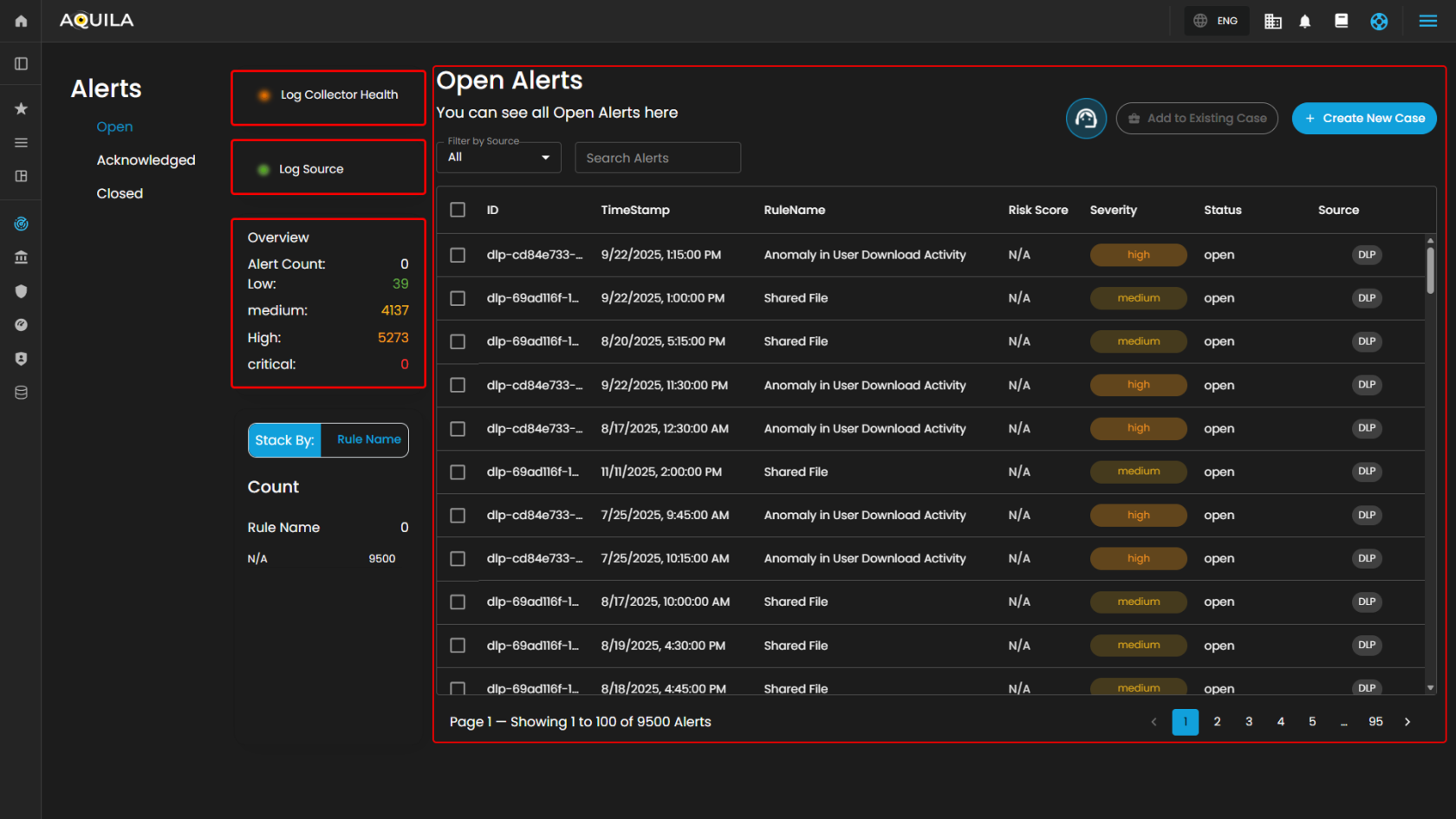
**Alerts Dashboard** is a tool that provides real-time security alerts and notifications. It provides a unified view of different types of alerts, categorizing them by severity and type, and displays critical details such as the source of the alert, affected assets, and relevant information. This dashboard enables security teams to quickly assess, prioritize, and respond to potential threats by offering comprehensive insights and plays a crucial role in enhancing situational awareness and streamlining the incident response process.

##### <span style="color: rgb(53, 152, 219);">**Alerts Status Types**</span>

**Open Alerts:** Alerts awaiting assignment to an analyst for further investigation.

[![image.png](https://cytechint-docs-bookstack.s3.amazonaws.com/uploads/images/gallery/2026-02/scaled-1680-/82ZFGvLtIGOcqa8C-image.png)](https://cytechint-docs-bookstack.s3.amazonaws.com/uploads/images/gallery/2026-02/82ZFGvLtIGOcqa8C-image.png)
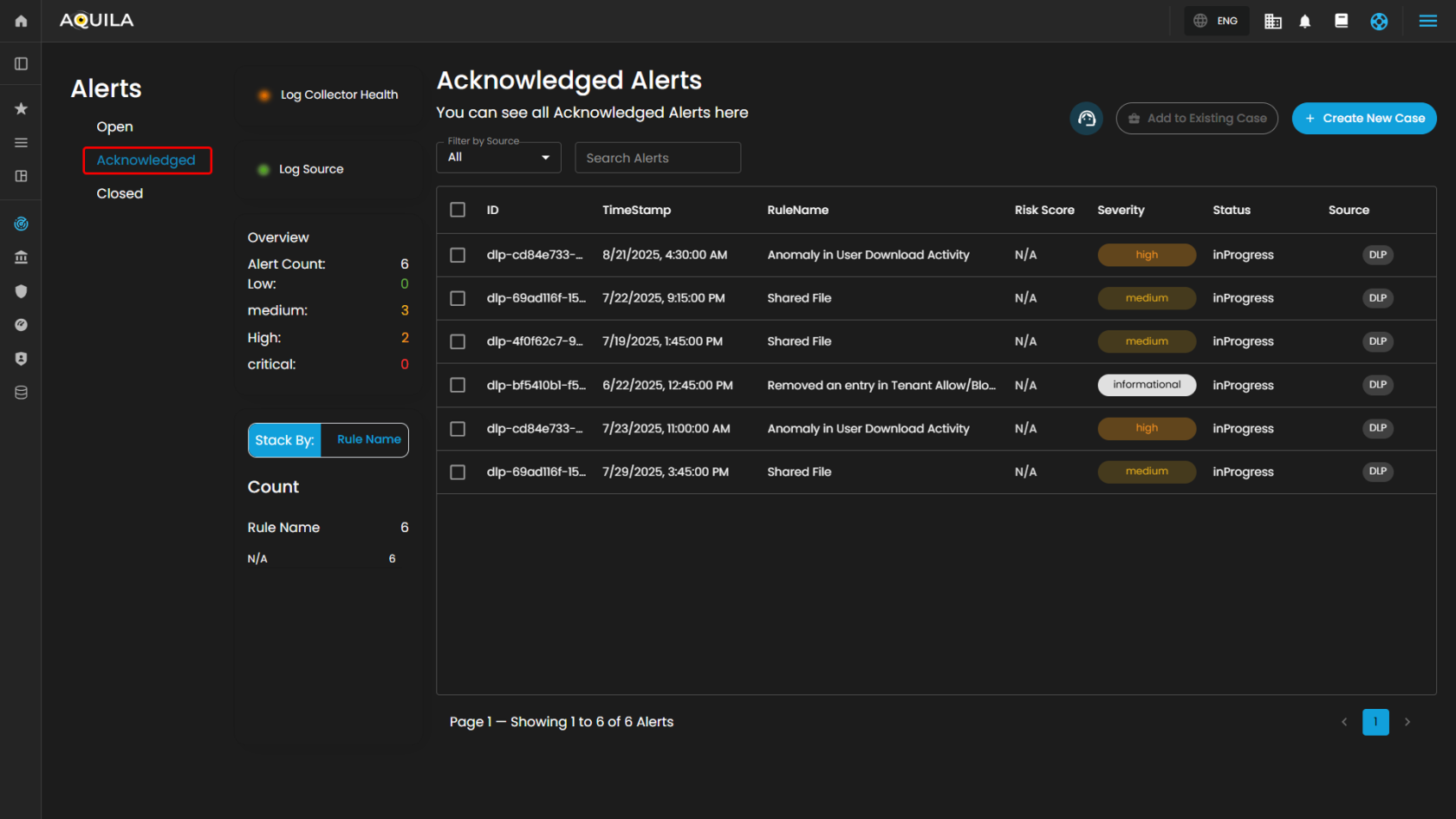
**<span style="color: rgb(53, 152, 219);">Acknowledged Alerts</span>:** Alerts currently in progress and assigned to an analyst for resolution.

[![image.png](https://cytechint-docs-bookstack.s3.amazonaws.com/uploads/images/gallery/2026-02/scaled-1680-/HEYm6T0740qQVfbO-image.png)](https://cytechint-docs-bookstack.s3.amazonaws.com/uploads/images/gallery/2026-02/HEYm6T0740qQVfbO-image.png)
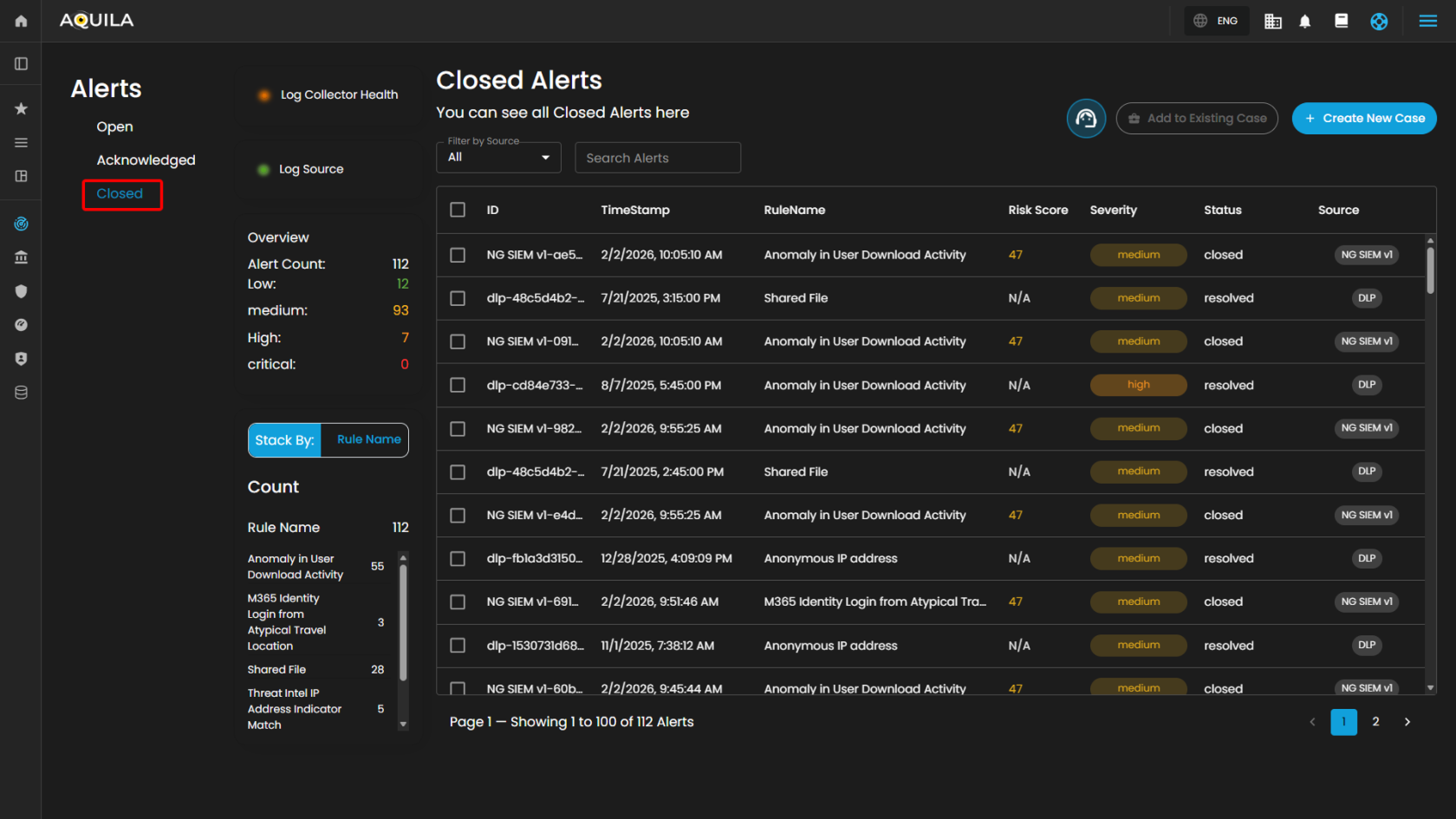
**<span style="color: rgb(53, 152, 219);">Closed Alerts</span>:** Alerts that have been successfully resolved and closed.

[![image.png](https://cytechint-docs-bookstack.s3.amazonaws.com/uploads/images/gallery/2026-02/scaled-1680-/bEsoCzrDGzbYavNp-image.png)](https://cytechint-docs-bookstack.s3.amazonaws.com/uploads/images/gallery/2026-02/bEsoCzrDGzbYavNp-image.png)
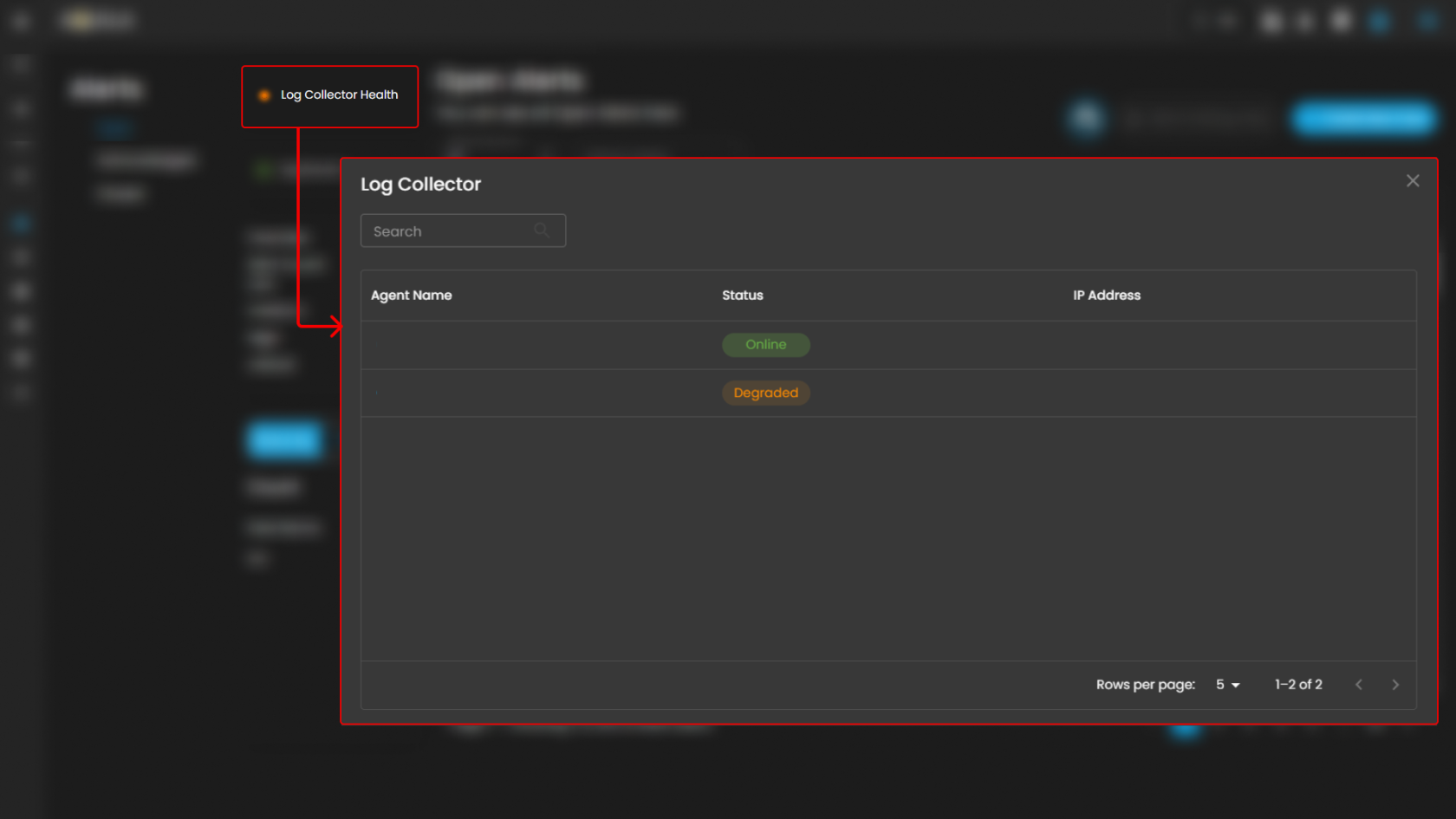
##### <span style="color: rgb(53, 152, 219);">**Log Collector Health**</span>

Indicates the current status of the log collector, ensuring that logs are being collected and monitored for any suspicious activity.

When you click on it, a small window will appear showing all installed **log collectors** along with their current **status**.

[![image.png](https://cytechint-docs-bookstack.s3.amazonaws.com/uploads/images/gallery/2026-02/scaled-1680-/7TUtjbq83E8SPamy-image.png)](https://cytechint-docs-bookstack.s3.amazonaws.com/uploads/images/gallery/2026-02/7TUtjbq83E8SPamy-image.png)
##### <span style="color: rgb(53, 152, 219);">**Log Source**</span>

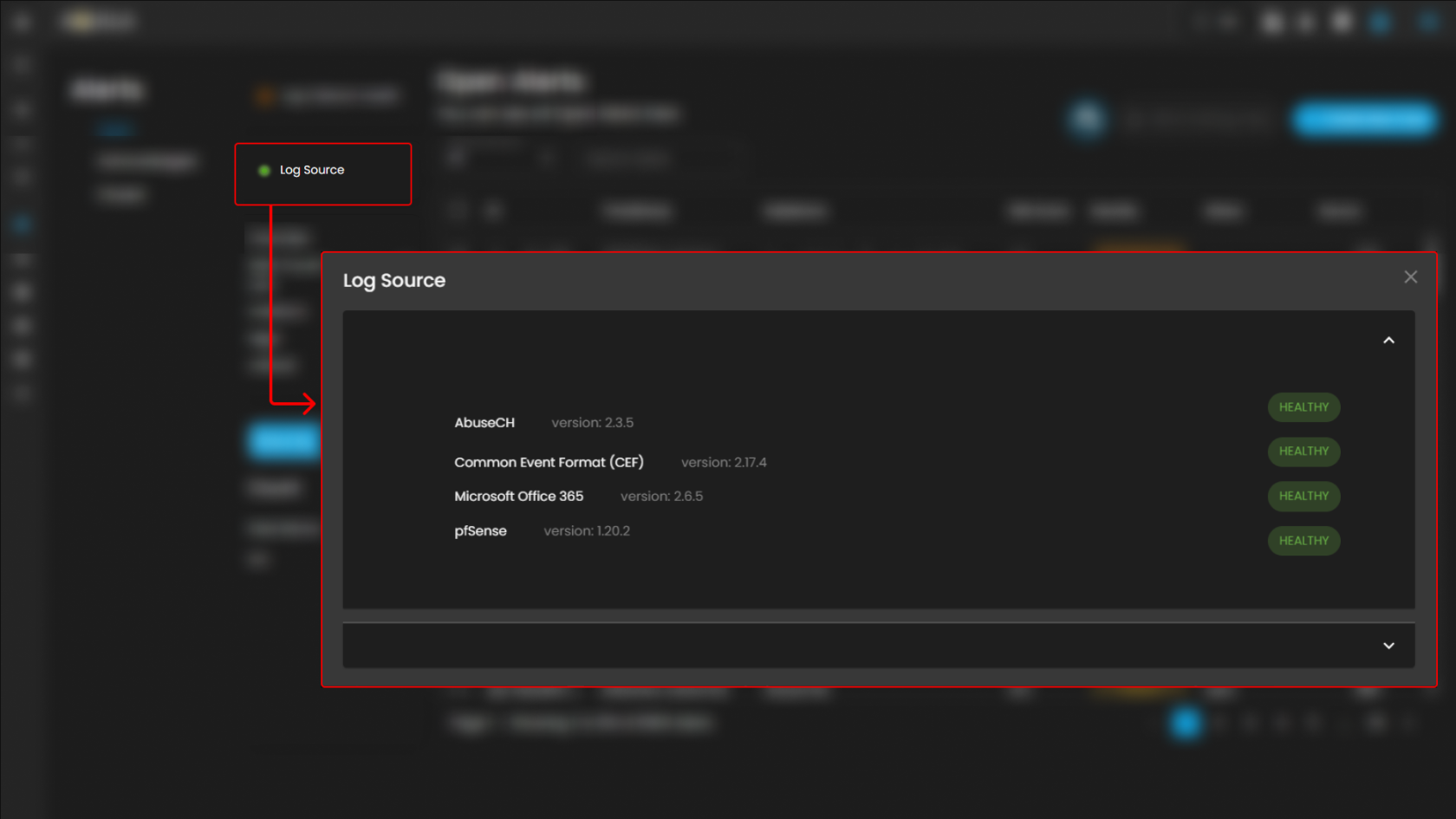
These are the various systems, applications, or devices that generate data sent into **AQUILA** for indexing, storage, and analysis. These sources provide visibility across infrastructure, applications, and security operations.  
  
When selected, a dialog window is displayed showing **all installed log collectors**. You can switch between collectors to view the integrated log sources associated with each one, along with their respective **versions** and **current status**, including whether log ingestion is functioning properly.

[![image.png](https://cytechint-docs-bookstack.s3.amazonaws.com/uploads/images/gallery/2026-02/scaled-1680-/ujRcPNOGs1Nq9OVg-image.png)](https://cytechint-docs-bookstack.s3.amazonaws.com/uploads/images/gallery/2026-02/ujRcPNOGs1Nq9OVg-image.png)
##### <span style="color: rgb(53, 152, 219);">**Overview**</span>

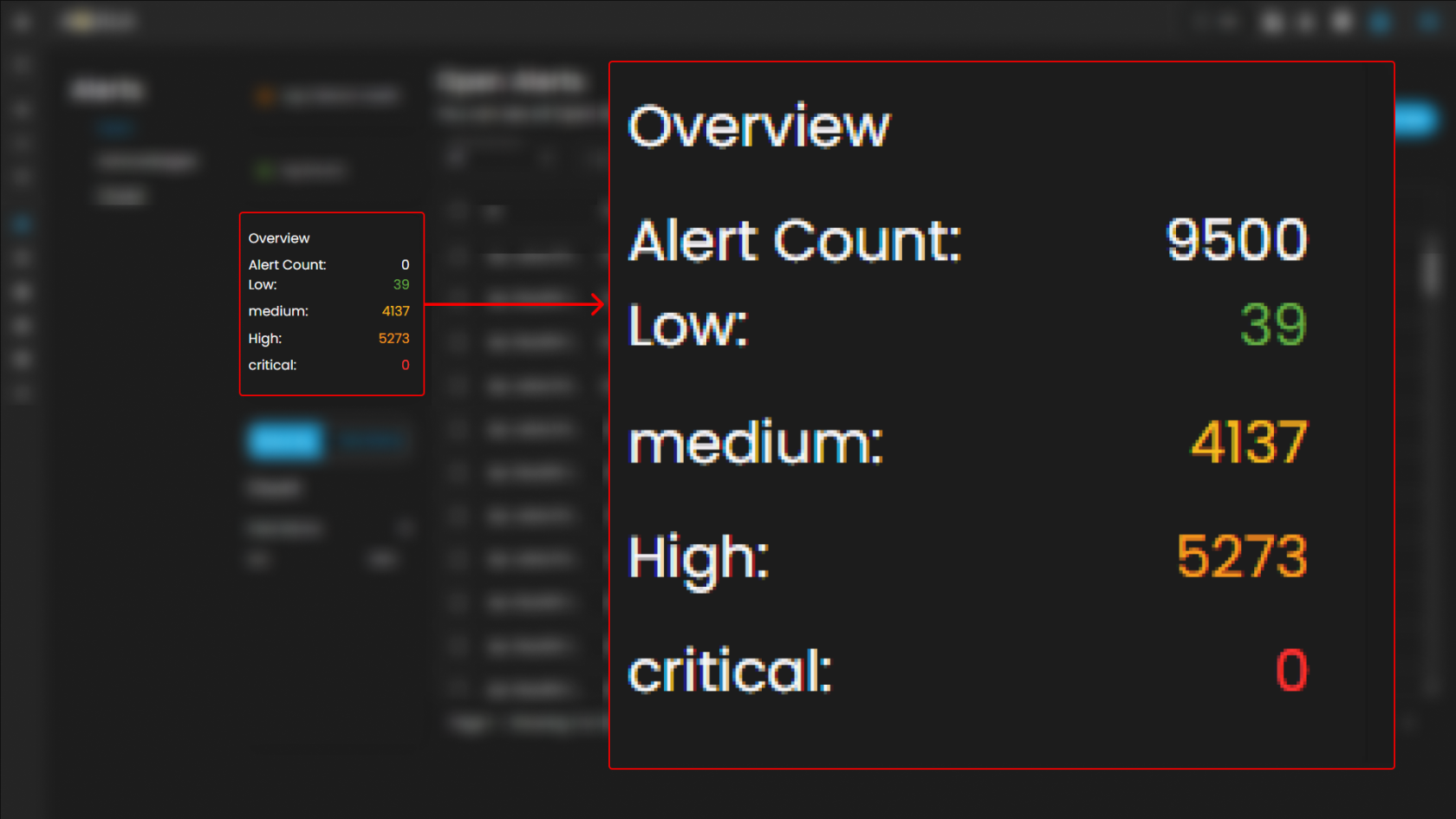
It provides an overview of **alert counts** categorized by **status type**, including the **total number of alerts** and their distribution across **severity levels**.

[![image.png](https://cytechint-docs-bookstack.s3.amazonaws.com/uploads/images/gallery/2026-02/scaled-1680-/LgnZjNihEGrm4pRT-image.png)](https://cytechint-docs-bookstack.s3.amazonaws.com/uploads/images/gallery/2026-02/LgnZjNihEGrm4pRT-image.png)
##### <span style="color: rgb(53, 152, 219);">**Stack By Rule Name**</span>

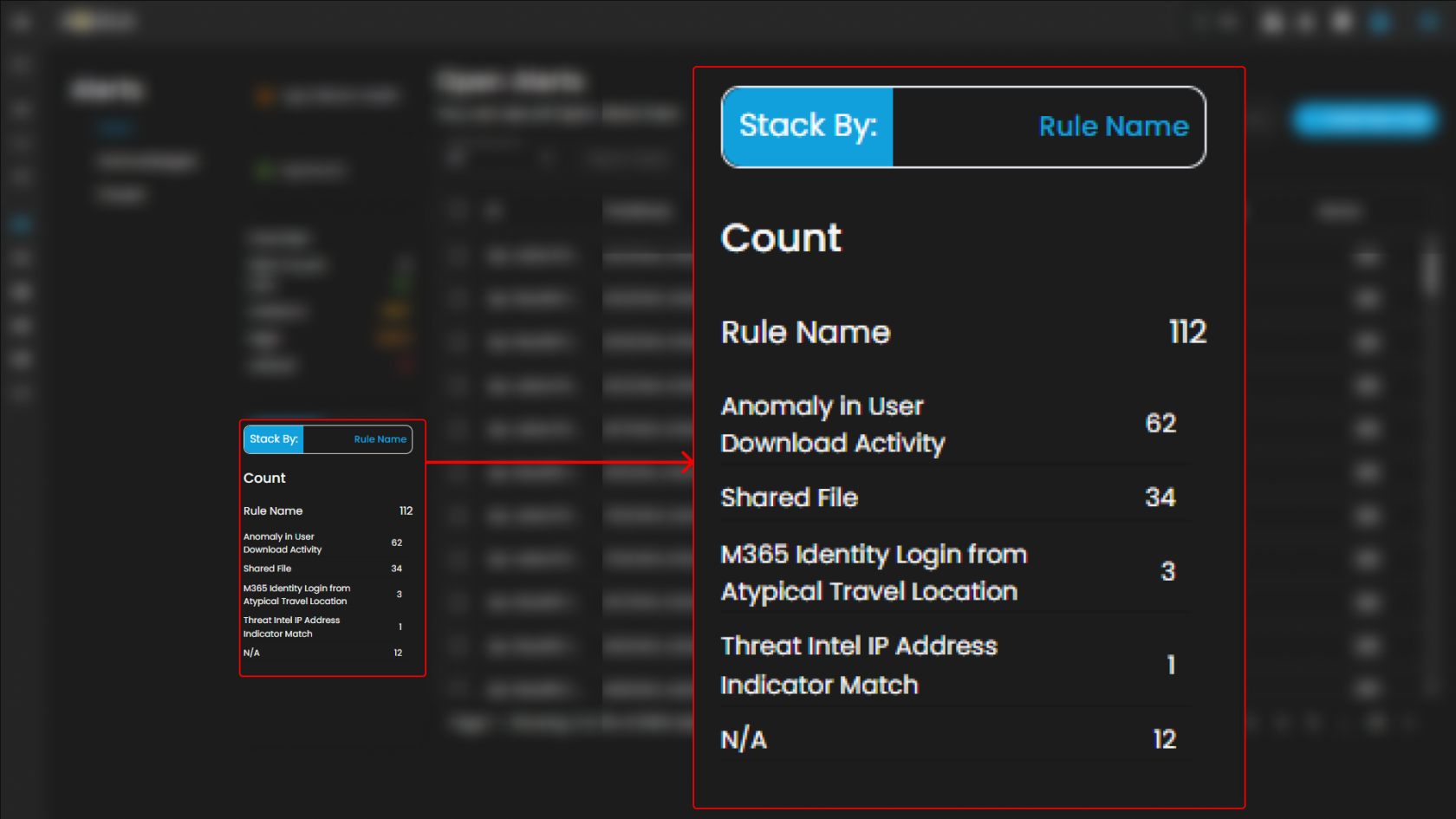
This view displays a **summary of alerts** grouped by their corresponding **detection rules**. At the top of the panel, the total number of alerts is presented. Below this, each rule is listed alongside the count of alerts it has generated. Users can scroll through the list to view additional rules when the number of entries exceeds the visible space. This view enables quick identification of which detection rules are generating the highest volume of alerts, supporting prioritization and investigation activities.

[![image.png](https://cytechint-docs-bookstack.s3.amazonaws.com/uploads/images/gallery/2026-02/scaled-1680-/uilPkhdgET6NGib7-image.png)](https://cytechint-docs-bookstack.s3.amazonaws.com/uploads/images/gallery/2026-02/uilPkhdgET6NGib7-image.png)
##### <span style="color: rgb(53, 152, 219);">**Filter by Source and Search box**</span>

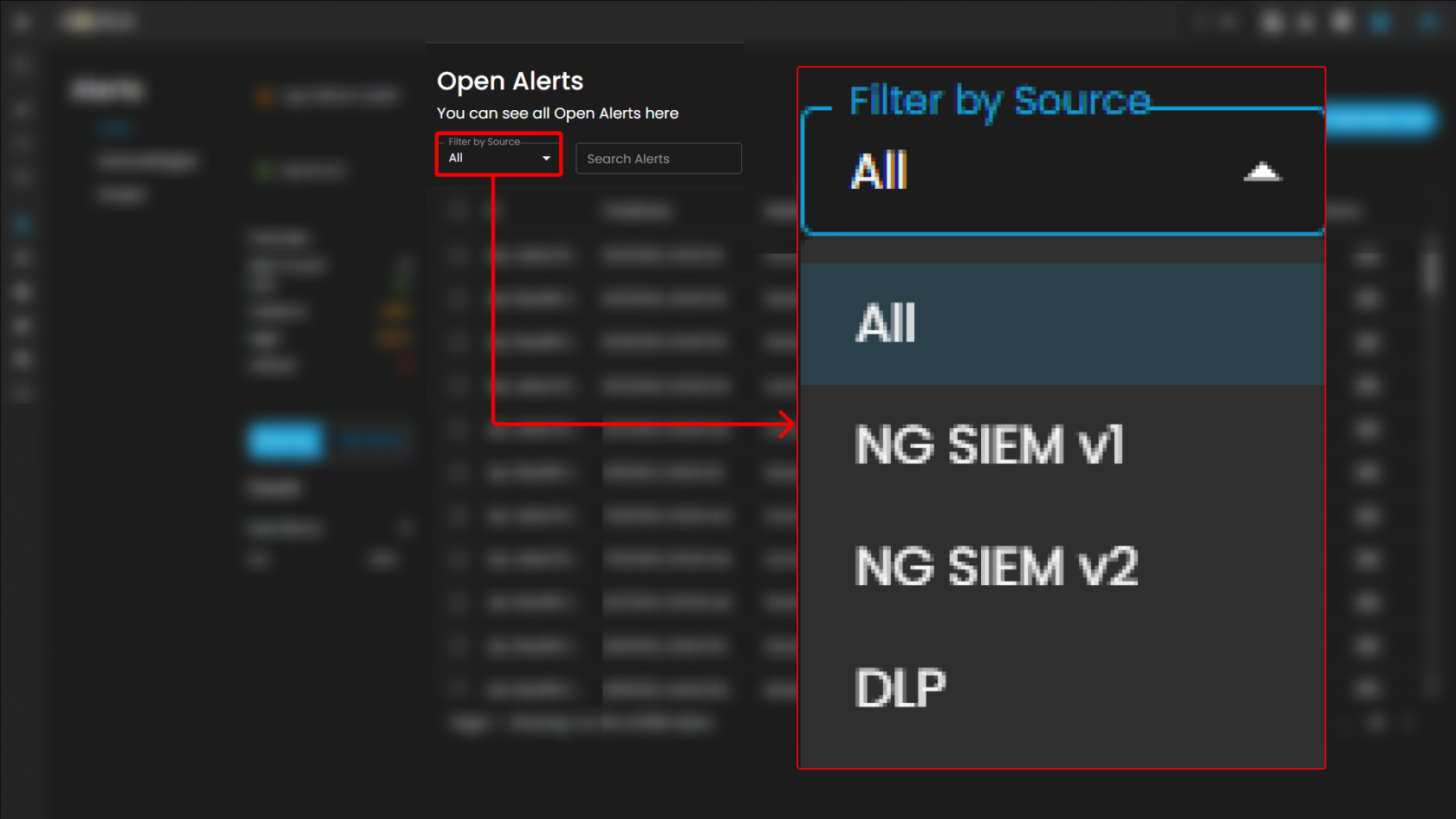
**Filter by Source:** This dropdown menu allows users to filter alerts based on their originating source. Selecting a specific source will limit the displayed alerts to only those generated by the chosen system or log source, while the default *All* option displays alerts from every available source.

[![image.png](https://cytechint-docs-bookstack.s3.amazonaws.com/uploads/images/gallery/2026-02/scaled-1680-/57z9cOxYiai2eCua-image.png)](https://cytechint-docs-bookstack.s3.amazonaws.com/uploads/images/gallery/2026-02/57z9cOxYiai2eCua-image.png)
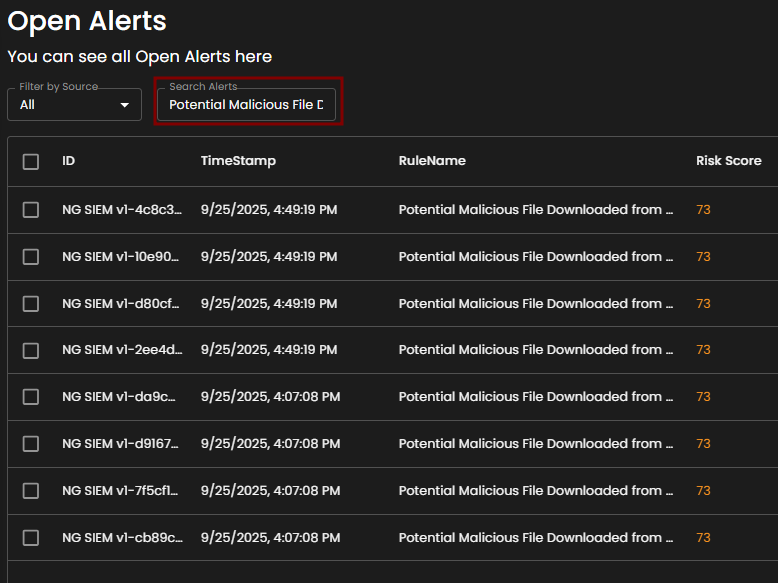
<span style="color: rgb(53, 152, 219);">**Search Alerts**</span>: This text-based search field enables users to query alerts by keywords, rule names, IDs, or other relevant attributes. Entering a search term dynamically filters the alert list, allowing users to quickly identify and focus on alerts of interest.

[![image.png](https://cytechint-docs-bookstack.s3.amazonaws.com/uploads/images/gallery/2026-02/scaled-1680-/YdMeo09lilIgJo9R-image.png)](https://cytechint-docs-bookstack.s3.amazonaws.com/uploads/images/gallery/2026-02/YdMeo09lilIgJo9R-image.png)
##### <span style="color: rgb(53, 152, 219);">**Alerts Information**</span>

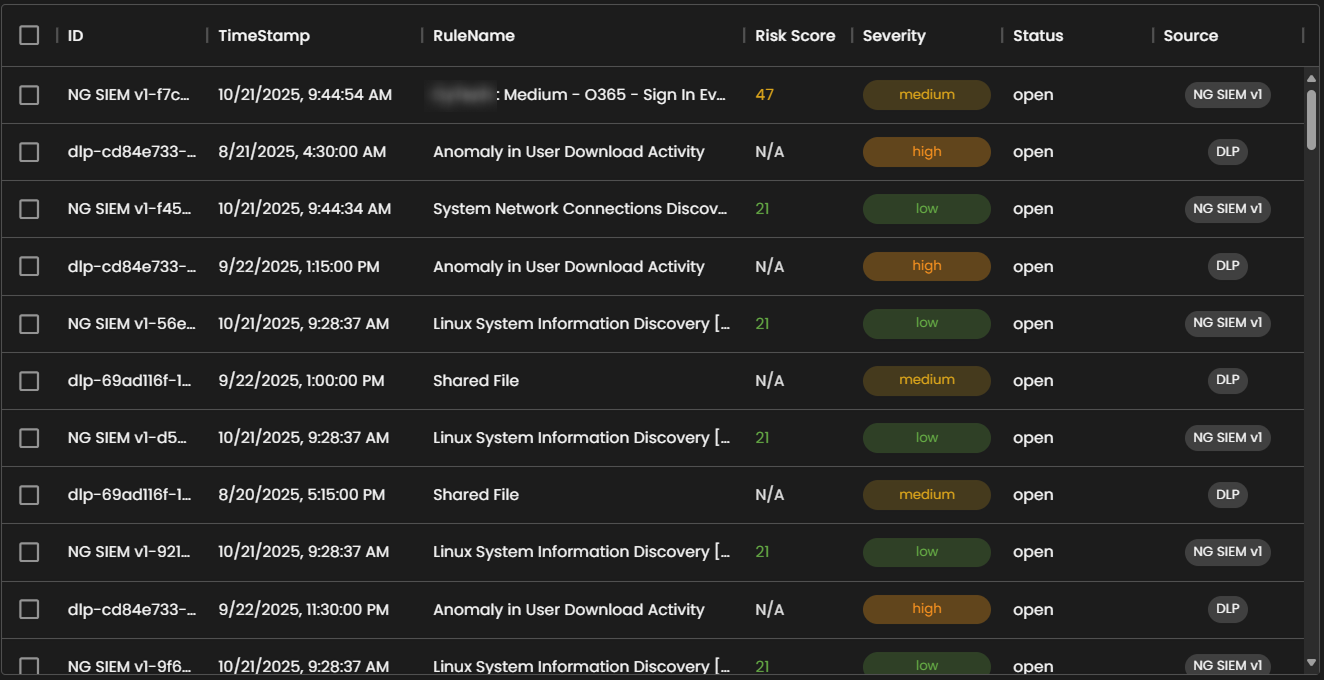
**Alerts Table** provides a detailed view of **all alerts**, organized in a tabular format for efficient **monitoring** and **analysis**. Each entry contains the following fields:

- **ID**: A unique identifier automatically assigned to each alert.
- **Timestamp**: The date and time the alert was generated, displayed in a standardized format.
- **Rule Name**: The detection rule that triggered the alert, enabling correlation with specific monitoring logic.
- **Risk Score**: A numerical value representing the assessed risk level of the alert.
- **Severity**: The severity classification (e.g., low, medium, high, critical) that contextualizes the potential impact of the event.
- **Status**: The current workflow state of the alert (e.g., open, acknowledged, closed).
- **Source**: The originating source of logs that produced the alert.

The table supports pagination to manage larger datasets, with navigation controls located at the bottom of the view. This ensures users can efficiently browse and review alerts when the total number exceeds the displayed entries per page.

[![image.png](https://cytechint-docs-bookstack.s3.amazonaws.com/uploads/images/gallery/2026-02/scaled-1680-/WdYuB2oLhFtOnAS3-image.png)](https://cytechint-docs-bookstack.s3.amazonaws.com/uploads/images/gallery/2026-02/WdYuB2oLhFtOnAS3-image.png)
##### <span style="color: rgb(53, 152, 219);">**Create a Case**</span>

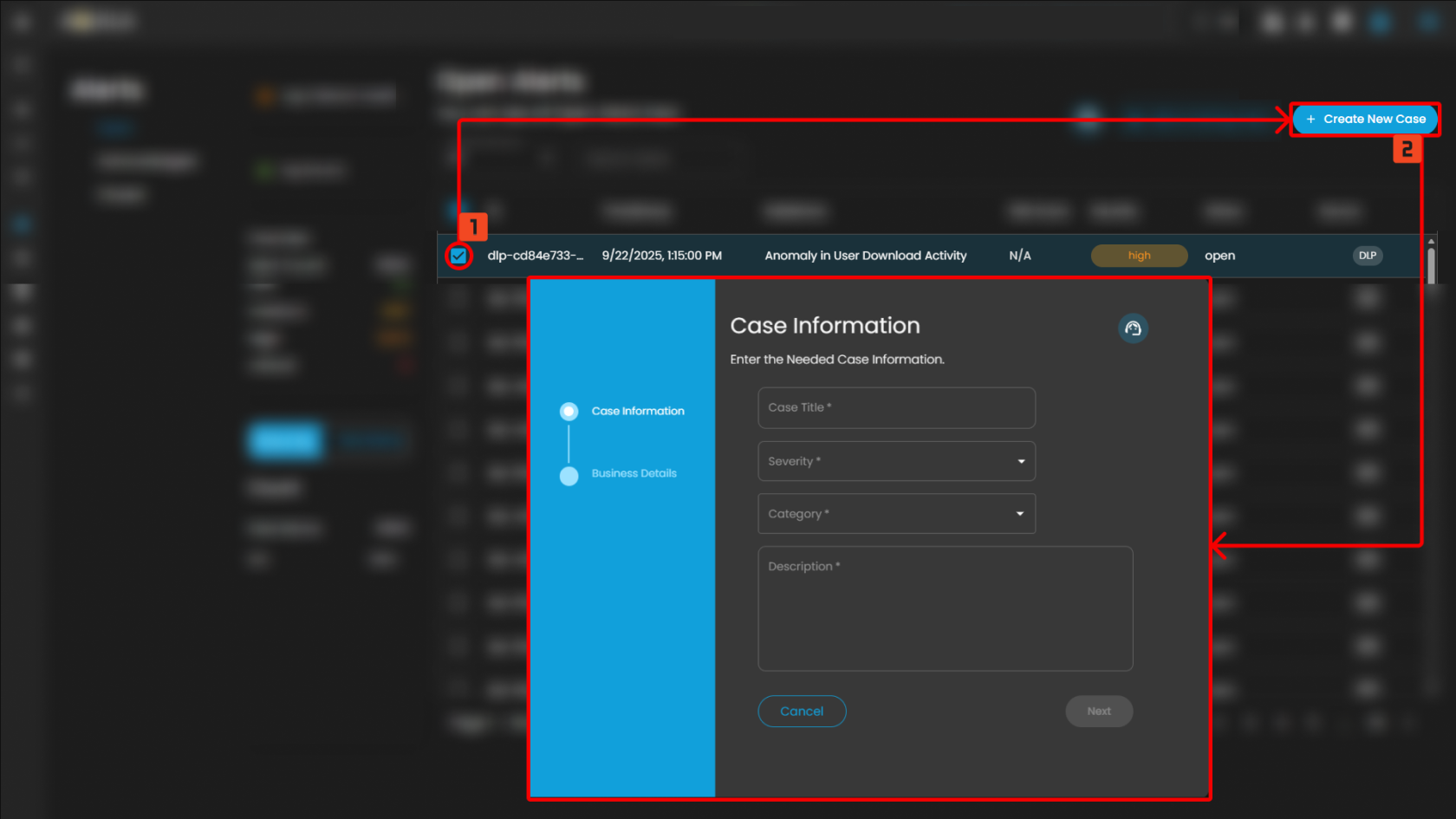
**Case Creation** involves initiating a new incident case when a security alert is detected. This process includes documenting key details about the alert, categorizing and prioritizing the case based on its severity and impact, and tracking all investigation and response activities. By creating a case, security teams can organize and manage the incident comprehensively, ensuring that all related actions and communications are centralized, which facilitates effective resolution and improves overall incident handling.

To create a case, you can opt to choose either to create a case from the Alerts Dashboard or the Case Management Dashboard.

**To create a case:**

1. **Select an alert**
2. **Click the create new case button as shown below**

Doing so will show a modal where information is required to create a case for investigation

[![image.png](https://cytechint-docs-bookstack.s3.amazonaws.com/uploads/images/gallery/2026-02/scaled-1680-/rMQuk9AwajhxUwXI-image.png)](https://cytechint-docs-bookstack.s3.amazonaws.com/uploads/images/gallery/2026-02/rMQuk9AwajhxUwXI-image.png)
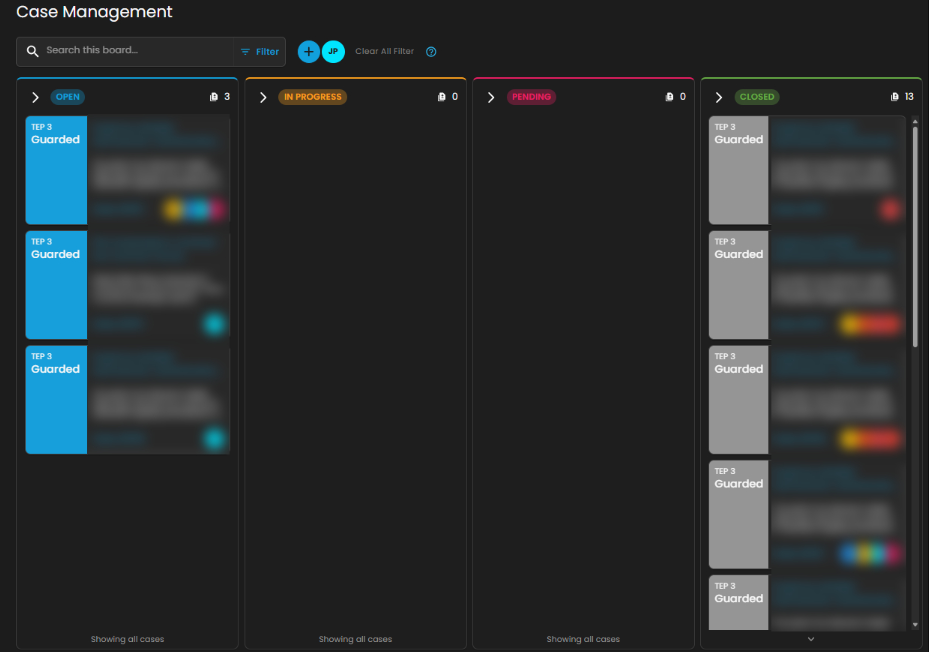
Once a case has been successfully created, it will show in the Case Management Dashboard as shown below.

[![image.png](https://cytechint-docs-bookstack.s3.amazonaws.com/uploads/images/gallery/2026-02/scaled-1680-/AqsLkvBovFWZFSse-image.png)](https://cytechint-docs-bookstack.s3.amazonaws.com/uploads/images/gallery/2026-02/AqsLkvBovFWZFSse-image.png)
##### <span style="color: rgb(53, 152, 219);">**Add Alerts to an Existing Case**</span>

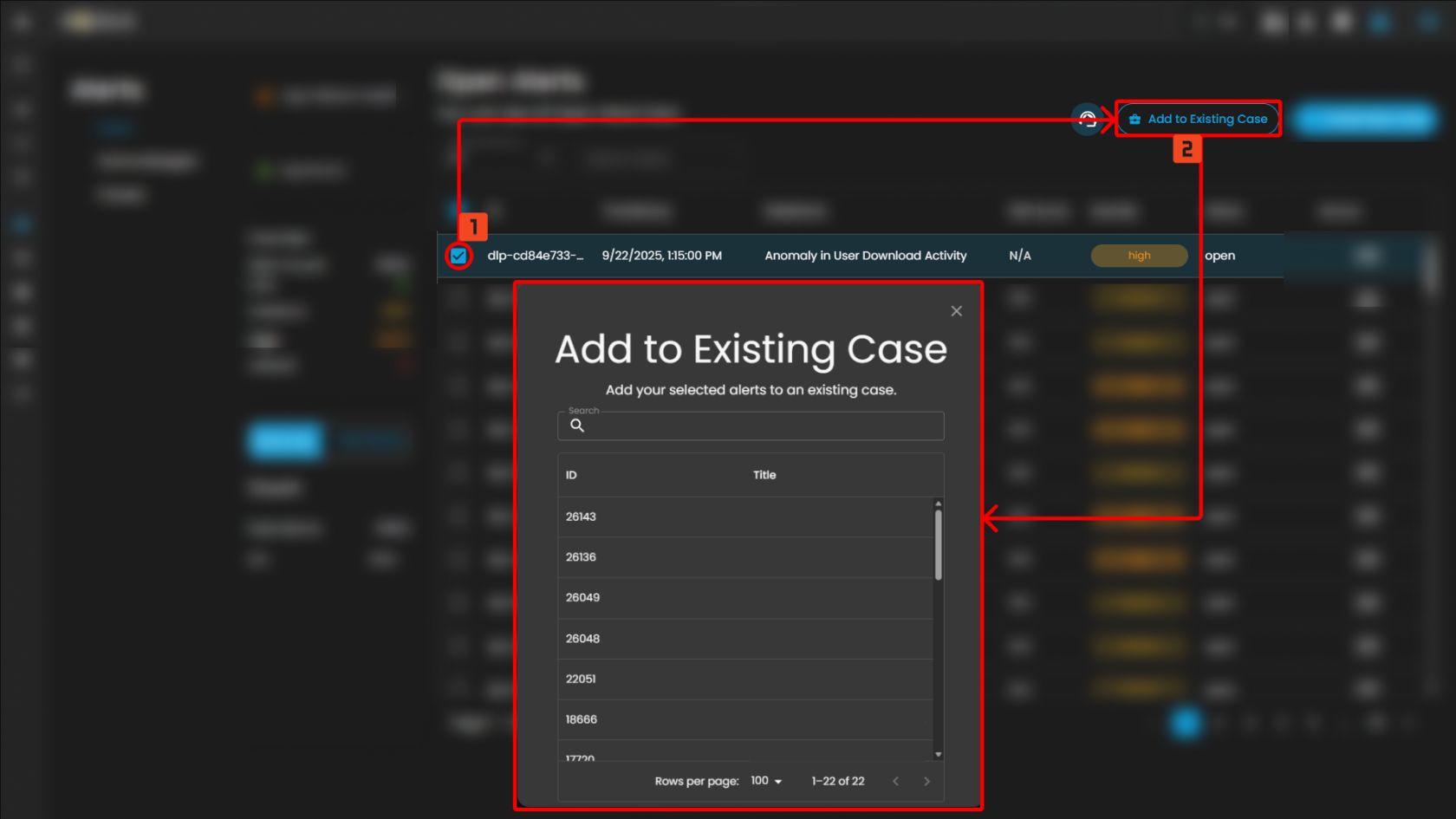
This feature allows security teams to associate a new alert with an ongoing or previously created incident case. By adding a new alert to an existing case, teams can streamline their investigation and response efforts, correlate related data, and avoid duplicating efforts.

**Steps to take:**

1. To add to an existing case, navigate to the Alerts Dashboard
2. Select an alert and click the add to existing case button as shown below
3. Select which existing case is relevant to the alert to add it as an existing case.

[![image.png](https://cytechint-docs-bookstack.s3.amazonaws.com/uploads/images/gallery/2026-02/scaled-1680-/7PR0dFdNTIbyT3df-image.png)](https://cytechint-docs-bookstack.s3.amazonaws.com/uploads/images/gallery/2026-02/7PR0dFdNTIbyT3df-image.png)
##### <span style="color: rgb(53, 152, 219);">**Support Assistance**</span>

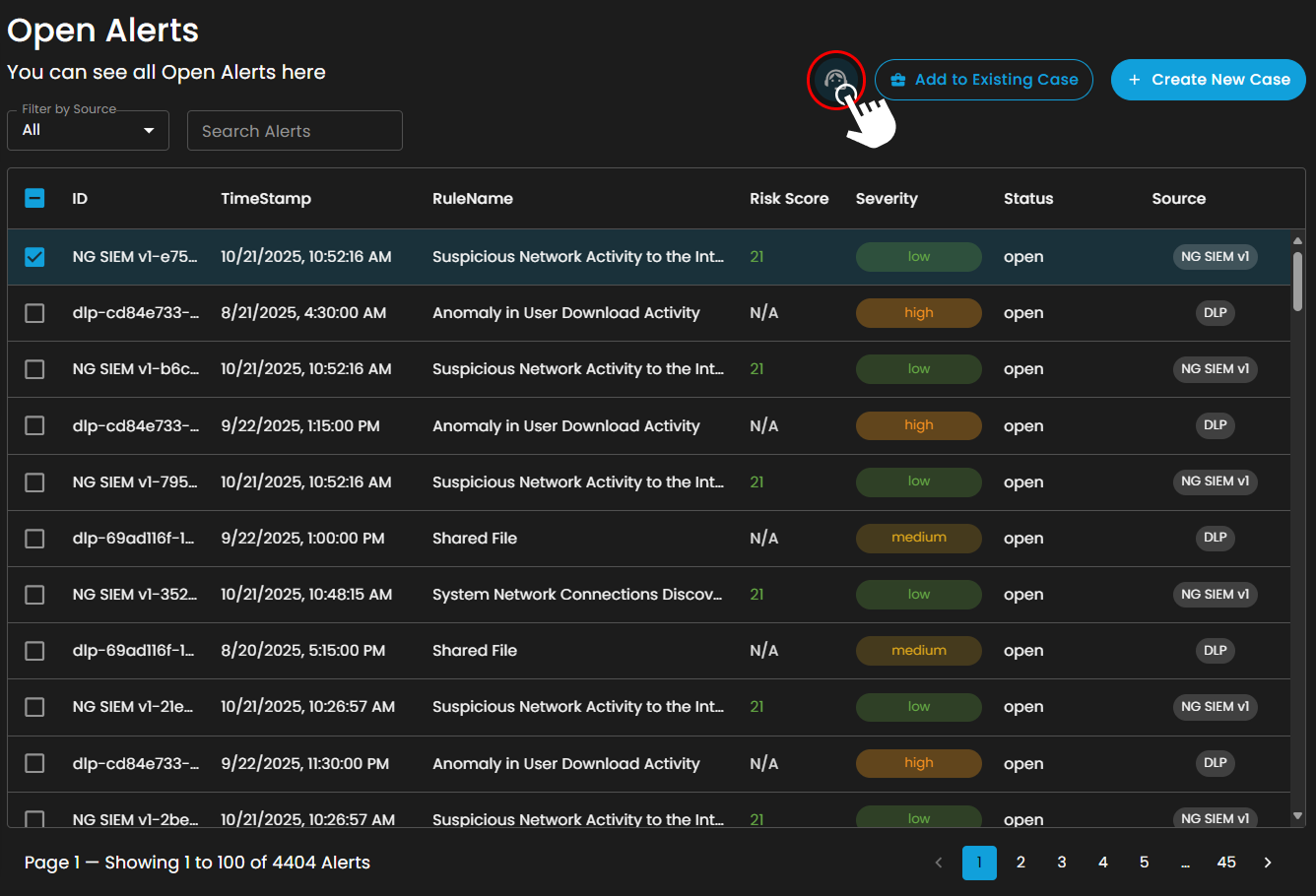
This button provides direct access to the support portal. When selected, the user is redirected to the designated support page, where the following actions are available:

- **Submit a Request**: Clients may create and submit a new support request or error report by providing the necessary details regarding the issue encountered.
- **Search Existing Tickets**: Clients can query and review tickets they have previously submitted, allowing them to track the status and resolution progress of ongoing requests.

This feature ensures that users can promptly report errors and access updates on existing support cases without leaving the Alerts interface.

[![image.png](https://cytechint-docs-bookstack.s3.amazonaws.com/uploads/images/gallery/2026-02/scaled-1680-/sI7CTqUxR1PkBWtT-image.png)](https://cytechint-docs-bookstack.s3.amazonaws.com/uploads/images/gallery/2026-02/sI7CTqUxR1PkBWtT-image.png)
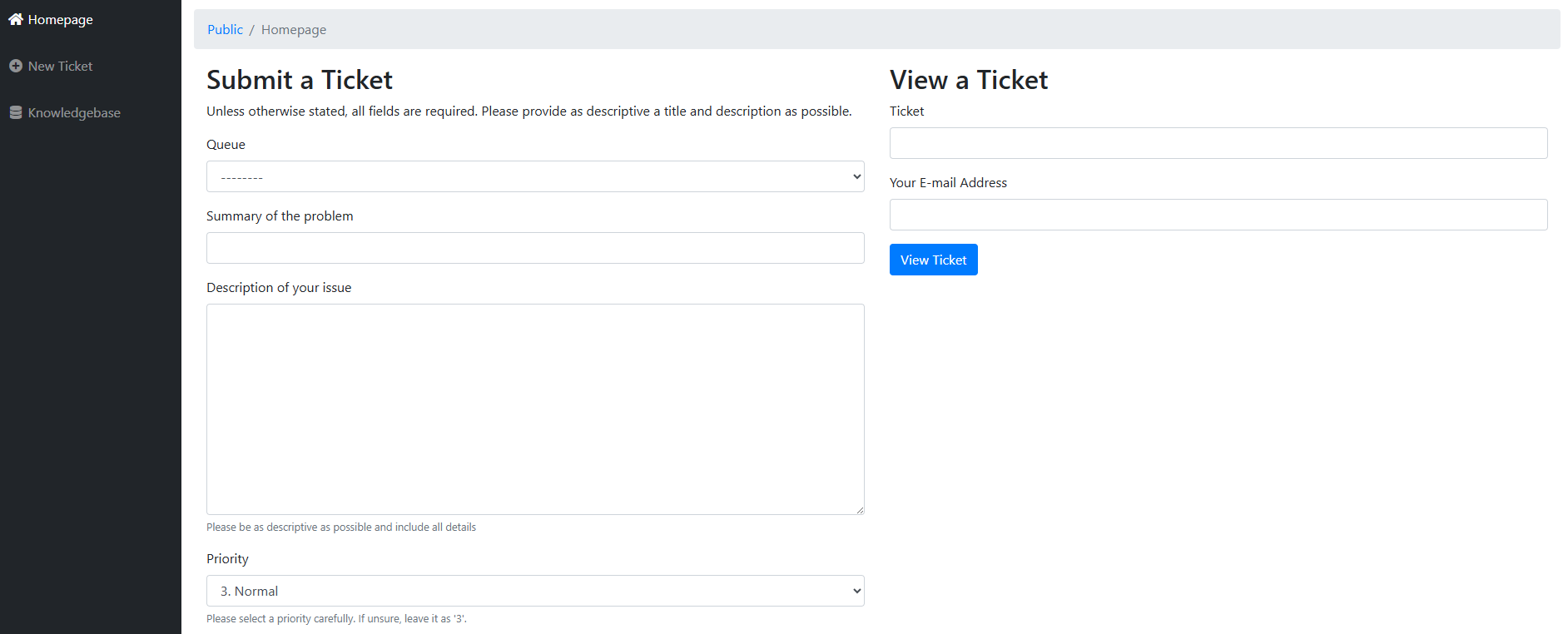
After pressing the icon, it will redirect you to the submit a ticket page where you can submit a ticket and be assisted at your module.

[![image.png](https://cytechint-docs-bookstack.s3.amazonaws.com/uploads/images/gallery/2026-02/scaled-1680-/86EPK36x0Xj1bynb-image.png)](https://cytechint-docs-bookstack.s3.amazonaws.com/uploads/images/gallery/2026-02/86EPK36x0Xj1bynb-image.png)
In conclusion, the <span style="color: rgb(53, 152, 219);">**Cyber Incident Management: Alerts**</span> plays a critical role in strengthening organizational security operations by providing a structured and systematic approach to threat detection, analysis, response, and remediation. It enhances real-time monitoring capabilities, streamlines incident classification and escalation processes, and ensures efficient coordination among security teams. By centralizing incident data and enabling faster decision-making, the module reduces response time, minimizes potential impact, and improves overall operational resilience. Ultimately, it reinforces the organization’s cybersecurity posture by ensuring proactive risk mitigation, regulatory compliance, and continuous improvement in incident handling procedures.

<p class="callout info">Please refer to the document from the previous sub-module: [CyTech AQUILA - Cyber Incident Management (CIM): Dashboard](https://usdc-docs.cytechint.io/books/security-automation-soc-optimization-tOO/page/cytech-aquila-cyber-incident-management-cim-dashboard)  
  
Please refer to the document for the next sub-module: [CyTech AQUILA - Cyber Incident Management (CIM): Cases](https://usdc-docs.cytechint.io/books/security-automation-soc-optimization-tOO/page/cytech-aquila-cyber-incident-management-cim-cases)</p>

*If you need further assistance, kindly contact our support at [support@cytechint.com](mailto:info@cytechint.com) for prompt assistance and guidance.*

# CyTech AQUILA - Cyber Incident Management (CIM): Cases

#### **Introduction**

**Case Management Dashboard** is a tool that provides a comprehensive overview of security incidents. It offers detailed insights into active and past incidents, including their status, severity, and timeline. The dashboard facilitates investigation and response by integrating real-time alerts, threat intelligence, and collaboration features, while also tracking performance metrics and compliance. This centralized approach enhances the efficiency of managing and resolving security incidents, ensuring timely and effective responses to mitigate risks and improve overall security posture.

[![image.png](https://cytechint-docs-bookstack.s3.amazonaws.com/uploads/images/gallery/2026-02/scaled-1680-/hGBa41vD9r2hb8Dj-image.png)](https://cytechint-docs-bookstack.s3.amazonaws.com/uploads/images/gallery/2026-02/hGBa41vD9r2hb8Dj-image.png)
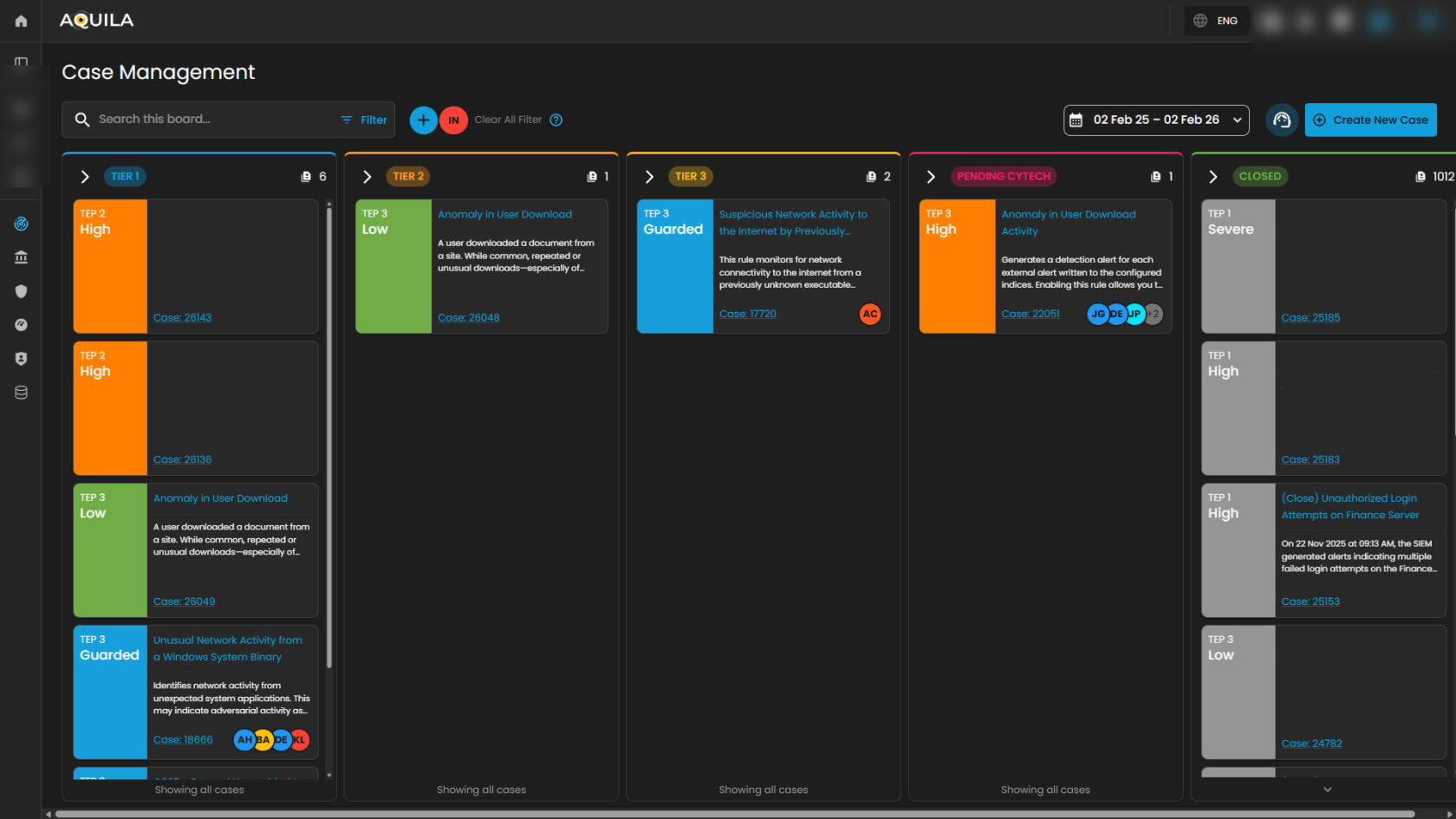
#### **Workflow Stages**

**1. Tier 1 – Initial Triage Cases**

- - **SOC Role**: *Tier 1 Analyst (Junior Analyst / Alert Triage)*.
    - **Purpose**: These cases represent **low-level alerts** or **first-line detections** that require quick review and initial triage.
    - **Activities**:
        
        
        - Validate whether the alert is a *false positive* or *true positive*.
        - Collect basic context (e.g., user, host, timestamp, IP address).
        - Escalate to Tier 2 if suspicious behavior is confirmed.
    - **Example from Dashboard**:
        
        
        - *O365 – Access Request Created (Low severity)*.
    - **Outcome**: Often resolved at Tier 1 if clearly benign, otherwise escalated.

---

**2. Tier 2 – Investigation Cases**

- - **SOC Role**: *Tier 2 Analyst (Intermediate / Incident Responder)*.
    - **Purpose**: These are **guarded alerts** requiring **deeper investigation** and contextual analysis.
    - **Activities**:
        
        
        - Correlate the alert with other logs or events (threat hunting, SIEM searches).
        - Investigate user behavior, process execution, network activity.
        - Assess potential adversary techniques (e.g., MITRE ATT&amp;CK mapping).
    - **Example from Dashboard**:
        
        
        - *Unusual Network Activity from a Windows System Binary*.
        - *Attempts to Brute Force Microsoft 365 User Account*.
    - **Outcome**: If confirmed malicious, escalated to Tier 3 for containment and response.

---

**3. Tier 3 – Advanced Investigation / Threat Containment**

- - **SOC Role**: *Tier 3 Analyst (Senior Incident Responder / Threat Hunter)*.
    - **Purpose**: These are **high-complexity or high-risk cases** requiring advanced analysis and incident response expertise.
    - **Activities**:
        
        
        - Perform in-depth forensic analysis.
        - Identify persistence, lateral movement, or exfiltration attempts.
        - Contain compromised systems or accounts.
        - Recommend remediation actions (patching, isolating endpoints, resetting credentials).
    - **Example from Dashboard**:
        
        
        - *Suspicious Network Activity to Internet by Unknown Executable*.
        - *System Network Connections Discovery*.
    - **Outcome**: Leads to confirmed incident reports, escalation to management, or remediation workflows.

---

**4. Pending – Escalated to Vendor/Support**

- - **SOC Role**: *Escalation Analysts / Vendor Support*.
    - **Purpose**: Cases flagged here are **awaiting validation or support from the vendor**. This stage ensures:
        
        
        - Validation of unusual detections.
        - Vendor-side investigation (e.g., signature tuning, false positive confirmation).
        - Guidance from product experts.
    - **Example from Dashboard**:
        
        
        - *Anomaly in User Download Activity (High severity)* pending Client validation.
    - **Outcome**: Case is updated and either closed, tuned, or sent back to SOC for action.

---

**5. Closed – Resolved or Dismissed Cases**

- - **SOC Role**: *Any Tier but validated and approved before closure*.
    - **Purpose**: Contains all cases that are **resolved, dismissed as false positives, or remediated**.
    - **Activities**:
        
        
        - Document final analysis and resolution steps.
        - Mark case as *False Positive*, *True Positive – Remediated*, or *Informational*.
        - Archive for compliance, auditing, and reporting.
    - **Outcome**: Closes the incident lifecycle. Closed cases can still be reviewed for reporting and lessons learned.

##### **Operational Workflow in SOC Terms**

1. **Detection → Tier 1** triages incoming alerts.
2. **Validation → Tier 2** investigates and correlates data.
3. **Escalation → Tier 3** performs deep analysis and containment.
4. **External Escalation → Pending** for vendor validation/support.
5. **Closure → Closed** with full documentation and resolution notes.

##### **Search and Date Filtering**

The **Case Management** interface provides filtering and search capabilities to streamline case navigation and improve analyst efficiency. These functions enable analysts to quickly locate specific cases or limit the view to a defined time range.

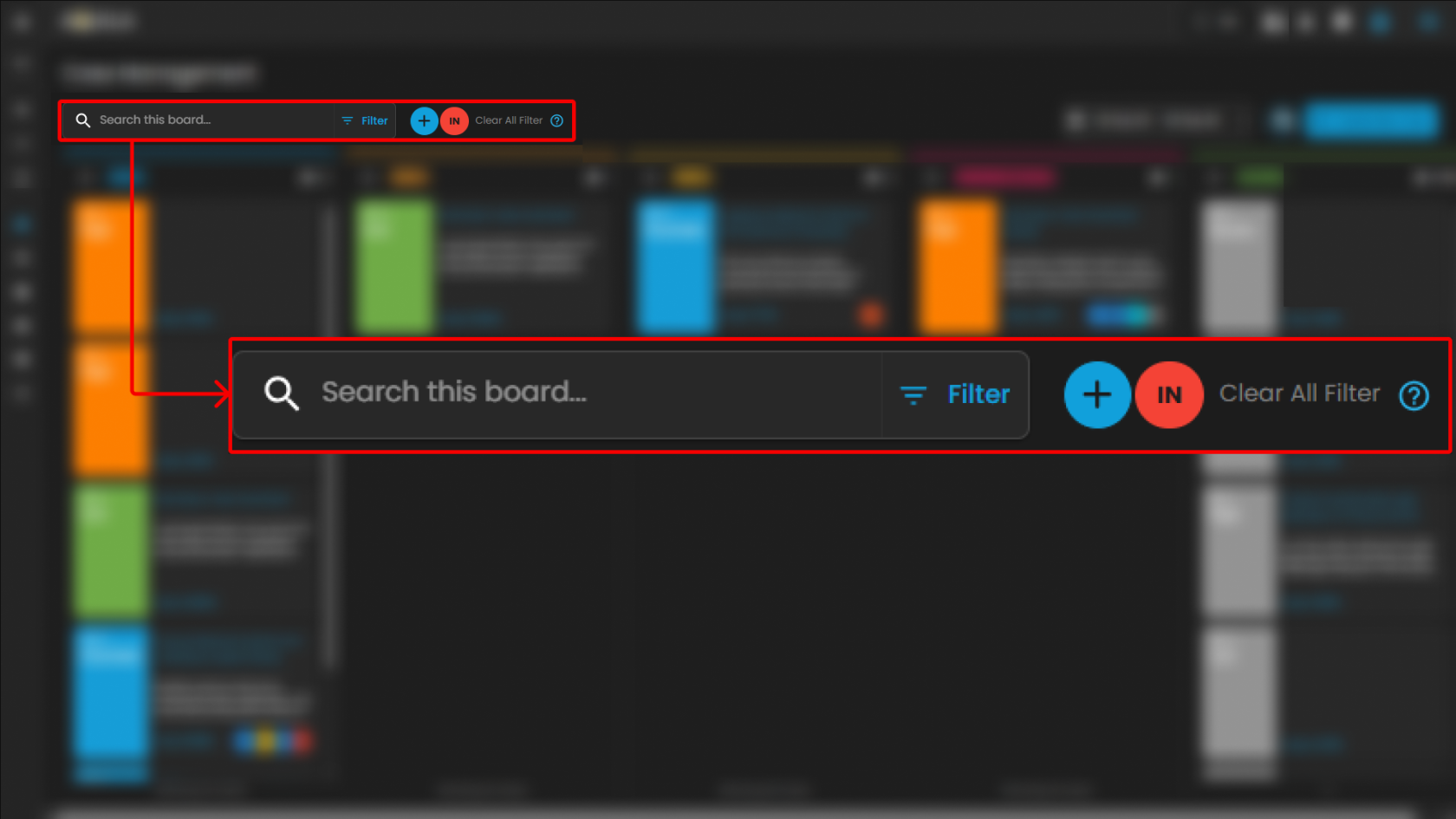
**Search Bar**

- **Location**: Positioned at the top-left of the Case Management interface.
- **Purpose**: Enables analysts to perform keyword-based searches across all available cases within the board.
- **Functionality**:
    
    
    - Accepts free-text input such as **case IDs**, **rule names**, **case titles**, or **descriptive terms**.
    - Returns a filtered set of cases that match the entered criteria.
    - Supports rapid retrieval of specific cases without manual scrolling through case columns.
- **Use Case in SOC Operations**:
    
    
    - Analysts can locate a case associated with a particular user or alert type during triage.
    - Facilitates targeted investigation by narrowing down large datasets to a manageable subset.

[![image.png](https://cytechint-docs-bookstack.s3.amazonaws.com/uploads/images/gallery/2026-02/scaled-1680-/fD9m8H8ZLye6FXMm-image.png)](https://cytechint-docs-bookstack.s3.amazonaws.com/uploads/images/gallery/2026-02/fD9m8H8ZLye6FXMm-image.png)
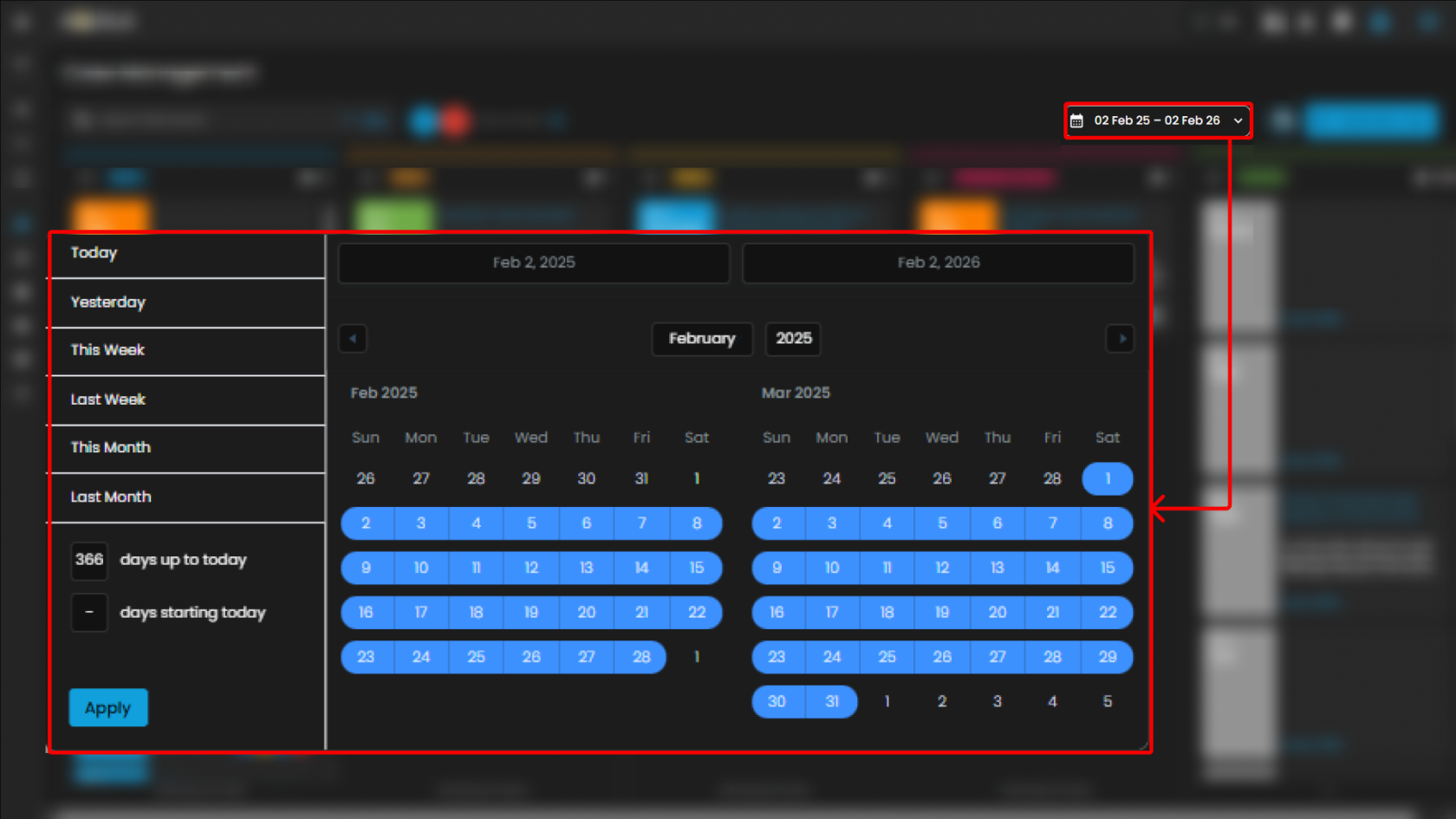
**Date Filter**

- **Location**: Displayed in the top-right section of the Case Management interface, adjacent to the “Create New Case” button.
- **Purpose**: Allows analysts to filter cases based on a specified date range.
- **Functionality**:
    
    
    - Provides a selectable calendar input with predefined and custom ranges (e.g., “**01 Jan 24 – 31 Dec 25**”).
    - Adjusts the case board to display only cases that fall within the chosen timeframe.
    - Ensures time-specific investigations can be conducted efficiently.
- **Use Case in SOC Operations**:
    
    
    - Supports incident review during a specified monitoring period (e.g., weekly/monthly threat activity reviews).
    - Enables correlation of cases to a known attack campaign or investigation window.
    - Assists with compliance reporting by extracting cases within regulatory audit timelines.

[![image.png](https://cytechint-docs-bookstack.s3.amazonaws.com/uploads/images/gallery/2026-02/scaled-1680-/ms9Nez6j6ISVtmzX-image.png)](https://cytechint-docs-bookstack.s3.amazonaws.com/uploads/images/gallery/2026-02/ms9Nez6j6ISVtmzX-image.png)
##### **Create New Case and Support**

The **Case Management** interface includes two primary action buttons located at the top-right of the screen: **Create New Case** and **Support**. These options enable analysts to initiate new investigations and provide clients with direct access to technical support resources when required.

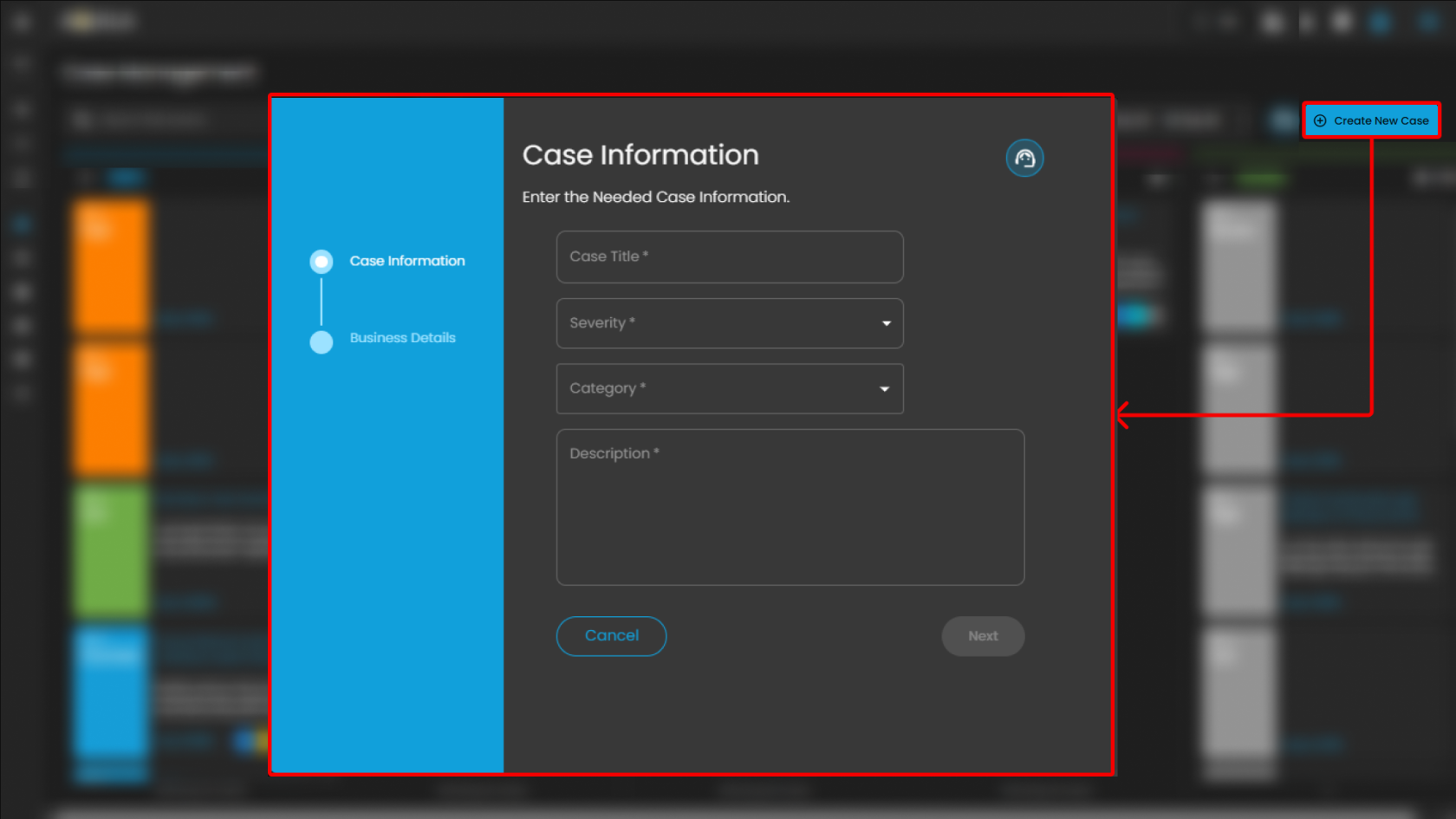
**Create New Case**

- **Purpose**: Enables analysts to manually initiate and document a new security case.
- **Functionality**:
    
    
    - When selected, the system displays a form where analysts can input case details, including title, description, severity, and assigned users.
    - Once submitted, the new case appears within the appropriate case column (e.g., ***Tier 1***) for tracking and escalation.
- **Use Case in SOC Operations**:
    
    
    - Allows analysts to proactively log incidents that may not have been automatically generated by alerts.
    - Facilitates documentation of investigations that originate from external intelligence sources, manual threat hunting, or analyst observations.

**Support**

- **Purpose**: Provides clients with direct access to the support portal for issue resolution and ticket management.
- **Functionality**:
    
    
    - When selected, the client is redirected to the **Support page**.
    - The Support page provides two primary options:
        
        
        1. **Submit a New Ticket** – Allows clients to report errors, technical issues, or product-related concerns.
        2. **Search Existing Tickets** – Enables clients to view and track the status of tickets they have previously submitted.
- **Use Case for Clients**:
    
    
    - Allows clients to escalate platform issues or request assistance directly from support.
    - Provides visibility into both new and ongoing tickets for efficient follow-up.
    - Ensures that clients can maintain continuity of operations by receiving timely support when technical difficulties arise.

[![image.png](https://cytechint-docs-bookstack.s3.amazonaws.com/uploads/images/gallery/2026-02/scaled-1680-/F8VRXMqWDOUS1Phy-image.png)](https://cytechint-docs-bookstack.s3.amazonaws.com/uploads/images/gallery/2026-02/F8VRXMqWDOUS1Phy-image.png)
The Cyber Incident Management (CIM): Cases module serves as a centralized case management system that enables structured handling, tracking, and escalation of security incidents across operational tiers (Tier 1, Tier 2, and Tier 3). It facilitates seamless case transfer and collaboration between analysts, ensuring proper investigation workflows, accountability, and timely resolution.

In addition, the module functions as a comprehensive repository of historical cases, providing valuable reference data for recurring or similar incidents across different clients. This historical intelligence supports more accurate analysis, faster root cause identification, and improved response strategies.

By maintaining detailed case documentation, escalation records, and investigative findings, the CIM: Cases module enhances operational efficiency, standardizes incident response procedures, and strengthens the overall effectiveness of daily security investigations within the Security Operations Center (SOC).

<p class="callout info">Please refer to the document from the previous sub-module: **[CyTech AQUILA - Cyber Incident Management (CIM): Alerts](https://usdc-docs.cytechint.io/books/security-automation-soc-optimization-tOO/page/cytech-aquila-cyber-incident-management-cim-alerts)**  
  
Please refer to the document for the next sub-module: **[CyTech AQUILA - Cyber Incident Management (CIM): Data Explorer](https://usdc-docs.cytechint.io/books/security-automation-soc-optimization-tOO/page/cytech-aquila-cyber-incident-management-cim-data-explorer)**  
</p>

*If you need further assistance, kindly contact our support at [support@cytechint.com](mailto:info@cytechint.com) for prompt assistance and guidance.*

# CyTech AQUILA - Cyber Incident Management (CIM): Data Explorer

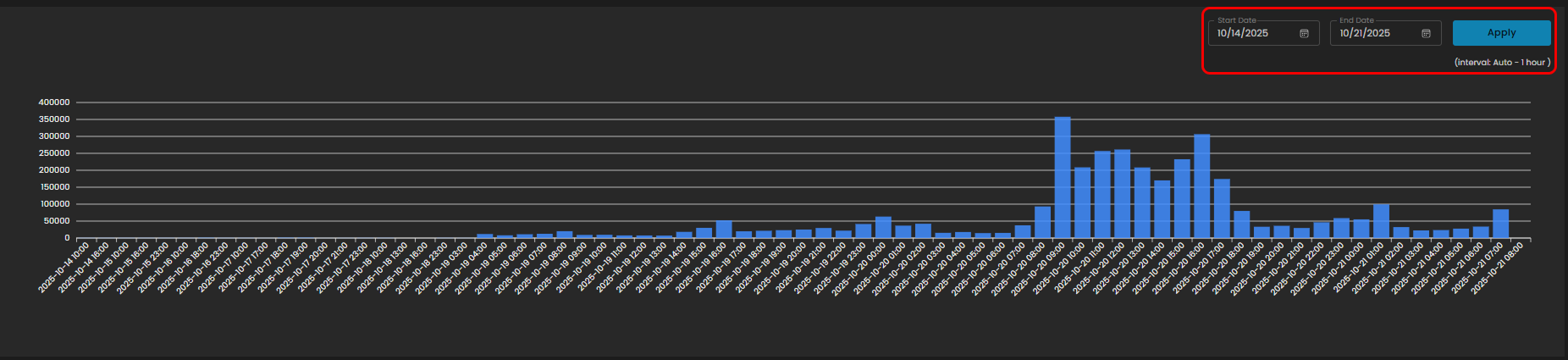
The **Data Explorer** feature provides a unified view of log ingestion and event details. It combines visual analytics and tabular data to help clients track log volumes, search for specific events, and analyze data patterns over time.

[![image.png](https://cytechint-docs-bookstack.s3.amazonaws.com/uploads/images/gallery/2026-02/scaled-1680-/Y81keWpQQqo25ivA-image.png)](https://cytechint-docs-bookstack.s3.amazonaws.com/uploads/images/gallery/2026-02/Y81keWpQQqo25ivA-image.png)
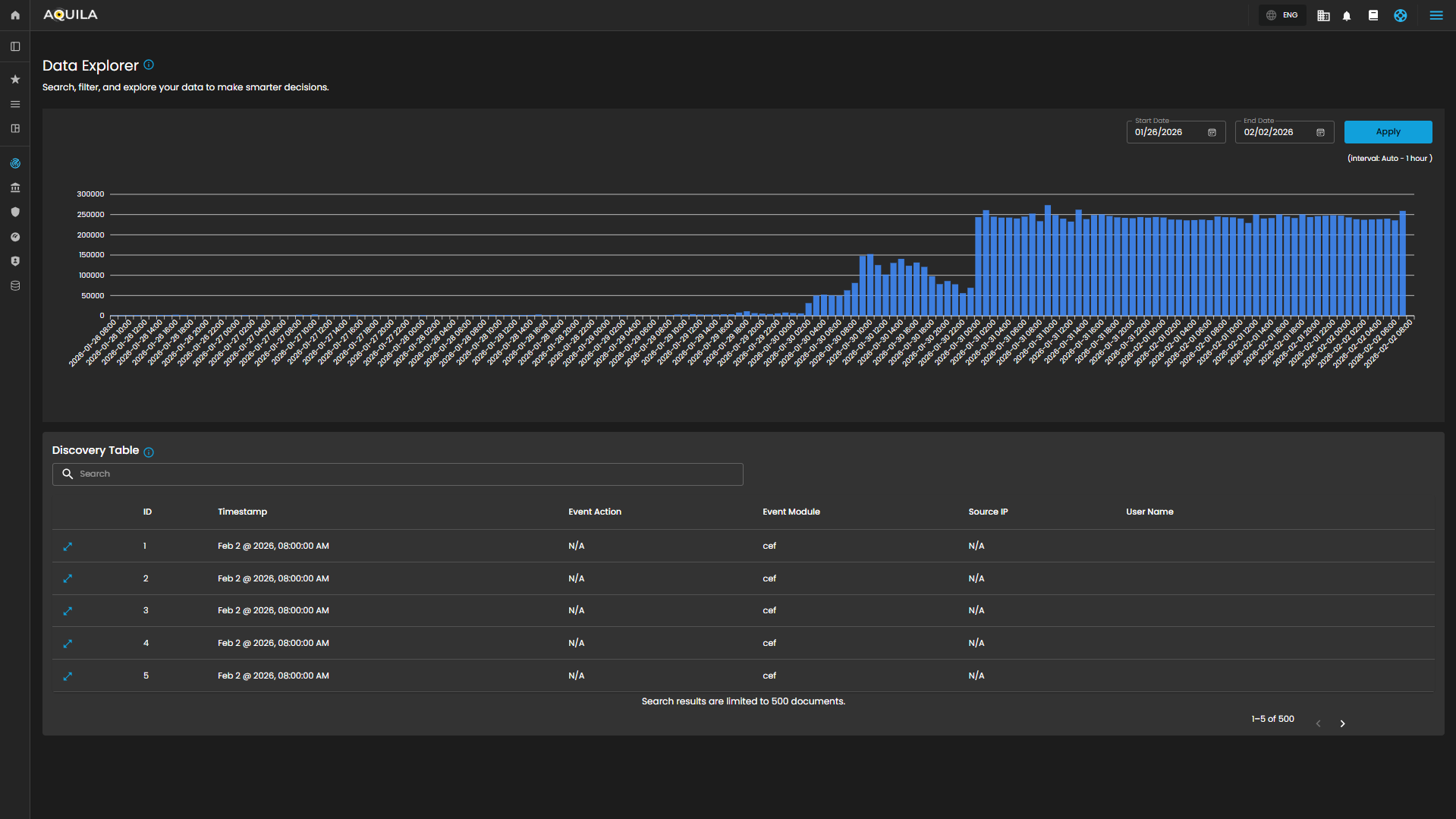
##### **Log Consumption Chart**

Displays the volume of logs ingested per hour within a selected timeframe, enabling quick identification of activity spikes, anomalies, and ingestion trends.

**Components**

- **Date Range Selector**
    - **Start Date**
    - **End Date**
    - **Apply Button**: Refreshes the chart according to the selected timeframe.
    - **Interval Note**: *(interval: Auto – 1 hour)* – data points are grouped per one-hour intervals.

[![image.png](https://cytechint-docs-bookstack.s3.amazonaws.com/uploads/images/gallery/2026-02/scaled-1680-/IanYvqD8sjw9tk7U-image.png)](https://cytechint-docs-bookstack.s3.amazonaws.com/uploads/images/gallery/2026-02/IanYvqD8sjw9tk7U-image.png)
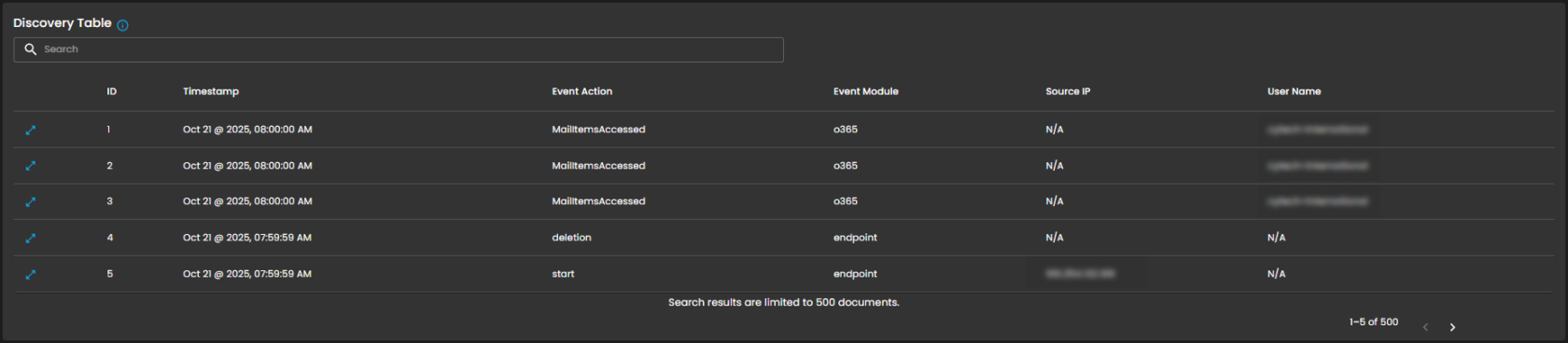
##### **Discovery Table**

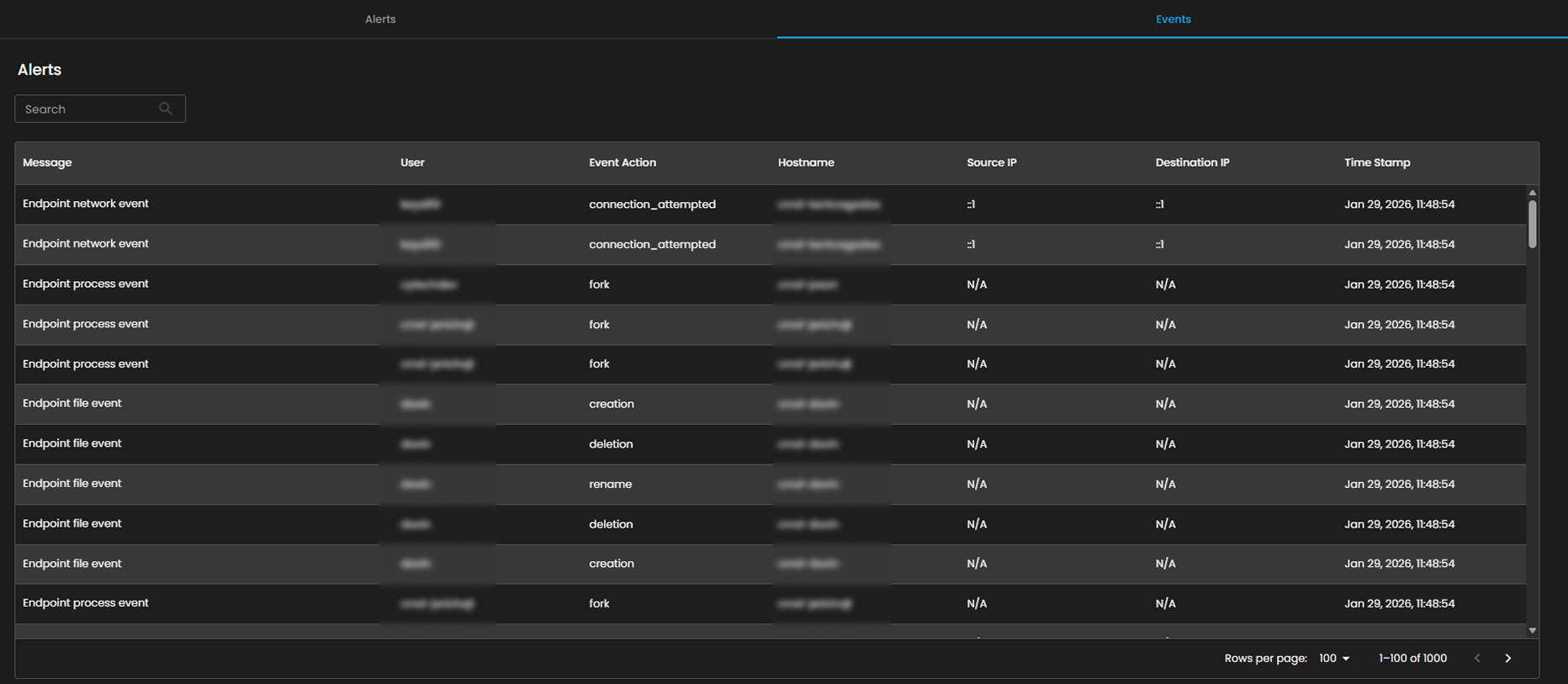
Provides detailed, event-level visibility into ingested logs for analysts. Displays logs that contain comprehensive records of activities and events, enabling analysts to search, filter, and review specific entries for investigation, correlation, and reporting.

**Components**

- ****Search Bar**:** Allows keyword-based filtering across event records**.**
- ****Tabular Columns**:**
    - **ID** – Unique identifier for each record.
    - **Timestamp** – Exact date and time the event occurred (e.g., *Sep 25, 2025, 07:59:59 AM*).
    - **Event Action** – Action performed within the event (e.g., *ListObjects*, *fork*).
    - **Event Module** – Source module of the event (e.g., *aws*, *endpoint*).
    - **Source IP** – Origin IP of the event.
    - **User Name** – User associated with the event.

[![image.png](https://cytechint-docs-bookstack.s3.amazonaws.com/uploads/images/gallery/2026-02/scaled-1680-/Gjwzxc7QHNPPHzFs-image.png)](https://cytechint-docs-bookstack.s3.amazonaws.com/uploads/images/gallery/2026-02/Gjwzxc7QHNPPHzFs-image.png)
##### **Functional Insights**

**Correlation Between Chart and Table**

- The chart provides an aggregated, volume-based overview of logs.
- The discovery table provides granular event details, allowing analysts to trace which specific actions contributed to spikes in log activity.

**Analyst Use Case**

- Analysts can monitor ingestion volumes, then drill down into specific events for deeper investigation.
- **Example:** A spike in logs on *09/24/2025 11:00* may be investigated by reviewing the detailed event records in the table.

Overall, the Data Explorer sub-domain plays a critical role in strengthening cybersecurity operations through comprehensive log monitoring and analysis.

<p class="callout info">Please refer to the document from the previous sub-module: **[CyTech AQUILA - Cyber Incident Management (CIM): Cases](https://usdc-docs.cytechint.io/books/security-automation-soc-optimization-tOO/page/cytech-aquila-cyber-incident-management-cim-cases)**  
  
Please refer to the document for the next sub-module: **[CyTech AQUILA - Cyber Incident Management (CIM): Reports](https://usdc-docs.cytechint.io/books/security-automation-soc-optimization-tOO/page/cytech-aquila-cyber-incident-management-cim-reports)**  
</p>

*If you need further assistance, kindly contact our support at [support@cytechint.com](mailto:info@cytechint.com) for prompt assistance and guidance.*

# CyTech AQUILA - Cyber Incident Management (CIM): Reports

The **Reports Dashboard** provides a centralized interface for monitoring, analyzing, and reviewing security tickets and alert activity within a defined date range. It consolidates data into visual charts and categorized metrics, enabling analysts to evaluate incident trends, ticket statuses, and alert sources for more effective decision-making.

[![image.png](https://cytechint-docs-bookstack.s3.amazonaws.com/uploads/images/gallery/2026-02/scaled-1680-/hRqbKbr19AbBcsfF-image.png)](https://cytechint-docs-bookstack.s3.amazonaws.com/uploads/images/gallery/2026-02/hRqbKbr19AbBcsfF-image.png)
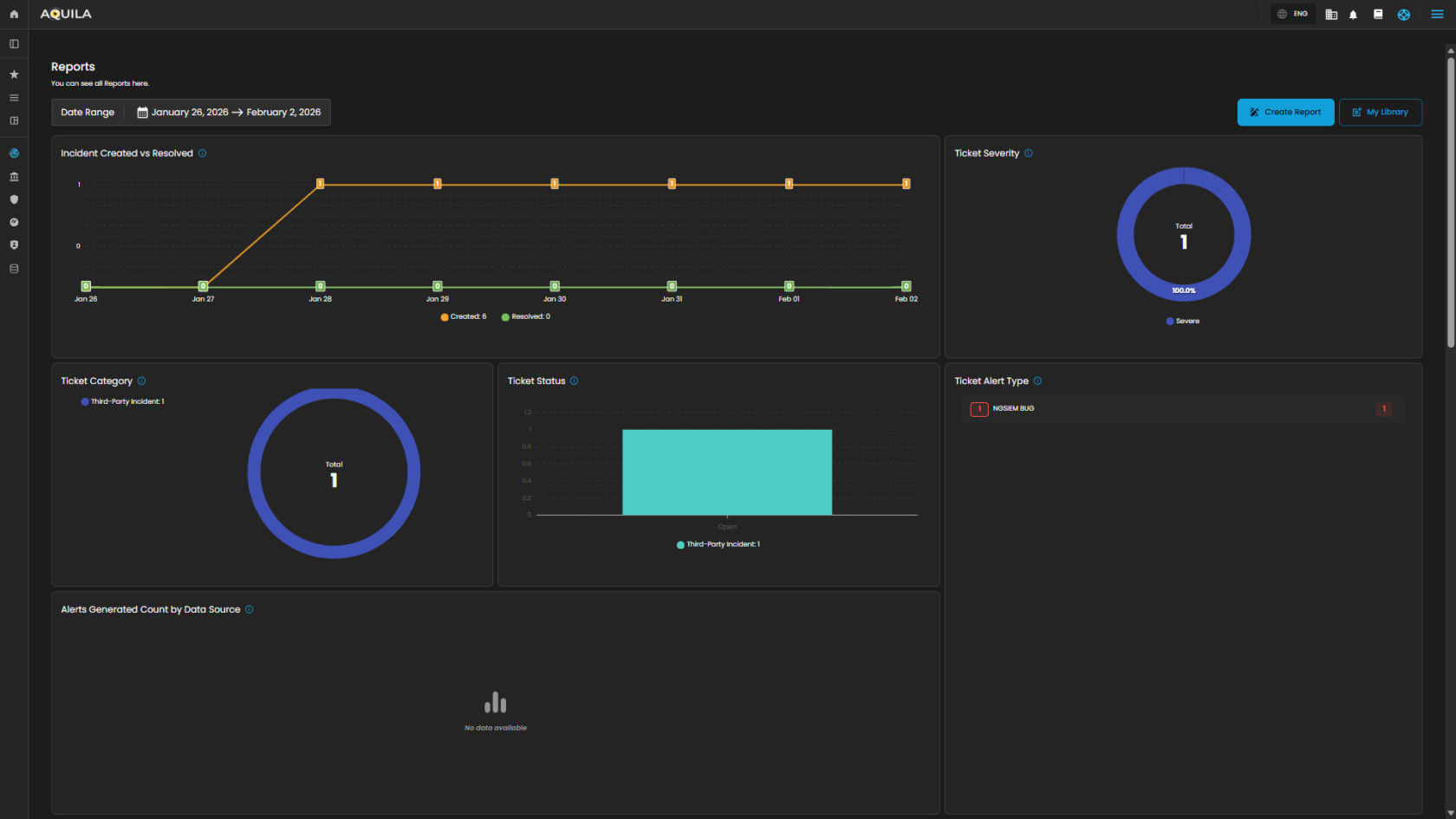
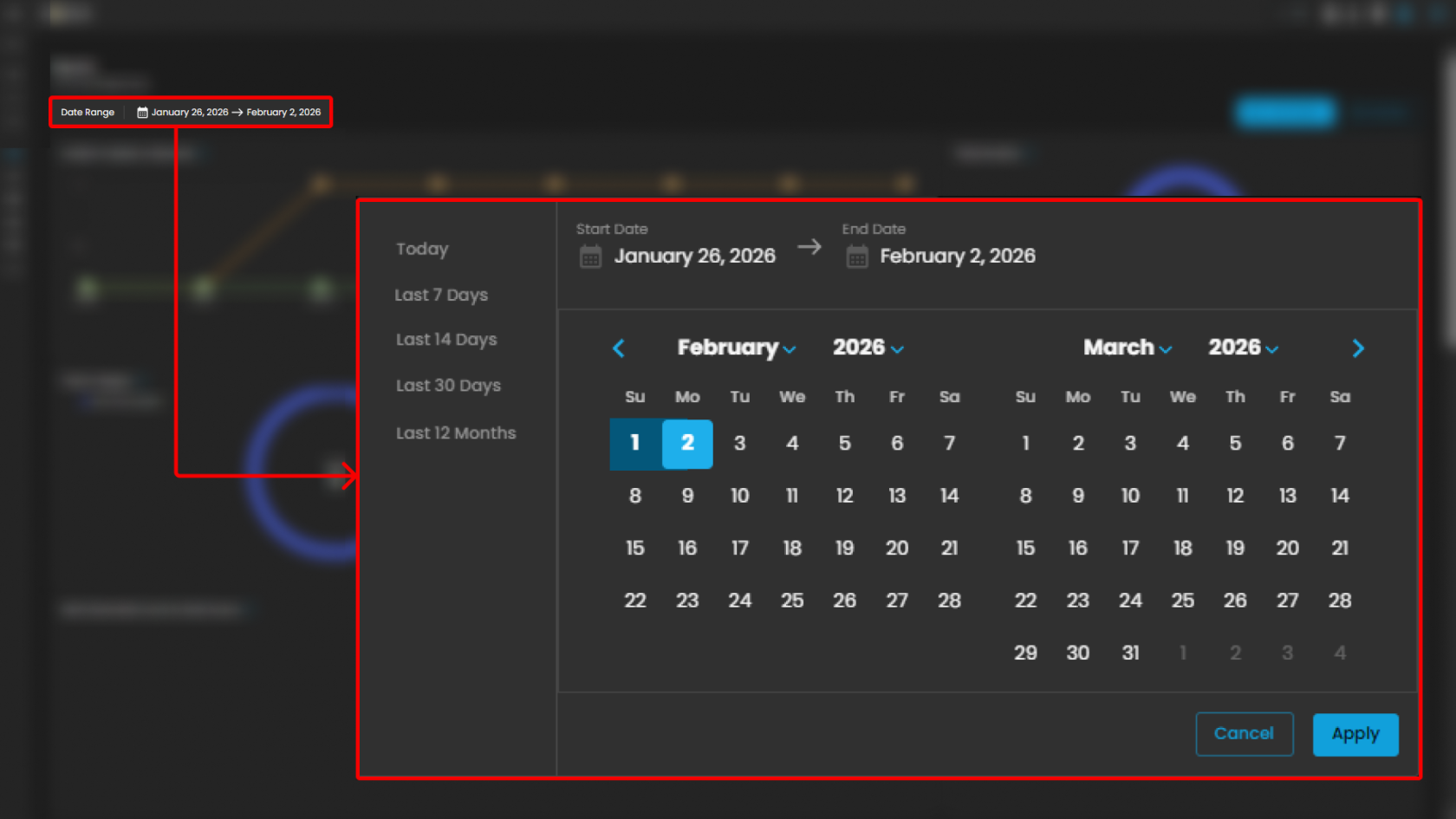
##### **Date Range Selector**

Defines the reporting period for all displayed metrics.

**Functionality:**

- When the user clicks on the **Date Range** field, a calendar pop-up appears.
- The calendar allows analysts to specify both **Start Date** and **End Date**.
- Predefined quick ranges are available for convenience:
    
    
    - **Today**
    - **Last 7 Days**
    - **Last 14 Days**
    - **Last 30 Days**
    - **Last 12 Months**
- Users can also select custom ranges directly from the calendar by clicking the desired start and end dates.
- Once the range is selected, the analyst can either:
    
    
    - **Apply** → Confirm and refresh dashboard data.
    - **Cancel** → Exit without changes.

**Operational Insight:**

- Enables analysts to generate **time-bound reports** for specific investigations (e.g., reviewing alerts during a known phishing campaign window).
- Quick ranges are useful for standard reporting periods (weekly, monthly, quarterly).
- Custom ranges support flexibility when investigating incidents that cross standard reporting boundaries.

[![image.png](https://cytechint-docs-bookstack.s3.amazonaws.com/uploads/images/gallery/2026-02/scaled-1680-/fK3B3ZAEPzdliRAd-image.png)](https://cytechint-docs-bookstack.s3.amazonaws.com/uploads/images/gallery/2026-02/fK3B3ZAEPzdliRAd-image.png)
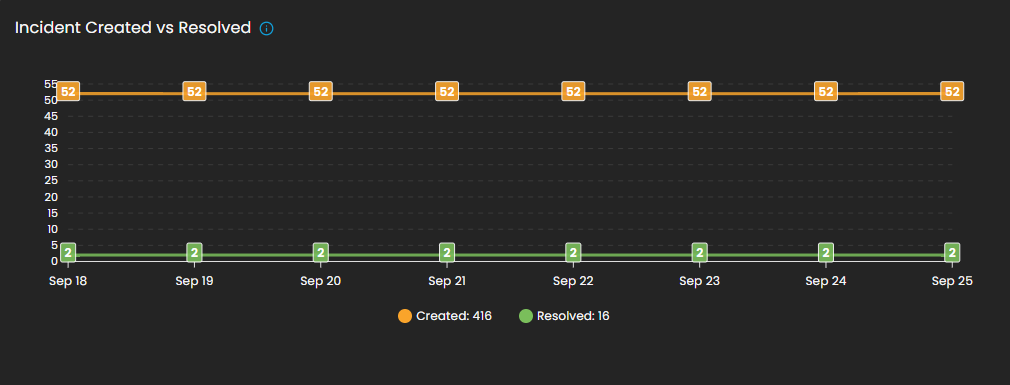
##### **Incident Created vs Resolved**

This graph shows the number of incidents **created** vs. **resolved**, depending on the selected date timeline.

- **Visualization:** Line chart with two metrics:
    
    
    - **Created (orange line):** Total number of incidents raised during the reporting period.
    - **Resolved (green line):** Total number of incidents successfully closed.
- **Purpose:** Enables analysts to assess case resolution efficiency compared to incident creation rates.

[![image.png](https://cytechint-docs-bookstack.s3.amazonaws.com/uploads/images/gallery/2026-02/scaled-1680-/ESq6yoMmdFcOkBM9-image.png)](https://cytechint-docs-bookstack.s3.amazonaws.com/uploads/images/gallery/2026-02/ESq6yoMmdFcOkBM9-image.png)
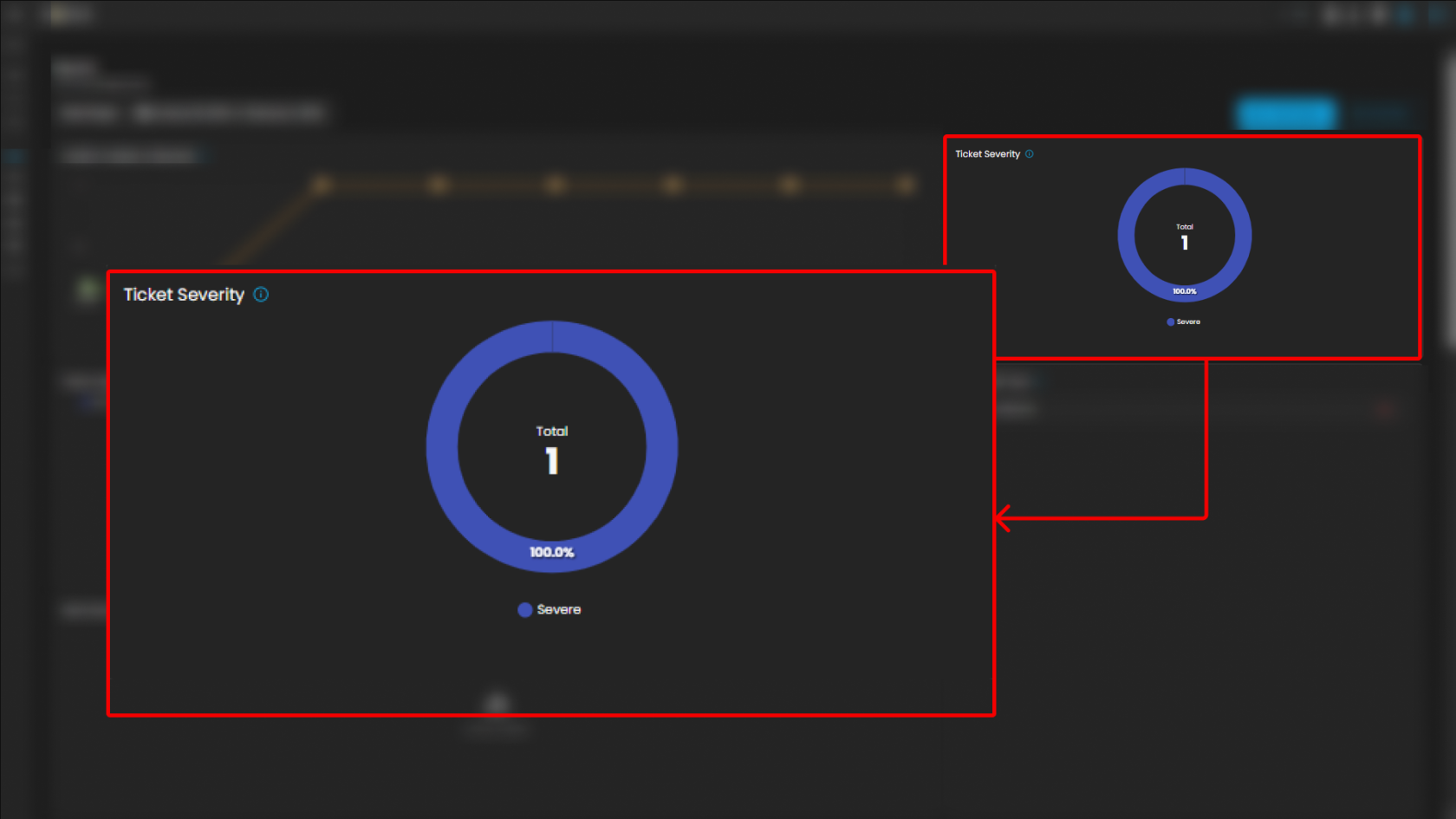
##### **Ticket Severity**

This graph displays the distribution of tickets by severity level.

- **Visualization:** Donut chart with severity distribution.
- **Categories Displayed:**
    
    
    - **Guarded**
    - **Low**
- **Purpose:** Summarizes the severity levels of tickets to help analysts prioritize workload.
- **Operational Insight:** A higher proportion of “**Guarded**” severity tickets may signal elevated but manageable risks, requiring proactive monitoring.

[![image.png](https://cytechint-docs-bookstack.s3.amazonaws.com/uploads/images/gallery/2026-02/scaled-1680-/FhT31vsDnnJt6NU2-image.png)](https://cytechint-docs-bookstack.s3.amazonaws.com/uploads/images/gallery/2026-02/FhT31vsDnnJt6NU2-image.png)
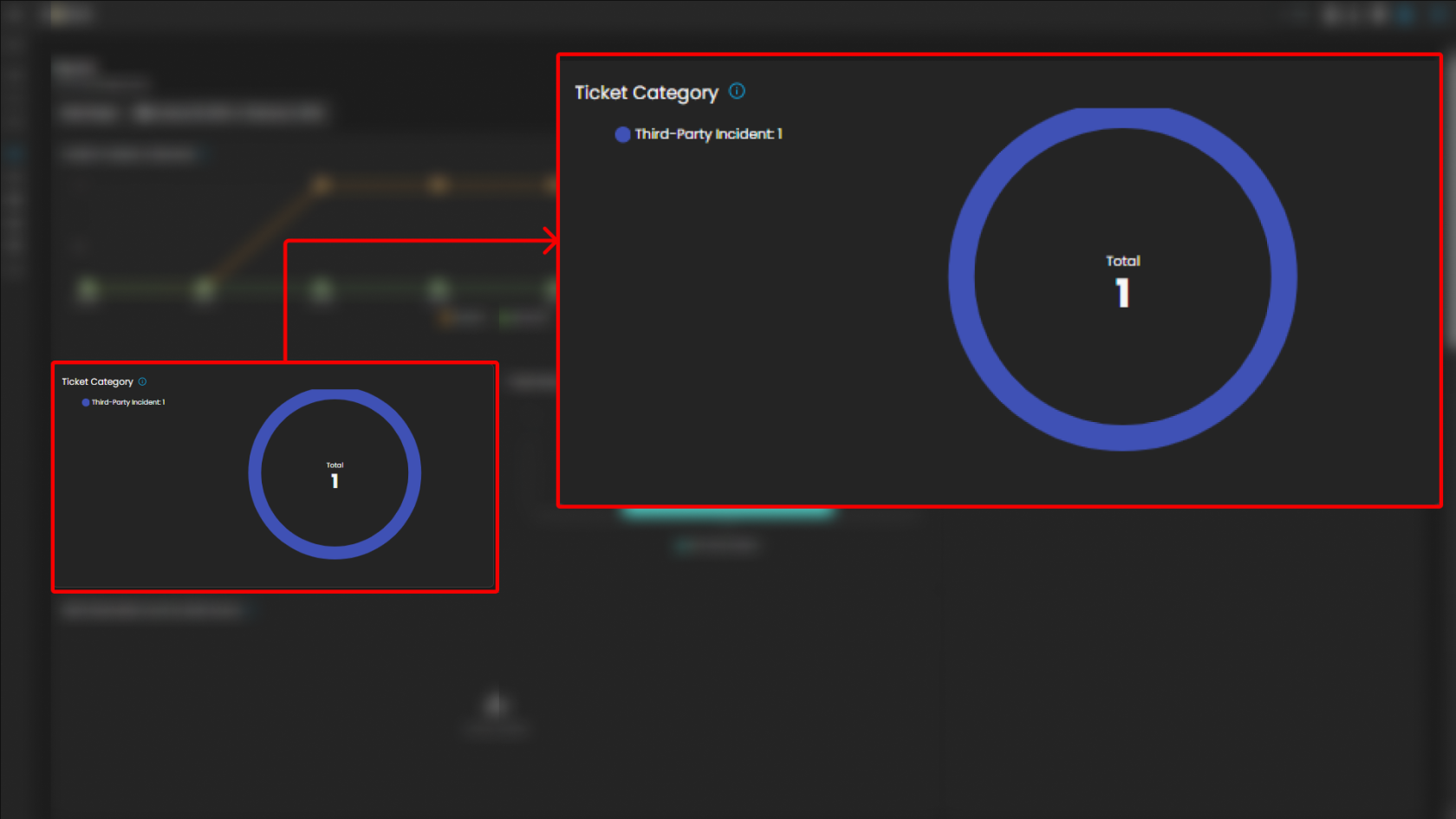
##### **Ticket Category**

Breaks down tickets based on their assigned category.

- **Visualization:** Donut chart displaying distribution across categories.
- **Categories:**
    
    
    - General
    - Credential Compromise
    - Malicious Email
    - Data Breach
    - Malware
- **Purpose:** Provides analysts with visibility into the types of threats most frequently encountered.

[![image.png](https://cytechint-docs-bookstack.s3.amazonaws.com/uploads/images/gallery/2026-02/scaled-1680-/gosC7DkQUu0WL3yw-image.png)](https://cytechint-docs-bookstack.s3.amazonaws.com/uploads/images/gallery/2026-02/gosC7DkQUu0WL3yw-image.png)
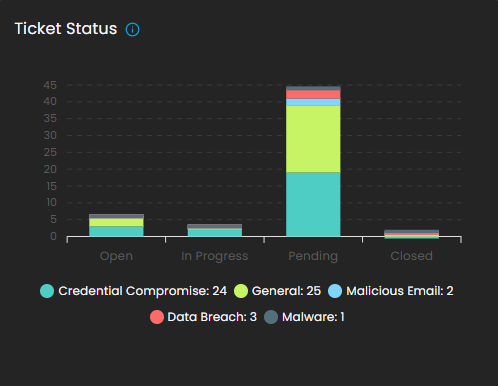
##### **Ticket Status**

This graph visualizes the current status of tickets to track resolution progress.

- **Visualization:** Bar chart of ticket states.
- **Statuses Monitored:**
    
    
    - Open
    - Pending
    - In Progress
    - Closed
- **Purpose:** Tracks current case lifecycles, supporting workload balancing and resolution monitoring.

[![image.png](https://cytechint-docs-bookstack.s3.amazonaws.com/uploads/images/gallery/2026-02/scaled-1680-/vGRL1PY9b7SY4UkV-image.png)](https://cytechint-docs-bookstack.s3.amazonaws.com/uploads/images/gallery/2026-02/vGRL1PY9b7SY4UkV-image.png)
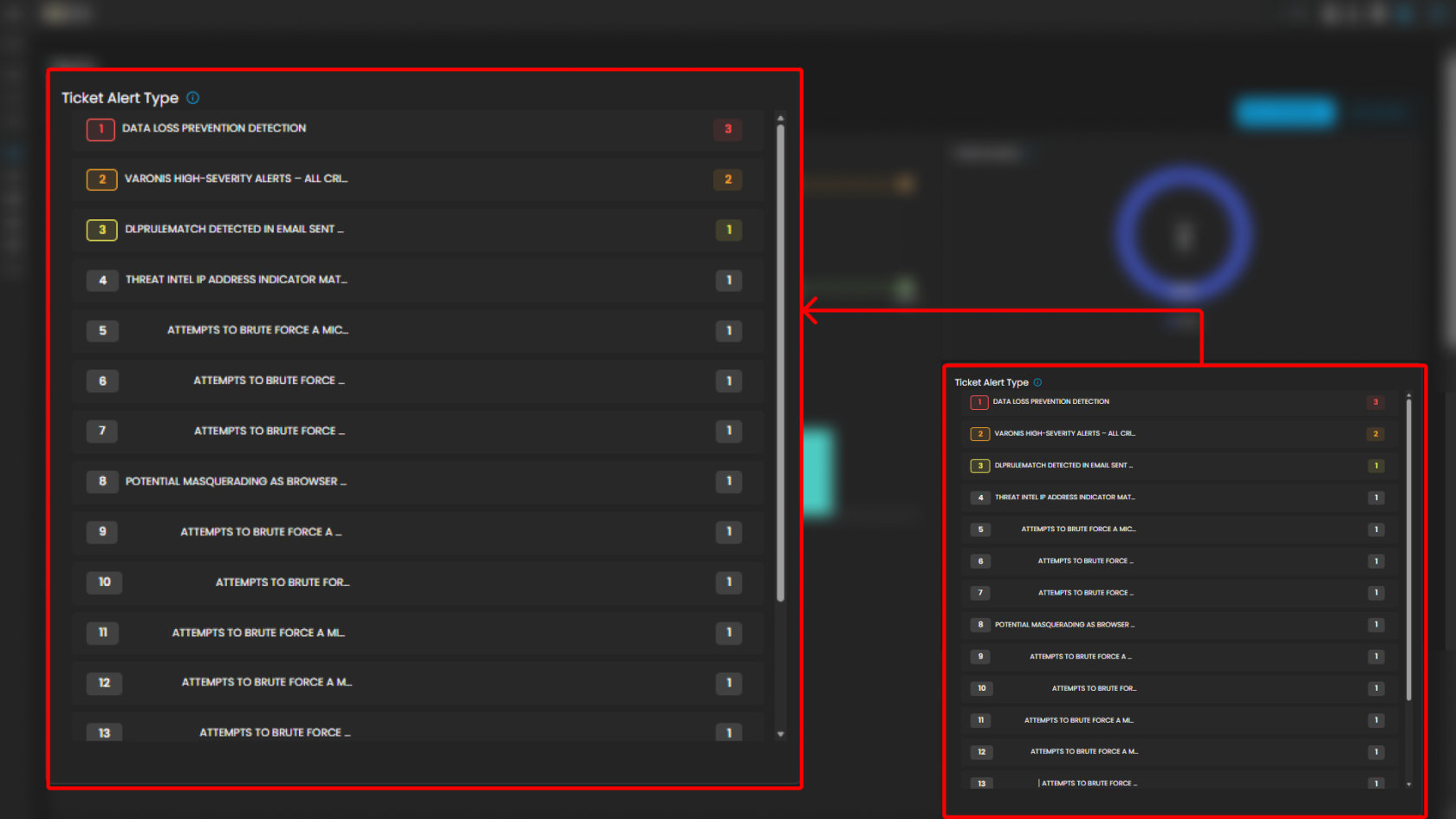
##### **Ticket Alert Type**

Provides a categorized breakdown of security alerts raised within the system. This helps analysts quickly identify the most frequent or severe types of alerts for prioritization and incident response. The feature also groups tickets by alert type and sorts them based on count, enabling analysts to focus on the most prevalent threats first.

**Functionality**

- Each alert type is listed in descending order of volume.
- A **numerical badge** beside each type shows the number of tickets generated.

**Analyst Use Case**

- **Prioritization:** Analysts can quickly spot which alert categories are most frequent and critical.
- **Trend Identification:** Helps SOC teams track recurring threats, such as repeated port scan attempts or ongoing phishing campaigns.
- **Investigation Focus:** Guides where resources should be allocated for further log analysis and incident response.
- **Escalation Decisioning:** High-volume or high-severity alert types can be escalated to Tier 2 or Tier 3 SOC analysts.

[![image.png](https://cytechint-docs-bookstack.s3.amazonaws.com/uploads/images/gallery/2026-02/scaled-1680-/Om1zODHtnokkWWTx-image.png)](https://cytechint-docs-bookstack.s3.amazonaws.com/uploads/images/gallery/2026-02/Om1zODHtnokkWWTx-image.png)
##### **Alerts Generated Count by Data Source**

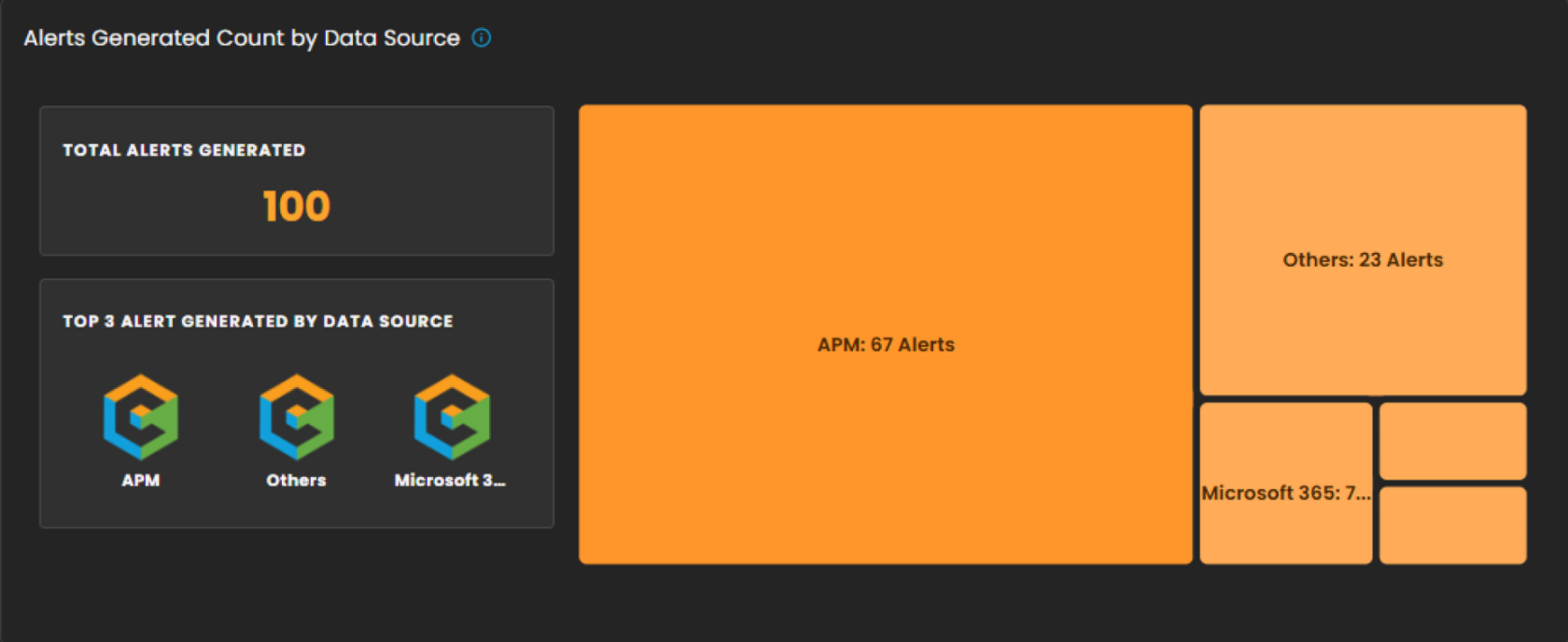
This section provides a breakdown of security alerts based on their originating data sources. It enables analysts to identify which systems or platforms are contributing the highest number of alerts, supporting more targeted investigation and resource allocation.

**Components**

- **Total Alerts Generated**  
    Displays the overall count of alerts detected within the selected date range. In the example shown, a total of **100 alerts** were generated.
- **Top 3 Alert Sources**  
    Highlights the three primary data sources that generated the most alerts, allowing analysts to quickly focus on the most active or risky environments.
- **Treemap Visualization**  
    Graphically represents the distribution of alerts by data source. Each block corresponds to a data source, with the block size proportional to the alert count.
    
    
    - Example: **APM** generated the highest number of alerts (**67**).
    - **Others** contributed **23** alerts.
    - Additional sources, including **Microsoft 365**, **Endpoint**, and **Defender**, are shown with smaller proportional segments.

**Analyst Use Case**

- Prioritize monitoring efforts on high-volume sources such as APM.
- Identify unusual spikes in alerts from less active sources.
- Allocate investigative resources efficiently across multiple platforms.

[![image.png](https://cytechint-docs-bookstack.s3.amazonaws.com/uploads/images/gallery/2026-02/scaled-1680-/xYdV6SY7GD504J96-image.png)](https://cytechint-docs-bookstack.s3.amazonaws.com/uploads/images/gallery/2026-02/xYdV6SY7GD504J96-image.png)
##### **Alert Comparison: Current vs Previous Period**

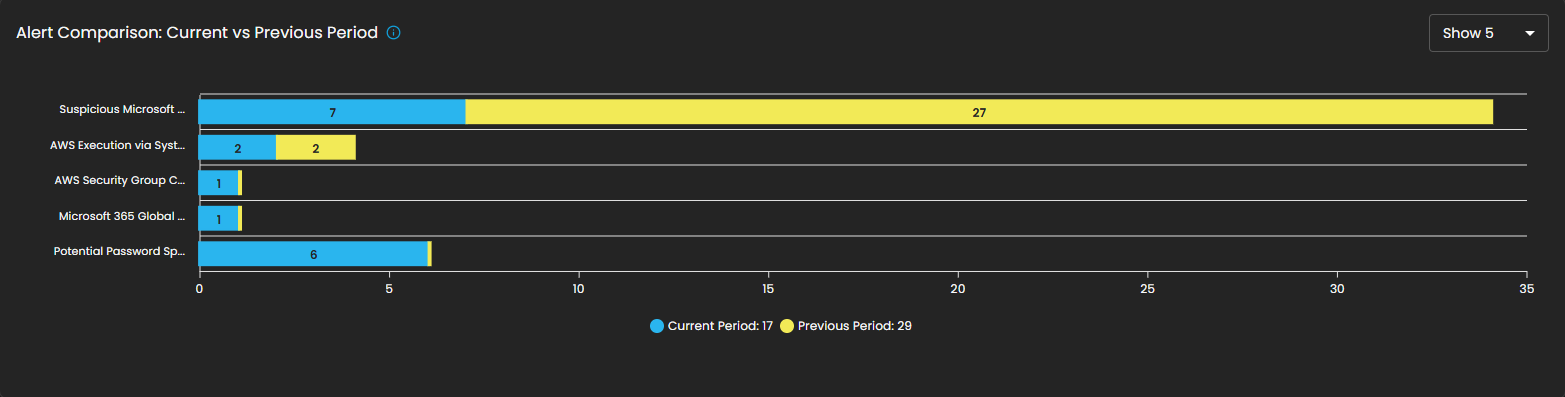
This section provides a comparative analysis of alerts generated during the current reporting period versus the previous period. The comparison highlights change in alert volume for specific alert types, helping analysts identify trends, anomalies, or shifts in the security landscape.

**Components**

- **Bar Chart Visualization**
    - Each bar represents a specific alert type, segmented into two colors: 
        - **Blue**: Alerts generated in the **current period**.
        - **Yellow**: Alerts generated in the **previous period**.
    - The length of the segments reflects the alert count, allowing quick visual identification of increases or decreases.

**Analyst Use Case**

- Identify **reductions in recurring alerts**, which may indicate resolved issues or improved security controls.
- Detect **emerging threats** when new alert types appear or when their frequency increases in the current period.
- Support **trend reporting** by comparing shifts in alert patterns over time, enabling better resource planning and proactive defense measures.

[![image.png](https://cytechint-docs-bookstack.s3.amazonaws.com/uploads/images/gallery/2026-02/scaled-1680-/ot6oX8D8cg8Z5xgR-image.png)](https://cytechint-docs-bookstack.s3.amazonaws.com/uploads/images/gallery/2026-02/ot6oX8D8cg8Z5xgR-image.png)
##### **SLA**

Displays **Service Level Agreement (SLA) compliance**, focusing on key performance metrics such as incident **detection time** and **resolution time**. This allows analysts and SOC teams to measure operational efficiency against defined service targets. The absence of data in the graph indicates that no incidents were recorded during the selected time period.

**Components**

- **Graph View**
    - Timeline chart representing SLA performance over a defined period.
    - Tracks detection and resolution trends for visibility into time-based compliance.
- **Metrics Panel** (Right Side) 
    - **Mean Detect Time**: 
        - Current Value: **01:11:56**
        - Change Compared to Previous Quarter: **0%**
    - ****Mean Resolve Time**:**
        - Current Value: **00:00:00**
        - Change Compared to Previous Quarter: **0%**

**Analyst Use Case**

- Monitor SLA adherence to ensure timely detection and resolution of incidents.
- Identify bottlenecks in the detection-to-resolution cycle.
- Provide operational reporting to stakeholders on SOC performance.
- Ensure compliance with contractual or organizational SLA requirements.

[![image.png](https://cytechint-docs-bookstack.s3.amazonaws.com/uploads/images/gallery/2026-02/scaled-1680-/UeOgnpFe4kUVsLS0-image.png)](https://cytechint-docs-bookstack.s3.amazonaws.com/uploads/images/gallery/2026-02/UeOgnpFe4kUVsLS0-image.png)

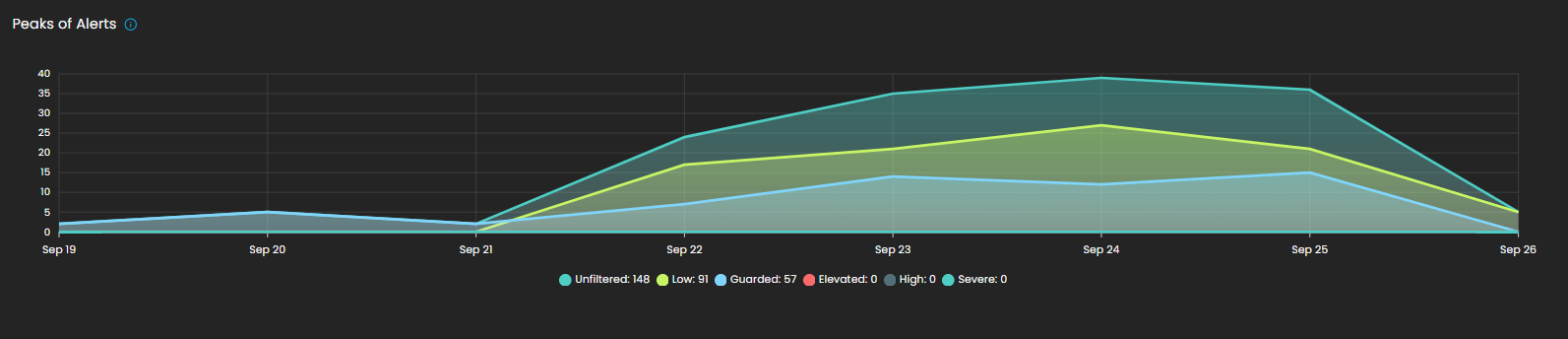
##### **Peaks of Alerts**

This visualization highlights time periods with the highest security alert activity. It provides analysts with a temporal view of alert distribution, making it easier to detect spikes, recurring trends, or unusual increases in activity. Alerts are categorized by severity levels such as *Unfiltered, Low, Guarded, Elevated, High,* and *Severe,* with corresponding counts shown for each.

By tracking alert peaks over time, this section helps security teams identify periods of heightened risk, allocate resources effectively, and prioritize investigation efforts.

[![image.png](https://cytechint-docs-bookstack.s3.amazonaws.com/uploads/images/gallery/2026-02/scaled-1680-/a2pUMyXTAasqhGvQ-image.png)](https://cytechint-docs-bookstack.s3.amazonaws.com/uploads/images/gallery/2026-02/a2pUMyXTAasqhGvQ-image.png)
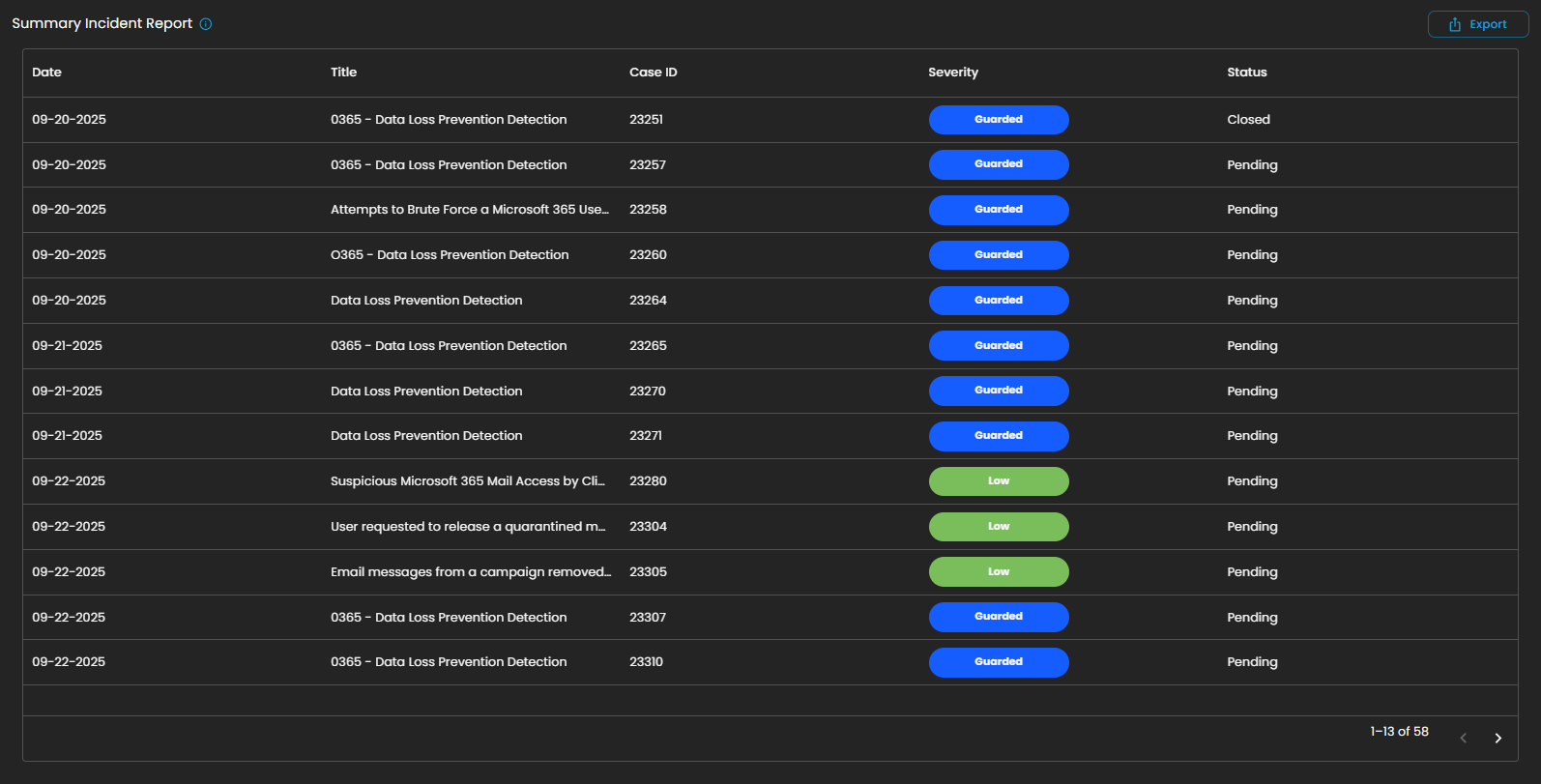
##### **Summary Incident Report**

This section displays a detailed list of incidents recorded within the selected date range. Each entry includes the **date of occurrence, incident title, case ID, severity level, and current status** (e.g., *Pending* or *Closed*). Incidents are categorized and color-coded by severity, allowing analysts to quickly assess their criticality and prioritize response efforts.

The report also supports **export functionality**, enabling users to generate and share incident data for further analysis, auditing, or compliance purposes.

This structured summary ensures that all incidents are systematically tracked and monitored, providing visibility into both ongoing and resolved security events.

[![image.png](https://cytechint-docs-bookstack.s3.amazonaws.com/uploads/images/gallery/2026-02/scaled-1680-/8Y1yR7ZAoFYkzCEO-image.png)](https://cytechint-docs-bookstack.s3.amazonaws.com/uploads/images/gallery/2026-02/8Y1yR7ZAoFYkzCEO-image.png)
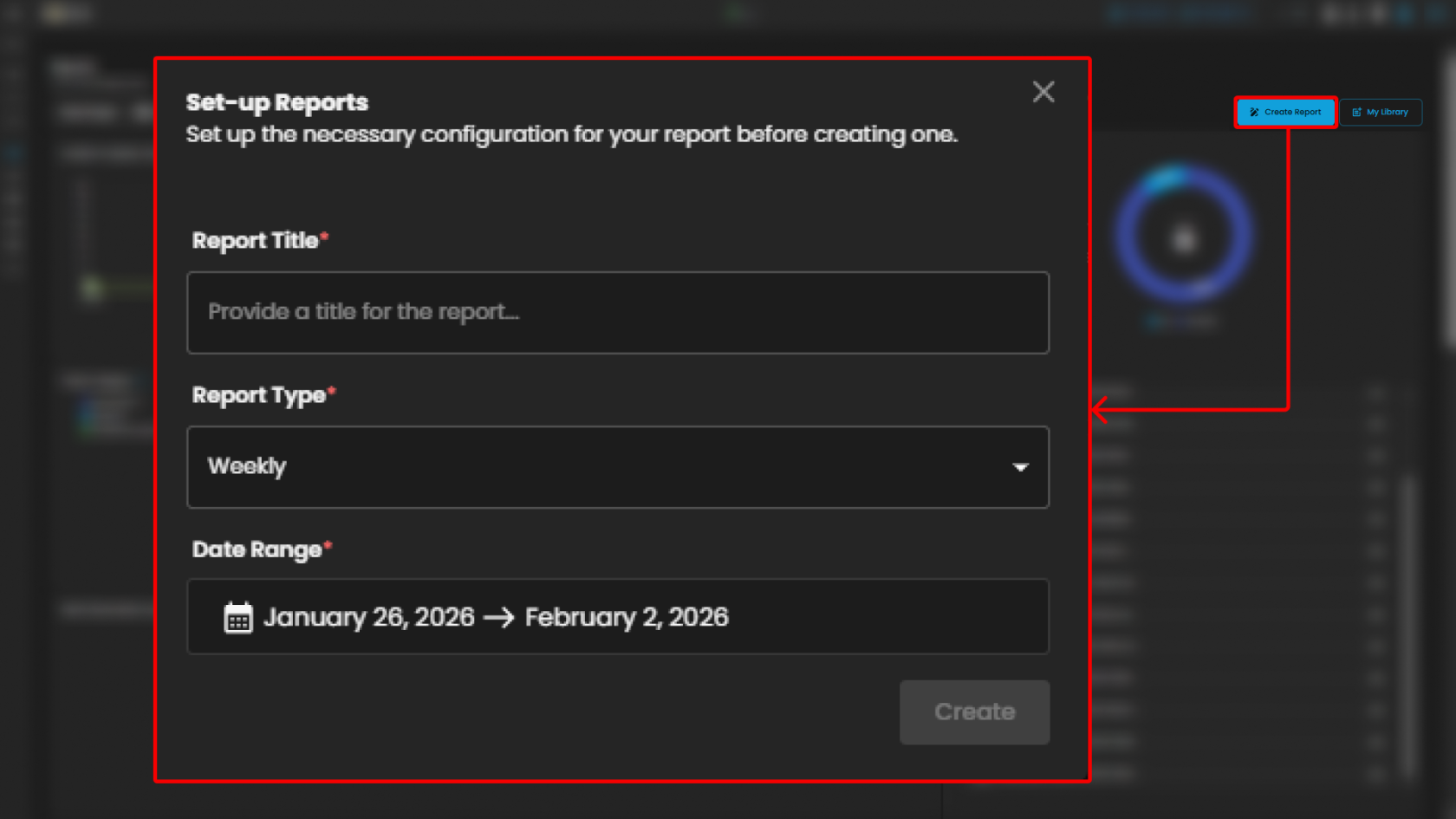
##### **Create Report and My Library**

The **Reports** module provides users with the ability to generate and manage analytical outputs for security incidents and operational performance. Within this module, two key functions are available:

- **Create Report**  
    The **Create Report** function allows users to generate customized reports based on selected parameters such as date range, ticket severity, incident category, or status. This feature is designed to provide flexibility in reporting, enabling analysts and stakeholders to extract meaningful insights tailored to their specific needs.

[![image.png](https://cytechint-docs-bookstack.s3.amazonaws.com/uploads/images/gallery/2026-02/scaled-1680-/xByeyKH0pm0O4eLP-image.png)](https://cytechint-docs-bookstack.s3.amazonaws.com/uploads/images/gallery/2026-02/xByeyKH0pm0O4eLP-image.png)
- **My Library**  
    The **My Library** function serves as a centralized repository where previously generated or saved reports are stored. Users can easily access, review, and manage their collection of reports, ensuring quick retrieval of historical data and consistent tracking of incident trends over time.

[![image.png](https://cytechint-docs-bookstack.s3.amazonaws.com/uploads/images/gallery/2026-02/scaled-1680-/ZDVlZkVguRqHwreR-image.png)](https://cytechint-docs-bookstack.s3.amazonaws.com/uploads/images/gallery/2026-02/ZDVlZkVguRqHwreR-image.png)
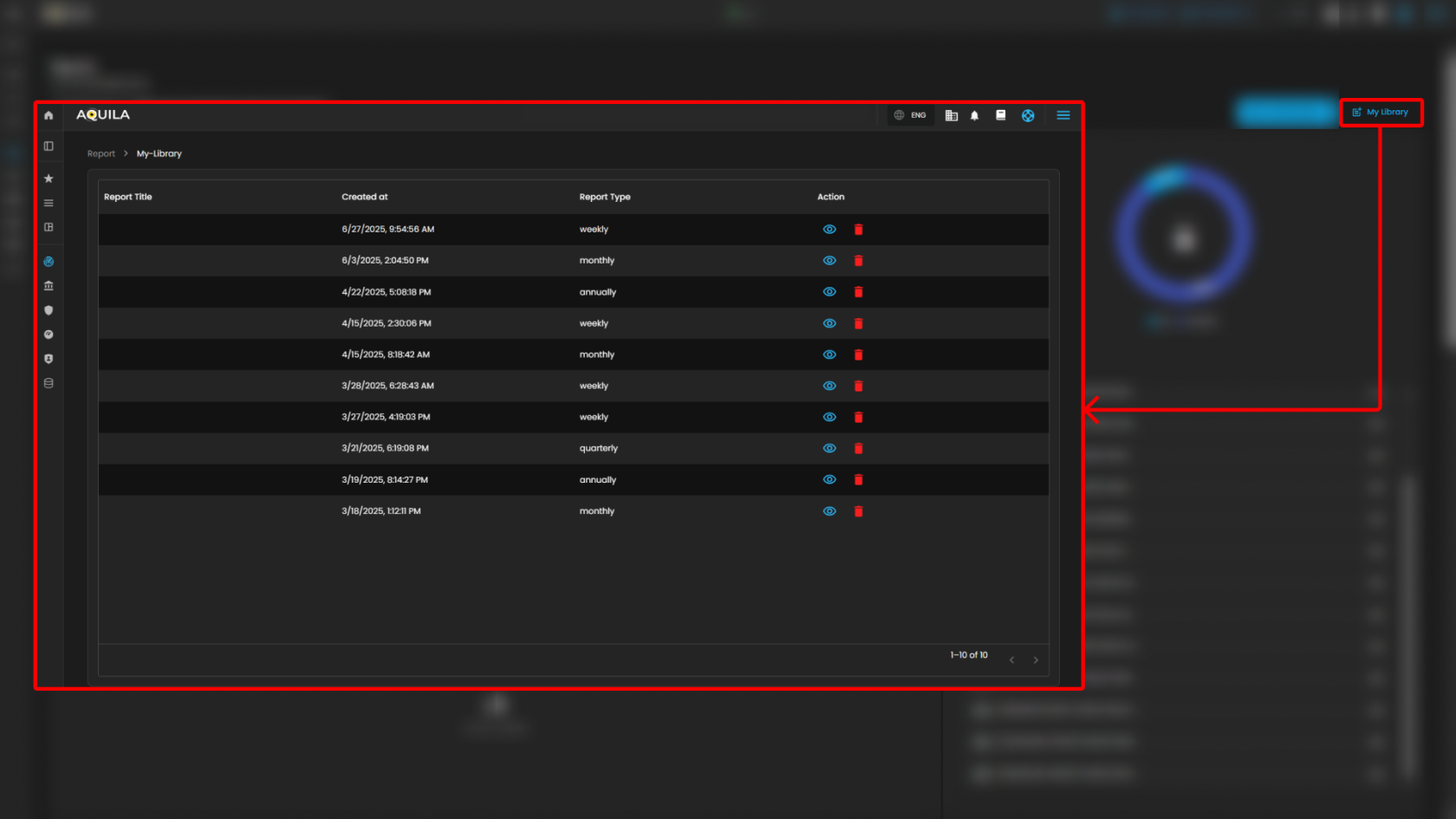
Users can also see more information about the report by pressing the eye icon. In this section, they can "**edit the report"** or "**download"** it by pressing the button above. The users can also send it **"via email"** or "**delete"** the report.

[![image.png](https://cytechint-docs-bookstack.s3.amazonaws.com/uploads/images/gallery/2026-02/scaled-1680-/KBz8TKTNUBXMWk5H-image.png)](https://cytechint-docs-bookstack.s3.amazonaws.com/uploads/images/gallery/2026-02/KBz8TKTNUBXMWk5H-image.png)
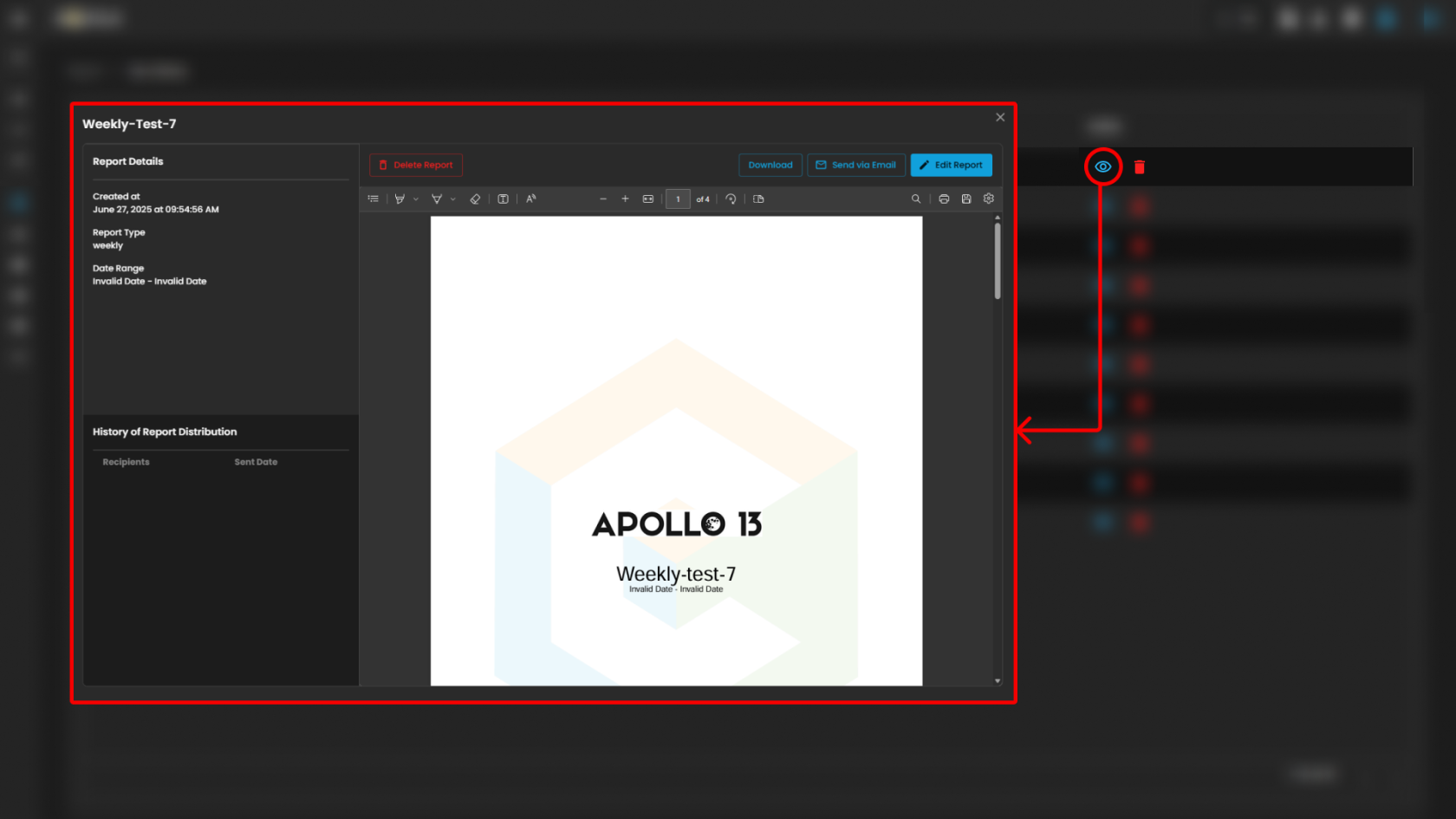
Together, these functions provide both the **flexibility to create new reports** and the **convenience of accessing saved outputs**, supporting continuous monitoring, analysis, and decision-making.

<p class="callout info">Please refer to the document from the previous sub-module: [CyTech AQUILA - Cyber Incident Management (CIM): Data Explorer](https://usdc-docs.cytechint.io/books/security-automation-soc-optimization-tOO/page/cytech-aquila-cyber-incident-management-cim-data-explorer)  
  
Please refer to the document for the next sub-module: [CyTech AQUILA - Cyber Incident Management (CIM): Alert Rules](https://usdc-docs.cytechint.io/books/security-automation-soc-optimization-tOO/page/cytech-aquila-cyber-incident-management-cim-alert-rules)</p>

*If you need further assistance, kindly contact our support at [support@cytechint.com](mailto:info@cytechint.com) for prompt assistance and guidance.*

# CyTech AQUILA - Cyber Incident Management (CIM): Alert Rules

The **Alert Rules** section provides centralized management of alert rules assigned to various log sources. This module enables administrators and analysts to review, configure, and monitor rules that generate alerts for security and operational events.

[![image.png](https://cytechint-docs-bookstack.s3.amazonaws.com/uploads/images/gallery/2026-02/scaled-1680-/JKr4ELYT8VogMoGd-image.png)](https://cytechint-docs-bookstack.s3.amazonaws.com/uploads/images/gallery/2026-02/JKr4ELYT8VogMoGd-image.png)

##### **Header Summary**

- **Total Alert Rules**: Displays the total number of alert rules configured in the system.
- **Active Alert Rules**: Shows the number of rules currently active and monitoring events.
- **Critical Rules**: Highlights the subset of rules categorized as critical, requiring immediate attention.

##### **Search and Filter**

- The **Search** bar allows users to quickly locate specific alert rules by entering keywords.
- The **Filter** option enables users to refine results based on categories or parameters, ensuring efficient navigation in environments with a large number of rules.

##### **Integrations** *(Under Development)*

- The **Integrations** menu provides options for connecting alert rules with integrated platforms or data sources, ensuring seamless rule application across multiple systems.

##### **Add Alert Rule**

- The **Add Alert Rule** button allows users to create new alert rules. These can be customized to monitor specific log sources, event patterns, or security indicators.

[![image.png](https://cytechint-docs-bookstack.s3.amazonaws.com/uploads/images/gallery/2026-02/scaled-1680-/MeChHPxqfhiDanyk-image.png)](https://cytechint-docs-bookstack.s3.amazonaws.com/uploads/images/gallery/2026-02/MeChHPxqfhiDanyk-image.png)

##### **Alert Rule Listings**

- Each listed entry represents a log source with its associated rules.
- **Details include**: 
    - **Name of the log source** (e.g., APM, AWS, Active Directory, Azure).
    - **Version** of the rule set applied.
    - **Rule count** indicating the total number of rules assigned to that log source.
    - A link to **View Alert Rules**, which opens the detailed configuration and management interface for that specific source.

[![image.png](https://cytechint-docs-bookstack.s3.amazonaws.com/uploads/images/gallery/2026-02/scaled-1680-/xVBtuje27xXIr4at-image.png)](https://cytechint-docs-bookstack.s3.amazonaws.com/uploads/images/gallery/2026-02/xVBtuje27xXIr4at-image.png)

Users can also click the Rule to see more details about the alert rules.

[![image.png](https://cytechint-docs-bookstack.s3.amazonaws.com/uploads/images/gallery/2026-02/scaled-1680-/Q5JQFnfpkHSyO5zc-image.png)](https://cytechint-docs-bookstack.s3.amazonaws.com/uploads/images/gallery/2026-02/Q5JQFnfpkHSyO5zc-image.png)

The users can also Edit Alert Rule by pressing the button. In this section they can adjust the time interval and its risk score or change its severity.

[![image.png](https://cytechint-docs-bookstack.s3.amazonaws.com/uploads/images/gallery/2026-02/scaled-1680-/KSDt8s3PtvJOQwZi-image.png)](https://cytechint-docs-bookstack.s3.amazonaws.com/uploads/images/gallery/2026-02/KSDt8s3PtvJOQwZi-image.png)

##### **Manage Alert Rules**

The **Manage Alert Rules** interface provides administrators with a centralized view and management panel for alert rules assigned to a **data source**. This page allows users to search, filter, review, enable/disable, and monitor the execution of a specific alert rule.

**Search and Filter**

- **Search Bar**: Provides keyword-based searching to quickly locate specific rules.
- **Filter Button**: Enables refined filtering of rules based on defined criteria such as severity, status, or log type.

[![image.png](https://cytechint-docs-bookstack.s3.amazonaws.com/uploads/images/gallery/2026-02/scaled-1680-/mUAJxeWXiRMhbmbM-image.png)](https://cytechint-docs-bookstack.s3.amazonaws.com/uploads/images/gallery/2026-02/mUAJxeWXiRMhbmbM-image.png)

**Global Toggle Controls**

- **Display All Disable**: When enabled, this toggle ensures all disabled rules are displayed.
- **Display All Enable**: When enabled, this toggle ensures all enabled rules are displayed.
- These global options simplify rule visibility management in environments with large numbers of configured alerts.

[![image.png](https://cytechint-docs-bookstack.s3.amazonaws.com/uploads/images/gallery/2026-02/scaled-1680-/l4Hqme2C5chXeweD-image.png)](https://cytechint-docs-bookstack.s3.amazonaws.com/uploads/images/gallery/2026-02/l4Hqme2C5chXeweD-image.png)

**Rule Table**

The central section of the page displays a table containing all AWS alert rules with associated metadata and controls. Each row corresponds to a specific rule, with the following columns:

1. **Rule**
    - The rule name is hyperlinked, directing the user to the detailed configuration page for that specific rule  
        [![image.png](https://cytechint-docs-bookstack.s3.amazonaws.com/uploads/images/gallery/2026-02/scaled-1680-/5aer1bDmvhpIw2hf-image.png)](https://cytechint-docs-bookstack.s3.amazonaws.com/uploads/images/gallery/2026-02/5aer1bDmvhpIw2hf-image.png)
2. **Risk Score**
    
    
    - Numerical value representing the calculated risk impact of the rule if triggered.  
        [![image.png](https://cytechint-docs-bookstack.s3.amazonaws.com/uploads/images/gallery/2026-02/scaled-1680-/j1p6JKGfI7YgzfN8-image.png)](https://cytechint-docs-bookstack.s3.amazonaws.com/uploads/images/gallery/2026-02/j1p6JKGfI7YgzfN8-image.png)
3. **Last Run**
    - Displays the most recent execution time of the rule.  
        [![image.png](https://cytechint-docs-bookstack.s3.amazonaws.com/uploads/images/gallery/2026-02/scaled-1680-/rkQ5iouz8Leo1B0u-image.png)](https://cytechint-docs-bookstack.s3.amazonaws.com/uploads/images/gallery/2026-02/rkQ5iouz8Leo1B0u-image.png)
4. **Severity**
    - Severity levels include: 
        - **Low** (Green)
        - **Medium** (Yellow)
        - **High** (Red)  
            [![image.png](https://cytechint-docs-bookstack.s3.amazonaws.com/uploads/images/gallery/2026-02/scaled-1680-/CIarQgWjBgkDeNYE-image.png)](https://cytechint-docs-bookstack.s3.amazonaws.com/uploads/images/gallery/2026-02/CIarQgWjBgkDeNYE-image.png)
5. **Last Response**
    - Shows the outcome of the most recent rule execution.
    - Status values include: 
        - **Succeeded** (green indicator)
        - Potential Failed
        - Failed  
            [![image.png](https://cytechint-docs-bookstack.s3.amazonaws.com/uploads/images/gallery/2026-02/scaled-1680-/p2hl42N3cAPT6YAQ-image.png)](https://cytechint-docs-bookstack.s3.amazonaws.com/uploads/images/gallery/2026-02/p2hl42N3cAPT6YAQ-image.png)
6. **Last Updated**
    - Provides the timestamp when the rule was last modified. [![HEHE.png](https://cytechint-docs-bookstack.s3.amazonaws.com/uploads/images/gallery/2026-02/scaled-1680-/E9K8mmRqAetvHqVG-hehe.png)](https://cytechint-docs-bookstack.s3.amazonaws.com/uploads/images/gallery/2026-02/E9K8mmRqAetvHqVG-hehe.png)
7. **Enabled/Disabled Toggle**
    - Each rule has an individual toggle to enable or disable its monitoring function.
    - Active (enabled) rules are marked in blue, while disabled rules would appear in gray.  
        [![HEHE (2).png](https://cytechint-docs-bookstack.s3.amazonaws.com/uploads/images/gallery/2026-02/scaled-1680-/U2Xi0Cf62GDtAHx9-hehe-2.png)](https://cytechint-docs-bookstack.s3.amazonaws.com/uploads/images/gallery/2026-02/U2Xi0Cf62GDtAHx9-hehe-2.png)

This section ensures visibility into how alerts are defined and enforced across environments. By consolidating rule management, it allows administrators to maintain consistency, identify gaps, and prioritize responses effectively.

<p class="callout info">Please refer to the document from the previous sub-module: **[CyTech AQUILA - Cyber Incident Management (CIM): Reports](https://usdc-docs.cytechint.io/books/security-automation-soc-optimization-tOO/page/cytech-aquila-cyber-incident-management-cim-reports)**  
  
Please refer to the document for the next sub-module: **[CyTech AQUILA - Cyber Incident Management (CIM): Settings](https://usdc-docs.cytechint.io/books/security-automation-soc-optimization-tOO/page/cytech-aquila-cyber-incident-management-cim-settings)**</p>

*If you need further assistance, kindly contact our support at [support@cytechint.com](mailto:info@cytechint.com) for prompt assistance and guidance.*

# CyTech AQUILA - Cyber Incident Management (CIM): Settings

This page allows users to configure and manage notification settings within the **CIM (Cyber Intelligence Management)** solution. The interface is organized into multiple sections for streamlined navigation and tailored notification management.

[![image.png](https://cytechint-docs-bookstack.s3.amazonaws.com/uploads/images/gallery/2026-02/scaled-1680-/cB913PMRcYGV8uHx-image.png)](https://cytechint-docs-bookstack.s3.amazonaws.com/uploads/images/gallery/2026-02/cB913PMRcYGV8uHx-image.png)
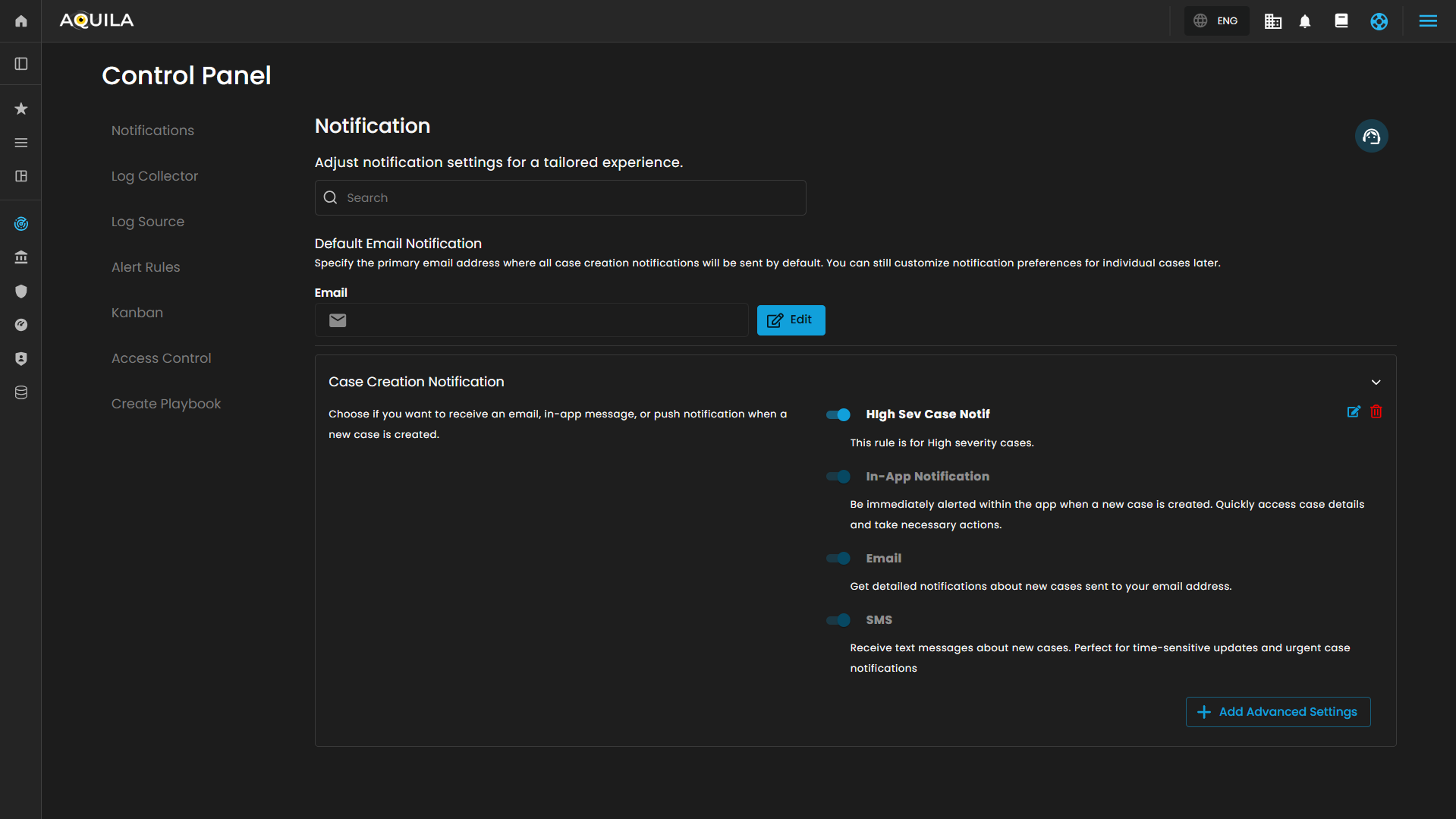
##### **Notification**

This main section allows for adjustment of general notification settings:

- **Search Bar**: A search field to quickly locate specific notification settings or preferences.
    
    [![image.png](https://cytechint-docs-bookstack.s3.amazonaws.com/uploads/images/gallery/2026-02/scaled-1680-/FLzzHL8zSVxQyr2G-image.png)](https://cytechint-docs-bookstack.s3.amazonaws.com/uploads/images/gallery/2026-02/FLzzHL8zSVxQyr2G-image.png)

- **Default Email Notification**
    - **Description**: Specifies the primary email address where all case creation notifications will be sent by default. This setting does not restrict customization for individual case notifications.
        
        [![image.png](https://cytechint-docs-bookstack.s3.amazonaws.com/uploads/images/gallery/2026-02/scaled-1680-/LN3eHEUuTBvqgHow-image.png)](https://cytechint-docs-bookstack.s3.amazonaws.com/uploads/images/gallery/2026-02/LN3eHEUuTBvqgHow-image.png)

    - **Email Input Field**: Placeholder text "example@domain.com" indicates where the default email address is entered.
        
        [![image.png](https://cytechint-docs-bookstack.s3.amazonaws.com/uploads/images/gallery/2026-02/scaled-1680-/tzd42Ex8D73bbZqo-image.png)](https://cytechint-docs-bookstack.s3.amazonaws.com/uploads/images/gallery/2026-02/tzd42Ex8D73bbZqo-image.png)

    - **Edit Button**: Allows editing and saving of the default email address for notifications.
        
        [![image.png](https://cytechint-docs-bookstack.s3.amazonaws.com/uploads/images/gallery/2026-02/scaled-1680-/eGAK4cV0IQvPlIhU-image.png)](https://cytechint-docs-bookstack.s3.amazonaws.com/uploads/images/gallery/2026-02/eGAK4cV0IQvPlIhU-image.png)

**Case Creation Notification**

This sub-section outlines options for notifications when a new case is created:

- **Description**: Users can choose notification channels for receiving alerts related to case creation.
- **Notification Types**: 
    - **In-App Notification**: Alerts are immediately displayed within the application. Users can quickly access new case details and take required actions.
        
        [![image.png](https://cytechint-docs-bookstack.s3.amazonaws.com/uploads/images/gallery/2026-02/scaled-1680-/AEueHJ7JejvY7ovU-image.png)](https://cytechint-docs-bookstack.s3.amazonaws.com/uploads/images/gallery/2026-02/AEueHJ7JejvY7ovU-image.png)

    - **Email**: Detailed notifications about newly created cases are sent to the designated email address.
        
        [![image.png](https://cytechint-docs-bookstack.s3.amazonaws.com/uploads/images/gallery/2026-02/scaled-1680-/jIyp5Hl2mgwfCjhV-image.png)](https://cytechint-docs-bookstack.s3.amazonaws.com/uploads/images/gallery/2026-02/jIyp5Hl2mgwfCjhV-image.png)

    - **SMS**: Text message alerts are dispatched for new cases. This channel is recommended for time-sensitive and urgent updates.
        
        [![image.png](https://cytechint-docs-bookstack.s3.amazonaws.com/uploads/images/gallery/2026-02/scaled-1680-/ziOGbncIB9HGBSyL-image.png)](https://cytechint-docs-bookstack.s3.amazonaws.com/uploads/images/gallery/2026-02/ziOGbncIB9HGBSyL-image.png)

- **Switches**: Each notification method has a toggle switch for enabling or disabling the specific notification type.
- **Advanced Settings**: A button labeled "Add Advanced Settings" provides access to Configure Rule pop up when clicked.

[![image.png](https://cytechint-docs-bookstack.s3.amazonaws.com/uploads/images/gallery/2026-02/scaled-1680-/MlSl8SQtsjJrwika-image.png)](https://cytechint-docs-bookstack.s3.amazonaws.com/uploads/images/gallery/2026-02/MlSl8SQtsjJrwika-image.png)
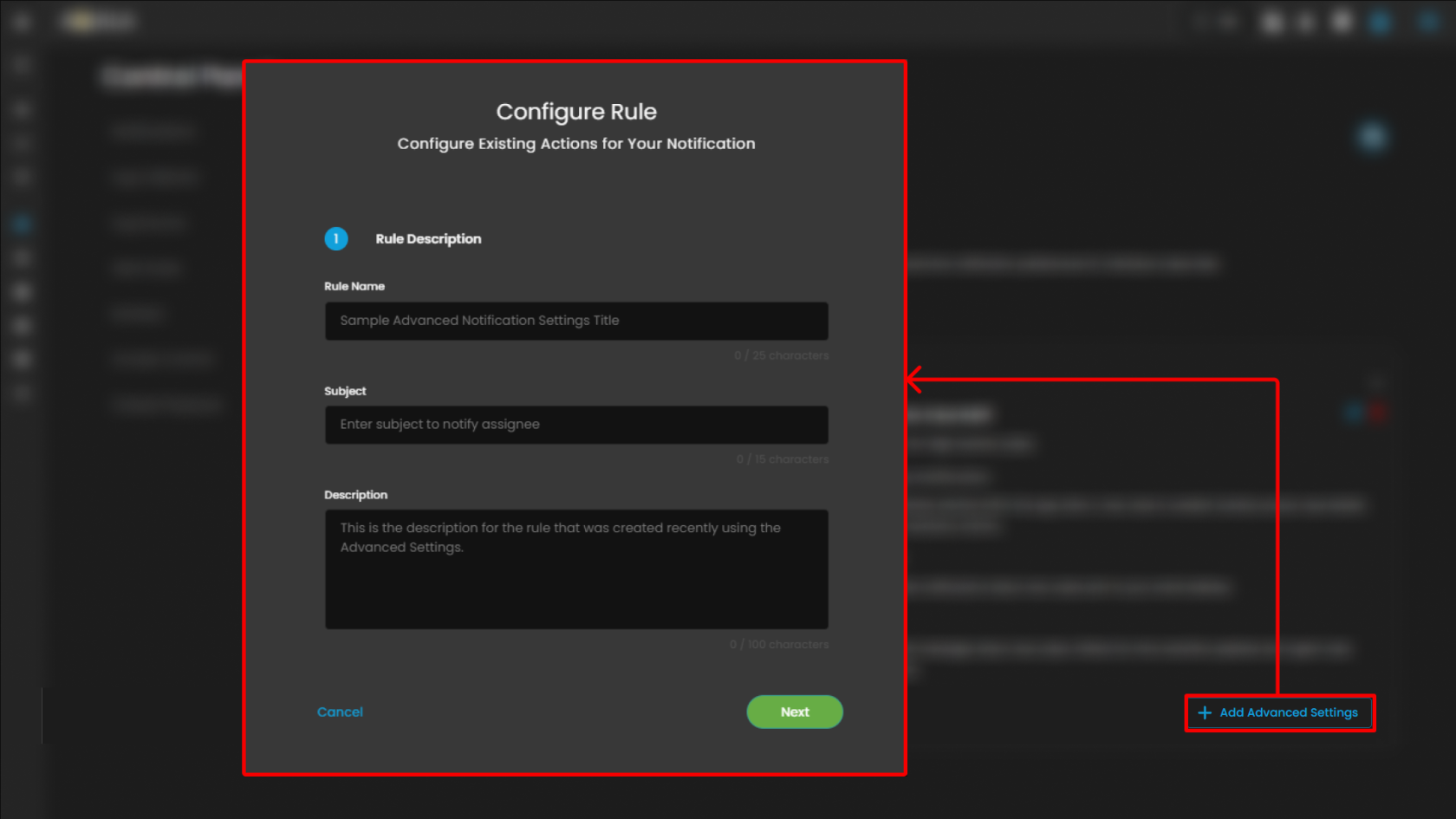
**Notification Action Configuration**

This page is used to configure the details for an existing action in a notification rule within the **CIM (Cyber Intelligence Management)** system. The user is guided through defining core attributes of the notification action, enabling efficient management and customization.

**Rule Name**

- **Purpose**: Enter the specific name for the notification rule. Example given is "Sample Advanced Notification Settings Title".
- **Character Limit**: Allows up to 25 characters, shown as a counter.

**Subject**

- **Purpose**: Specify a concise subject line for the notification, intended to notify the assigned recipient.
- **Character Limit**: 15 characters, displayed as a counter.

**Description**

- **Purpose**: Provide a detailed description of the rule. This field is for explanatory text supporting clarity on the rule's intent and function.
- **Character Limit**: 100 characters, indicated below the field.

Clicking **Next** will redirect you to the second page of the configuration.

[![image.png](https://cytechint-docs-bookstack.s3.amazonaws.com/uploads/images/gallery/2026-02/scaled-1680-/1IZQ0nFCocd85IQf-image.png)](https://cytechint-docs-bookstack.s3.amazonaws.com/uploads/images/gallery/2026-02/1IZQ0nFCocd85IQf-image.png)
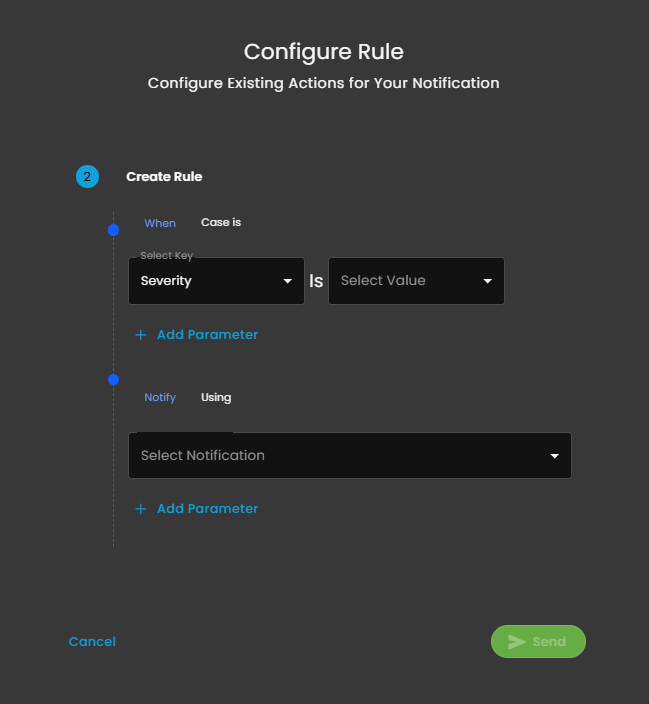
**Notification Rule Creation**

This interface is the second step in the process of configuring actions for a notification rule within the **CIM** platform. It enables administrators to define the specific conditions under which notifications should be sent, as well as the corresponding notification methods.

**Rule Condition Configuration**

- **When Case is**
    - **Select Key**: Dropdown to choose a case attribute to evaluate; shown as "Severity".
    - **Is**: Operator for comparison.
    - **Select Value**: Dropdown to specify the value for the selected key.
- **Add Parameter**: Option to increase rule complexity by adding additional parameters for multi-conditional logic.

**Notification Action Specification**

- **Notify Using**
    - **Select Notification**: Dropdown list for choosing the desired notification channel (e.g., email, in-app, SMS).
- **Add Parameter**: Option to customize or refine notification actions with additional parameters.

**Support Section**

- **Purpose**: Provides users with quick access to support resources, assistance, or help documentation related to the Cyber Intelligence Management (CIM) system.
- **Functionality**: Typically, clicking this icon would open a support menu, chat widget, or redirect to a help center where users can submit support tickets, search FAQs, or get live assistance.
- **Accessibility**: Its prominent placement ensures immediate visibility for users needing assistance without navigating away from the current workspace or settings page.


---

##### **Log Collector List**

The **Log Collector List** interface provides administrators with a centralized view for managing and monitoring log collectors. This section is part of the **Settings for CIM** (Cyber Incident Management) module and enables easy configuration, visibility, and operational control of log collectors.

[![image.png](https://cytechint-docs-bookstack.s3.amazonaws.com/uploads/images/gallery/2026-02/scaled-1680-/i2KHdS5fkB2Thaf2-image.png)](https://cytechint-docs-bookstack.s3.amazonaws.com/uploads/images/gallery/2026-02/i2KHdS5fkB2Thaf2-image.png)
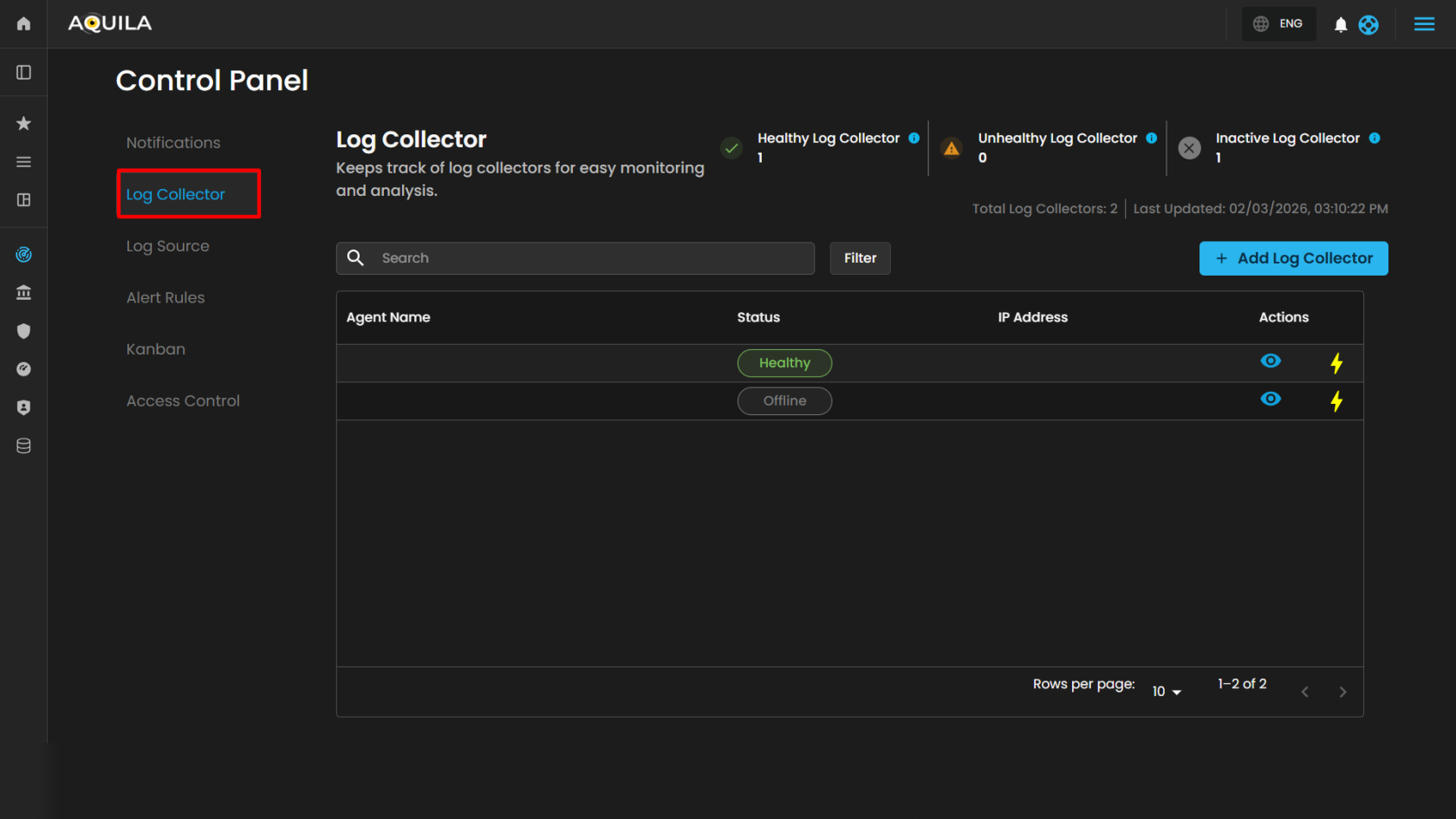
**Action Controls**

- **Add Log Collector** (button): Located on the upper-right corner. This allows administrators to register a new log collector agent into the system.  
    [![HEHE (31).png](https://cytechint-docs-bookstack.s3.amazonaws.com/uploads/images/gallery/2026-02/scaled-1680-/li6s7cgqjcYBRvSi-hehe-31.png)](https://cytechint-docs-bookstack.s3.amazonaws.com/uploads/images/gallery/2026-02/li6s7cgqjcYBRvSi-hehe-31.png)
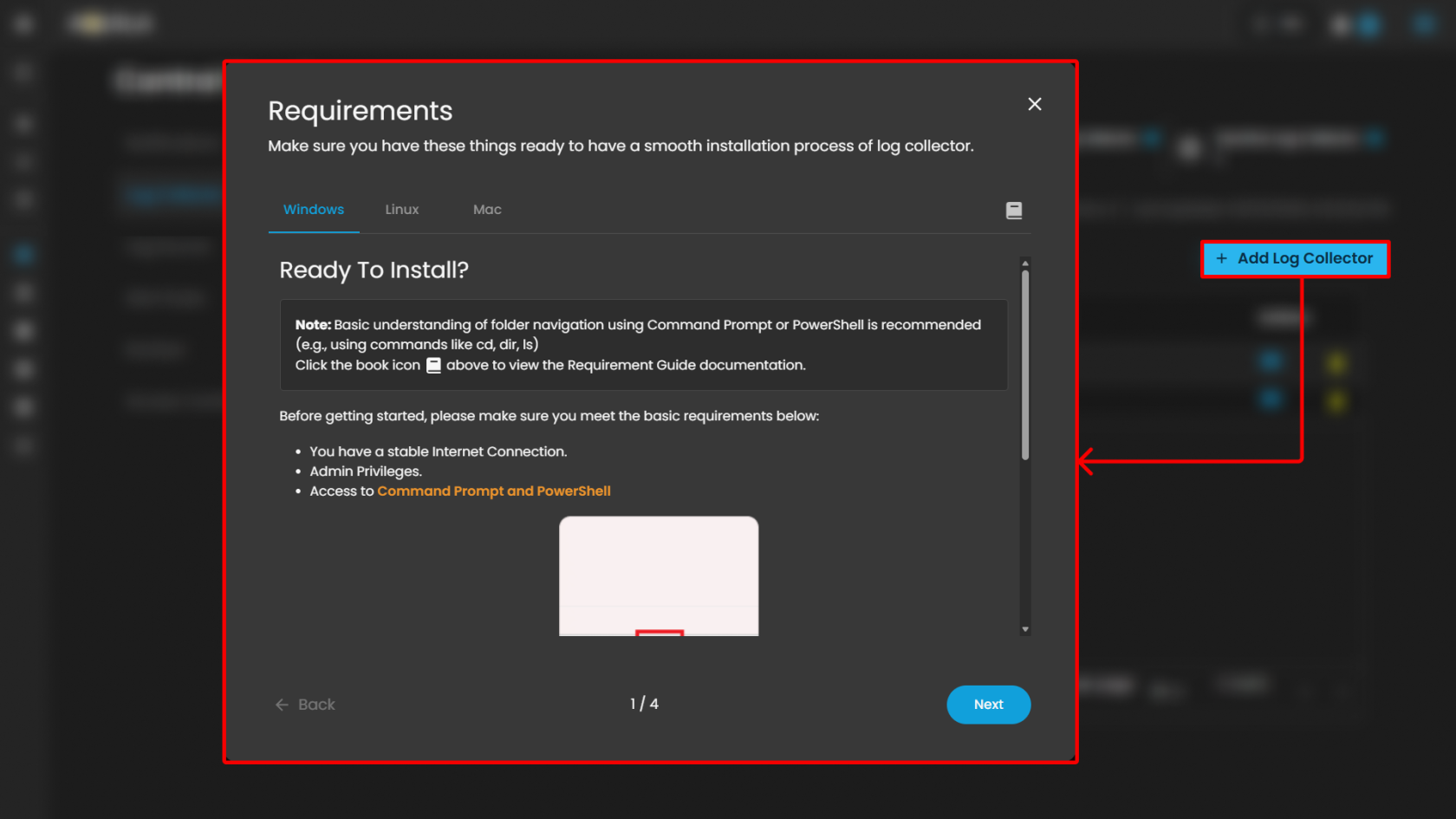
<p class="callout info">To learn more about "Add Log Collector" please refer to this link.   
  
**Windows Log Collector Installation**: [Log Collector Installa... | AQUILA Documentations](https://usdc-docs.cytechint.io/books/log-collector-installations/page/log-collector-installation-windows-manual)  
**Linux Log Collector Installation**: [Log Collector Installa... | AQUILA Documentations](https://usdc-docs.cytechint.io/books/log-collector-installations/page/log-collector-installation-linux-manual)  
**Mac Log Collector Installation**: [Log Collector Installa... | AQUILA Documentations](https://usdc-docs.cytechint.io/books/log-collector-installations/page/log-collector-installation-mac-manual)</p>

**Log Collector Table**

The main section of the page displays a table of log collectors, providing key operational details:

<table border="1" id="bkmrk-column-description-a"><colgroup><col></col><col></col></colgroup><tbody><tr><td>**Column**</td><td>**Description**</td></tr><tr><td>**Agent Name**  
</td><td>Displays the name of the log collector agent. Clickable for detailed view. Example: ***HYDRA-DC***.</td></tr><tr><td>**Status**</td><td>Indicates whether the log collector is currently online or offline. Example: *Offline*.</td></tr><tr><td>**IP Address**</td><td>Shows the network address assigned to the log collector.

</td></tr></tbody></table>

- **View Icon**: Located on the left side of each row, enabling quick inspection of collector details. When clicking it redirects you to the page where all the **log sources** was integrated on the specific **log collector**. [![image.png](https://cytechint-docs-bookstack.s3.amazonaws.com/uploads/images/gallery/2026-02/scaled-1680-/cPcCl0PNCdrAUs2g-image.png)](https://cytechint-docs-bookstack.s3.amazonaws.com/uploads/images/gallery/2026-02/cPcCl0PNCdrAUs2g-image.png)

When pressing the "**eye icon"** in the Log Source, it will show a side bar where it will give more information

[![image.png](https://cytechint-docs-bookstack.s3.amazonaws.com/uploads/images/gallery/2026-02/scaled-1680-/JhTKmM0lyq8cyLCM-image.png)](https://cytechint-docs-bookstack.s3.amazonaws.com/uploads/images/gallery/2026-02/JhTKmM0lyq8cyLCM-image.png)

<p class="callout info">Please refer to this document for troubleshooting: "[AWS Integrations | AQUILA Documentations](https://usdc-docs.cytechint.io/books/system-integrations/page/aws-integrations)" </p>

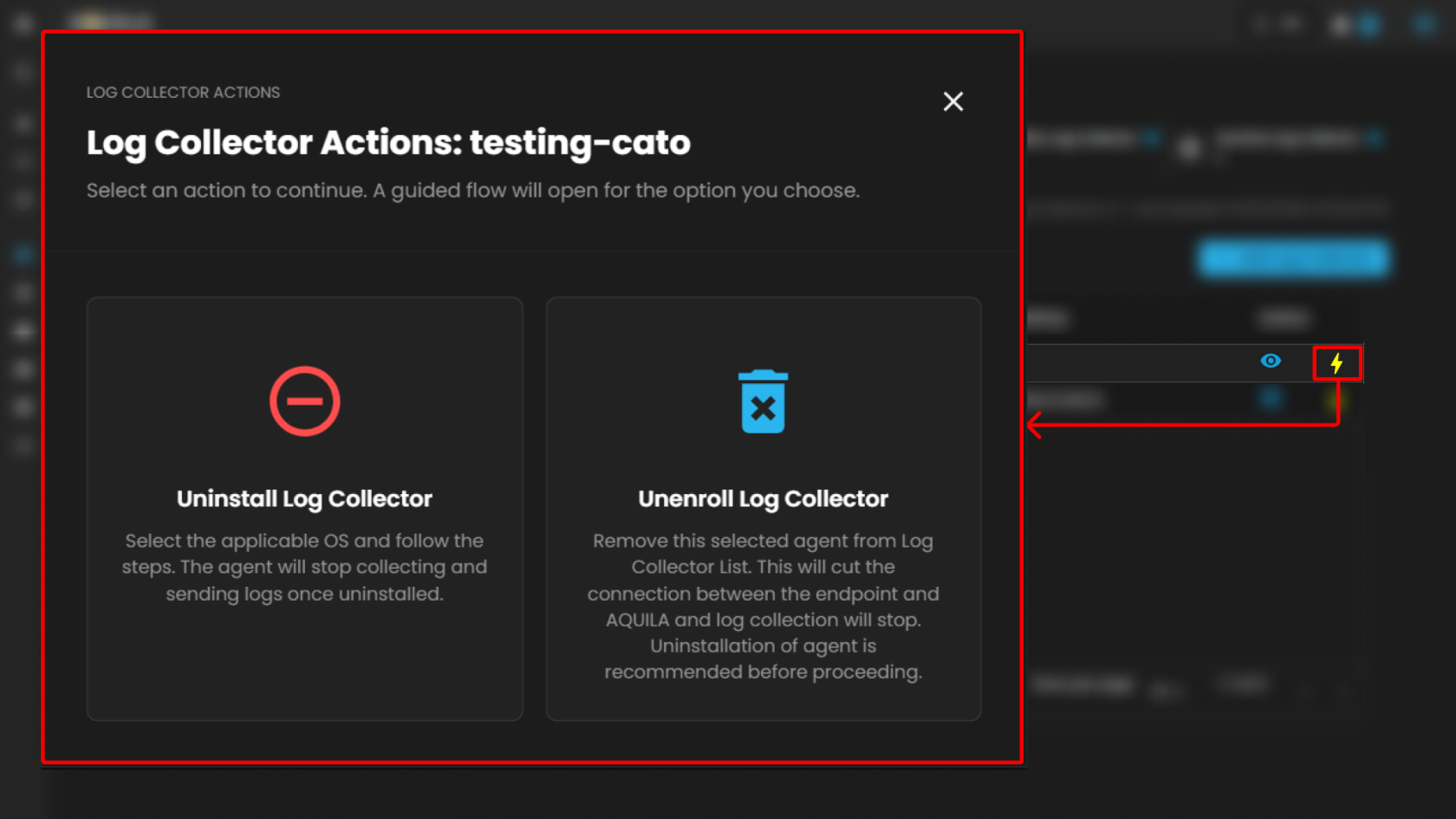
Users can also uninstall their **Log Collector** or **Unenroll** it by pressing the "⚡" symbol.

[![image.png](https://cytechint-docs-bookstack.s3.amazonaws.com/uploads/images/gallery/2026-02/scaled-1680-/d9O7xu5G7DT2AkHZ-image.png)](https://cytechint-docs-bookstack.s3.amazonaws.com/uploads/images/gallery/2026-02/d9O7xu5G7DT2AkHZ-image.png)
**Overview Panel**

Located on the left side, the **Overview** section provides basic collector details:

- **Policy ID** – Displays the unique policy identifier assigned to the log collector.
- **Status** – Shows whether the collector is online or offline (e.g., *Offline*).
- **Host Name** – Displays the assigned host identifier or network name.
- **Platform** – Indicates the operating system platform on which the collector is installed (e.g., *Windows*).

**Additional note:** A usage indicator is displayed below, showing the number of log sources currently added relative to the maximum available. Example: *2 out of 254 Log Sources added*. A link is provided (*Add Log Sources*) for extending the configuration.

**Integrations Panel**

The **Integrations** section lists available integrations assigned to the collector. Each integration includes details and health indicators.

**Support Section**

- **Purpose**: Provides users with quick access to support resources, assistance, or help documentation related to the Cyber Intelligence Management (CIM) system.
- **Functionality**: Typically, clicking this icon would open a support menu, chat widget, or redirect to a help center where users can submit support tickets, search FAQs, or get live assistance.
- **Accessibility**: Its prominent placement ensures immediate visibility for users needing assistance without navigating away from the current workspace or settings page.


---

##### **Log Source**

The **Log Source** section within **Settings for CIM** provides administrators with a centralized interface for managing available log source integrations. This module enables users to search, review, and add integrations to a Log Agent for log collection and monitoring.

[![image.png](https://cytechint-docs-bookstack.s3.amazonaws.com/uploads/images/gallery/2026-02/scaled-1680-/eqxZWxUfp7b4CXdd-image.png)](https://cytechint-docs-bookstack.s3.amazonaws.com/uploads/images/gallery/2026-02/eqxZWxUfp7b4CXdd-image.png)
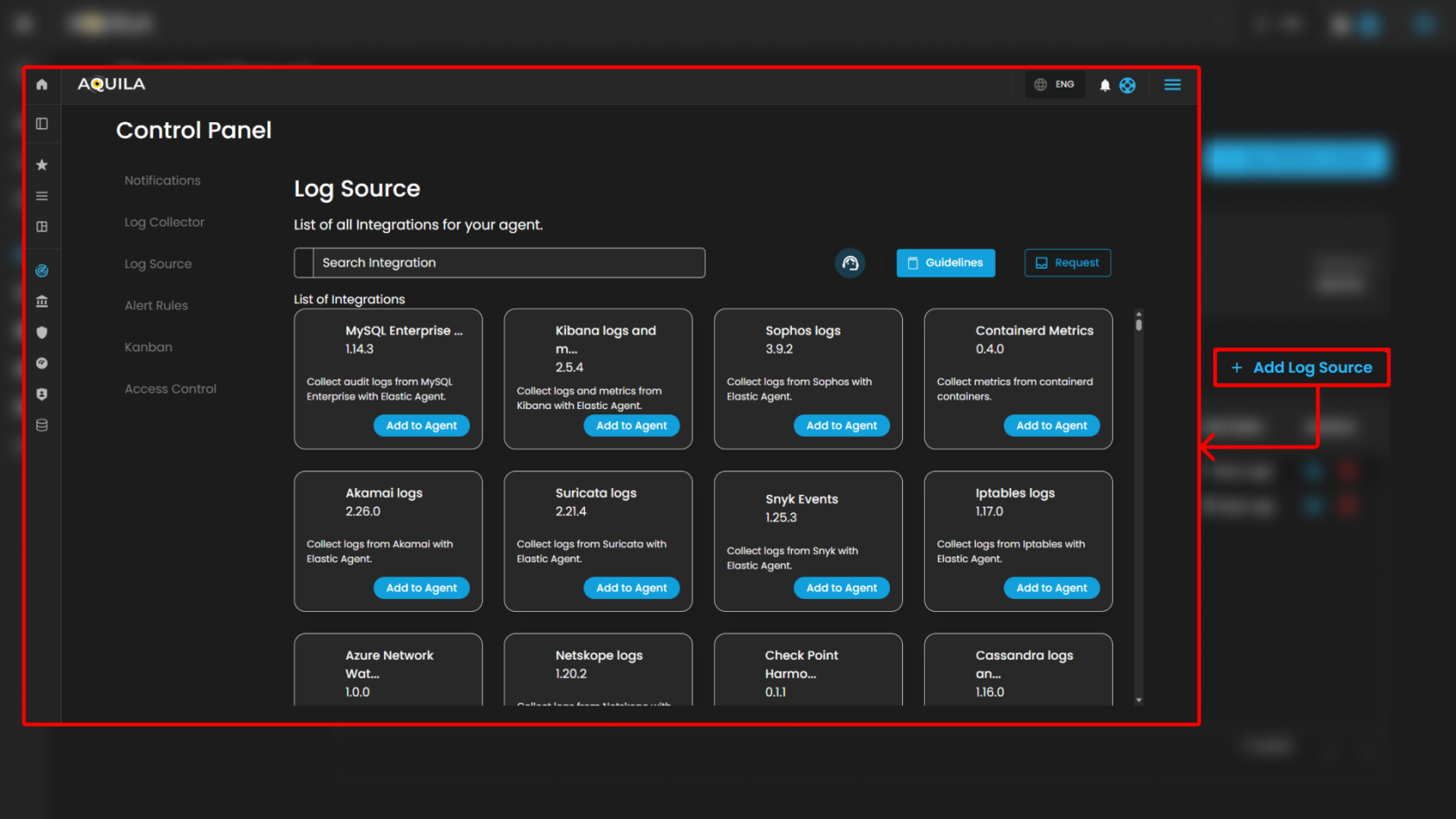
**Search and Action Controls**

- **Search Integration**
    
    
    - Enables keyword searches to quickly locate a specific integration by name or capability.
        
        [![image.png](https://cytechint-docs-bookstack.s3.amazonaws.com/uploads/images/gallery/2026-02/scaled-1680-/LPDt3tvG3xYQ0fa0-image.png)](https://cytechint-docs-bookstack.s3.amazonaws.com/uploads/images/gallery/2026-02/LPDt3tvG3xYQ0fa0-image.png)

- **Guidelines**
    
    
    - Opens the integration setup documentation and best-practice guidance for configuring integrations with the Log Agent. Use this to review prerequisites, configuration steps, and recommended settings prior to adding an integration.
        
        [![image.png](https://cytechint-docs-bookstack.s3.amazonaws.com/uploads/images/gallery/2026-02/scaled-1680-/K7iHnunuCo6Vt4PX-image.png)](https://cytechint-docs-bookstack.s3.amazonaws.com/uploads/images/gallery/2026-02/K7iHnunuCo6Vt4PX-image.png)

- **Request**
    
    
    - Opens a request form or submission workflow to request support for a new integration, report missing functionality, or ask for assistance with an existing integration. This provides a mechanism for users to request extension of available integrations or additional support resources.
        
        [![HEHE (36).png](https://cytechint-docs-bookstack.s3.amazonaws.com/uploads/images/gallery/2026-02/scaled-1680-/DRNTF8eoqUUASMjC-hehe-36.png)](https://cytechint-docs-bookstack.s3.amazonaws.com/uploads/images/gallery/2026-02/DRNTF8eoqUUASMjC-hehe-36.png)
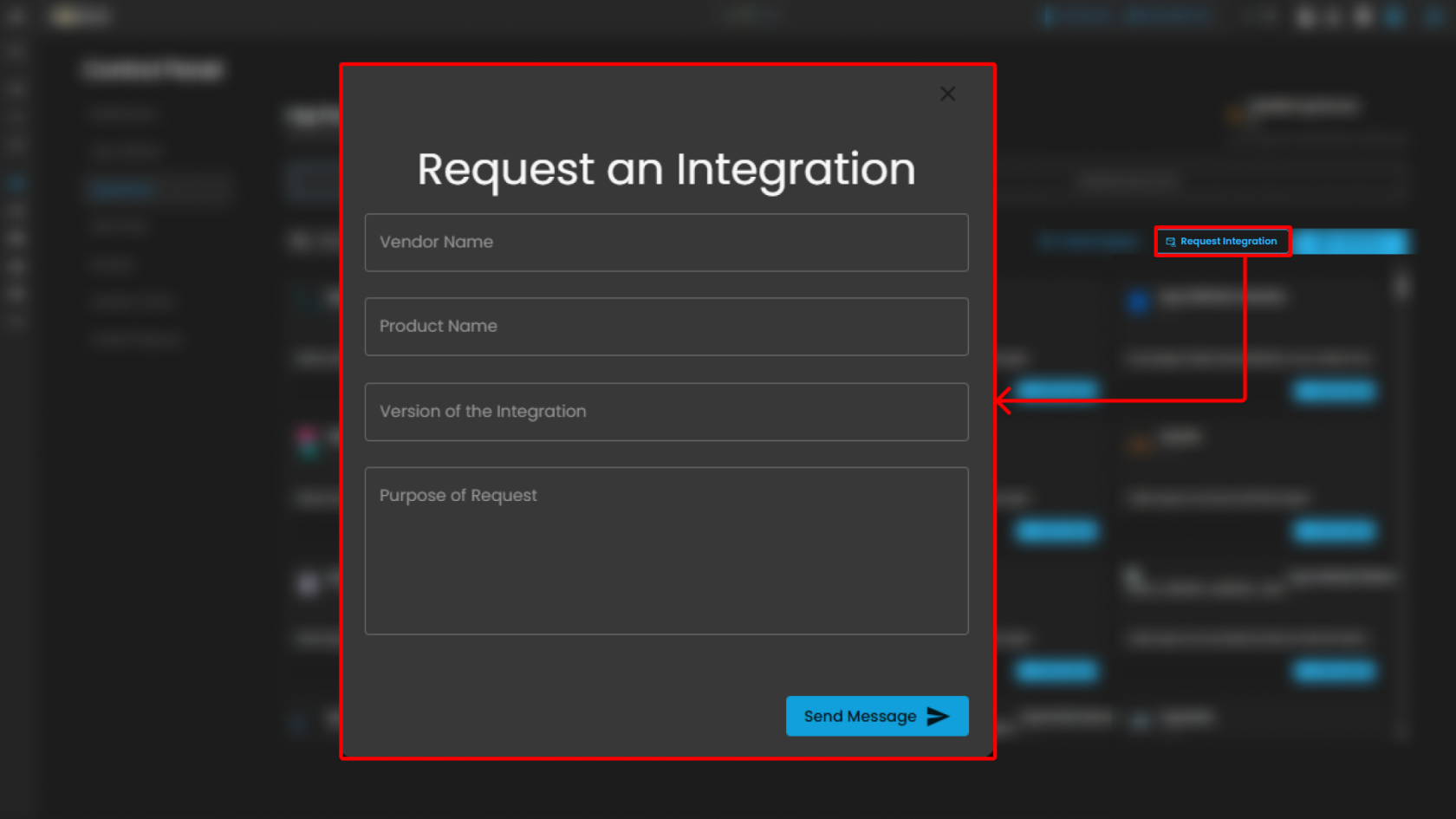
<p class="callout info">Note: The **Guidelines** and **Request** controls are located at the top-right of the page for convenient access while browsing integrations.</p>

**List of Integrations**

This section displays all available integrations supported by the CIM platform. Each integration card includes:

- **Integration Name &amp; Version** – Specifies the log source and its current integration version.
- **Description** – Briefly describes the purpose and type of logs collected.
- **Action Button (Add to Agent)** – Assigns the integration to a Log Agent for log collection.

**Support Section**

- **Purpose**: Provides users with quick access to support resources, assistance, or help documentation related to the Cyber Intelligence Management (CIM) system.
- **Functionality**: Typically, clicking this icon would open a support menu, chat widget, or redirect to a help center where users can submit support tickets, search FAQs, or get live assistance.
- **Accessibility**: Its prominent placement ensures immediate visibility for users needing assistance without navigating away from the current workspace or settings page.

##### **Alert Rules**

This section of the **Security Operations Center (SOC)** dashboard presents a summary of active alert rules, providing security personnel with a high-level overview of automated detection mechanisms, their recent execution status, and configured severity levels.

[![image.png](https://cytechint-docs-bookstack.s3.amazonaws.com/uploads/images/gallery/2026-02/scaled-1680-/EsY4sCHisCFStomB-image.png)](https://cytechint-docs-bookstack.s3.amazonaws.com/uploads/images/gallery/2026-02/EsY4sCHisCFStomB-image.png)
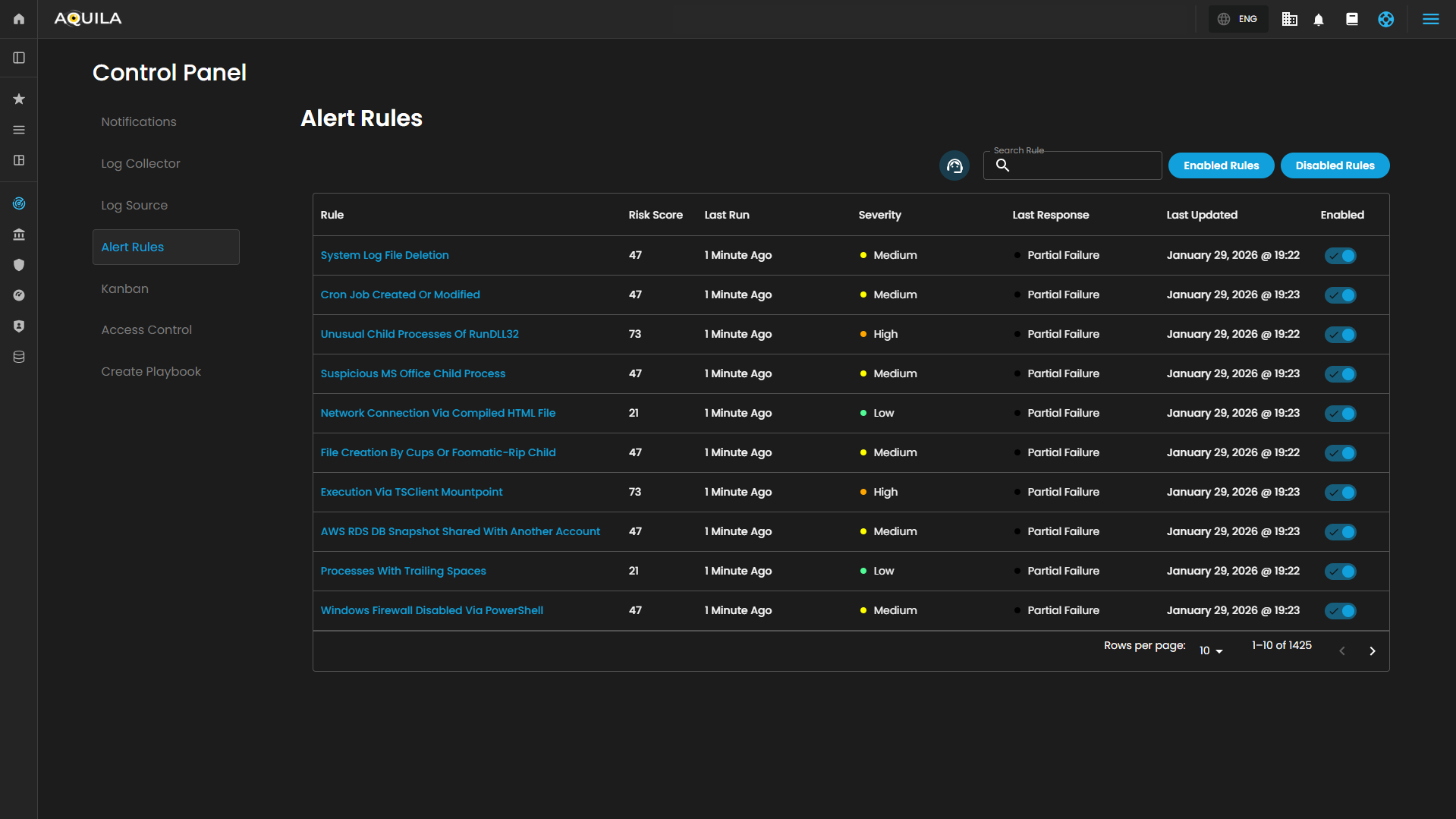
**nteractive Controls**

The dashboard is equipped with several interactive elements for filtering and searching the alert rules:

- **Search Bar**: A free-text input field located above the table, allowing operators to quickly find specific rules by name, keyword, or other identifiable attributes.
    
    [![image.png](https://cytechint-docs-bookstack.s3.amazonaws.com/uploads/images/gallery/2026-02/scaled-1680-/ed9wFUfKoam1KgMI-image.png)](https://cytechint-docs-bookstack.s3.amazonaws.com/uploads/images/gallery/2026-02/ed9wFUfKoam1KgMI-image.png)

- **Filter Buttons**: A set of toggle buttons, typically found near the search bar, for dynamically filtering the rule set based on their operational state:
    
    [![image.png](https://cytechint-docs-bookstack.s3.amazonaws.com/uploads/images/gallery/2026-02/scaled-1680-/9n7AVebCvYY864mY-image.png)](https://cytechint-docs-bookstack.s3.amazonaws.com/uploads/images/gallery/2026-02/9n7AVebCvYY864mY-image.png)

    
    
    - **Enabled Rules**: When selected, displays only the alert rules that are currently active (indicated by a ✅ in the `Enabled` column).
    - **Disabled Rules**: When selected, would display rules that have been turned off.

**Summary Table**

The core of the dashboard is a tabular interface that lists configured alert rules with the following key metadata:

<table border="1" id="bkmrk-column-description-r"><colgroup><col></col><col></col></colgroup><tbody><tr><th class="align-left">**Column**</th><td>**Description**</td></tr><tr><td>**Rule**</td><td>The descriptive name of the automated security detection rule. Names often indicate the specific technique or threat being monitored.</td></tr><tr><td>**Risk Score**</td><td>A numerical value (e.g., 73, 47, 21) associated with each rule, likely representing a relative weight or priority used for overall risk calculation and alert triage.</td></tr><tr><td>**Last Run**</td><td>A timestamp indicating how long ago each rule was last executed. All displayed rules have run within the last 10 minutes, indicating frequent, near-real-time monitoring.</td></tr><tr><td>**Severity**</td><td>The assigned impact level of the alert. The dashboard uses a three-tiered classification: **High**, **Medium**, and **Low**.</td></tr><tr><td>**Last Response**</td><td>The operational status of the rule's most recent execution. The possible states are:  
• **Succeeded**: The rule executed without errors.  
• **Partial Failure**: The rule executed but encountered issues with a subset of its tasks or data sources.  
• **Failed**: The rule execution was unsuccessful.</td></tr><tr><td>**Last Updated**</td><td>The date the rule's logic or configuration was last modified.</td></tr><tr><td>**Enabled**</td><td>A status indicator (✅) confirming that the rule is currently active and monitoring for the specified conditions. It will be grayed out and no check mark if disabled.</td></tr></tbody></table>

**Support Section**

- **Purpose**: Provides users with quick access to support resources, assistance, or help documentation related to the Cyber Intelligence Management (CIM) system.
- **Functionality**: Typically, clicking this icon would open a support menu, chat widget, or redirect to a help center where users can submit support tickets, search FAQs, or get live assistance.
- **Accessibility**: Its prominent placement ensures immediate visibility for users needing assistance without navigating away from the current workspace or settings page.

These functions collectively enable a dynamic, visual approach to task management, allowing teams to adapt the board to their specific workflows while maintaining oversight of task distribution and progress.


---

##### **Kanban Settings**

The **Kanban Settings** page provides a user interface for configuring and managing a Kanban board, which is a visual tool for tracking cases across various stages. The **Kanban Settings** page facilitates the configuration and management of this board, enabling users to customize its structure to suit specific needs, such as those in cybersecurity or technical support.

[![image.png](https://cytechint-docs-bookstack.s3.amazonaws.com/uploads/images/gallery/2026-02/scaled-1680-/C3n3WNp6FGheMYSq-image.png)](https://cytechint-docs-bookstack.s3.amazonaws.com/uploads/images/gallery/2026-02/C3n3WNp6FGheMYSq-image.png)

Users can also add new column by pressing the "Add Column" button.

[![image.png](https://cytechint-docs-bookstack.s3.amazonaws.com/uploads/images/gallery/2026-02/scaled-1680-/sxgNRITSI2e2C3Cr-image.png)](https://cytechint-docs-bookstack.s3.amazonaws.com/uploads/images/gallery/2026-02/sxgNRITSI2e2C3Cr-image.png)

1. **Column Configuration:**
    
    
    - **Purpose:** Allows users to define and label columns to represent workflow stages.
    - **Function:** Users can add new columns via the "+ Add Column" button to expand the board with additional stages. This enables tailoring the board to specific processes or team structures.
    - **Customization:** Columns can be edited (via the pencil icon ✏️) to rename or adjust their purpose, accommodating evolving workflow requirements.
2. **Task Tracking:**
    
    
    - **Purpose:** Displays the number of cases or tasks in each column.
    - **Function:** Provides a real-time overview of workload distribution across stages, helping teams monitor progress and identify bottlenecks.
3. **Column Reordering**: 
    - **Purpose**: Facilitates adjustment of the workflow sequence.
    - **Function**: Users can drag and drop columns (using the three-dot handle) to reorder them, optimizing the flow of tasks. Default columns remain fixed, ensuring critical stages (e.g., "Closed") stay in place, while custom columns can be rearranged for flexibility.
4. **Workflow Management**: 
    - **Purpose**: Visualizes the progression of tasks from initiation to completion.
    - **Function**: Columns like "**Tier 1**" and "**Tier 2 &amp; 3**" suggest a tiered support or escalation process, while "**Pending**" and "**Closed**" indicate stages for review and resolution. This structure helps teams manage tasks efficiently across the lifecycle.
5. **Support Section**: 
    - **Purpose**: Offers support for clients.
    - **Location:** To the **right** of the subtitle, in a **subtle gray-blue** color.
    - **Function**: Typically, clicking this icon would open a support menu, chat widget, or redirect to a help center where users can submit support tickets, search FAQs, or get live assistance.

##### **Access Control**

The **Access Control** page provides a user interface for managing and enforcing user permissions within a **Case Incident Management (CIM)** system or similar application. It allows administrators to define and oversee groups based on roles, controlling access to functions and data. This interface appears tailored for security or administrative contexts, such as **role-based access control (RBAC)** in cybersecurity tools.

[![image.png](https://cytechint-docs-bookstack.s3.amazonaws.com/uploads/images/gallery/2026-02/scaled-1680-/9MyW8bpRDLVxq7jg-image.png)](https://cytechint-docs-bookstack.s3.amazonaws.com/uploads/images/gallery/2026-02/9MyW8bpRDLVxq7jg-image.png)

**Header Section**

- **Add Group Button**: "+ Add Group"
    
    
    - A blue rectangular button with white text, positioned at the top-right of the header.
    - Enables users to create new user groups, expanding the access control structure.

[![image.png](https://cytechint-docs-bookstack.s3.amazonaws.com/uploads/images/gallery/2026-02/scaled-1680-/cYaxTLpxRmmliZ4k-image.png)](https://cytechint-docs-bookstack.s3.amazonaws.com/uploads/images/gallery/2026-02/cYaxTLpxRmmliZ4k-image.png)

**Table Section**

- **Table Headers:**
    - **Group Name**: Lists the name of each user group.
    - **Description**: Provides a brief overview or purpose of the group (blank in the visible row).
    - **Date Created**: Indicates the creation timestamp of the group (blank in the visible row).
    - **Members Count**: Shows the number of users assigned to the group.
    - **Action**: Contains links or buttons for managing the group.
- **Action**: 
    - "**View Details**" (blue link): Likely opens a detailed view or edit modal for the group.
    - "**Delete**" (gray link): Allows removal of the group.

When clicking the **View Details** link it will open a pop up that will show the **group settings**, **permissions** and **members list** that you can change and update.

[![image.png](https://cytechint-docs-bookstack.s3.amazonaws.com/uploads/images/gallery/2026-02/scaled-1680-/MwXCTJQaYqlu8wyW-image.png)](https://cytechint-docs-bookstack.s3.amazonaws.com/uploads/images/gallery/2026-02/MwXCTJQaYqlu8wyW-image.png)

##### **Create Playbook Container**

[![image.png](https://cytechint-docs-bookstack.s3.amazonaws.com/uploads/images/gallery/2026-02/scaled-1680-/x59hi8tUvu0xaVpr-image.png)](https://cytechint-docs-bookstack.s3.amazonaws.com/uploads/images/gallery/2026-02/x59hi8tUvu0xaVpr-image.png)

Users can create a new playbook by pressing the "Add Playbook" button.

[![image.png](https://cytechint-docs-bookstack.s3.amazonaws.com/uploads/images/gallery/2026-02/scaled-1680-/RercyzTtohPrmuDb-image.png)](https://cytechint-docs-bookstack.s3.amazonaws.com/uploads/images/gallery/2026-02/RercyzTtohPrmuDb-image.png)

Conclusion:

Cyber Incident Management is a comprehensive module designed to support the detection, handling, and resolution of cybersecurity incidents. It provides a robust set of tools that enable organizations to efficiently identify threats, coordinate incident response activities, minimize operational and security impact, and ensure timely remediation. The module supports alert ingestion and correlation, incident tracking, root cause analysis, and detailed reporting, allowing security teams to maintain visibility across the entire incident lifecycle. By leveraging automated alerts, structured workflows, and analytical reporting capabilities, Cyber Incident Management enhances situational awareness, improves response efficiency, and strengthens an organization’s overall security posture.

<p class="callout info">Please refer to the document from the previous sub-module: [CyTech AQUILA - Cyber Incident Management (CIM): Alert Rules](https://usdc-docs.cytechint.io/books/security-automation-soc-optimization-tOO/page/cytech-aquila-cyber-incident-management-cim-alert-rules)  
 [CyTech AQUILA - Cyber Incident Management (CIM): Reports](https://usdc-docs.cytechint.io/books/security-automation-soc-optimization-tOO/page/cytech-aquila-cyber-incident-management-cim-reports)  
 [CyTech AQUILA - Cyber Incident Management (CIM): Data Explorer](https://usdc-docs.cytechint.io/books/security-automation-soc-optimization-tOO/page/cytech-aquila-cyber-incident-management-cim-data-explorer)  
 [CyTech AQUILA - Cyber Incident Management (CIM): Cases](https://usdc-docs.cytechint.io/books/security-automation-soc-optimization-tOO/page/cytech-aquila-cyber-incident-management-cim-cases)  
 [CyTech AQUILA - Cyber Incident Management (CIM): Alerts](https://usdc-docs.cytechint.io/books/security-automation-soc-optimization-tOO/page/cytech-aquila-cyber-incident-management-cim-alerts)</p>

*If you need further assistance, kindly contact our support at [support@cytechint.com](mailto:info@cytechint.com) for prompt assistance and guidance.*

# CyTech AQUILA - Endpoint Detection and Response (EDR)

##### <span style="color: rgb(53, 152, 219);">**Overview:**</span>

<span style="color: rgb(0, 0, 0);"><span class="TextRun SCXW169441868 BCX0" data-contrast="auto" lang="EN-US" xml:lang="EN-US"><span class="NormalTextRun SCXW169441868 BCX0">AQUILA EDR provides organizations with prevention, detection, and response capabilities with deep visibility for EPP, EDR, SIEM, and Security Analytics use cases across Windows, macOS, and Linux operating systems running on both traditional endpoints and public cloud environments.</span></span><span class="EOP SCXW169441868 BCX0" data-ccp-props="{}"> </span></span>

---

##### <span style="color: rgb(53, 152, 219);"><span class="TextRun SCXW169441868 BCX0" data-contrast="none" lang="EN-US" xml:lang="EN-US"><span class="NormalTextRun SCXW169441868 BCX0" data-ccp-parastyle="heading 2">🔒 </span></span>**<span class="TextRun SCXW169441868 BCX0" data-contrast="none" lang="EN-US" xml:lang="EN-US"><span class="NormalTextRun SCXW169441868 BCX0" data-ccp-parastyle="heading 2">Core Capabilities</span></span><span class="EOP SCXW169441868 BCX0" data-ccp-props="{"134233117":false,"134233118":false,"134245418":true,"134245529":true,"335559738":299,"335559739":299}"> </span>**</span>

<div class="SCXW169441868 BCX0" id="bkmrk-prevent-complex-atta"><div class="ListContainerWrapper SCXW169441868 BCX0">1. <span style="color: rgb(0, 0, 0);">**<span class="TextRun SCXW169441868 BCX0" data-contrast="none" lang="EN-US" xml:lang="EN-US"><span class="NormalTextRun SCXW169441868 BCX0">Prevent complex attacks</span></span>** <span class="TextRun SCXW169441868 BCX0" data-contrast="auto" lang="EN-US" xml:lang="EN-US"><span class="NormalTextRun SCXW169441868 BCX0">- Prevent malware (Windows, macOS, Linux) and ransomware (Windows) from executing, and stop advanced threats with malicious behavior (Windows, macOS, Linux), memory threat (Windows, macOS, Linux), and credential hardening (Windows) protections.</span></span></span>

</div></div><div class="SCXW169441868 BCX0" id="bkmrk-alert-in-high-fideli"><div class="ListContainerWrapper SCXW169441868 BCX0">2. <span style="color: rgb(0, 0, 0);"><span class="TextRun SCXW169441868 BCX0" data-contrast="none" lang="EN-US" xml:lang="EN-US"><span class="NormalTextRun SCXW169441868 BCX0">**Alert in high fidelity** </span></span><span class="TextRun SCXW169441868 BCX0" data-contrast="auto" lang="EN-US" xml:lang="EN-US"><span class="NormalTextRun SCXW169441868 BCX0">- Bolster team efficacy by detecting threats centrally and minimizing false positives via extensive corroboration.</span></span><span class="EOP SCXW169441868 BCX0" data-ccp-props="{}"> </span></span>

</div></div><div class="SCXW169441868 BCX0" id="bkmrk-detect-threats-in-hi"><div class="ListContainerWrapper SCXW169441868 BCX0">3. <span style="color: rgb(0, 0, 0);">**<span class="TextRun SCXW169441868 BCX0" data-contrast="none" lang="EN-US" xml:lang="EN-US"><span class="NormalTextRun SCXW169441868 BCX0">Detect threats in high fidelity</span></span>** <span class="TextRun SCXW169441868 BCX0" data-contrast="auto" lang="EN-US" xml:lang="EN-US"><span class="NormalTextRun SCXW169441868 BCX0">- </span><span class="NormalTextRun SCXW169441868 BCX0">facilitates</span><span class="NormalTextRun SCXW169441868 BCX0"> deep visibility by instrumenting the process, file, and network data in your </span><span class="NormalTextRun ContextualSpellingAndGrammarErrorV2Themed SCXW169441868 BCX0">environments</span><span class="NormalTextRun SCXW169441868 BCX0"> with minimal data collection overhead.</span></span><span class="EOP SCXW169441868 BCX0" data-ccp-props="{}"> </span></span>

</div></div><div class="SCXW169441868 BCX0" id="bkmrk-triage-and-respond-r"><div class="ListContainerWrapper SCXW169441868 BCX0">4. <span style="color: rgb(0, 0, 0);">**<span class="TextRun SCXW169441868 BCX0" data-contrast="none" lang="EN-US" xml:lang="EN-US"><span class="NormalTextRun SCXW169441868 BCX0">Triage and respond rapidly</span></span>**<span class="TextRun SCXW169441868 BCX0" data-contrast="auto" lang="EN-US" xml:lang="EN-US"><span class="NormalTextRun SCXW169441868 BCX0"> - Quickly analyze detailed data from across your hosts. Examine host-based </span><span class="NormalTextRun ContextualSpellingAndGrammarErrorV2Themed SCXW169441868 BCX0">activity</span><span class="NormalTextRun SCXW169441868 BCX0"> with interactive visualizations. Invoke remote response actions across distributed endpoints. Extend investigation capabilities even further with the </span><span class="NormalTextRun SpellingErrorV2Themed SCXW169441868 BCX0">Osquery</span><span class="NormalTextRun SCXW169441868 BCX0"> integration, fully integrated into Security workflows.</span></span><span class="EOP SCXW169441868 BCX0" data-ccp-props="{}"> </span></span>

</div></div><div class="SCXW169441868 BCX0" id="bkmrk-secure-your-cloud-wo"><div class="ListContainerWrapper SCXW169441868 BCX0">5. <span style="color: rgb(0, 0, 0);">**<span class="TextRun SCXW169441868 BCX0" data-contrast="none" lang="EN-US" xml:lang="EN-US"><span class="NormalTextRun SCXW169441868 BCX0">Secure your cloud workloads</span></span>** <span class="TextRun SCXW169441868 BCX0" data-contrast="auto" lang="EN-US" xml:lang="EN-US"><span class="NormalTextRun SCXW169441868 BCX0">- Stop threats targeting cloud workloads and cloud-native applications. Gain real-time visibility and control with a lightweight user-space agent, powered by </span><span class="NormalTextRun SpellingErrorV2Themed SCXW169441868 BCX0">eBPF</span><span class="NormalTextRun SCXW169441868 BCX0">. Automate the identification of cloud threats with detection rules and machine learning (ML). Achieve rapid time-to-value with MITRE ATT&amp;CK-aligned detections.</span></span></span>

</div></div><div class="SCXW169441868 BCX0" id="bkmrk-view-terminal-sessio"><div class="ListContainerWrapper SCXW169441868 BCX0">6. <span style="color: rgb(0, 0, 0);">**<span class="TextRun SCXW169441868 BCX0" data-contrast="none" lang="EN-US" xml:lang="EN-US"><span class="NormalTextRun SCXW169441868 BCX0">View terminal sessions</span></span>** <span class="TextRun SCXW169441868 BCX0" data-contrast="auto" lang="EN-US" xml:lang="EN-US"><span class="NormalTextRun SCXW169441868 BCX0">- Give your security team a unique and powerful investigative tool for digital forensics and incident response (DFIR), reducing the mean time to respond (MTTR). </span><span class="NormalTextRun SCXW169441868 BCX0">Session view provides a time-ordered series of process executions in your Linux workloads in the form of a terminal shell, as well as the ability to replay the terminal session.</span></span><span class="EOP SCXW169441868 BCX0" data-ccp-props="{}"> </span></span>

</div></div>---

##### <span style="color: rgb(53, 152, 219);">**<span class="TextRun SCXW169441868 BCX0" data-contrast="none" lang="EN-US" xml:lang="EN-US"><span class="NormalTextRun SCXW169441868 BCX0" data-ccp-parastyle="heading 2">🛡️ Protections Matrix</span></span><span class="EOP SCXW169441868 BCX0" data-ccp-props="{"134233117":false,"134233118":false,"134245418":true,"134245529":true,"335559738":299,"335559739":299}"> </span>**</span>

<div class="OutlineElement Ltr SCXW169441868 BCX0" id="bkmrk-protection-type%C2%A0-os-"><div class="TableContainer Ltr SCXW169441868 BCX0"><div aria-hidden="true" class="WACAltTextDescribedBy SCXW169441868 BCX0" id="bkmrk--2"></div><table aria-rowcount="6" border="1" class="Table Ltr TableWordWrap SCXW169441868 BCX0" data-tablelook="1696" data-tablestyle="MsoNormalTable" dir="ltr" style="width: 100%;"><tbody class="SCXW169441868 BCX0"><tr aria-rowindex="1" class="TableRow SCXW169441868 BCX0" role="row"><td class="FirstRow FirstCol SCXW169441868 BCX0" data-celllook="0" role="rowheader" style="width: 16.2146%;">**<span style="color: rgb(0, 0, 0);"><span class="TextRun SCXW169441868 BCX0" data-contrast="none" lang="EN-US" xml:lang="EN-US"><span class="NormalTextRun SCXW169441868 BCX0">Protection Type</span></span><span class="EOP SCXW169441868 BCX0" data-ccp-props="{"134233117":false,"134233118":false,"335551550":2,"335551620":2,"335559738":0,"335559739":0}"> </span></span>**

</td><td class="FirstRow SCXW169441868 BCX0" data-celllook="0" role="columnheader" style="width: 17.8838%;">**<span style="color: rgb(0, 0, 0);"><span class="TextRun SCXW169441868 BCX0" data-contrast="none" lang="EN-US" xml:lang="EN-US"><span class="NormalTextRun SCXW169441868 BCX0">OS Support</span></span><span class="EOP SCXW169441868 BCX0" data-ccp-props="{"134233117":false,"134233118":false,"335551550":2,"335551620":2,"335559738":0,"335559739":0}"> </span></span>**

</td><td class="FirstRow SCXW169441868 BCX0" data-celllook="0" role="columnheader" style="width: 8.94188%;">**<span style="color: rgb(0, 0, 0);"><span class="TextRun SCXW169441868 BCX0" data-contrast="none" lang="EN-US" xml:lang="EN-US"><span class="NormalTextRun SCXW169441868 BCX0">Detect</span></span><span class="EOP SCXW169441868 BCX0" data-ccp-props="{"134233117":false,"134233118":false,"335551550":2,"335551620":2,"335559738":0,"335559739":0}"> </span></span>**

</td><td class="FirstRow SCXW169441868 BCX0" data-celllook="0" role="columnheader" style="width: 9.89248%;"><span style="color: rgb(0, 0, 0);">**<span class="TextRun SCXW169441868 BCX0" data-contrast="none" lang="EN-US" xml:lang="EN-US"><span class="NormalTextRun SCXW169441868 BCX0">Prevent</span></span>**<span class="EOP SCXW169441868 BCX0" data-ccp-props="{"134233117":false,"134233118":false,"335551550":2,"335551620":2,"335559738":0,"335559739":0}"> </span></span>

</td><td class="FirstRow LastCol SCXW169441868 BCX0" data-celllook="0" role="columnheader" style="width: 47.0971%;">**<span style="color: rgb(0, 0, 0);"><span class="TextRun SCXW169441868 BCX0" data-contrast="none" lang="EN-US" xml:lang="EN-US"><span class="NormalTextRun SCXW169441868 BCX0">Description</span></span><span class="EOP SCXW169441868 BCX0" data-ccp-props="{"134233117":false,"134233118":false,"335551550":2,"335551620":2,"335559738":0,"335559739":0}"> </span></span>**

</td></tr><tr aria-rowindex="2" class="TableRow SCXW169441868 BCX0" role="row"><td class="FirstCol SCXW169441868 BCX0" data-celllook="0" role="rowheader" style="width: 16.2146%;">**<span style="color: rgb(0, 0, 0);"><span class="TextRun SCXW169441868 BCX0" data-contrast="auto" lang="EN-US" xml:lang="EN-US"><span class="NormalTextRun SCXW169441868 BCX0">Malware</span></span><span class="EOP SCXW169441868 BCX0" data-ccp-props="{"134233117":false,"134233118":false,"335559738":0,"335559739":0}"> </span></span>**

</td><td class="SCXW169441868 BCX0" data-celllook="0" style="width: 17.8838%;"><span style="color: rgb(0, 0, 0);"><span class="TextRun SCXW169441868 BCX0" data-contrast="auto" lang="EN-US" xml:lang="EN-US"><span class="NormalTextRun SCXW169441868 BCX0">Windows, macOS, Linux</span></span><span class="EOP SCXW169441868 BCX0" data-ccp-props="{"134233117":false,"134233118":false,"335559738":0,"335559739":0}"> </span></span>

</td><td class="SCXW169441868 BCX0" data-celllook="0" style="width: 8.94188%;"><span class="EOP SCXW169441868 BCX0" data-ccp-props="{}"> </span>

</td><td class="SCXW169441868 BCX0" data-celllook="0" style="width: 9.89248%;"><span class="TextRun SCXW169441868 BCX0" data-contrast="auto" lang="EN-US" xml:lang="EN-US"><span class="NormalTextRun SCXW169441868 BCX0"> </span><span class="NormalTextRun SCXW169441868 BCX0">✅</span></span><span class="EOP SCXW169441868 BCX0" data-ccp-props="{"134233117":false,"134233118":false,"335559738":0,"335559739":0}"> </span>

</td><td class="LastCol SCXW169441868 BCX0" data-celllook="0" style="width: 47.0971%;"><span style="color: rgb(0, 0, 0);"><span class="TextRun SCXW169441868 BCX0" data-contrast="auto" lang="EN-US" xml:lang="EN-US"><span class="NormalTextRun SCXW169441868 BCX0">Blocks </span><span class="NormalTextRun ContextualSpellingAndGrammarErrorV2Themed SCXW169441868 BCX0">known</span><span class="NormalTextRun SCXW169441868 BCX0"> malicious executables and scripts at runtime.</span></span><span class="EOP SCXW169441868 BCX0" data-ccp-props="{"134233117":false,"134233118":false,"335559738":0,"335559739":0}"> </span></span>

</td></tr><tr aria-rowindex="3" class="TableRow SCXW169441868 BCX0" role="row"><td class="FirstCol SCXW169441868 BCX0" data-celllook="0" role="rowheader" style="width: 16.2146%;">**<span style="color: rgb(0, 0, 0);"><span class="TextRun SCXW169441868 BCX0" data-contrast="auto" lang="EN-US" xml:lang="EN-US"><span class="NormalTextRun SCXW169441868 BCX0">Ransomware</span></span><span class="EOP SCXW169441868 BCX0" data-ccp-props="{"134233117":false,"134233118":false,"335559738":0,"335559739":0}"> </span></span>**

</td><td class="SCXW169441868 BCX0" data-celllook="0" style="width: 17.8838%;"><span style="color: rgb(0, 0, 0);"><span class="TextRun SCXW169441868 BCX0" data-contrast="auto" lang="EN-US" xml:lang="EN-US"><span class="NormalTextRun SCXW169441868 BCX0">Windows</span></span><span class="EOP SCXW169441868 BCX0" data-ccp-props="{"134233117":false,"134233118":false,"335559738":0,"335559739":0}"> </span></span>

</td><td class="SCXW169441868 BCX0" data-celllook="0" style="width: 8.94188%;"><span class="EOP SCXW169441868 BCX0" data-ccp-props="{}"> </span>

</td><td class="SCXW169441868 BCX0" data-celllook="0" style="width: 9.89248%;"><span class="TextRun SCXW169441868 BCX0" data-contrast="auto" lang="EN-US" xml:lang="EN-US"><span class="NormalTextRun SCXW169441868 BCX0"> </span><span class="NormalTextRun SCXW169441868 BCX0">✅</span></span><span class="EOP SCXW169441868 BCX0" data-ccp-props="{"134233117":false,"134233118":false,"335559738":0,"335559739":0}"> </span>

</td><td class="LastCol SCXW169441868 BCX0" data-celllook="0" style="width: 47.0971%;"><span style="color: rgb(0, 0, 0);"><span class="TextRun SCXW169441868 BCX0" data-contrast="auto" lang="EN-US" xml:lang="EN-US"><span class="NormalTextRun SCXW169441868 BCX0">Detects rapid file changes and unauthorized encryption activity.</span></span><span class="EOP SCXW169441868 BCX0" data-ccp-props="{"134233117":false,"134233118":false,"335559738":0,"335559739":0}"> </span></span>

</td></tr><tr aria-rowindex="4" class="TableRow SCXW169441868 BCX0" role="row"><td class="FirstCol SCXW169441868 BCX0" data-celllook="0" role="rowheader" style="width: 16.2146%;">**<span style="color: rgb(0, 0, 0);"><span class="TextRun SCXW169441868 BCX0" data-contrast="auto" lang="EN-US" xml:lang="EN-US"><span class="NormalTextRun SCXW169441868 BCX0">Memory Threats</span></span><span class="EOP SCXW169441868 BCX0" data-ccp-props="{"134233117":false,"134233118":false,"335559738":0,"335559739":0}"> </span></span>**

</td><td class="SCXW169441868 BCX0" data-celllook="0" style="width: 17.8838%;"><span style="color: rgb(0, 0, 0);"><span class="TextRun SCXW169441868 BCX0" data-contrast="auto" lang="EN-US" xml:lang="EN-US"><span class="NormalTextRun SCXW169441868 BCX0">Windows, macOS, Linux</span></span><span class="EOP SCXW169441868 BCX0" data-ccp-props="{"134233117":false,"134233118":false,"335559738":0,"335559739":0}"> </span></span>

</td><td class="SCXW169441868 BCX0" data-celllook="0" style="width: 8.94188%;"><span class="EOP SCXW169441868 BCX0" data-ccp-props="{}"> </span>

</td><td class="SCXW169441868 BCX0" data-celllook="0" style="width: 9.89248%;"><span class="TextRun SCXW169441868 BCX0" data-contrast="auto" lang="EN-US" xml:lang="EN-US"><span class="NormalTextRun SCXW169441868 BCX0"> </span><span class="NormalTextRun SCXW169441868 BCX0">✅</span></span><span class="EOP SCXW169441868 BCX0" data-ccp-props="{"134233117":false,"134233118":false,"335559738":0,"335559739":0}"> </span>

</td><td class="LastCol SCXW169441868 BCX0" data-celllook="0" style="width: 47.0971%;"><span style="color: rgb(0, 0, 0);"><span class="TextRun SCXW169441868 BCX0" data-contrast="auto" lang="EN-US" xml:lang="EN-US"><span class="NormalTextRun SCXW169441868 BCX0">Prevents memory-based attacks like process injection or ROP chains.</span></span><span class="EOP SCXW169441868 BCX0" data-ccp-props="{"134233117":false,"134233118":false,"335559738":0,"335559739":0}"> </span></span>

</td></tr><tr aria-rowindex="5" class="TableRow SCXW169441868 BCX0" role="row"><td class="FirstCol SCXW169441868 BCX0" data-celllook="0" role="rowheader" style="width: 16.2146%;">**<span style="color: rgb(0, 0, 0);"><span class="TextRun SCXW169441868 BCX0" data-contrast="auto" lang="EN-US" xml:lang="EN-US"><span class="NormalTextRun SCXW169441868 BCX0">Malicious Behavior</span></span><span class="EOP SCXW169441868 BCX0" data-ccp-props="{"134233117":false,"134233118":false,"335559738":0,"335559739":0}"> </span></span>**

</td><td class="SCXW169441868 BCX0" data-celllook="0" style="width: 17.8838%;"><span style="color: rgb(0, 0, 0);"><span class="TextRun SCXW169441868 BCX0" data-contrast="auto" lang="EN-US" xml:lang="EN-US"><span class="NormalTextRun SCXW169441868 BCX0">Windows, macOS, Linux</span></span><span class="EOP SCXW169441868 BCX0" data-ccp-props="{"134233117":false,"134233118":false,"335559738":0,"335559739":0}"> </span></span>

</td><td class="SCXW169441868 BCX0" data-celllook="0" style="width: 8.94188%;"><span class="EOP SCXW169441868 BCX0" data-ccp-props="{}"> </span>

</td><td class="SCXW169441868 BCX0" data-celllook="0" style="width: 9.89248%;"><span class="TextRun SCXW169441868 BCX0" data-contrast="auto" lang="EN-US" xml:lang="EN-US"><span class="NormalTextRun SCXW169441868 BCX0"> </span><span class="NormalTextRun SCXW169441868 BCX0">✅</span></span><span class="EOP SCXW169441868 BCX0" data-ccp-props="{"134233117":false,"134233118":false,"335559738":0,"335559739":0}"> </span>

</td><td class="LastCol SCXW169441868 BCX0" data-celllook="0" style="width: 47.0971%;"><span style="color: rgb(0, 0, 0);"><span class="TextRun SCXW169441868 BCX0" data-contrast="auto" lang="EN-US" xml:lang="EN-US"><span class="NormalTextRun SCXW169441868 BCX0">Stops suspicious techniques such as abnormal child processes or </span><span class="NormalTextRun SpellingErrorV2Themed SCXW169441868 BCX0">LOLBins</span><span class="NormalTextRun SCXW169441868 BCX0">.</span></span><span class="EOP SCXW169441868 BCX0" data-ccp-props="{"134233117":false,"134233118":false,"335559738":0,"335559739":0}"> </span></span>

</td></tr><tr aria-rowindex="6" class="TableRow SCXW169441868 BCX0" role="row"><td class="FirstCol LastRow SCXW169441868 BCX0" data-celllook="0" role="rowheader" style="width: 16.2146%;">**<span style="color: rgb(0, 0, 0);"><span class="TextRun SCXW169441868 BCX0" data-contrast="auto" lang="EN-US" xml:lang="EN-US"><span class="NormalTextRun SCXW169441868 BCX0">Credential Hardening</span></span><span class="EOP SCXW169441868 BCX0" data-ccp-props="{"134233117":false,"134233118":false,"335559738":0,"335559739":0}"> </span></span>**

</td><td class="LastRow SCXW169441868 BCX0" data-celllook="0" style="width: 17.8838%;"><span style="color: rgb(0, 0, 0);"><span class="TextRun SCXW169441868 BCX0" data-contrast="auto" lang="EN-US" xml:lang="EN-US"><span class="NormalTextRun SCXW169441868 BCX0">Windows</span></span><span class="EOP SCXW169441868 BCX0" data-ccp-props="{"134233117":false,"134233118":false,"335559738":0,"335559739":0}"> </span></span>

</td><td class="LastRow SCXW169441868 BCX0" data-celllook="0" style="width: 8.94188%;"><span class="EOP SCXW169441868 BCX0" data-ccp-props="{}"> </span>

</td><td class="LastRow SCXW169441868 BCX0" data-celllook="0" style="width: 9.89248%;"><span class="TextRun SCXW169441868 BCX0" data-contrast="auto" lang="EN-US" xml:lang="EN-US"><span class="NormalTextRun SCXW169441868 BCX0"> </span></span> <span style="color: rgb(0, 0, 0);"><span class="TextRun SCXW169441868 BCX0" data-contrast="none" lang="EN-US" xml:lang="EN-US"><span class="NormalTextRun SCXW169441868 BCX0">Enabled</span></span><span class="EOP SCXW169441868 BCX0" data-ccp-props="{"134233117":false,"134233118":false,"335559738":0,"335559739":0}"> </span></span>

</td><td class="LastCol LastRow SCXW169441868 BCX0" data-celllook="0" style="width: 47.0971%;"><span style="color: rgb(0, 0, 0);"><span class="TextRun SCXW169441868 BCX0" data-contrast="auto" lang="EN-US" xml:lang="EN-US"><span class="NormalTextRun SCXW169441868 BCX0">Protects credentials by preventing unauthorized LSASS access.</span></span><span class="EOP SCXW169441868 BCX0" data-ccp-props="{"134233117":false,"134233118":false,"335559738":0,"335559739":0}"> </span></span>

</td></tr></tbody></table>

</div></div>---

##### <span style="color: rgb(53, 152, 219);">**<span class="TextRun SCXW169441868 BCX0" data-contrast="none" lang="EN-US" xml:lang="EN-US"><span class="NormalTextRun SCXW169441868 BCX0" data-ccp-parastyle="heading 2">📊 Event Collection</span></span><span class="EOP SCXW169441868 BCX0" data-ccp-props="{"134233117":false,"134233118":false,"134245418":true,"134245529":true,"335559738":299,"335559739":299}"> </span>**</span>

<div class="OutlineElement Ltr SCXW169441868 BCX0" id="bkmrk-event-type%C2%A0-windows%C2%A0"><div class="TableContainer Ltr SCXW169441868 BCX0"><div aria-hidden="true" class="WACAltTextDescribedBy SCXW169441868 BCX0" id="bkmrk--4"></div><table aria-rowcount="9" border="1" class="Table Ltr TableWordWrap SCXW169441868 BCX0" data-tablelook="1696" data-tablestyle="MsoNormalTable" dir="ltr"><tbody class="SCXW169441868 BCX0"><tr aria-rowindex="1" class="TableRow SCXW169441868 BCX0" role="row"><td class="FirstRow FirstCol SCXW169441868 BCX0" data-celllook="0" role="rowheader">**<span style="color: rgb(0, 0, 0);"><span class="TextRun SCXW169441868 BCX0" data-contrast="none" lang="EN-US" xml:lang="EN-US"><span class="NormalTextRun SCXW169441868 BCX0">Event Type</span></span><span class="EOP SCXW169441868 BCX0" data-ccp-props="{"134233117":false,"134233118":false,"335551550":2,"335551620":2,"335559738":0,"335559739":0}"> </span></span>**

</td><td class="FirstRow SCXW169441868 BCX0" data-celllook="0" role="columnheader">**<span style="color: rgb(0, 0, 0);"><span class="TextRun SCXW169441868 BCX0" data-contrast="none" lang="EN-US" xml:lang="EN-US"><span class="NormalTextRun SCXW169441868 BCX0">Windows</span></span><span class="EOP SCXW169441868 BCX0" data-ccp-props="{"134233117":false,"134233118":false,"335551550":2,"335551620":2,"335559738":0,"335559739":0}"> </span></span>**

</td><td class="FirstRow SCXW169441868 BCX0" data-celllook="0" role="columnheader">**<span style="color: rgb(0, 0, 0);"><span class="TextRun SCXW169441868 BCX0" data-contrast="none" lang="EN-US" xml:lang="EN-US"><span class="NormalTextRun SCXW169441868 BCX0">macOS</span></span><span class="EOP SCXW169441868 BCX0" data-ccp-props="{"134233117":false,"134233118":false,"335551550":2,"335551620":2,"335559738":0,"335559739":0}"> </span></span>**

</td><td class="FirstRow SCXW169441868 BCX0" data-celllook="0" role="columnheader">**<span style="color: rgb(0, 0, 0);"><span class="TextRun SCXW169441868 BCX0" data-contrast="none" lang="EN-US" xml:lang="EN-US"><span class="NormalTextRun SCXW169441868 BCX0">Linux</span></span><span class="EOP SCXW169441868 BCX0" data-ccp-props="{"134233117":false,"134233118":false,"335551550":2,"335551620":2,"335559738":0,"335559739":0}"> </span></span>**

</td><td class="FirstRow LastCol SCXW169441868 BCX0" data-celllook="0" role="columnheader">**<span style="color: rgb(0, 0, 0);"><span class="TextRun SCXW169441868 BCX0" data-contrast="none" lang="EN-US" xml:lang="EN-US"><span class="NormalTextRun SCXW169441868 BCX0">Description</span></span><span class="EOP SCXW169441868 BCX0" data-ccp-props="{"134233117":false,"134233118":false,"335551550":2,"335551620":2,"335559738":0,"335559739":0}"> </span></span>**

</td></tr><tr aria-rowindex="2" class="TableRow SCXW169441868 BCX0" role="row"><td class="FirstCol SCXW169441868 BCX0" data-celllook="0" role="rowheader">**<span style="color: rgb(0, 0, 0);"><span class="TextRun SCXW169441868 BCX0" data-contrast="auto" lang="EN-US" xml:lang="EN-US"><span class="NormalTextRun SCXW169441868 BCX0">API</span></span><span class="EOP SCXW169441868 BCX0" data-ccp-props="{"134233117":false,"134233118":false,"335559738":0,"335559739":0}"> </span></span>**

</td><td class="SCXW169441868 BCX0" data-celllook="0"><span class="TextRun SCXW169441868 BCX0" data-contrast="auto" lang="EN-US" xml:lang="EN-US"><span class="NormalTextRun SCXW169441868 BCX0"> </span><span class="NormalTextRun SCXW169441868 BCX0">✅</span></span><span class="EOP SCXW169441868 BCX0" data-ccp-props="{"134233117":false,"134233118":false,"335559738":0,"335559739":0}"> </span>

</td><td class="SCXW169441868 BCX0" data-celllook="0"><span class="TextRun SCXW169441868 BCX0" data-contrast="auto" lang="EN-US" xml:lang="EN-US"><span class="NormalTextRun SCXW169441868 BCX0"> </span><span class="NormalTextRun SCXW169441868 BCX0">–</span></span><span class="EOP SCXW169441868 BCX0" data-ccp-props="{"134233117":false,"134233118":false,"335559738":0,"335559739":0}"> </span>

</td><td class="SCXW169441868 BCX0" data-celllook="0"><span class="TextRun SCXW169441868 BCX0" data-contrast="auto" lang="EN-US" xml:lang="EN-US"><span class="NormalTextRun SCXW169441868 BCX0"> </span><span class="NormalTextRun SCXW169441868 BCX0">–</span></span><span class="EOP SCXW169441868 BCX0" data-ccp-props="{"134233117":false,"134233118":false,"335559738":0,"335559739":0}"> </span>

</td><td class="LastCol SCXW169441868 BCX0" data-celllook="0"><span style="color: rgb(0, 0, 0);"><span class="TextRun SCXW169441868 BCX0" data-contrast="auto" lang="EN-US" xml:lang="EN-US"><span class="NormalTextRun ContextualSpellingAndGrammarErrorV2Themed SCXW169441868 BCX0">Logs</span><span class="NormalTextRun SCXW169441868 BCX0"> sensitive API calls that may </span><span class="NormalTextRun SCXW169441868 BCX0">indicate</span><span class="NormalTextRun SCXW169441868 BCX0"> injection or system tampering.</span></span><span class="EOP SCXW169441868 BCX0" data-ccp-props="{"134233117":false,"134233118":false,"335559738":0,"335559739":0}"> </span></span>

</td></tr><tr aria-rowindex="3" class="TableRow SCXW169441868 BCX0" role="row"><td class="FirstCol SCXW169441868 BCX0" data-celllook="0" role="rowheader">**<span style="color: rgb(0, 0, 0);"><span class="TextRun SCXW169441868 BCX0" data-contrast="auto" lang="EN-US" xml:lang="EN-US"><span class="NormalTextRun SCXW169441868 BCX0">DLL &amp; Driver Load</span></span><span class="EOP SCXW169441868 BCX0" data-ccp-props="{"134233117":false,"134233118":false,"335559738":0,"335559739":0}"> </span></span>**

</td><td class="SCXW169441868 BCX0" data-celllook="0"><span class="TextRun SCXW169441868 BCX0" data-contrast="auto" lang="EN-US" xml:lang="EN-US"><span class="NormalTextRun SCXW169441868 BCX0"> </span> <span class="NormalTextRun SCXW169441868 BCX0">✅</span></span><span class="EOP SCXW169441868 BCX0" data-ccp-props="{"134233117":false,"134233118":false,"335559738":0,"335559739":0}"> </span>

</td><td class="SCXW169441868 BCX0" data-celllook="0"><span class="TextRun SCXW169441868 BCX0" data-contrast="auto" lang="EN-US" xml:lang="EN-US"><span class="NormalTextRun SCXW169441868 BCX0"> </span> <span class="NormalTextRun SCXW169441868 BCX0">–</span></span><span class="EOP SCXW169441868 BCX0" data-ccp-props="{"134233117":false,"134233118":false,"335559738":0,"335559739":0}"> </span>

</td><td class="SCXW169441868 BCX0" data-celllook="0"><span class="TextRun SCXW169441868 BCX0" data-contrast="auto" lang="EN-US" xml:lang="EN-US"><span class="NormalTextRun SCXW169441868 BCX0"> </span><span class="NormalTextRun SCXW169441868 BCX0"> </span><span class="NormalTextRun SCXW169441868 BCX0">–</span></span><span class="EOP SCXW169441868 BCX0" data-ccp-props="{"134233117":false,"134233118":false,"335559738":0,"335559739":0}"> </span>

</td><td class="LastCol SCXW169441868 BCX0" data-celllook="0"><span style="color: rgb(0, 0, 0);"><span class="TextRun SCXW169441868 BCX0" data-contrast="auto" lang="EN-US" xml:lang="EN-US"><span class="NormalTextRun SCXW169441868 BCX0">Captures DLL/driver loading to detect unsigned or malicious code injection.</span></span><span class="EOP SCXW169441868 BCX0" data-ccp-props="{"134233117":false,"134233118":false,"335559738":0,"335559739":0}"> </span></span>

</td></tr><tr aria-rowindex="4" class="TableRow SCXW169441868 BCX0" role="row"><td class="FirstCol SCXW169441868 BCX0" data-celllook="0" role="rowheader">**<span style="color: rgb(0, 0, 0);"><span class="TextRun SCXW169441868 BCX0" data-contrast="auto" lang="EN-US" xml:lang="EN-US"><span class="NormalTextRun SCXW169441868 BCX0">DNS</span></span><span class="EOP SCXW169441868 BCX0" data-ccp-props="{"134233117":false,"134233118":false,"335559738":0,"335559739":0}"> </span></span>**

</td><td class="SCXW169441868 BCX0" data-celllook="0"><span class="TextRun SCXW169441868 BCX0" data-contrast="auto" lang="EN-US" xml:lang="EN-US"><span class="NormalTextRun SCXW169441868 BCX0"> </span><span class="NormalTextRun SCXW169441868 BCX0"> </span><span class="NormalTextRun SCXW169441868 BCX0"> </span> <span class="NormalTextRun SCXW169441868 BCX0">✅</span></span><span class="EOP SCXW169441868 BCX0" data-ccp-props="{"134233117":false,"134233118":false,"335559738":0,"335559739":0}"> </span>

</td><td class="SCXW169441868 BCX0" data-celllook="0"><span class="TextRun SCXW169441868 BCX0" data-contrast="auto" lang="EN-US" xml:lang="EN-US"><span class="NormalTextRun SCXW169441868 BCX0"> </span><span class="NormalTextRun SCXW169441868 BCX0">–</span></span><span class="EOP SCXW169441868 BCX0" data-ccp-props="{"134233117":false,"134233118":false,"335559738":0,"335559739":0}"> </span>

</td><td class="SCXW169441868 BCX0" data-celllook="0"><span class="TextRun SCXW169441868 BCX0" data-contrast="auto" lang="EN-US" xml:lang="EN-US"><span class="NormalTextRun SCXW169441868 BCX0"> </span><span class="NormalTextRun SCXW169441868 BCX0">–</span></span><span class="EOP SCXW169441868 BCX0" data-ccp-props="{"134233117":false,"134233118":false,"335559738":0,"335559739":0}"> </span>

</td><td class="LastCol SCXW169441868 BCX0" data-celllook="0"><span style="color: rgb(0, 0, 0);"><span class="TextRun SCXW169441868 BCX0" data-contrast="auto" lang="EN-US" xml:lang="EN-US"><span class="NormalTextRun ContextualSpellingAndGrammarErrorV2Themed SCXW169441868 BCX0">Records</span><span class="NormalTextRun SCXW169441868 BCX0"> DNS queries/responses to spot C2, tunneling, or data exfiltration.</span></span><span class="EOP SCXW169441868 BCX0" data-ccp-props="{"134233117":false,"134233118":false,"335559738":0,"335559739":0}"> </span></span>

</td></tr><tr aria-rowindex="5" class="TableRow SCXW169441868 BCX0" role="row"><td class="FirstCol SCXW169441868 BCX0" data-celllook="0" role="rowheader">**<span style="color: rgb(0, 0, 0);"><span class="TextRun SCXW169441868 BCX0" data-contrast="auto" lang="EN-US" xml:lang="EN-US"><span class="NormalTextRun SCXW169441868 BCX0">File</span></span><span class="EOP SCXW169441868 BCX0" data-ccp-props="{"134233117":false,"134233118":false,"335559738":0,"335559739":0}"> </span></span>**

</td><td class="SCXW169441868 BCX0" data-celllook="0"><span class="TextRun SCXW169441868 BCX0" data-contrast="auto" lang="EN-US" xml:lang="EN-US"><span class="NormalTextRun SCXW169441868 BCX0"> </span><span class="NormalTextRun SCXW169441868 BCX0"> </span> <span class="NormalTextRun SCXW169441868 BCX0">✅</span></span><span class="EOP SCXW169441868 BCX0" data-ccp-props="{"134233117":false,"134233118":false,"335559738":0,"335559739":0}"> </span>

</td><td class="SCXW169441868 BCX0" data-celllook="0"><span class="TextRun SCXW169441868 BCX0" data-contrast="auto" lang="EN-US" xml:lang="EN-US"><span class="NormalTextRun SCXW169441868 BCX0"> </span> <span class="NormalTextRun SCXW169441868 BCX0">✅</span></span><span class="EOP SCXW169441868 BCX0" data-ccp-props="{"134233117":false,"134233118":false,"335559738":0,"335559739":0}"> </span>

</td><td class="SCXW169441868 BCX0" data-celllook="0"><span class="TextRun SCXW169441868 BCX0" data-contrast="auto" lang="EN-US" xml:lang="EN-US"><span class="NormalTextRun SCXW169441868 BCX0"> </span><span class="NormalTextRun SCXW169441868 BCX0">✅</span></span><span class="EOP SCXW169441868 BCX0" data-ccp-props="{"134233117":false,"134233118":false,"335559738":0,"335559739":0}"> </span>

</td><td class="LastCol SCXW169441868 BCX0" data-celllook="0"><span style="color: rgb(0, 0, 0);"><span class="TextRun SCXW169441868 BCX0" data-contrast="auto" lang="EN-US" xml:lang="EN-US"><span class="NormalTextRun SCXW169441868 BCX0">Monitors file creation, deletion, and modification to detect malware or ransomware.</span></span><span class="EOP SCXW169441868 BCX0" data-ccp-props="{"134233117":false,"134233118":false,"335559738":0,"335559739":0}"> </span></span>

</td></tr><tr aria-rowindex="6" class="TableRow SCXW169441868 BCX0" role="row"><td class="FirstCol SCXW169441868 BCX0" data-celllook="0" role="rowheader">**<span style="color: rgb(0, 0, 0);"><span class="TextRun SCXW169441868 BCX0" data-contrast="auto" lang="EN-US" xml:lang="EN-US"><span class="NormalTextRun SCXW169441868 BCX0">Network</span></span><span class="EOP SCXW169441868 BCX0" data-ccp-props="{"134233117":false,"134233118":false,"335559738":0,"335559739":0}"> </span></span>**

</td><td class="SCXW169441868 BCX0" data-celllook="0"><span class="TextRun SCXW169441868 BCX0" data-contrast="auto" lang="EN-US" xml:lang="EN-US"><span class="NormalTextRun SCXW169441868 BCX0"> </span><span class="NormalTextRun SCXW169441868 BCX0"> </span> <span class="NormalTextRun SCXW169441868 BCX0">✅</span></span><span class="EOP SCXW169441868 BCX0" data-ccp-props="{"134233117":false,"134233118":false,"335559738":0,"335559739":0}"> </span>

</td><td class="SCXW169441868 BCX0" data-celllook="0"><span class="TextRun SCXW169441868 BCX0" data-contrast="auto" lang="EN-US" xml:lang="EN-US"><span class="NormalTextRun SCXW169441868 BCX0"> </span><span class="NormalTextRun SCXW169441868 BCX0"> </span> <span class="NormalTextRun SCXW169441868 BCX0">✅</span></span><span class="EOP SCXW169441868 BCX0" data-ccp-props="{"134233117":false,"134233118":false,"335559738":0,"335559739":0}"> </span>

</td><td class="SCXW169441868 BCX0" data-celllook="0"><span class="TextRun SCXW169441868 BCX0" data-contrast="auto" lang="EN-US" xml:lang="EN-US"><span class="NormalTextRun SCXW169441868 BCX0"> </span><span class="NormalTextRun SCXW169441868 BCX0">✅</span></span><span class="EOP SCXW169441868 BCX0" data-ccp-props="{"134233117":false,"134233118":false,"335559738":0,"335559739":0}"> </span>

</td><td class="LastCol SCXW169441868 BCX0" data-celllook="0"><span style="color: rgb(0, 0, 0);"><span class="TextRun SCXW169441868 BCX0" data-contrast="auto" lang="EN-US" xml:lang="EN-US"><span class="NormalTextRun ContextualSpellingAndGrammarErrorV2Themed SCXW169441868 BCX0">Logs</span><span class="NormalTextRun SCXW169441868 BCX0"> connections, ports, and protocols to uncover C2 traffic or lateral movement.</span></span><span class="EOP SCXW169441868 BCX0" data-ccp-props="{"134233117":false,"134233118":false,"335559738":0,"335559739":0}"> </span></span>

</td></tr><tr aria-rowindex="7" class="TableRow SCXW169441868 BCX0" role="row"><td class="FirstCol SCXW169441868 BCX0" data-celllook="0" role="rowheader">**<span style="color: rgb(0, 0, 0);"><span class="TextRun SCXW169441868 BCX0" data-contrast="auto" lang="EN-US" xml:lang="EN-US"><span class="NormalTextRun SCXW169441868 BCX0">Process</span></span><span class="EOP SCXW169441868 BCX0" data-ccp-props="{"134233117":false,"134233118":false,"335559738":0,"335559739":0}"> </span></span>**

</td><td class="SCXW169441868 BCX0" data-celllook="0"><span class="TextRun SCXW169441868 BCX0" data-contrast="auto" lang="EN-US" xml:lang="EN-US"><span class="NormalTextRun SCXW169441868 BCX0"> </span><span class="NormalTextRun SCXW169441868 BCX0"> </span> <span class="NormalTextRun SCXW169441868 BCX0">✅</span><span class="NormalTextRun SCXW169441868 BCX0"> </span></span><span class="EOP SCXW169441868 BCX0" data-ccp-props="{"134233117":false,"134233118":false,"335559738":0,"335559739":0}"> </span>

</td><td class="SCXW169441868 BCX0" data-celllook="0"><span class="TextRun SCXW169441868 BCX0" data-contrast="auto" lang="EN-US" xml:lang="EN-US"><span class="NormalTextRun SCXW169441868 BCX0"> </span><span class="NormalTextRun SCXW169441868 BCX0"> </span> <span class="NormalTextRun SCXW169441868 BCX0">✅</span></span><span class="EOP SCXW169441868 BCX0" data-ccp-props="{"134233117":false,"134233118":false,"335559738":0,"335559739":0}"> </span>

</td><td class="SCXW169441868 BCX0" data-celllook="0"><span class="TextRun SCXW169441868 BCX0" data-contrast="auto" lang="EN-US" xml:lang="EN-US"><span class="NormalTextRun SCXW169441868 BCX0"> </span><span class="NormalTextRun SCXW169441868 BCX0">✅</span></span><span class="EOP SCXW169441868 BCX0" data-ccp-props="{"134233117":false,"134233118":false,"335559738":0,"335559739":0}"> </span>

</td><td class="LastCol SCXW169441868 BCX0" data-celllook="0"><span style="color: rgb(0, 0, 0);"><span class="TextRun SCXW169441868 BCX0" data-contrast="auto" lang="EN-US" xml:lang="EN-US"><span class="NormalTextRun SCXW169441868 BCX0">Tracks process execution, parent/child relationships, and suspicious spawns.</span></span><span class="EOP SCXW169441868 BCX0" data-ccp-props="{"134233117":false,"134233118":false,"335559738":0,"335559739":0}"> </span></span>

</td></tr><tr aria-rowindex="8" class="TableRow SCXW169441868 BCX0" role="row"><td class="FirstCol SCXW169441868 BCX0" data-celllook="0" role="rowheader">**<span style="color: rgb(0, 0, 0);"><span class="TextRun SCXW169441868 BCX0" data-contrast="auto" lang="EN-US" xml:lang="EN-US"><span class="NormalTextRun SCXW169441868 BCX0">Registry</span></span><span class="EOP SCXW169441868 BCX0" data-ccp-props="{"134233117":false,"134233118":false,"335559738":0,"335559739":0}"> </span></span>**

</td><td class="SCXW169441868 BCX0" data-celllook="0"><span class="TextRun SCXW169441868 BCX0" data-contrast="auto" lang="EN-US" xml:lang="EN-US"><span class="NormalTextRun SCXW169441868 BCX0"> </span><span class="NormalTextRun SCXW169441868 BCX0"> </span> <span class="NormalTextRun SCXW169441868 BCX0">✅</span></span><span class="EOP SCXW169441868 BCX0" data-ccp-props="{"134233117":false,"134233118":false,"335559738":0,"335559739":0}"> </span>

</td><td class="SCXW169441868 BCX0" data-celllook="0"><span class="TextRun SCXW169441868 BCX0" data-contrast="auto" lang="EN-US" xml:lang="EN-US"><span class="NormalTextRun SCXW169441868 BCX0"> </span><span class="NormalTextRun SCXW169441868 BCX0"> </span> <span class="NormalTextRun SCXW169441868 BCX0">–</span></span><span class="EOP SCXW169441868 BCX0" data-ccp-props="{"134233117":false,"134233118":false,"335559738":0,"335559739":0}"> </span>

</td><td class="SCXW169441868 BCX0" data-celllook="0"><span class="TextRun SCXW169441868 BCX0" data-contrast="auto" lang="EN-US" xml:lang="EN-US"><span class="NormalTextRun SCXW169441868 BCX0"> </span><span class="NormalTextRun SCXW169441868 BCX0">–</span></span><span class="EOP SCXW169441868 BCX0" data-ccp-props="{"134233117":false,"134233118":false,"335559738":0,"335559739":0}"> </span>

</td><td class="LastCol SCXW169441868 BCX0" data-celllook="0"><span style="color: rgb(0, 0, 0);"><span class="TextRun SCXW169441868 BCX0" data-contrast="auto" lang="EN-US" xml:lang="EN-US"><span class="NormalTextRun ContextualSpellingAndGrammarErrorV2Themed SCXW169441868 BCX0">Detects</span><span class="NormalTextRun SCXW169441868 BCX0"> persistence or tampering with critical Windows registry keys.</span></span><span class="EOP SCXW169441868 BCX0" data-ccp-props="{"134233117":false,"134233118":false,"335559738":0,"335559739":0}"> </span></span>

</td></tr><tr aria-rowindex="9" class="TableRow SCXW169441868 BCX0" role="row"><td class="FirstCol LastRow SCXW169441868 BCX0" data-celllook="0" role="rowheader">**<span style="color: rgb(0, 0, 0);"><span class="TextRun SCXW169441868 BCX0" data-contrast="auto" lang="EN-US" xml:lang="EN-US"><span class="NormalTextRun SCXW169441868 BCX0">Security</span><span class="NormalTextRun SCXW169441868 BCX0"> </span></span><span class="EOP SCXW169441868 BCX0" data-ccp-props="{"134233117":false,"134233118":false,"335559738":0,"335559739":0}"> </span></span>**

</td><td class="LastRow SCXW169441868 BCX0" data-celllook="0"><span class="TextRun SCXW169441868 BCX0" data-contrast="auto" lang="EN-US" xml:lang="EN-US"><span class="NormalTextRun SCXW169441868 BCX0"> </span><span class="NormalTextRun SCXW169441868 BCX0"> </span><span class="NormalTextRun SCXW169441868 BCX0"> </span> <span class="NormalTextRun SCXW169441868 BCX0">✅</span></span><span class="EOP SCXW169441868 BCX0" data-ccp-props="{"134233117":false,"134233118":false,"335559738":0,"335559739":0}"> </span>

</td><td class="LastRow SCXW169441868 BCX0" data-celllook="0"><span class="TextRun SCXW169441868 BCX0" data-contrast="auto" lang="EN-US" xml:lang="EN-US"><span class="NormalTextRun SCXW169441868 BCX0"> </span><span class="NormalTextRun SCXW169441868 BCX0"> </span><span class="NormalTextRun SCXW169441868 BCX0"> </span> <span class="NormalTextRun SCXW169441868 BCX0">–</span></span><span class="EOP SCXW169441868 BCX0" data-ccp-props="{"134233117":false,"134233118":false,"335559738":0,"335559739":0}"> </span>

</td><td class="LastRow SCXW169441868 BCX0" data-celllook="0"><span class="TextRun SCXW169441868 BCX0" data-contrast="auto" lang="EN-US" xml:lang="EN-US"><span class="NormalTextRun SCXW169441868 BCX0"> </span><span class="NormalTextRun SCXW169441868 BCX0">–</span></span><span class="EOP SCXW169441868 BCX0" data-ccp-props="{"134233117":false,"134233118":false,"335559738":0,"335559739":0}"> </span>

</td><td class="LastCol LastRow SCXW169441868 BCX0" data-celllook="0"><span style="color: rgb(0, 0, 0);"><span class="TextRun SCXW169441868 BCX0" data-contrast="auto" lang="EN-US" xml:lang="EN-US"><span class="NormalTextRun SCXW169441868 BCX0">Captures login attempts, privilege changes, and policy modifications.</span></span><span class="EOP SCXW169441868 BCX0" data-ccp-props="{"134233117":false,"134233118":false,"335559738":0,"335559739":0}"> </span></span>

</td></tr></tbody></table>

</div></div>---

##### <span style="color: rgb(53, 152, 219);">**<span class="EOP SCXW169441868 BCX0" data-ccp-props="{}"> </span><span class="TextRun SCXW169441868 BCX0" data-contrast="none" lang="EN-US" xml:lang="EN-US"><span class="NormalTextRun SCXW169441868 BCX0" data-ccp-parastyle="heading 2">⚙️ Windows Antivirus Registration</span></span><span class="EOP SCXW169441868 BCX0" data-ccp-props="{"134233117":false,"134233118":false,"134245418":true,"134245529":true,"335559738":299,"335559739":299}"> </span>**</span>

<div class="SCXW169441868 BCX0" id="bkmrk-aquila-edr-can-regis"><div class="ListContainerWrapper SCXW169441868 BCX0">- <span style="color: rgb(0, 0, 0);"><span class="TextRun SCXW169441868 BCX0" data-contrast="auto" lang="EN-US" xml:lang="EN-US"><span class="NormalTextRun SCXW169441868 BCX0">AQUILA EDR can </span></span><span class="TextRun SCXW169441868 BCX0" data-contrast="auto" lang="EN-US" xml:lang="EN-US"><span class="NormalTextRun SCXW169441868 BCX0">register as the primary antivirus</span></span><span class="TextRun SCXW169441868 BCX0" data-contrast="auto" lang="EN-US" xml:lang="EN-US"><span class="NormalTextRun SCXW169441868 BCX0"> through Windows Security Center.</span></span><span class="EOP SCXW169441868 BCX0" data-ccp-props="{"134233117":false,"134233118":false,"335559738":240,"335559739":240}"> </span></span>

</div><div class="ListContainerWrapper SCXW169441868 BCX0">- <span style="color: rgb(0, 0, 0);"><span class="TextRun SCXW169441868 BCX0" data-contrast="auto" lang="EN-US" xml:lang="EN-US"><span class="NormalTextRun SCXW169441868 BCX0">Not supported on </span></span><span class="TextRun SCXW169441868 BCX0" data-contrast="auto" lang="EN-US" xml:lang="EN-US"><span class="NormalTextRun SCXW169441868 BCX0">Windows Server</span></span><span class="TextRun SCXW169441868 BCX0" data-contrast="auto" lang="EN-US" xml:lang="EN-US"><span class="NormalTextRun SCXW169441868 BCX0"> (no Security Center available).</span></span><span class="EOP SCXW169441868 BCX0" data-ccp-props="{"134233117":false,"134233118":false,"335559738":240,"335559739":240}"> </span></span>

</div><div class="ListContainerWrapper SCXW169441868 BCX0">- <span style="color: rgb(0, 0, 0);"><span class="TextRun SCXW169441868 BCX0" data-contrast="auto" lang="EN-US" xml:lang="EN-US"><span class="NormalTextRun SCXW169441868 BCX0">Enable</span><span class="NormalTextRun SCXW169441868 BCX0">d</span><span class="NormalTextRun SCXW169441868 BCX0"> to register </span><span class="NormalTextRun SCXW169441868 BCX0">AQUILA EDR</span><span class="NormalTextRun SCXW169441868 BCX0"> as an official Antivirus solution for Windows OS. This will also disable Windows Defender.</span></span><span class="EOP SCXW169441868 BCX0" data-ccp-props="{"134233117":false,"134233118":false,"335559738":240,"335559739":240}"> </span></span>

</div><div class="ListContainerWrapper SCXW169441868 BCX0">- <span style="color: rgb(0, 0, 0);"><span class="TextRun SCXW169441868 BCX0" data-contrast="auto" lang="EN-US" xml:lang="EN-US"><span class="NormalTextRun SCXW169441868 BCX0">Current configuration: </span></span><span class="TextRun SCXW169441868 BCX0" data-contrast="auto" lang="EN-US" xml:lang="EN-US"><span class="NormalTextRun SCXW169441868 BCX0">S</span><span class="NormalTextRun SCXW169441868 BCX0">ync with malware </span><span class="NormalTextRun SCXW169441868 BCX0">protectio</span><span class="NormalTextRun SCXW169441868 BCX0">n level</span><span class="NormalTextRun SCXW169441868 BCX0">.</span></span></span><span class="TextRun SCXW169441868 BCX0" data-contrast="auto" lang="EN-US" xml:lang="EN-US"><span class="NormalTextRun SCXW169441868 BCX0"> ✅</span></span><span class="EOP SCXW169441868 BCX0" data-ccp-props="{"134233117":false,"134233118":false,"335559738":240,"335559739":240}"> </span>

</div></div>---

##### <span style="color: rgb(53, 152, 219);">**<span class="TextRun SCXW169441868 BCX0" data-contrast="none" lang="EN-US" xml:lang="EN-US"><span class="NormalTextRun SCXW169441868 BCX0" data-ccp-parastyle="heading 1">Event Categories – Detailed Reference</span></span><span class="EOP SCXW169441868 BCX0" data-ccp-props="{"134233117":false,"134233118":false,"134245418":true,"134245529":true,"335559738":322,"335559739":322}"> </span>**</span>

<div class="OutlineElement Ltr SCXW169441868 BCX0" id="bkmrk-event-type%C2%A0-descript"><div class="TableContainer Ltr SCXW169441868 BCX0"><div aria-hidden="true" class="WACAltTextDescribedBy SCXW169441868 BCX0" id="bkmrk--7"></div><table aria-rowcount="16" border="1" class="Table Ltr TableWordWrap SCXW169441868 BCX0" data-tablelook="1696" data-tablestyle="MsoNormalTable" dir="ltr" style="width: 100%;"><tbody class="SCXW169441868 BCX0"><tr aria-rowindex="1" class="TableRow SCXW169441868 BCX0" role="row"><td class="FirstRow FirstCol SCXW169441868 BCX0" data-celllook="0" role="rowheader" style="width: 10.9648%;"><span style="color: rgb(0, 0, 0);">**<span class="TextRun SCXW169441868 BCX0" data-contrast="none" lang="EN-US" xml:lang="EN-US"><span class="NormalTextRun SCXW169441868 BCX0">Event Type</span></span><span class="EOP SCXW169441868 BCX0" data-ccp-props="{"134233117":false,"134233118":false,"335551550":2,"335551620":2,"335559738":0,"335559739":0}"> </span>**</span>

</td><td class="FirstRow SCXW169441868 BCX0" data-celllook="0" role="columnheader" style="width: 30.8832%;"><span style="color: rgb(0, 0, 0);">**<span class="TextRun SCXW169441868 BCX0" data-contrast="none" lang="EN-US" xml:lang="EN-US"><span class="NormalTextRun SCXW169441868 BCX0">Description</span></span><span class="EOP SCXW169441868 BCX0" data-ccp-props="{"134233117":false,"134233118":false,"335551550":2,"335551620":2,"335559738":0,"335559739":0}"> </span>**</span>

</td><td class="FirstRow SCXW169441868 BCX0" data-celllook="0" role="columnheader" style="width: 28.8525%;"><span style="color: rgb(0, 0, 0);">**<span class="TextRun SCXW169441868 BCX0" data-contrast="none" lang="EN-US" xml:lang="EN-US"><span class="NormalTextRun SCXW169441868 BCX0">Use Case</span></span><span class="EOP SCXW169441868 BCX0" data-ccp-props="{"134233117":false,"134233118":false,"335551550":2,"335551620":2,"335559738":0,"335559739":0}"> </span>**</span>

</td><td class="FirstRow LastCol SCXW169441868 BCX0" data-celllook="0" role="columnheader" style="width: 29.2101%;"><span style="color: rgb(0, 0, 0);">**<span class="TextRun SCXW169441868 BCX0" data-contrast="none" lang="EN-US" xml:lang="EN-US"><span class="NormalTextRun SCXW169441868 BCX0">Example</span></span><span class="EOP SCXW169441868 BCX0" data-ccp-props="{"134233117":false,"134233118":false,"335551550":2,"335551620":2,"335559738":0,"335559739":0}"> </span>**</span>

</td></tr><tr aria-rowindex="2" class="TableRow SCXW169441868 BCX0" role="row"><td class="FirstCol SCXW169441868 BCX0" data-celllook="0" role="rowheader" style="width: 10.9648%;"><span style="color: rgb(0, 0, 0);">**<span class="TextRun SCXW169441868 BCX0" data-contrast="auto" lang="EN-US" xml:lang="EN-US"><span class="NormalTextRun SCXW169441868 BCX0">API Events</span></span>**<span class="EOP SCXW169441868 BCX0" data-ccp-props="{"134233117":false,"134233118":false,"335559738":0,"335559739":0}"> </span></span>

</td><td class="SCXW169441868 BCX0" data-celllook="0" style="width: 30.8832%;"><span style="color: rgb(0, 0, 0);"><span class="TextRun SCXW169441868 BCX0" data-contrast="auto" lang="EN-US" xml:lang="EN-US"><span class="NormalTextRun SCXW169441868 BCX0">Capture system-level API calls made by processes. These events show how applications interact with the OS, libraries, and security-sensitive functions.</span></span><span class="EOP SCXW169441868 BCX0" data-ccp-props="{"134233117":false,"134233118":false,"335559738":0,"335559739":0}"> </span></span>

</td><td class="SCXW169441868 BCX0" data-celllook="0" style="width: 28.8525%;"><span style="color: rgb(0, 0, 0);"><span class="TextRun SCXW169441868 BCX0" data-contrast="auto" lang="EN-US" xml:lang="EN-US"><span class="NormalTextRun SCXW169441868 BCX0">Detect process injection, privilege escalation, exploitation attempts, or use of unusual APIs by non-standard processes.</span></span><span class="EOP SCXW169441868 BCX0" data-ccp-props="{"134233117":false,"134233118":false,"335559738":0,"335559739":0}"> </span></span>

</td><td class="LastCol SCXW169441868 BCX0" data-celllook="0" style="width: 29.2101%;"><span style="color: rgb(0, 0, 0);"><span class="TextRun SCXW169441868 BCX0" data-contrast="auto" lang="EN-US" xml:lang="EN-US"><span class="NormalTextRun SCXW169441868 BCX0">A Microsoft Office process (WINWORD.EXE) invokes </span><span class="NormalTextRun SpellingErrorV2Themed SCXW169441868 BCX0">VirtualAllocEx</span><span class="NormalTextRun SCXW169441868 BCX0"> and </span><span class="NormalTextRun SpellingErrorV2Themed SCXW169441868 BCX0">WriteProcessMemory</span><span class="NormalTextRun SCXW169441868 BCX0"> to inject code into another process.</span></span><span class="EOP SCXW169441868 BCX0" data-ccp-props="{"134233117":false,"134233118":false,"335559738":0,"335559739":0}"> </span></span>

</td></tr><tr aria-rowindex="3" class="TableRow SCXW169441868 BCX0" role="row"><td class="FirstCol SCXW169441868 BCX0" data-celllook="0" role="rowheader" style="width: 10.9648%;"><span class="EOP SCXW169441868 BCX0" data-ccp-props="{}" style="color: rgb(0, 0, 0);"> </span>

</td><td class="SCXW169441868 BCX0" data-celllook="0" style="width: 30.8832%;"><span class="EOP SCXW169441868 BCX0" data-ccp-props="{}" style="color: rgb(0, 0, 0);"> </span>

</td><td class="SCXW169441868 BCX0" data-celllook="0" style="width: 28.8525%;"><span class="EOP SCXW169441868 BCX0" data-ccp-props="{}" style="color: rgb(0, 0, 0);"> </span>

</td><td class="LastCol SCXW169441868 BCX0" data-celllook="0" style="width: 29.2101%;"><span class="EOP SCXW169441868 BCX0" data-ccp-props="{}" style="color: rgb(0, 0, 0);"> </span>

</td></tr><tr aria-rowindex="4" class="TableRow SCXW169441868 BCX0" role="row"><td class="FirstCol SCXW169441868 BCX0" data-celllook="0" role="rowheader" style="width: 10.9648%;"><span style="color: rgb(0, 0, 0);">**<span class="TextRun SCXW169441868 BCX0" data-contrast="auto" lang="EN-US" xml:lang="EN-US"><span class="NormalTextRun SCXW169441868 BCX0">DLL &amp; Driver Load Events</span></span>**<span class="EOP SCXW169441868 BCX0" data-ccp-props="{"134233117":false,"134233118":false,"335559738":0,"335559739":0}"> </span></span>

</td><td class="SCXW169441868 BCX0" data-celllook="0" style="width: 30.8832%;"><span style="color: rgb(0, 0, 0);"><span class="TextRun SCXW169441868 BCX0" data-contrast="auto" lang="EN-US" xml:lang="EN-US"><span class="NormalTextRun SCXW169441868 BCX0">Record the loading of DLLs into user processes and drivers into the OS kernel. Includes path, signature status, and process context.</span></span><span class="EOP SCXW169441868 BCX0" data-ccp-props="{"134233117":false,"134233118":false,"335559738":0,"335559739":0}"> </span></span>

</td><td class="SCXW169441868 BCX0" data-celllook="0" style="width: 28.8525%;"><span style="color: rgb(0, 0, 0);"><span class="TextRun SCXW169441868 BCX0" data-contrast="auto" lang="EN-US" xml:lang="EN-US"><span class="NormalTextRun SCXW169441868 BCX0">Detect unsigned or suspicious DLLs/drivers, DLL search order hijacking, and kernel-level rootkits.</span></span><span class="EOP SCXW169441868 BCX0" data-ccp-props="{"134233117":false,"134233118":false,"335559738":0,"335559739":0}"> </span></span>

</td><td class="LastCol SCXW169441868 BCX0" data-celllook="0" style="width: 29.2101%;"><span style="color: rgb(0, 0, 0);"><span class="TextRun SCXW169441868 BCX0" data-contrast="auto" lang="EN-US" xml:lang="EN-US"><span class="NormalTextRun SCXW169441868 BCX0">An unsigned driver is loaded during system boot, or a legitimate app loads a DLL from a non-standard directory.</span></span><span class="EOP SCXW169441868 BCX0" data-ccp-props="{"134233117":false,"134233118":false,"335559738":0,"335559739":0}"> </span></span>

</td></tr><tr aria-rowindex="5" class="TableRow SCXW169441868 BCX0" role="row"><td class="FirstCol SCXW169441868 BCX0" data-celllook="0" role="rowheader" style="width: 10.9648%;"><span class="EOP SCXW169441868 BCX0" data-ccp-props="{}" style="color: rgb(0, 0, 0);"> </span>

</td><td class="SCXW169441868 BCX0" data-celllook="0" style="width: 30.8832%;"><span class="EOP SCXW169441868 BCX0" data-ccp-props="{}" style="color: rgb(0, 0, 0);"> </span>

</td><td class="SCXW169441868 BCX0" data-celllook="0" style="width: 28.8525%;"><span class="EOP SCXW169441868 BCX0" data-ccp-props="{}" style="color: rgb(0, 0, 0);"> </span>

</td><td class="LastCol SCXW169441868 BCX0" data-celllook="0" style="width: 29.2101%;"><span class="EOP SCXW169441868 BCX0" data-ccp-props="{}" style="color: rgb(0, 0, 0);"> </span>

</td></tr><tr aria-rowindex="6" class="TableRow SCXW169441868 BCX0" role="row"><td class="FirstCol SCXW169441868 BCX0" data-celllook="0" role="rowheader" style="width: 10.9648%;"><span style="color: rgb(0, 0, 0);">**<span class="TextRun SCXW169441868 BCX0" data-contrast="auto" lang="EN-US" xml:lang="EN-US"><span class="NormalTextRun SCXW169441868 BCX0">DNS Events</span></span><span class="EOP SCXW169441868 BCX0" data-ccp-props="{"134233117":false,"134233118":false,"335559738":0,"335559739":0}"> </span>**</span>

</td><td class="SCXW169441868 BCX0" data-celllook="0" style="width: 30.8832%;"><span style="color: rgb(0, 0, 0);"><span class="TextRun SCXW169441868 BCX0" data-contrast="auto" lang="EN-US" xml:lang="EN-US"><span class="NormalTextRun SCXW169441868 BCX0">Log all DNS lookups and responses, showing which domains are queried and by which process.</span></span><span class="EOP SCXW169441868 BCX0" data-ccp-props="{"134233117":false,"134233118":false,"335559738":0,"335559739":0}"> </span></span>

</td><td class="SCXW169441868 BCX0" data-celllook="0" style="width: 28.8525%;"><span style="color: rgb(0, 0, 0);"><span class="TextRun SCXW169441868 BCX0" data-contrast="auto" lang="EN-US" xml:lang="EN-US"><span class="NormalTextRun SCXW169441868 BCX0">Detect C2 callbacks, malware beaconing, DNS tunneling, and suspicious domain resolution.</span></span><span class="EOP SCXW169441868 BCX0" data-ccp-props="{"134233117":false,"134233118":false,"335559738":0,"335559739":0}"> </span></span>

</td><td class="LastCol SCXW169441868 BCX0" data-celllook="0" style="width: 29.2101%;"><span style="color: rgb(0, 0, 0);"><span class="TextRun SCXW169441868 BCX0" data-contrast="auto" lang="EN-US" xml:lang="EN-US"><span class="NormalTextRun SCXW169441868 BCX0">A process repeatedly queries random subdomains of example\[.\]com, suggesting DGA (Domain Generation Algorithm) use.</span></span><span class="EOP SCXW169441868 BCX0" data-ccp-props="{"134233117":false,"134233118":false,"335559738":0,"335559739":0}"> </span></span>

</td></tr><tr aria-rowindex="7" class="TableRow SCXW169441868 BCX0" role="row"><td class="FirstCol SCXW169441868 BCX0" data-celllook="0" role="rowheader" style="width: 10.9648%;"><span class="EOP SCXW169441868 BCX0" data-ccp-props="{}" style="color: rgb(0, 0, 0);"> </span>

</td><td class="SCXW169441868 BCX0" data-celllook="0" style="width: 30.8832%;"><span class="EOP SCXW169441868 BCX0" data-ccp-props="{}" style="color: rgb(0, 0, 0);"> </span>

</td><td class="SCXW169441868 BCX0" data-celllook="0" style="width: 28.8525%;"><span class="EOP SCXW169441868 BCX0" data-ccp-props="{}" style="color: rgb(0, 0, 0);"> </span>

</td><td class="LastCol SCXW169441868 BCX0" data-celllook="0" style="width: 29.2101%;"><span class="EOP SCXW169441868 BCX0" data-ccp-props="{}" style="color: rgb(0, 0, 0);"> </span>

</td></tr><tr aria-rowindex="8" class="TableRow SCXW169441868 BCX0" role="row"><td class="FirstCol SCXW169441868 BCX0" data-celllook="0" role="rowheader" style="width: 10.9648%;"><span style="color: rgb(0, 0, 0);">**<span class="TextRun SCXW169441868 BCX0" data-contrast="auto" lang="EN-US" xml:lang="EN-US"><span class="NormalTextRun SCXW169441868 BCX0">File Events</span></span><span class="EOP SCXW169441868 BCX0" data-ccp-props="{"134233117":false,"134233118":false,"335559738":0,"335559739":0}"> </span>**</span>

</td><td class="SCXW169441868 BCX0" data-celllook="0" style="width: 30.8832%;"><span style="color: rgb(0, 0, 0);"><span class="TextRun SCXW169441868 BCX0" data-contrast="auto" lang="EN-US" xml:lang="EN-US"><span class="NormalTextRun SCXW169441868 BCX0">Monitor file activity: creation, modification, deletion, renaming, and read access. Includes metadata like file path, hash, and process context.</span></span><span class="EOP SCXW169441868 BCX0" data-ccp-props="{"134233117":false,"134233118":false,"335559738":0,"335559739":0}"> </span></span>

</td><td class="SCXW169441868 BCX0" data-celllook="0" style="width: 28.8525%;"><span style="color: rgb(0, 0, 0);"><span class="TextRun SCXW169441868 BCX0" data-contrast="auto" lang="EN-US" xml:lang="EN-US"><span class="NormalTextRun SCXW169441868 BCX0">Detect ransomware encryption, malware staging (dropping executables), </span><span class="NormalTextRun ContextualSpellingAndGrammarErrorV2Themed SCXW169441868 BCX0">tampering with</span><span class="NormalTextRun SCXW169441868 BCX0"> sensitive files, or unauthorized access.</span></span><span class="EOP SCXW169441868 BCX0" data-ccp-props="{"134233117":false,"134233118":false,"335559738":0,"335559739":0}"> </span></span>

</td><td class="LastCol SCXW169441868 BCX0" data-celllook="0" style="width: 29.2101%;"><span style="color: rgb(0, 0, 0);"><span class="TextRun SCXW169441868 BCX0" data-contrast="auto" lang="EN-US" xml:lang="EN-US"><span class="NormalTextRun SCXW169441868 BCX0">A process writes </span><span class="NormalTextRun ContextualSpellingAndGrammarErrorV2Themed SCXW169441868 BCX0">multiple .encrypted</span><span class="NormalTextRun SCXW169441868 BCX0"> files in rapid succession in a user’s documents folder.</span></span><span class="EOP SCXW169441868 BCX0" data-ccp-props="{"134233117":false,"134233118":false,"335559738":0,"335559739":0}"> </span></span>

</td></tr><tr aria-rowindex="9" class="TableRow SCXW169441868 BCX0" role="row"><td class="FirstCol SCXW169441868 BCX0" data-celllook="0" role="rowheader" style="width: 10.9648%;"><span class="EOP SCXW169441868 BCX0" data-ccp-props="{}" style="color: rgb(0, 0, 0);"> </span>

</td><td class="SCXW169441868 BCX0" data-celllook="0" style="width: 30.8832%;"><span class="EOP SCXW169441868 BCX0" data-ccp-props="{}" style="color: rgb(0, 0, 0);"> </span>

</td><td class="SCXW169441868 BCX0" data-celllook="0" style="width: 28.8525%;"><span class="EOP SCXW169441868 BCX0" data-ccp-props="{}" style="color: rgb(0, 0, 0);"> </span>

</td><td class="LastCol SCXW169441868 BCX0" data-celllook="0" style="width: 29.2101%;"><span class="EOP SCXW169441868 BCX0" data-ccp-props="{}" style="color: rgb(0, 0, 0);"> </span>

</td></tr><tr aria-rowindex="10" class="TableRow SCXW169441868 BCX0" role="row"><td class="FirstCol SCXW169441868 BCX0" data-celllook="0" role="rowheader" style="width: 10.9648%;"><span style="color: rgb(0, 0, 0);">**<span class="TextRun SCXW169441868 BCX0" data-contrast="auto" lang="EN-US" xml:lang="EN-US"><span class="NormalTextRun SCXW169441868 BCX0">Network Events</span></span>**<span class="EOP SCXW169441868 BCX0" data-ccp-props="{"134233117":false,"134233118":false,"335559738":0,"335559739":0}"> </span></span>

</td><td class="SCXW169441868 BCX0" data-celllook="0" style="width: 30.8832%;"><span style="color: rgb(0, 0, 0);"><span class="TextRun SCXW169441868 BCX0" data-contrast="auto" lang="EN-US" xml:lang="EN-US"><span class="NormalTextRun SCXW169441868 BCX0">Capture TCP/UDP connections, ports, IPs, protocols, and process </span><span class="NormalTextRun ContextualSpellingAndGrammarErrorV2Themed SCXW169441868 BCX0">responsible</span><span class="NormalTextRun SCXW169441868 BCX0">.</span></span><span class="EOP SCXW169441868 BCX0" data-ccp-props="{"134233117":false,"134233118":false,"335559738":0,"335559739":0}"> </span></span>

</td><td class="SCXW169441868 BCX0" data-celllook="0" style="width: 28.8525%;"><span style="color: rgb(0, 0, 0);"><span class="TextRun SCXW169441868 BCX0" data-contrast="auto" lang="EN-US" xml:lang="EN-US"><span class="NormalTextRun SCXW169441868 BCX0">Detect outbound connections to malicious infrastructure, lateral movement inside a network, or data exfiltration attempts.</span></span><span class="EOP SCXW169441868 BCX0" data-ccp-props="{"134233117":false,"134233118":false,"335559738":0,"335559739":0}"> </span></span>

</td><td class="LastCol SCXW169441868 BCX0" data-celllook="0" style="width: 29.2101%;"><span style="color: rgb(0, 0, 0);"><span class="TextRun SCXW169441868 BCX0" data-contrast="auto" lang="EN-US" xml:lang="EN-US"><span class="NormalTextRun SCXW169441868 BCX0">PowerShell </span><span class="NormalTextRun SCXW169441868 BCX0">initiates</span><span class="NormalTextRun SCXW169441868 BCX0"> a connection to a known malicious IP over port 443 with </span><span class="NormalTextRun ContextualSpellingAndGrammarErrorV2Themed SCXW169441868 BCX0">unusual</span><span class="NormalTextRun SCXW169441868 BCX0"> payload size.</span></span><span class="EOP SCXW169441868 BCX0" data-ccp-props="{"134233117":false,"134233118":false,"335559738":0,"335559739":0}"> </span></span>

</td></tr><tr aria-rowindex="11" class="TableRow SCXW169441868 BCX0" role="row"><td class="FirstCol SCXW169441868 BCX0" data-celllook="0" role="rowheader" style="width: 10.9648%;"><span class="EOP SCXW169441868 BCX0" data-ccp-props="{}" style="color: rgb(0, 0, 0);"> </span>

</td><td class="SCXW169441868 BCX0" data-celllook="0" style="width: 30.8832%;"><span class="EOP SCXW169441868 BCX0" data-ccp-props="{}" style="color: rgb(0, 0, 0);"> </span>

</td><td class="SCXW169441868 BCX0" data-celllook="0" style="width: 28.8525%;"><span class="EOP SCXW169441868 BCX0" data-ccp-props="{}" style="color: rgb(0, 0, 0);"> </span>

</td><td class="LastCol SCXW169441868 BCX0" data-celllook="0" style="width: 29.2101%;"><span class="EOP SCXW169441868 BCX0" data-ccp-props="{}" style="color: rgb(0, 0, 0);"> </span>

</td></tr><tr aria-rowindex="12" class="TableRow SCXW169441868 BCX0" role="row"><td class="FirstCol SCXW169441868 BCX0" data-celllook="0" role="rowheader" style="width: 10.9648%;"><span style="color: rgb(0, 0, 0);">**<span class="TextRun SCXW169441868 BCX0" data-contrast="auto" lang="EN-US" xml:lang="EN-US"><span class="NormalTextRun SCXW169441868 BCX0">Process Events</span></span>**<span class="EOP SCXW169441868 BCX0" data-ccp-props="{"134233117":false,"134233118":false,"335559738":0,"335559739":0}"> </span></span>

</td><td class="SCXW169441868 BCX0" data-celllook="0" style="width: 30.8832%;"><span style="color: rgb(0, 0, 0);"><span class="TextRun SCXW169441868 BCX0" data-contrast="auto" lang="EN-US" xml:lang="EN-US"><span class="NormalTextRun SCXW169441868 BCX0">Record process lifecycle: creation, termination, parent-child relationships, command-line arguments, and integrity info.</span></span><span class="EOP SCXW169441868 BCX0" data-ccp-props="{"134233117":false,"134233118":false,"335559738":0,"335559739":0}"> </span></span>

</td><td class="SCXW169441868 BCX0" data-celllook="0" style="width: 28.8525%;"><span style="color: rgb(0, 0, 0);"><span class="TextRun SCXW169441868 BCX0" data-contrast="auto" lang="EN-US" xml:lang="EN-US"><span class="NormalTextRun SCXW169441868 BCX0">Detect abnormal parent-child chains, privilege escalation, process hollowing/injection, and script-based attacks.</span></span><span class="EOP SCXW169441868 BCX0" data-ccp-props="{"134233117":false,"134233118":false,"335559738":0,"335559739":0}"> </span></span>

</td><td class="LastCol SCXW169441868 BCX0" data-celllook="0" style="width: 29.2101%;"><span style="color: rgb(0, 0, 0);"><span class="TextRun SCXW169441868 BCX0" data-contrast="auto" lang="EN-US" xml:lang="EN-US"><span class="NormalTextRun SCXW169441868 BCX0">explorer.exe launches powershell.exe with a Base64-encoded command to download a payload.</span></span><span class="EOP SCXW169441868 BCX0" data-ccp-props="{"134233117":false,"134233118":false,"335559738":0,"335559739":0}"> </span></span>

</td></tr><tr aria-rowindex="13" class="TableRow SCXW169441868 BCX0" role="row"><td class="FirstCol SCXW169441868 BCX0" data-celllook="0" role="rowheader" style="width: 10.9648%;"><span class="EOP SCXW169441868 BCX0" data-ccp-props="{}" style="color: rgb(0, 0, 0);"> </span>

</td><td class="SCXW169441868 BCX0" data-celllook="0" style="width: 30.8832%;"><span class="EOP SCXW169441868 BCX0" data-ccp-props="{}" style="color: rgb(0, 0, 0);"> </span>

</td><td class="SCXW169441868 BCX0" data-celllook="0" style="width: 28.8525%;"><span class="EOP SCXW169441868 BCX0" data-ccp-props="{}" style="color: rgb(0, 0, 0);"> </span>

</td><td class="LastCol SCXW169441868 BCX0" data-celllook="0" style="width: 29.2101%;"><span class="EOP SCXW169441868 BCX0" data-ccp-props="{}" style="color: rgb(0, 0, 0);"> </span>

</td></tr><tr aria-rowindex="14" class="TableRow SCXW169441868 BCX0" role="row"><td class="FirstCol SCXW169441868 BCX0" data-celllook="0" role="rowheader" style="width: 10.9648%;"><span style="color: rgb(0, 0, 0);">**<span class="TextRun SCXW169441868 BCX0" data-contrast="auto" lang="EN-US" xml:lang="EN-US"><span class="NormalTextRun SCXW169441868 BCX0">Registry Events</span></span>**<span class="EOP SCXW169441868 BCX0" data-ccp-props="{"134233117":false,"134233118":false,"335559738":0,"335559739":0}"> </span></span>

</td><td class="SCXW169441868 BCX0" data-celllook="0" style="width: 30.8832%;"><span style="color: rgb(0, 0, 0);"><span class="TextRun SCXW169441868 BCX0" data-contrast="auto" lang="EN-US" xml:lang="EN-US"><span class="NormalTextRun SCXW169441868 BCX0">Log modifications to Windows Registry, including key creation, deletion, and value changes.</span></span><span class="EOP SCXW169441868 BCX0" data-ccp-props="{"134233117":false,"134233118":false,"335559738":0,"335559739":0}"> </span></span>

</td><td class="SCXW169441868 BCX0" data-celllook="0" style="width: 28.8525%;"><span style="color: rgb(0, 0, 0);"><span class="TextRun SCXW169441868 BCX0" data-contrast="auto" lang="EN-US" xml:lang="EN-US"><span class="NormalTextRun SCXW169441868 BCX0">Detect persistence mechanisms, system tampering, and security feature bypasses.</span></span><span class="EOP SCXW169441868 BCX0" data-ccp-props="{"134233117":false,"134233118":false,"335559738":0,"335559739":0}"> </span></span>

</td><td class="LastCol SCXW169441868 BCX0" data-celllook="0" style="width: 29.2101%;"><span style="color: rgb(0, 0, 0);"><span class="TextRun SCXW169441868 BCX0" data-contrast="auto" lang="EN-US" xml:lang="EN-US"><span class="NormalTextRun SCXW169441868 BCX0">Malware creates HKCU\\Software\\Microsoft\\Windows\\CurrentVersion\\Run\\malware.exe for auto-start persistence.</span></span><span class="EOP SCXW169441868 BCX0" data-ccp-props="{"134233117":false,"134233118":false,"335559738":0,"335559739":0}"> </span></span>

</td></tr><tr aria-rowindex="15" class="TableRow SCXW169441868 BCX0" role="row"><td class="FirstCol SCXW169441868 BCX0" data-celllook="0" role="rowheader" style="width: 10.9648%;"><span class="EOP SCXW169441868 BCX0" data-ccp-props="{}" style="color: rgb(0, 0, 0);"> </span>

</td><td class="SCXW169441868 BCX0" data-celllook="0" style="width: 30.8832%;"><span class="EOP SCXW169441868 BCX0" data-ccp-props="{}" style="color: rgb(0, 0, 0);"> </span>

</td><td class="SCXW169441868 BCX0" data-celllook="0" style="width: 28.8525%;"><span class="EOP SCXW169441868 BCX0" data-ccp-props="{}" style="color: rgb(0, 0, 0);"> </span>

</td><td class="LastCol SCXW169441868 BCX0" data-celllook="0" style="width: 29.2101%;"><span class="EOP SCXW169441868 BCX0" data-ccp-props="{}" style="color: rgb(0, 0, 0);"> </span>

</td></tr><tr aria-rowindex="16" class="TableRow SCXW169441868 BCX0" role="row"><td class="FirstCol LastRow SCXW169441868 BCX0" data-celllook="0" role="rowheader" style="width: 10.9648%;"><span style="color: rgb(0, 0, 0);">**<span class="TextRun SCXW169441868 BCX0" data-contrast="auto" lang="EN-US" xml:lang="EN-US"><span class="NormalTextRun SCXW169441868 BCX0">Security Events</span></span><span class="EOP SCXW169441868 BCX0" data-ccp-props="{"134233117":false,"134233118":false,"335559738":0,"335559739":0}"> </span>**</span>

</td><td class="LastRow SCXW169441868 BCX0" data-celllook="0" style="width: 30.8832%;"><span style="color: rgb(0, 0, 0);"><span class="TextRun SCXW169441868 BCX0" data-contrast="auto" lang="EN-US" xml:lang="EN-US"><span class="NormalTextRun SCXW169441868 BCX0">Record security-related activity: authentication attempts, user/group changes, privilege assignments, and policy alterations.</span></span><span class="EOP SCXW169441868 BCX0" data-ccp-props="{"134233117":false,"134233118":false,"335559738":0,"335559739":0}"> </span></span>

</td><td class="LastRow SCXW169441868 BCX0" data-celllook="0" style="width: 28.8525%;"><span style="color: rgb(0, 0, 0);"><span class="TextRun SCXW169441868 BCX0" data-contrast="auto" lang="EN-US" xml:lang="EN-US"><span class="NormalTextRun SCXW169441868 BCX0">Detect brute force attacks, privilege abuse, unauthorized access, and security control disabling.</span></span><span class="EOP SCXW169441868 BCX0" data-ccp-props="{"134233117":false,"134233118":false,"335559738":0,"335559739":0}"> </span></span>

</td><td class="LastCol LastRow SCXW169441868 BCX0" data-celllook="0" style="width: 29.2101%;"><span style="color: rgb(0, 0, 0);"><span class="TextRun SCXW169441868 BCX0" data-contrast="auto" lang="EN-US" xml:lang="EN-US"><span class="NormalTextRun SCXW169441868 BCX0">Multiple failed login attempts followed by a successful login with a privileged account.</span></span><span class="EOP SCXW169441868 BCX0" data-ccp-props="{"134233117":false,"134233118":false,"335559738":0,"335559739":0}"> </span></span>

</td></tr></tbody></table>

</div></div>---

##### <span style="color: rgb(53, 152, 219);">**Pre-requisites**</span>

1. <span style="color: rgb(0, 0, 0);">**Access to CyTech - AQUILA**</span>
    - <span style="color: rgb(0, 0, 0);">Only users assigned the **"Owner"** or **"Admin"** role can access the Control Panel page within this module.</span>

<p class="callout success"><span style="color: rgb(53, 152, 219);">**To navigate to EDR Module please follow the instructions below:**</span></p>

<div class="x_elementToProof" id="bkmrk-step1%3A-log-in-to-cyt"><span style="color: rgb(0, 0, 0);">**Step 1: Log in to CyTech - AQUILA.** *click here --&gt;*<span style="color: rgb(132, 63, 161);"> **[usdc.cytechint.io](https://usdc.cytechint.io/)**</span></span></div><div class="x_elementToProof" id="bkmrk-step2%3A-click-on-cybe"><span style="color: rgb(0, 0, 0);">**Step 2: Click on SOC Optimization.**</span></div>[![HEHE-2 (7).png](https://cytechint-docs-bookstack.s3.amazonaws.com/uploads/images/gallery/2026-04/scaled-1680-/qRiHxam65fWMEdzc-hehe-2-7.png)](https://cytechint-docs-bookstack.s3.amazonaws.com/uploads/images/gallery/2026-04/qRiHxam65fWMEdzc-hehe-2-7.png)

<span style="color: rgb(0, 0, 0);">**Step 3: Choose Endpoint Detection and Response (EDR).**</span>

[![HEHE (21).png](https://cytechint-docs-bookstack.s3.amazonaws.com/uploads/images/gallery/2026-04/scaled-1680-/HK7nUdk0umNV4OeP-hehe-21.png)](https://cytechint-docs-bookstack.s3.amazonaws.com/uploads/images/gallery/2026-04/HK7nUdk0umNV4OeP-hehe-21.png)

<span style="color: rgb(0, 0, 0);">**Step 4: Hover into leftmost panel to view all the EDR sections. This Process is applicable in all navigating into a Module.**</span>

[![Hello (10).png](https://cytechint-docs-bookstack.s3.amazonaws.com/uploads/images/gallery/2026-04/scaled-1680-/3Ysz9JPU4TGHJzli-hello-10.png)](https://cytechint-docs-bookstack.s3.amazonaws.com/uploads/images/gallery/2026-04/3Ysz9JPU4TGHJzli-hello-10.png)

#### <span style="color: rgb(53, 152, 219);">**Dashboard**</span>

<p class="callout success">In the EDR Module Dashboard, you can monitor the security status of endpoints at a glance. This includes Detection Status, Endpoint Health, Authentication Attempts, Event Activity, and Recurring Offenders.</p>

[![HEHE (51).png](https://cytechint-docs-bookstack.s3.amazonaws.com/uploads/images/gallery/2026-01/scaled-1680-/oazahGNBXkspBwnx-hehe-51.png)](https://cytechint-docs-bookstack.s3.amazonaws.com/uploads/images/gallery/2026-01/oazahGNBXkspBwnx-hehe-51.png)

1. <span style="color: rgb(0, 0, 0);">**Detection Status:** </span>
    
    
    - <span style="color: rgb(0, 0, 0);">This widget shows the overall security status of the monitored endpoints. It indicates that there are no suspicious activities or malware detected. The green "SECURE" status confirms that the system is not facing any security issues at the moment.  
        </span>
        
        [![HEHE (52).png](https://cytechint-docs-bookstack.s3.amazonaws.com/uploads/images/gallery/2026-01/scaled-1680-/6NRz5IutG0QbZaBc-hehe-52.png)](https://cytechint-docs-bookstack.s3.amazonaws.com/uploads/images/gallery/2026-01/6NRz5IutG0QbZaBc-hehe-52.png)
        
        <span style="color: rgb(0, 0, 0);">  
        </span>
2. <span style="color: rgb(0, 0, 0);">**Open Endpoint Detections:**</span>
    
    
    - <span style="color: rgb(0, 0, 0);">Displays the number of currently active endpoint detections.   
        </span>
        
        [![HEHE (53).png](https://cytechint-docs-bookstack.s3.amazonaws.com/uploads/images/gallery/2026-01/scaled-1680-/ScOeAPJXTFcAdRFf-hehe-53.png)](https://cytechint-docs-bookstack.s3.amazonaws.com/uploads/images/gallery/2026-01/ScOeAPJXTFcAdRFf-hehe-53.png)
        
        <span style="color: rgb(0, 0, 0);">  
        </span>
3. <span style="color: rgb(0, 0, 0);">**Number of Isolated Endpoints:**</span>
    
    
    - <span style="color: rgb(0, 0, 0);">Displays the number of endpoints that have been isolated due to detected threats or suspicious activities. The value is 0, indicating that no endpoints have been isolated.  
        </span>
        
        [![HEHE (54).png](https://cytechint-docs-bookstack.s3.amazonaws.com/uploads/images/gallery/2026-01/scaled-1680-/aTLfuoP8Jc1WifgK-hehe-54.png)](https://cytechint-docs-bookstack.s3.amazonaws.com/uploads/images/gallery/2026-01/aTLfuoP8Jc1WifgK-hehe-54.png)
        
        <span style="color: rgb(0, 0, 0);">  
          
        </span>
4. <span style="color: rgb(0, 0, 0);">**Managed Endpoints:**</span>
    
    
    - <span style="color: rgb(0, 0, 0);">Shows a breakdown of the endpoints under management. There is one endpoint marked as "Online" (green), and one is "Offline" (gray). The "Unhealthy" count is 0, which suggests no issues with endpoint health.  
        </span>
        
        [![HEHE (55).png](https://cytechint-docs-bookstack.s3.amazonaws.com/uploads/images/gallery/2026-01/scaled-1680-/KHMVz4UiZ5CNN75E-hehe-55.png)](https://cytechint-docs-bookstack.s3.amazonaws.com/uploads/images/gallery/2026-01/KHMVz4UiZ5CNN75E-hehe-55.png)
        
        <span style="color: rgb(0, 0, 0);">  
        </span>
5. <span style="color: rgb(0, 0, 0);">**Recurring Offenders:**</span>
    
    
    - <span style="color: rgb(0, 0, 0);">This widget lists any repeated offenders or recurring threats detected across the endpoints. It shows "No Results Found," meaning there are no repeated malicious activities detected at the moment.  
        </span>
        
        [![HEHE (56).png](https://cytechint-docs-bookstack.s3.amazonaws.com/uploads/images/gallery/2026-01/scaled-1680-/I8YcQetTQmMScOB5-hehe-56.png)](https://cytechint-docs-bookstack.s3.amazonaws.com/uploads/images/gallery/2026-01/I8YcQetTQmMScOB5-hehe-56.png)
        
        <span style="color: rgb(0, 0, 0);">  
          
        </span>
6. <span style="color: rgb(0, 0, 0);">**Authentication:**</span>
    
    
    - <span style="color: rgb(0, 0, 0);">Provides a graph showing the number of successful versus failed authentications. As of the latest data, there have been 397 successful authentications and 0 failed attempts, suggesting no authentication issues.  
        </span>
        
        [![HEHE (58).png](https://cytechint-docs-bookstack.s3.amazonaws.com/uploads/images/gallery/2026-01/scaled-1680-/lmykWRI02DIgYlpe-hehe-58.png)](https://cytechint-docs-bookstack.s3.amazonaws.com/uploads/images/gallery/2026-01/lmykWRI02DIgYlpe-hehe-58.png)
        
        <span style="color: rgb(0, 0, 0);">  
          
        </span>
7. <span style="color: rgb(0, 0, 0);">**Events:**</span>
    
    
    - <span style="color: rgb(0, 0, 0);">Displays the graphical representation of various system events over time. The chart breaks down different types of events (e.g., "end", "fork", "exec", etc.) that occurred between 08:35 and 09:00. The graph shows how these events fluctuate over time, with certain actions peaking during specific periods.  
        </span>
        
        [![HEHE (59).png](https://cytechint-docs-bookstack.s3.amazonaws.com/uploads/images/gallery/2026-01/scaled-1680-/FqoB2wOO0FhCuv36-hehe-59.png)](https://cytechint-docs-bookstack.s3.amazonaws.com/uploads/images/gallery/2026-01/FqoB2wOO0FhCuv36-hehe-59.png)
        
        <span style="color: rgb(0, 0, 0);">  
        </span>


#### **<span style="color: rgb(53, 152, 219);">Detections</span>**

<p class="callout success">In the **Detections**, you can manage and analyze all detection and alert data. It includes an overview of open, closed, and acknowledged alerts, event activity trends, and detailed alerts with filtering capabilities.</p>

[![HEHE (61).png](https://cytechint-docs-bookstack.s3.amazonaws.com/uploads/images/gallery/2026-01/scaled-1680-/cqGoH4pGgNEptJZB-hehe-61.png)](https://cytechint-docs-bookstack.s3.amazonaws.com/uploads/images/gallery/2026-01/cqGoH4pGgNEptJZB-hehe-61.png)

1. <span style="color: rgb(0, 0, 0);">**Detections**</span>
    
    
    - <span style="color: rgb(0, 0, 0);">**Open Alerts** and **Acknowledged Alerts** give you a quick overview of the current alerts that are either unresolved or acknowledged by users. As of now, there are no open or acknowledged alerts.  
        </span>
        
        [![image.png](https://cytechint-docs-bookstack.s3.amazonaws.com/uploads/images/gallery/2026-01/scaled-1680-/2NsB40kBslT6XRRy-image.png)](https://cytechint-docs-bookstack.s3.amazonaws.com/uploads/images/gallery/2026-01/2NsB40kBslT6XRRy-image.png)
        
        <span style="color: rgb(0, 0, 0);">  
        </span>
2. <span style="color: rgb(0, 0, 0);">Alert Summary</span>
    - <span style="color: rgb(0, 0, 0);">The **Alerts Summary - 7 Days** section shows a historical overview of detections from the past week. At the moment, it shows no results, indicating no major alerts have been triggered recently.  
        </span>
        
        [![image.png](https://cytechint-docs-bookstack.s3.amazonaws.com/uploads/images/gallery/2026-01/scaled-1680-/QKelZ2j8RWWcDw0e-image.png)](https://cytechint-docs-bookstack.s3.amazonaws.com/uploads/images/gallery/2026-01/QKelZ2j8RWWcDw0e-image.png)
        
        <span style="color: rgb(0, 0, 0);">  
        </span>
3. <span style="color: rgb(0, 0, 0);">**Events Graph**</span>
    - <span style="color: rgb(0, 0, 0);">The **Events graph** visualizes system activity, with each color representing different types of events like “end,” “fork,” “exec,” and “creation.” This graph provides insights into endpoint activity over time, showing fluctuations between 09:00 and 09:45 AM. For example, we can see spikes in events at certain times, allowing you to quickly identify periods of increased activity.  
        </span>
        
        [![image.png](https://cytechint-docs-bookstack.s3.amazonaws.com/uploads/images/gallery/2026-01/scaled-1680-/7KoMlWHETUm7PnKo-image.png)](https://cytechint-docs-bookstack.s3.amazonaws.com/uploads/images/gallery/2026-01/7KoMlWHETUm7PnKo-image.png)
        
        <span style="color: rgb(0, 0, 0);">  
        </span>
4. <span style="color: rgb(0, 0, 0);">**Alerts Tab**</span>
    - <span style="color: rgb(0, 0, 0);">The **Alerts** section allows you to search for specific alerts using the search bar. This feature helps you quickly locate an alert by its ID, user, or rule name.  
        </span>
        
        [![Hello (1).png](https://cytechint-docs-bookstack.s3.amazonaws.com/uploads/images/gallery/2026-01/scaled-1680-/BVR8yYp9BgcItLxQ-hello-1.png)](https://cytechint-docs-bookstack.s3.amazonaws.com/uploads/images/gallery/2026-01/BVR8yYp9BgcItLxQ-hello-1.png)
        
          
        <span style="color: rgb(0, 0, 0);">  
        </span>
5. <span style="color: rgb(0, 0, 0);">**Events Tab**</span>
    - <span style="color: rgb(0, 0, 0);">The **Events tab** contains detailed logs of endpoint process events, including the user, event action, hostname, source and destination IPs, and timestamps. This tab enables you to investigate and track specific activities and behaviors occurring on endpoints.  
        </span>
        
        [![Hello.png](https://cytechint-docs-bookstack.s3.amazonaws.com/uploads/images/gallery/2026-01/scaled-1680-/cwzwpgEUDdAifjnW-hello.png)](https://cytechint-docs-bookstack.s3.amazonaws.com/uploads/images/gallery/2026-01/cwzwpgEUDdAifjnW-hello.png)
        
          
        <span style="color: rgb(0, 0, 0);">  
        </span>
6. <span style="color: rgb(0, 0, 0);">**Activity Filter**</span>
    - <span style="color: rgb(0, 0, 0);">The **Active Filters** allow you to filter the alerts by status (e.g., open, acknowledged, or closed) and endpoint. You can clear any applied filters with the “Clear Filters” button.  
        </span>[![image.png](https://cytechint-docs-bookstack.s3.amazonaws.com/uploads/images/gallery/2026-01/scaled-1680-/9b3PV7AQ66ZrlDt0-image.png)](https://cytechint-docs-bookstack.s3.amazonaws.com/uploads/images/gallery/2026-01/9b3PV7AQ66ZrlDt0-image.png)


#### <span style="color: rgb(53, 152, 219);">**Endpoints** </span>

<p class="callout success">In the **Endpoints Page**, you can view a general summary of organization’s endpoint security status. This includes metrics such as secured, infected, and isolated endpoints. As of now, there are no infected or isolated endpoints in the system.</p>

[![HEHE (63).png](https://cytechint-docs-bookstack.s3.amazonaws.com/uploads/images/gallery/2026-01/scaled-1680-/79U8G21huUhDDjUl-hehe-63.png)](https://cytechint-docs-bookstack.s3.amazonaws.com/uploads/images/gallery/2026-01/79U8G21huUhDDjUl-hehe-63.png)

1. <span style="color: rgb(0, 0, 0);">**Endpoint Security State**</span>
    - <span style="color: rgb(0, 0, 0);">This section provides a summary of the security state of endpoints. It displays the count of endpoints that are secured, infected, and isolated. At the moment, there are 2 secured endpoints, with no infected or isolated endpoints.  
        </span>[![image.png](https://cytechint-docs-bookstack.s3.amazonaws.com/uploads/images/gallery/2026-01/scaled-1680-/kQttd5LUbg8f8koT-image.png)](https://cytechint-docs-bookstack.s3.amazonaws.com/uploads/images/gallery/2026-01/kQttd5LUbg8f8koT-image.png)
        
        <span style="color: rgb(0, 0, 0);">  
        </span>
2. <span style="color: rgb(0, 0, 0);">**Endpoint Health Overview**</span>
    - <span style="color: rgb(0, 0, 0);">The **Endpoint Health** section gives a snapshot of the health status of organization’s endpoints. It shows whether an endpoint is healthy, unhealthy, or offline. Currently, 2 endpoints are listed, with 1 healthy and 1 offline.  
        </span>[![image.png](https://cytechint-docs-bookstack.s3.amazonaws.com/uploads/images/gallery/2026-01/scaled-1680-/PzndyJ0iXxQQPlUw-image.png)](https://cytechint-docs-bookstack.s3.amazonaws.com/uploads/images/gallery/2026-01/PzndyJ0iXxQQPlUw-image.png)
        
        <span style="color: rgb(0, 0, 0);">  
        </span>
3. <span style="color: rgb(0, 0, 0);">**Endpoint OS Type Distribution**</span>
    - <span style="color: rgb(0, 0, 0);">This section breaks down the operating system types of the endpoints across the network. It helps identify the diversity of operating systems in organization. For instance, 1 endpoint is running Windows, and another is using Linux.  
        </span>[![image.png](https://cytechint-docs-bookstack.s3.amazonaws.com/uploads/images/gallery/2026-01/scaled-1680-/yEzNtfl2VRjzgg1T-image.png)](https://cytechint-docs-bookstack.s3.amazonaws.com/uploads/images/gallery/2026-01/yEzNtfl2VRjzgg1T-image.png)
        
        <span style="color: rgb(0, 0, 0);">  
        </span>
4. <span style="color: rgb(0, 0, 0);">**Endpoint List**</span>
    - <span style="color: rgb(0, 0, 0);">The **Endpoint List** section shows detailed information about each endpoint within a network. This includes the endpoint name, security status, IP address, MAC address, version, health status, and when it was last seen. At the moment, there are no alerts for compromised or unhealthy endpoints.  
        </span>[![Hello (3).png](https://cytechint-docs-bookstack.s3.amazonaws.com/uploads/images/gallery/2026-01/scaled-1680-/SWz1iYBnAyuR7U7j-hello-3.png)](https://cytechint-docs-bookstack.s3.amazonaws.com/uploads/images/gallery/2026-01/SWz1iYBnAyuR7U7j-hello-3.png)  
          
        The client can also access further information if they press the eye icon, which is located at the right side of a specific endpoint on the list.
        
        [![HEHE (65).png](https://cytechint-docs-bookstack.s3.amazonaws.com/uploads/images/gallery/2026-01/scaled-1680-/tbh21MbApKyQaQEV-hehe-65.png)](https://cytechint-docs-bookstack.s3.amazonaws.com/uploads/images/gallery/2026-01/tbh21MbApKyQaQEV-hehe-65.png)  
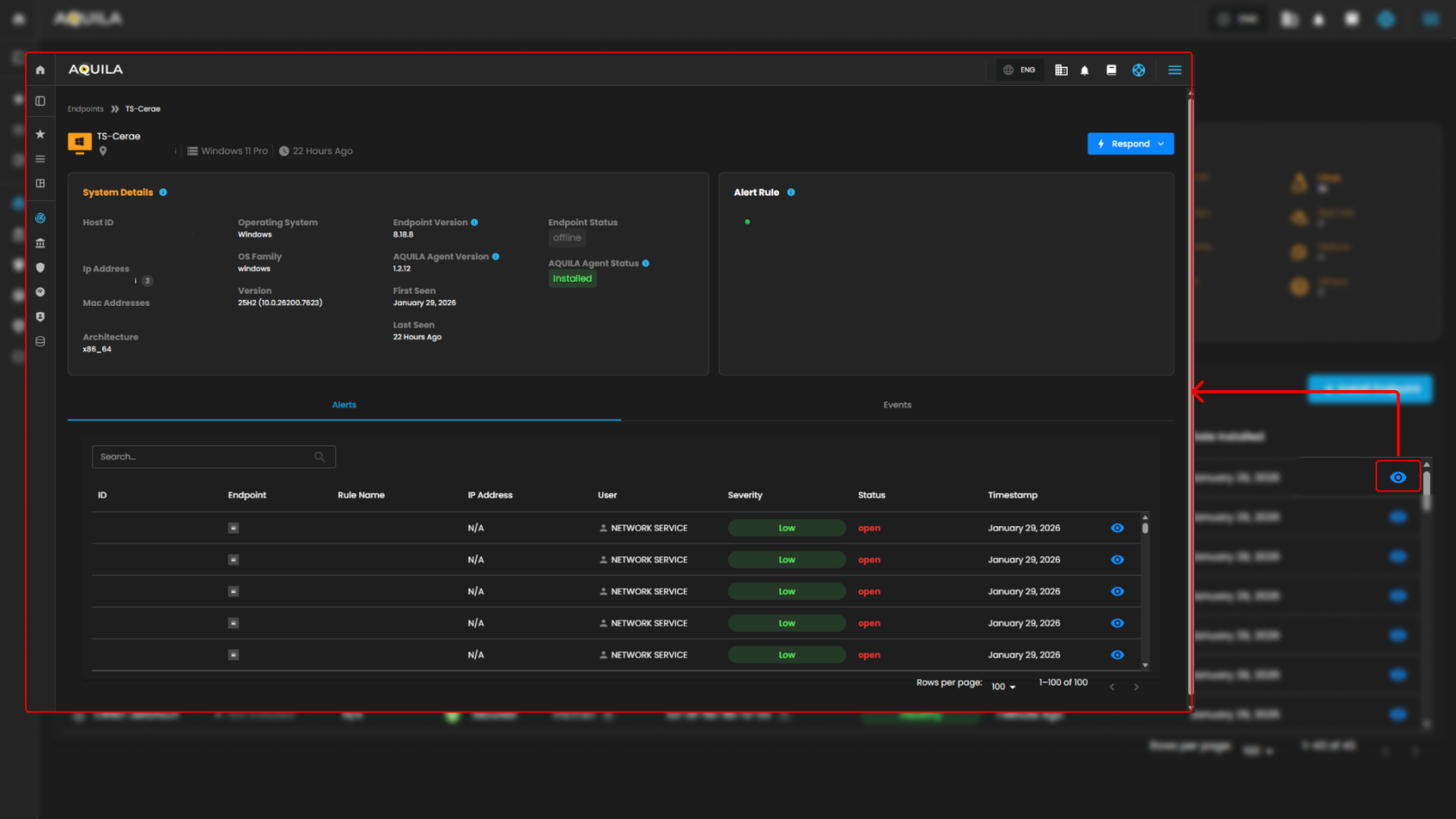
          
        The client can select **Respond** button to **isolate the host** or **initiate a command prompt**. In this section when pressing the **Isolate Host**, a window will pop up asking for a Reason for Isolation.
        
        [![HEHE (68).png](https://cytechint-docs-bookstack.s3.amazonaws.com/uploads/images/gallery/2026-01/scaled-1680-/GSC7aYhhqJ43rv9O-hehe-68.png)](https://cytechint-docs-bookstack.s3.amazonaws.com/uploads/images/gallery/2026-01/GSC7aYhhqJ43rv9O-hehe-68.png)
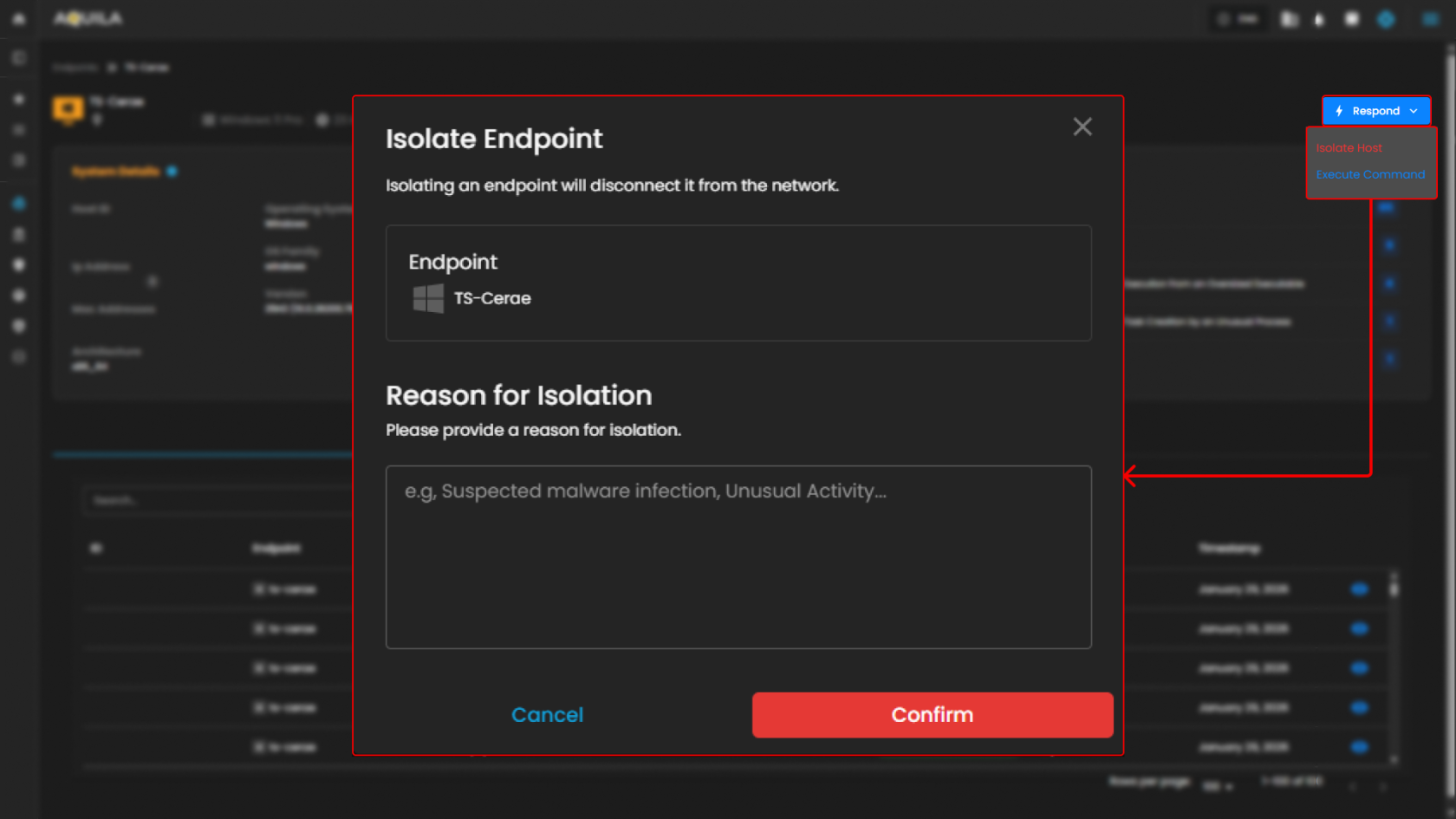
        
          
        In this section, the Administrator can execute a command. The main commands are Kill Process, Suspend Process, Running Process, Get File, Upload File, Scan.
        
        [![HEHE (67).png](https://cytechint-docs-bookstack.s3.amazonaws.com/uploads/images/gallery/2026-01/scaled-1680-/RBOjQzQopgJqaYmn-hehe-67.png)](https://cytechint-docs-bookstack.s3.amazonaws.com/uploads/images/gallery/2026-01/RBOjQzQopgJqaYmn-hehe-67.png)  
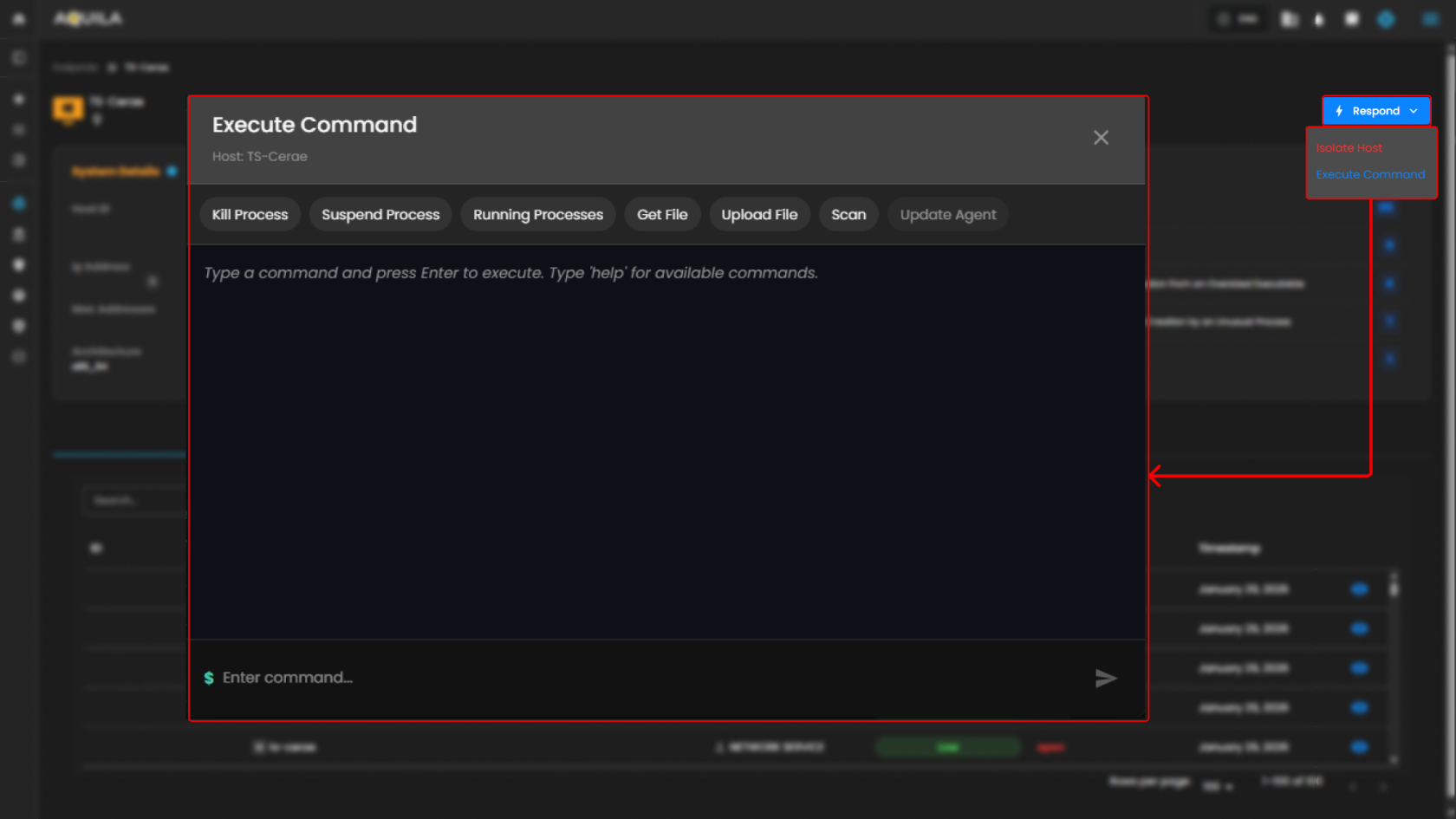
          
        **To learn more about Execute Commands, Please Refer to this Link: [AQUILA EDR - Execute C... | AQUILA Documentations](https://usdc-docs.cytechint.io/books/aquila-edr-installation/page/aquila-edr-execute-command-and-response-actions)**
5. <span style="color: rgb(0, 0, 0);">**Search Bar**</span>
    - <span style="color: rgb(0, 0, 0);">The **Search Bar** provides an easy way to quickly search for a specific endpoint by its name, IP address, security status, or health. This helps streamline navigation, especially when dealing with a large number of endpoints.  
        </span>[![image.png](https://cytechint-docs-bookstack.s3.amazonaws.com/uploads/images/gallery/2026-01/scaled-1680-/A0XKBs1eSewufcLh-image.png)](https://cytechint-docs-bookstack.s3.amazonaws.com/uploads/images/gallery/2026-01/A0XKBs1eSewufcLh-image.png)
        
        <span style="color: rgb(0, 0, 0);">  
          
        </span>
6. <span style="color: rgb(0, 0, 0);">**Install Endpoint**</span>
    - <span style="color: rgb(0, 0, 0);">To add new endpoints to the system, click the **Install Endpoint** button. This will start the process of onboarding new devices into a network, allowing them to be tracked and secured like the existing endpoints.  
        </span>[![HEHE (64).png](https://cytechint-docs-bookstack.s3.amazonaws.com/uploads/images/gallery/2026-01/scaled-1680-/EuzmxKPD01vg0BxP-hehe-64.png)](https://cytechint-docs-bookstack.s3.amazonaws.com/uploads/images/gallery/2026-01/EuzmxKPD01vg0BxP-hehe-64.png)


#### <span style="color: rgb(53, 152, 219);">**Control Panel**</span>

<span style="color: rgb(0, 0, 0);">In the **Control Panel**, you can manage various security settings and configurations for your organization’s endpoints. This section gives you access to several tools for managing **Policies, Manage Endpoints, Trusted Applications, Event Filters, Host Isolation Exception** and **Blocklist**. The control panel helps streamline the process of securing and monitoring endpoints, providing easy access to the most critical settings.  
</span>


##### <span style="color: rgb(53, 152, 219);">**Policy Settings**</span>

<p class="callout success">In the **Policy Settings Page**, you can view and manage organization’s security policies. This includes configuring protection levels for various types of threats, such as malware, ransomware, memory threats, and malicious behavior. Currently, all protection policies are enabled with options to either detect or prevent these security risks across supported operating systems (Windows, Mac, Linux).</p>

[![HEHE (69).png](https://cytechint-docs-bookstack.s3.amazonaws.com/uploads/images/gallery/2026-01/scaled-1680-/tGAWSr1MFGI6RKQf-hehe-69.png)](https://cytechint-docs-bookstack.s3.amazonaws.com/uploads/images/gallery/2026-01/tGAWSr1MFGI6RKQf-hehe-69.png)

[![image.png](https://cytechint-docs-bookstack.s3.amazonaws.com/uploads/images/gallery/2026-01/scaled-1680-/ls7Ohuq7wO6m5oVA-image.png)](https://cytechint-docs-bookstack.s3.amazonaws.com/uploads/images/gallery/2026-01/ls7Ohuq7wO6m5oVA-image.png)
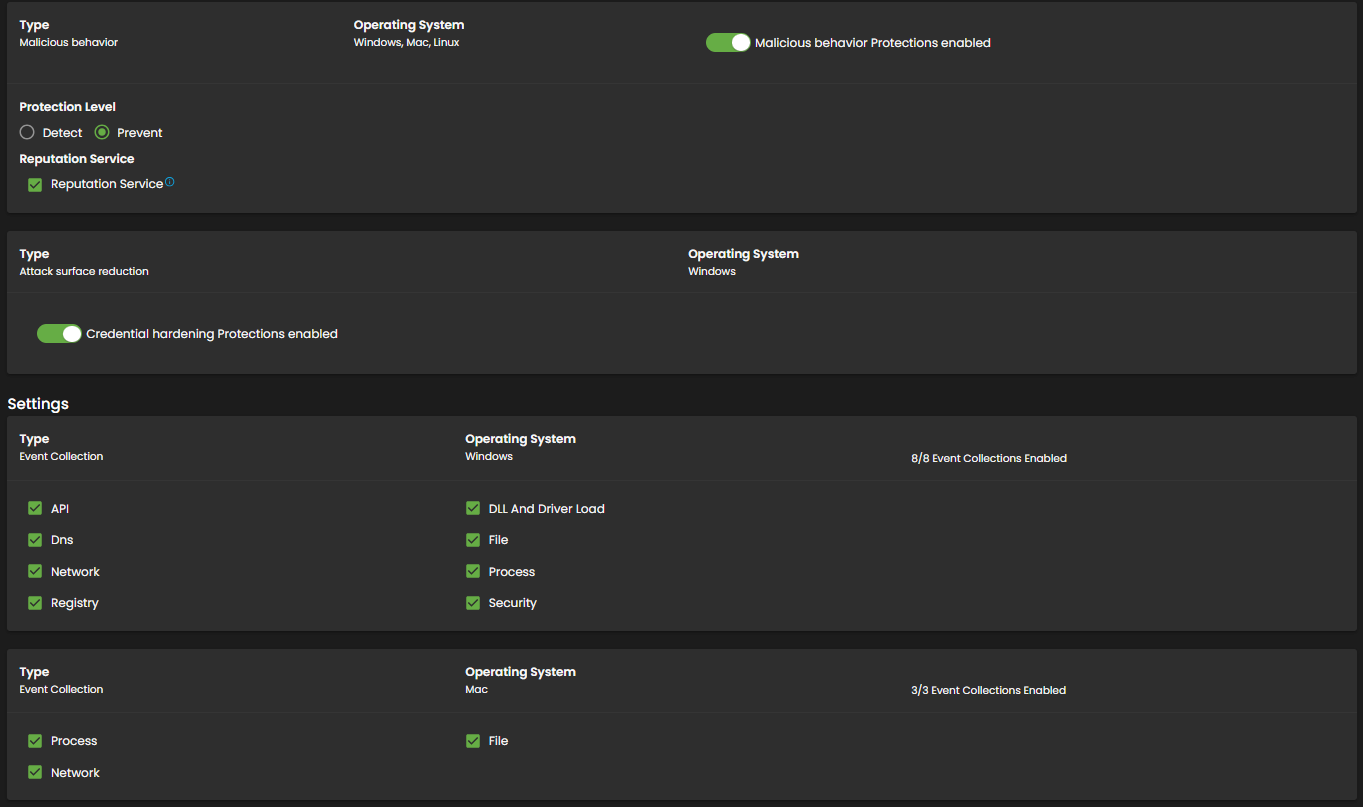
[![image.png](https://cytechint-docs-bookstack.s3.amazonaws.com/uploads/images/gallery/2026-01/scaled-1680-/RYK4glZBVov7nWmV-image.png)](https://cytechint-docs-bookstack.s3.amazonaws.com/uploads/images/gallery/2026-01/RYK4glZBVov7nWmV-image.png)
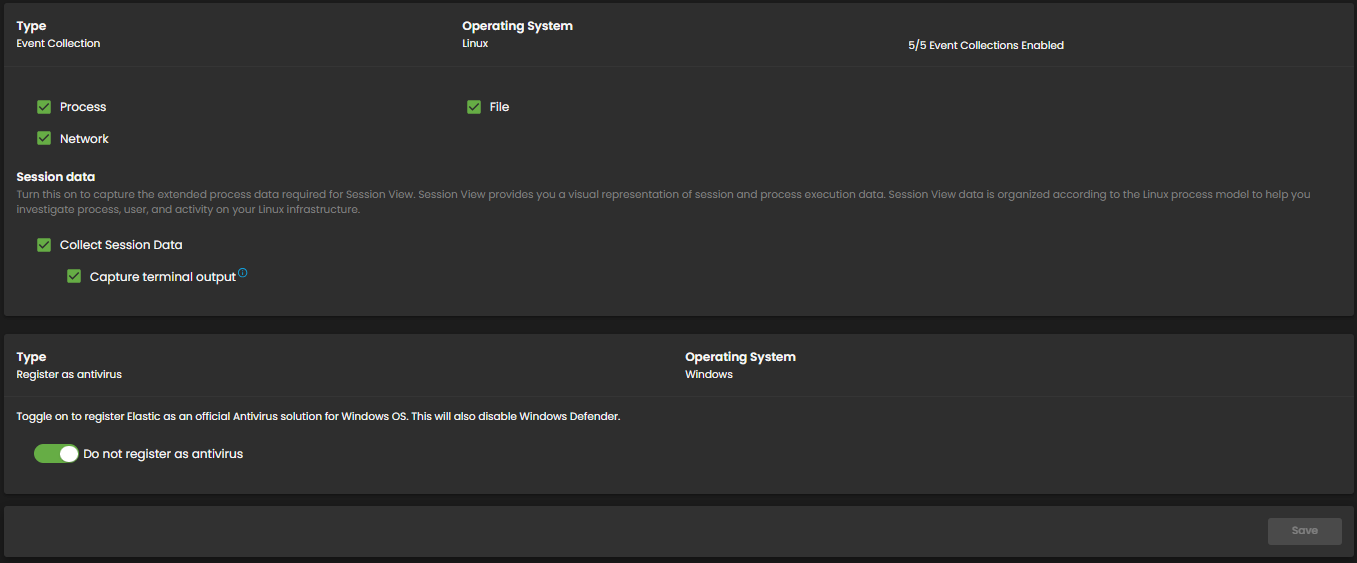
1. <span style="color: rgb(0, 0, 0);">**Policy Settings Overview**</span>
    - <span style="color: rgb(0, 0, 0);">In the **Policy Settings** section, you can manage and view all the security policies set for your organization's endpoints. This section allows you to control and configure various protection levels for different types of security threats. Policies can be applied to endpoints based on their operating system (Windows, Mac, Linux), and enabling these policies can trigger alerts for the respective security events.  
          
        </span>
2. <span style="color: rgb(0, 0, 0);">**Policy Settings Panel**</span>
    - <span style="color: rgb(0, 0, 0);">The **Policy Settings Panel** displays the different types of protection policies in place for your endpoints. Each policy corresponds to a specific security threat, such as malware, ransomware, memory threats, or malicious behavior. You can configure the protection level for each policy by toggling between **Detect** and **Prevent** options. Additionally, a blocklist feature can be enabled or disabled to provide further protection against unwanted software or threats.</span>

- - - <span style="color: rgb(0, 0, 0);">**Malware Protection**: Enabled with options to Detect or Prevent.</span>
        - <span style="color: rgb(0, 0, 0);">**Ransomware Protection**: Enabled for Windows endpoints with Detect or Prevent options.</span>
        - <span style="color: rgb(0, 0, 0);">**Memory Threat Protection**: Enabled for all operating systems (Windows, Mac, Linux) with Detect or Prevent options.</span>
        - <span style="color: rgb(0, 0, 0);">**Malicious Behavior Protection**: Enabled for all operating systems (Windows, Mac, Linux) with the same detection or prevention options.</span>
- <span style="color: rgb(0, 0, 0);">Each policy has a toggle switch to enable or disable protection for the corresponding threat, and these settings can be easily modified according to your needs.</span>


##### <span style="color: rgb(53, 152, 219);">**Manage Endpoints**</span>

<p class="callout success">In the **Manage Endpoints Page**, you can easily isolate, delete, or add new endpoints to your system. This section provides a quick overview of all your endpoints, including details like the endpoint name, last seen time, operating system, and status. Currently, all protection policies are enabled with options to either detect or prevent security risks across the endpoints in your system.</p>

[![HEHE (70).png](https://cytechint-docs-bookstack.s3.amazonaws.com/uploads/images/gallery/2026-01/scaled-1680-/umUHppm7GqHIwog0-hehe-70.png)](https://cytechint-docs-bookstack.s3.amazonaws.com/uploads/images/gallery/2026-01/umUHppm7GqHIwog0-hehe-70.png)

- <span style="color: rgb(0, 0, 0);">**Manage Endpoints Overview**</span>

- - <span style="color: rgb(0, 0, 0);">In the **Manage Endpoints Page**, you can easily isolate, delete, or add new endpoints to your system. This section provides a quick overview of all your endpoints, including details like the endpoint name, last seen time, operating system, and status.  
          
        </span>
- <span style="color: rgb(0, 0, 0);">**Endpoint List and Actions**</span>
    - <span style="color: rgb(0, 0, 0);">This section displays a list of all endpoints currently in your network. Each endpoint entry shows the following details:</span>
        - <span style="color: rgb(0, 0, 0);">**Endpoint Name**: Identifies the device in the system.</span>
        - <span style="color: rgb(0, 0, 0);">**Last Seen**: Indicates when the endpoint was last connected to the network.</span>
        - <span style="color: rgb(0, 0, 0);">**Operating System**: Displays the OS of the endpoint (e.g., Linux, Windows).</span>
        - <span style="color: rgb(0, 0, 0);">**Status**: Shows whether the endpoint is currently online or offline.</span>
        - <span style="color: rgb(0, 0, 0);">Each endpoint can be acted upon with available options, such as isolating the host (for security reasons) or uninstalling it from the system. Currently, all endpoints listed are marked as offline.</span>

- <span style="color: rgb(0, 0, 0);">**Search Endpoint**</span>
    - <span style="color: rgb(0, 0, 0);">The **Search Endpoint** bar at the top allows you to quickly locate specific endpoints in your system by searching for their names or other attributes. </span>[![image.png](https://cytechint-docs-bookstack.s3.amazonaws.com/uploads/images/gallery/2026-01/scaled-1680-/xXBHtNFkKk2aaQCO-image.png)](https://cytechint-docs-bookstack.s3.amazonaws.com/uploads/images/gallery/2026-01/xXBHtNFkKk2aaQCO-image.png)
        
        <span style="color: rgb(0, 0, 0);">  
          
        </span>
- <span style="color: rgb(0, 0, 0);">**Install Endpoint**</span>
    - <span style="color: rgb(0, 0, 0);">To add new endpoints to your network, click the **Install Endpoint** button. This will allow you to initiate the process of registering new devices to be tracked and managed within your system.  
        </span>[![HEHE (71).png](https://cytechint-docs-bookstack.s3.amazonaws.com/uploads/images/gallery/2026-01/scaled-1680-/XLHwJ8GL1ho8Urs2-hehe-71.png)](https://cytechint-docs-bookstack.s3.amazonaws.com/uploads/images/gallery/2026-01/XLHwJ8GL1ho8Urs2-hehe-71.png)

<p class="callout info">To update an Endpoint, please refer to this document: [CyTech AQUILA - Cyber ... | AQUILA Documentations](https://usdc-docs.cytechint.io/books/security-automation-soc-optimization-tOO/page/cytech-aquila-agent-mass-update-function) Thank you.</p>


##### <span style="color: rgb(53, 152, 219);">**Trusted Application Page**</span>

<p class="callout success">**In the Trusted Application Page**, you can see an overview of your organization's trusted applications. This section includes the names of the applications, their descriptions, and the last updated time. Currently, there are several trusted applications listed, such as "AQUILA Agent Exception" and "test app2."</p>

- <span style="color: rgb(0, 0, 0);">**The Trusted Application Overview**</span>
    - <span style="color: rgb(0, 0, 0);">This provides a list of the currently trusted applications along with their descriptions and the most recent updates. These applications are categorized by the name of the application and a brief description of their purpose.</span>

[![HEHE (72).png](https://cytechint-docs-bookstack.s3.amazonaws.com/uploads/images/gallery/2026-01/scaled-1680-/1uaJauHbx0tzgWvL-hehe-72.png)](https://cytechint-docs-bookstack.s3.amazonaws.com/uploads/images/gallery/2026-01/1uaJauHbx0tzgWvL-hehe-72.png)

- <span style="color: rgb(0, 0, 0);">**The Application Details Table** </span>
    - <span style="color: rgb(0, 0, 0);">It displays additional details, including the application name, description, and the timestamp of the last update. This table helps you track which applications are trusted and their associated descriptions. You can also update or remove any trusted application from this section.  
          
        </span>[![HEHE (74).png](https://cytechint-docs-bookstack.s3.amazonaws.com/uploads/images/gallery/2026-01/scaled-1680-/7liwdHOAaHIobh5x-hehe-74.png)](https://cytechint-docs-bookstack.s3.amazonaws.com/uploads/images/gallery/2026-01/7liwdHOAaHIobh5x-hehe-74.png)
        
        <span style="color: rgb(0, 0, 0);">  
          
        </span>
- <span style="color: rgb(0, 0, 0);">**Add Trusted Application**</span>
    - <span style="color: rgb(0, 0, 0);">This popup allows users to input the **Name** and **Description** of the trusted application. Additionally, it includes a **Conditions** section where you can select an operating system and specify conditions using fields, operators, and values. At the bottom, there are two buttons: **Add Trusted Application** to confirm the addition and **Cancel** to discard the action.  
          
        </span>[![HEHE (73).png](https://cytechint-docs-bookstack.s3.amazonaws.com/uploads/images/gallery/2026-01/scaled-1680-/mZsmLLWFOJtCf76l-hehe-73.png)](https://cytechint-docs-bookstack.s3.amazonaws.com/uploads/images/gallery/2026-01/mZsmLLWFOJtCf76l-hehe-73.png)


##### <span style="color: rgb(53, 152, 219);">**Event Filters Page**</span>

<p class="callout success">**In the Event Filters Page**, you can assign or manage event filters that define which events should be tracked for your endpoints. Currently, there are no event filters assigned to any of the endpoints, as the section shows the message "No Assigned Event Filters."</p>

[![HEHE (75).png](https://cytechint-docs-bookstack.s3.amazonaws.com/uploads/images/gallery/2026-01/scaled-1680-/Dz1zNZWT57JrYfbu-hehe-75.png)](https://cytechint-docs-bookstack.s3.amazonaws.com/uploads/images/gallery/2026-01/Dz1zNZWT57JrYfbu-hehe-75.png)

<span style="color: rgb(0, 0, 0);">**Event Filters**</span>

- - <span style="color: rgb(0, 0, 0);">**The Assign Events Filters Option** allows you to easily configure and apply filters to events, helping you focus on specific types of activities or behaviors across your endpoints. This will enable you to narrow down the event logs to show only relevant information.</span>

<span style="color: rgb(0, 0, 0);">**The Empty Event Filter Status**</span>

- - <span style="color: rgb(0, 0, 0);">It shows that no filters have been assigned yet, but it provides a clear call-to-action to add event filters.</span>

<span style="color: rgb(0, 0, 0);">**Assign Event Filters**</span>

- - <span style="color: rgb(0, 0, 0);">This section allows users to configure filters that exclude high volume or unwanted events from being written to the EDR (Endpoint Detection and Response) system. It includes fields for the **Name** and **Description** of the event filter, both of which can be filled out with relevant details. Below that, the **Conditions** section lets you select an operating system and apply specific conditions using **Field**, **Operator**, and **Value** to filter events based on certain criteria.  
        </span>[![HEHE (76).png](https://cytechint-docs-bookstack.s3.amazonaws.com/uploads/images/gallery/2026-01/scaled-1680-/YOwJd6qb6mgnOJVO-hehe-76.png)](https://cytechint-docs-bookstack.s3.amazonaws.com/uploads/images/gallery/2026-01/YOwJd6qb6mgnOJVO-hehe-76.png)


##### <span style="color: rgb(53, 152, 219);">**Host Isolation Exception Page**</span>

<p class="callout success">**In the Host Isolation Exception Page**, you can see the list of exceptions that allow isolated endpoints to connect to specific IP addresses. This section displays the names of the exceptions, their descriptions, and the most recent update times.</p>

- <span style="color: rgb(0, 0, 0);">**The Host Isolation Exception Overview**</span>
    - <span style="color: rgb(0, 0, 0);">This gives you the ability to manage exceptions made to the host isolation policy. Here, you can track any exceptions, that have been made to allow endpoints to access certain IPs.</span>

[![HEHE (77).png](https://cytechint-docs-bookstack.s3.amazonaws.com/uploads/images/gallery/2026-01/scaled-1680-/ksyMCZ5PbAjgVUd4-hehe-77.png)](https://cytechint-docs-bookstack.s3.amazonaws.com/uploads/images/gallery/2026-01/ksyMCZ5PbAjgVUd4-hehe-77.png)

- <span style="color: rgb(0, 0, 0);">**The Exception Details Table**</span>
    - <span style="color: rgb(0, 0, 0);">It lists the exception names, descriptions, and the timestamp of when they were last updated. You can use this table to manage and modify these exceptions, ensuring proper access while maintaining security policies.  
        </span>[![HEHE (78).png](https://cytechint-docs-bookstack.s3.amazonaws.com/uploads/images/gallery/2026-01/scaled-1680-/nCnZR8LO3Jyl1jkm-hehe-78.png)](https://cytechint-docs-bookstack.s3.amazonaws.com/uploads/images/gallery/2026-01/nCnZR8LO3Jyl1jkm-hehe-78.png)
        
        <span style="color: rgb(0, 0, 0);">  
          
        </span>
- <span style="color: rgb(0, 0, 0);">**Add Host Isolation Exception.**</span>
    - <span style="color: rgb(0, 0, 0);">This popup allows users to create exceptions for isolated hosts, enabling them to connect to specific IP addresses. It includes fields for the **Name** of the exception and an optional **Description** to provide additional details. Under **Conditions**, there is a field labeled **Enter IP Address**, where users can specify the IP addresses (IPv4, with optional CIDR) to which the isolated hosts are allowed to connect.  
        </span>[![HEHE (79).png](https://cytechint-docs-bookstack.s3.amazonaws.com/uploads/images/gallery/2026-01/scaled-1680-/a5WBYOcJwXxqZtO6-hehe-79.png)](https://cytechint-docs-bookstack.s3.amazonaws.com/uploads/images/gallery/2026-01/a5WBYOcJwXxqZtO6-hehe-79.png)
        
        <span style="color: rgb(0, 0, 0);">  
          
        </span>


##### <span style="color: rgb(53, 152, 219);">**Blocklist**</span>

<p class="callout success">The **Blocklist** page allows you to manage applications that are restricted from running on your endpoints, preventing specified applications from being executed. The page displays a list of blocklisted applications, including their names, descriptions, and the time when each blocklist entry was last updated.</p>

1. <span style="color: rgb(0, 0, 0);">**Blocklist Overview**</span>
    
    
    - <span style="color: rgb(0, 0, 0);">This section provides an overview of all the blocklist entries. For example, you can view blocklist entries like **Notepad Block - Test**, which prevent specific applications from running on isolated systems, ensuring security is maintained.</span>

  
[![HEHE (80).png](https://cytechint-docs-bookstack.s3.amazonaws.com/uploads/images/gallery/2026-01/scaled-1680-/MaVb7d7U7Ofvo3a4-hehe-80.png)](https://cytechint-docs-bookstack.s3.amazonaws.com/uploads/images/gallery/2026-01/MaVb7d7U7Ofvo3a4-hehe-80.png)

1. <span style="color: rgb(0, 0, 0);">**Blocklist Details Table**</span>
    1. <span style="color: rgb(0, 0, 0);">The **Blocklist Details Table** provides detailed information about each entry, displaying the name of the application, description for additional context, and the time it was last updated. This table allows you to view and manage the entries, ensuring they align with your security policies. You can track the status of each entry and modify them as necessary to maintain proper access control and prevent unwanted applications from running.  
          
        </span>
2. <span style="color: rgb(0, 0, 0);">**Add Blocklist Entry**</span>
    - <span style="color: rgb(0, 0, 0);">When adding a new blocklist entry, a popup window appears allowing you to set up the entry. In this window, you can enter the **Name** of the entry and an optional **Description**. You can also define the **Conditions** by specifying the application and other criteria that should be blocked on your endpoints.  
        </span>

[![HEHE (81).png](https://cytechint-docs-bookstack.s3.amazonaws.com/uploads/images/gallery/2026-01/scaled-1680-/7Q5V3XNWa1owLwHR-hehe-81.png)](https://cytechint-docs-bookstack.s3.amazonaws.com/uploads/images/gallery/2026-01/7Q5V3XNWa1owLwHR-hehe-81.png)

 *If you need further assistance, kindly contact our support at **[support@cytechint.com](mailto:info@cytechint.com)** for prompt assistance and guidance.*

# CyTech AQUILA - Security Orchestration, Automation, and Response (SOAR)

#### <span style="color: rgb(53, 152, 219);">**Overview:**</span>

The **SOAR** module helps streamline and enhance security operations by automating responses to security alerts and orchestrating workflows across various tools and systems. It allows for faster incident detection, response, and resolution, ensuring your security team can effectively handle a wide range of incidents without manual intervention.

#### <span style="color: rgb(53, 152, 219);">**Key Features:**</span>

- **Mean Time to Detect:** Displays the average time taken to detect security incidents. Monitoring this metric helps evaluate the efficiency of the system in identifying potential threats.
- **Mean Time to Respond:** Tracks the average time required to respond to an incident after it has been detected. This metric ensures that your team is responding quickly to mitigate risks.
- **False Positive Rate:** Measures the percentage of alerts that are determined to be false positives. Monitoring this helps reduce unnecessary responses and fine-tune detection rules.
- **Total Number of Open Alerts:** Shows the current number of active alerts. This data is crucial for understanding the workload of the security team and prioritizing incident handling.
- **Alerts Resolved:** Indicates the total number of alerts that have been resolved, helping track the effectiveness of your response efforts and overall security performance.
- **Incident Type by Status:** Provides a breakdown of incidents by their current status (open, in-progress, pending, or closed). This helps track the progress of ongoing investigations and responses.
- **Open Alerts Table:** Displays a list of open alerts with detailed information such as alert ID, timestamp, rule name, risk score, and severity. This table allows security teams to prioritize alerts and manage responses efficiently.

#### <span style="color: rgb(53, 152, 219);">**Pre-requisites**</span>

1. **Access to CyTech - AQUILA**
    - Only users assigned the **"Owner"** or **"Admin"** role can access the Control Panel page within this module.

<p class="callout success">**To navigate to SOAR Module please follow the instructions below:**</p>

<div class="x_elementToProof" id="bkmrk-step1%3A-log-in-to-cyt" style="text-align: justify;">**Step 1: Log in to CyTech - AQUILA.** *click here --&gt;* **[usdc.cytechint.io](https://usdc.cytechint.io/)**</div><div class="x_elementToProof" id="bkmrk-step2%3A-click-on-cybe" style="text-align: justify;">**Step 2: Click on SOC Optimization**</div>[![HEHE-2 (8).png](https://cytechint-docs-bookstack.s3.amazonaws.com/uploads/images/gallery/2026-04/scaled-1680-/sEC0qAWRPGJFpkmj-hehe-2-8.png)](https://cytechint-docs-bookstack.s3.amazonaws.com/uploads/images/gallery/2026-04/sEC0qAWRPGJFpkmj-hehe-2-8.png)

**Step 3: Choose Security Orchestration, Automation and Response (SOAR).**

[![HEHE (22).png](https://cytechint-docs-bookstack.s3.amazonaws.com/uploads/images/gallery/2026-04/scaled-1680-/4uVTU5EFdAPWNhYu-hehe-22.png)](https://cytechint-docs-bookstack.s3.amazonaws.com/uploads/images/gallery/2026-04/4uVTU5EFdAPWNhYu-hehe-22.png)

**Step 4: Hover into leftmost panel to view all the SOAR sections. This Process is applicable in all navigating into a Module.**

[![Hello (11).png](https://cytechint-docs-bookstack.s3.amazonaws.com/uploads/images/gallery/2026-04/scaled-1680-/Ry1BZeaz8gQiqu9W-hello-11.png)](https://cytechint-docs-bookstack.s3.amazonaws.com/uploads/images/gallery/2026-04/Ry1BZeaz8gQiqu9W-hello-11.png)

#### <span style="color: rgb(53, 152, 219);">**Dashboard**</span>

The **SOAR Dashboard** allows you to monitor and manage security incidents in real time. It provides key metrics like **Incident Status**, **Automated Playbooks**, **Response Actions**, and **Case Prioritization**, helping you quickly assess and respond to security events while streamlining workflows.

[![HEHE (15).png](https://cytechint-docs-bookstack.s3.amazonaws.com/uploads/images/gallery/2026-02/scaled-1680-/j7hT7glGFXYHNxmB-hehe-15.png)](https://cytechint-docs-bookstack.s3.amazonaws.com/uploads/images/gallery/2026-02/j7hT7glGFXYHNxmB-hehe-15.png)

- **Mean Time to Detect:** This widget shows the average time it takes to detect security threats on the endpoints. Currently, the "Mean Time to Detect" is 1 hour, 11 minutes, and 50 seconds, indicating the time it takes for the system to identify potential security risks. The metric shows a slight decrease of -0.23%, which suggests a minor improvement in detection time.
- **Mean Time to Respond:** This widget indicates the average time it takes to respond to detected security incidents. At present, the "Mean Time to Respond" is 2 hours, 36 minutes, and 50 seconds. This metric shows a small decrease of -0.22%, suggesting that the response times are gradually improving.
- **False Positive Rate:** The "False Positive Rate" widget shows the percentage of detected alerts that turned out to be false positives. The current rate is 10.44%, with a significant decrease of -8.74%, indicating an improvement in the accuracy of the alerts being raised by the system.
- **Total Number of Open Alerts:** This widget displays the total number of active alerts that require attention from the security team. Currently, there are 18 open alerts, showing a decrease of -99.04%. This indicates that most alerts have either been addressed or resolved, and only a few remain pending or in progress.
- **Alerts Resolved:** The "Alerts Resolved" widget shows the total number of alerts that have been successfully resolved. With 142,300 alerts resolved, this number reflects the effectiveness and efficiency of the security team's response to incidents. The metric shows a minimal increase of +0.01%, suggesting that the resolution rate remains stable.

**Incident Type by Status:** This widget breaks down the incidents by their current status: "Open," "In Progress," "Pending," and "Closed." In the provided data, there are no incidents listed, with "Total Incidents" showing as 0, meaning there are no incidents requiring immediate action at the moment.

[![HEHE (19).png](https://cytechint-docs-bookstack.s3.amazonaws.com/uploads/images/gallery/2026-02/scaled-1680-/noyI8XHRsQRhZkaS-hehe-19.png)](https://cytechint-docs-bookstack.s3.amazonaws.com/uploads/images/gallery/2026-02/noyI8XHRsQRhZkaS-hehe-19.png)

**Open Alerts Table:** The Open Alerts Table lists all the currently open alerts, showing detailed information for each one. The table includes the alert ID, timestamp, rule name, risk score, and severity of the incident. For example, it shows multiple entries related to External User File Access with a risk score of 47 and a severity level marked as "Medium." These entries help the security team assess the potential threats and prioritize actions.

[![HEHE (20).png](https://cytechint-docs-bookstack.s3.amazonaws.com/uploads/images/gallery/2026-02/scaled-1680-/hYKpRW639avb7yTJ-hehe-20.png)](https://cytechint-docs-bookstack.s3.amazonaws.com/uploads/images/gallery/2026-02/hYKpRW639avb7yTJ-hehe-20.png)

**Severity Breakdown of Alerts:** This widget displays a breakdown of the severity levels of the ongoing incidents. The severity levels are categorized by color codes, such as Severe, High, Elevated, Guarded, and Low. The widget helps track the urgency of incidents and prioritize response efforts accordingly.

[![image.png](https://cytechint-docs-bookstack.s3.amazonaws.com/uploads/images/gallery/2026-02/scaled-1680-/RZ8dTNXVQNWNmSJw-image.png)](https://cytechint-docs-bookstack.s3.amazonaws.com/uploads/images/gallery/2026-02/RZ8dTNXVQNWNmSJw-image.png)

#### <span style="color: rgb(53, 152, 219);">**Control Panel**</span>

The Control Panel is the hub for managing alerts, rules, and tools. It lets users configure settings for Alert Tagging, Alert Rules, and External Tools, offering an organized way to control how security alerts and responses are handled.

[![HEHE (21).png](https://cytechint-docs-bookstack.s3.amazonaws.com/uploads/images/gallery/2026-02/scaled-1680-/LCoXcAwqCN14xp4z-hehe-21.png)](https://cytechint-docs-bookstack.s3.amazonaws.com/uploads/images/gallery/2026-02/LCoXcAwqCN14xp4z-hehe-21.png)

#### **<span style="color: rgb(53, 152, 219);">Alert Tagging</span>**

The Alert Tagging section in the Control Panel allows you to organize and prioritize your alerts using custom tags. This feature helps users manage their alerts more effectively. Currently, there are no tags set, and the section shows an empty state.

- **Search:** The search bar in the middle of the page allows you to filter and search for specific alerts or tags. However, as of now, no results are displayed, suggesting that no specific search criteria have been applied or that there are no available alerts to display.
- **No Results Found:** This message indicates that there are no alerts or tags currently available or set. The prompt informs the user that there is nothing to display at the moment. If further assistance is needed, the user can click on the “Contact Support” button for help.

[![HEHE (22).png](https://cytechint-docs-bookstack.s3.amazonaws.com/uploads/images/gallery/2026-02/scaled-1680-/zcaQBkqwOCIQrhBj-hehe-22.png)](https://cytechint-docs-bookstack.s3.amazonaws.com/uploads/images/gallery/2026-02/zcaQBkqwOCIQrhBj-hehe-22.png)

#### <span style="color: rgb(53, 152, 219);">**Alert Rules**</span>

The **Alert Rules** section in the Control Panel provides a comprehensive list of active detection rules. Each rule is associated with a specific alert or action that the system monitors. The table lists key details, such as the rule name, risk score, severity, and the status of the rule’s last response. This section also indicates whether the rule is currently enabled or disabled, with the option to toggle its status.

[![HEHE (24).png](https://cytechint-docs-bookstack.s3.amazonaws.com/uploads/images/gallery/2026-02/scaled-1680-/ME9OEJy2ef3OzhZl-hehe-24.png)](https://cytechint-docs-bookstack.s3.amazonaws.com/uploads/images/gallery/2026-02/ME9OEJy2ef3OzhZl-hehe-24.png)

1. **Search Rule**
    - At the top of the table, there is a search bar that allows users to filter and search for specific alert rules. This feature helps users quickly locate a particular rule based on its name or other criteria.
2. **Enabled/Disabled Rules**
    - There are two buttons above the list: **Enabled Rules** and **Disabled Rules**. These buttons allow users to toggle between viewing only enabled or disabled rules, providing a more streamlined way to manage and review the status of detection rules.  
        [![HEHE (26).png](https://cytechint-docs-bookstack.s3.amazonaws.com/uploads/images/gallery/2026-02/scaled-1680-/sJ6eYT0F8MKM6lzO-hehe-26.png)](https://cytechint-docs-bookstack.s3.amazonaws.com/uploads/images/gallery/2026-02/sJ6eYT0F8MKM6lzO-hehe-26.png)

1. **Rule Overview**
    
    
    - Each row in the table presents details of an individual alert rule, such as:
        
        
        - **Rule**: The name of the rule and associated system or operation.
        - **Risk Score**: The assigned risk score for the rule, which helps indicate the potential severity of the detected activity.
        - **Severity**: A color-coded indicator representing the severity level of the rule, ranging from low to high.
        - **Last Run**: The most recent execution time of the rule.
        - **Last Response**: The outcome of the rule's most recent execution, which can be "Succeeded," "Failed," or "Partial Failure."
        - **Last Updated**: When the rule was last updated.
        - **Enabled**: Indicates whether the rule is currently active or disabled.
        
        [![image.png](https://cytechint-docs-bookstack.s3.amazonaws.com/uploads/images/gallery/2026-02/scaled-1680-/jlvDbav80h2Jc8rG-image.png)](https://cytechint-docs-bookstack.s3.amazonaws.com/uploads/images/gallery/2026-02/jlvDbav80h2Jc8rG-image.png)

This section helps system administrators monitor and manage active detection rules and respond to threats effectively.

#### <span style="color: rgb(53, 152, 219);">**Tools**</span>

The **Tools** section in the Control Panel allows users to manage and enhance their IP security using custom tools. This section displays a list of available tools, including their current state and the actions that can be taken with them. At the moment, no tools are displayed, indicating that there are no custom tools configured or available in the system.

- **Search:** A search bar is provided at the top of the section, allowing users to filter and find specific tools by name. This feature helps users quickly locate a particular tool if many tools are available.
- **State and Actions:** Each tool entry would typically display its current **State** (e.g., active, inactive) and available **Actions** (such as edit, enable/disable, or delete). However, since no tools are listed at the moment, this section appears empty.
- **New Tools**
    - **New Tools** button is available in the upper-right corner, allowing users to add new custom tools to the system. This provides an easy way to enhance IP security by integrating new tools.
    - The **IP Reputation Tool** section allows users to add a new tool for managing and enhancing their IP security. To do so, users are prompted to enter the **name** and **URL** of the tool.
    - After completing these fields, users can submit the information, adding the tool to the system for improved IP reputation management. This functionality enables users to customize their security tools and optimize how IP reputation data is handled within their system.

[![HEHE (27).png](https://cytechint-docs-bookstack.s3.amazonaws.com/uploads/images/gallery/2026-02/scaled-1680-/JIb3m93HumBZyYYb-hehe-27.png)](https://cytechint-docs-bookstack.s3.amazonaws.com/uploads/images/gallery/2026-02/JIb3m93HumBZyYYb-hehe-27.png)

##### <span style="color: rgb(53, 152, 219);">**Conclusion**</span>

Security Orchestration, Automation, and Response (SOAR) is a powerful module designed to enhance the efficiency of security operations and enable faster responses to cyber threats. It streamlines monitoring processes and supports security teams by automating workflows and incident handling. Additionally, users can manage alert tagging, configure alert rules, and control integrated tools through a centralized control panel, making threat management more organized and user-friendly.

*<span class="TextRun SCXW71272603 BCX0" data-contrast="auto" lang="EN-US" xml:lang="EN-US"><span class="NormalTextRun SCXW71272603 BCX0">If you need further </span><span class="NormalTextRun SCXW71272603 BCX0">assistance</span><span class="NormalTextRun SCXW71272603 BCX0">, kindly contact </span></span>**<span class="TextRun SCXW71272603 BCX0" data-contrast="none" lang="EN-US" xml:lang="EN-US"><span class="NormalTextRun SCXW71272603 BCX0">support@cytechint.com</span></span>**<span class="TextRun SCXW71272603 BCX0" data-contrast="auto" lang="EN-US" xml:lang="EN-US"><span class="NormalTextRun SCXW71272603 BCX0"> for prompt </span><span class="NormalTextRun SCXW71272603 BCX0">assistance</span><span class="NormalTextRun SCXW71272603 BCX0"> and guidance.</span></span><span class="EOP SCXW71272603 BCX0" data-ccp-props="{}"></span>*

# CyTech AQUILA - All in One Endpoint Protection (EDR, DLP,VDR)

### **Overview**

Install the AQUILA Endpoint Agent (AEA) to start monitoring your device and strengthen your security posture. The AQUILA Endpoint Agent (AEA) helps you scan and monitor your endpoints for Endpoint Protection, Data Loss Prevention, and Vulnerability Detection, giving you continuous visibility and control over your environment.

### **Installation Process**

Run the installer and press install to begin the installation of the AQUILA Endpoint Agent.

[![image.png](https://cytechint-docs-bookstack.s3.amazonaws.com/uploads/images/gallery/2026-01/scaled-1680-/d6r3rtrF6za8cG1v-image.png)](https://cytechint-docs-bookstack.s3.amazonaws.com/uploads/images/gallery/2026-01/d6r3rtrF6za8cG1v-image.png)

Allow this application to proceed in the installation

[![image.png](https://cytechint-docs-bookstack.s3.amazonaws.com/uploads/images/gallery/2026-01/scaled-1680-/wiwApHUmbrWydM0C-image.png)](https://cytechint-docs-bookstack.s3.amazonaws.com/uploads/images/gallery/2026-01/wiwApHUmbrWydM0C-image.png)

[![image.png](https://cytechint-docs-bookstack.s3.amazonaws.com/uploads/images/gallery/2026-01/scaled-1680-/QkmIipT6YtSfrC6V-image.png)](https://cytechint-docs-bookstack.s3.amazonaws.com/uploads/images/gallery/2026-01/QkmIipT6YtSfrC6V-image.png)

[![image.png](https://cytechint-docs-bookstack.s3.amazonaws.com/uploads/images/gallery/2026-01/scaled-1680-/KbzFAaXSWD7FohqQ-image.png)](https://cytechint-docs-bookstack.s3.amazonaws.com/uploads/images/gallery/2026-01/KbzFAaXSWD7FohqQ-image.png)

And now the installation is complete.

[![hehehehe.png](https://cytechint-docs-bookstack.s3.amazonaws.com/uploads/images/gallery/2026-01/scaled-1680-/kLuLcFoMvkV1Lzev-hehehehe.png)](https://cytechint-docs-bookstack.s3.amazonaws.com/uploads/images/gallery/2026-01/kLuLcFoMvkV1Lzev-hehehehe.png)

After the installation we can now proceed and see the scanned files through AQUILA website [usdc.cytechint.io](https://usdc-docs.cytechint.io/).

#### **Endpoint Detection and Response (EDR)**

By Navigating through **Cyber Monitoring Module**, the client can find the **Endpoint Detection and Response (EDR)** sub-module, this is where the client can locate the **Endpoint Detection and Response (EDR)** of **AQUILA Agent Endpoint.**

<p class="callout info">**Note: The name of your Endpoint is using the name of your Personal Computer (PC).**</p>

[![HEHE (4).png](https://cytechint-docs-bookstack.s3.amazonaws.com/uploads/images/gallery/2026-01/scaled-1680-/U5M1OurakBQg9l9M-hehe-4.png)](https://cytechint-docs-bookstack.s3.amazonaws.com/uploads/images/gallery/2026-01/U5M1OurakBQg9l9M-hehe-4.png)

Or the client can access the endpoint in the "**Control Panel**" as well to isolate it or uninstall the Endpoint Detection and Response (EDR) but be wary, **Endpoint Detection and Response (EDR)** is a separate application process of the AQUILA Agent Endpoint therefore do not uninstall the **Endpoint Detection and Response (EDR).** If the client decides to uninstall it, please contact ***<support@cytechint.com>*** to be assisted on the uninstallation for the **AQUILA Agent Endpoint. Thank you.**

[![HEHE (3).png](https://cytechint-docs-bookstack.s3.amazonaws.com/uploads/images/gallery/2026-01/scaled-1680-/6jRAOOHMORQaLzMB-hehe-3.png)](https://cytechint-docs-bookstack.s3.amazonaws.com/uploads/images/gallery/2026-01/6jRAOOHMORQaLzMB-hehe-3.png)

#### **Endpoint Detection and Response Capabilities**

Endpoint Detection and Response (EDR) have multiple features to offer, let's summarize each of those features that could be helpful for monitoring multiple devices.

1. Endpoint Security State - In this section, the client can identify which Endpoints are Secured, Infected, or Isolated. Which is helpful to identify which Endpoint needs remediation and needs to be isolated.
2. Endpoint Health - In this chart, it shows how many Endpoints does the client have and how many are online, unhealthy, or offline.
3. Endpoint OS Type - This section provides OS Types and how many Endpoints are installed in a specific Operating System.
4. Endpoint List - This list provides information on each Endpoints. The client can also see further information by pressing the eye icon.

[![HEHE.png](https://cytechint-docs-bookstack.s3.amazonaws.com/uploads/images/gallery/2026-01/scaled-1680-/BC26iNzNsMNkeh9P-hehe.png)](https://cytechint-docs-bookstack.s3.amazonaws.com/uploads/images/gallery/2026-01/BC26iNzNsMNkeh9P-hehe.png)

#### **Data Loss Prevention (DLP)**

Data Loss Prevention (DLP) is a section where the client can check if the endpoint can detect Private Data, Confidential Data, or Sensitive Data,

[![HEHE (1).png](https://cytechint-docs-bookstack.s3.amazonaws.com/uploads/images/gallery/2026-01/scaled-1680-/sgjc2lIY0zJci45h-hehe-1.png)](https://cytechint-docs-bookstack.s3.amazonaws.com/uploads/images/gallery/2026-01/sgjc2lIY0zJci45h-hehe-1.png)

#### **Data Loss Prevention (DLP) Capabilities**

Data Loss Prevention (DLP) has plenty of features to identify and classify files and alert which are helpful for proper monitoring on data.

1. Detection Resolution - Displays the current resolution rate of alerts generated by the DLP system. This includes how many alerts have been resolved versus those still open and require investigation.
2. Data Discover &amp; Classification - Summarizes the total number of files discovered, their combined size, and how they've been classified based on sensitivity levels.
3. Top Detection by Alert Rule - Lists the top alert rules triggered by user or system behavior, indicating which policies are being violated most frequently.
4. Current Files Being Exposed - Displays real-time visibility into sensitive or exposed files, including classification level, responsible user, and timestamp.
5. 24-Hour Alert Activity - This chart displays the number of detections categorized by the type of data involved.

[![HEHE (2).png](https://cytechint-docs-bookstack.s3.amazonaws.com/uploads/images/gallery/2026-01/scaled-1680-/G3Mds0kylkPhoc53-hehe-2.png)](https://cytechint-docs-bookstack.s3.amazonaws.com/uploads/images/gallery/2026-01/G3Mds0kylkPhoc53-hehe-2.png)

#### **Vulnerability Detection and Response (VDR)**

Vulnerability Detection and Response (VDR) is a section where clients can view detected vulnerabilities on their endpoints, including associated CVEs and the applications and endpoints affected by each vulnerability. Vulnerability Detection and Response (VDR) can be navigated on the sidebar inside Risk Management.

[![HEHE (3).png](https://cytechint-docs-bookstack.s3.amazonaws.com/uploads/images/gallery/2026-01/scaled-1680-/f2BsTIOv2DNCy5Cj-hehe-3.png)](https://cytechint-docs-bookstack.s3.amazonaws.com/uploads/images/gallery/2026-01/f2BsTIOv2DNCy5Cj-hehe-3.png)

#### **Vulnerability Detection and Response (VDR) Capabilities**

Vulnerability Detection and Response (VDR) provide multiple features to determine whether a vulnerability is currently in the process of mitigation or has already been mitigated. These vulnerabilities are based on a list of CVEs, which identify known security issues associated with vulnerable applications.

1. Total Vulnerabilities - Displays the total number of detected vulnerabilities across all endpoints and their current mitigation status.
2. Severity Breakdown - Shows the distribution of vulnerabilities based on their severity levels, helping prioritize remediation efforts.
3. Needs Attention Vulnerabilities - Lists critical or high-severity vulnerabilities that require immediate review or action.
4. Mitigated in Progress - List of the Vulnerabilities and Endpoints that are currently on process of mitigation.
5. Mitigated - List of the Vulnerabilities that are mitigated

[![HEHE (4).png](https://cytechint-docs-bookstack.s3.amazonaws.com/uploads/images/gallery/2026-01/scaled-1680-/dxxnijWWIfA0JskZ-hehe-4.png)](https://cytechint-docs-bookstack.s3.amazonaws.com/uploads/images/gallery/2026-01/dxxnijWWIfA0JskZ-hehe-4.png)

The client can also access the list of their endpoints and how many vulnerabilities are affected, this section can be found below the Detection.

[![HEHE (5).png](https://cytechint-docs-bookstack.s3.amazonaws.com/uploads/images/gallery/2026-01/scaled-1680-/F9G13Z7rF9qpdvf3-hehe-5.png)](https://cytechint-docs-bookstack.s3.amazonaws.com/uploads/images/gallery/2026-01/F9G13Z7rF9qpdvf3-hehe-5.png)

1. Exposure Distribution -Shows the number of endpoints based on their current exposure level (Critical, High, Medium, Low).
2. Top 3 Vulnerable Endpoints by Exposure - Displays the three endpoints with the highest number of detected critical and high vulnerabilities, broken down by severity level.
3. Top 5 Vulnerabilities Needing Attention - Lists the vulnerabilities that impact the most endpoints and require immediate action. Prioritizes Critical and High severity.
4. Endpoint list - List of the Endpoints and # of vulnerabilities.

### **Core Capabilities**

What does it do? The AEA provides three main security functions:

#### **1. Endpoint Detection and Response (EDR)**

- Checks your device for threats such as malware, suspicious behavior, or unauthorized changes.
- Helps ensure your device is compliant with your company’s security rules.
- **<span class="TextRun SCXW169441868 BCX0" data-contrast="none" lang="EN-US" xml:lang="EN-US"><span class="NormalTextRun SCXW169441868 BCX0">Prevent complex attacks</span></span>** <span class="TextRun SCXW169441868 BCX0" data-contrast="auto" lang="EN-US" xml:lang="EN-US"><span class="NormalTextRun SCXW169441868 BCX0">- Prevent malware (Windows, macOS, Linux) and ransomware (Windows) from executing, and stop advanced threats with malicious behavior (Windows, macOS, Linux), memory threat (Windows, macOS, Linux), and credential hardening (Windows) protections.</span></span>
- <span class="TextRun SCXW169441868 BCX0" data-contrast="none" lang="EN-US" xml:lang="EN-US"><span class="NormalTextRun SCXW169441868 BCX0">**Alert in high fidelity** </span></span><span class="TextRun SCXW169441868 BCX0" data-contrast="auto" lang="EN-US" xml:lang="EN-US"><span class="NormalTextRun SCXW169441868 BCX0">- Bolster team efficacy by detecting threats centrally and minimizing false positives via extensive corroboration.</span></span><span class="EOP SCXW169441868 BCX0" data-ccp-props="{}"> </span>
- <span class="EOP SCXW169441868 BCX0" data-ccp-props="{}">**Detect <span class="TextRun SCXW169441868 BCX0" data-contrast="none" lang="EN-US" xml:lang="EN-US"><span class="NormalTextRun SCXW169441868 BCX0">threats in high fidelity</span></span>** <span class="TextRun SCXW169441868 BCX0" data-contrast="auto" lang="EN-US" xml:lang="EN-US"><span class="NormalTextRun SCXW169441868 BCX0">- </span><span class="NormalTextRun SCXW169441868 BCX0">facilitates</span><span class="NormalTextRun SCXW169441868 BCX0"> deep visibility by instrumenting the process, file, and network data in your </span><span class="NormalTextRun ContextualSpellingAndGrammarErrorV2Themed SCXW169441868 BCX0">environments</span><span class="NormalTextRun SCXW169441868 BCX0"> with minimal data collection overhead.</span></span> </span>
- <span class="EOP SCXW169441868 BCX0" data-ccp-props="{}">**Triage <span class="TextRun SCXW169441868 BCX0" data-contrast="none" lang="EN-US" xml:lang="EN-US"><span class="NormalTextRun SCXW169441868 BCX0">and respond rapidly</span></span>**<span class="TextRun SCXW169441868 BCX0" data-contrast="auto" lang="EN-US" xml:lang="EN-US"><span class="NormalTextRun SCXW169441868 BCX0"> - Quickly analyze detailed data from across your hosts. Examine host-based </span><span class="NormalTextRun ContextualSpellingAndGrammarErrorV2Themed SCXW169441868 BCX0">activity</span><span class="NormalTextRun SCXW169441868 BCX0"> with interactive visualizations. Invoke remote response actions across distributed endpoints. Extend investigation capabilities even further with the </span><span class="NormalTextRun SpellingErrorV2Themed SCXW169441868 BCX0">Osquery</span><span class="NormalTextRun SCXW169441868 BCX0"> integration, fully integrated into Security workflows.</span></span> </span>
- <span class="EOP SCXW169441868 BCX0" data-ccp-props="{}">**Secure <span class="TextRun SCXW169441868 BCX0" data-contrast="none" lang="EN-US" xml:lang="EN-US"><span class="NormalTextRun SCXW169441868 BCX0">your cloud workloads</span></span>** <span class="TextRun SCXW169441868 BCX0" data-contrast="auto" lang="EN-US" xml:lang="EN-US"><span class="NormalTextRun SCXW169441868 BCX0">- Stop threats targeting cloud workloads and cloud-native applications. Gain real-time visibility and control with a lightweight user-space agent, powered by </span><span class="NormalTextRun SpellingErrorV2Themed SCXW169441868 BCX0">eBPF</span><span class="NormalTextRun SCXW169441868 BCX0">. Automate the identification of cloud threats with detection rules and machine learning (ML). Achieve rapid time-to-value with MITRE ATT&amp;CK-aligned detections.</span></span></span>
- <span class="EOP SCXW169441868 BCX0" data-ccp-props="{}"><span class="TextRun SCXW169441868 BCX0" data-contrast="auto" lang="EN-US" xml:lang="EN-US"><span class="NormalTextRun SCXW169441868 BCX0">**View <span class="TextRun SCXW169441868 BCX0" data-contrast="none" lang="EN-US" xml:lang="EN-US">terminal sessions</span>** - Give your security team a unique and powerful investigative tool for digital forensics and incident response (DFIR), reducing the mean time to respond (MTTR). Session view provides a time-ordered series of process executions in your Linux workloads in the form of a terminal shell, as well as the ability to replay the terminal session. </span></span></span>

##### **<span class="TextRun SCXW169441868 BCX0" data-contrast="none" lang="EN-US" xml:lang="EN-US"><span class="NormalTextRun SCXW169441868 BCX0" data-ccp-parastyle="heading 2">🛡️</span></span>**<span style="color: rgb(53, 152, 219);">**<span class="TextRun SCXW169441868 BCX0" data-contrast="none" lang="EN-US" xml:lang="EN-US"><span class="NormalTextRun SCXW169441868 BCX0" data-ccp-parastyle="heading 2">Protections Matrix</span></span><span class="EOP SCXW169441868 BCX0" data-ccp-props="{"134233117":false,"134233118":false,"134245418":true,"134245529":true,"335559738":299,"335559739":299}"> </span>**</span>

<div class="OutlineElement Ltr SCXW169441868 BCX0" id="bkmrk-protection-type%C2%A0-os-"><div class="TableContainer Ltr SCXW169441868 BCX0"><div aria-hidden="true" class="WACAltTextDescribedBy SCXW169441868 BCX0" id="bkmrk--19"></div><table aria-rowcount="6" border="1" class="Table Ltr TableWordWrap SCXW169441868 BCX0" data-tablelook="1696" data-tablestyle="MsoNormalTable" dir="ltr" style="width: 100%;"><tbody class="SCXW169441868 BCX0"><tr aria-rowindex="1" class="TableRow SCXW169441868 BCX0" role="row"><td class="FirstRow FirstCol SCXW169441868 BCX0" data-celllook="0" role="rowheader" style="width: 16.93%;">**<span class="TextRun SCXW169441868 BCX0" data-contrast="none" lang="EN-US" xml:lang="EN-US"><span class="NormalTextRun SCXW169441868 BCX0">Protection Type</span></span><span class="EOP SCXW169441868 BCX0" data-ccp-props="{"134233117":false,"134233118":false,"335551550":2,"335551620":2,"335559738":0,"335559739":0}"> </span>**

</td><td class="FirstRow SCXW169441868 BCX0" data-celllook="0" role="columnheader" style="width: 17.5261%;">**<span class="TextRun SCXW169441868 BCX0" data-contrast="none" lang="EN-US" xml:lang="EN-US"><span class="NormalTextRun SCXW169441868 BCX0">OS Support</span></span><span class="EOP SCXW169441868 BCX0" data-ccp-props="{"134233117":false,"134233118":false,"335551550":2,"335551620":2,"335559738":0,"335559739":0}"> </span>**

</td><td class="FirstRow SCXW169441868 BCX0" data-celllook="0" role="columnheader" style="width: 7.6304%;">**<span class="TextRun SCXW169441868 BCX0" data-contrast="none" lang="EN-US" xml:lang="EN-US"><span class="NormalTextRun SCXW169441868 BCX0">Detect</span></span><span class="EOP SCXW169441868 BCX0" data-ccp-props="{"134233117":false,"134233118":false,"335551550":2,"335551620":2,"335559738":0,"335559739":0}"> </span>**

</td><td class="FirstRow SCXW169441868 BCX0" data-celllook="0" role="columnheader" style="width: 8.46604%;">**<span class="TextRun SCXW169441868 BCX0" data-contrast="none" lang="EN-US" xml:lang="EN-US"><span class="NormalTextRun SCXW169441868 BCX0">Prevent</span></span>**<span class="EOP SCXW169441868 BCX0" data-ccp-props="{"134233117":false,"134233118":false,"335551550":2,"335551620":2,"335559738":0,"335559739":0}"> </span>

</td><td class="FirstRow LastCol SCXW169441868 BCX0" data-celllook="0" role="columnheader" style="width: 49.4773%;">**<span class="TextRun SCXW169441868 BCX0" data-contrast="none" lang="EN-US" xml:lang="EN-US"><span class="NormalTextRun SCXW169441868 BCX0">Description</span></span><span class="EOP SCXW169441868 BCX0" data-ccp-props="{"134233117":false,"134233118":false,"335551550":2,"335551620":2,"335559738":0,"335559739":0}"> </span>**

</td></tr><tr aria-rowindex="2" class="TableRow SCXW169441868 BCX0" role="row"><td class="FirstCol SCXW169441868 BCX0" data-celllook="0" role="rowheader" style="width: 16.93%;">**<span class="TextRun SCXW169441868 BCX0" data-contrast="auto" lang="EN-US" xml:lang="EN-US"><span class="NormalTextRun SCXW169441868 BCX0">Malware</span></span><span class="EOP SCXW169441868 BCX0" data-ccp-props="{"134233117":false,"134233118":false,"335559738":0,"335559739":0}"> </span>**

</td><td class="SCXW169441868 BCX0" data-celllook="0" style="width: 17.5261%;"><span class="TextRun SCXW169441868 BCX0" data-contrast="auto" lang="EN-US" xml:lang="EN-US"><span class="NormalTextRun SCXW169441868 BCX0">Windows, macOS, Linux</span></span><span class="EOP SCXW169441868 BCX0" data-ccp-props="{"134233117":false,"134233118":false,"335559738":0,"335559739":0}"> </span>

</td><td class="SCXW169441868 BCX0" data-celllook="0" style="width: 7.6304%;"><span class="EOP SCXW169441868 BCX0" data-ccp-props="{}"> </span>

</td><td class="SCXW169441868 BCX0 align-center" data-celllook="0" style="width: 8.46604%;"><span class="TextRun SCXW169441868 BCX0" data-contrast="auto" lang="EN-US" xml:lang="EN-US"><span class="NormalTextRun SCXW169441868 BCX0"> </span><span class="NormalTextRun SCXW169441868 BCX0">✅</span></span><span class="EOP SCXW169441868 BCX0" data-ccp-props="{"134233117":false,"134233118":false,"335559738":0,"335559739":0}"> </span>

</td><td class="LastCol SCXW169441868 BCX0" data-celllook="0" style="width: 49.4773%;"><span class="TextRun SCXW169441868 BCX0" data-contrast="auto" lang="EN-US" xml:lang="EN-US"><span class="NormalTextRun SCXW169441868 BCX0">Blocks </span><span class="NormalTextRun ContextualSpellingAndGrammarErrorV2Themed SCXW169441868 BCX0">known</span><span class="NormalTextRun SCXW169441868 BCX0"> malicious executables and scripts at runtime.</span></span><span class="EOP SCXW169441868 BCX0" data-ccp-props="{"134233117":false,"134233118":false,"335559738":0,"335559739":0}"> </span>

</td></tr><tr aria-rowindex="3" class="TableRow SCXW169441868 BCX0" role="row"><td class="FirstCol SCXW169441868 BCX0" data-celllook="0" role="rowheader" style="width: 16.93%;">**<span class="TextRun SCXW169441868 BCX0" data-contrast="auto" lang="EN-US" xml:lang="EN-US"><span class="NormalTextRun SCXW169441868 BCX0">Ransomware</span></span><span class="EOP SCXW169441868 BCX0" data-ccp-props="{"134233117":false,"134233118":false,"335559738":0,"335559739":0}"> </span>**

</td><td class="SCXW169441868 BCX0" data-celllook="0" style="width: 17.5261%;"><span class="TextRun SCXW169441868 BCX0" data-contrast="auto" lang="EN-US" xml:lang="EN-US"><span class="NormalTextRun SCXW169441868 BCX0">Windows</span></span><span class="EOP SCXW169441868 BCX0" data-ccp-props="{"134233117":false,"134233118":false,"335559738":0,"335559739":0}"> </span>

</td><td class="SCXW169441868 BCX0" data-celllook="0" style="width: 7.6304%;"><span class="EOP SCXW169441868 BCX0" data-ccp-props="{}"> </span>

</td><td class="SCXW169441868 BCX0 align-center" data-celllook="0" style="width: 8.46604%;"><span class="TextRun SCXW169441868 BCX0" data-contrast="auto" lang="EN-US" xml:lang="EN-US"><span class="NormalTextRun SCXW169441868 BCX0"> </span><span class="NormalTextRun SCXW169441868 BCX0">✅</span></span><span class="EOP SCXW169441868 BCX0" data-ccp-props="{"134233117":false,"134233118":false,"335559738":0,"335559739":0}"> </span>

</td><td class="LastCol SCXW169441868 BCX0" data-celllook="0" style="width: 49.4773%;"><span class="TextRun SCXW169441868 BCX0" data-contrast="auto" lang="EN-US" xml:lang="EN-US"><span class="NormalTextRun SCXW169441868 BCX0">Detects rapid file changes and unauthorized encryption activity.</span></span><span class="EOP SCXW169441868 BCX0" data-ccp-props="{"134233117":false,"134233118":false,"335559738":0,"335559739":0}"> </span>

</td></tr><tr aria-rowindex="4" class="TableRow SCXW169441868 BCX0" role="row"><td class="FirstCol SCXW169441868 BCX0" data-celllook="0" role="rowheader" style="width: 16.93%;">**<span class="TextRun SCXW169441868 BCX0" data-contrast="auto" lang="EN-US" xml:lang="EN-US"><span class="NormalTextRun SCXW169441868 BCX0">Memory Threats</span></span><span class="EOP SCXW169441868 BCX0" data-ccp-props="{"134233117":false,"134233118":false,"335559738":0,"335559739":0}"> </span>**

</td><td class="SCXW169441868 BCX0" data-celllook="0" style="width: 17.5261%;"><span class="TextRun SCXW169441868 BCX0" data-contrast="auto" lang="EN-US" xml:lang="EN-US"><span class="NormalTextRun SCXW169441868 BCX0">Windows, macOS, Linux</span></span><span class="EOP SCXW169441868 BCX0" data-ccp-props="{"134233117":false,"134233118":false,"335559738":0,"335559739":0}"> </span>

</td><td class="SCXW169441868 BCX0" data-celllook="0" style="width: 7.6304%;"><span class="EOP SCXW169441868 BCX0" data-ccp-props="{}"> </span>

</td><td class="SCXW169441868 BCX0 align-center" data-celllook="0" style="width: 8.46604%;"><span class="TextRun SCXW169441868 BCX0" data-contrast="auto" lang="EN-US" xml:lang="EN-US"><span class="NormalTextRun SCXW169441868 BCX0"> </span><span class="NormalTextRun SCXW169441868 BCX0">✅</span></span><span class="EOP SCXW169441868 BCX0" data-ccp-props="{"134233117":false,"134233118":false,"335559738":0,"335559739":0}"> </span>

</td><td class="LastCol SCXW169441868 BCX0" data-celllook="0" style="width: 49.4773%;"><span class="TextRun SCXW169441868 BCX0" data-contrast="auto" lang="EN-US" xml:lang="EN-US"><span class="NormalTextRun SCXW169441868 BCX0">Prevents memory-based attacks like process injection or ROP chains.</span></span><span class="EOP SCXW169441868 BCX0" data-ccp-props="{"134233117":false,"134233118":false,"335559738":0,"335559739":0}"> </span>

</td></tr><tr aria-rowindex="5" class="TableRow SCXW169441868 BCX0" role="row"><td class="FirstCol SCXW169441868 BCX0" data-celllook="0" role="rowheader" style="width: 16.93%;">**<span class="TextRun SCXW169441868 BCX0" data-contrast="auto" lang="EN-US" xml:lang="EN-US"><span class="NormalTextRun SCXW169441868 BCX0">Malicious Behavior</span></span><span class="EOP SCXW169441868 BCX0" data-ccp-props="{"134233117":false,"134233118":false,"335559738":0,"335559739":0}"> </span>**

</td><td class="SCXW169441868 BCX0" data-celllook="0" style="width: 17.5261%;"><span class="TextRun SCXW169441868 BCX0" data-contrast="auto" lang="EN-US" xml:lang="EN-US"><span class="NormalTextRun SCXW169441868 BCX0">Windows, macOS, Linux</span></span><span class="EOP SCXW169441868 BCX0" data-ccp-props="{"134233117":false,"134233118":false,"335559738":0,"335559739":0}"> </span>

</td><td class="SCXW169441868 BCX0" data-celllook="0" style="width: 7.6304%;"><span class="EOP SCXW169441868 BCX0" data-ccp-props="{}"> </span>

</td><td class="SCXW169441868 BCX0 align-center" data-celllook="0" style="width: 8.46604%;"><span class="TextRun SCXW169441868 BCX0" data-contrast="auto" lang="EN-US" xml:lang="EN-US"><span class="NormalTextRun SCXW169441868 BCX0"> </span><span class="NormalTextRun SCXW169441868 BCX0">✅</span></span><span class="EOP SCXW169441868 BCX0" data-ccp-props="{"134233117":false,"134233118":false,"335559738":0,"335559739":0}"> </span>

</td><td class="LastCol SCXW169441868 BCX0" data-celllook="0" style="width: 49.4773%;"><span class="TextRun SCXW169441868 BCX0" data-contrast="auto" lang="EN-US" xml:lang="EN-US"><span class="NormalTextRun SCXW169441868 BCX0">Stops suspicious techniques such as abnormal child processes or </span><span class="NormalTextRun SpellingErrorV2Themed SCXW169441868 BCX0">LOLBins</span><span class="NormalTextRun SCXW169441868 BCX0">.</span></span><span class="EOP SCXW169441868 BCX0" data-ccp-props="{"134233117":false,"134233118":false,"335559738":0,"335559739":0}"> </span>

</td></tr><tr aria-rowindex="6" class="TableRow SCXW169441868 BCX0" role="row"><td class="FirstCol LastRow SCXW169441868 BCX0" data-celllook="0" role="rowheader" style="width: 16.93%;">**<span class="TextRun SCXW169441868 BCX0" data-contrast="auto" lang="EN-US" xml:lang="EN-US"><span class="NormalTextRun SCXW169441868 BCX0">Credential Hardening</span></span><span class="EOP SCXW169441868 BCX0" data-ccp-props="{"134233117":false,"134233118":false,"335559738":0,"335559739":0}"> </span>**

</td><td class="LastRow SCXW169441868 BCX0" data-celllook="0" style="width: 17.5261%;"><span class="TextRun SCXW169441868 BCX0" data-contrast="auto" lang="EN-US" xml:lang="EN-US"><span class="NormalTextRun SCXW169441868 BCX0">Windows</span></span><span class="EOP SCXW169441868 BCX0" data-ccp-props="{"134233117":false,"134233118":false,"335559738":0,"335559739":0}"> </span>

</td><td class="LastRow SCXW169441868 BCX0" data-celllook="0" style="width: 7.6304%;"><span class="EOP SCXW169441868 BCX0" data-ccp-props="{}"> </span>

</td><td class="LastRow SCXW169441868 BCX0" data-celllook="0" style="width: 8.46604%;"><span class="TextRun SCXW169441868 BCX0" data-contrast="none" lang="EN-US" xml:lang="EN-US"><span class="NormalTextRun SCXW169441868 BCX0">Enabled</span></span><span class="EOP SCXW169441868 BCX0" data-ccp-props="{"134233117":false,"134233118":false,"335559738":0,"335559739":0}"> </span>

</td><td class="LastCol LastRow SCXW169441868 BCX0" data-celllook="0" style="width: 49.4773%;"><span class="TextRun SCXW169441868 BCX0" data-contrast="auto" lang="EN-US" xml:lang="EN-US"><span class="NormalTextRun SCXW169441868 BCX0">Protects credentials by preventing unauthorized LSASS access.</span></span><span class="EOP SCXW169441868 BCX0" data-ccp-props="{"134233117":false,"134233118":false,"335559738":0,"335559739":0}"> </span>

</td></tr></tbody></table>

</div></div>##### **<span class="TextRun SCXW169441868 BCX0" data-contrast="none" lang="EN-US" xml:lang="EN-US"><span class="NormalTextRun SCXW169441868 BCX0" data-ccp-parastyle="heading 2">📊</span></span>**<span style="color: rgb(53, 152, 219);">**<span class="TextRun SCXW169441868 BCX0" data-contrast="none" lang="EN-US" xml:lang="EN-US"><span class="NormalTextRun SCXW169441868 BCX0" data-ccp-parastyle="heading 2">Event Collection</span></span><span class="EOP SCXW169441868 BCX0" data-ccp-props="{"134233117":false,"134233118":false,"134245418":true,"134245529":true,"335559738":299,"335559739":299}"> </span>**</span>

<div class="OutlineElement Ltr SCXW169441868 BCX0" id="bkmrk-event-type%C2%A0-windows%C2%A0"><div class="TableContainer Ltr SCXW169441868 BCX0"><div aria-hidden="true" class="WACAltTextDescribedBy SCXW169441868 BCX0" id="bkmrk--20"></div><table aria-rowcount="9" border="1" class="Table Ltr TableWordWrap SCXW169441868 BCX0" data-tablelook="1696" data-tablestyle="MsoNormalTable" dir="ltr" style="width: 100%;"><tbody class="SCXW169441868 BCX0"><tr aria-rowindex="1" class="TableRow SCXW169441868 BCX0" role="row"><td class="FirstRow FirstCol SCXW169441868 BCX0" data-celllook="0" role="rowheader" style="width: 15.8569%;">**<span class="TextRun SCXW169441868 BCX0" data-contrast="none" lang="EN-US" xml:lang="EN-US"><span class="NormalTextRun SCXW169441868 BCX0">Event Type</span></span><span class="EOP SCXW169441868 BCX0" data-ccp-props="{"134233117":false,"134233118":false,"335551550":2,"335551620":2,"335559738":0,"335559739":0}"> </span>**

</td><td class="FirstRow SCXW169441868 BCX0 align-center" data-celllook="0" role="columnheader" style="width: 9.41878%;">**<span class="TextRun SCXW169441868 BCX0" data-contrast="none" lang="EN-US" xml:lang="EN-US"><span class="NormalTextRun SCXW169441868 BCX0">Windows</span></span><span class="EOP SCXW169441868 BCX0" data-ccp-props="{"134233117":false,"134233118":false,"335551550":2,"335551620":2,"335559738":0,"335559739":0}"> </span>**

</td><td class="FirstRow SCXW169441868 BCX0 align-center" data-celllook="0" role="columnheader" style="width: 7.6304%;">**<span class="TextRun SCXW169441868 BCX0" data-contrast="none" lang="EN-US" xml:lang="EN-US"><span class="NormalTextRun SCXW169441868 BCX0">macOS</span></span><span class="EOP SCXW169441868 BCX0" data-ccp-props="{"134233117":false,"134233118":false,"335551550":2,"335551620":2,"335559738":0,"335559739":0}"> </span>**

</td><td class="FirstRow SCXW169441868 BCX0 align-center" data-celllook="0" role="columnheader" style="width: 6.43939%;">**<span class="TextRun SCXW169441868 BCX0" data-contrast="none" lang="EN-US" xml:lang="EN-US"><span class="NormalTextRun SCXW169441868 BCX0">Linux</span></span><span class="EOP SCXW169441868 BCX0" data-ccp-props="{"134233117":false,"134233118":false,"335551550":2,"335551620":2,"335559738":0,"335559739":0}"> </span>**

</td><td class="FirstRow LastCol SCXW169441868 BCX0" data-celllook="0" role="columnheader" style="width: 60.5651%;">**<span class="TextRun SCXW169441868 BCX0" data-contrast="none" lang="EN-US" xml:lang="EN-US"><span class="NormalTextRun SCXW169441868 BCX0">Description</span></span><span class="EOP SCXW169441868 BCX0" data-ccp-props="{"134233117":false,"134233118":false,"335551550":2,"335551620":2,"335559738":0,"335559739":0}"> </span>**

</td></tr><tr aria-rowindex="2" class="TableRow SCXW169441868 BCX0" role="row"><td class="FirstCol SCXW169441868 BCX0" data-celllook="0" role="rowheader" style="width: 15.8569%;">**<span class="TextRun SCXW169441868 BCX0" data-contrast="auto" lang="EN-US" xml:lang="EN-US"><span class="NormalTextRun SCXW169441868 BCX0">API</span></span><span class="EOP SCXW169441868 BCX0" data-ccp-props="{"134233117":false,"134233118":false,"335559738":0,"335559739":0}"> </span>**

</td><td class="SCXW169441868 BCX0 align-left" data-celllook="0" style="width: 9.41878%;"><span class="TextRun SCXW169441868 BCX0" data-contrast="auto" lang="EN-US" xml:lang="EN-US"><span class="NormalTextRun SCXW169441868 BCX0"> </span><span class="NormalTextRun SCXW169441868 BCX0">✅</span></span><span class="EOP SCXW169441868 BCX0" data-ccp-props="{"134233117":false,"134233118":false,"335559738":0,"335559739":0}"> </span>

</td><td class="SCXW169441868 BCX0 align-left" data-celllook="0" style="width: 7.6304%;"> </td><td class="SCXW169441868 BCX0 align-left" data-celllook="0" style="width: 6.43939%;"><span class="TextRun SCXW169441868 BCX0" data-contrast="auto" lang="EN-US" xml:lang="EN-US"><span class="NormalTextRun SCXW169441868 BCX0"> </span><span class="NormalTextRun SCXW169441868 BCX0">–</span></span><span class="EOP SCXW169441868 BCX0" data-ccp-props="{"134233117":false,"134233118":false,"335559738":0,"335559739":0}"> </span>

</td><td class="LastCol SCXW169441868 BCX0" data-celllook="0" style="width: 60.5651%;"><span class="TextRun SCXW169441868 BCX0" data-contrast="auto" lang="EN-US" xml:lang="EN-US"><span class="NormalTextRun ContextualSpellingAndGrammarErrorV2Themed SCXW169441868 BCX0">Logs</span><span class="NormalTextRun SCXW169441868 BCX0"> sensitive API calls that may </span><span class="NormalTextRun SCXW169441868 BCX0">indicate</span><span class="NormalTextRun SCXW169441868 BCX0"> injection or system tampering.</span></span><span class="EOP SCXW169441868 BCX0" data-ccp-props="{"134233117":false,"134233118":false,"335559738":0,"335559739":0}"> </span>

</td></tr><tr aria-rowindex="3" class="TableRow SCXW169441868 BCX0" role="row"><td class="FirstCol SCXW169441868 BCX0" data-celllook="0" role="rowheader" style="width: 15.8569%;">**<span class="TextRun SCXW169441868 BCX0" data-contrast="auto" lang="EN-US" xml:lang="EN-US"><span class="NormalTextRun SCXW169441868 BCX0">DLL &amp; Driver Load</span></span><span class="EOP SCXW169441868 BCX0" data-ccp-props="{"134233117":false,"134233118":false,"335559738":0,"335559739":0}"> </span>**

</td><td class="SCXW169441868 BCX0 align-left" data-celllook="0" style="width: 9.41878%;"><span class="TextRun SCXW169441868 BCX0" data-contrast="auto" lang="EN-US" xml:lang="EN-US"><span class="NormalTextRun SCXW169441868 BCX0"> </span> <span class="NormalTextRun SCXW169441868 BCX0">✅</span></span><span class="EOP SCXW169441868 BCX0" data-ccp-props="{"134233117":false,"134233118":false,"335559738":0,"335559739":0}"> </span>

</td><td class="SCXW169441868 BCX0 align-left" data-celllook="0" style="width: 7.6304%;"> </td><td class="SCXW169441868 BCX0 align-left" data-celllook="0" style="width: 6.43939%;"><span class="TextRun SCXW169441868 BCX0" data-contrast="auto" lang="EN-US" xml:lang="EN-US"><span class="NormalTextRun SCXW169441868 BCX0"> </span><span class="NormalTextRun SCXW169441868 BCX0"> </span><span class="NormalTextRun SCXW169441868 BCX0">–</span></span><span class="EOP SCXW169441868 BCX0" data-ccp-props="{"134233117":false,"134233118":false,"335559738":0,"335559739":0}"> </span>

</td><td class="LastCol SCXW169441868 BCX0" data-celllook="0" style="width: 60.5651%;"><span class="TextRun SCXW169441868 BCX0" data-contrast="auto" lang="EN-US" xml:lang="EN-US"><span class="NormalTextRun SCXW169441868 BCX0">Captures DLL/driver loading to detect unsigned or malicious code injection.</span></span><span class="EOP SCXW169441868 BCX0" data-ccp-props="{"134233117":false,"134233118":false,"335559738":0,"335559739":0}"> </span>

</td></tr><tr aria-rowindex="4" class="TableRow SCXW169441868 BCX0" role="row"><td class="FirstCol SCXW169441868 BCX0" data-celllook="0" role="rowheader" style="width: 15.8569%;">**<span class="TextRun SCXW169441868 BCX0" data-contrast="auto" lang="EN-US" xml:lang="EN-US"><span class="NormalTextRun SCXW169441868 BCX0">DNS</span></span><span class="EOP SCXW169441868 BCX0" data-ccp-props="{"134233117":false,"134233118":false,"335559738":0,"335559739":0}"> </span>**

</td><td class="SCXW169441868 BCX0 align-left" data-celllook="0" style="width: 9.41878%;"><span class="TextRun SCXW169441868 BCX0" data-contrast="auto" lang="EN-US" xml:lang="EN-US"><span class="NormalTextRun SCXW169441868 BCX0"> </span><span class="NormalTextRun SCXW169441868 BCX0"> </span><span class="NormalTextRun SCXW169441868 BCX0"> </span> <span class="NormalTextRun SCXW169441868 BCX0">✅</span></span><span class="EOP SCXW169441868 BCX0" data-ccp-props="{"134233117":false,"134233118":false,"335559738":0,"335559739":0}"> </span>

</td><td class="SCXW169441868 BCX0 align-left" data-celllook="0" style="width: 7.6304%;"> </td><td class="SCXW169441868 BCX0 align-left" data-celllook="0" style="width: 6.43939%;"><span class="TextRun SCXW169441868 BCX0" data-contrast="auto" lang="EN-US" xml:lang="EN-US"><span class="NormalTextRun SCXW169441868 BCX0"> </span><span class="NormalTextRun SCXW169441868 BCX0">–</span></span><span class="EOP SCXW169441868 BCX0" data-ccp-props="{"134233117":false,"134233118":false,"335559738":0,"335559739":0}"> </span>

</td><td class="LastCol SCXW169441868 BCX0" data-celllook="0" style="width: 60.5651%;"><span class="TextRun SCXW169441868 BCX0" data-contrast="auto" lang="EN-US" xml:lang="EN-US"><span class="NormalTextRun ContextualSpellingAndGrammarErrorV2Themed SCXW169441868 BCX0">Records</span><span class="NormalTextRun SCXW169441868 BCX0"> DNS queries/responses to spot C2, tunneling, or data exfiltration.</span></span><span class="EOP SCXW169441868 BCX0" data-ccp-props="{"134233117":false,"134233118":false,"335559738":0,"335559739":0}"> </span>

</td></tr><tr aria-rowindex="5" class="TableRow SCXW169441868 BCX0" role="row"><td class="FirstCol SCXW169441868 BCX0" data-celllook="0" role="rowheader" style="width: 15.8569%;">**<span class="TextRun SCXW169441868 BCX0" data-contrast="auto" lang="EN-US" xml:lang="EN-US"><span class="NormalTextRun SCXW169441868 BCX0">File</span></span><span class="EOP SCXW169441868 BCX0" data-ccp-props="{"134233117":false,"134233118":false,"335559738":0,"335559739":0}"> </span>**

</td><td class="SCXW169441868 BCX0 align-left" data-celllook="0" style="width: 9.41878%;"><span class="TextRun SCXW169441868 BCX0" data-contrast="auto" lang="EN-US" xml:lang="EN-US"><span class="NormalTextRun SCXW169441868 BCX0"> </span><span class="NormalTextRun SCXW169441868 BCX0"> </span> <span class="NormalTextRun SCXW169441868 BCX0">✅</span></span><span class="EOP SCXW169441868 BCX0" data-ccp-props="{"134233117":false,"134233118":false,"335559738":0,"335559739":0}"> </span>

</td><td class="SCXW169441868 BCX0 align-left" data-celllook="0" style="width: 7.6304%;"><span class="TextRun SCXW169441868 BCX0" data-contrast="auto" lang="EN-US" xml:lang="EN-US"><span class="NormalTextRun SCXW169441868 BCX0"> </span> <span class="NormalTextRun SCXW169441868 BCX0">✅</span></span><span class="EOP SCXW169441868 BCX0" data-ccp-props="{"134233117":false,"134233118":false,"335559738":0,"335559739":0}"> </span>

</td><td class="SCXW169441868 BCX0 align-left" data-celllook="0" style="width: 6.43939%;"><span class="TextRun SCXW169441868 BCX0" data-contrast="auto" lang="EN-US" xml:lang="EN-US"><span class="NormalTextRun SCXW169441868 BCX0"> </span><span class="NormalTextRun SCXW169441868 BCX0">✅</span></span><span class="EOP SCXW169441868 BCX0" data-ccp-props="{"134233117":false,"134233118":false,"335559738":0,"335559739":0}"> </span>

</td><td class="LastCol SCXW169441868 BCX0" data-celllook="0" style="width: 60.5651%;"><span class="TextRun SCXW169441868 BCX0" data-contrast="auto" lang="EN-US" xml:lang="EN-US"><span class="NormalTextRun SCXW169441868 BCX0">Monitors file creation, deletion, and modification to detect malware or ransomware.</span></span><span class="EOP SCXW169441868 BCX0" data-ccp-props="{"134233117":false,"134233118":false,"335559738":0,"335559739":0}"> </span>

</td></tr><tr aria-rowindex="6" class="TableRow SCXW169441868 BCX0" role="row"><td class="FirstCol SCXW169441868 BCX0" data-celllook="0" role="rowheader" style="width: 15.8569%;">**<span class="TextRun SCXW169441868 BCX0" data-contrast="auto" lang="EN-US" xml:lang="EN-US"><span class="NormalTextRun SCXW169441868 BCX0">Network</span></span><span class="EOP SCXW169441868 BCX0" data-ccp-props="{"134233117":false,"134233118":false,"335559738":0,"335559739":0}"> </span>**

</td><td class="SCXW169441868 BCX0 align-left" data-celllook="0" style="width: 9.41878%;"><span class="TextRun SCXW169441868 BCX0" data-contrast="auto" lang="EN-US" xml:lang="EN-US"><span class="NormalTextRun SCXW169441868 BCX0"> </span><span class="NormalTextRun SCXW169441868 BCX0"> </span> <span class="NormalTextRun SCXW169441868 BCX0">✅</span></span><span class="EOP SCXW169441868 BCX0" data-ccp-props="{"134233117":false,"134233118":false,"335559738":0,"335559739":0}"> </span>

</td><td class="SCXW169441868 BCX0 align-left" data-celllook="0" style="width: 7.6304%;"><span class="TextRun SCXW169441868 BCX0" data-contrast="auto" lang="EN-US" xml:lang="EN-US"><span class="NormalTextRun SCXW169441868 BCX0"> </span><span class="NormalTextRun SCXW169441868 BCX0"> </span> <span class="NormalTextRun SCXW169441868 BCX0">✅</span></span><span class="EOP SCXW169441868 BCX0" data-ccp-props="{"134233117":false,"134233118":false,"335559738":0,"335559739":0}"> </span>

</td><td class="SCXW169441868 BCX0 align-left" data-celllook="0" style="width: 6.43939%;"><span class="TextRun SCXW169441868 BCX0" data-contrast="auto" lang="EN-US" xml:lang="EN-US"><span class="NormalTextRun SCXW169441868 BCX0"> </span><span class="NormalTextRun SCXW169441868 BCX0">✅</span></span><span class="EOP SCXW169441868 BCX0" data-ccp-props="{"134233117":false,"134233118":false,"335559738":0,"335559739":0}"> </span>

</td><td class="LastCol SCXW169441868 BCX0" data-celllook="0" style="width: 60.5651%;"><span class="TextRun SCXW169441868 BCX0" data-contrast="auto" lang="EN-US" xml:lang="EN-US"><span class="NormalTextRun ContextualSpellingAndGrammarErrorV2Themed SCXW169441868 BCX0">Logs</span><span class="NormalTextRun SCXW169441868 BCX0"> connections, ports, and protocols to uncover C2 traffic or lateral movement.</span></span><span class="EOP SCXW169441868 BCX0" data-ccp-props="{"134233117":false,"134233118":false,"335559738":0,"335559739":0}"> </span>

</td></tr><tr aria-rowindex="7" class="TableRow SCXW169441868 BCX0" role="row"><td class="FirstCol SCXW169441868 BCX0" data-celllook="0" role="rowheader" style="width: 15.8569%;">**<span class="TextRun SCXW169441868 BCX0" data-contrast="auto" lang="EN-US" xml:lang="EN-US"><span class="NormalTextRun SCXW169441868 BCX0">Process</span></span><span class="EOP SCXW169441868 BCX0" data-ccp-props="{"134233117":false,"134233118":false,"335559738":0,"335559739":0}"> </span>**

</td><td class="SCXW169441868 BCX0 align-left" data-celllook="0" style="width: 9.41878%;"><span class="TextRun SCXW169441868 BCX0" data-contrast="auto" lang="EN-US" xml:lang="EN-US"><span class="NormalTextRun SCXW169441868 BCX0"> </span><span class="NormalTextRun SCXW169441868 BCX0"> </span> <span class="NormalTextRun SCXW169441868 BCX0">✅</span><span class="NormalTextRun SCXW169441868 BCX0"> </span></span><span class="EOP SCXW169441868 BCX0" data-ccp-props="{"134233117":false,"134233118":false,"335559738":0,"335559739":0}"> </span>

</td><td class="SCXW169441868 BCX0 align-left" data-celllook="0" style="width: 7.6304%;"><span class="TextRun SCXW169441868 BCX0" data-contrast="auto" lang="EN-US" xml:lang="EN-US"><span class="NormalTextRun SCXW169441868 BCX0"> </span><span class="NormalTextRun SCXW169441868 BCX0"> </span> <span class="NormalTextRun SCXW169441868 BCX0">✅</span></span><span class="EOP SCXW169441868 BCX0" data-ccp-props="{"134233117":false,"134233118":false,"335559738":0,"335559739":0}"> </span>

</td><td class="SCXW169441868 BCX0 align-left" data-celllook="0" style="width: 6.43939%;"><span class="TextRun SCXW169441868 BCX0" data-contrast="auto" lang="EN-US" xml:lang="EN-US"><span class="NormalTextRun SCXW169441868 BCX0"> </span><span class="NormalTextRun SCXW169441868 BCX0">✅</span></span><span class="EOP SCXW169441868 BCX0" data-ccp-props="{"134233117":false,"134233118":false,"335559738":0,"335559739":0}"> </span>

</td><td class="LastCol SCXW169441868 BCX0" data-celllook="0" style="width: 60.5651%;"><span class="TextRun SCXW169441868 BCX0" data-contrast="auto" lang="EN-US" xml:lang="EN-US"><span class="NormalTextRun SCXW169441868 BCX0">Tracks process execution, parent/child relationships, and suspicious spawns.</span></span><span class="EOP SCXW169441868 BCX0" data-ccp-props="{"134233117":false,"134233118":false,"335559738":0,"335559739":0}"> </span>

</td></tr><tr aria-rowindex="8" class="TableRow SCXW169441868 BCX0" role="row"><td class="FirstCol SCXW169441868 BCX0" data-celllook="0" role="rowheader" style="width: 15.8569%;">**<span class="TextRun SCXW169441868 BCX0" data-contrast="auto" lang="EN-US" xml:lang="EN-US"><span class="NormalTextRun SCXW169441868 BCX0">Registry</span></span><span class="EOP SCXW169441868 BCX0" data-ccp-props="{"134233117":false,"134233118":false,"335559738":0,"335559739":0}"> </span>**

</td><td class="SCXW169441868 BCX0 align-left" data-celllook="0" style="width: 9.41878%;"><span class="TextRun SCXW169441868 BCX0" data-contrast="auto" lang="EN-US" xml:lang="EN-US"><span class="NormalTextRun SCXW169441868 BCX0"> </span><span class="NormalTextRun SCXW169441868 BCX0"> </span> <span class="NormalTextRun SCXW169441868 BCX0">✅</span></span><span class="EOP SCXW169441868 BCX0" data-ccp-props="{"134233117":false,"134233118":false,"335559738":0,"335559739":0}"> </span>

</td><td class="SCXW169441868 BCX0 align-left" data-celllook="0" style="width: 7.6304%;"><span class="TextRun SCXW169441868 BCX0" data-contrast="auto" lang="EN-US" xml:lang="EN-US"><span class="NormalTextRun SCXW169441868 BCX0"> </span><span class="NormalTextRun SCXW169441868 BCX0"> </span> <span class="NormalTextRun SCXW169441868 BCX0">–</span></span><span class="EOP SCXW169441868 BCX0" data-ccp-props="{"134233117":false,"134233118":false,"335559738":0,"335559739":0}"> </span>

</td><td class="SCXW169441868 BCX0 align-left" data-celllook="0" style="width: 6.43939%;"><span class="TextRun SCXW169441868 BCX0" data-contrast="auto" lang="EN-US" xml:lang="EN-US"><span class="NormalTextRun SCXW169441868 BCX0"> </span><span class="NormalTextRun SCXW169441868 BCX0">–</span></span><span class="EOP SCXW169441868 BCX0" data-ccp-props="{"134233117":false,"134233118":false,"335559738":0,"335559739":0}"> </span>

</td><td class="LastCol SCXW169441868 BCX0" data-celllook="0" style="width: 60.5651%;"><span class="TextRun SCXW169441868 BCX0" data-contrast="auto" lang="EN-US" xml:lang="EN-US"><span class="NormalTextRun ContextualSpellingAndGrammarErrorV2Themed SCXW169441868 BCX0">Detects</span><span class="NormalTextRun SCXW169441868 BCX0"> persistence or tampering with critical Windows registry keys.</span></span><span class="EOP SCXW169441868 BCX0" data-ccp-props="{"134233117":false,"134233118":false,"335559738":0,"335559739":0}"> </span>

</td></tr><tr aria-rowindex="9" class="TableRow SCXW169441868 BCX0" role="row"><td class="FirstCol LastRow SCXW169441868 BCX0" data-celllook="0" role="rowheader" style="width: 15.8569%;">**<span class="TextRun SCXW169441868 BCX0" data-contrast="auto" lang="EN-US" xml:lang="EN-US"><span class="NormalTextRun SCXW169441868 BCX0">Security</span><span class="NormalTextRun SCXW169441868 BCX0"> </span></span><span class="EOP SCXW169441868 BCX0" data-ccp-props="{"134233117":false,"134233118":false,"335559738":0,"335559739":0}"> </span>**

</td><td class="LastRow SCXW169441868 BCX0 align-left" data-celllook="0" style="width: 9.41878%;"><span class="TextRun SCXW169441868 BCX0" data-contrast="auto" lang="EN-US" xml:lang="EN-US"><span class="NormalTextRun SCXW169441868 BCX0"> </span><span class="NormalTextRun SCXW169441868 BCX0"> </span><span class="NormalTextRun SCXW169441868 BCX0"> </span> <span class="NormalTextRun SCXW169441868 BCX0">✅</span></span><span class="EOP SCXW169441868 BCX0" data-ccp-props="{"134233117":false,"134233118":false,"335559738":0,"335559739":0}"> </span>

</td><td class="LastRow SCXW169441868 BCX0 align-left" data-celllook="0" style="width: 7.6304%;"><span class="TextRun SCXW169441868 BCX0" data-contrast="auto" lang="EN-US" xml:lang="EN-US"><span class="NormalTextRun SCXW169441868 BCX0"> </span><span class="NormalTextRun SCXW169441868 BCX0"> </span><span class="NormalTextRun SCXW169441868 BCX0"> </span> <span class="NormalTextRun SCXW169441868 BCX0">–</span></span><span class="EOP SCXW169441868 BCX0" data-ccp-props="{"134233117":false,"134233118":false,"335559738":0,"335559739":0}"> </span>

</td><td class="LastRow SCXW169441868 BCX0 align-left" data-celllook="0" style="width: 6.43939%;"><span class="TextRun SCXW169441868 BCX0" data-contrast="auto" lang="EN-US" xml:lang="EN-US"><span class="NormalTextRun SCXW169441868 BCX0"> </span><span class="NormalTextRun SCXW169441868 BCX0">–</span></span><span class="EOP SCXW169441868 BCX0" data-ccp-props="{"134233117":false,"134233118":false,"335559738":0,"335559739":0}"> </span>

</td><td class="LastCol LastRow SCXW169441868 BCX0" data-celllook="0" style="width: 60.5651%;"><span class="TextRun SCXW169441868 BCX0" data-contrast="auto" lang="EN-US" xml:lang="EN-US"><span class="NormalTextRun SCXW169441868 BCX0">Captures login attempts, privilege changes, and policy modifications.</span></span><span class="EOP SCXW169441868 BCX0" data-ccp-props="{"134233117":false,"134233118":false,"335559738":0,"335559739":0}"> </span>

</td></tr></tbody></table>

</div></div>##### **<span class="TextRun SCXW169441868 BCX0" data-contrast="none" lang="EN-US" xml:lang="EN-US"><span class="NormalTextRun SCXW169441868 BCX0" data-ccp-parastyle="heading 2">⚙️</span></span>**<span style="color: rgb(53, 152, 219);">**<span class="TextRun SCXW169441868 BCX0" data-contrast="none" lang="EN-US" xml:lang="EN-US"><span class="NormalTextRun SCXW169441868 BCX0" data-ccp-parastyle="heading 2">Windows Antivirus Registration</span></span><span class="EOP SCXW169441868 BCX0" data-ccp-props="{"134233117":false,"134233118":false,"134245418":true,"134245529":true,"335559738":299,"335559739":299}"> </span>**</span>

<div class="SCXW169441868 BCX0" id="bkmrk-aquila-edr-can%C2%A0regis"><div class="ListContainerWrapper SCXW169441868 BCX0">- <span class="TextRun SCXW169441868 BCX0" data-contrast="auto" lang="EN-US" xml:lang="EN-US"><span class="NormalTextRun SCXW169441868 BCX0">AQUILA EDR can </span></span><span class="TextRun SCXW169441868 BCX0" data-contrast="auto" lang="EN-US" xml:lang="EN-US"><span class="NormalTextRun SCXW169441868 BCX0">register as the primary antivirus</span></span><span class="TextRun SCXW169441868 BCX0" data-contrast="auto" lang="EN-US" xml:lang="EN-US"><span class="NormalTextRun SCXW169441868 BCX0"> through Windows Security Center.</span></span>
- <span class="TextRun SCXW169441868 BCX0" data-contrast="auto" lang="EN-US" xml:lang="EN-US"><span class="NormalTextRun SCXW169441868 BCX0">Not supported on </span></span><span class="TextRun SCXW169441868 BCX0" data-contrast="auto" lang="EN-US" xml:lang="EN-US"><span class="NormalTextRun SCXW169441868 BCX0">Windows Server</span></span><span class="TextRun SCXW169441868 BCX0" data-contrast="auto" lang="EN-US" xml:lang="EN-US"><span class="NormalTextRun SCXW169441868 BCX0"> (no Security Center available).</span></span>
- <span class="NormalTextRun SCXW169441868 BCX0">Enable</span><span class="NormalTextRun SCXW169441868 BCX0">d</span><span class="NormalTextRun SCXW169441868 BCX0"> to register </span><span class="NormalTextRun SCXW169441868 BCX0">AQUILA EDR</span><span class="NormalTextRun SCXW169441868 BCX0"> as an official Antivirus solution for Windows OS. This will also disable Windows Defender.</span>
- <span class="NormalTextRun SCXW169441868 BCX0">Current configuration: </span><span class="TextRun SCXW169441868 BCX0" data-contrast="auto" lang="EN-US" xml:lang="EN-US"><span class="NormalTextRun SCXW169441868 BCX0">S</span><span class="NormalTextRun SCXW169441868 BCX0">ync with malware </span><span class="NormalTextRun SCXW169441868 BCX0">protectio</span><span class="NormalTextRun SCXW169441868 BCX0">n level</span><span class="NormalTextRun SCXW169441868 BCX0">.</span></span><span class="TextRun SCXW169441868 BCX0" data-contrast="auto" lang="EN-US" xml:lang="EN-US"><span class="NormalTextRun SCXW169441868 BCX0"> ✅</span></span><span class="EOP SCXW169441868 BCX0" data-ccp-props="{"134233117":false,"134233118":false,"335559738":240,"335559739":240}"> </span>

</div></div>##### <span style="color: rgb(53, 152, 219);">**<span class="TextRun SCXW169441868 BCX0" data-contrast="none" lang="EN-US" xml:lang="EN-US"><span class="NormalTextRun SCXW169441868 BCX0" data-ccp-parastyle="heading 1">Event Categories – Detailed Reference</span></span><span class="EOP SCXW169441868 BCX0" data-ccp-props="{"134233117":false,"134233118":false,"134245418":true,"134245529":true,"335559738":322,"335559739":322}"> </span>**</span>

<table border="1" id="bkmrk-event-type%C2%A0-descript" style="border-collapse: collapse; width: 100%; height: 270.352px;"><colgroup><col style="width: 25.0373%;"></col><col style="width: 25.0373%;"></col><col style="width: 25.0373%;"></col><col style="width: 25.0373%;"></col></colgroup><thead><tr style="height: 30.0391px;"><td style="height: 30.0391px;">**<span class="TextRun SCXW169441868 BCX0" data-contrast="none" lang="EN-US" xml:lang="EN-US"><span class="NormalTextRun SCXW169441868 BCX0">Event Type</span></span><span class="EOP SCXW169441868 BCX0" data-ccp-props="{"134233117":false,"134233118":false,"335551550":2,"335551620":2,"335559738":0,"335559739":0}"> </span>**</td><td style="height: 30.0391px;">**<span class="TextRun SCXW169441868 BCX0" data-contrast="none" lang="EN-US" xml:lang="EN-US"><span class="NormalTextRun SCXW169441868 BCX0">Description</span></span><span class="EOP SCXW169441868 BCX0" data-ccp-props="{"134233117":false,"134233118":false,"335551550":2,"335551620":2,"335559738":0,"335559739":0}"> </span>**</td><td style="height: 30.0391px;">**<span class="TextRun SCXW169441868 BCX0" data-contrast="none" lang="EN-US" xml:lang="EN-US"><span class="NormalTextRun SCXW169441868 BCX0">Use Case</span></span><span class="EOP SCXW169441868 BCX0" data-ccp-props="{"134233117":false,"134233118":false,"335551550":2,"335551620":2,"335559738":0,"335559739":0}"> </span>**</td><td style="height: 30.0391px;">**<span class="TextRun SCXW169441868 BCX0" data-contrast="none" lang="EN-US" xml:lang="EN-US"><span class="NormalTextRun SCXW169441868 BCX0">Example</span></span><span class="EOP SCXW169441868 BCX0" data-ccp-props="{"134233117":false,"134233118":false,"335551550":2,"335551620":2,"335559738":0,"335559739":0}"> </span>**</td></tr></thead><tbody><tr style="height: 30.0391px;"><td class="FirstCol SCXW169441868 BCX0" data-celllook="0" role="rowheader">**<span class="TextRun SCXW169441868 BCX0" data-contrast="auto" lang="EN-US" xml:lang="EN-US"><span class="NormalTextRun SCXW169441868 BCX0">API Events</span></span>**<span class="EOP SCXW169441868 BCX0" data-ccp-props="{"134233117":false,"134233118":false,"335559738":0,"335559739":0}"> </span>

</td><td class="SCXW169441868 BCX0" data-celllook="0"><span class="TextRun SCXW169441868 BCX0" data-contrast="auto" lang="EN-US" xml:lang="EN-US"><span class="NormalTextRun SCXW169441868 BCX0">Capture system-level API calls made by processes. These events show how applications interact with the OS, libraries, and security-sensitive functions.</span></span><span class="EOP SCXW169441868 BCX0" data-ccp-props="{"134233117":false,"134233118":false,"335559738":0,"335559739":0}"> </span></td><td style="height: 30.0391px;"><span class="TextRun SCXW169441868 BCX0" data-contrast="auto" lang="EN-US" xml:lang="EN-US"><span class="NormalTextRun SCXW169441868 BCX0">Detect process injection, privilege escalation, exploitation attempts, or use of unusual APIs by non-standard processes.</span></span><span class="EOP SCXW169441868 BCX0" data-ccp-props="{"134233117":false,"134233118":false,"335559738":0,"335559739":0}"> </span></td><td style="height: 30.0391px;"><span class="TextRun SCXW169441868 BCX0" data-contrast="auto" lang="EN-US" xml:lang="EN-US"><span class="NormalTextRun SCXW169441868 BCX0">A Microsoft Office process (WINWORD.EXE) invokes </span><span class="NormalTextRun SpellingErrorV2Themed SCXW169441868 BCX0">VirtualAllocEx</span><span class="NormalTextRun SCXW169441868 BCX0"> and </span><span class="NormalTextRun SpellingErrorV2Themed SCXW169441868 BCX0">WriteProcessMemory</span><span class="NormalTextRun SCXW169441868 BCX0"> to inject code into another process.</span></span><span class="EOP SCXW169441868 BCX0" data-ccp-props="{"134233117":false,"134233118":false,"335559738":0,"335559739":0}"> </span></td></tr><tr style="height: 30.0391px;"><td style="height: 30.0391px;">**<span class="TextRun SCXW169441868 BCX0" data-contrast="auto" lang="EN-US" xml:lang="EN-US"><span class="NormalTextRun SCXW169441868 BCX0">DLL &amp; Driver Load Events</span></span>**<span class="EOP SCXW169441868 BCX0" data-ccp-props="{"134233117":false,"134233118":false,"335559738":0,"335559739":0}"> </span></td><td style="height: 30.0391px;"><span class="TextRun SCXW169441868 BCX0" data-contrast="auto" lang="EN-US" xml:lang="EN-US"><span class="NormalTextRun SCXW169441868 BCX0">Record the loading of DLLs into user processes and drivers into the OS kernel. Includes path, signature status, and process context.</span></span><span class="EOP SCXW169441868 BCX0" data-ccp-props="{"134233117":false,"134233118":false,"335559738":0,"335559739":0}"> </span></td><td style="height: 30.0391px;"><span class="TextRun SCXW169441868 BCX0" data-contrast="auto" lang="EN-US" xml:lang="EN-US"><span class="NormalTextRun SCXW169441868 BCX0">Detect unsigned or suspicious DLLs/drivers, DLL search order hijacking, and kernel-level rootkits.</span></span><span class="EOP SCXW169441868 BCX0" data-ccp-props="{"134233117":false,"134233118":false,"335559738":0,"335559739":0}"> </span></td><td style="height: 30.0391px;"><span class="TextRun SCXW169441868 BCX0" data-contrast="auto" lang="EN-US" xml:lang="EN-US"><span class="NormalTextRun SCXW169441868 BCX0">An unsigned driver is loaded during system boot, or a legitimate app loads a DLL from a non-standard directory.</span></span><span class="EOP SCXW169441868 BCX0" data-ccp-props="{"134233117":false,"134233118":false,"335559738":0,"335559739":0}"> </span></td></tr><tr style="height: 30.0391px;"><td style="height: 30.0391px;">**<span class="TextRun SCXW169441868 BCX0" data-contrast="auto" lang="EN-US" xml:lang="EN-US"><span class="NormalTextRun SCXW169441868 BCX0">DNS Events</span></span><span class="EOP SCXW169441868 BCX0" data-ccp-props="{"134233117":false,"134233118":false,"335559738":0,"335559739":0}"> </span>**</td><td style="height: 30.0391px;"><span class="TextRun SCXW169441868 BCX0" data-contrast="auto" lang="EN-US" xml:lang="EN-US"><span class="NormalTextRun SCXW169441868 BCX0">Log all DNS lookups and responses, showing which domains are queried and by which process.</span></span><span class="EOP SCXW169441868 BCX0" data-ccp-props="{"134233117":false,"134233118":false,"335559738":0,"335559739":0}"> </span></td><td style="height: 30.0391px;"><span class="TextRun SCXW169441868 BCX0" data-contrast="auto" lang="EN-US" xml:lang="EN-US"><span class="NormalTextRun SCXW169441868 BCX0">Detect C2 callbacks, malware beaconing, DNS tunneling, and suspicious domain resolution.</span></span><span class="EOP SCXW169441868 BCX0" data-ccp-props="{"134233117":false,"134233118":false,"335559738":0,"335559739":0}"> </span></td><td style="height: 30.0391px;"><span class="TextRun SCXW169441868 BCX0" data-contrast="auto" lang="EN-US" xml:lang="EN-US"><span class="NormalTextRun SCXW169441868 BCX0">A process repeatedly queries random subdomains of example\[.\]com, suggesting DGA (Domain Generation Algorithm) use.</span></span><span class="EOP SCXW169441868 BCX0" data-ccp-props="{"134233117":false,"134233118":false,"335559738":0,"335559739":0}"> </span></td></tr><tr style="height: 30.0391px;"><td style="height: 30.0391px;">**<span class="TextRun SCXW169441868 BCX0" data-contrast="auto" lang="EN-US" xml:lang="EN-US"><span class="NormalTextRun SCXW169441868 BCX0">File Events</span></span><span class="EOP SCXW169441868 BCX0" data-ccp-props="{"134233117":false,"134233118":false,"335559738":0,"335559739":0}"> </span>**</td><td style="height: 30.0391px;"><span class="TextRun SCXW169441868 BCX0" data-contrast="auto" lang="EN-US" xml:lang="EN-US"><span class="NormalTextRun SCXW169441868 BCX0">Monitor file activity: creation, modification, deletion, renaming, and read access. Includes metadata like file path, hash, and process context.</span></span><span class="EOP SCXW169441868 BCX0" data-ccp-props="{"134233117":false,"134233118":false,"335559738":0,"335559739":0}"> </span></td><td style="height: 30.0391px;"><span class="TextRun SCXW169441868 BCX0" data-contrast="auto" lang="EN-US" xml:lang="EN-US"><span class="NormalTextRun SCXW169441868 BCX0">Detect ransomware encryption, malware staging (dropping executables), </span><span class="NormalTextRun ContextualSpellingAndGrammarErrorV2Themed SCXW169441868 BCX0">tampering with</span><span class="NormalTextRun SCXW169441868 BCX0"> sensitive files, or unauthorized access.</span></span><span class="EOP SCXW169441868 BCX0" data-ccp-props="{"134233117":false,"134233118":false,"335559738":0,"335559739":0}"> </span></td><td style="height: 30.0391px;"><span class="TextRun SCXW169441868 BCX0" data-contrast="auto" lang="EN-US" xml:lang="EN-US"><span class="NormalTextRun SCXW169441868 BCX0">A process writes </span><span class="NormalTextRun ContextualSpellingAndGrammarErrorV2Themed SCXW169441868 BCX0">multiple .encrypted</span><span class="NormalTextRun SCXW169441868 BCX0"> files in rapid succession in a user’s documents folder.</span></span><span class="EOP SCXW169441868 BCX0" data-ccp-props="{"134233117":false,"134233118":false,"335559738":0,"335559739":0}"> </span></td></tr><tr style="height: 30.0391px;"><td style="height: 30.0391px;">**<span class="TextRun SCXW169441868 BCX0" data-contrast="auto" lang="EN-US" xml:lang="EN-US"><span class="NormalTextRun SCXW169441868 BCX0">Network Events</span></span>**<span class="EOP SCXW169441868 BCX0" data-ccp-props="{"134233117":false,"134233118":false,"335559738":0,"335559739":0}"> </span></td><td style="height: 30.0391px;"><span class="TextRun SCXW169441868 BCX0" data-contrast="auto" lang="EN-US" xml:lang="EN-US"><span class="NormalTextRun SCXW169441868 BCX0">Capture TCP/UDP connections, ports, IPs, protocols, and process </span><span class="NormalTextRun ContextualSpellingAndGrammarErrorV2Themed SCXW169441868 BCX0">responsible</span><span class="NormalTextRun SCXW169441868 BCX0">.</span></span><span class="EOP SCXW169441868 BCX0" data-ccp-props="{"134233117":false,"134233118":false,"335559738":0,"335559739":0}"> </span></td><td style="height: 30.0391px;"><span class="TextRun SCXW169441868 BCX0" data-contrast="auto" lang="EN-US" xml:lang="EN-US"><span class="NormalTextRun SCXW169441868 BCX0">Detect outbound connections to malicious infrastructure, lateral movement inside a network, or data exfiltration attempts.</span></span><span class="EOP SCXW169441868 BCX0" data-ccp-props="{"134233117":false,"134233118":false,"335559738":0,"335559739":0}"> </span></td><td style="height: 30.0391px;"><span class="TextRun SCXW169441868 BCX0" data-contrast="auto" lang="EN-US" xml:lang="EN-US"><span class="NormalTextRun SCXW169441868 BCX0">PowerShell </span><span class="NormalTextRun SCXW169441868 BCX0">initiates</span><span class="NormalTextRun SCXW169441868 BCX0"> a connection to a known malicious IP over port 443 with </span><span class="NormalTextRun ContextualSpellingAndGrammarErrorV2Themed SCXW169441868 BCX0">unusual</span><span class="NormalTextRun SCXW169441868 BCX0"> payload size.</span></span><span class="EOP SCXW169441868 BCX0" data-ccp-props="{"134233117":false,"134233118":false,"335559738":0,"335559739":0}"> </span></td></tr><tr style="height: 30.0391px;"><td style="height: 30.0391px;">**<span class="TextRun SCXW169441868 BCX0" data-contrast="auto" lang="EN-US" xml:lang="EN-US"><span class="NormalTextRun SCXW169441868 BCX0">Process Events</span></span>**</td><td style="height: 30.0391px;"><span class="TextRun SCXW169441868 BCX0" data-contrast="auto" lang="EN-US" xml:lang="EN-US"><span class="NormalTextRun SCXW169441868 BCX0">Record process lifecycle: creation, termination, parent-child relationships, command-line arguments, and integrity info.</span></span><span class="EOP SCXW169441868 BCX0" data-ccp-props="{"134233117":false,"134233118":false,"335559738":0,"335559739":0}"> </span></td><td style="height: 30.0391px;"><span class="TextRun SCXW169441868 BCX0" data-contrast="auto" lang="EN-US" xml:lang="EN-US"><span class="NormalTextRun SCXW169441868 BCX0">Detect abnormal parent-child chains, privilege escalation, process hollowing/injection, and script-based attacks.</span></span><span class="EOP SCXW169441868 BCX0" data-ccp-props="{"134233117":false,"134233118":false,"335559738":0,"335559739":0}"> </span></td><td style="height: 30.0391px;"><span class="TextRun SCXW169441868 BCX0" data-contrast="auto" lang="EN-US" xml:lang="EN-US"><span class="NormalTextRun SCXW169441868 BCX0">explorer.exe launches powershell.exe with a Base64-encoded command to download a payload.</span></span><span class="EOP SCXW169441868 BCX0" data-ccp-props="{"134233117":false,"134233118":false,"335559738":0,"335559739":0}"> </span></td></tr><tr style="height: 30.0391px;"><td style="height: 30.0391px;">**<span class="TextRun SCXW169441868 BCX0" data-contrast="auto" lang="EN-US" xml:lang="EN-US"><span class="NormalTextRun SCXW169441868 BCX0">Registry Events</span></span>**<span class="EOP SCXW169441868 BCX0" data-ccp-props="{"134233117":false,"134233118":false,"335559738":0,"335559739":0}"> </span></td><td style="height: 30.0391px;"><span class="TextRun SCXW169441868 BCX0" data-contrast="auto" lang="EN-US" xml:lang="EN-US"><span class="NormalTextRun SCXW169441868 BCX0">Log modifications to Windows Registry, including key creation, deletion, and value changes.</span></span><span class="EOP SCXW169441868 BCX0" data-ccp-props="{"134233117":false,"134233118":false,"335559738":0,"335559739":0}"> </span></td><td style="height: 30.0391px;"><span class="TextRun SCXW169441868 BCX0" data-contrast="auto" lang="EN-US" xml:lang="EN-US"><span class="NormalTextRun SCXW169441868 BCX0">Detect persistence mechanisms, system tampering, and security feature bypasses.</span></span><span class="EOP SCXW169441868 BCX0" data-ccp-props="{"134233117":false,"134233118":false,"335559738":0,"335559739":0}"> </span></td><td style="height: 30.0391px;"><span class="TextRun SCXW169441868 BCX0" data-contrast="auto" lang="EN-US" xml:lang="EN-US"><span class="NormalTextRun SCXW169441868 BCX0">Malware creates HKCU\\Software\\Microsoft\\Windows\\CurrentVersion\\Run\\malware.exe for auto-start persistence.</span></span><span class="EOP SCXW169441868 BCX0" data-ccp-props="{"134233117":false,"134233118":false,"335559738":0,"335559739":0}"> </span></td></tr><tr style="height: 30.0391px;"><td style="height: 30.0391px;">**<span class="TextRun SCXW169441868 BCX0" data-contrast="auto" lang="EN-US" xml:lang="EN-US"><span class="NormalTextRun SCXW169441868 BCX0">Security Events</span></span><span class="EOP SCXW169441868 BCX0" data-ccp-props="{"134233117":false,"134233118":false,"335559738":0,"335559739":0}"> </span>**</td><td style="height: 30.0391px;"><span class="TextRun SCXW169441868 BCX0" data-contrast="auto" lang="EN-US" xml:lang="EN-US"><span class="NormalTextRun SCXW169441868 BCX0">Record security-related activity: authentication attempts, user/group changes, privilege assignments, and policy alterations.</span></span><span class="EOP SCXW169441868 BCX0" data-ccp-props="{"134233117":false,"134233118":false,"335559738":0,"335559739":0}"> </span></td><td style="height: 30.0391px;"><span class="TextRun SCXW169441868 BCX0" data-contrast="auto" lang="EN-US" xml:lang="EN-US"><span class="NormalTextRun SCXW169441868 BCX0">Detect brute force attacks, privilege abuse, unauthorized access, and security control disabling.</span></span><span class="EOP SCXW169441868 BCX0" data-ccp-props="{"134233117":false,"134233118":false,"335559738":0,"335559739":0}"> </span></td><td style="height: 30.0391px;"><span class="TextRun SCXW169441868 BCX0" data-contrast="auto" lang="EN-US" xml:lang="EN-US"><span class="NormalTextRun SCXW169441868 BCX0">Multiple failed login attempts followed by a successful login with a privileged account.</span></span><span class="EOP SCXW169441868 BCX0" data-ccp-props="{"134233117":false,"134233118":false,"335559738":0,"335559739":0}"> </span></td></tr></tbody></table>

<div class="OutlineElement Ltr SCXW169441868 BCX0" id="bkmrk-for-more-information">*For more information about EDR, please refer to this link: [AQUILA - Endpoint Dete... | AQUILA Documentations](https://usdc-docs.cytechint.io/books/aquila-edr-installation/page/aquila-endpoint-detection-and-response-edr-manual-installation)*</div><div class="OutlineElement Ltr SCXW169441868 BCX0" id="bkmrk-%C2%A0-%C2%A0-%C2%A0-%C2%A0-%C2%A0-%C2%A0-%C2%A0-%C2%A0-%C2%A0-%C2%A0-"> *[AQUILA - Endpoint Dete... | AQUILA Documentations](https://usdc-docs.cytechint.io/books/aquila-edr-installation/page/aquila-endpoint-detection-and-response-edr-automatic-installation)*</div><div class="OutlineElement Ltr SCXW169441868 BCX0" id="bkmrk--21"><div class="TableContainer Ltr SCXW169441868 BCX0"><div aria-hidden="true" class="WACAltTextDescribedBy SCXW169441868 BCX0" id="bkmrk--22"></div></div></div>---

#### **2. Data Loss Prevention (DLP)**

- Monitors how sensitive data is being used, shared, or transferred.
- Helps prevent accidental or intentional leaks of confidential information.
- Provide real-time visibility into data security by tracking potential risks and exposures.
- Monitor unresolved alerts to identify and address security issues promptly.
- Identify sensitive data that may be exposed and classify files accordingly (e.g., confidential, private, or public).
- Highlight trends in alert activity to spot and respond to critical incidents.
- Serve as a central tool for ensuring sensitive information remains secure and compliant with organizational policies.

##### **<span class="TextRun SCXW169441868 BCX0" data-contrast="none" lang="EN-US" xml:lang="EN-US"><span class="NormalTextRun SCXW169441868 BCX0" data-ccp-parastyle="heading 2">🛡️</span></span>**<span style="color: rgb(53, 152, 219);">**<span class="TextRun SCXW169441868 BCX0" data-contrast="none" lang="EN-US" xml:lang="EN-US"><span class="NormalTextRun SCXW169441868 BCX0" data-ccp-parastyle="heading 2">Protections Matrix</span></span><span class="EOP SCXW169441868 BCX0" data-ccp-props="{"134233117":false,"134233118":false,"134245418":true,"134245529":true,"335559738":299,"335559739":299}"> </span>**</span>

<table id="bkmrk-dlp-purpose-descript"><thead><tr><th>**DLP Purpose**</th><th>**Description**</th><th>**DLP Detect**</th></tr></thead><tbody><tr><td>**Identify Sensitive Data**</td><td>Finds confidential or regulated information (PII, PHI, PCI, IP).</td><td>Recognizes sensitive data using patterns, keywords, regex, file classification, or ML.</td></tr><tr><td>**Protect Against Data Breaches**</td><td>Reduces risk from insiders, malware, or accidents.</td><td>Alerts on anomalous access or large data movement.</td></tr><tr><td>**Enforce Security Policies**</td><td>Ensures compliance with regulations (GDPR, HIPAA, PCI).</td><td>Detects policy violations automatically.</td></tr><tr><td>**Control Data Flow**</td><td>Manages how data moves inside/outside the network.</td><td>Detects data movement patterns and unauthorized destinations.</td></tr><tr><td>**Provide Visibility &amp; Reporting**</td><td>Offers logs and insights for audits/investigations.</td><td>Detects events and logs all data-related activities.</td></tr></tbody></table>

<div class="OutlineElement Ltr SCXW169441868 BCX0" id="bkmrk-for-more-information-1">*For more information about DLP, please refer to this link: [Data Loss Prevention (... | AQUILA Documentations](https://usdc-docs.cytechint.io/books/data-governance-privacy-Frn/page/cytech-aquila-data-security-posture-management)*</div><div class="OutlineElement Ltr SCXW169441868 BCX0" id="bkmrk-%C2%A0-%C2%A0-%C2%A0-%C2%A0-%C2%A0-%C2%A0-%C2%A0-%C2%A0-%C2%A0-%C2%A0--1"> </div>---

#### **3. Vulnerability Detection and Response (VDR)**

- Scans the device for weaknesses, outdated software, or security gaps that hackers could exploit.
- Alerts administrators so they can fix issues before they become serious threats.

##### **<span class="TextRun SCXW169441868 BCX0" data-contrast="none" lang="EN-US" xml:lang="EN-US"><span class="NormalTextRun SCXW169441868 BCX0" data-ccp-parastyle="heading 2">🛡️</span></span>**<span style="color: rgb(53, 152, 219);">**<span class="TextRun SCXW169441868 BCX0" data-contrast="none" lang="EN-US" xml:lang="EN-US"><span class="NormalTextRun SCXW169441868 BCX0" data-ccp-parastyle="heading 2">Protections Matrix</span></span><span class="EOP SCXW169441868 BCX0" data-ccp-props="{"134233117":false,"134233118":false,"134245418":true,"134245529":true,"335559738":299,"335559739":299}"> </span>**</span>

<table id="bkmrk-category-%2F-purpose-d" style="width: 100%;"><thead><tr><th style="width: 22.772%;">**Category / Purpose**</th><th style="width: 37.3174%;">**Description**</th><th style="width: 39.9404%;">**Detect**</th></tr></thead><tbody><tr><td style="width: 22.772%;">**Identify System Weaknesses**</td><td style="width: 37.3174%;">Finds flaws in software, or configurations that attackers could exploit.</td><td style="width: 39.9404%;">Scans for outdated software, missing patches, known CVEs.</td></tr><tr><td style="width: 22.772%;">**Assess Security Posture**</td><td style="width: 37.3174%;">Evaluates how secure an environment is against threats.</td><td style="width: 39.9404%;">Runs vulnerability assessments, baseline checks, and compliance scans.</td></tr><tr><td style="width: 22.772%;">**Continuous Monitoring**</td><td style="width: 37.3174%;">Ongoing observation for new or emerging vulnerabilities.</td><td style="width: 39.9404%;">Uses automated scanning, SIEM alerts, threat intelligence feeds.</td></tr><tr><td style="width: 22.772%;">**Risk Prioritization**</td><td style="width: 37.3174%;">Determines which vulnerabilities are most dangerous.</td><td style="width: 39.9404%;">Rates vulnerabilities using CVSS scores and exploit likelihood.</td></tr></tbody></table>

### **Why is it important?**

- It gives your IT or security team **continuous visibility** into the health and security status of all devices.
- It allows them to **control risks proactively**, rather than waiting for something bad to happen.
- Overall, it strengthens the **security posture** of your organization by ensuring every device is properly monitored and protected.

### **Requirements**

- Your device must have at least 1 CPU core running at 2 GHz or higher (2 cores recommended).
- Requires a minimum of 2 GB DDR4 RAM (3 GB recommended).
- Needs at least of 1.5 GB of available SSD storage space (2 GB recommended for optimal performance).
- Compatible with Windows OS.
- Requires a stable internet connection (minimum 5 Mbps) to connect with AQUILA services.

# CyTech AQUILA Endpoint Agent (EDR, DLP, VDR)

<div data-olk-copy-source="MessageBody" id="bkmrk-aquila-edr-leverages">AQUILA EDR leverages the core engine of **Elastic Endpoint Security**, which has been fully integrated and operationalized within the **AQUILA Cyber Monitoring and Response Domain**.</div><div id="bkmrk-this-integration-is-">This integration is not merely white labeling at the interface level. Instead, Elastic Endpoint telemetry, detection logic, behavioral analytics, and response capabilities are directly ingested into AQUILA’s centralized monitoring framework. This enables our SOC to:</div>- <div role="presentation">Correlate endpoint telemetry with network, email, and other security domains</div>
- <div role="presentation">Perform centralized detection, investigation, and response (DIR) workflows</div>
- <div role="presentation">Enrich alerts with contextual threat intelligence</div>
- <div role="presentation">Execute rapid containment and remediation actions from a unified console</div>

<div id="bkmrk-by-embedding-elastic">By embedding Elastic Endpoint Security into AQUILA, we **strengthen endpoint visibility** while ensuring seamless interoperability across our broader cybersecurity domains. This approach enhances detection fidelity, reduces alert fatigue through correlation, and **improves mean time to detect (MTTD)** and **mean time to respond (MTTR)**.</div><div id="bkmrk-as-a-result%2C-aquila-">As a result, AQUILA operates as a consolidated cybersecurity suite — delivering multiple security capabilities within a single platform, designed to support **SOC-driven operations**, **incident response readiness**, and **continuous threat monitoring**.</div><div id="bkmrk-please-find-below-th">Please find below the images that fully reflect the standing of Elastic Endpoint Security into the real world.</div><div id="bkmrk-"></div><div id="bkmrk--1"></div>[![image.png](https://cytechint-docs-bookstack.s3.amazonaws.com/uploads/images/gallery/2026-03/scaled-1680-/k6xANV6X8lLO489T-image.png)](https://cytechint-docs-bookstack.s3.amazonaws.com/uploads/images/gallery/2026-03/k6xANV6X8lLO489T-image.png)

The **Real-World Protection Test** is one of the most comprehensive evaluations in the industry. It runs 461 test cases that mimic online malware attacks a typical business user might encounter when surfing the internet.

<div class="section blog-title-text mt-6" id="bkmrk-elastic-result%3A%C2%A0bloc">- **Elastic result:** Blocked 461 out of 461 threats (100%)
- **The competition:** Elastic notably outperformed incumbents like Microsoft (99.1%), CrowdStrike (99.3%), and Cisco (96.3%), all of which allowed compromises during this test cycle.

</div>[![image.png](https://cytechint-docs-bookstack.s3.amazonaws.com/uploads/images/gallery/2026-03/scaled-1680-/W9qCd0pBZm0moj0M-image.png)](https://cytechint-docs-bookstack.s3.amazonaws.com/uploads/images/gallery/2026-03/W9qCd0pBZm0moj0M-image.png)

**Malware Protection Test**

This test considers scenarios where malware pre-exists on the disk or enters the system via local area networks or removable devices.

<div class="section blog-title-text" id="bkmrk-elastic-result%3A%C2%A0achi">- **Elastic result:** Achieved 100% detection rate
- **False alarms:** Scored a perfect result with zero false alarms on common business software

</div><div class="section blog-title-text mt-6" id="bkmrk--4"></div>[![image.png](https://cytechint-docs-bookstack.s3.amazonaws.com/uploads/images/gallery/2026-03/scaled-1680-/v8dPA9FesygrloaL-image.png)](https://cytechint-docs-bookstack.s3.amazonaws.com/uploads/images/gallery/2026-03/v8dPA9FesygrloaL-image.png)

**Key Comparison Table**

<table id="bkmrk-aspect-elastic-secur"><thead><tr><th data-col-size="md">Aspect</th><th data-col-size="xl">Elastic Security</th><th data-col-size="lg">CrowdStrike Falcon</th><th data-col-size="md">Microsoft Defender for Endpoint</th><th data-col-size="md">SentinelOne Singularity</th><th data-col-size="md">Bitdefender GravityZone</th></tr></thead><tbody><tr><td data-col-size="md">**AV-Comparatives 2025 Protection Rate (Real-World + Malware Tests – Full Year Consistency)**</td><td data-col-size="xl">**100% across both cycles** – Only vendor with flawless, unwavering 100% in both categories throughout 2025 (zero compromises)</td><td data-col-size="lg">99.3% (allowed some compromises in cycles)</td><td data-col-size="md">99.1% (allowed compromises)</td><td data-col-size="md">Not fully in main 2025 Business series (strong elsewhere)</td><td data-col-size="md">Near-top but not consistent 100% streak</td></tr><tr><td data-col-size="md">**Key 2025 AV-Comparatives Win**</td><td data-col-size="xl">Sole vendor standing: Perfect scores in Real-World (e.g., 461/461 blocked) &amp; Malware – Consistent clean sweep confirmed</td><td data-col-size="lg">Solid but dipped below 100% in key tests</td><td data-col-size="md">Solid but dipped below 100%</td><td data-col-size="md">Excellent in other evals, but not the year-long 100% holder</td><td data-col-size="md">High performer, but Elastic took the consistency crown</td></tr><tr><td data-col-size="md">**Gartner Magic Quadrant 2025 Position**</td><td data-col-size="xl">Not in Leader quadrant (more niche/observability-integrated play)</td><td data-col-size="lg">**Leader** (top for vision &amp; execution)</td><td data-col-size="md">**Leader**</td><td data-col-size="md">**Leader**</td><td data-col-size="md">Visionary / Strong</td></tr><tr><td data-col-size="md">**Gartner Peer Insights Rating (Recent)**</td><td data-col-size="xl">4.6/5 (smaller review base)</td><td data-col-size="lg">4.7/5 (3000+ reviews – massive user love)</td><td data-col-size="md">4.4/5 (strong Microsoft ecosystem)</td><td data-col-size="md">4.7/5 (top-tier automation)</td><td data-col-size="md">4.8/5 (excellent value/satisfaction)</td></tr><tr><td data-col-size="md">**MITRE ATT&amp;CK / EPR 2025**</td><td data-col-size="xl">99.3% effectiveness in EPR (outscored some on detection/response)</td><td data-col-size="lg">100% in prior rounds, strong but not always top in every metric</td><td data-col-size="md">Strong integration, but varies</td><td data-col-size="md">High automation, often elite</td><td data-col-size="md">Strong prevention</td></tr><tr><td data-col-size="md">**Core Strengths (Elastic Lens)**</td><td data-col-size="xl">**Unmatched prevention consistency** + seamless SIEM/observability integration (ELK stack power for hunting/investigation) – No compromises in tests</td><td data-col-size="lg">Elite AI-driven EDR/XDR, managed hunting, breach prevention king</td><td data-col-size="md">Deep Windows/Microsoft stack integration, cost-effective bundling</td><td data-col-size="md">Autonomous AI response, rollback features</td><td data-col-size="md">Lightweight, top user ratings, balanced prevention</td></tr><tr><td data-col-size="md">**Where Elastic Pulls Ahead**</td><td data-col-size="xl">Pure block rate perfection in AV-Comparatives – If zero misses matter most, Elastic delivered where others didn't</td><td data-col-size="lg">Broader XDR/managed services dominance</td><td data-col-size="md">Ecosystem lock-in wins for MS shops</td><td data-col-size="md">Automation kings</td><td data-col-size="md">Value/performance champ</td></tr><tr><td data-col-size="md">**Potential Drawbacks**</td><td data-col-size="xl">Smaller standalone EDR footprint, setup complexity if not in Elastic ecosystem</td><td data-col-size="lg">Premium pricing, occasional ecosystem lock-in</td><td data-col-size="md">Non-Windows gaps, occasional misses in tests</td><td data-col-size="md">Pricing for scale</td><td data-col-size="md">Less XDR breadth</td></tr><tr><td data-col-size="md">**Best Fit**</td><td data-col-size="xl">Orgs prioritizing **flawless prevention + deep analytics/hunting** (Elastic users win big)</td><td data-col-size="lg">High-risk enterprises wanting top-tier managed EDR</td><td data-col-size="md">Microsoft-heavy environments</td><td data-col-size="md">Auto-response heavy setups</td><td data-col-size="md">Balanced, lightweight needs</td></tr></tbody></table>

**Summary**

**Elastic Security** achieved outstanding results in the 2025 AV-Comparatives Business Security Tests, delivering a consistent 100% protection rate across both the Real-World Protection Test and Malware Protection Test throughout the year—the only vendor to maintain perfect scores with zero compromises. This performance surpassed competitors such as CrowdStrike (99.3%) and Microsoft (99.1%) in core prevention efficacy.

This proven foundation underpins solutions like **AQUILA EDR**, which is built directly on Elastic Endpoint Security’s core engine and fully integrated into the AQUILA Cyber Monitoring and Response Domain. The integration extends beyond interface-level customization: Elastic telemetry, detection logic, behavioral analytics, and response capabilities are ingested natively into AQUILA’s centralized platform.

This architecture enables **SOC** teams to:

- Correlate endpoint events with network, email, and other security domains
- Conduct unified detection, investigation, and response workflows
- Enrich alerts with contextual threat intelligence
- Perform rapid containment and remediation from a single console

The outcome is improved endpoint visibility, reduced alert fatigue through cross-domain correlation, faster mean time to detect (MTTD) and mean time to respond (MTTR), and a consolidated cybersecurity platform optimized for SOC-led operations, incident response preparedness, and continuous threat monitoring.

In summary, Elastic Security provides industry-leading prevention consistency and advanced analytics capabilities, while **AQUILA EDR** extends these strengths into a unified, operationally efficient SOC solution. This combination is well suited for enterprises seeking robust endpoint protection and seamless integration across security domains.

<div class="align-left" id="bkmrk-source%3A">*Source:* </div><div class="align-left" id="bkmrk-https%3A%2F%2Fwww.elastic.">*[https://www.elastic.co/blog/av-comparatives-business-security-test-2025](https://www.elastic.co/blog/av-comparatives-business-security-test-2025)*</div><div class="align-left" id="bkmrk-business-security-te">*[Business Security Test 2025 (August - November) - AV-Comparatives](https://www.av-comparatives.org/tests/business-security-test-2025-august-november/)*</div><div class="align-left" id="bkmrk-business-security-te-1">*[Business Security Test 2025 (March - June) - AV-Comparatives](https://www.av-comparatives.org/tests/business-security-test-2025-march-june/)*</div><div class="align-left" id="bkmrk-business-security-te-2">*[Business Security Test March-April 2025 - Factsheet - AV-Comparatives](https://www.av-comparatives.org/tests/business-security-test-march-april-2025-factsheet/)*</div><div class="align-left" id="bkmrk-elastic-security-sco">*[Elastic Security scores 100% in AV-Comparatives Business Security Test — Elastic Security Labs](https://www.elastic.co/security-labs/elastic-security-av-comparatives-business-security-test-2025)*</div><div class="align-left" id="bkmrk-elastic---av-compara">*[Elastic - AV-Comparatives](https://www.av-comparatives.org/vendors/elastic/)*</div><div class="align-left" id="bkmrk--7"></div><div id="bkmrk--8"></div>

# CyTech AQUILA Agent Mass Update Function

#### <span style="color: rgb(53, 152, 219);">**Overview**</span>

**AQUILA Endpoint** is a unified, agent-based security solution that delivers prevention, detection, and response directly on the endpoint — fully integrated with your broader security data pipeline and SIEM infrastructure.

- Blocks malware, ransomware, and exploits using machine learning and behavioral analytics — before execution. Signature-based and signatureless detection work in tandem.
- Continuous endpoint telemetry collection enables deep threat hunting and EDR workflows. Every process, file, network event, and registry change is recorded and queryable.
- Isolate hosts, kill malicious processes, and neutralize threats in real time — automatically or via analyst-triggered actions — minimizing dwell time across your fleet.
- AQUILA Endpoint ingests threat intel feeds and maps detections to the MITRE ATT&amp;CK framework automatically — enriching every alert with adversary context.

In this section, you will learn how to update **AQUILA Endpoint** using the Control Panel. The update process is straightforward and can be performed centrally across your entire fleet without the need to touch individual machines. Simply navigate to the relevant section within the Control Panel, select the endpoints you wish to update, and apply the latest version — **AQUILA Endpoint** will handle the rest automatically.

#### <span style="color: rgb(53, 152, 219);">**Pre-requisites**</span>

1. **Access to CyTech - AQUILA**
    - Only users assigned the **"Owner"** or **"Admin"** role can access the Control Panel page within this module.

<p class="callout success">**To navigate to EDR Module please follow the instructions below:**</p>

<div class="x_elementToProof" id="bkmrk-step1%3A-log-in-to-cyt">**Step 1: Log in to CyTech - AQUILA.** *click here --&gt;* **[usdc.cytechint.io](https://usdc.cytechint.io/)**</div><div class="x_elementToProof" id="bkmrk-step2%3A-click-on-cybe">**Step 2: Click on Cyber Monitoring.**</div>[![image.png](https://cytechint-docs-bookstack.s3.amazonaws.com/uploads/images/gallery/2026-03/scaled-1680-/GhVOVVGcE50v7Th8-image.png)](https://cytechint-docs-bookstack.s3.amazonaws.com/uploads/images/gallery/2026-03/GhVOVVGcE50v7Th8-image.png)

**Step 3: Choose Endpoint Detection and Response (EDR).**

[![image.png](https://cytechint-docs-bookstack.s3.amazonaws.com/uploads/images/gallery/2026-03/scaled-1680-/FzCnFfgCU1eRzmLp-image.png)](https://cytechint-docs-bookstack.s3.amazonaws.com/uploads/images/gallery/2026-03/FzCnFfgCU1eRzmLp-image.png)

**Step 4: Hover into leftmost panel to view all the EDR sections. This Process is applicable in all navigating into a Module.**

[![image.png](https://cytechint-docs-bookstack.s3.amazonaws.com/uploads/images/gallery/2026-03/scaled-1680-/Uwp0l09cO5oEpHA4-image.png)](https://cytechint-docs-bookstack.s3.amazonaws.com/uploads/images/gallery/2026-03/Uwp0l09cO5oEpHA4-image.png)

---

#### <span style="color: rgb(53, 152, 219);">**Control Panel**</span>

In the **Control Panel**, you can manage various security settings and configurations for your organization’s endpoints. This section gives you access to several tools for managing **Policies, Manage Endpoints, Trusted Applications, Event Filters, Host Isolation Exception** and **Blocklist**. The control panel helps streamline the process of securing and monitoring endpoints, providing easy access to the most critical settings.

- **Manage Endpoints**
    - In the **Manage Endpoints Page**, you can easily isolate, delete, or add new endpoints to your system. This section provides a quick overview of all your endpoints, including details like the endpoint name, last seen time, operating system, and status. Currently, all protection policies are enabled with options to either detect or prevent security risks across the endpoints in your system.

[![HEHE (42).png](https://cytechint-docs-bookstack.s3.amazonaws.com/uploads/images/gallery/2026-03/scaled-1680-/27FUf0bxHwqiHz6d-hehe-42.png)](https://cytechint-docs-bookstack.s3.amazonaws.com/uploads/images/gallery/2026-03/27FUf0bxHwqiHz6d-hehe-42.png)
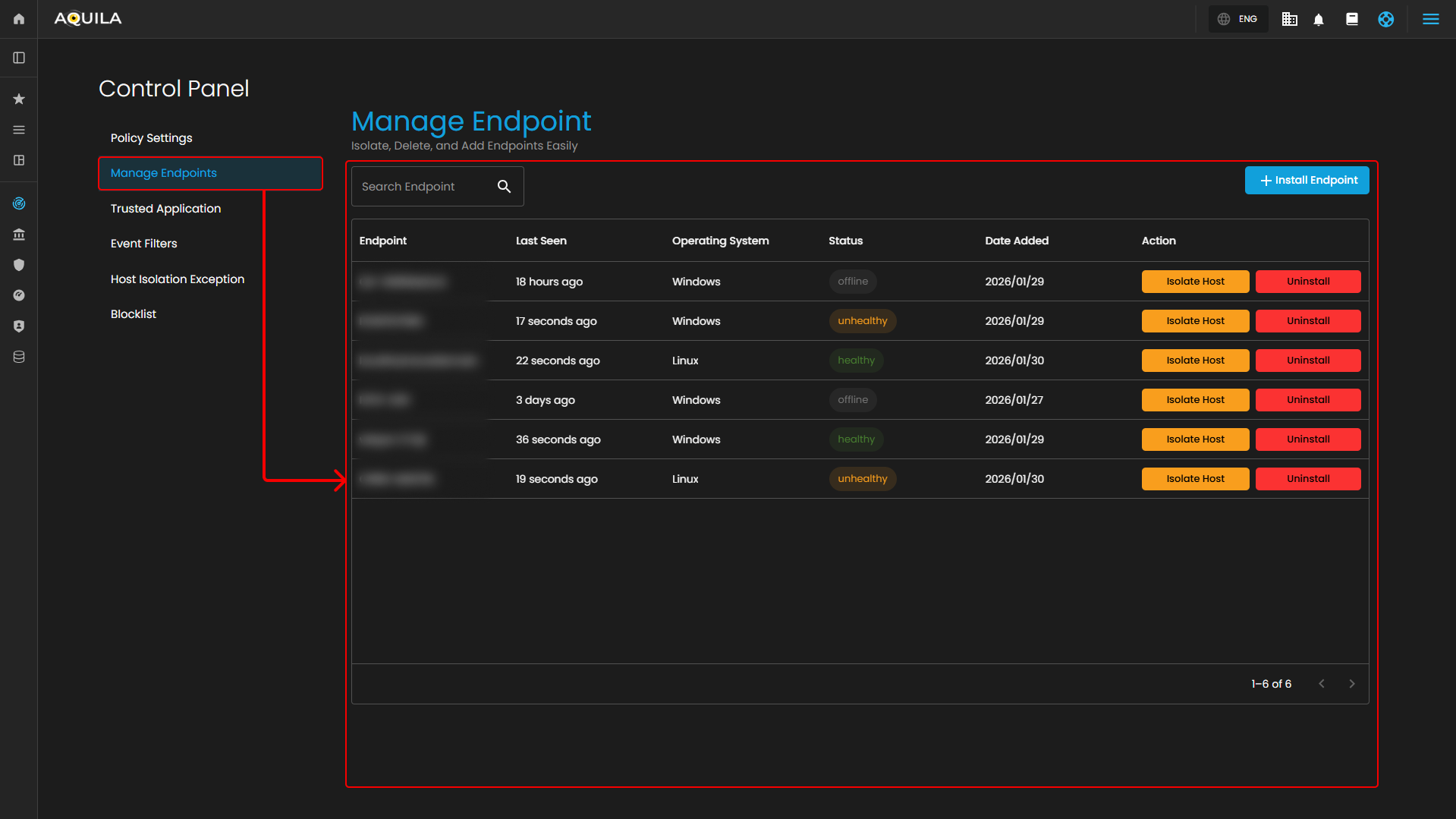
---

#### <span style="color: rgb(53, 152, 219);">**Update Aquila Agent Endpoint**</span>

Users can now update their **Endpoint** by pressing the [![image.png](https://cytechint-docs-bookstack.s3.amazonaws.com/uploads/images/gallery/2026-03/scaled-1680-/ohtOF5Z7Jx46C7P3-image.png)](https://cytechint-docs-bookstack.s3.amazonaws.com/uploads/images/gallery/2026-03/ohtOF5Z7Jx46C7P3-image.png) button and select **Agents** that requires update. The "**Bulk Update Agen**t" button will also turn into [![image.png](https://cytechint-docs-bookstack.s3.amazonaws.com/uploads/images/gallery/2026-03/scaled-1680-/RLEHyesnIZeDiugF-image.png)](https://cytechint-docs-bookstack.s3.amazonaws.com/uploads/images/gallery/2026-03/RLEHyesnIZeDiugF-image.png) to cancel the selection of the **Agents**.

[![HEHE (38).png](https://cytechint-docs-bookstack.s3.amazonaws.com/uploads/images/gallery/2026-03/scaled-1680-/jWjoSR3khRZqrbMe-hehe-38.png)](https://cytechint-docs-bookstack.s3.amazonaws.com/uploads/images/gallery/2026-03/jWjoSR3khRZqrbMe-hehe-38.png)

Select the agent that requires an update, then click **"Update Agent"** to open a review window for verifying selected endpoints before proceeding with the version update.

[![HEHE (37).png](https://cytechint-docs-bookstack.s3.amazonaws.com/uploads/images/gallery/2026-03/scaled-1680-/xHxElfebryBg6290-hehe-37.png)](https://cytechint-docs-bookstack.s3.amazonaws.com/uploads/images/gallery/2026-03/xHxElfebryBg6290-hehe-37.png)

After selecting the endpoint to update, click **"Update Now"** to open the **"Agent Update Progress"** sidebar. The sidebar displays agent details, pending updates, and the update progress.

[![HEHE (40).png](https://cytechint-docs-bookstack.s3.amazonaws.com/uploads/images/gallery/2026-03/scaled-1680-/9zSAgL8B3V01Tz3x-hehe-40.png)](https://cytechint-docs-bookstack.s3.amazonaws.com/uploads/images/gallery/2026-03/9zSAgL8B3V01Tz3x-hehe-40.png)

When the progress bar reaches **100%**, the agent version updates to the latest version.

[![HEHE (43).png](https://cytechint-docs-bookstack.s3.amazonaws.com/uploads/images/gallery/2026-03/scaled-1680-/xye8uOv5oyRK7Mdm-hehe-43.png)](https://cytechint-docs-bookstack.s3.amazonaws.com/uploads/images/gallery/2026-03/xye8uOv5oyRK7Mdm-hehe-43.png)

#### <span style="color: rgb(53, 152, 219);">**Conclusion**</span>

In conclusion, the new feature introduced in the Aquila Agent update provides a significant improvement to the overall update process. Unlike previous versions that required manual script implementation whenever the agent needed to be updated, this enhancement simplifies the process by reducing manual intervention and minimizing the possibility of configuration errors.

By streamlining the update workflow, administrators and users can now deploy updates more efficiently and with greater consistency across environments. This improvement not only saves time but also helps maintain stability and reliability during the update process.

Overall, the addition of this feature demonstrates a clear step toward improving system manageability and operational efficiency. It enables a more automated and user-friendly approach to maintaining the Aquila Agent, making future updates easier to implement and manage.