**To navigate to Unified Compliance Blueprint module, please follow the instructions below:**
**Step 1: Log in to CyTech - AQUILA: [usdc.cytechint.io](https://usdc.cytechint.io/)** **Step 2: Click on Regulatory Intelligence** [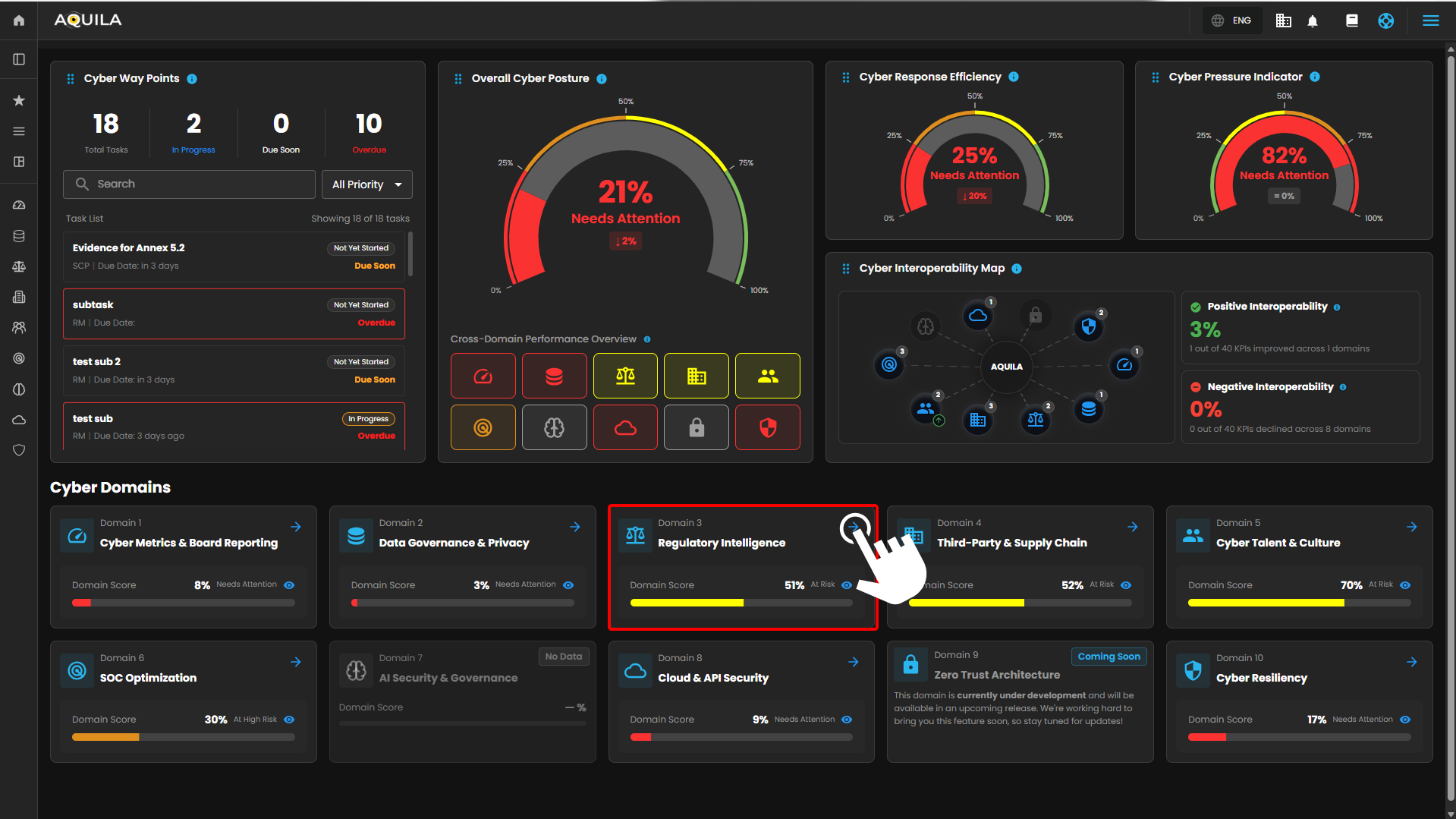](https://cytechint-docs-bookstack.s3.amazonaws.com/uploads/images/gallery/2026-04/8XJl3NlqwG3zHQZh-hehe-2.png) *Figure 1. Overview* **Step 3: Choose Unified Compliance Framework (UCB)** [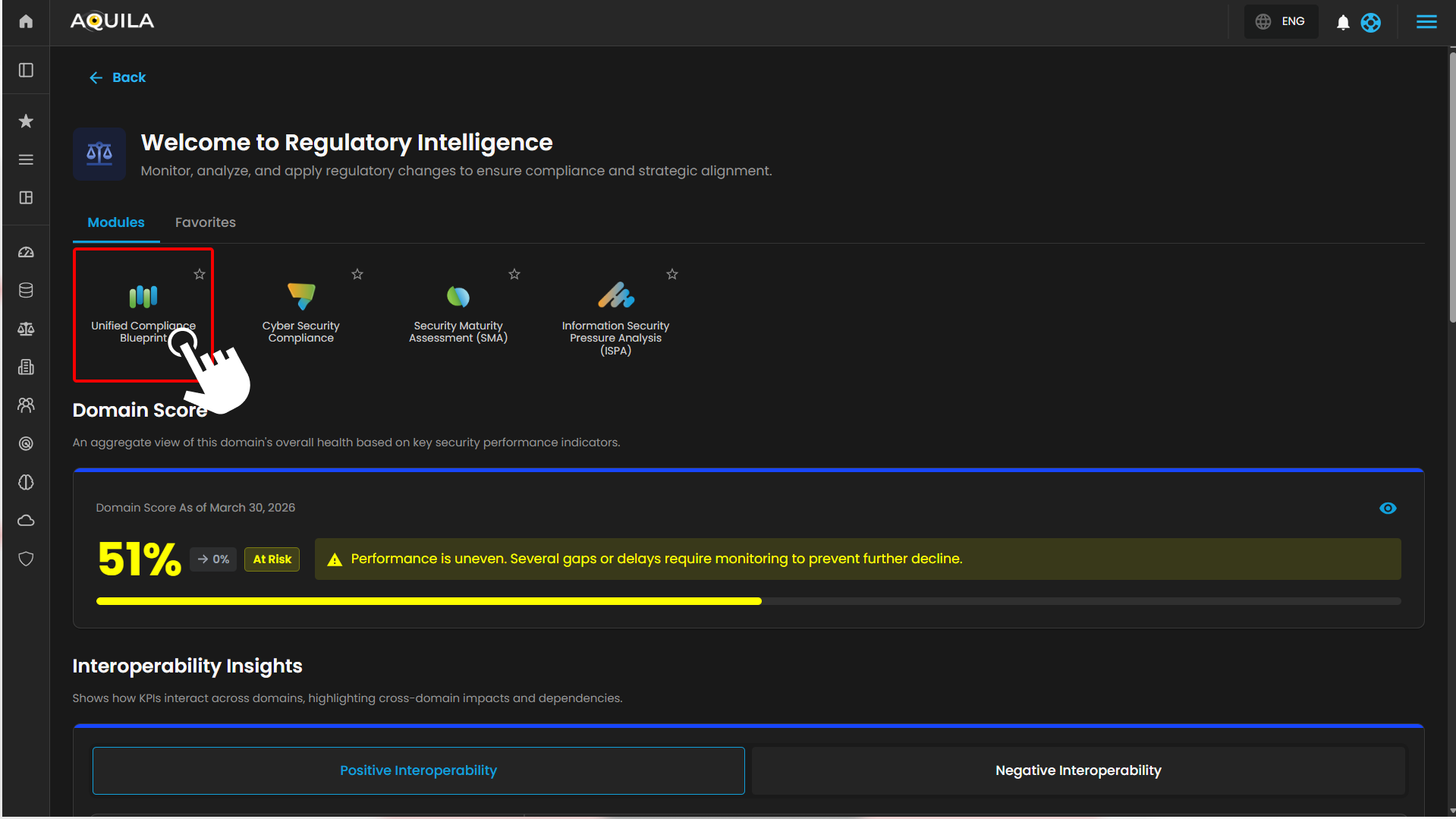](https://cytechint-docs-bookstack.s3.amazonaws.com/uploads/images/gallery/2026-04/DiA74feh4JEYdgvf-hehe-2.png) *Figure 1.1 Cyber Compliance* **Step 4: Hover into leftmost panel to view all the Cyber Compliance sections. This Process is applicable in all navigating into a Module.** [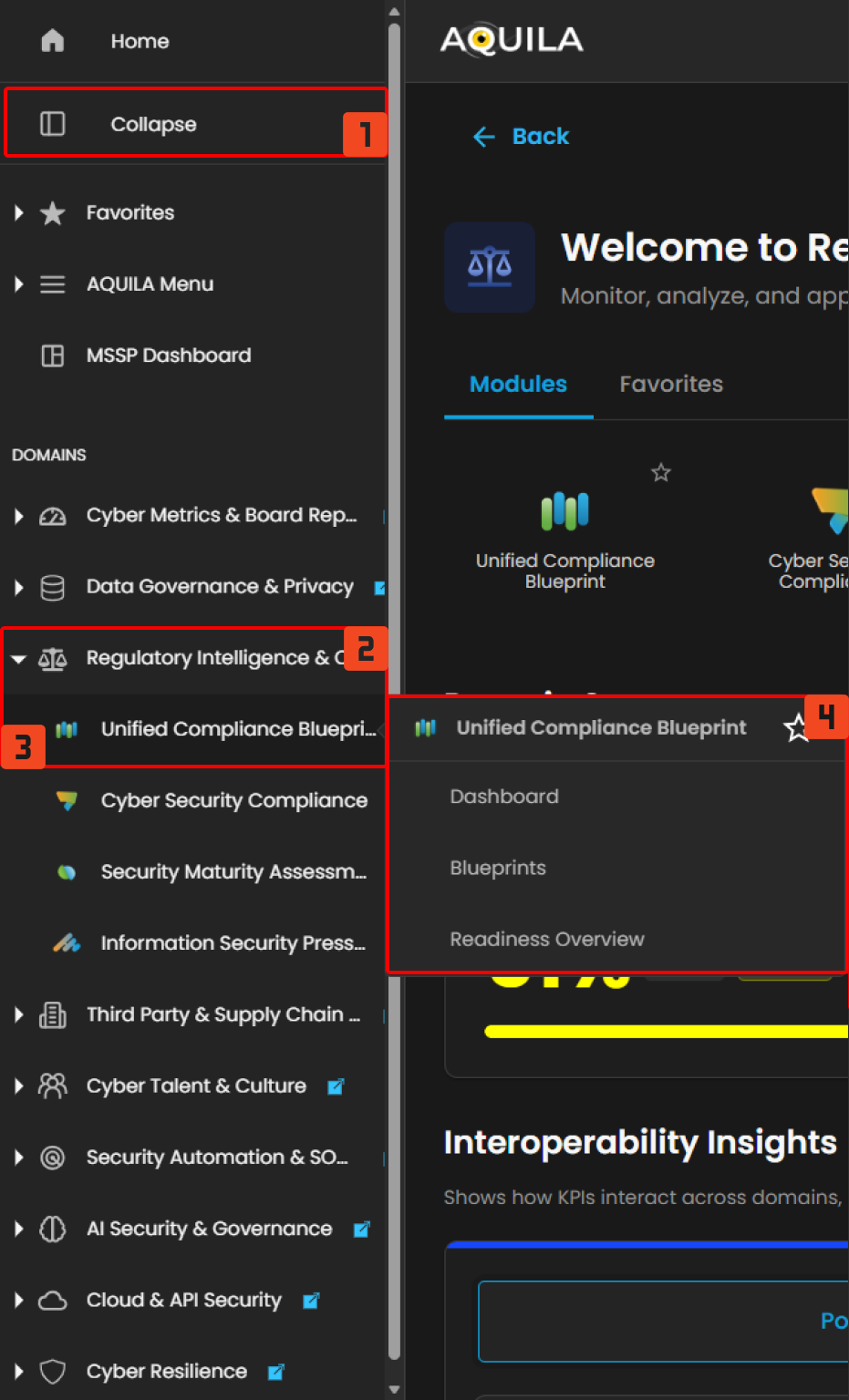](https://cytechint-docs-bookstack.s3.amazonaws.com/uploads/images/gallery/2026-04/xewIq9cXEFW1YljZ-hello.png) *Figure 1.2 Cyber Compliance Navigation* ##### **Dashboard** The **Unified Compliance Blueprint (UCB)** dashboard provides overall view of the blueprints, frameworks and the control overview. [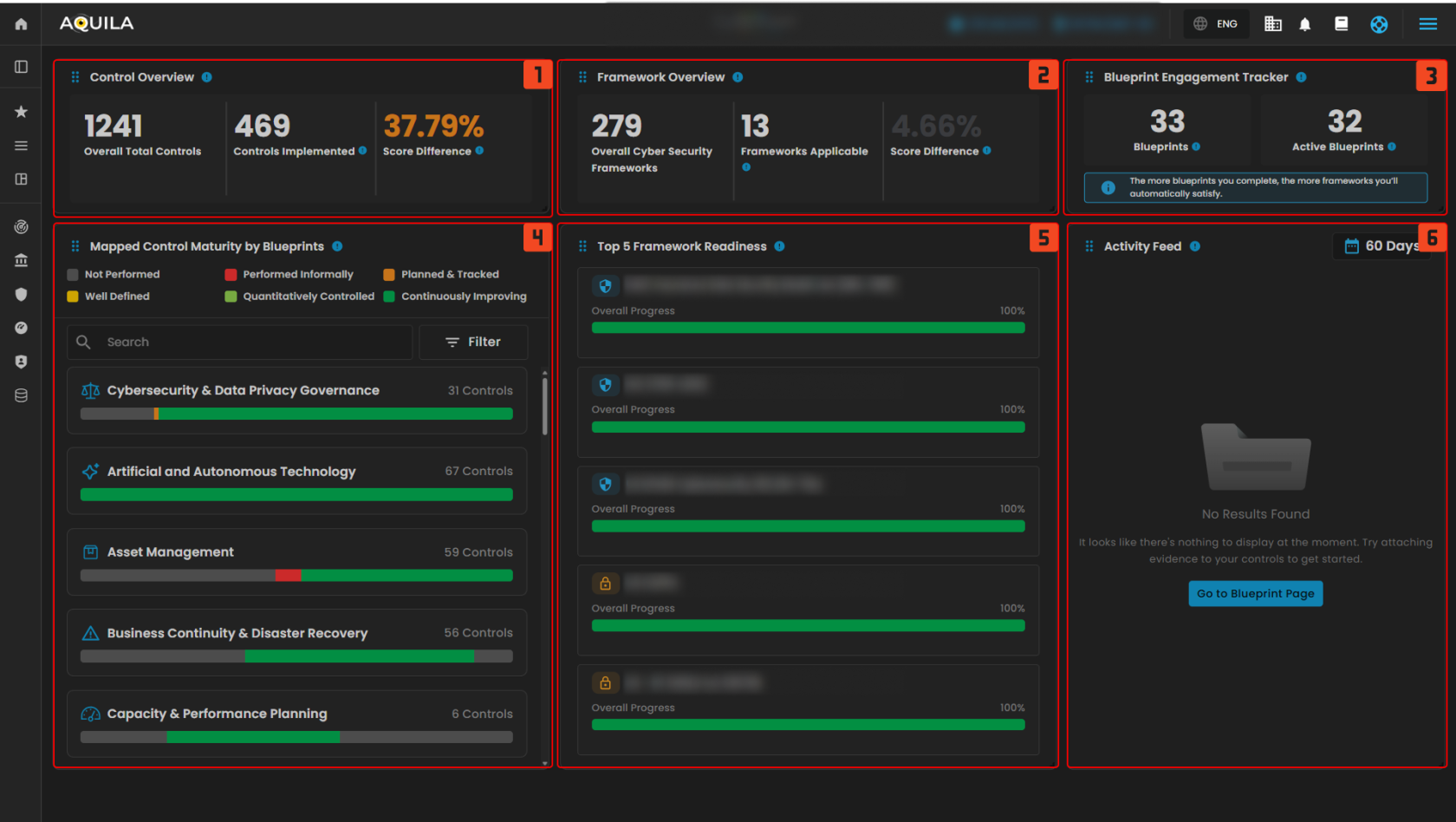](https://cytechint-docs-bookstack.s3.amazonaws.com/uploads/images/gallery/2025-10/wgQza5czhPRs42i8-test-16.png) *Figure 2. Unified Compliance Blueprint Dashboard* **1. Control Overview** The **Control Overview** provides a high-level snapshot of control implementation status. This widget shows the total number of mapped controls, how many have been implemented, and the improvement over time based on score differences. - **Controls Implemented:** The number of controls actively implemented, reflecting actual progress toward meeting compliance requirements. - **Score Difference:** The percentage improvement in overall control maturity or coverage compared to a previous baseline. A higher value indicates better progress. Clicking the **Control Overview** opens a detailed window displaying control progress and performance. The **eye icon** redirects you to the blueprints section related to that control. This window also highlights the score difference and includes widgets showing the number of controls implemented and those yet to be implemented. [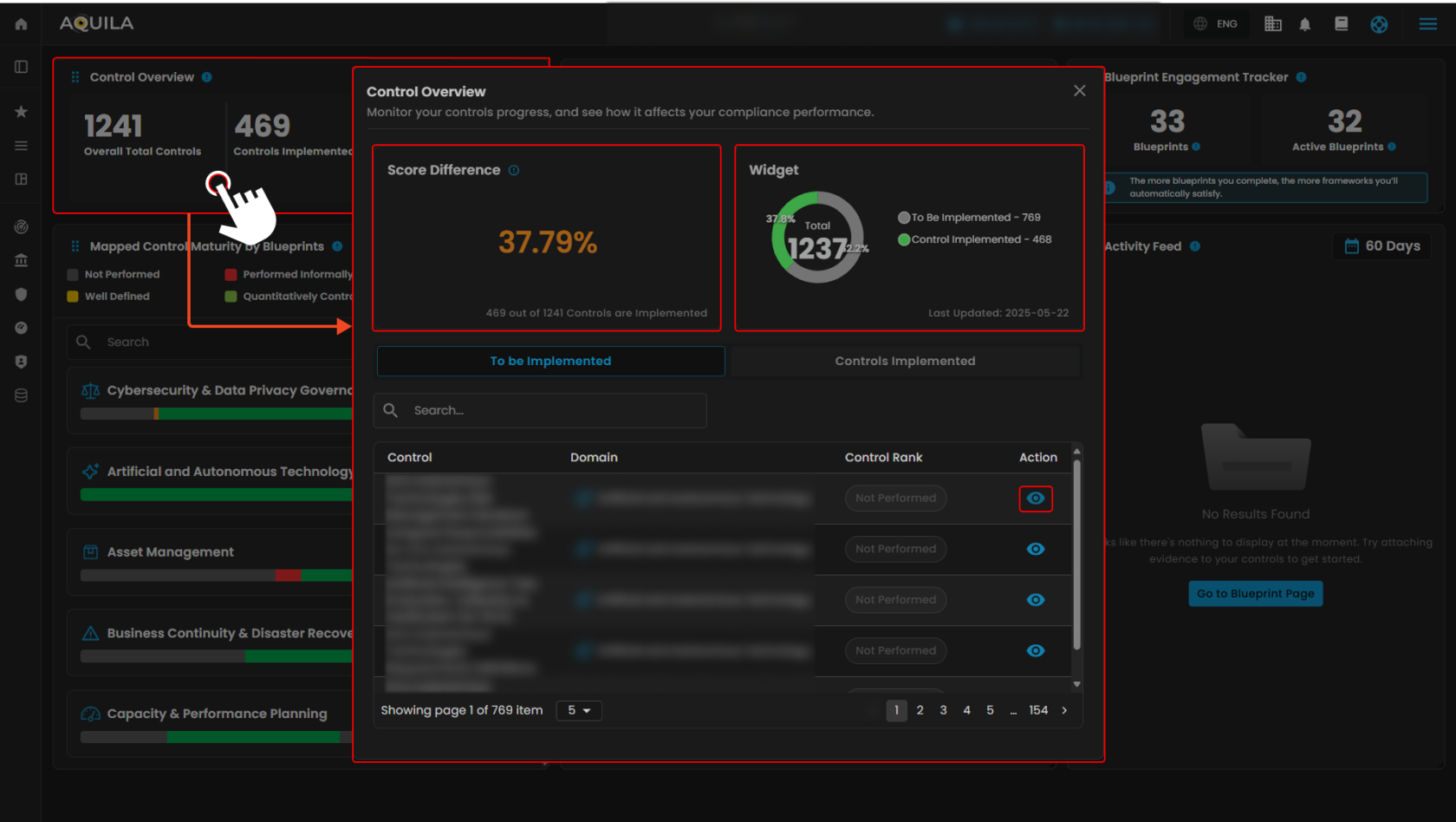](https://cytechint-docs-bookstack.s3.amazonaws.com/uploads/images/gallery/2025-10/aRhdYfMosMZMO2uW-test-17.png) *Figure 2.1 Control Overview***Note: Controls Implemented is the same as "To be Implemented", both shows Control, Domains and Control Rank. Clicking the eye icon redirects to this page.**
[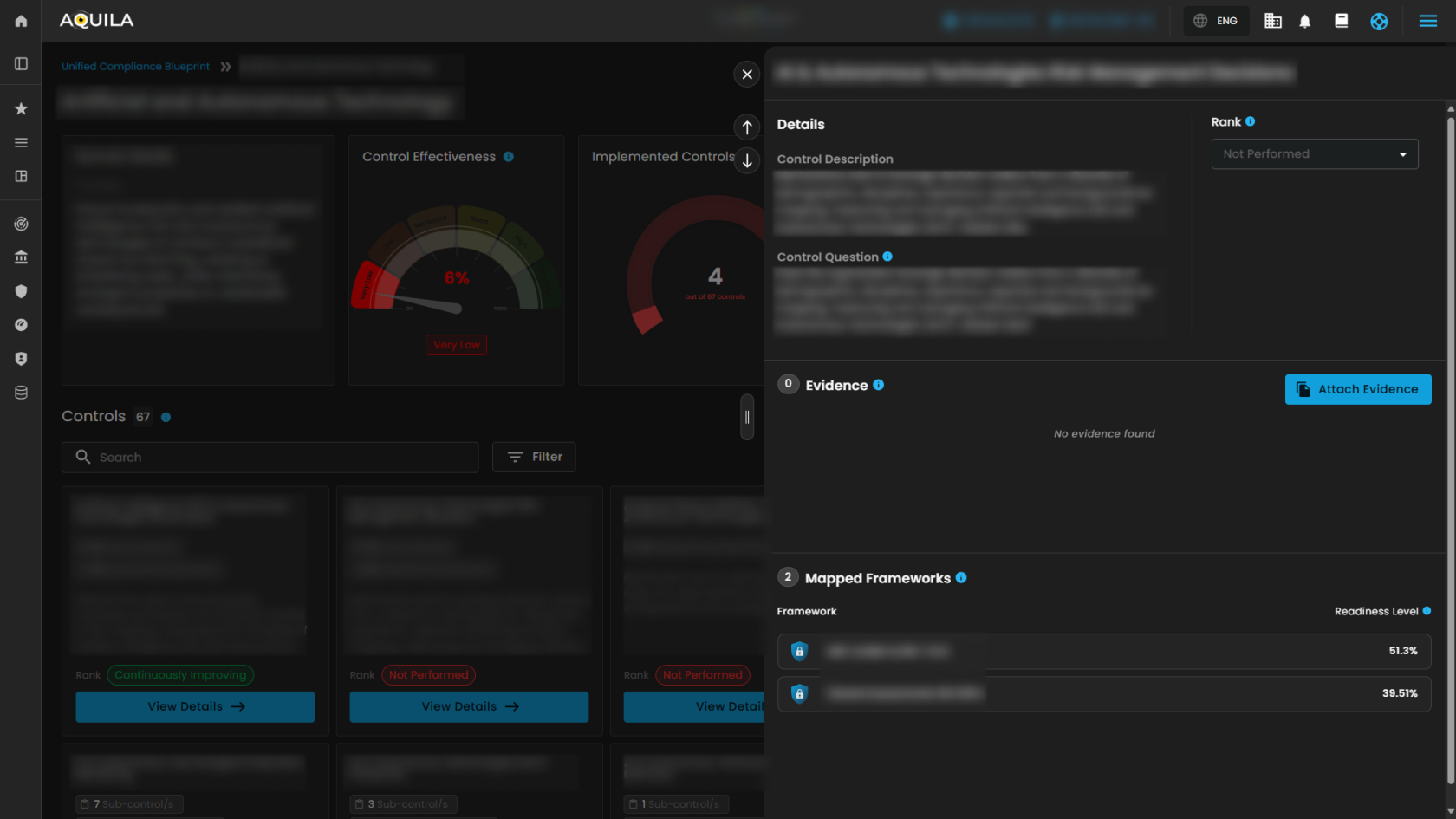](https://cytechint-docs-bookstack.s3.amazonaws.com/uploads/images/gallery/2025-10/Cxn1p0LUB98rQtjR-test-18.png) *Figure 2.1.2 Control Overview - Action* 2\. Framework Overview The **Framework Overview** tracks how blueprint efforts translate into framework alignment. This widget displays the total number of cybersecurity frameworks in the system, the number applicable to current blueprints, and the progress made. - **Frameworks Applicable:** Cybersecurity frameworks where at least one mapped control has been implemented, indicating measurable progress toward framework readiness. - **Score Difference:** The improvement in overall framework alignment based on recent blueprint activities. A higher percentage reflects broader compliance coverage across supported frameworks. Clicking the **Framework Overview** opens a window that tracks implementation progress and measures readiness. This window also displays the score difference and the applicable frameworks progressing toward compliance. Additionally, it shows how many controls have been implemented and those yet to be implemented.****Note:** The Privacy Framework functions similarly to the Security Framework. It displays the framework, controls implemented, and readiness. The eye icon can also be clicked to access additional details.**
[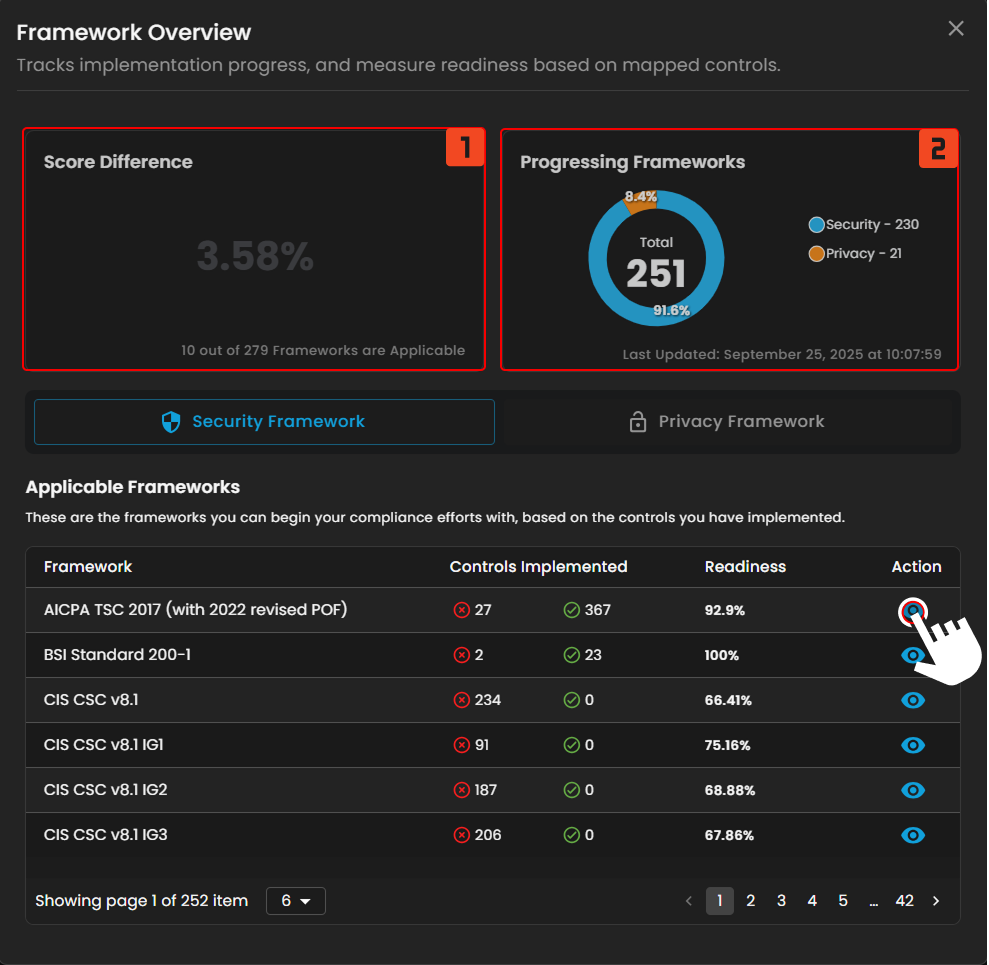](https://cytechint-docs-bookstack.s3.amazonaws.com/uploads/images/gallery/2025-10/tv8hJ6NvmHnAT1fz-test-19.png) *Figure 2.2 Framework Overview* Clicking the **eye icon** next to a framework opens a window showing its Readiness Check and the total number of controls within the framework. Users can expand details for **Progressed Controls** and **Pending Controls** by pressing the "<" button. Additionally, users can edit controls and add standards for the framework from this window. [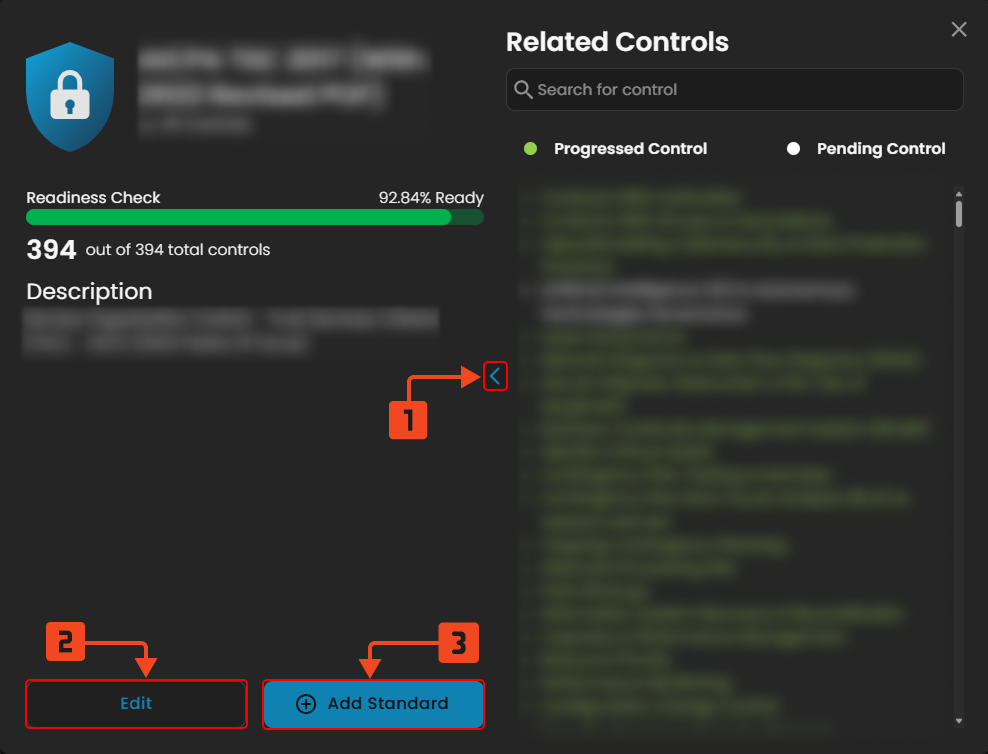](https://cytechint-docs-bookstack.s3.amazonaws.com/uploads/images/gallery/2025-10/zPuSahKySJhe3Jp8-test-22.png) *Figure 2.2.1 Framework Overview - Action* 3\. Blueprint Engagement Tracker Clients can track blueprint efforts and their alignment with frameworks using this widget. It displays the total number of cybersecurity frameworks in the system, how many are applicable to the current blueprints, and the progress made. - **Blueprints:** The total number of compliance blueprints available in the **Unified Compliance Blueprint (UCB)** library. These serve as structured guides aligning controls with various cybersecurity frameworks. - **Active Blueprints:** Blueprints that are currently engaged with, containing controls that have been implemented or mapped to ongoing compliance efforts. Clicking on **Blueprints** opens a window showing **Mapped Control Maturity by Blueprints**, which tracks blueprint completion rates and monitors the latest updates on client compliance goals. Users can search blueprints and apply three available filters. Clicking on **Active Blueprints** redirects the client to the blueprint module section.**Note: Pressing the active blueprints button in the blueprint engagement tracker shows the same window.**
[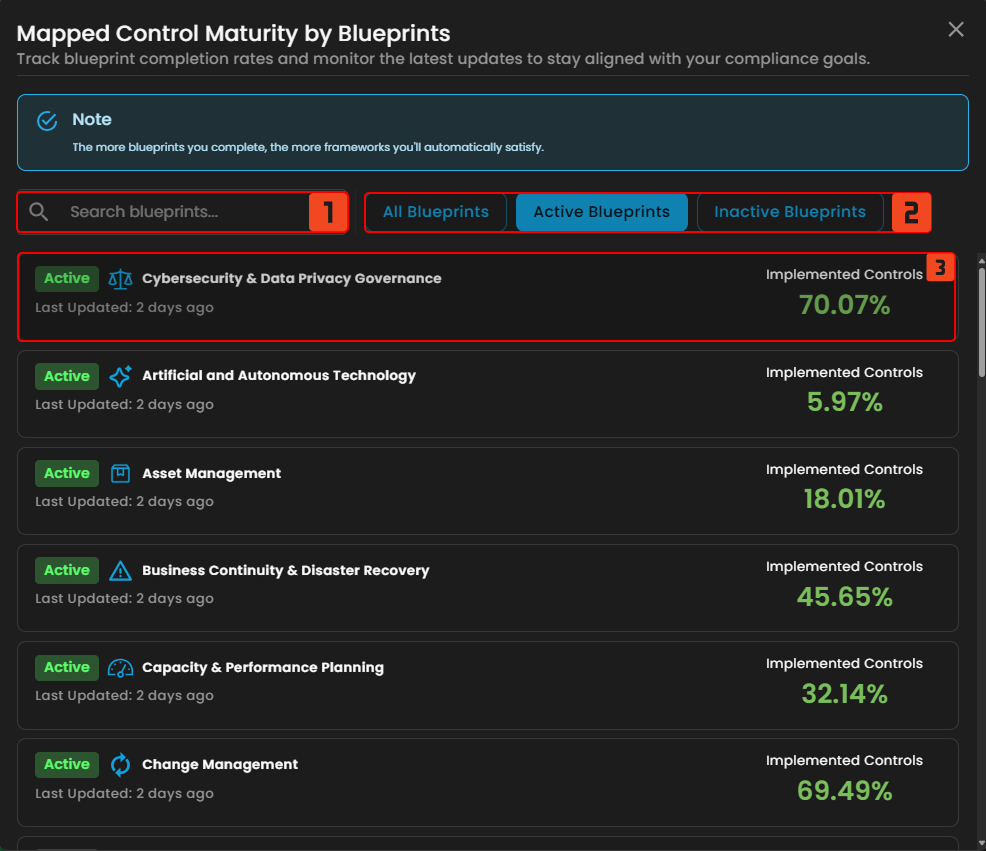](https://cytechint-docs-bookstack.s3.amazonaws.com/uploads/images/gallery/2025-10/baqDE7alWYlKMlGK-test-23.png) *Figure 2.3 Blueprint Engagement Tracker* **4. Mapped Control Maturity by Blueprints** Understand the maturity of controls across various blueprint domains. Each bar is color-coded to represent control rankings—from **Not Performed** to **Continuously Improving**—making it easy to identify areas that require attention. - Not Performed - Performed Informally - Planned & Tracked - Well Defined - Quantitatively Controlled - Continuously Improving - **Search 🔍** - The client can search their blueprint - **Filter ᯤ** - Blueprint filter - **Filter Options** - **Filter by** - Non-Compliant - Fully Compliant - Partially Compliant - Mostly Compliant [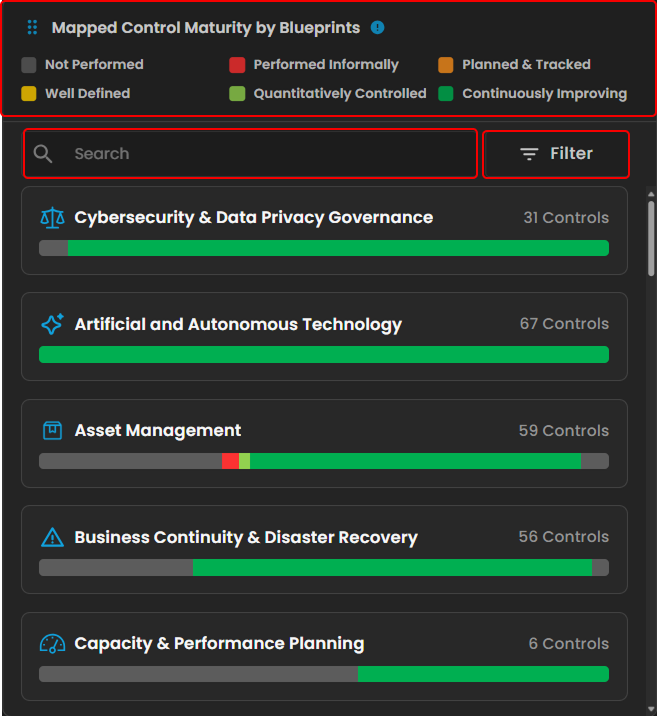](https://cytechint-docs-bookstack.s3.amazonaws.com/uploads/images/gallery/2025-10/ZysbOFi6bPGirINt-test-24.png) *Figure 2.4 Mapped Control Maturity by Blueprints* Clicking a blueprint opens a window displaying the mapped control maturity for that blueprint. This view tracks the progress and maturity of control implementation within the selected blueprint. Clicking **Controls Implemented** shows the list of controls that have been implemented. Clicking the **eye icon** redirects to the blueprint module section. [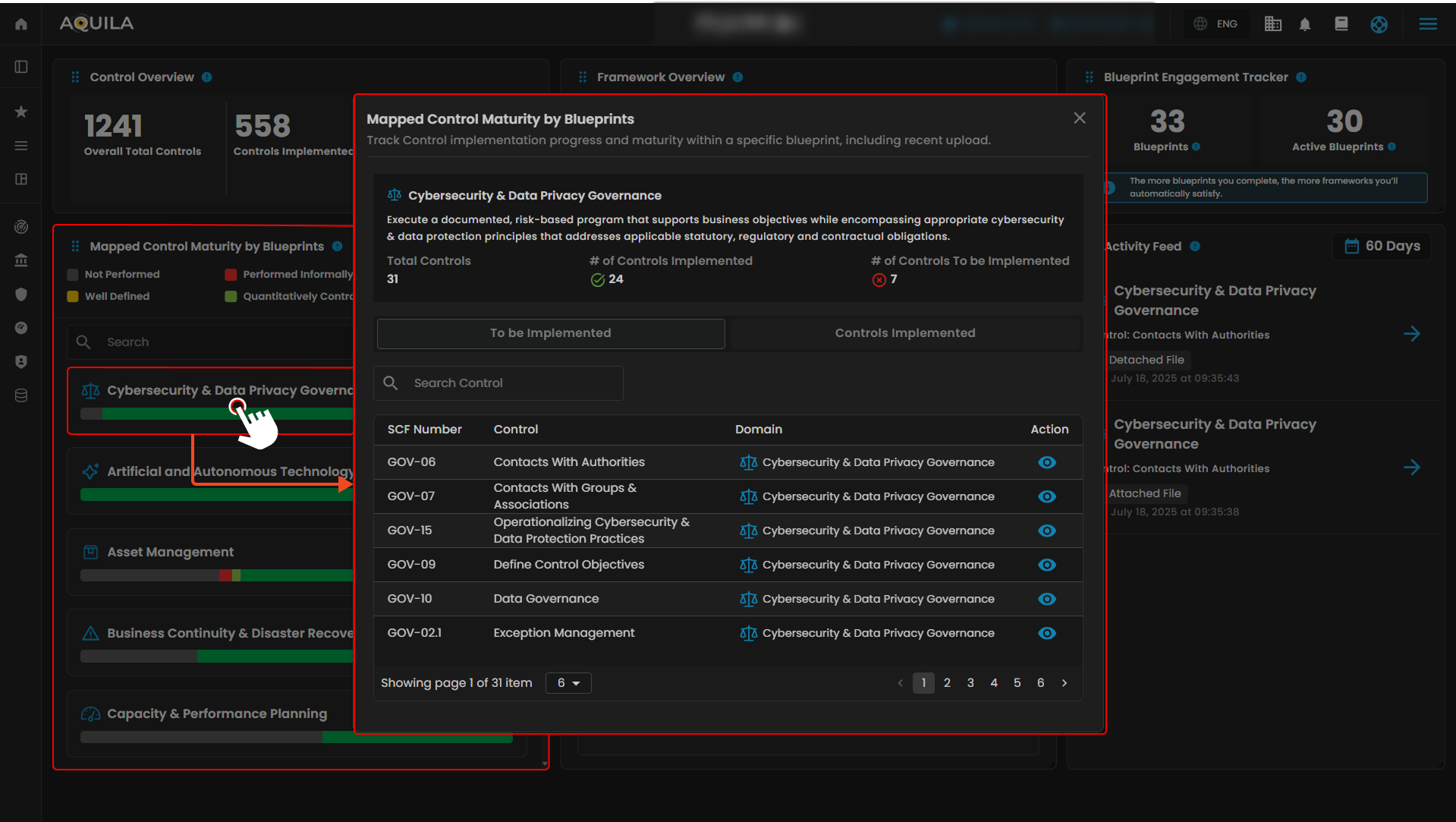](https://cytechint-docs-bookstack.s3.amazonaws.com/uploads/images/gallery/2025-10/7GgLnWJtW8VEUseD-test-25.png) *Figure 2.4.1 Mapped Control Maturity by Blueprints - Action* 5\. Framework Readiness This widget displays the top five frameworks by readiness, offering a quick overview of compliance progress across the most relevant frameworks. It shows each framework’s overall completion percentage and highlights recent improvements. Clicking on a framework opens a window displaying its Readiness Check, Progressed Controls, and Pending Controls—similar to the view shown in Figure 2.3.1 **Framework Overview**. [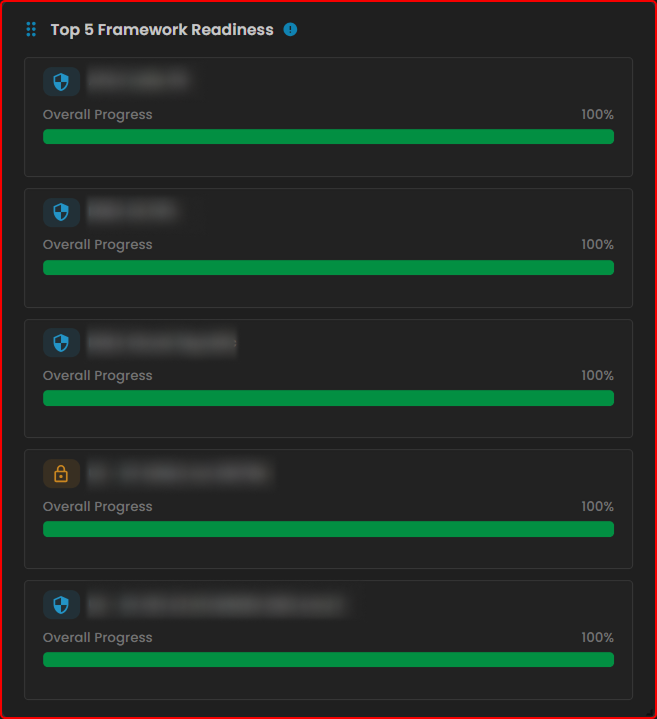](https://cytechint-docs-bookstack.s3.amazonaws.com/uploads/images/gallery/2025-10/eqSN3FwErfV0CF0U-test-26.png) *Figure 2.5 Framework Readiness* 6\. Activity Feed The **Activity Feed** tracks recent actions, including evidence uploads and blueprint activity. It helps monitor contributions, maintain audit trails, and keep users informed about compliance progress. Clicking on the **Blueprint Page** redirects the user to the blueprint sub-module section. [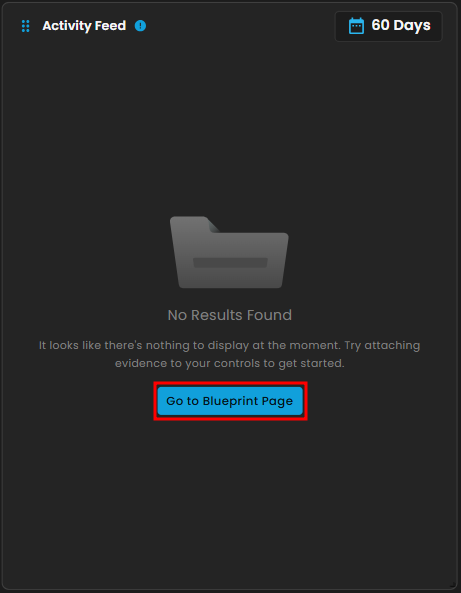](https://cytechint-docs-bookstack.s3.amazonaws.com/uploads/images/gallery/2025-10/pyYw41nUJoHZOmBi-image.png) *Figure 2.6 Activity Feed***To navigate to the Blueprints sub-module, click the left-side panel where Cyber Compliance is located, then hover over Unified Compliance Blueprints. Cyber Compliance (Domain) → Unified Compliance Blueprints (Module) → Blueprints (Sub-module).**
##### **Blueprints** This is where you can monitor your blueprints and ensure compliance with various security standards. The dashboard provides an overview of control effectiveness across different domains, showing the number of implemented controls out of the total available for each domain. You can use the search bar (1) to quickly find specific domains or controls, and the filter drop-down (2) to view blueprints based on their status, such as active or inactive. Each domain card displays a control effectiveness gauge, color-coded to indicate performance levels from “Very Low” to “Good.” By clicking the **View Domain** button (3), you can dive deeper into detailed progress, assess control maturity, and manage compliance efforts more effectively. [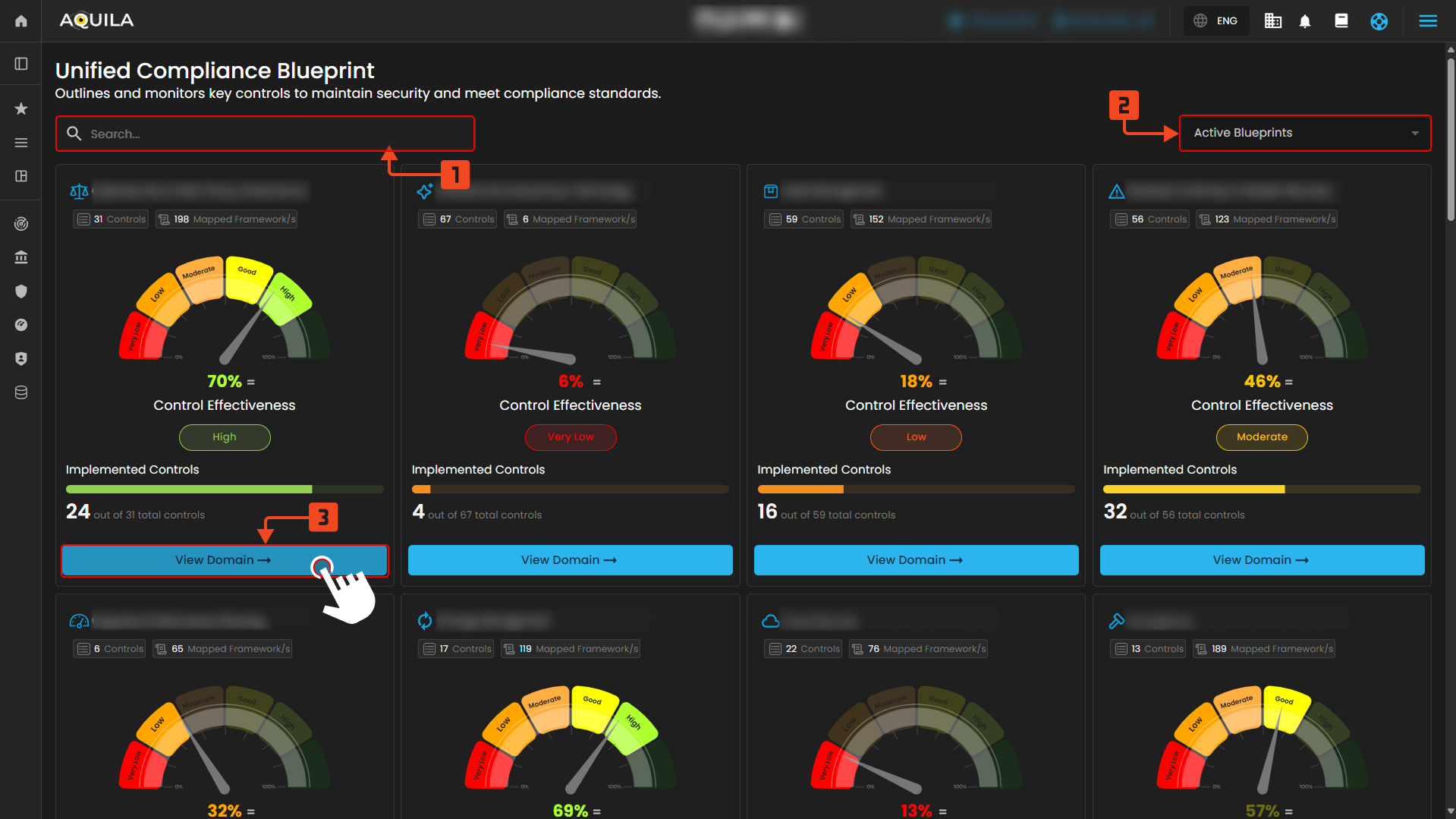](https://cytechint-docs-bookstack.s3.amazonaws.com/uploads/images/gallery/2025-10/y1yr4bm4xoP2cs7i-test-27.png) *Figure 3. Unified Compliance Blueprint* ##### **View Domain** 1\. Domain Details This section provides a comprehensive overview of the selected blueprint domain. It includes a description of the domain’s objectives and the overall effectiveness of controls, represented by a control effectiveness gauge. You can also see the total number of implemented controls out of the total available. Additionally, this section displays the distribution of compliance requirements across all sub-domains within the domain, categorized by their status such as **Continuously Improving**, **Quantitatively Controlled**, **Well Defined**, **Planned & Tracked**, **Performed Informally**, or **Not Performed**. 2\. Controls Each control within the domain is listed below with its description and the number of mapped frameworks it applies to. Controls are individual elements that must be addressed to meet compliance standards. Each control also has a maturity rank, reflecting the level of implementation and effectiveness based on the Mapped Control Maturity model. 3\. View Details By clicking the **View Details** button on any control, users can access more in-depth information, including detailed control descriptions and specific control questions. These questions help determine whether the control is applicable to the organization. Users can also attach evidence to demonstrate compliance. The page shows which frameworks are mapped to this control and how progress on the control contributes to the organization’s readiness score within each framework. This helps track compliance maturity and readiness levels effectively. [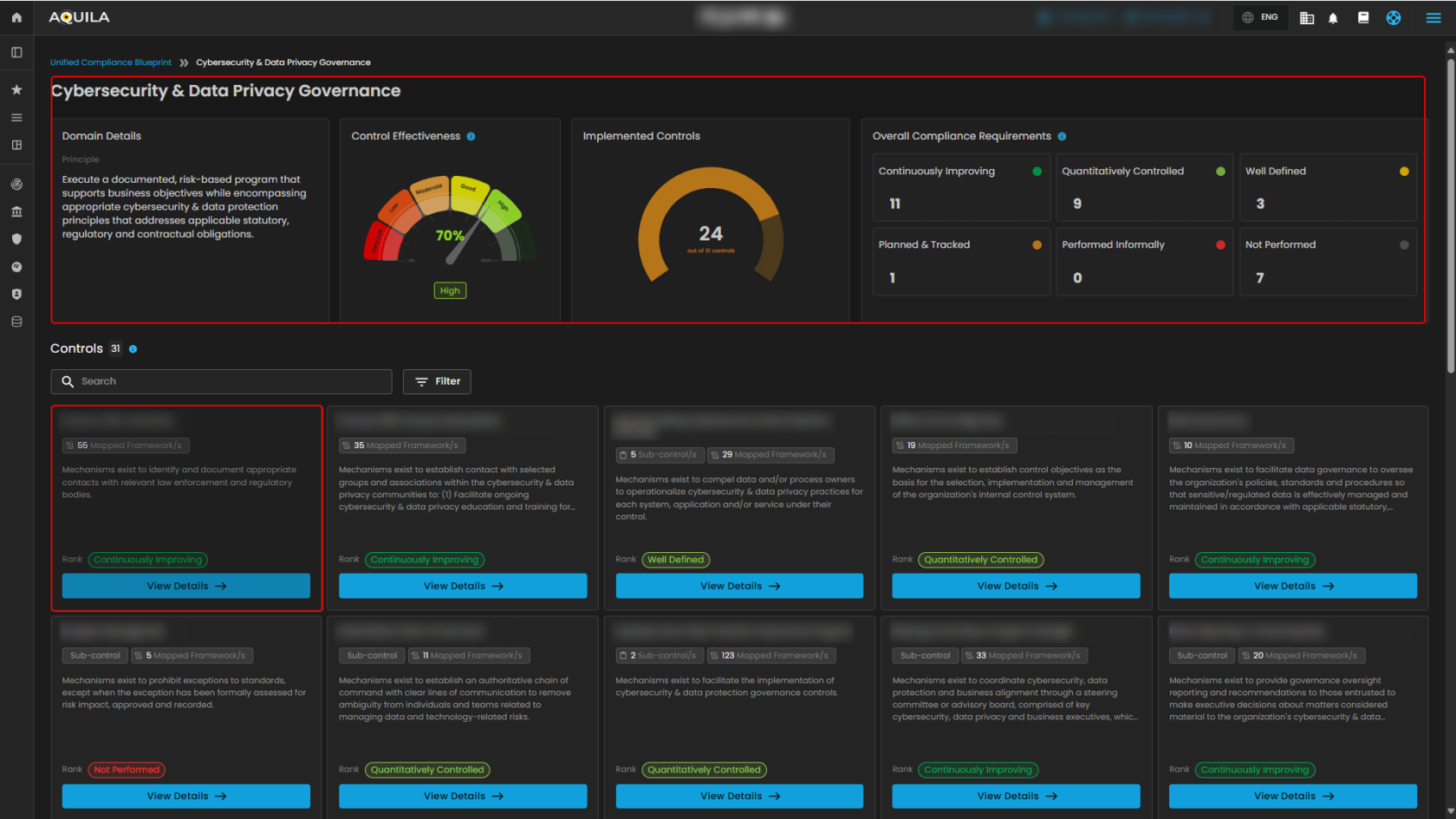](https://cytechint-docs-bookstack.s3.amazonaws.com/uploads/images/gallery/2025-10/Mki8OFdSq58Ebb6G-test-28.png) *Figure 3.1 Unified Compliance Blueprint* [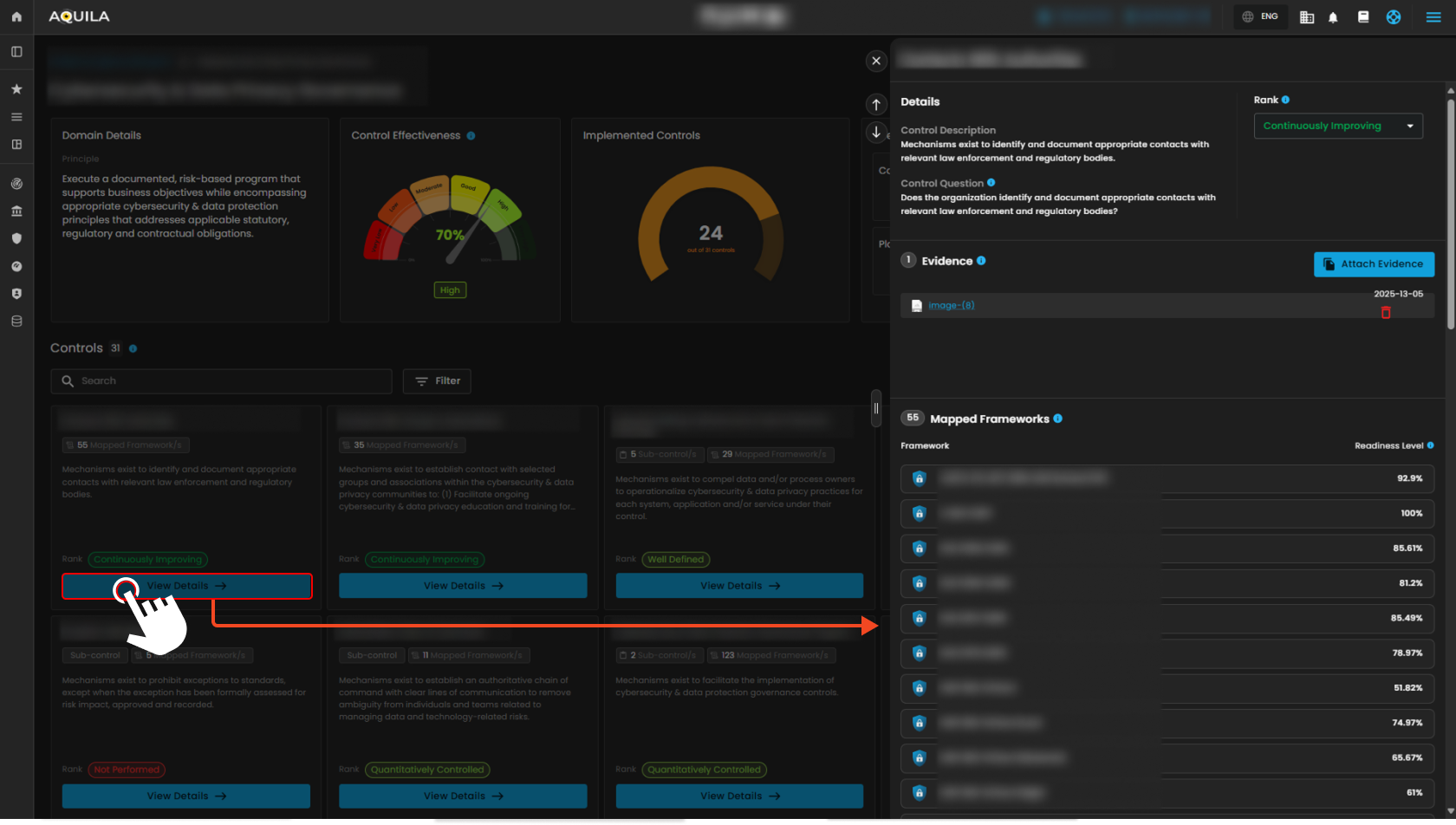](https://cytechint-docs-bookstack.s3.amazonaws.com/uploads/images/gallery/2025-10/U3aE2xnDIsKg5qf2-test-31.png) *Figure 3.2 Unified Compliance Blueprint - Details***To navigate to the Readiness Overview sub-module, click the left-side panel where Cyber Compliance is located, then hover over Unified Compliance Blueprints. Cyber Compliance (Domain) → Unified Compliance Blueprints (Module) → Readiness Overview (Sub-module).**
##### **Readiness Overview** This page shows your progress across selected frameworks and allows you to explore controls. Pressing the **"View Details"** button will redirect you to the detailed view of the control, as shown in **Figure 3.2**.**Note: By pressing Highlight Controls will show the user's 100% readiness in their framework. They work the same as Core Controls that redirect you back to the details of the control. Refer to Figure 3.2.**
[](https://cytechint-docs-bookstack.s3.amazonaws.com/uploads/images/gallery/2025-10/914EcDIeB9FhdhUn-test-30.png) *Figure 3.3 Readiness Overview* ##### **Conclusion** The Unified Compliance Blueprint serves as a central hub for monitoring your blueprints and frameworks. It enables you to track their performance by assessing control maturity and readiness, ensuring effective management and continuous improvement. *If you need further assistance, kindly contact **support@cytechint.com** for prompt assistance and guidance.*