**Let’s proceed to navigate the Cyber Security Compliance Module kindly follow the instructions below:**
**Step 1:** Log in to **CyTech** – **AQUILA. [https://usdc.cytechint.io/](https://usdc.cytechint.io/ "AQUILA Website")** **Step 2:** Click on Regulatory Intelligence [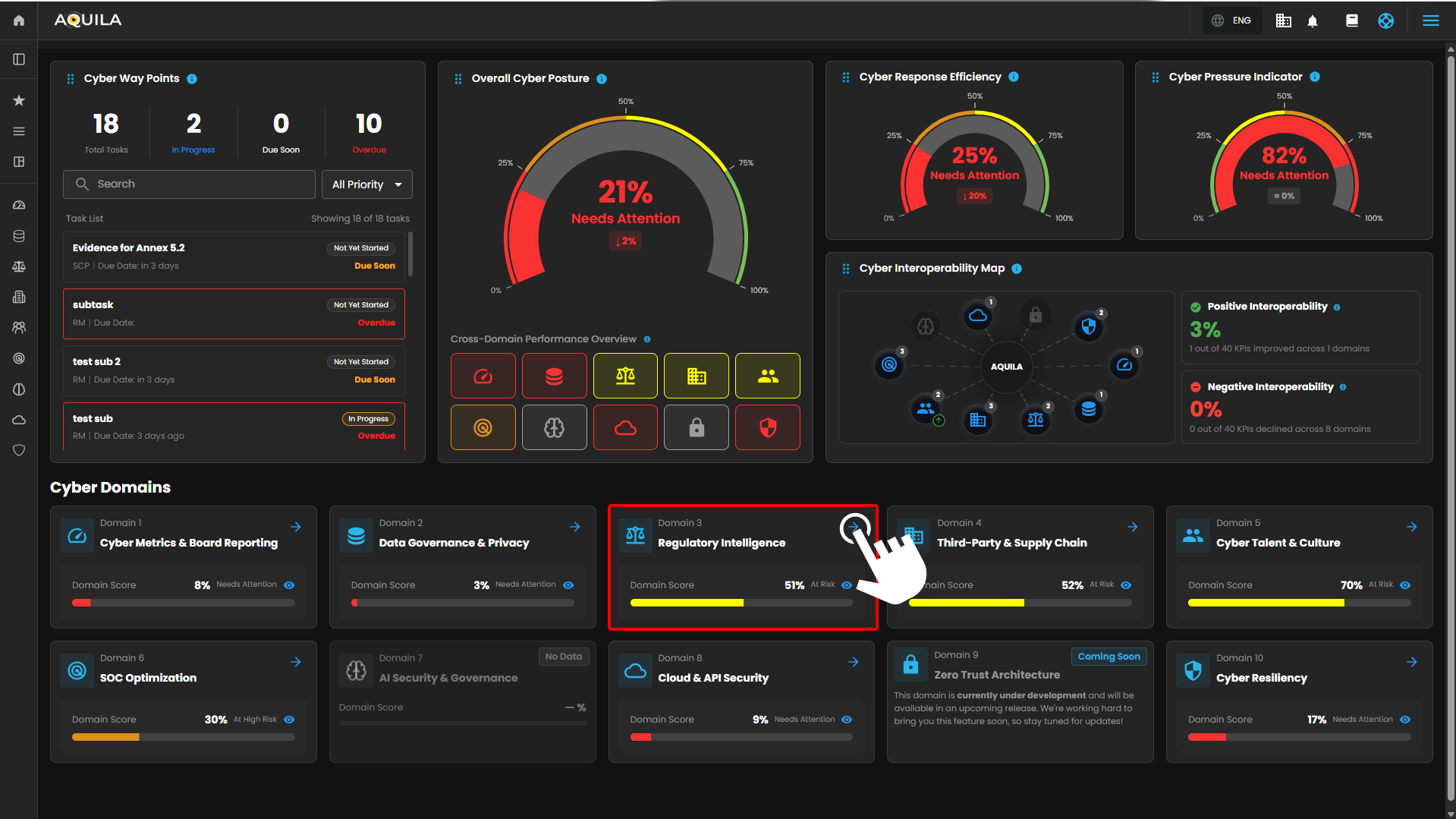](https://cytechint-docs-bookstack.s3.amazonaws.com/uploads/images/gallery/2026-04/nkT4zd9GWsW5ie3J-hehe-2-1.png) **Step 3: Security Maturity Assessment (SMA)** [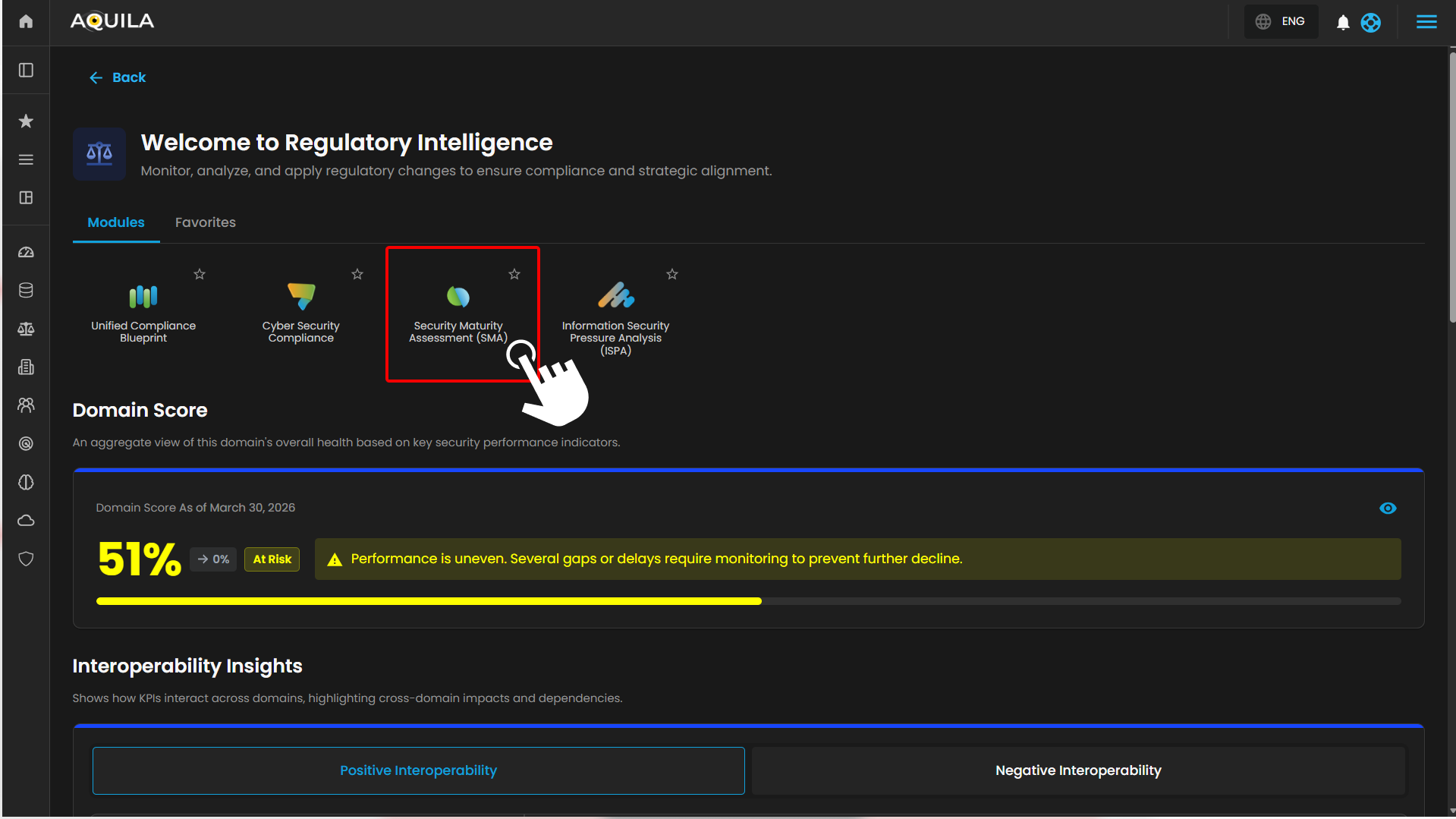](https://cytechint-docs-bookstack.s3.amazonaws.com/uploads/images/gallery/2026-04/OYurPGiZOBYXiajq-hehe-4.png) **Step 4: Client can also access it through the sidebar** [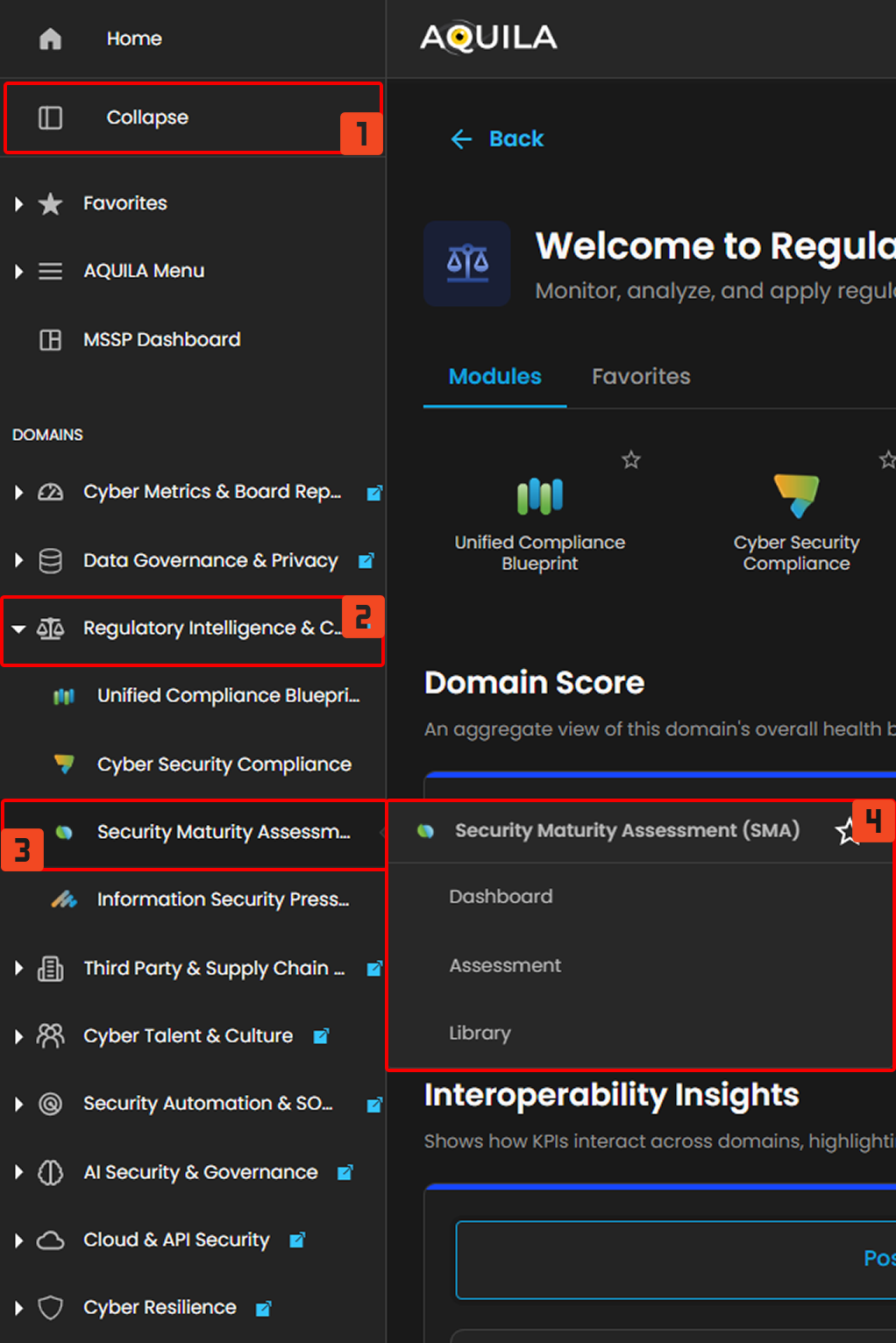](https://cytechint-docs-bookstack.s3.amazonaws.com/uploads/images/gallery/2026-04/shj5cmihyqucrLMs-hello-2.png) ### **Dashboard - Cyber Security Compliance (Module)** The Cybersecurity Maturity Dashboard provides a consolidated view of an organization’s security posture across governance, technical controls, and cultural domains. It enables users to monitor performance, benchmark against peers, and identify areas for improvement. The dashboard is divided into five key sections, each representing a different analytical perspective. **1. Overall Maturity Score** **Purpose** Displays the organization’s **aggregate cybersecurity maturity level**. **Components** - **Maturity Percentage:** Represents the overall score (e.g., 68%) - **Maturity Rating:** Qualitative label (e.g., *Good Maturity*) - **Peer Comparison:** - Peer Score (e.g., 54%) - Score Difference (e.g., +14%) **How to Use** - Quickly assess overall security posture - Compare performance against industry or peer benchmarks - Track improvement over time --- **2. Score by Governance & Management Area** **Purpose** Provides a **domain-level breakdown** of cybersecurity maturity across key governance and management areas. **Domains Included** - Risk Analysis - Compliance Management - Auditing - Vulnerability Management - Event & Incident Management - Policy & Process Governance - Security Culture **How to Use** - Identify strong vs weak domains - Prioritize improvement initiatives - Support audit readiness and compliance tracking --- **3. Policy & Process Scores by Security Area** **Purpose** Displays **detailed maturity scores across technical and operational security domains**. **Security Areas** - Network Security - Applications - Physical Security - Host Security (Servers) - Data Security - End User Devices - Identity & Access Management (IAM) - Security Culture – End Users - Security Culture – IT **How to Use** - Evaluate effectiveness of implemented controls - Identify gaps in technical vs human security layers - Support risk assessments and remediation planning --- **4. Days Left to Next Assessment** **Purpose** Indicates the **remaining time until the next scheduled assessment**. **Components** - Number of days remaining (e.g., 338 Days) - Next assessment date **How to Use** - Plan remediation and improvement activities - Track audit cycles and compliance timelines - Ensure readiness before reassessment --- **5. Comparison: Your Score vs Peer Score** **Purpose** Visual comparison of **organization performance against peer benchmarks** across all domains. **Visualization** - Radar (spider) chart - Two datasets: - Your Score - Peer Score **How to Use** - Identify competitive advantages - Detect underperforming areas relative to peers - Support strategic security planning [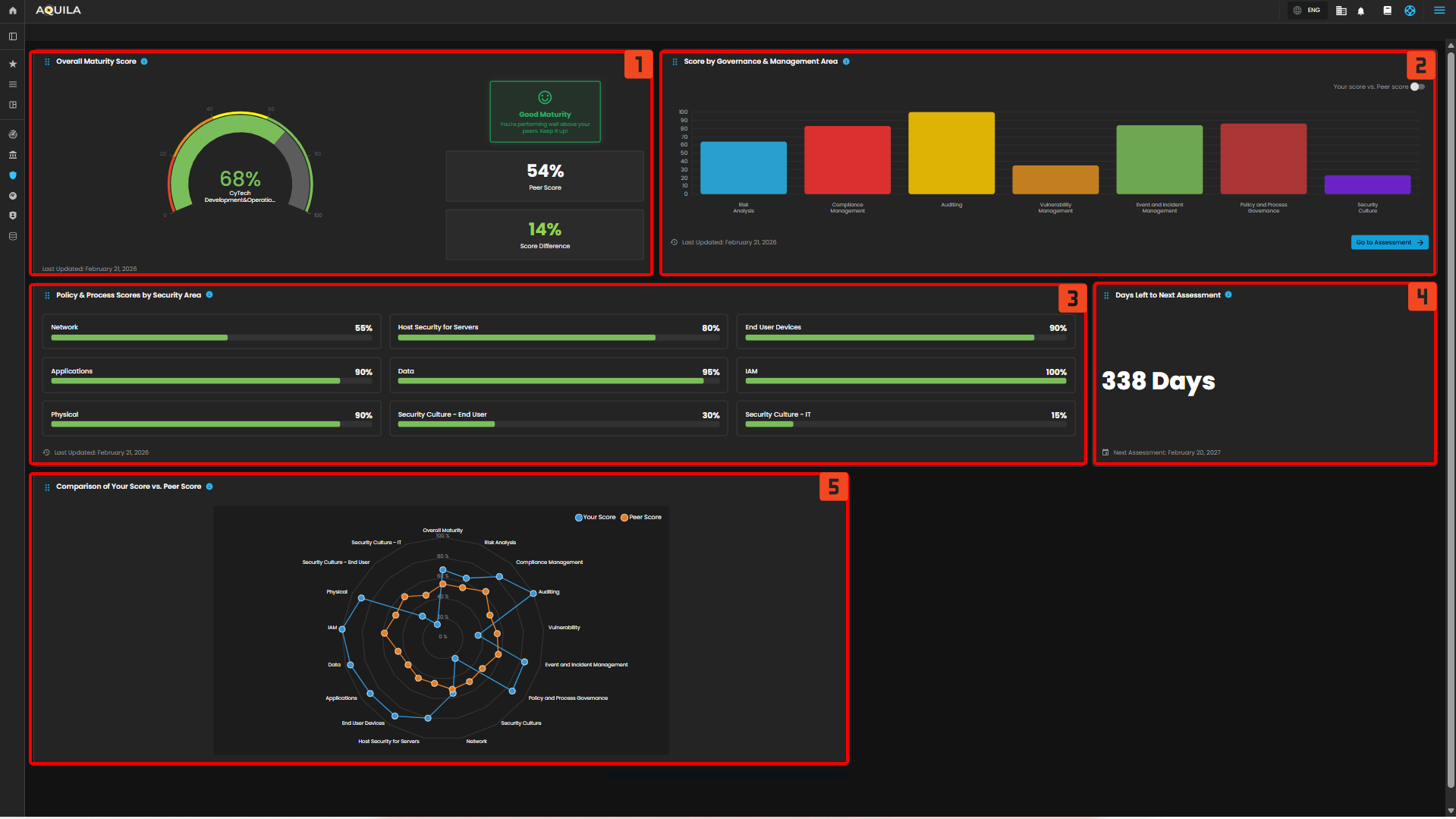](https://cytechint-docs-bookstack.s3.amazonaws.com/uploads/images/gallery/2026-03/j9RtHyDt70uENVQX-hehe-16.png) ### **Assessment - Cyber Security Compliance (Module)** The Assessment Dashboard enables organizations to evaluate their cybersecurity maturity across multiple domains. It provides visibility into assessment progress, performance against peers, and detailed scoring across core security areas. The dashboard is organized into four main sections. **1. Organization Details** **Purpose** Displays key contextual information about the organization being assessed. **Components** - **Organization Name:** (e.g., CyTech Development & Operations) - **Sector & Industry Classification** - **Sub-sector Information** - **Assessment Details:** - Reassessment date - Assessment frequency (e.g., every 12 months) **How to Use** - Validate assessment scope and organizational context - Ensure correct industry benchmarking alignment - Confirm assessment timelines and scheduling --- **2. Assessment Progress** **Purpose** Tracks completion status of the cybersecurity assessment. **Components** - **Progress Indicator:** Percentage completion (e.g., 100%) - **Status Message:** (e.g., *All Done!*) - **Next Reassessment Date** **How to Use** - Monitor completion of assessment questionnaires - Ensure all required inputs have been submitted - Identify readiness for generating results and reports --- **3. Overview Results** **Purpose** Provides a **summary of overall assessment outcomes**. **Components** - **Your Score:** Overall maturity score (e.g., 68%) - **Peer Score:** Industry benchmark (e.g., 54%) - **Score Difference:** Performance gap vs peers (e.g., +14%) - **Maturity Rating:** Qualitative status (e.g., *Good Maturity*) **How to Use** - Quickly evaluate overall cybersecurity posture - Understand relative performance against peers - Communicate high-level results to stakeholders --- **4. Core Areas** **Purpose** Breaks down cybersecurity maturity into **individual assessment domains**, allowing detailed evaluation. **Domains Included** **Risk Analysis** - Evaluates how effectively risks are identified and assessed - Example Score: 64% vs 54% (peer) **Compliance Management** - Measures alignment with regulatory and policy requirements - Example Score: 83% vs 63% **Auditing** - Assesses effectiveness of audit processes and controls validation - Example Score: 100% vs 52% **Vulnerability Management** - Evaluates identification and remediation of vulnerabilities - Example Score: 35% vs 54% **Event & Incident Management** - Measure's ability to detect, respond, and recover from incidents - Example Score: 84% vs 57% **Policy & Process Governance** - Assesses management and enforcement of policies and procedures - Example Score: 86% vs 49% **Security Culture** - Evaluates awareness, training, and security behavior across users - Example Score: 23% vs 50% [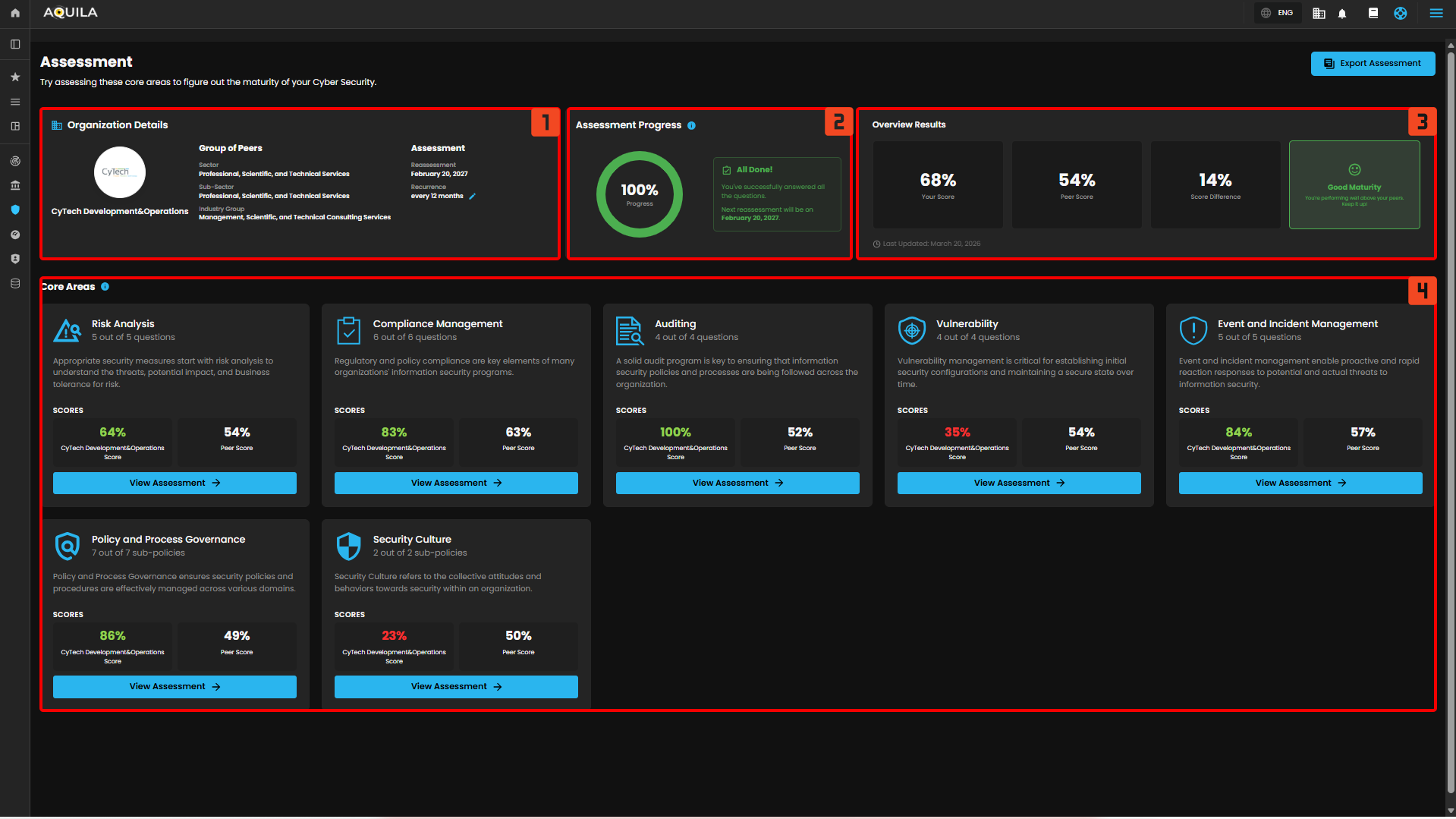](https://cytechint-docs-bookstack.s3.amazonaws.com/uploads/images/gallery/2026-03/1XU58G9IFFYSkkVJ-hehe-17.png) ### **Library - Cyber Security Compliance (Module)** The Assessment Library provides a centralized repository of all previously created cybersecurity assessments. It enables users to search, review, manage, and export assessment records for tracking, reporting, and audit purposes. **1. Library Header & Actions** **Purpose** Provides quick access to key actions and navigation within the Library. **Components** - **Page Title:** *Library* - **Description:** Overview of the section’s purpose - **Export Assessment Button:** Allows users to export selected assessment data **How to Use** - Use this section to understand the purpose of the page - Export assessments for reporting, sharing, or audit documentation --- **2. Search and Filter** **Purpose** Enables users to quickly locate specific assessments. **Components** - **Search Bar:** Search by assessment title or keywords - **Filter Option:** Apply filters to refine results (e.g., status, date, version) **How to Use** - Enter keywords to locate specific assessments - Apply filters to narrow down results for large datasets --- **3. Assessment List Table** **Purpose** Displays all stored assessments in a structured, tabular format. **Columns Explained** - **Assessment Title** Name of the assessment (e.g., *February 2026 – February 2027 Assessment*) - **Assessment Period** Timeframe covered by the assessment - **Version** Version identifier (e.g., v1) - **Request Status** Indicates whether the assessment has been requested or initiated - Example: *Not Requested* - **Assessed At** Date when the assessment was conducted - **Assessed By** User or entity responsible for completing the assessment --- **4. Assessment Actions** **Purpose** Provides quick actions for managing individual assessments. **Available Actions** - **View (👁️)** Opens the detailed assessment dashboard - **Download (⬇️)** Exports the assessment results - **Delete (🗑️)** Removes the assessment from the library **How to Use** - Use **View** to analyze results - Use **Download** for reporting or sharing - Use **Delete** to remove outdated or unnecessary records --- **5. Pagination Controls** **Purpose** Manages how many records are displayed and navigation across pages. **Components** - **Items per Page Selector** (e.g., 10/page) - **Page Navigation Controls** - **Total Items Indicator** (e.g., 1–1 of 1) **How to Use** - Adjust the number of items displayed per page - Navigate between pages when multiple assessments exist [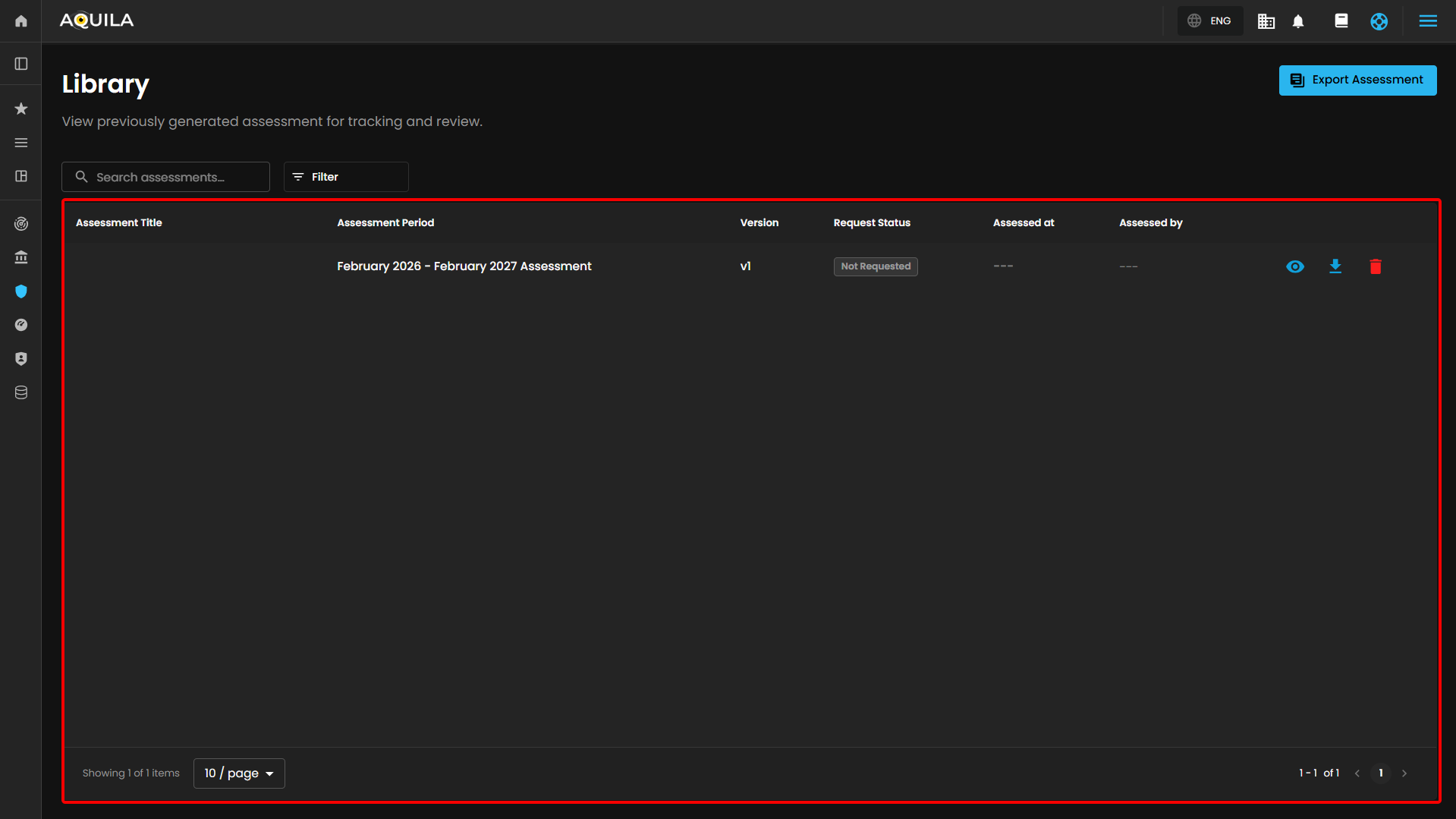](https://cytechint-docs-bookstack.s3.amazonaws.com/uploads/images/gallery/2026-03/WIRfNqOvRU3Nk5oK-hehe-18.png) Client can also export their assessment by clicking the "**Export Assessment**" button [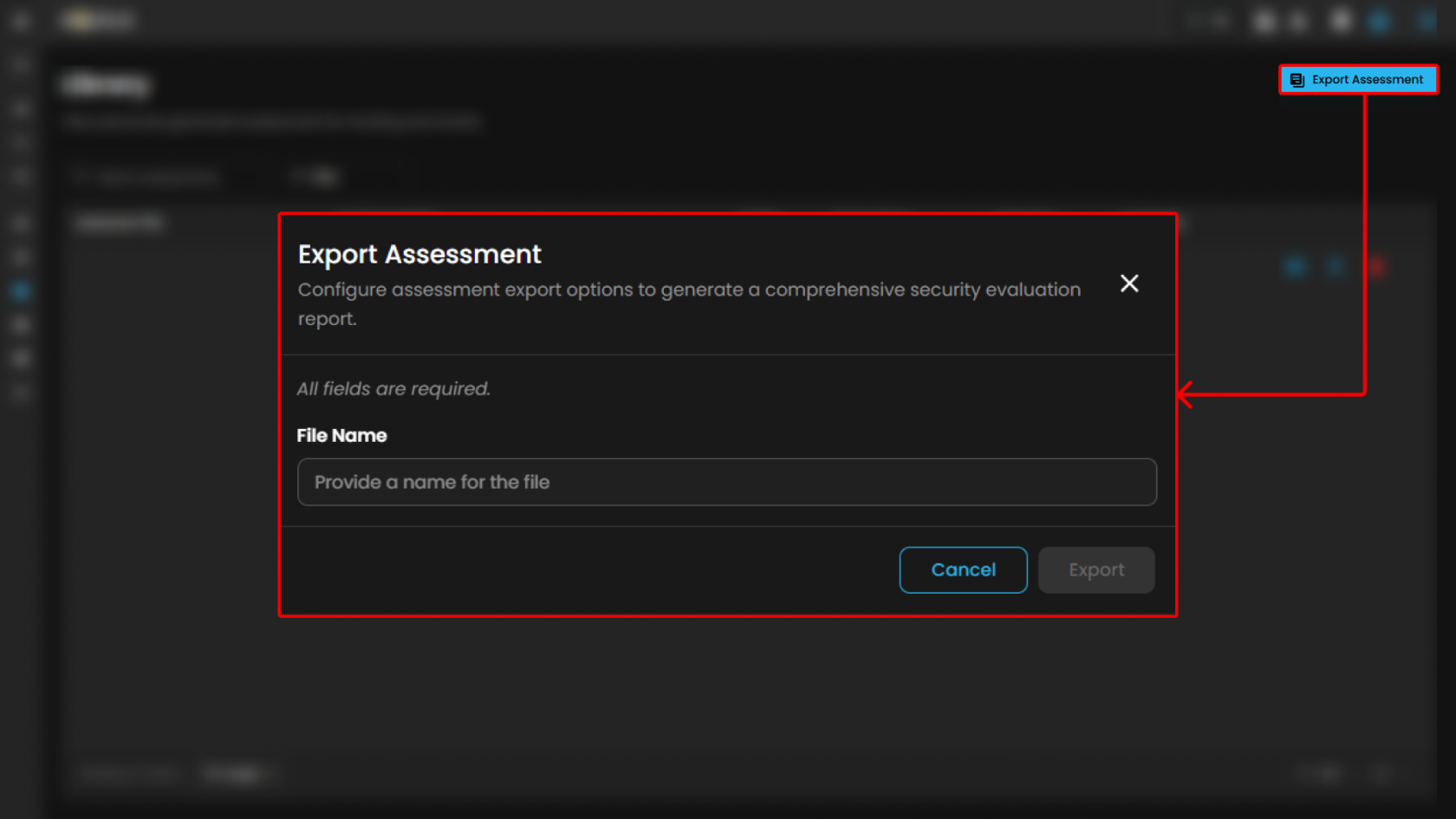](https://cytechint-docs-bookstack.s3.amazonaws.com/uploads/images/gallery/2026-03/pevuDt10c8m9Zhu6-hehe-19.png) **Conclusion** The AQUILA Security Maturity Assessment Platform provides a comprehensive and structured approach to assessing, monitoring, and managing an organization’s security posture. Through its integrated modules—Assessment, Dashboard, and Library—the platform enables continuous visibility, benchmarking, and improvement of cybersecurity capabilities. The **Assessment module** establishes the foundation by guiding users through structured evaluations across key security domains, including risk analysis, compliance, auditing, vulnerability management, incident response, governance, and security culture. It ensures that organizations can systematically measure their maturity using standardized criteria. The **Dashboard module** transforms assessment data into actionable insights. It provides a consolidated view of overall maturity, domain-level performance, and peer benchmarking. Visualizations such as maturity scores, governance breakdowns, and comparative analytics allow stakeholders to quickly identify strengths, weaknesses, and priority areas for remediation. The **Library module** supports long-term governance by maintaining a centralized repository of all assessments. It enables efficient tracking, version control, and retrieval of historical data, which is essential for audit readiness, compliance validation, and continuous improvement initiatives. Overall, the platform demonstrates that the organization has: - A **solid cybersecurity maturity level**, exceeding peer benchmarks - Strong capabilities in **governance, auditing, and identity management** - Identified improvement areas in **vulnerability management and security culture** By leveraging these insights, organizations can prioritize remediation efforts, strengthen operational security, and align more effectively with industry standards such as ISO 27001 and SOC 2. The platform ultimately supports a **continuous improvement lifecycle**, enabling organizations to move from reactive security practices toward a more **proactive, risk-driven, and maturity-based cybersecurity posture**.