**To navigate to Unified Compliance Blueprint module, please follow the instructions below:**
**Step 1:** Log in to CyTech - AQUILA: [usdc.cytechint.io](https://usdc.cytechint.io/) **Step 2:** Click on Cyber Resiliency [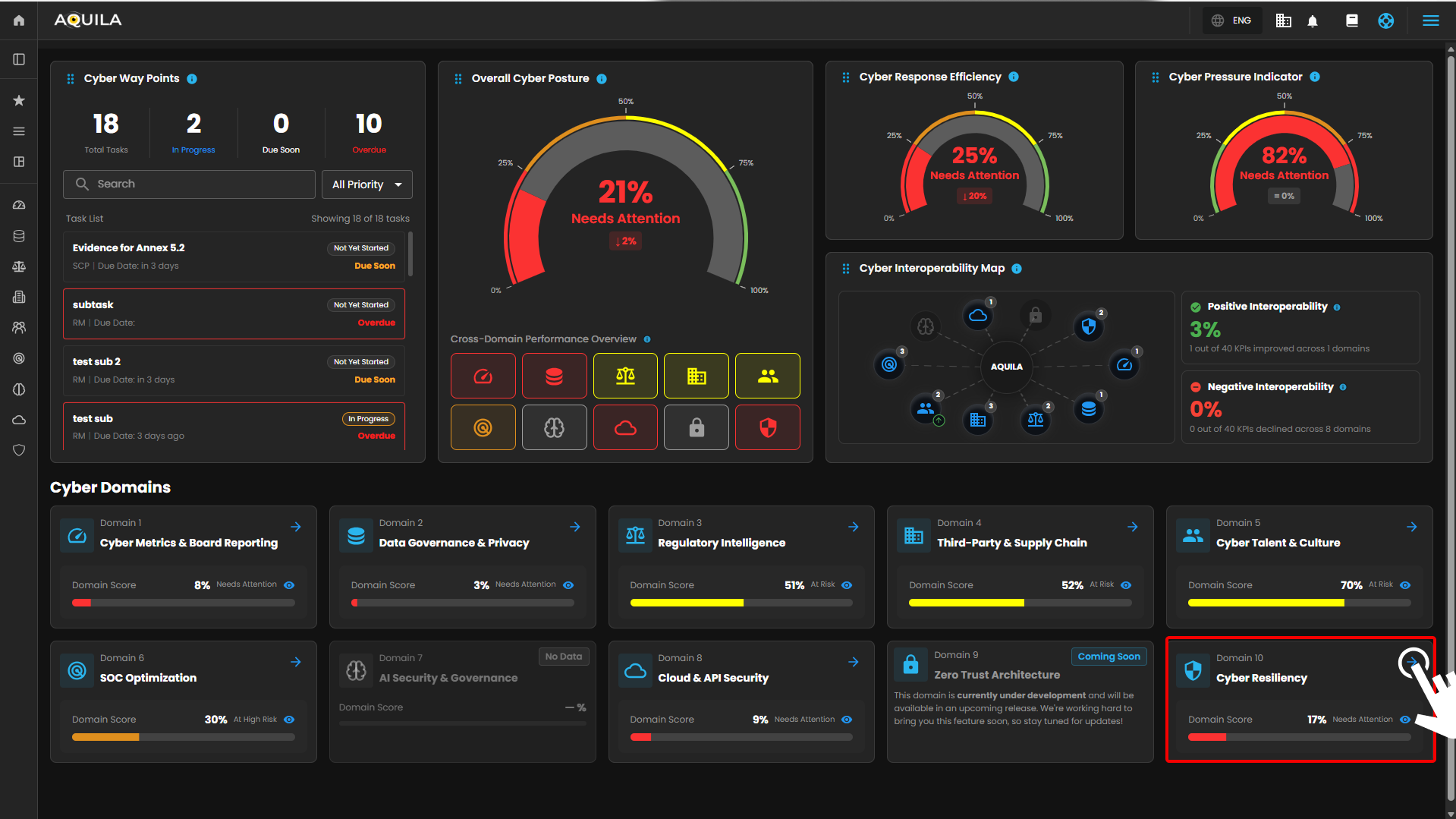](https://cytechint-docs-bookstack.s3.amazonaws.com/uploads/images/gallery/2026-04/ZEBvGw05TSxSElBE-hehe-2-10.png) *Figure 1. Overview* **Step 3:** Choose Business Impact Analysis (BIA) [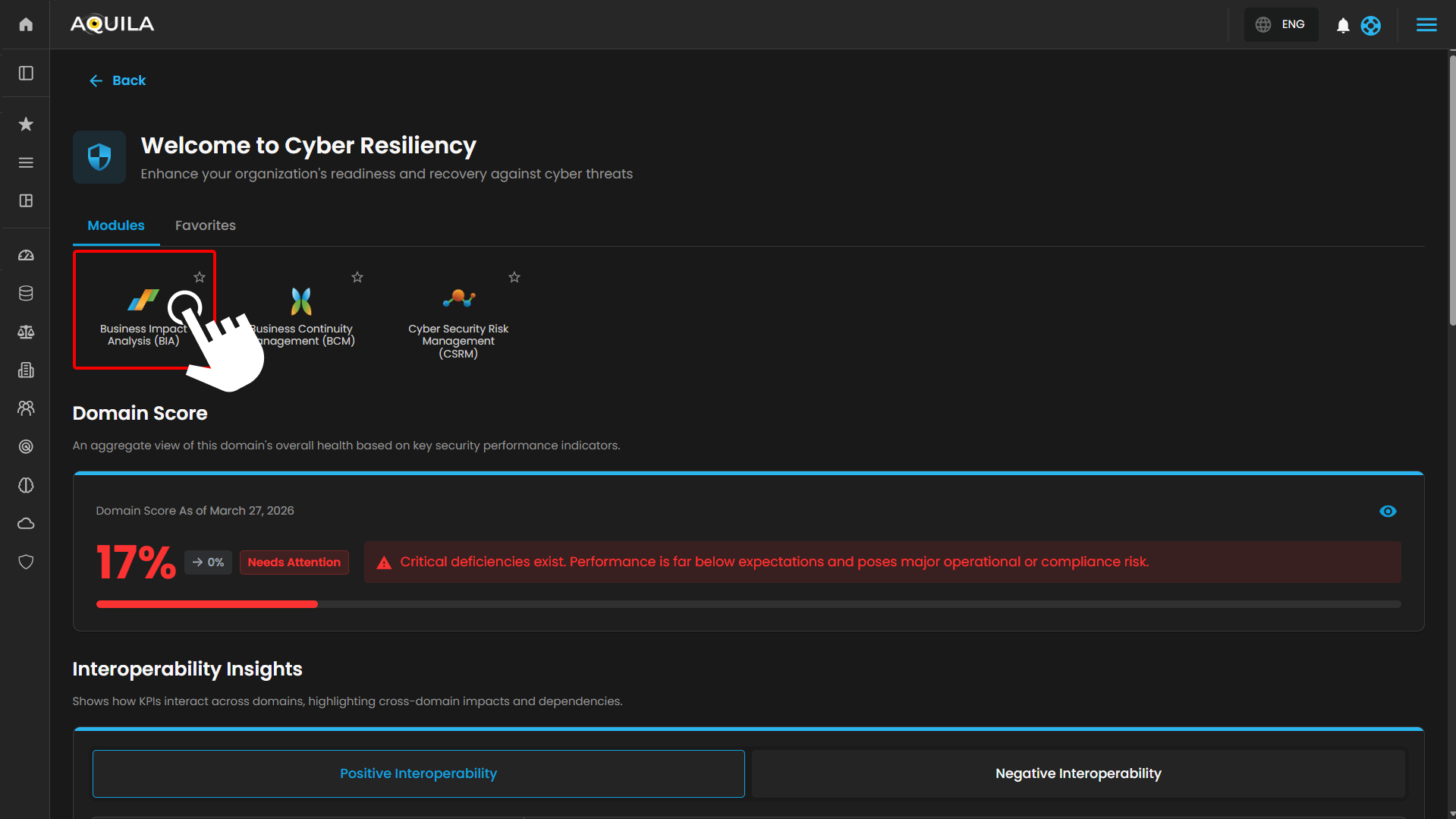](https://cytechint-docs-bookstack.s3.amazonaws.com/uploads/images/gallery/2026-04/gfPZOM8dknYwKqtb-hehe-24.png) *Figure 1.1 Cyber Resilience* **Step 4:** Hover into leftmost panel to view all the Risk Management sections. This Process is applicable in all navigating into a Module. [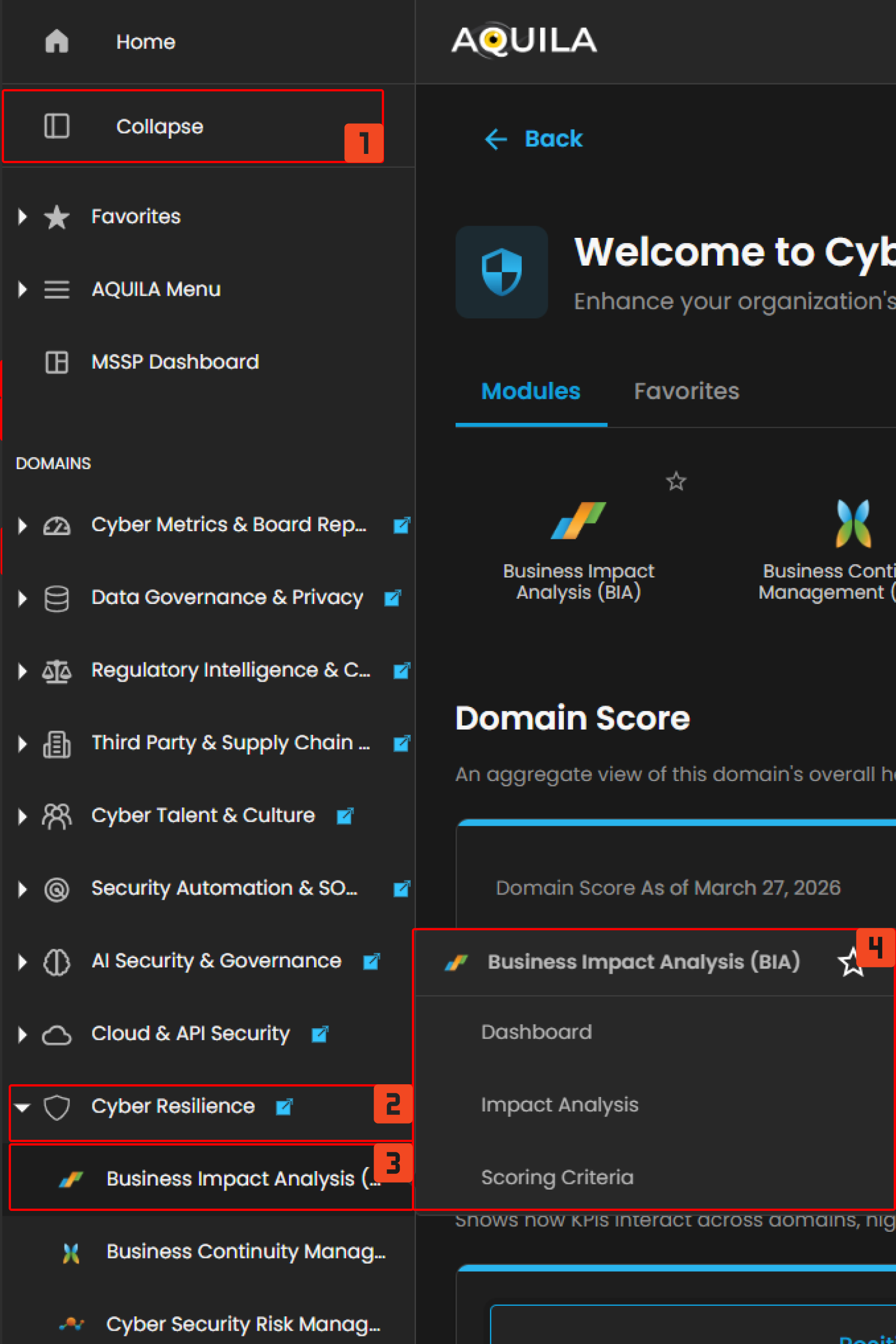](https://cytechint-docs-bookstack.s3.amazonaws.com/uploads/images/gallery/2026-04/kvFlUDAJSlU3Xiq4-hello-13.png) *Figure 1.2 Cyber Resilience Navigation* ##### **Dashboard** This dashboard provides a snapshot of a **Business Impact Analysis (BIA)**, highlighting the status of risk assessments for key assets. It tracks the **downtime costs** of these assets, the impact on **goodwill, compliance**, and **safety**, and breaks down the financial effects like **revenue loss** and **productivity declines**. It also assesses the **impact on customers, staff, and partners**, offering a clear view of business vulnerabilities and aiding in effective risk management. [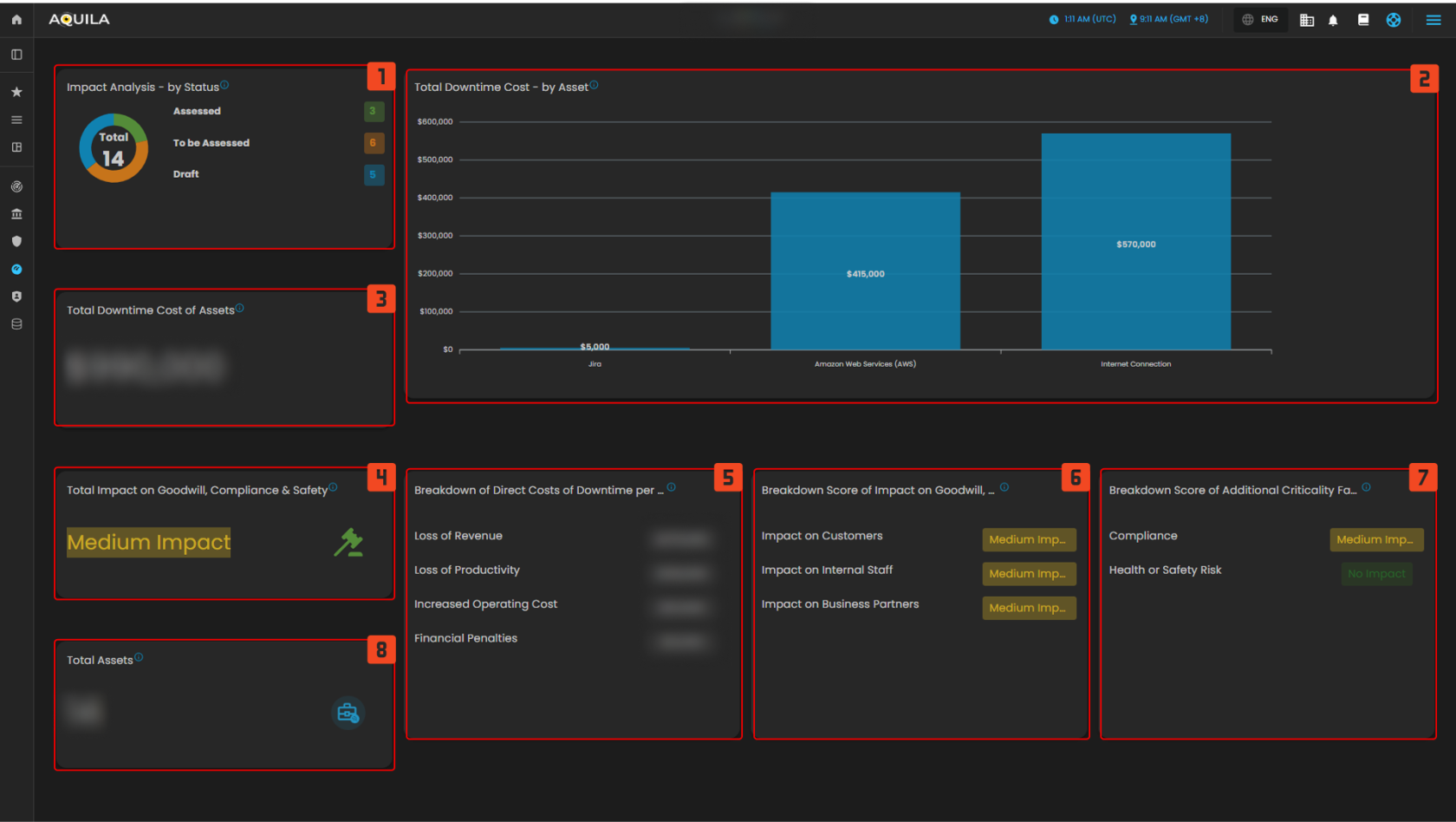](https://cytechint-docs-bookstack.s3.amazonaws.com/uploads/images/gallery/2025-10/yxEBv7HAGYScbTVt-test-19.png) *Figure 2. Business Impact Analysis (BIA) Dashboard* **1. Impact Analysis** - This section gives a summary of the total assessments made, divided into three categories: **Assessed**, **to be Assessed**, and **Draft**. The numbers reflect how many assets or processes have gone through different stages of impact analysis. **2. Total Downtime Cost - by Asset** - A graphical representation shows the estimated downtime costs of various assets. These visual highlights which assets are more costly when disrupted, emphasizing the financial risks associated with certain business functions. **3. Total Downtime Cost of Assets** - This metric focuses on the total financial cost caused by downtime across all assets, showing the overall impact on the organization. **4. Total Impact on Goodwill, Compliance & Safety** - This section measures the broader effects of downtime or disruptions, specifically the impact on the company’s **reputation (goodwill)**, **compliance** with regulations, and **safety standards**. **5. Breakdown of Direct Costs of Downtime per 24 hours** - The breakdown includes specific areas affected by downtime, such as **loss of revenue**, **loss of productivity**, and **increased operating costs**. These factors give insight into where financial losses are most likely to occur. **6. Breakdown Score of Impact on Goodwill, Compliance & Safety** - This section provides more detailed insights into how disruptions affect various business areas like **customers**, **internal staff**, and **business partners**, providing a medium-level impact score for most areas. **7. Breakdown of Additional Criticality Factors** - This part evaluates how disruptions affect other critical aspects like **compliance** and **health or safety risks**, with some areas marked as having medium impact, while others like health and safety show no impact. **8. Total Assets** - The total assets being assessed for risk are listed here, providing an overview of all the business functions under analysis.**To navigate to the Impact Analysis sub-module, click the left-side panel where Risk Management is located, then hover over Business Impact Analysis. Risk Management (Domain) → Business Impact Analysis (Module) → Impact Analysis (Sub-module).**
##### **Impact Analysis** identifies critical, time-sensitive business operations and evaluates the impact of disruptions or interruptions. These disruptions may result from natural disasters or infrastructure problems within the company. [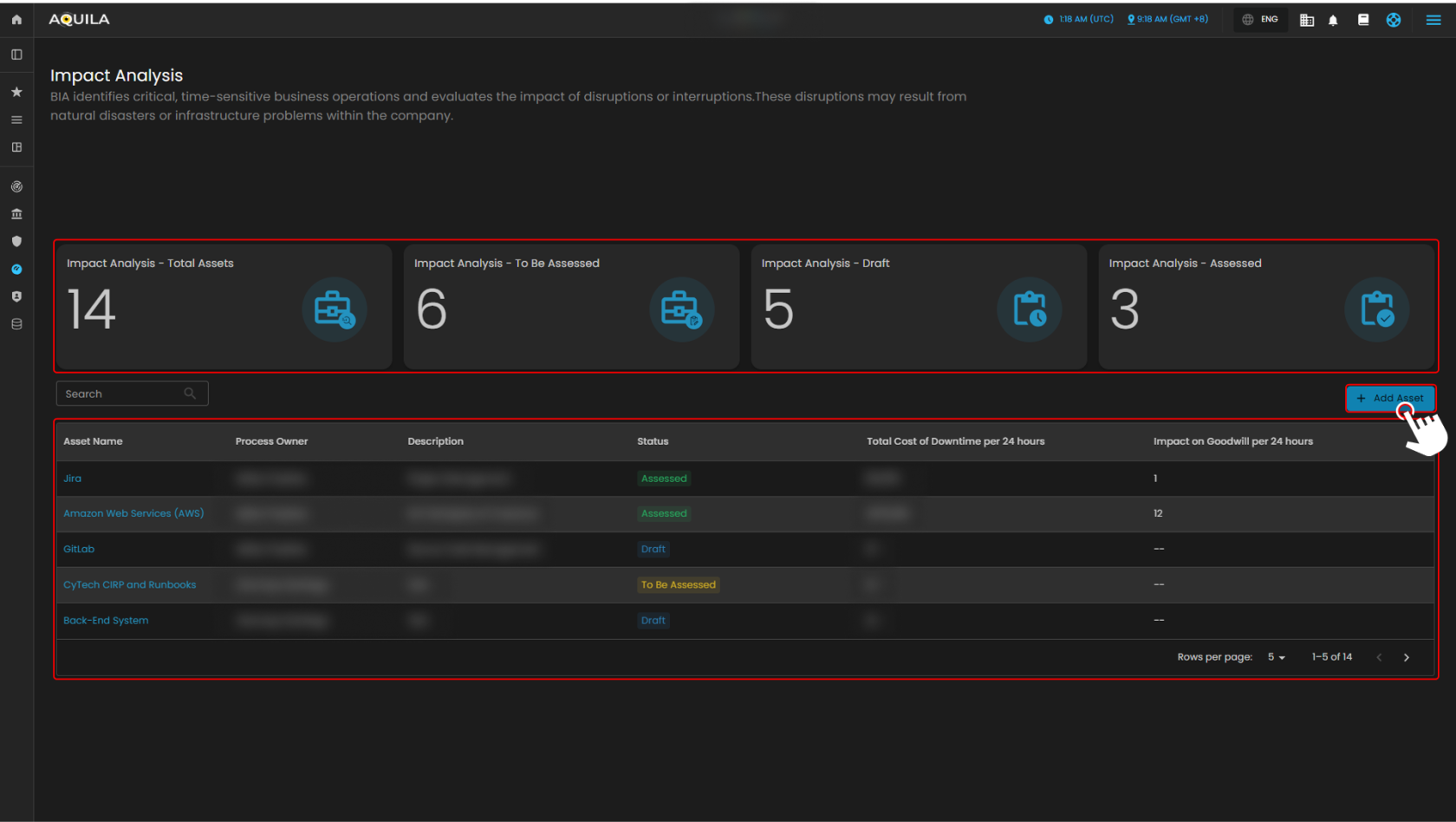](https://cytechint-docs-bookstack.s3.amazonaws.com/uploads/images/gallery/2025-10/e39fajG67Lyqo9Bo-test.png) *Figure 3. Impact Analysis* By pressing the Add Asset button it will direct you into this page where the user can add their asset to conduct a business impact analysis. After adding the new asset then it will reflect on the impact analysis. [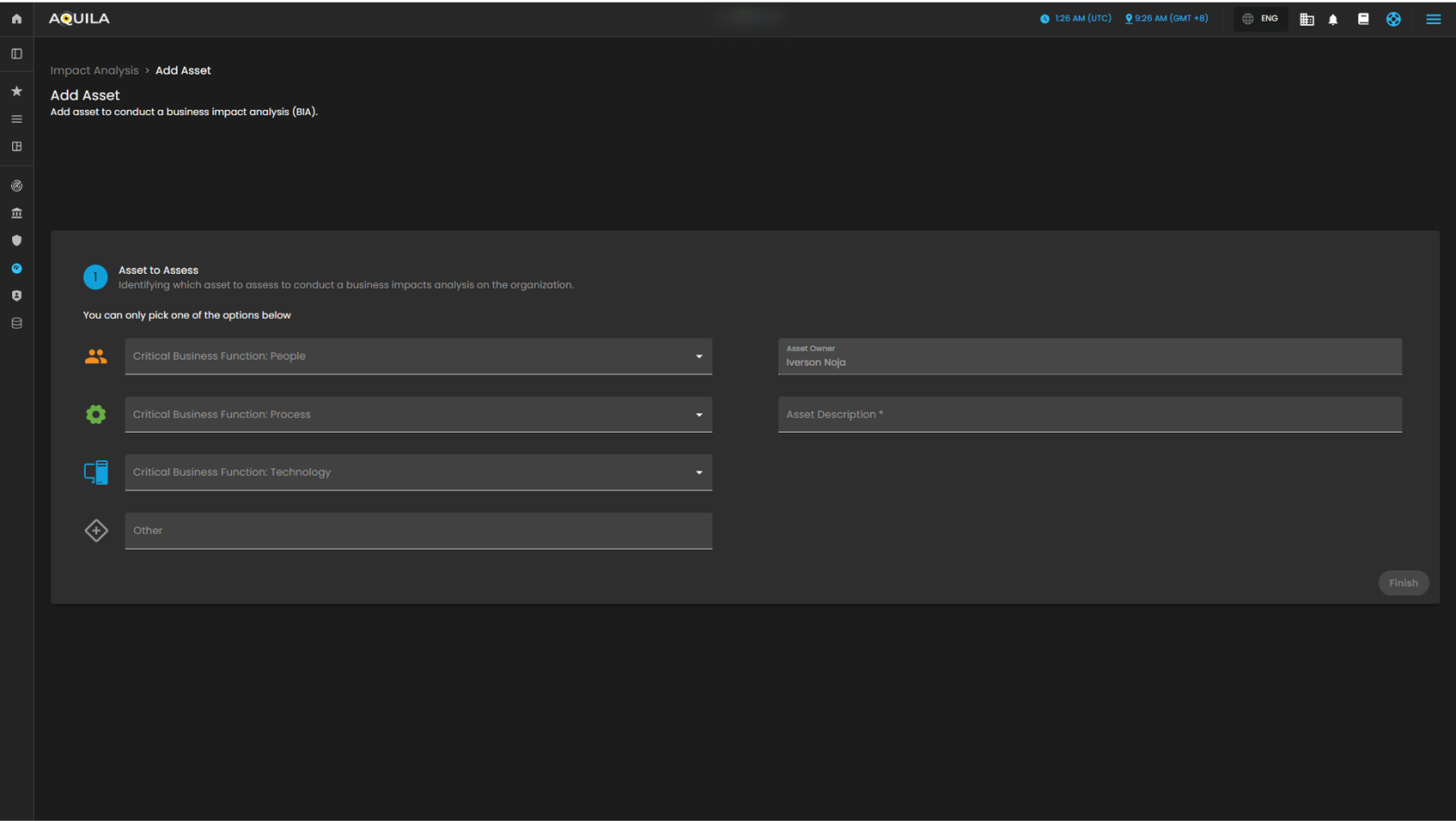](https://cytechint-docs-bookstack.s3.amazonaws.com/uploads/images/gallery/2025-10/URnyBLq09kUNhLMT-test-1.png) *Figure 3.1 Impact Analysis - Add Asset***To navigate to the Scoring Criteria sub-module, click the left-side panel where Risk Management is located, then hover over Business Impact Analysis. Risk Management (Domain) → Business Impact Analysis (Module) → Scoring Criteria (Sub-module).**
##### **Scoring Criteria** This page will define the scales that will be used throughout this tool to measure criticality, business impact, and risk. The client can also edit their scoring criteria or reset to their default. [](https://cytechint-docs-bookstack.s3.amazonaws.com/uploads/images/gallery/2025-10/pZUdnhpbBwIPpZEa-test-2.png) *Figure 4. Scoring Criteria* ##### **Conclusion** In conclusion, Business Impact Analysis is a page where the client can monitor their business and their asset to see their total downtime cost, loss of revenue or breakdown score of goodwill, compliance and safety. *If you need further assistance, kindly contact **support@cytechint.com** for prompt assistance and guidance.* # Business Continuity Management (BCM) ##### Overview The Business Continuity Planning (BCP) module in AQUILA provides an easy way to document critical business functions, assess downtime impact, and define recovery needs. It also helps map dependencies, assign team roles, and keep track of contacts. With these tools, users can ensure their organization is prepared for disruptions and can recover operations quickly. ##### Key Features - Document project details such as description, goals, scope, and key milestones. - Track Business Continuity Plan (BCP) maturity with visual dashboards and detailed progress views. - Perform Business Impact Analysis (BIA) to measure financial, compliance, and operational risks. - Define Recovery Time Objectives (RTO) and Recovery Point Objectives (RPO) for downtime and data recovery. - Map dependencies across IT systems, facilities, suppliers, people, and processes with backup options. - Assign teams and roles using RACI (Responsible, Accountable, Consulted, Informed) for clear accountability. - Record both primary and alternate contacts to ensure communication continuity. - Add and manage team members with role-based details and disaster declaration authority.**To navigate to Unified Compliance Blueprint module, please follow the instructions below:**
**Step 1**: Log in to CyTech - AQUILA: [usdc.cytechint.io](https://usdc.cytechint.io/) **Step 2**: Click on Cyber Resilience [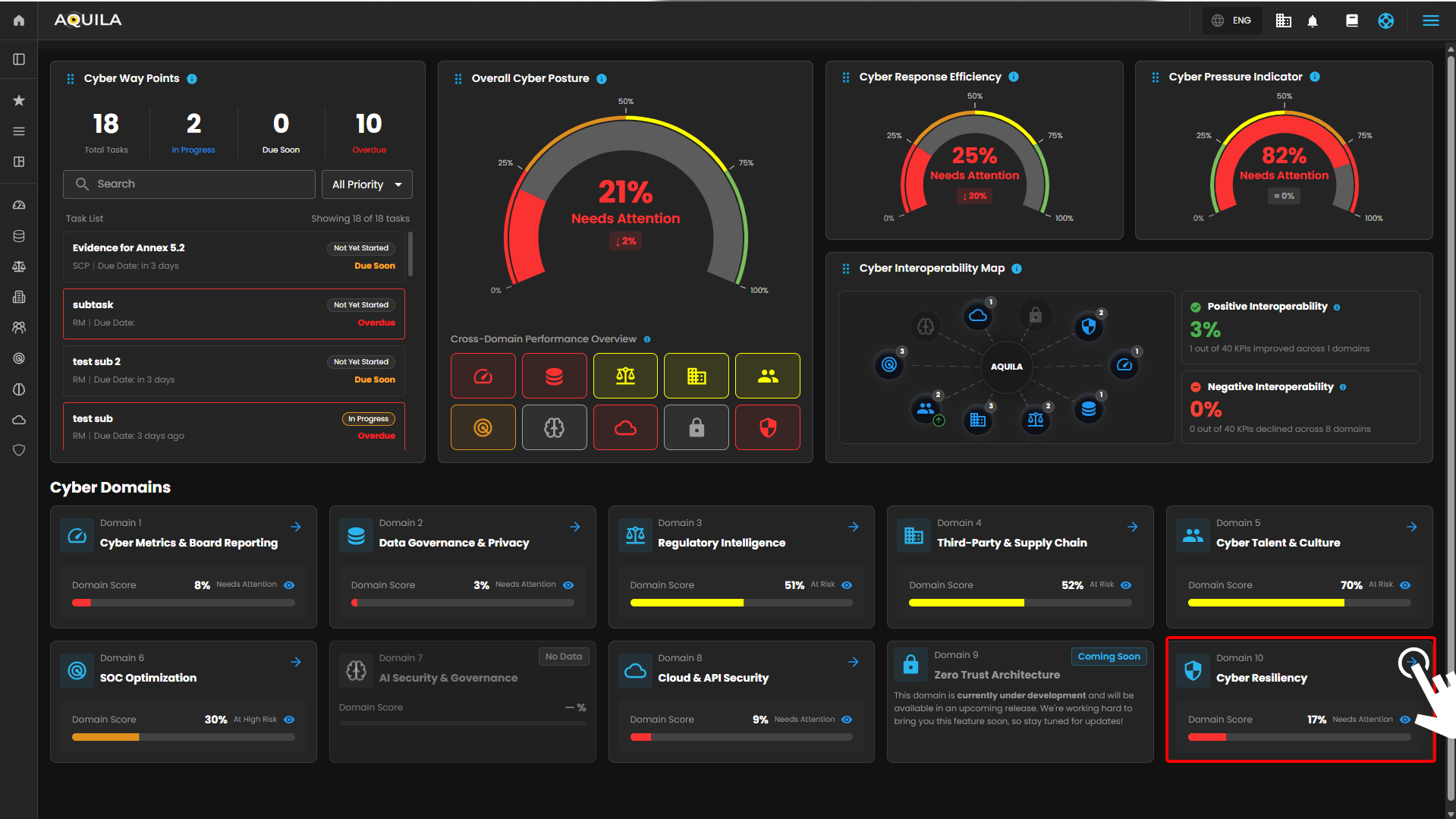](https://cytechint-docs-bookstack.s3.amazonaws.com/uploads/images/gallery/2026-04/XOhIzPjrBypUwAPf-hehe-2-11.png) *Figure 1. Overview* Step 3: Press the ">" icon and Choose Business Continuity Management (BCM) [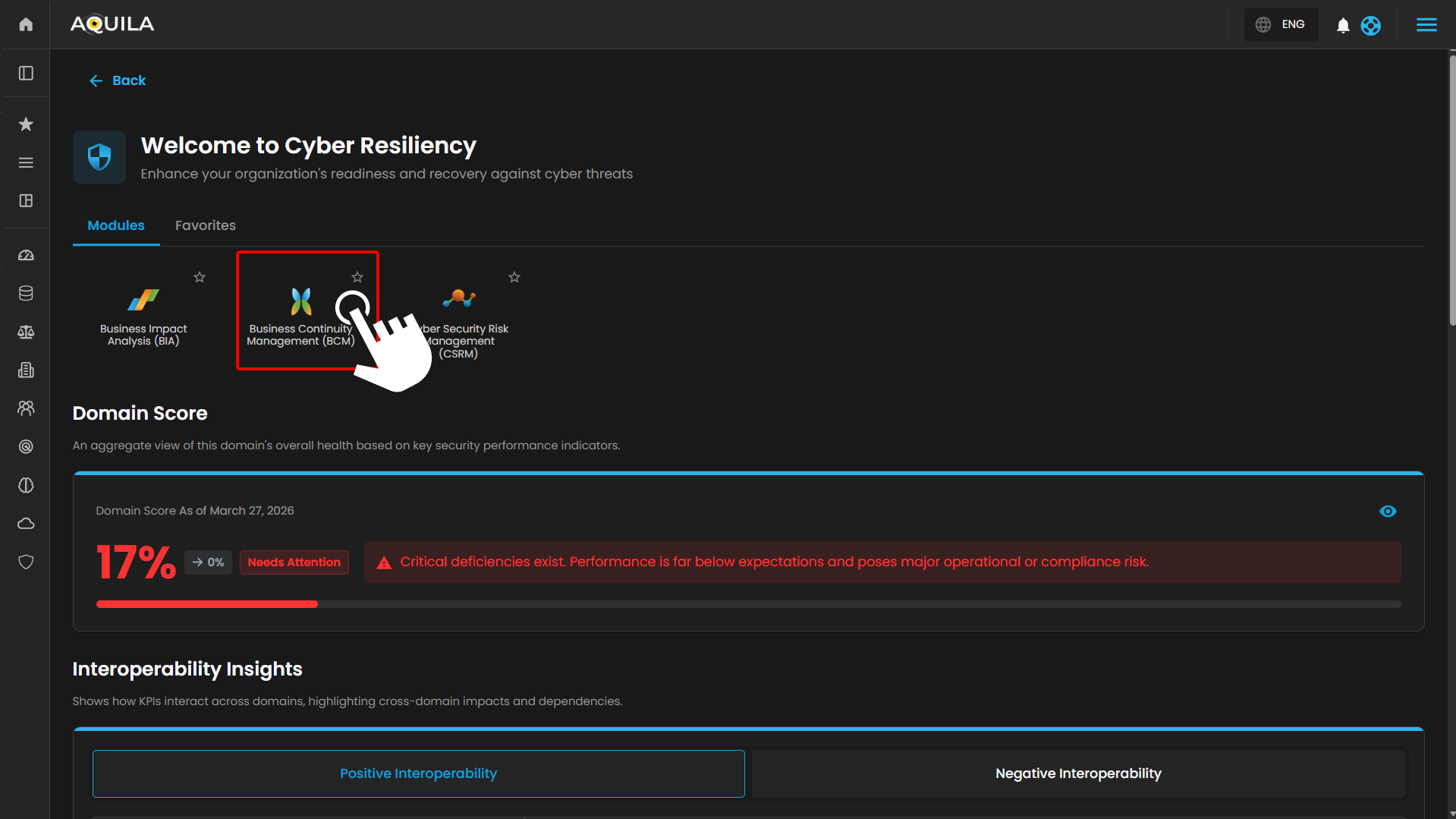](https://cytechint-docs-bookstack.s3.amazonaws.com/uploads/images/gallery/2026-04/A57GCGwVhk1W29Dr-hehe-25.png) *Figure 1.1 Business Continuity Management (BCM)* Step 4: Hover into leftmost panel to view all the Risk Management sections. This Process is applicable in all navigating into a Module. [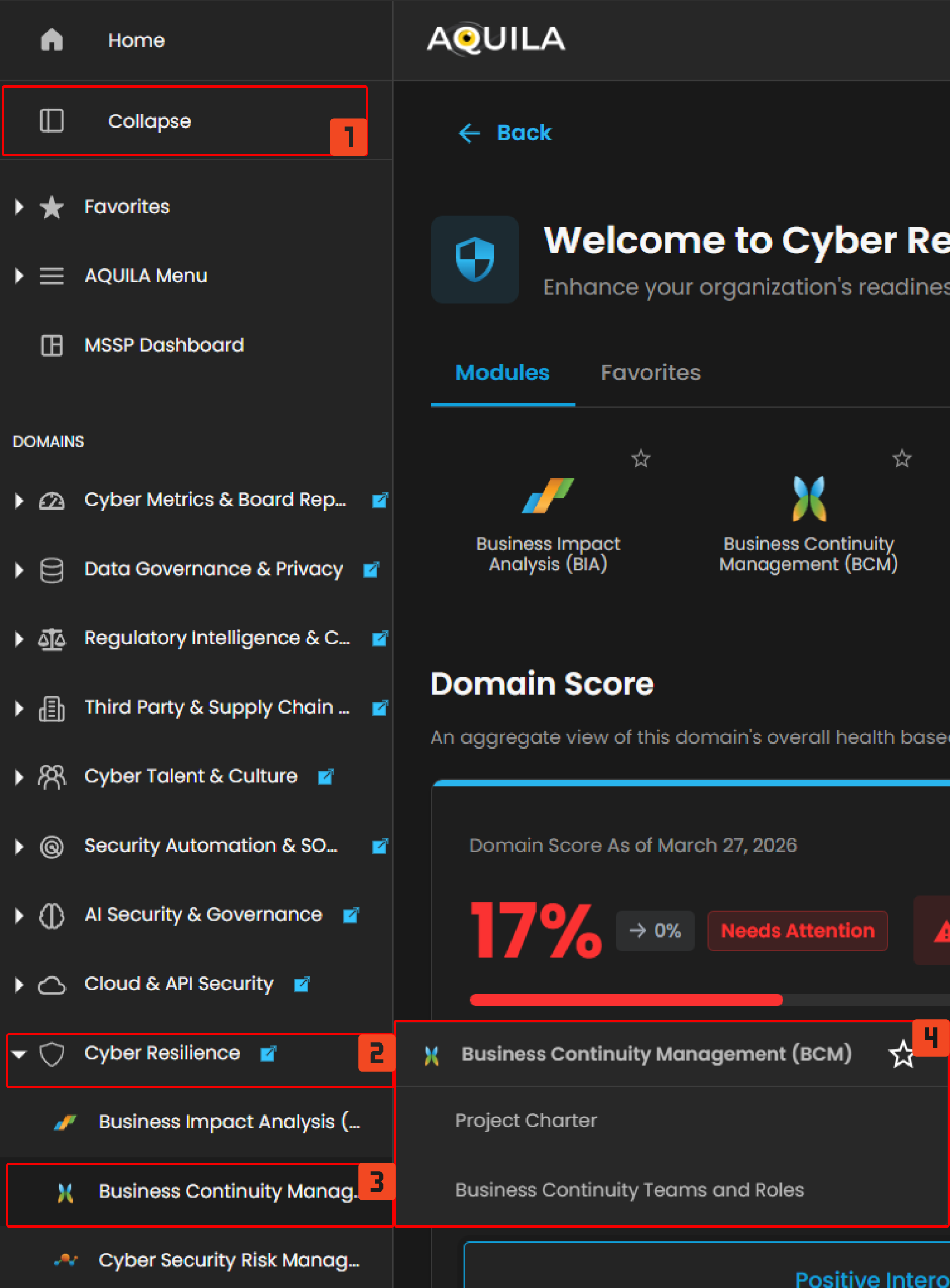](https://cytechint-docs-bookstack.s3.amazonaws.com/uploads/images/gallery/2026-04/bK6eWUFJAMZKUVEm-hello-14.png) *Figure 1.2 Cyber Resilience Navigation* ##### **Project Charter** - This section shows the main details of each project, such as the project name, manager, sponsor, start and end dates, approver, reviewer, and current status. Projects that still need evaluation are marked as *For Review*. To see full details of a project, click the **eye icon** beside it. [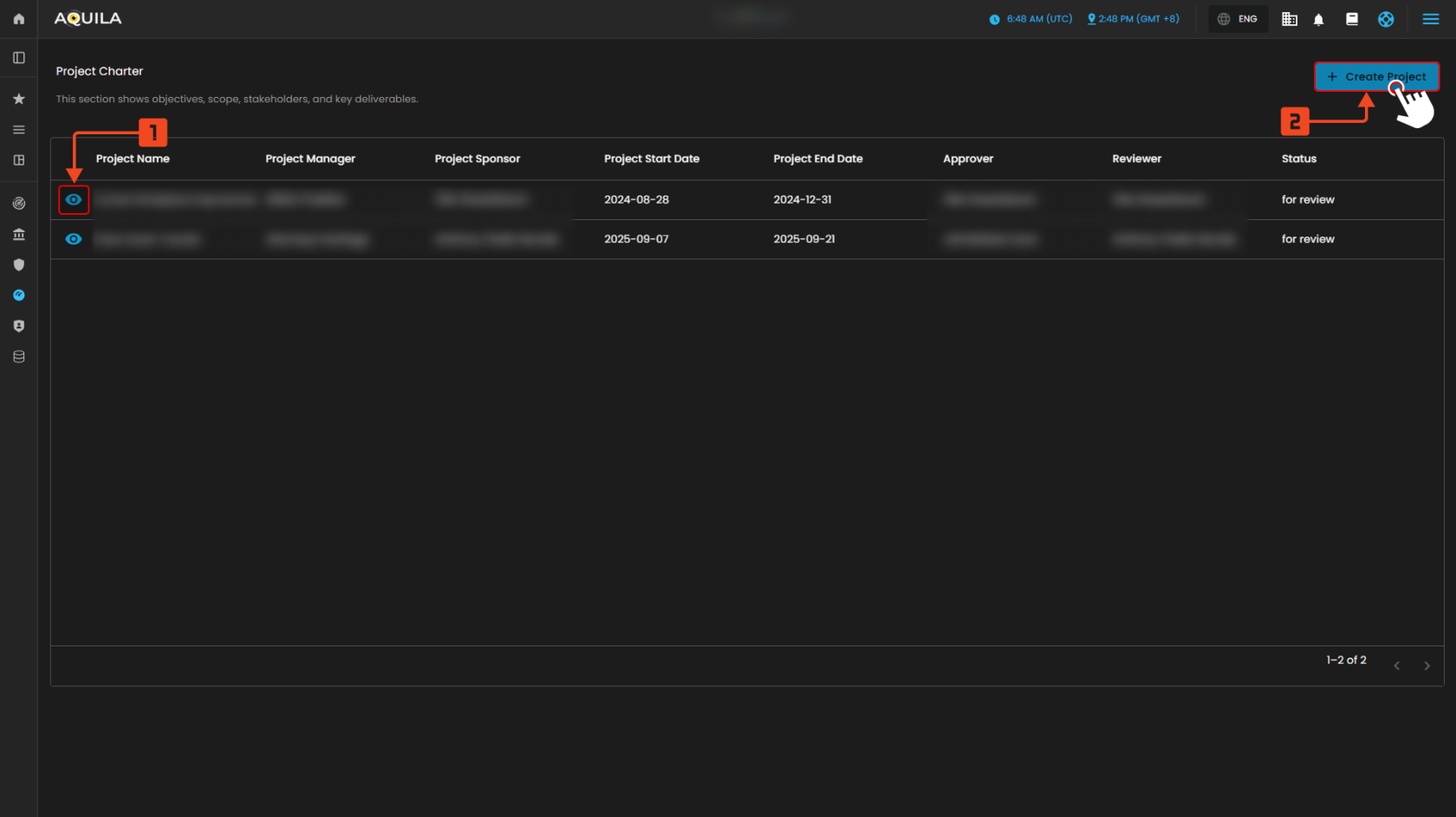](https://cytechint-docs-bookstack.s3.amazonaws.com/uploads/images/gallery/2025-10/BRLsHiwcdJqgrcKt-test-4.png) *Figure 2. Project Charter* **Create Project Charter** - In this section the user can input the details of the project charter they want to add. [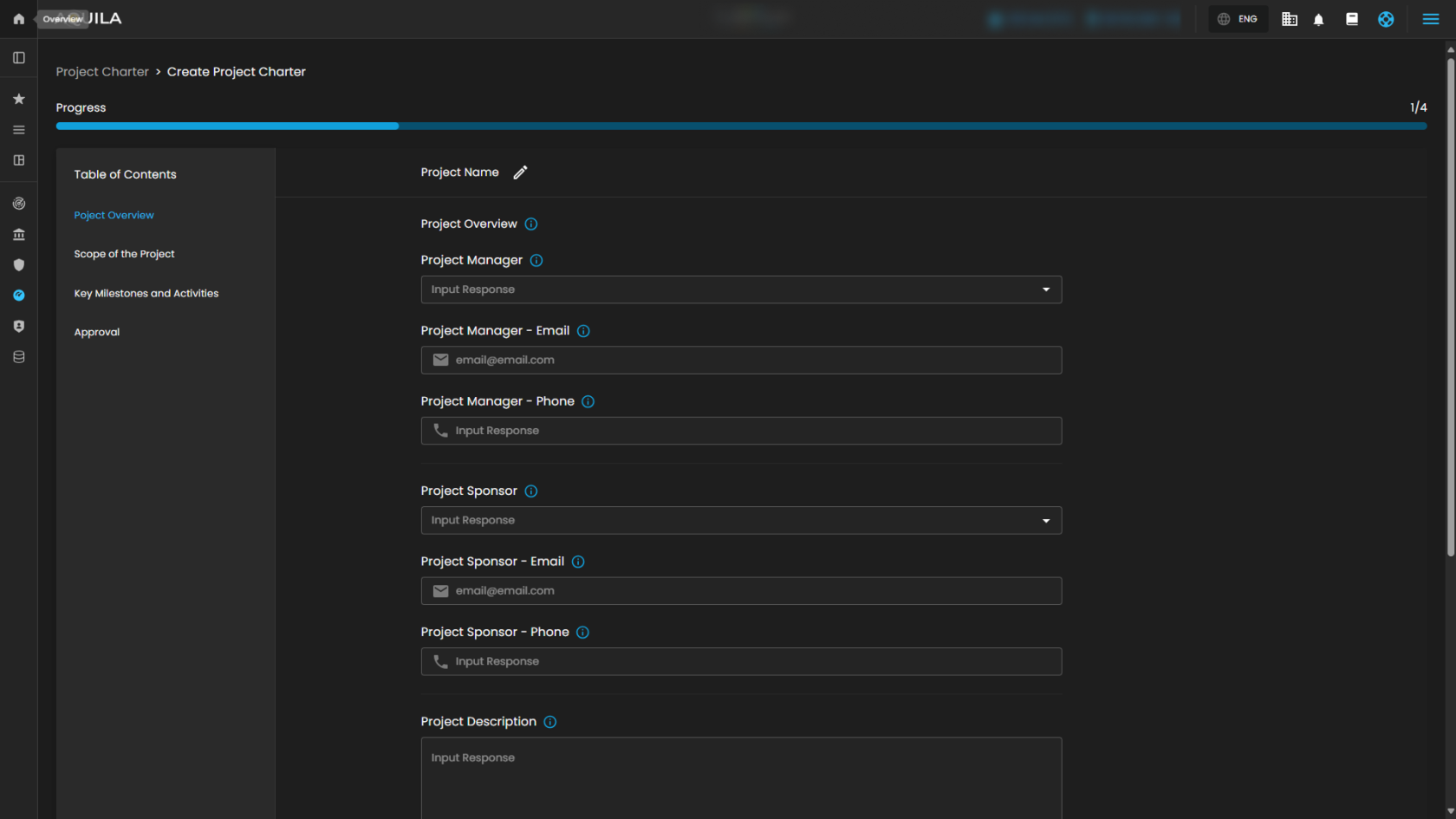](https://cytechint-docs-bookstack.s3.amazonaws.com/uploads/images/gallery/2025-10/k4ZP57M5z7H0XC56-test-5.png) *Figure 2.1 Create Project Charter* **Business Continuity Plan Pilot** **1. Project Details** This section shows a full view of the selected project. It includes the **Project Description**, **Goals**, and the items that are **In-Scope** or **Out-of-Scope**. The **Project Overview panel** lists key details such as the manager, sponsor, contacts, dates, and approvals. On the right, the **Key Milestones and Activities panel** displays the project timeline, showing each phase (initiation, planning, training, execution, and closure) with its start and end dates. [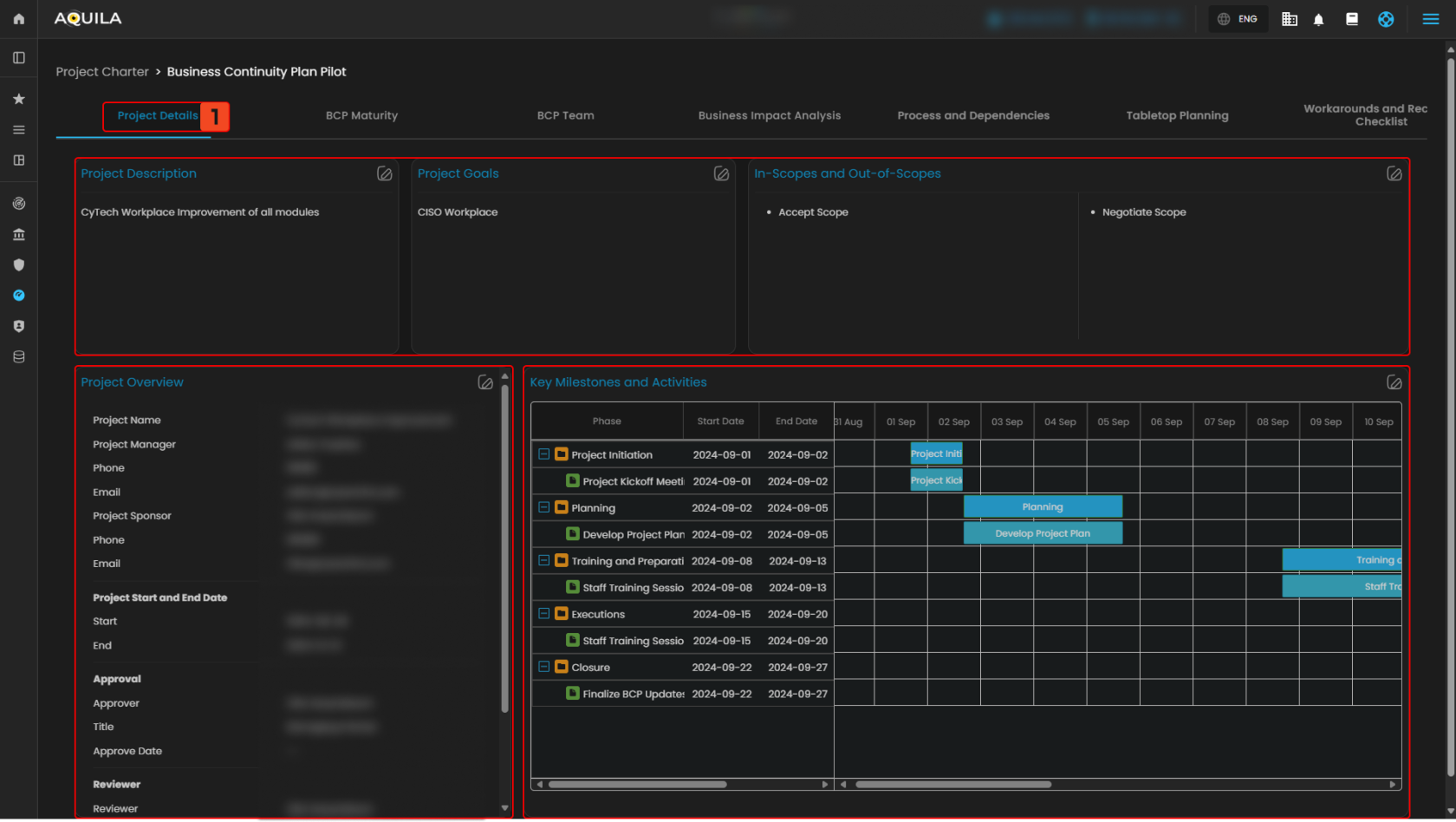](https://cytechint-docs-bookstack.s3.amazonaws.com/uploads/images/gallery/2025-10/WeCLTmixT5qpm88w-test-6.png) *Figure 2.2.1 Project Charter - Detail Dashboard* **2. Business Continuity Plan Maturity** This section gives a visual view of the organization’s Business Continuity Plan (BCP) progress. The **Overall BCMS Maturity gauge** shows the total maturity percentage, while the **Section-by-Section chart** breaks down results for areas like scope definition, business impact analysis (BIA), incident response, and governance. Below, the **Core BCP Maturity panel** highlights progress in key areas based on ISO 22301 standards, and the **Additional Requirements panel** tracks supporting areas such as crisis management, BCP testing, and documentation. [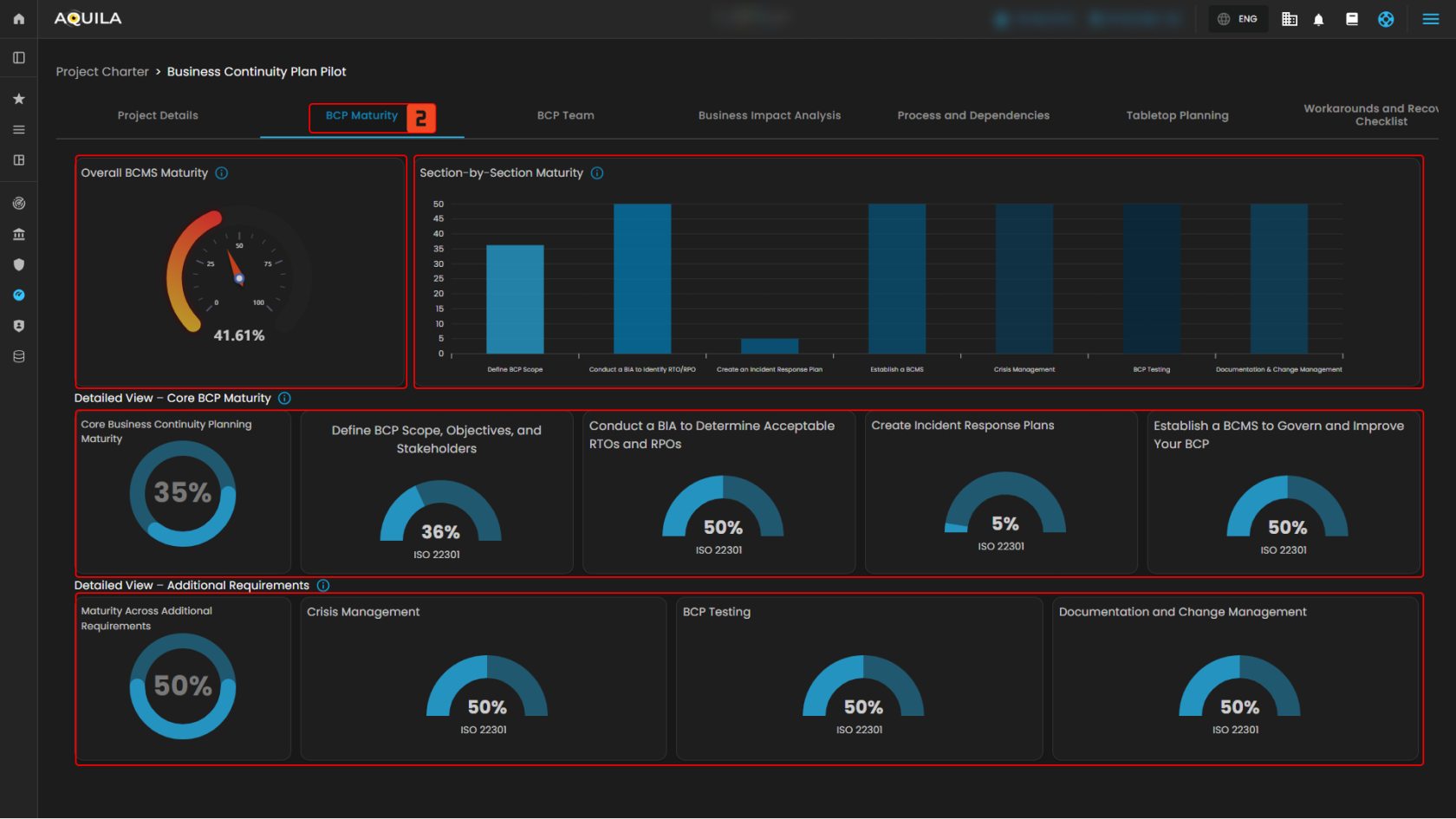](https://cytechint-docs-bookstack.s3.amazonaws.com/uploads/images/gallery/2025-10/HyHd1aSmzzkDAGDV-test-7.png) *Figure 2.2.2 Project Charter - Business Continuity Plan Maturity* **3. Business Continuity Plan Team** This section lists all team members in the project, along with their roles, team, responsibilities, and contact details. Each entry shows the primary contact, their title, email, and **RACI designation** (Responsible, Accountable, Consulted, Informed). To add a new member, click the **Add Members** button in the upper-right corner. [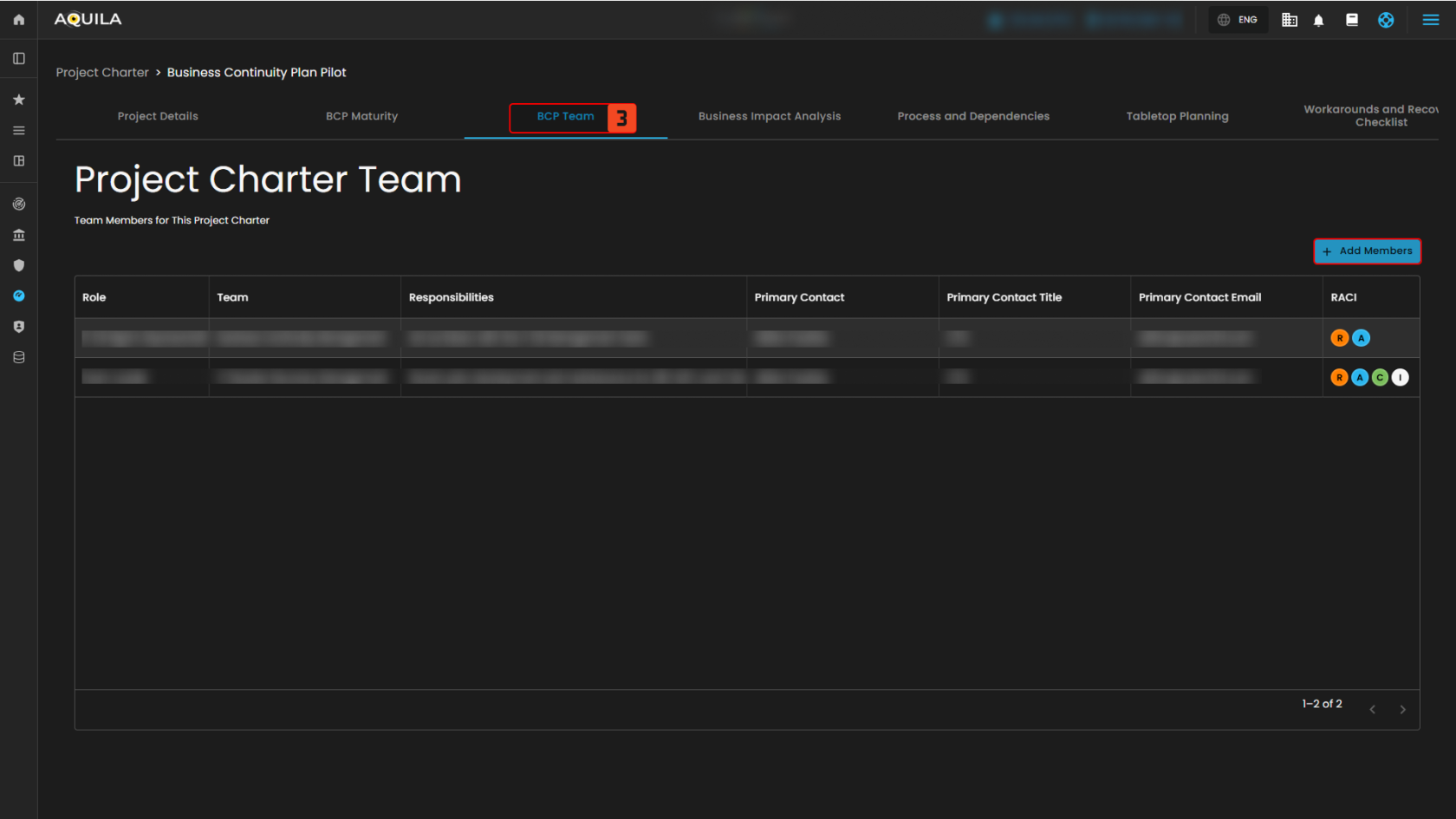](https://cytechint-docs-bookstack.s3.amazonaws.com/uploads/images/gallery/2025-10/RLxPJhYW62dUaATY-test-8.png) *Figure 2.2.3 Project Charter - Business Continuity Management Team* **4. Business Impact Analysis** This section shows how critical business functions are affected by downtime. The **Asset section** lists key assets with their owners and descriptions, while the **Impact Analysis panels** display effects such as goodwill loss, compliance issues, health and safety risks, and financial costs (e.g., revenue loss, productivity impact, operating costs, and penalties). The **Total Impact of Downtime Summary** combines these into an overall risk and cost estimate. Below, the **Recovery Objectives Analysis** helps measure resilience. The **RTO (Recovery Time Objective) table** compares target vs. actual downtime, while the **RPO (Recovery Point Objective) table** compares target vs. actual data loss. These help identify gaps in recovery planning. [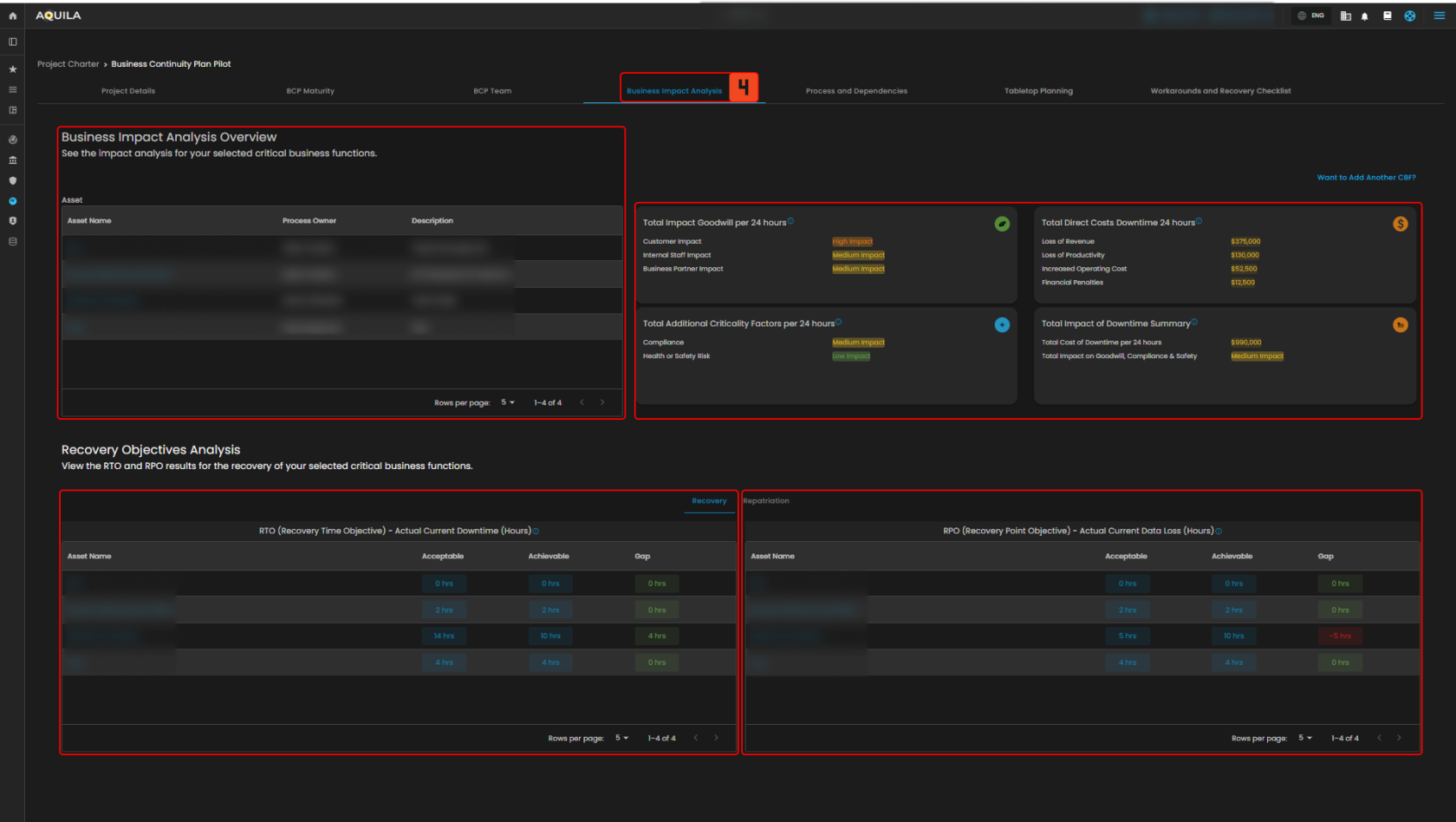](https://cytechint-docs-bookstack.s3.amazonaws.com/uploads/images/gallery/2025-10/XBH0JMpke0M5tLBw-test-11.png) *Figure 2.2.5 Project Charter - Business Impact Analysis* **5. Process and Dependencies** The **Process and Dependencies** section allows users to document and review the essential resources required to sustain business operations. Dependencies are grouped into categories, each showing **primary** and **alternative** options for resilience. - **End User Devices** – Lists workstations, PCs, and related equipment, with fallback alternatives. - **IT Applications, Data, and Services** – Captures critical IT systems, data sources, and services, including contingency measures such as disaster recovery. - **Facility Location and Requirements** – Identifies operational sites (e.g., offices, warehouses) and backup facilities. - **Suppliers and External Services** – Details third-party vendors and service providers, along with their alternate suppliers. - **People** – Records key personnel roles and responsibilities, with designated alternates. - **Additional Process Inputs and Requirements** – Tracks supporting inputs such as control lists, tools, or documentation, with offline or backup options. Each section provides **asset details, primary resources, and alternative resources**. Pagination controls are available to navigate records efficiently. [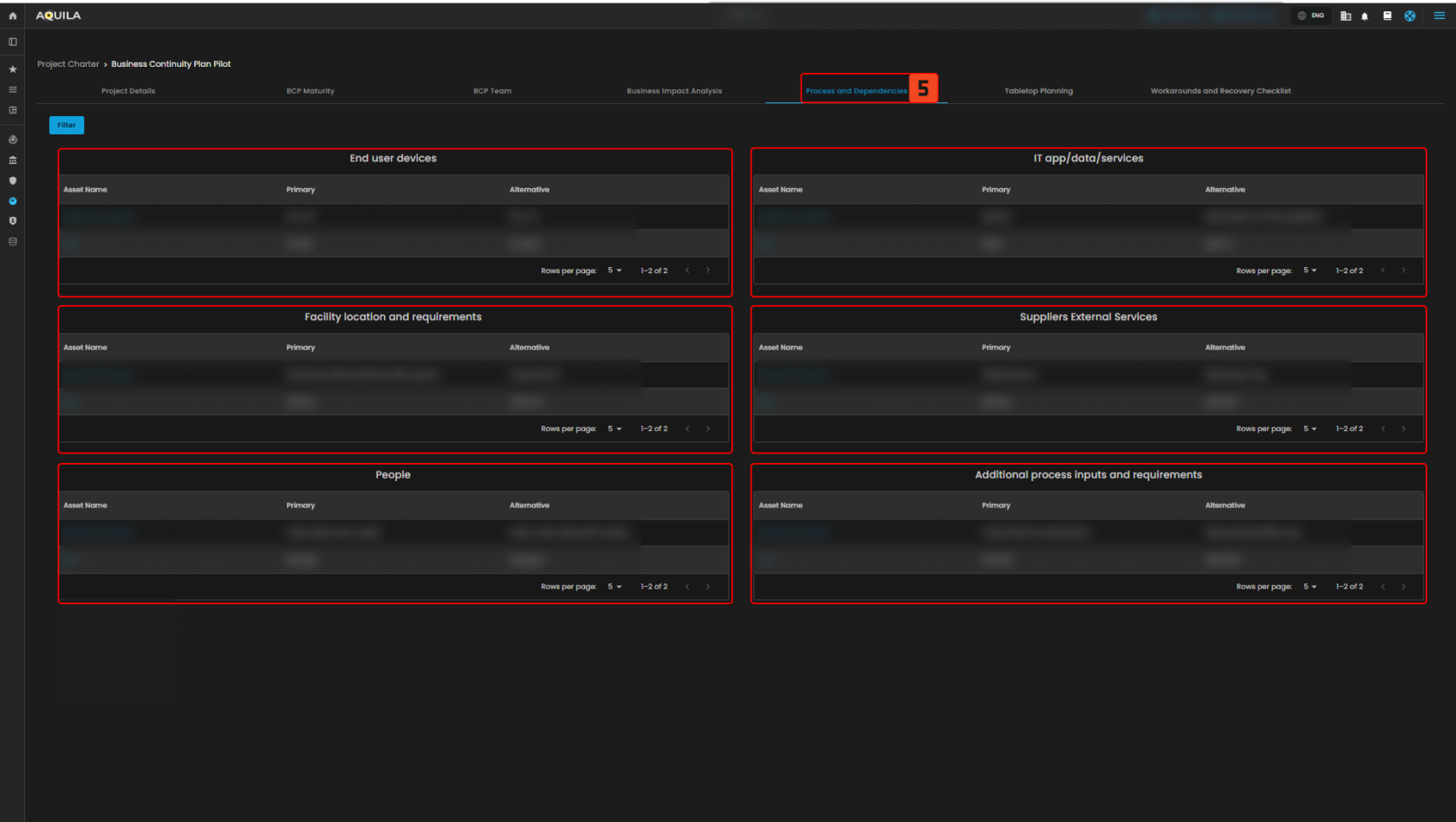](https://cytechint-docs-bookstack.s3.amazonaws.com/uploads/images/gallery/2025-10/URfiPLIHgdK7JBhQ-test-12.png) *Figure 2.2.6 Project Charter - Process and Dependencies***To navigate to the Business Continuity Teams and Roles sub-module, click the left-side panel where Risk Management is located, then hover over Business Continuity Management. Risk Management (Domain) → Business Continuity Management (Module) → Business Continuity Teams and Roles (Sub-module).**
##### **Business Continuity Teams and Roles** - This section allows users to **define and assign roles and responsibilities** across different areas that support business continuity and resilience. Each team card provides a description of its function, and users can view team details by selecting **View Team**. [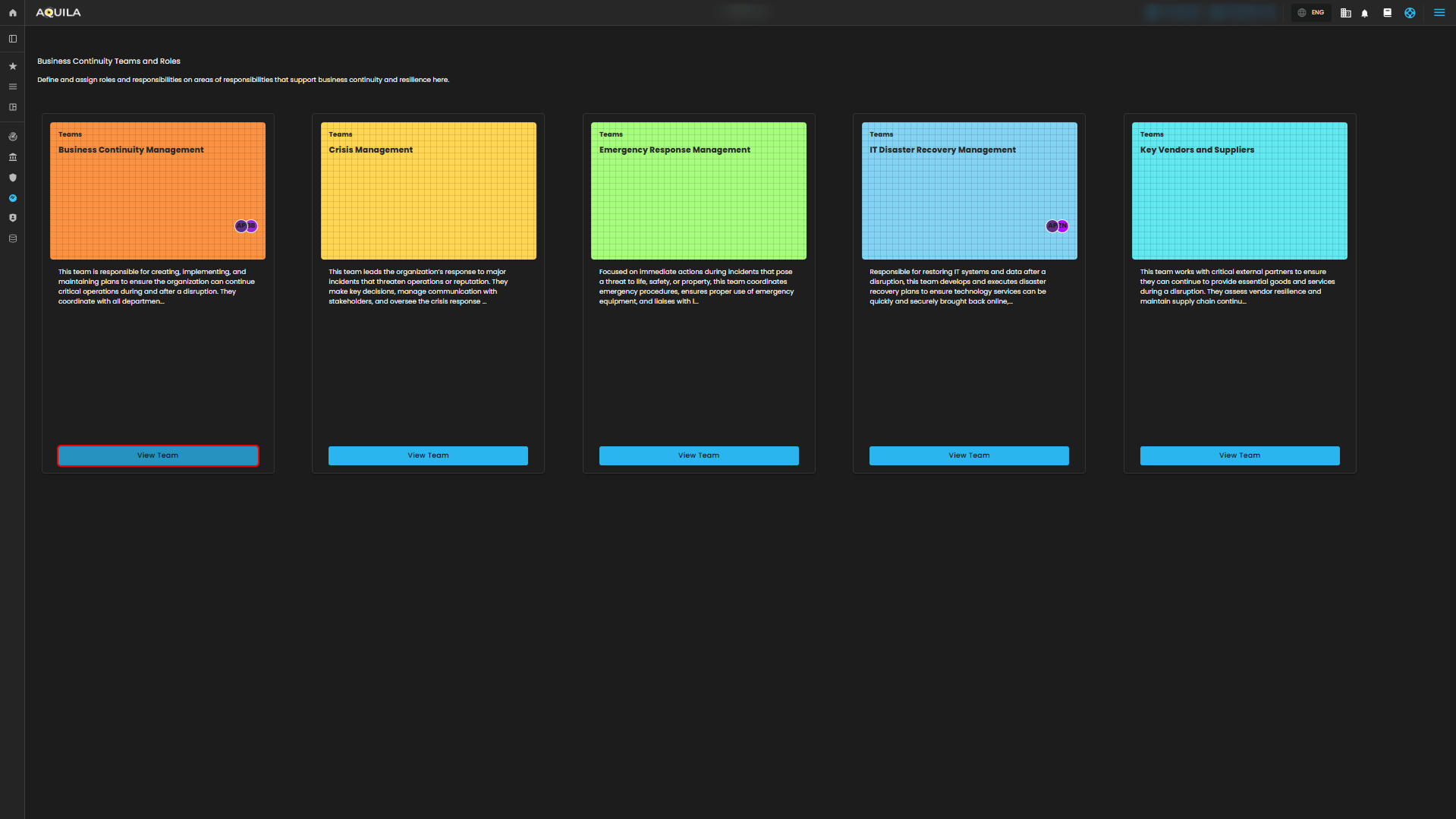](https://cytechint-docs-bookstack.s3.amazonaws.com/uploads/images/gallery/2025-10/gcd8EzSoAWybpF8t-test-13.png) *Figure 3. Business Continuity Teams and Roles* **Team Roles** - This section shows the team members of this team, their roles, responsibilities, primary contact, primary contact titles, primary contact email, Responsible. Accountable. Consulted. Informed (RACI). The user can also add a team member through "**+ Add Member**" button. [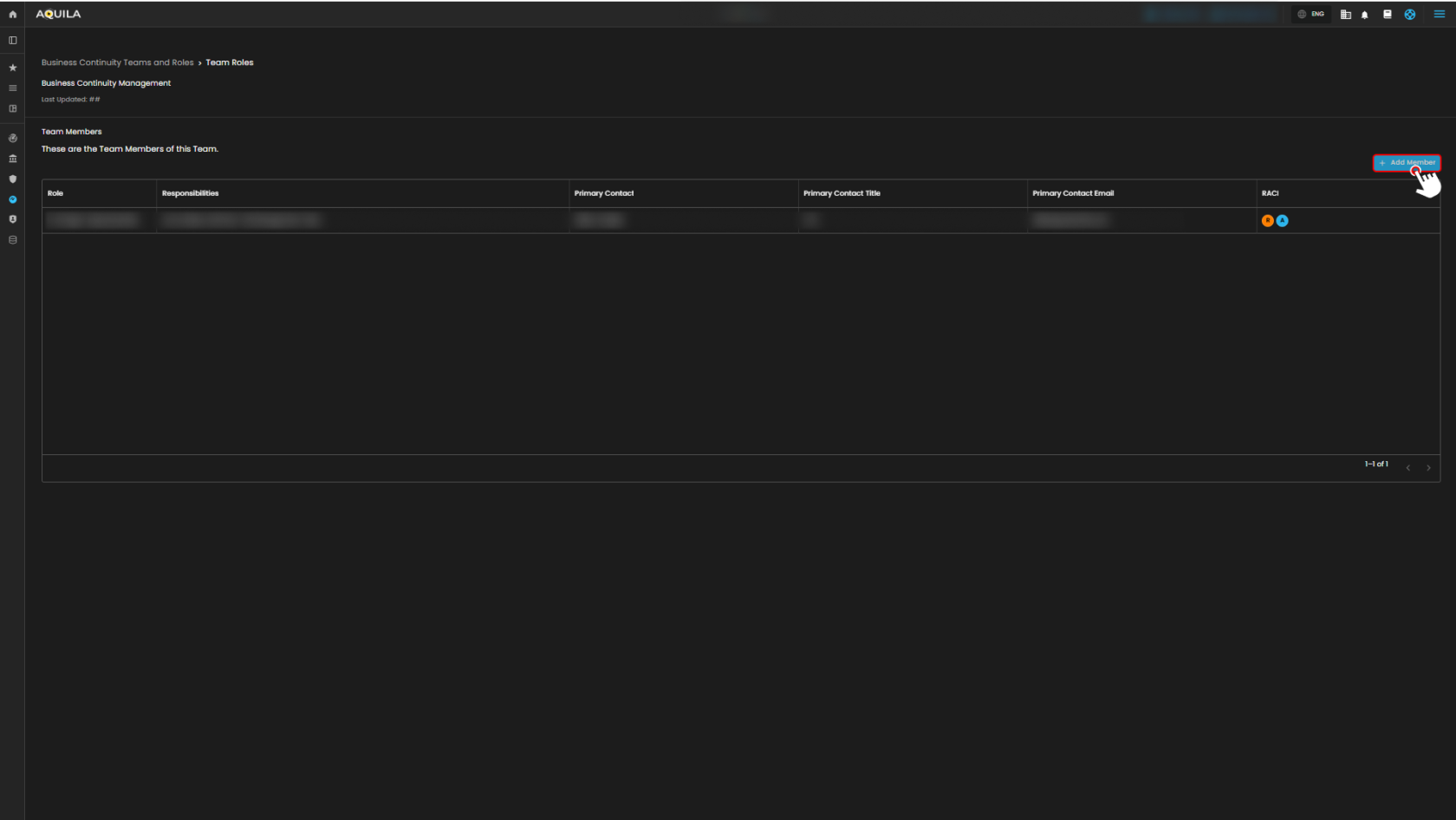](https://cytechint-docs-bookstack.s3.amazonaws.com/uploads/images/gallery/2025-10/M3PRPvGWpp63te2q-test-14.png) *Figure 3.1 Business Continuity Teams and Roles - View Teams* **Add Team Member** - The user can add their team members through here and input any necessary information about the new team members. [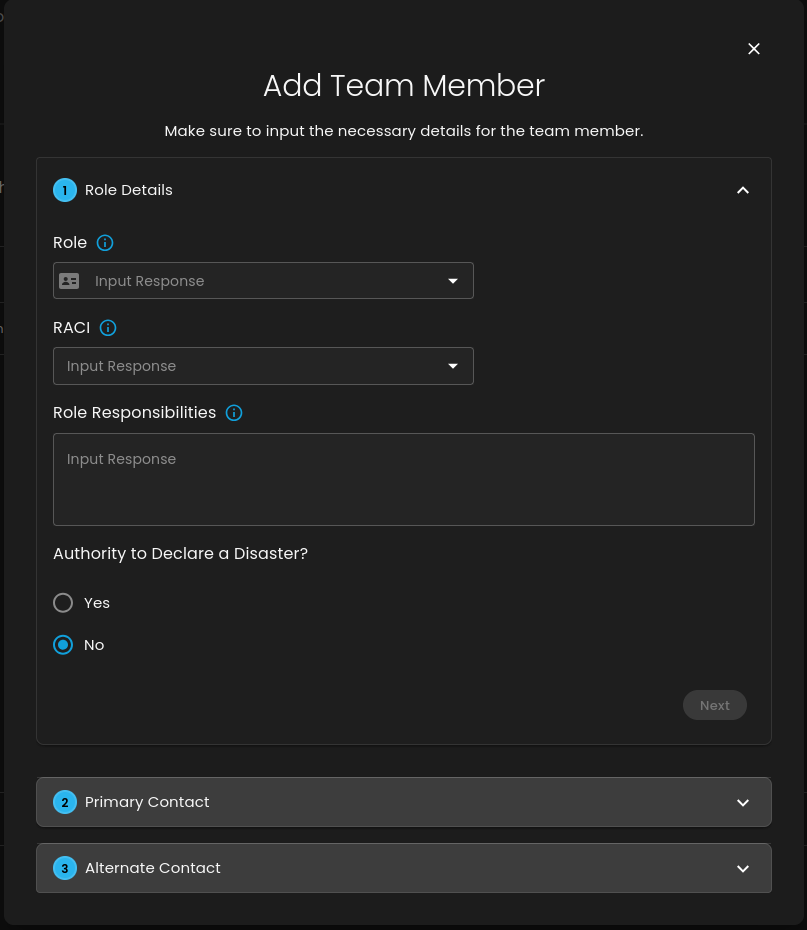](https://cytechint-docs-bookstack.s3.amazonaws.com/uploads/images/gallery/2025-10/uIX2QPcQjqqkhbq5-image.png) *Figure 3.2* *Business Continuity Teams and Roles - Add Members* ##### **Conclusion** The **Business Continuity Management (BCM) module in AQUILA** helps you prepare for disruptions by identifying your critical business functions, checking the impact of downtime, and tracking costs or risks. It also lets you set recovery targets (RTO and RPO), map out dependencies like systems, suppliers, people, and facilities, and assign clear team roles with both primary and backup contacts. Altogether, it gives you a straightforward way to make sure your organization can keep running smoothly and recover faster when issues happen. *If you need further assistance, kindly contact **support@cytechint.com** for prompt assistance and guidance.* # Cyber Security Risk Management (CSRM) ##### **Overview:** **Cyber Security Risk Management (CSRM)** is a structured process organizations use to identify, assess, mitigate, and monitor cyber threats and vulnerabilities that could impact their assets, operations, or reputation. It integrates cybersecurity into broader enterprise risk management, treating cyber risks like financial or operational ones. **CSRM** helps prioritize resources, comply with regulations, and build resilience against evolving threats like ransomware, data breaches, and supply chain attacks. ##### **Key Features:** 1. ****Dashboard**** - Delivers a centralized, real-time view of critical risk metrics and statuses, providing a comprehensive overview of ongoing risks, a concise summary of findings, and a detailed impact breakdown (pending integration into CRAM™). This empowers security teams with the insights needed for swift, informed decision-making. 2. **Asset Identification** - Experience your tailored Cyber Risk Assessment and Management™ (CRAM™), where this module meticulously maps out the assets requiring safeguarding, establishing a robust foundation for risk assessment by laying the essential groundwork for your CRAM™ building blocks. 3. **Asset Inventory** - Maintains a comprehensive, up-to-date catalog of all assets, including hardware, software, and data. It tracks ownership, location, and vulnerabilities, ensuring nothing is overlooked during risk evaluations. 4. **Assessed Asset** - Focuses on evaluating the security posture of identified assets. This module assesses vulnerabilities, threats, and potential impacts, providing data to prioritize risk mitigation efforts. 5. **Risk Register** - Serves as a repository for documenting identified risks, including their likelihood, impact, and status. It acts as a single source of truth for tracking and reporting risks across the organization. 6. **Risk Management** - Enables the development and implementation of strategies to address risks (e.g., avoidance, mitigation, transfer, acceptance). This module supports planning, executing, and monitoring risk treatment plans. 7. **Task Management** - Assigns, tracks, and manages tasks related to risk mitigation, such as patch updates or employee training. It ensures accountability and timely completion of security actions. 8. **Geo Location** - Tracks the geographic distribution of assets and risks, identifying location-specific threats (e.g., market cyber resiliency or market vulnerability level). This aids in tailoring security measures to specific areas. ##### **Pre-requisites:** 1. ****Access to CyTech - AQUILA**** - Only users assigned the **"Owner"** or **"Admin"** role can access the Log Collector installation resources within the platform.**To navigate to CSRM Module please follow the instructions below:**
**Step 1:** Log in to CyTech - AQUILA. *click here* ***-->* [USDC-CyTech AQUILA](https://usdc-docs.cytechint.io/usdc.cytechint.io)** **Step 2:** Click on AI Security & Governance [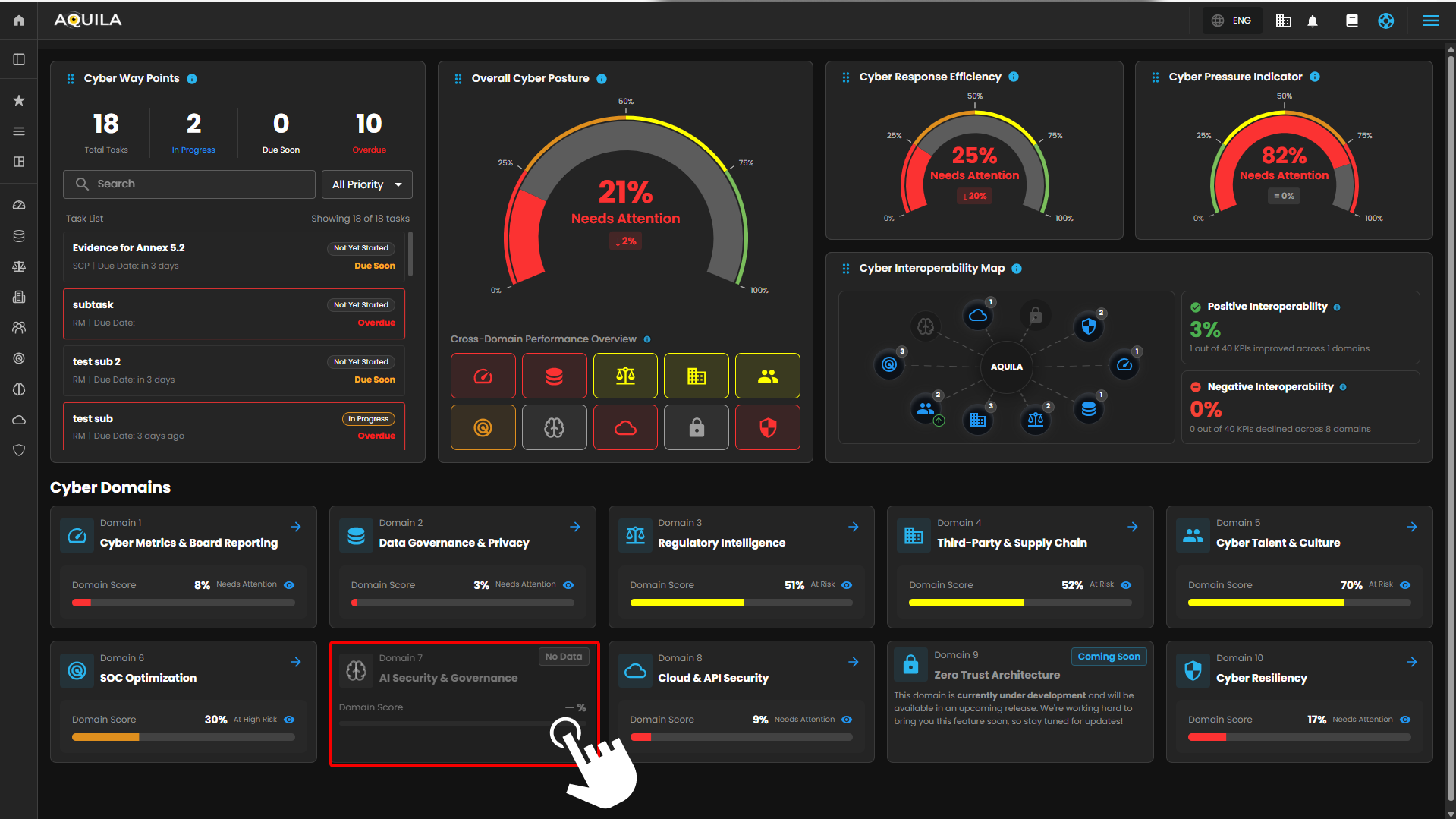](https://cytechint-docs-bookstack.s3.amazonaws.com/uploads/images/gallery/2026-04/AroCHVr5QQihlAmt-hehe-2-9.png) *Figure 1. Overview* **Step 3: Click on Cyber Security Risk Management (CSRM)** [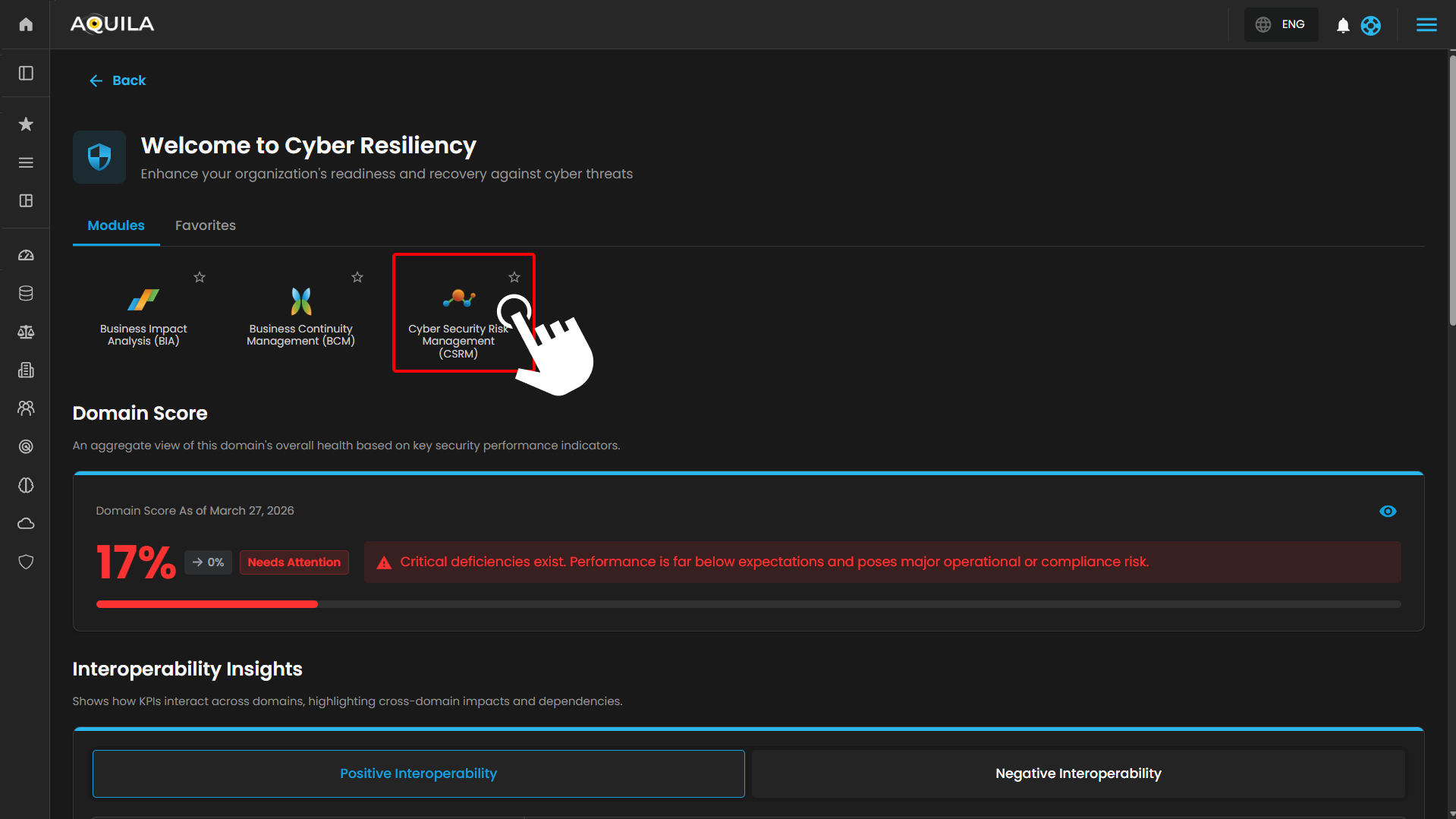](https://cytechint-docs-bookstack.s3.amazonaws.com/uploads/images/gallery/2026-04/ZFjYTmVkkcwTNHhM-image.png) *Figure 1.1 Cyber Security Risk Management (CSRM)* **Step 4:** [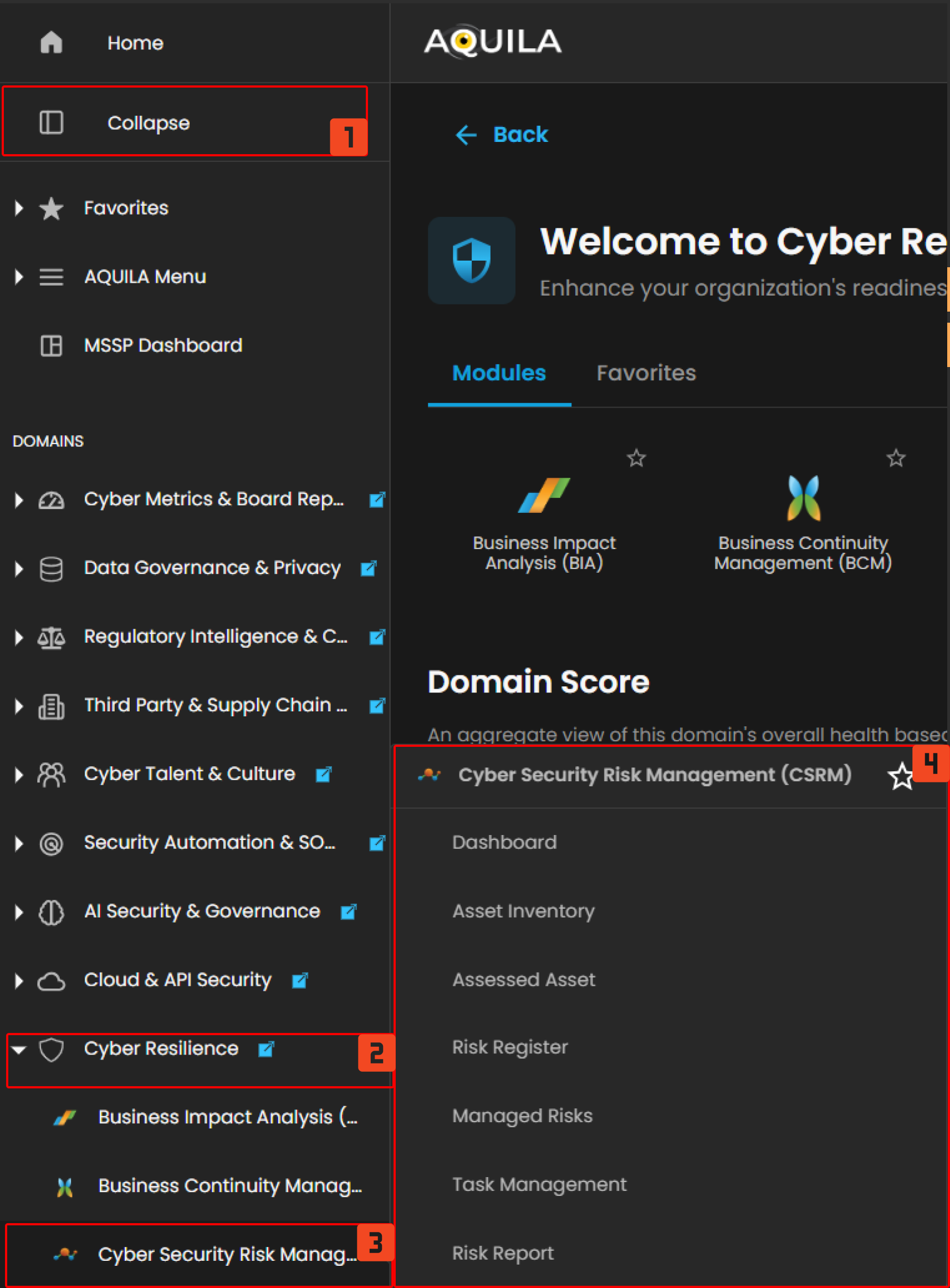](https://cytechint-docs-bookstack.s3.amazonaws.com/uploads/images/gallery/2026-04/KGJ8TYp5WKD1ZVYw-image.png) *Figure 1.3 Navigation* #### **Cyber Security Risk Management (CSRM): Dashboard** The Dashboard page serves as the central hub for visualizing cybersecurity risk metrics and insights within a **Cyber Risk Assessment and Management (CRAM™)** system. It provides real-time overviews of risk levels, breakdowns, and trends through interactive widgets, charts, and summaries. This interface appears tailored for security teams to monitor risks, identify issues, and facilitate quick decision-making. [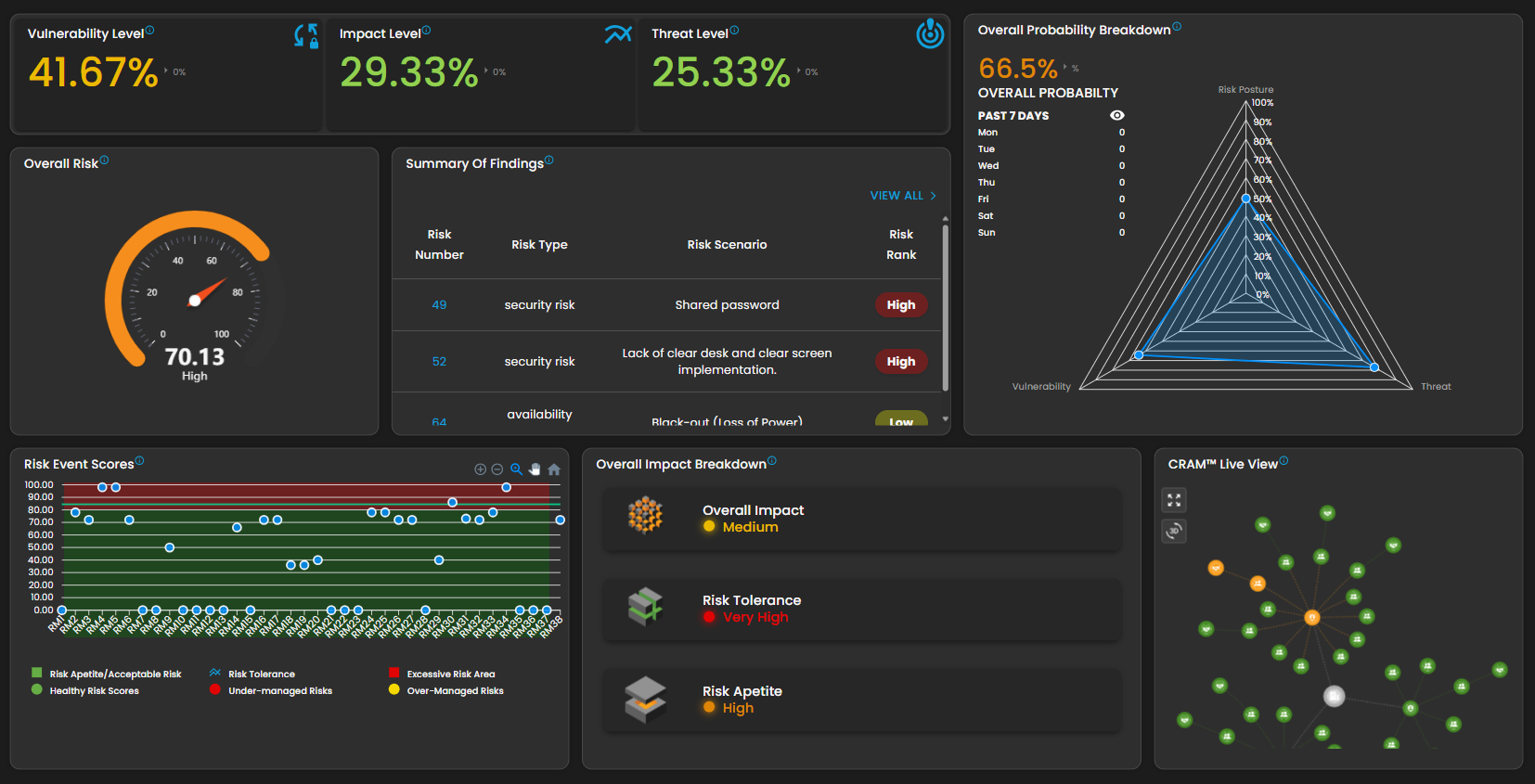](https://cytechint-docs-bookstack.s3.amazonaws.com/uploads/images/gallery/2025-10/8w7B2WfLT7XoXkTe-image.png) *Figure 2 Cyber Security Risk Management (CSRM) - Dashboard* **Vulnerability Level** - Represents the overall vulnerability exposure, meticulously calculated from asset scans and assessments. This metric elegantly gauges the susceptibility of your organization to market fluctuations, providing a refined understanding of potential risks. - Clicking it will open the **Market Vulnerability Level** pop up box that emphasizes economic factors like growth, inflation, consumer confidence, and geopolitical risks, rather than cybersecurity specifics, indicating a holistic risk management perspective. [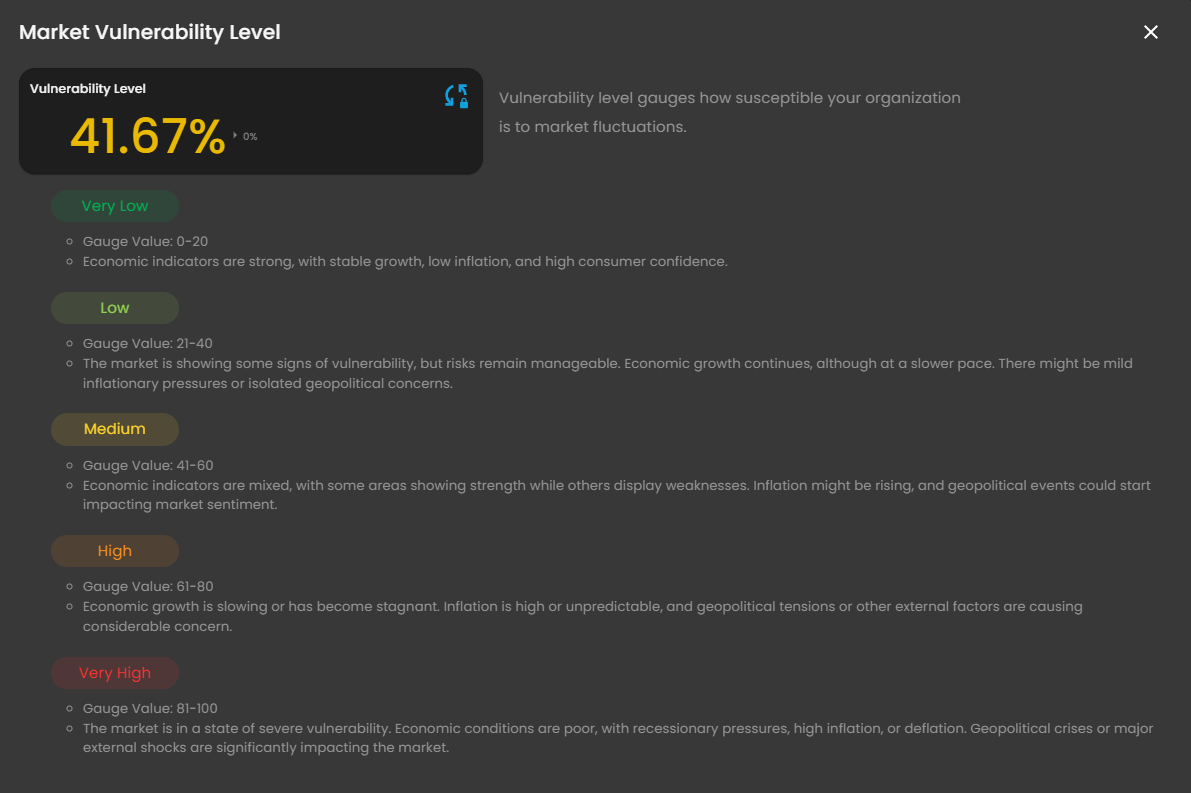](https://cytechint-docs-bookstack.s3.amazonaws.com/uploads/images/gallery/2025-10/riF54YqAMNXM9Zyh-image.png) *Figure 2.1 Cyber Security Risk Management (CSRM) -Dashboard / Market Vulnerability* **Impact Level** - Measures the potential business or operational impact of identified risks. This metric elegantly assesses how external factors, such as economic conditions and industry trends, influence the overall risk landscape. - Clicking it will open the **Market Impact Level** pop up box that focuses on external economic and market influences, including growth, inflation, geopolitical events, and investor confidence, rather than cybersecurity-specific risks. [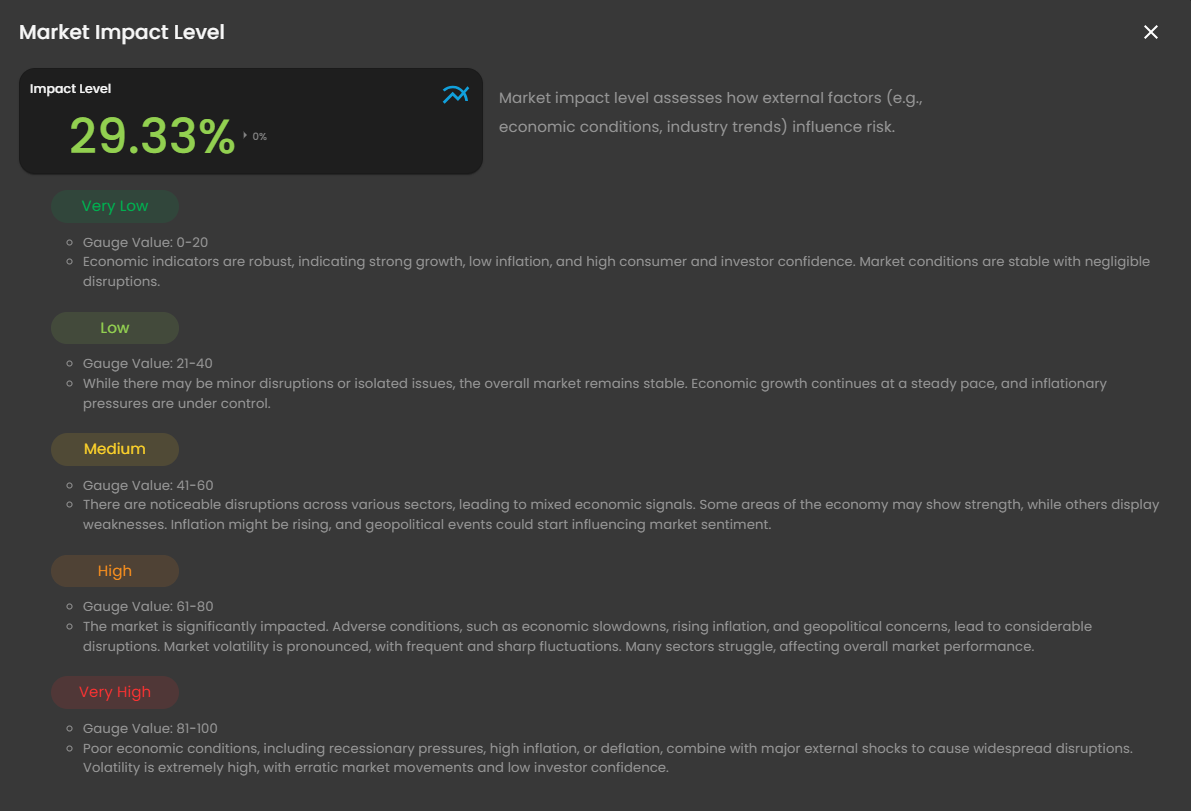](https://cytechint-docs-bookstack.s3.amazonaws.com/uploads/images/gallery/2025-10/7dGazwdGgDPRvEKT-image.png) *Figure 2.2 Cyber Security Risk Management (CSRM) - Dashboard / Market Impact Level* **Threat Level** - Indicates the severity or likelihood of external threats. This metric elegantly assesses the intensity of external threats, including competition and regulatory changes, that may impact your business. - Clicking it will open the **Market Threat Level** pop up box that centers on assessing the severity of external threats affecting market stability, incorporating economic indicators such as growth, inflation, consumer/investor confidence, and geopolitical factors. [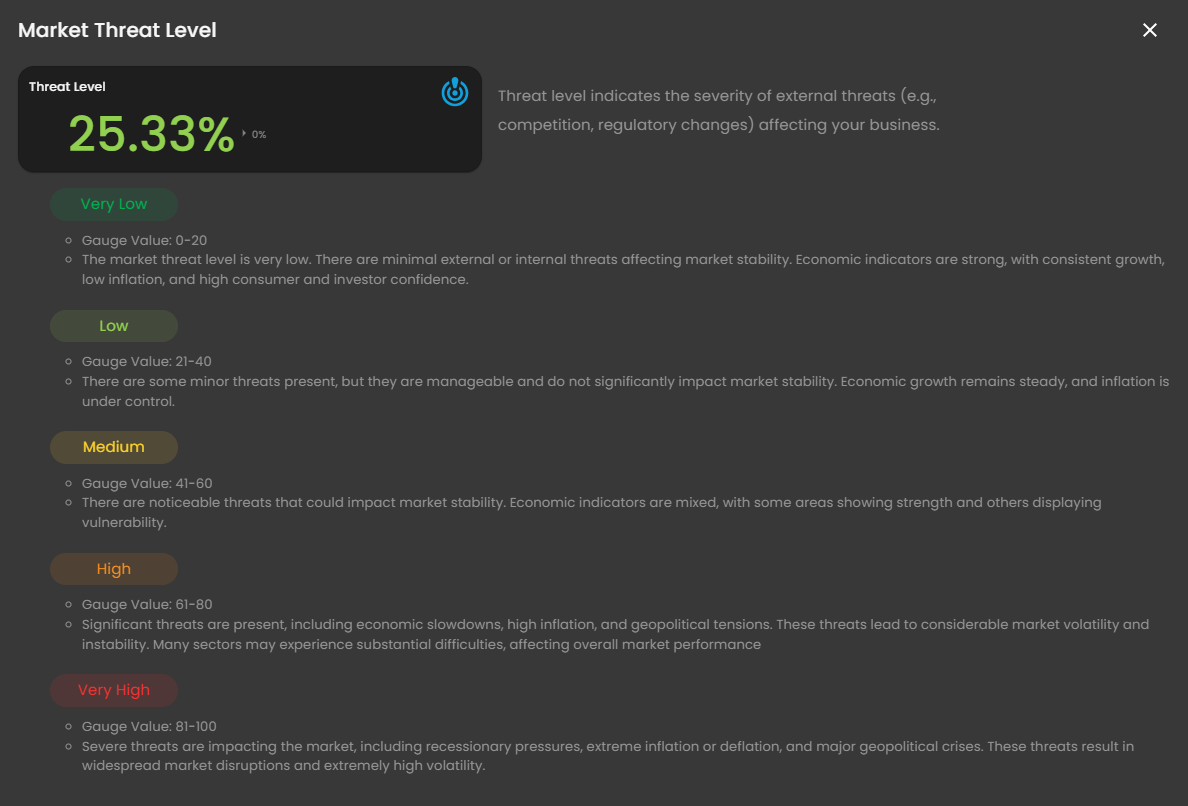](https://cytechint-docs-bookstack.s3.amazonaws.com/uploads/images/gallery/2025-10/QBzOIDCqpifXghPh-image.png) *Figure 2.3 Cyber Security Risk Management (CSRM) - Dashboard / Market Threat Level* **Overall Probability Breakdown** - This component, integral to a risk management dashboard such as the **CRAM™** system, focuses on probabilistic risk metrics over time. The probability breakdown elegantly illustrates the likelihood of a risk event occurring, empowering stakeholders to prioritize mitigation efforts effectively. **Overall Risk** - Provides a holistic score aggregating vulnerability, impact, and threat levels. This metric formally represents the combined impact and probability of a risk event, offering a comprehensive assessment of the organization's overall risk exposure. - Clicking this element unveils a popup window, a pivotal component of a risk management dashboard such as the **CRAM™** system, meticulously crafted to provide a comprehensive assessment of an organization's risk posture. It delivers a holistic score that elegantly aggregates vulnerability, impact, and threat levels, empowering security teams and decision-makers to monitor and prioritize risk mitigation efforts with precision. [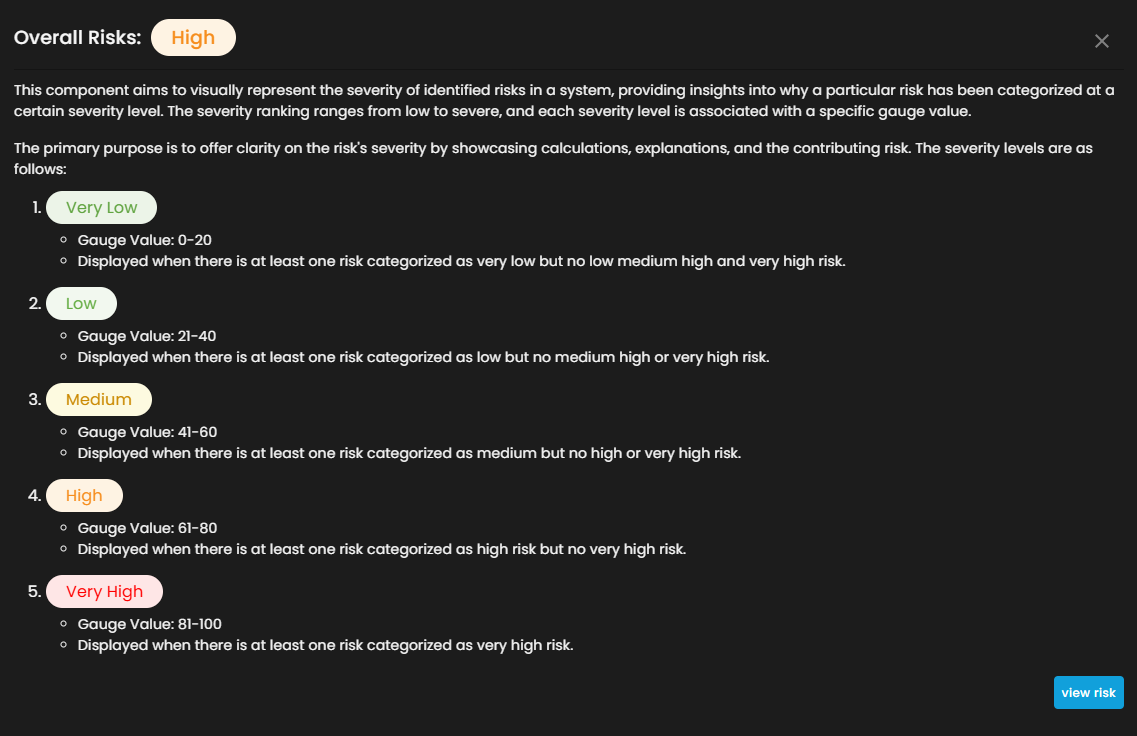](https://cytechint-docs-bookstack.s3.amazonaws.com/uploads/images/gallery/2025-10/sfdyOrAFxeSM72Xw-image.png) *Figure 2.4 Cyber Security Risk Management (CSRM) - Dashboard / Overall Risk* - Clicking the **view risk** button will redirect you to its risk assessment. [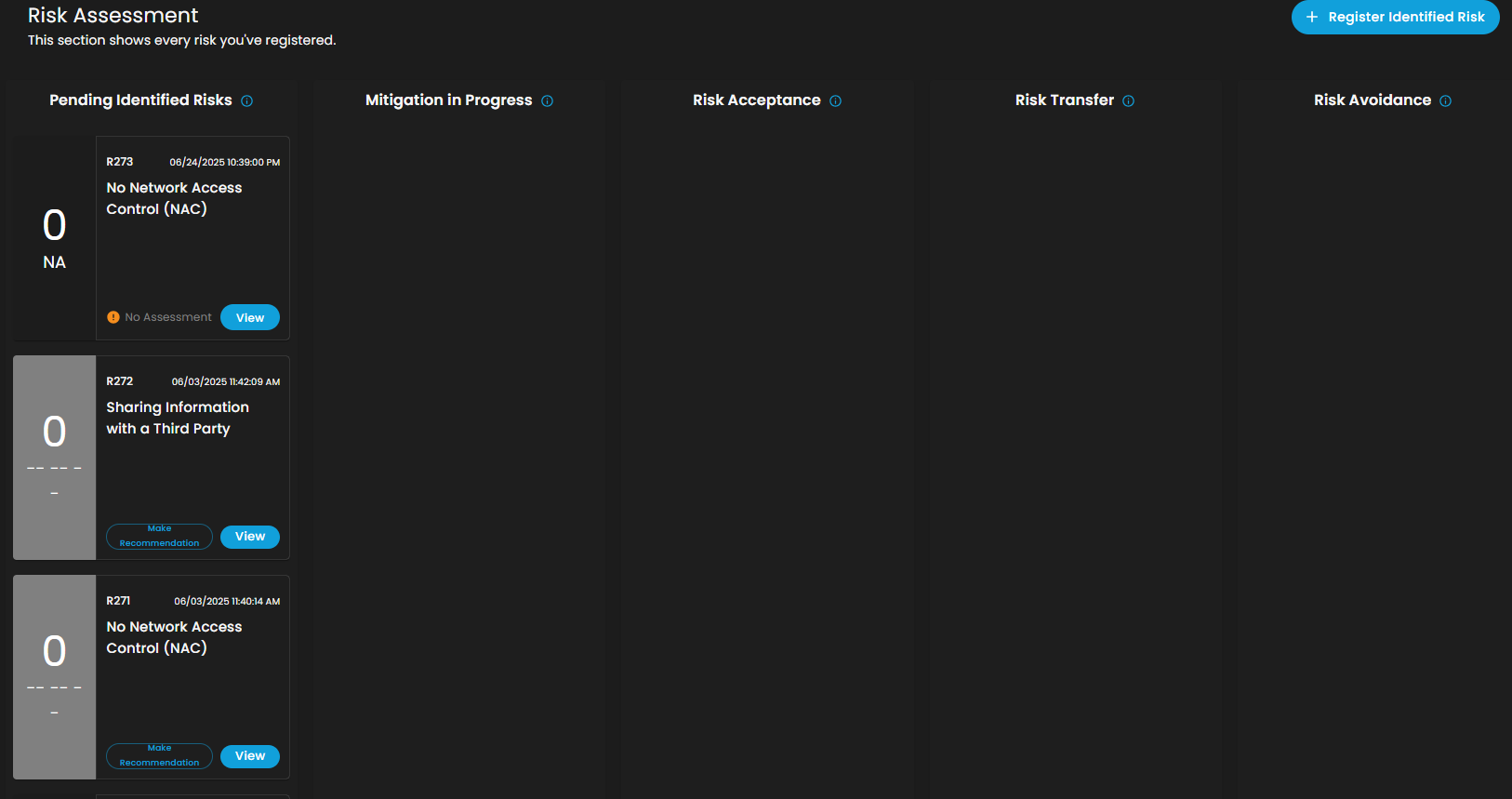](https://cytechint-docs-bookstack.s3.amazonaws.com/uploads/images/gallery/2025-10/pb2YgRPXB55RkDQY-image.png) *Figure 2.4.1 Cyber Security Risk Management (CSRM) - Dashboard / Overall Risk / Risk Assessment* - This page offers comprehensive visibility into **pending identified risks**, **ongoing mitigation efforts**, **risk acceptance**, **risk transfer**, and **risk avoidance** strategies. Additionally, it enables client to seamlessly **register newly identified risks** with ease. **Summary of Findings** - The summary of findings provides a concise overview of identified risk and their implications. - Upon selecting the **View All** link, a sophisticated popup will be revealed, presenting a comprehensive overview of all risk scenarios. [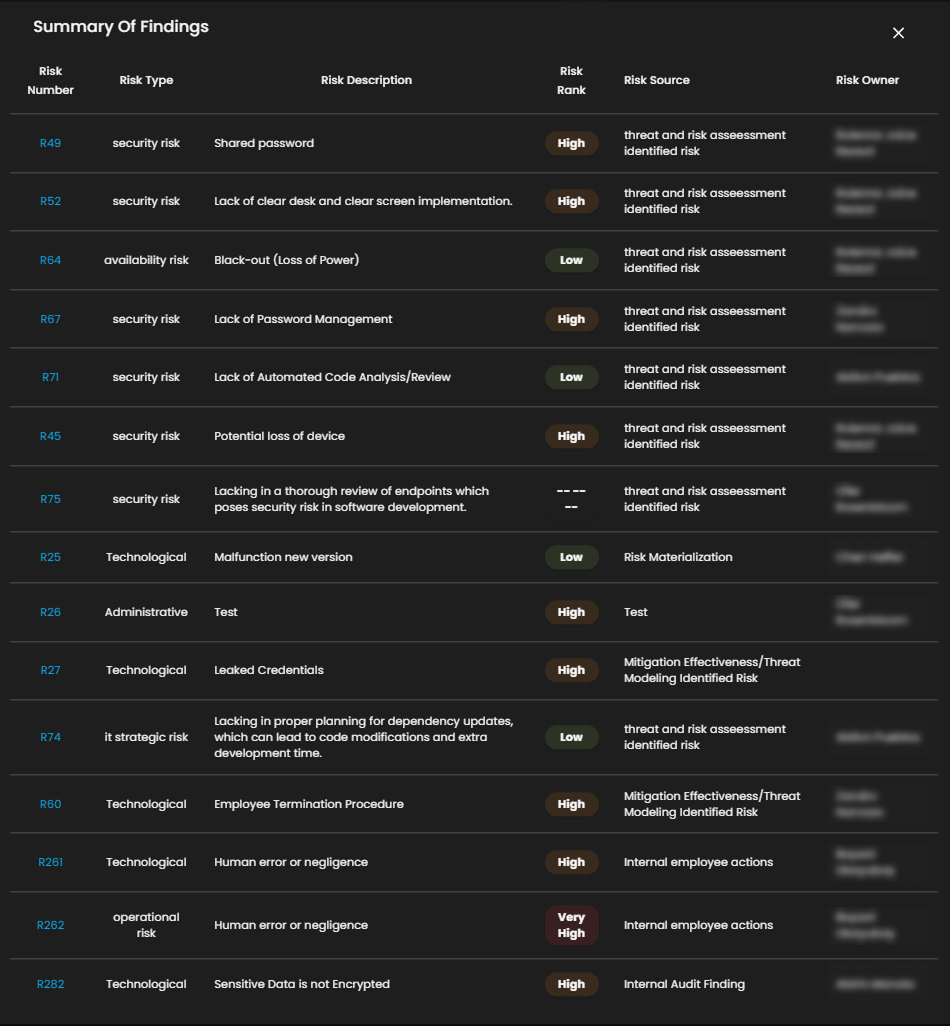](https://cytechint-docs-bookstack.s3.amazonaws.com/uploads/images/gallery/2025-10/juTQttEIvPRu0Vv9-summary-of-findings.png) *Figure 2.5 Cyber Security Risk Management (CSRM) - Dashboard / Summary of Findings* - Selecting a **risk scenario** will unveil a sophisticated Risk Breakdown popup, an integral visualization component within a risk management dashboard such as the **CRAM™** system, meticulously crafted to dissect a specific identified risk for comprehensive in-depth analysis. This feature is thoughtfully designed for security teams and risk managers, providing profound insights into the composition of a risk event and empowering informed mitigation strategies with precision. [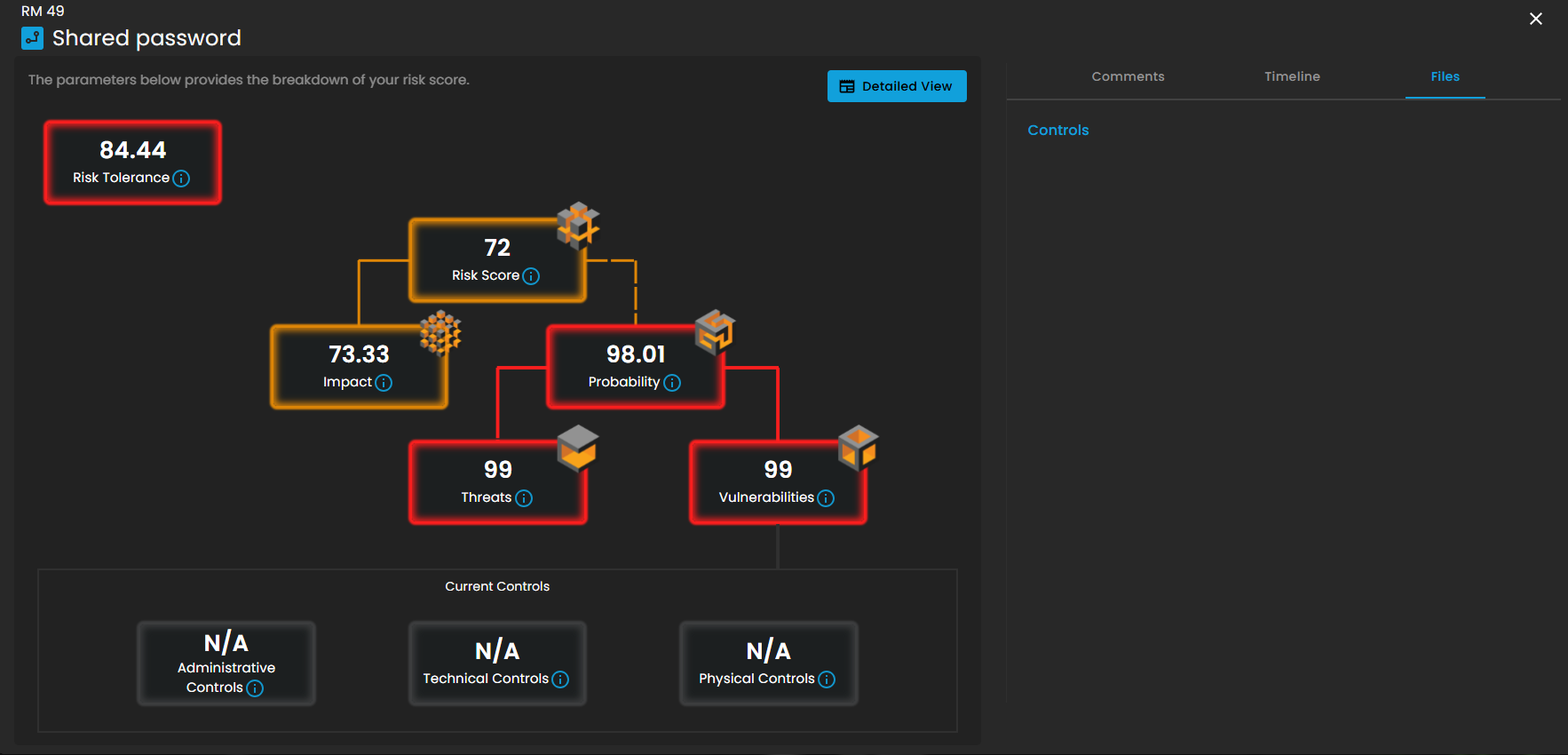](https://cytechint-docs-bookstack.s3.amazonaws.com/uploads/images/gallery/2025-10/82mPCmZpPpSHFYIg-image.png) *Figure 2.5.1 Cyber Security Risk Management (CSRM) - Dashboard / Summary of Findings / Risk Scenario* - Upon clicking the **Detailed View** button, you will be presented with an intricate and comprehensive breakdown of information, encompassing **Threats**, **Vulnerabilities**, and additional **critical factors**. [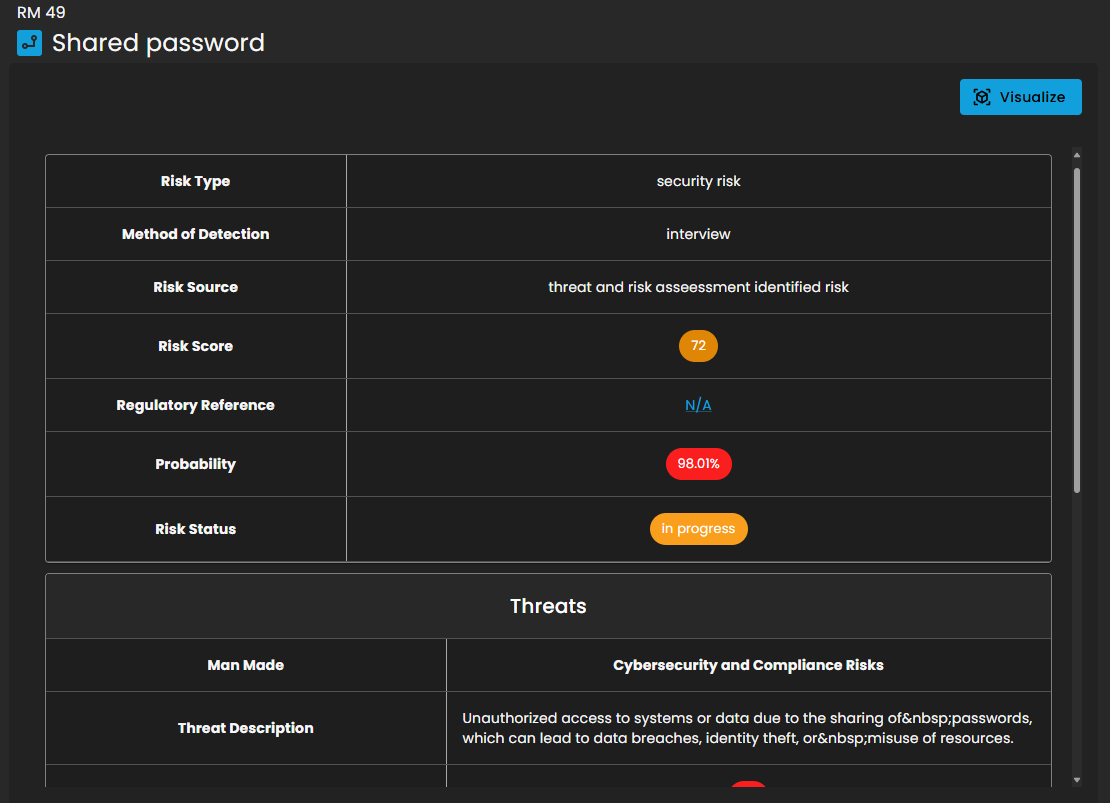](https://cytechint-docs-bookstack.s3.amazonaws.com/uploads/images/gallery/2025-10/TwVbOFvXPPIiYYVu-image.png) *Figure 2.5.2 Cyber Security Risk Management (CSRM) - Dashboard / Summary of Findings / Risk Scenario / Detailed View* **Risk Event Scores** - **Risk event scores** combine probability and impact to quantify individual risks. Higher scores indicate greater risk. [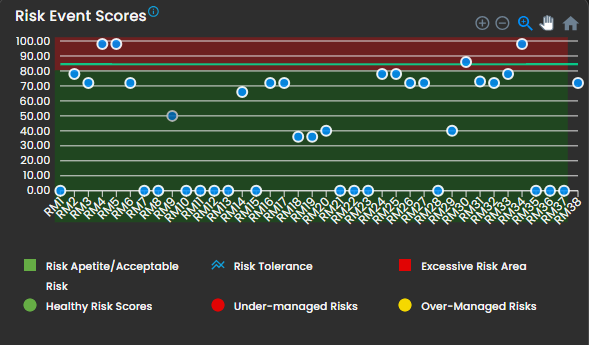](https://cytechint-docs-bookstack.s3.amazonaws.com/uploads/images/gallery/2025-10/dZFRUKZdodn6sOKu-image.png) *Figure 2.6 Cyber Security Risk Management (CSRM) - Dashboard / Risk Event Scores* **Overall Impact Breakdown** - Impact breakdown illustrates the potential consequences of a risk event. [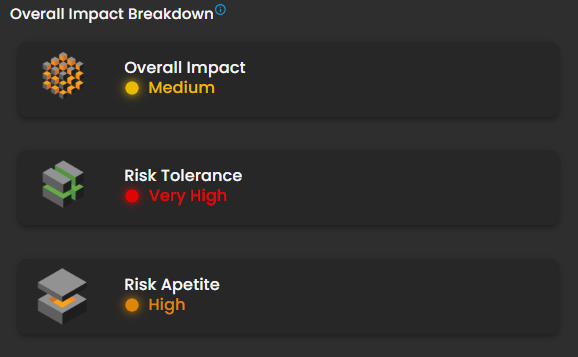](https://cytechint-docs-bookstack.s3.amazonaws.com/uploads/images/gallery/2025-10/HKfZU1d3T9PvzB3j-image.png) *Figure 2.7 Cyber Security Risk Management (CSRM) - Dashboard / Overall Impact Breakdown* - Upon selecting **Overall Impact**, a sophisticated popup emerges, serving as an educational and analytical component within a risk management dashboard such as the **CRAM™** system, meticulously crafted to illuminate the dynamic interplay between an organization's **risk tolerance**, **appetite**, and **overall impact severity**. This interface delivers a structured explanation of risk severity levels, expertly guiding users in evaluating potential impacts on operations, finances, and reputation. It empowers security teams and executives to prioritize responses based on severity, ensuring optimal resource allocation and strategic mitigation planning. [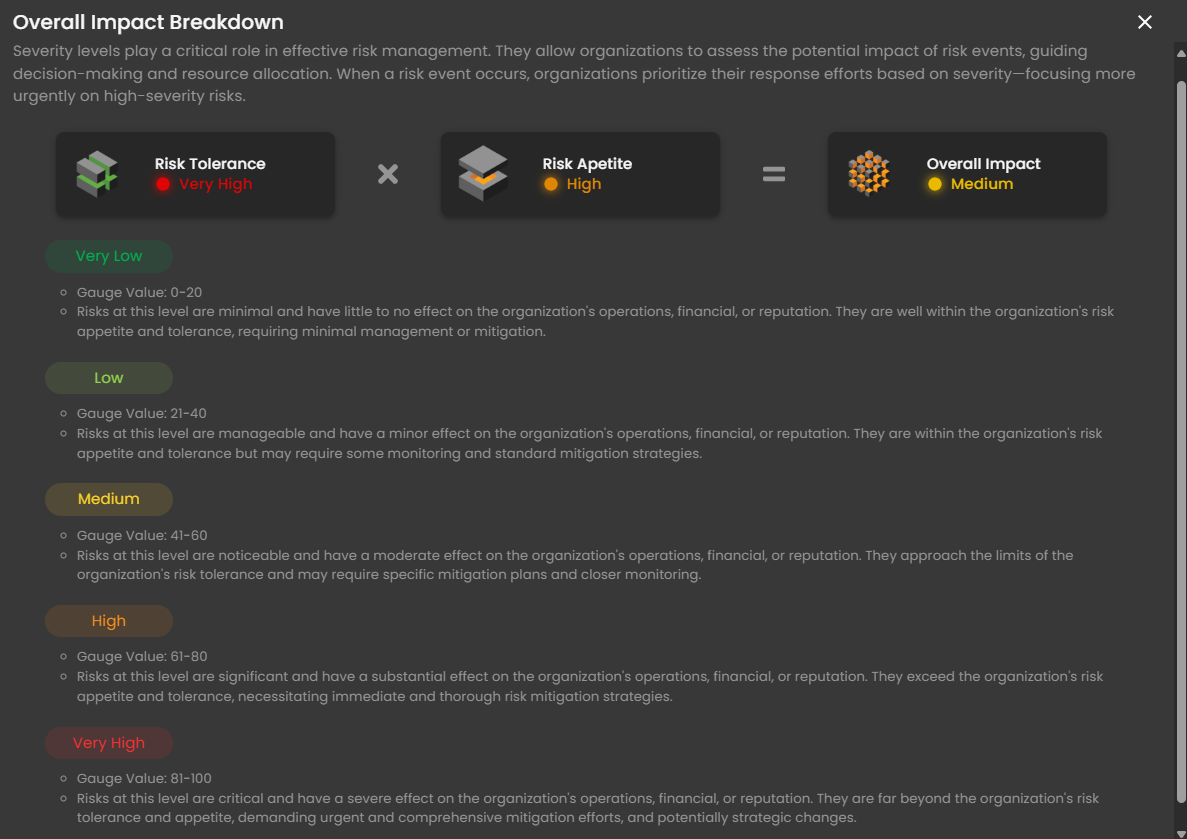](https://cytechint-docs-bookstack.s3.amazonaws.com/uploads/images/gallery/2025-10/f2fB81d6bforaGWi-image.png) *Figure 2.7.1 Cyber Security Risk Management (CSRM) - Dashboard / Overall Impact Breakdown / Overall Impact* - Upon selecting **Risk Tolerance**, a refined popup unveils itself, serving as an insightful informational component within a risk management dashboard such as the **CRAM™** system, meticulously crafted to deliver a comprehensive explanation of risk tolerance levels for individuals or organizations. It elegantly outlines how risk tolerance shapes **investment** and **decision-making strategies**, accentuating preferences for stability versus potential returns. This interface empowers users, including **financial advisors**, **security teams**, and **executives**, to assess and align risk profiles with organizational objectives, fostering balanced and strategic portfolio management. [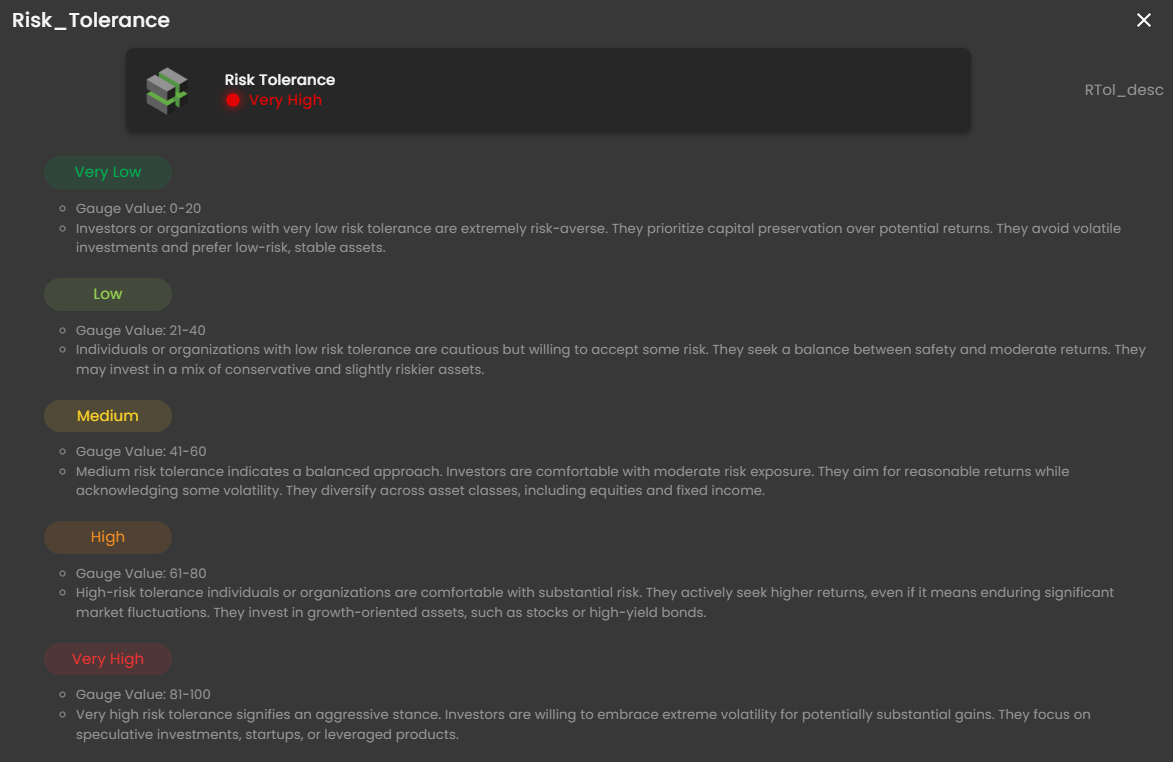](https://cytechint-docs-bookstack.s3.amazonaws.com/uploads/images/gallery/2025-10/D0HaTs5jmW1cR2xz-image.png) *Figure 2.7.2 Cyber Security Risk Management (CSRM) - Dashboard / Overall Impact Breakdown / Risk Tolerance* - Upon selecting **Risk Appetite**, a refined popup unveils itself, elucidating that this term denotes the amount and type of risk an organization is prepared to embrace in pursuit of its objectives. As a pivotal component of risk management and strategic planning, it empowers organizations to make well-informed decisions regarding the level of risk they are willing to undertake across diverse operational domains. [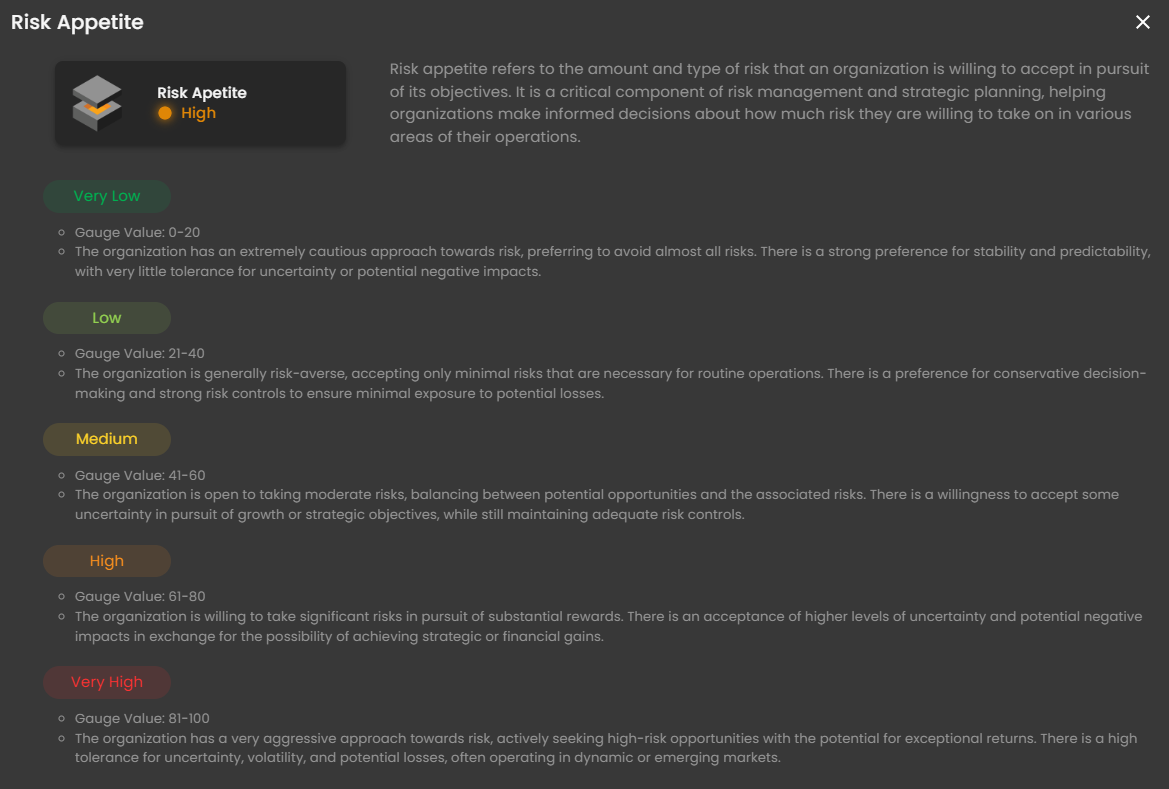](https://cytechint-docs-bookstack.s3.amazonaws.com/uploads/images/gallery/2025-10/V9hOzSxyGop1eicu-image.png) *Figure 2.7.3 Cyber Security Risk Management (CSRM) - Dashboard / Overall Impact Breakdown / Risk Appetite* **CRAM™ Live View** - This will display all your **Critical Business Process** and **Critical Business Functions** in 3D view. Click the switch icon to change the view. [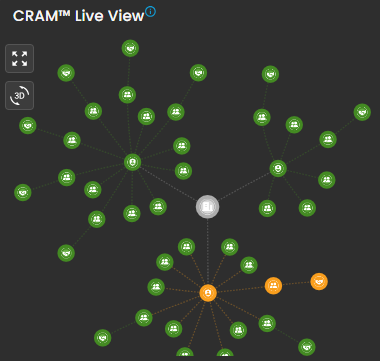](https://cytechint-docs-bookstack.s3.amazonaws.com/uploads/images/gallery/2025-10/Vps248pM33iA8yuT-image.png) [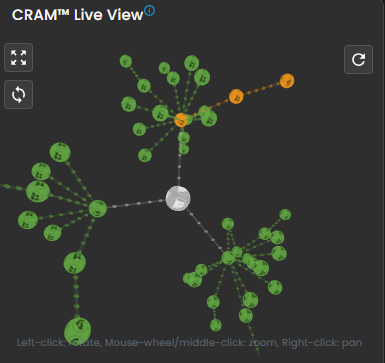](https://cytechint-docs-bookstack.s3.amazonaws.com/uploads/images/gallery/2025-10/aueiBfSiqODrqeiw-image.png) *Figure 2.8 Cyber Security Risk Management (CSRM) - Dashboard / CRAM™ Live View* \_\_\_\_\_\_\_\_\_\_\_\_\_\_\_\_\_\_\_\_\_\_\_\_\_\_\_\_\_\_\_\_\_\_\_\_\_\_\_\_\_\_\_\_\_\_\_\_\_\_\_\_\_\_\_\_\_\_\_\_\_\_\_\_\_\_\_\_\_\_\_\_\_\_\_\_\_\_\_\_\_\_\_\_\_\_\_\_\_\_\_\_\_\_\_\_\_\_\_\_\_\_\_\_\_\_\_\_\_\_\_\_\_\_\_\_\_\_\_\_\_\_\_\_\_\_\_\_\_\_\_\_\_\_\_\_\_\_\_\_\_\_\_\_ #### **Cyber Security Risk Management (CSRM): Asset Identification** The **CRAM™** Building Blocks page serves as an onboarding or configuration interface within the Cyber Risk Assessment and Management (**CRAM™**) system, designed to collect foundational business information for generating a personalized cybersecurity risk profile. This page emphasizes simplicity in input to demystify cyber complexity, targeting users like CISOs, organizations, or individuals seeking to enhance cyber resiliency.For detailed instructions, visit the [**Cyber Risk Assessment section**](https://usdc-docs.cytechint.io/books/cram-onboarding-guide/page/cyber-risk-assessment-management-cram) of the **AQUILA Documentation**, which provides a comprehensive guide to the **CRAM™ Building Blocks**.
[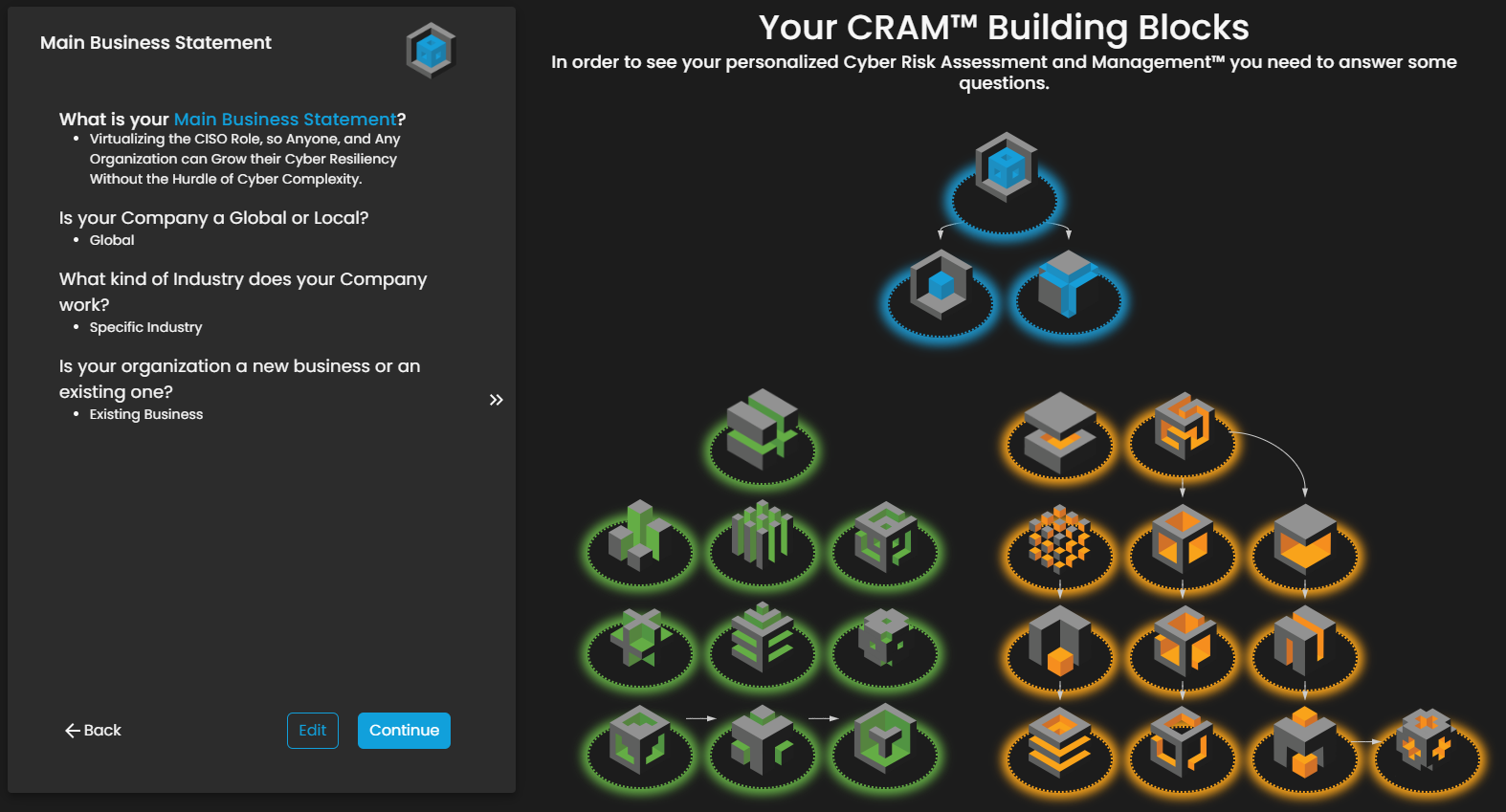](https://cytechint-docs-bookstack.s3.amazonaws.com/uploads/images/gallery/2025-10/qt1O93gEIoVEmsjH-image.png) *Figure 3 Cyber Security Risk Management (CSRM) - Asset Identification* \_\_\_\_\_\_\_\_\_\_\_\_\_\_\_\_\_\_\_\_\_\_\_\_\_\_\_\_\_\_\_\_\_\_\_\_\_\_\_\_\_\_\_\_\_\_\_\_\_\_\_\_\_\_\_\_\_\_\_\_\_\_\_\_\_\_\_\_\_\_\_\_\_\_\_\_\_\_\_\_\_\_\_\_\_\_\_\_\_\_\_\_\_\_\_\_\_\_\_\_\_\_\_\_\_\_\_\_\_\_\_\_\_\_\_\_\_\_\_\_\_\_\_\_\_\_\_\_\_\_\_\_\_\_\_\_\_\_\_\_\_\_\_\_ #### **Cyber Security Risk Management (CSRM): Asset Inventory** The **Asset Inventory** page is a central management interface within the **Cyber Risk Assessment and Management (CRAM™)** system, designed to centralize, categorize, and visualize organizational assets for enhanced risk visibility. This interface supports risk managers, IT teams, and security professionals in tracking assets like hardware, software, and data, enabling proactive identification of vulnerabilities and exposures. [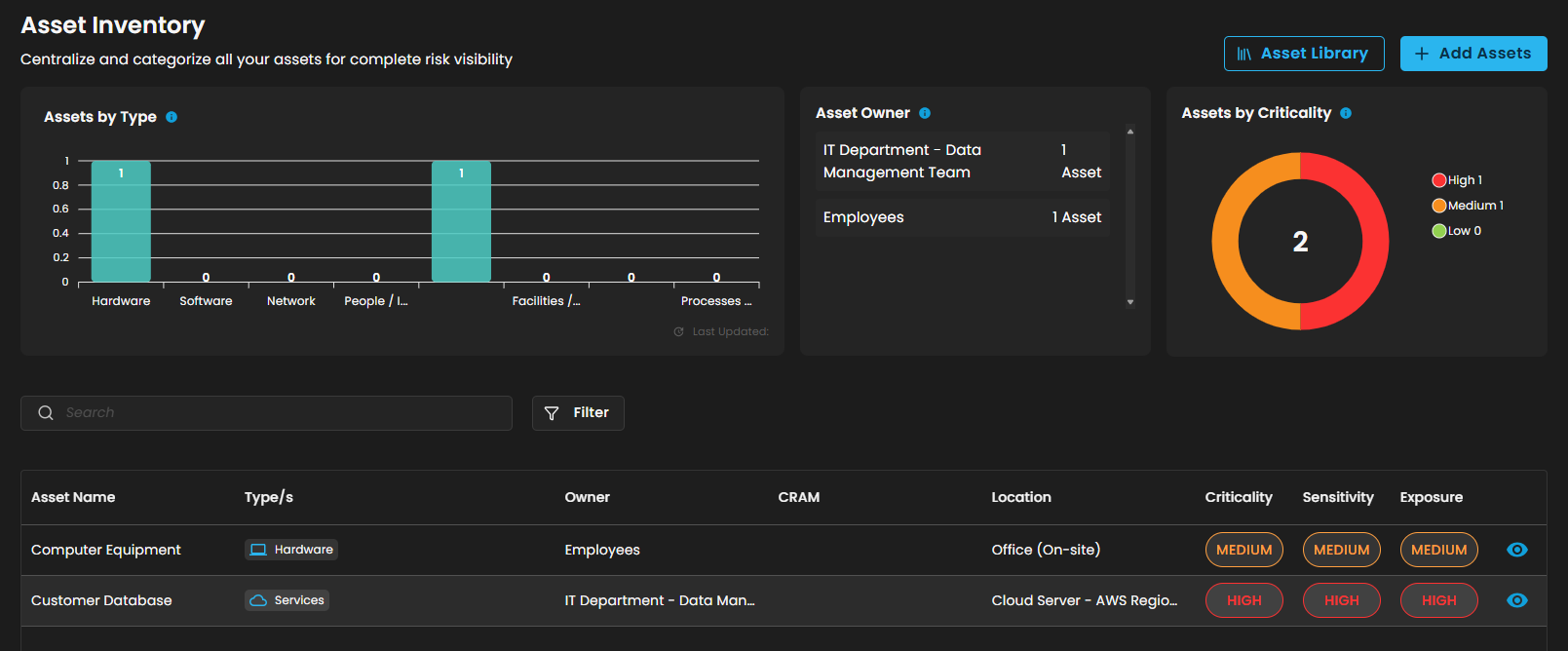](https://cytechint-docs-bookstack.s3.amazonaws.com/uploads/images/gallery/2025-10/2nH2FaDvWgEhPI9l-image.png) *Figure 4 Cyber Security Risk Management (CSRM) - Asset Inventory* **Assets by Type** - This visualization elegantly presents the distribution of registered assets, meticulously grouped by their type, including hardware, software, networks, people, and more. **Asset Owner** - Highlights the user with the highest number of registered assets, offering a valuable tool for identifying key owners across the organization. **Assets by Criticality** - Elegantly visualizes assets according to their assigned criticality levels—High, Medium, or Low—serving as a vital tool to prioritize which assets require the utmost protection. **Search and Filter Section** - **Search Bar** - Allows text-based querying of the asset table for quick navigation. - **Filter Button** - Opens advanced filtering options for refining the asset list by criteria like type, owner, or criticality. **Table Section** - This section contains a tabular display of individual assets, organized in rows with sortable columns. - Selecting the **eye icon** gracefully expands to reveal comprehensive and detailed information. [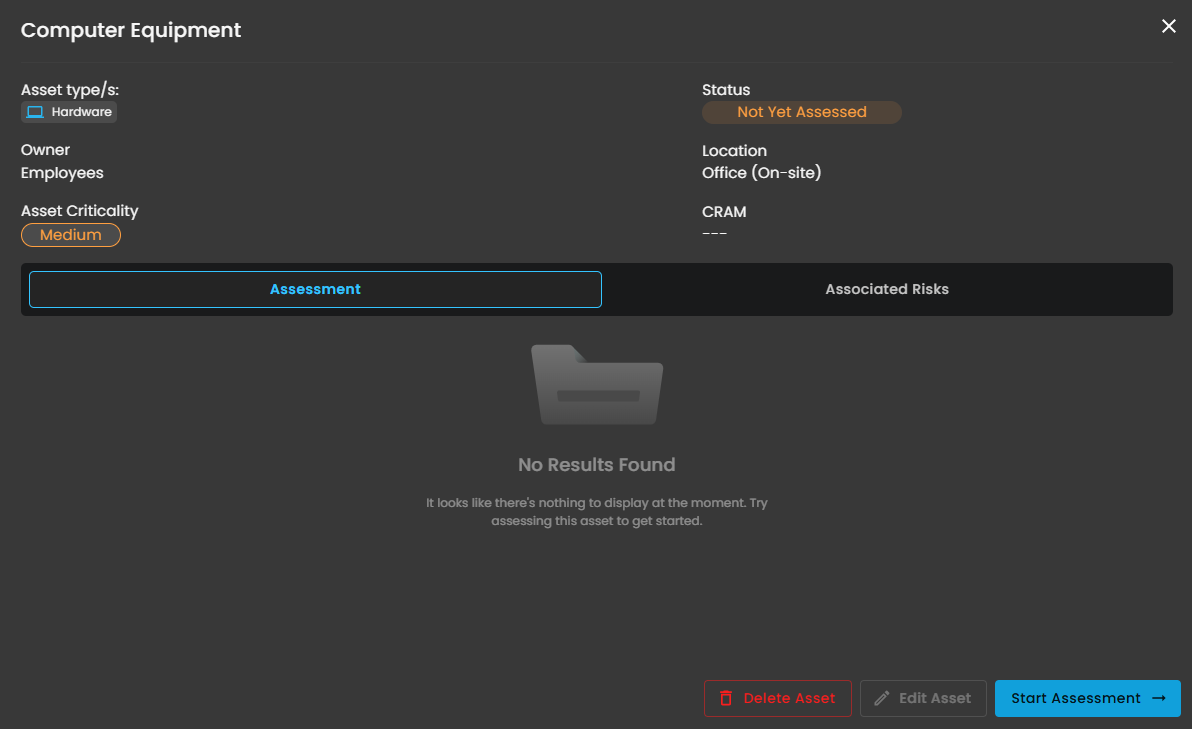](https://cytechint-docs-bookstack.s3.amazonaws.com/uploads/images/gallery/2025-10/5z0Y07rjrSYEoUeV-image.png) *Figure 4.1 Cyber Security Risk Management (CSRM) - Asset Inventory - Details* **Action Buttons** - **Asset Library** - It serves as a customizable template repository for users to import and adapt pre-defined asset examples, streamlining the process of populating the asset inventory for risk assessment. This design facilitates quick onboarding by allowing users to select, edit, and integrate example assets like hardware and services, ensuring comprehensive coverage without starting from scratch. [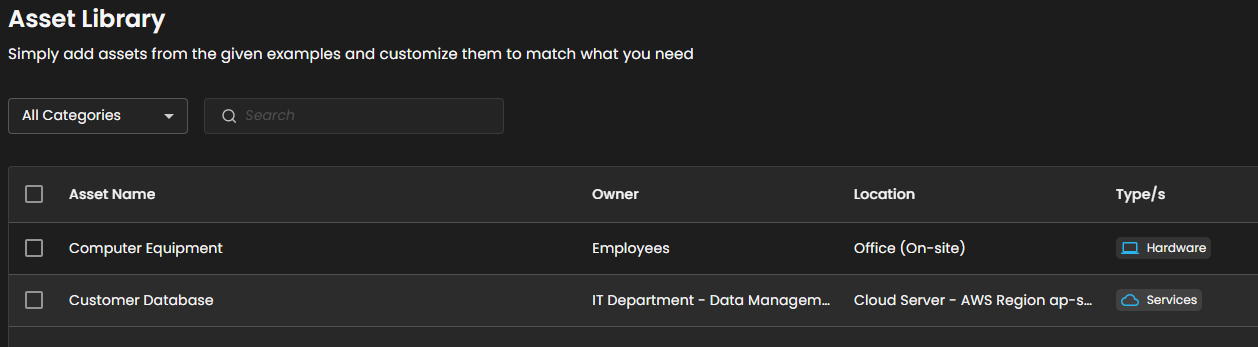](https://cytechint-docs-bookstack.s3.amazonaws.com/uploads/images/gallery/2025-10/YTAy3Z2rJehXuInZ-image.png) *Figure 4.2 Cyber Security Risk Management (CSRM) - Asset Inventory / Asset Library* - **Add Assets** - A dedicated input interface within the Asset Inventory module of the **Cyber Risk Assessment and Management (CRAM™)** system, focused on registering and categorizing new assets to build a comprehensive risk inventory. This interface empowers IT/security teams to systematically document assets, assigning attributes like criticality and sensitivity to facilitate risk analysis. [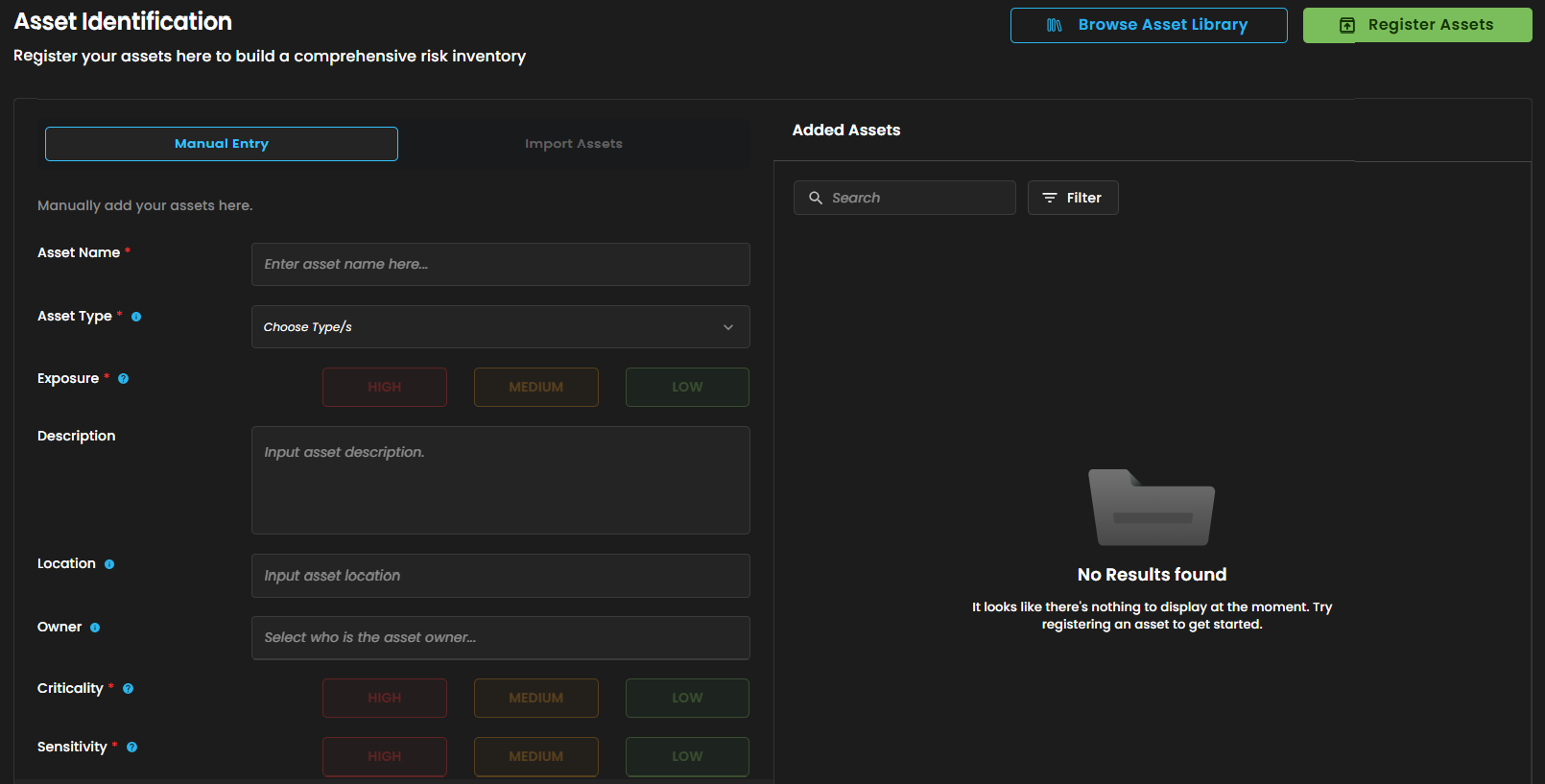](https://cytechint-docs-bookstack.s3.amazonaws.com/uploads/images/gallery/2025-10/tpf6eZIJEDOyYAp4-image.png) *Figure 4.3 Cyber Security Risk Management (CSRM) - Asset Inventory / Asset Library / Asset Identification* - It has 2 action buttons: - **Browse Asset Library** - Enables users to access pre-defined asset templates for quick import or inspiration. - **Register Assets** - Submits the form to add the entered asset to the inventory. \_\_\_\_\_\_\_\_\_\_\_\_\_\_\_\_\_\_\_\_\_\_\_\_\_\_\_\_\_\_\_\_\_\_\_\_\_\_\_\_\_\_\_\_\_\_\_\_\_\_\_\_\_\_\_\_\_\_\_\_\_\_\_\_\_\_\_\_\_\_\_\_\_\_\_\_\_\_\_\_\_\_\_\_\_\_\_\_\_\_\_\_\_\_\_\_\_\_\_\_\_\_\_\_\_\_\_\_\_\_\_\_\_\_\_\_\_\_\_\_\_\_\_\_\_\_\_\_\_\_\_\_\_\_\_\_\_\_\_\_\_\_\_\_ #### **Cyber Security Risk Management (CSRM): Assessed Asset** Designed to facilitate the identification, assessment, and classification of potential risks associated with organizational assets (e.g., hardware equipment). [](https://cytechint-docs-bookstack.s3.amazonaws.com/uploads/images/gallery/2025-10/7f9dyJBJUA0oTZGd-image.png) *Figure 5 Cyber Security Risk Management (CSRM) - Assessed Asset* **Search and Filter Section** - **Search Bar** - Allows text-based querying of the asset table for quick navigation. - **Filter Button** - Opens advanced filtering options for refining the asset list by criteria like type, owner, or criticality. **Action Buttons** - **Assess Asset Button** - This invites immediate engagement, triggering a modal or workflow for in-depth evaluation. [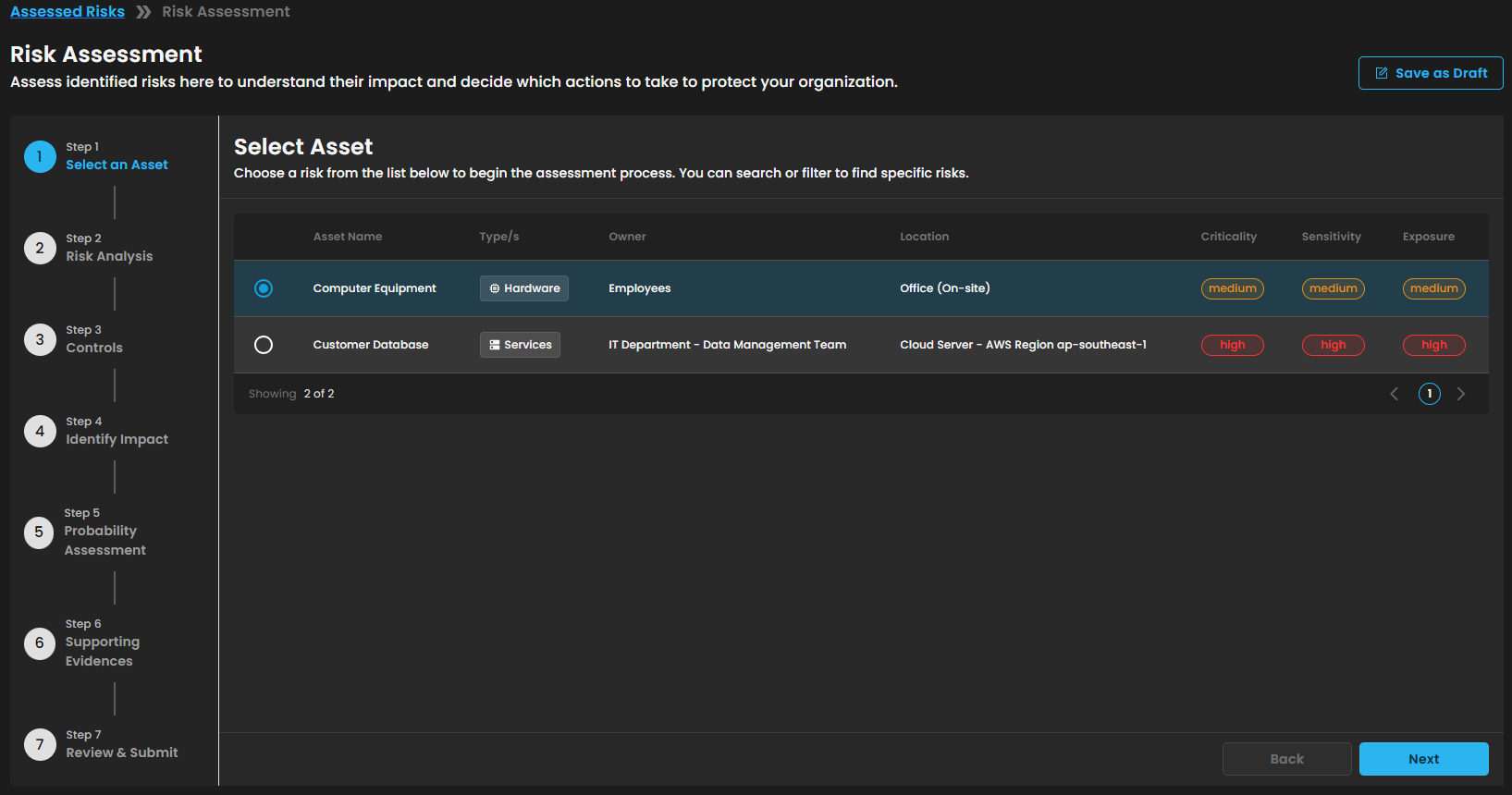](https://cytechint-docs-bookstack.s3.amazonaws.com/uploads/images/gallery/2025-10/up40O1VzKDBE2ryL-image.png) *Figure 5.1 Cyber Security Risk Management (CSRM) - Assessed Asset / Risk Assessment* - **Start Risk Identification** - This initiates the risk evaluation process for the specific asset. [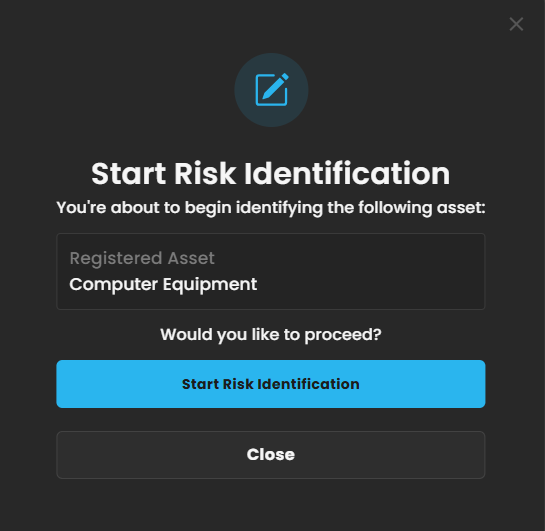](https://cytechint-docs-bookstack.s3.amazonaws.com/uploads/images/gallery/2025-10/ln5XmFUYMulMLOO7-image.png) *Figure 5.2 Cyber Security Risk Management (CSRM) - Assessed Asset / Start Risk Identification* \_\_\_\_\_\_\_\_\_\_\_\_\_\_\_\_\_\_\_\_\_\_\_\_\_\_\_\_\_\_\_\_\_\_\_\_\_\_\_\_\_\_\_\_\_\_\_\_\_\_\_\_\_\_\_\_\_\_\_\_\_\_\_\_\_\_\_\_\_\_\_\_\_\_\_\_\_\_\_\_\_\_\_\_\_\_\_\_\_\_\_\_\_\_\_\_\_\_\_\_\_\_\_\_\_\_\_\_\_\_\_\_\_\_\_\_\_\_\_\_\_\_\_\_\_\_\_\_\_\_\_\_\_\_\_\_\_\_\_\_\_\_\_\_ #### **Cyber Security Risk Management (CSRM): Risk Register** 1. **Critical Risks** - Displays the number of risks that require immediate attention based on asset criticality, sensitivity, and exposure. 2. **Risk Status** - Shows how many risks have already been assessed versus those pending assessment. 3. **Risk Distribution by Type** - Breakdown of all registered risks categorized by their type: Administrative, Technological, Physical, or Others. 4. **Risk Identified by Month** - Tracks the number of risks identified across your organization on a monthly basis. 5. **Risk Logs** - Shows the entire logs of the risks 6. **Risk Library** - Added Risks can be found in this section. 7. **Add Risks / Risk Identification** - Risks can be added in this section to be identified and document. [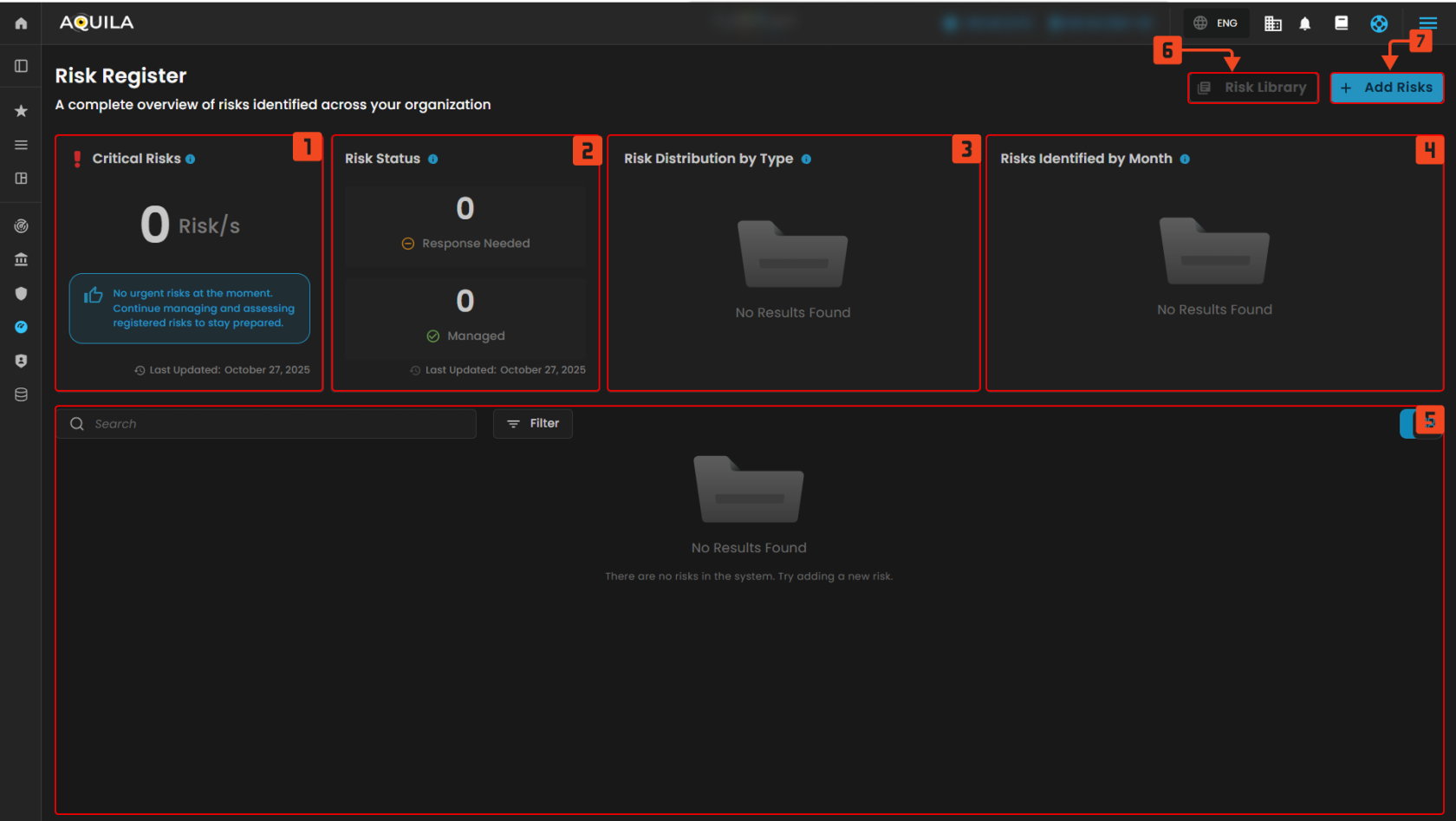](https://cytechint-docs-bookstack.s3.amazonaws.com/uploads/images/gallery/2025-10/BgDeLO11U2pSBr1M-test-1.png) *Figure 6 Cyber Security Risk Management (CSRM) - Risk Register* - **Add Risks / Risk Identification** [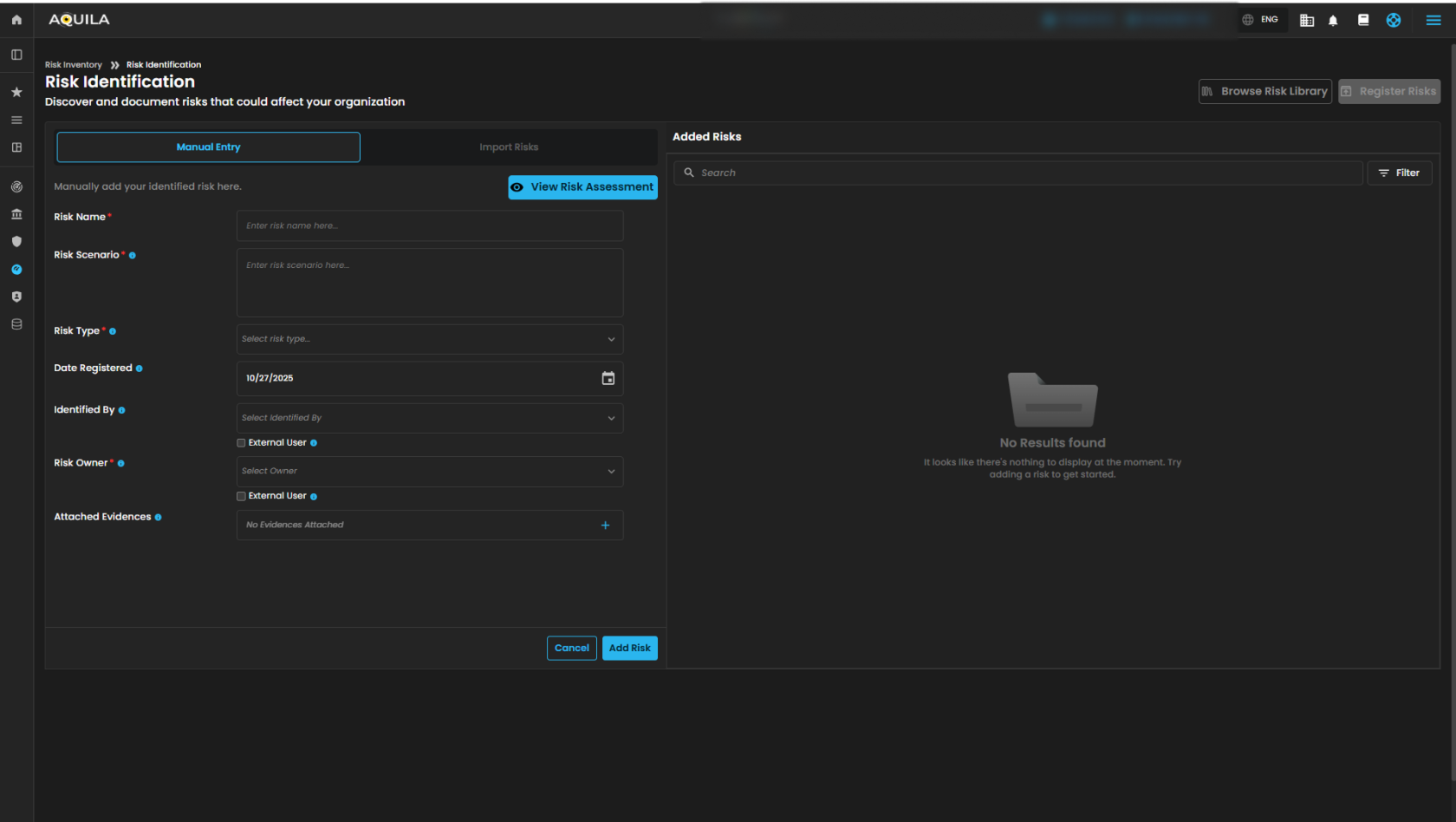](https://cytechint-docs-bookstack.s3.amazonaws.com/uploads/images/gallery/2025-10/kyWBHf25mMTy3sYr-test-3.png) *Figure 6.1 Cyber Security Risk Management (CSRM) - Risk Register / Add Risks* #### **Cyber Security Risk Management (CSRM): Risk Management** 1. **Risk Response Type** - Categorizes risks according to the type of response strategy used. It helps identify trends in how different response types are being utilized and can highlight areas where certain strategies may be more effective 2. **Top Risk Owner** - Identify the individuals or teams most frequently responsible for managing risks. 3. **Number of Risk Severity** - Shows the count of risks divided by their severity levels. It helps in understanding the distribution of risks and focusing attention on the most severe ones that require immediate attention. 4. **Risk Repository** - Shows the risk logs and their details. [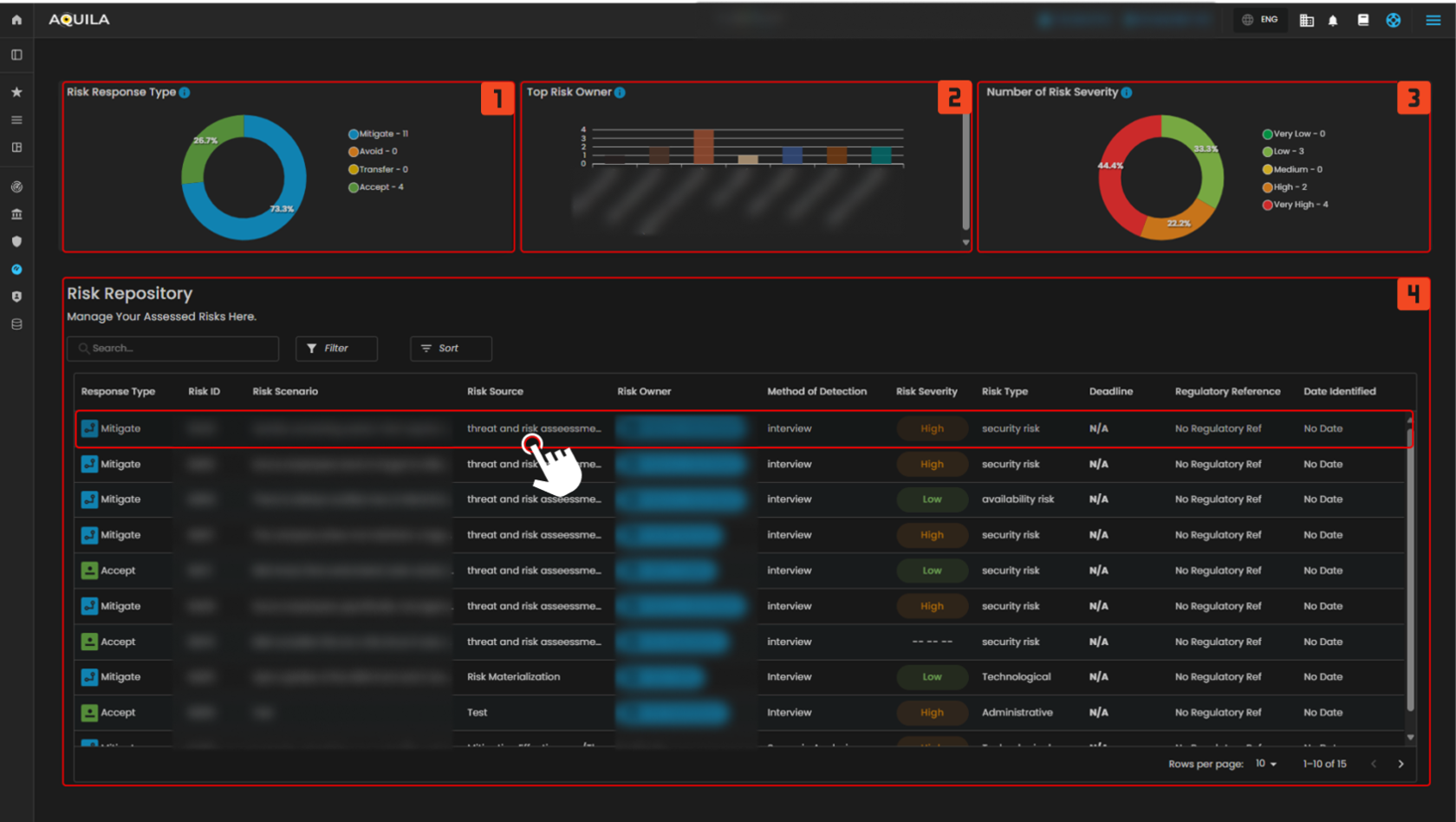](https://cytechint-docs-bookstack.s3.amazonaws.com/uploads/images/gallery/2025-10/0fUVR8R6udhMOpCS-test-9.png) *Figure 7 Cyber Security Risk Management (CSRM) - Risk Management* When one of the risks from the risk repository is clicked it will show a pop-up window for further details. [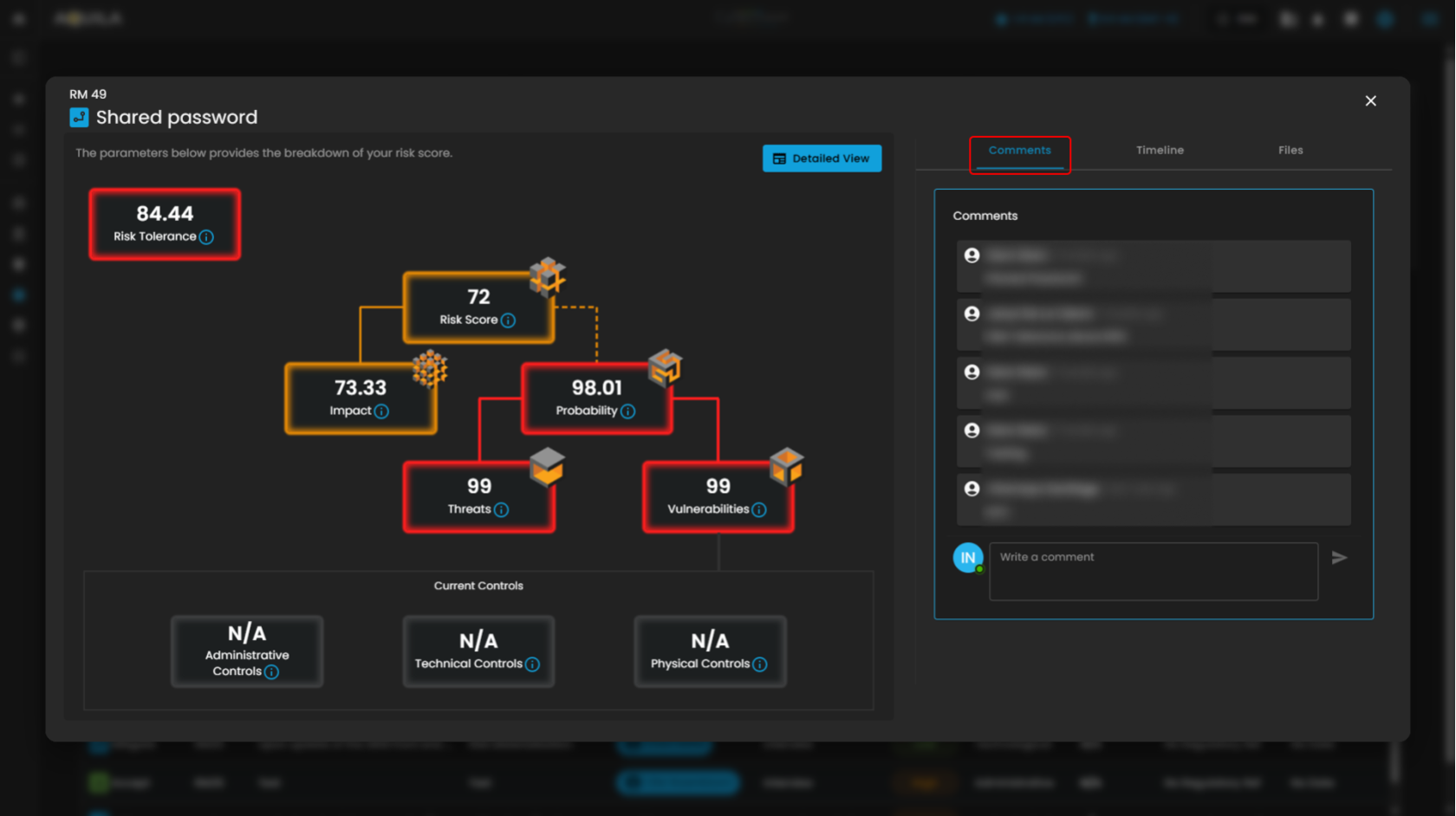](https://cytechint-docs-bookstack.s3.amazonaws.com/uploads/images/gallery/2025-10/DRy5k81o7jus85wQ-test-6.png) *Figure 7.1 Cyber Security Risk Management (CSRM) - Risk Management / Risk Repository Details / Comments* In this section it shows risk timelines [](https://cytechint-docs-bookstack.s3.amazonaws.com/uploads/images/gallery/2025-10/pKLJhPoR19mfdOrM-test-7.png) *Figure 7.2 Cyber Security Risk Management (CSRM) - Risk Management / Risk Repository Details / Timeline* Shows the files associated by the risks [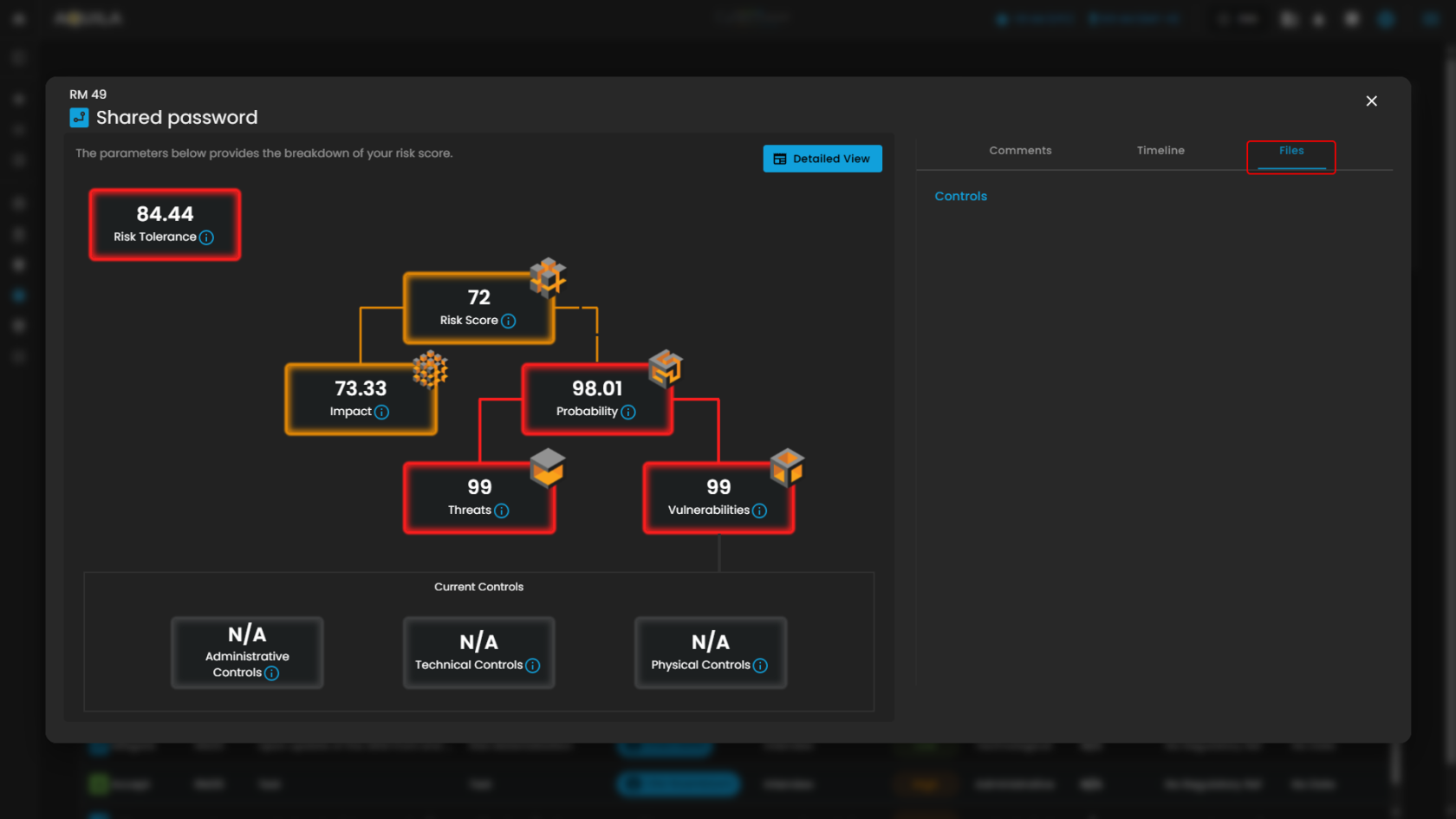](https://cytechint-docs-bookstack.s3.amazonaws.com/uploads/images/gallery/2025-10/RKJ0JjmBa1WUreDN-test-8.png) *Figure 7.3 Cyber Security Risk Management (CSRM) - Risk Management / Risk Repository Details / Files* Clicking the detailed view button opens an in-depth panel that summarizes all relevant information about the identified risk, helping users understand its nature, impact, and current status. [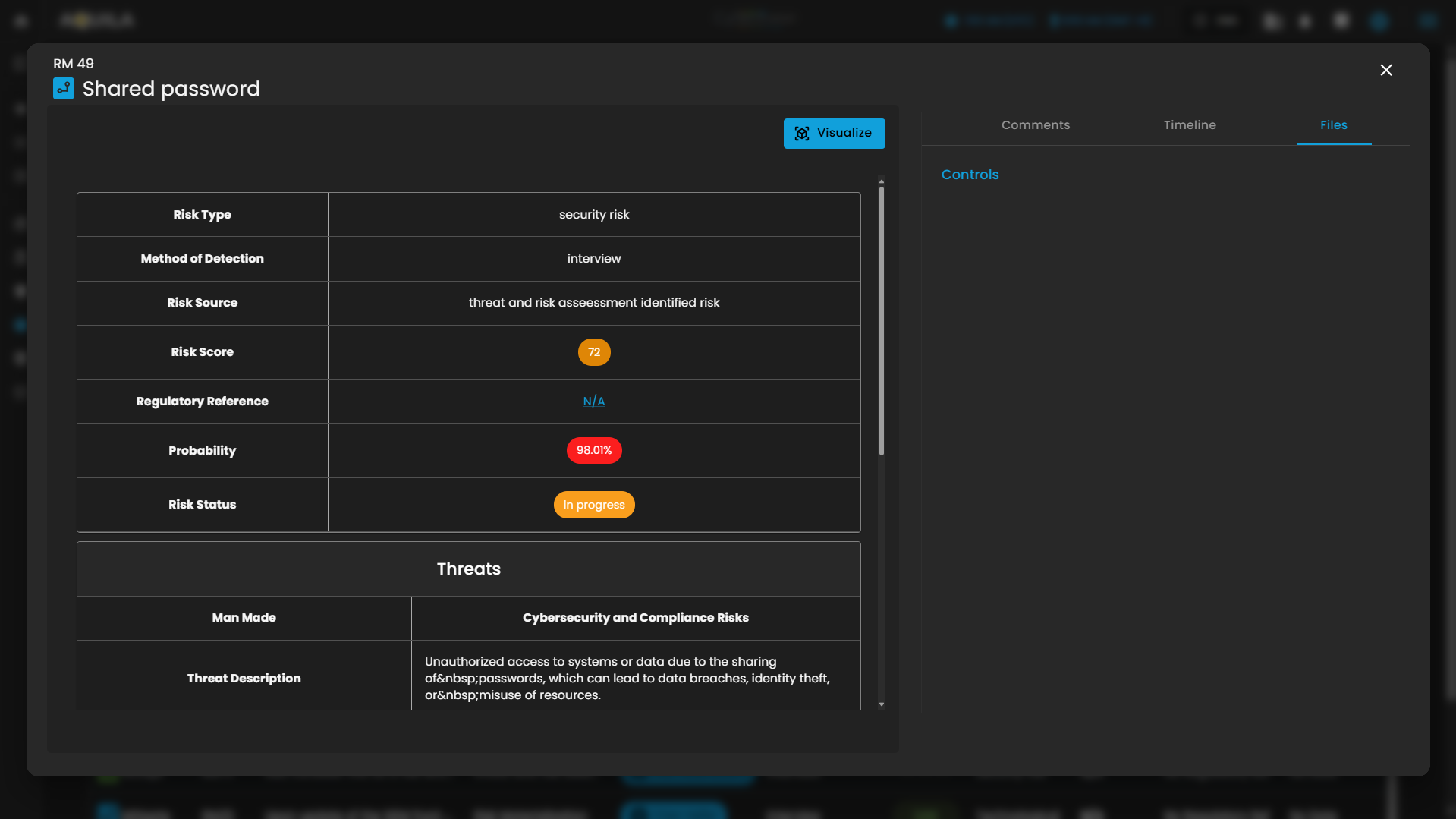](https://cytechint-docs-bookstack.s3.amazonaws.com/uploads/images/gallery/2025-10/cNy49Q8Img7FiqME-image.png) *Figure 7.4 Cyber Security Risk Management (CSRM) - Risk Management / Risk Repository / View Details* #### **Cyber Security Risk Management (CSRM): Task Management** 1. **Task Gantt Chart** This section displays a **visual timeline** of all active tasks, allowing users to easily track task progress and overlapping schedules. - Each row represents an individual task, showing its **assignee**, **start date**, and **end date**. - The horizontal bar illustrates the task’s **duration** within the selected date range. - The **search bar** at the top allows filtering of tasks by name or keyword. - Users can scroll horizontally or vertically to view all scheduled items. 2. **Task Table** This section provides a **detailed tabular view** of all tasks recorded in the system. Each row contains the following fields: - **Risk ID** – References the related risk entry from the risk register. - **Task ID** – Unique identifier for each task. - **Task Title** – The specific name or activity assigned. - **Risk Owner** – The individual responsible for managing the associated risk. - **Assignee** – The user assigned to complete the task. - **Start Date / End Date** – Defines the task timeline. - **Status** – Displays the current progress (e.g., *Not Started*, *In Progress*, *Completed*). A search field allows users to quickly locate tasks, and pagination controls appear at the bottom for navigation through large datasets. 3. **Task Overview** This panel provides **summary metrics** for all tasks currently in the system. It includes the following widgets: - **Unassigned Tasks** – Total number of tasks without an assigned user. - **New Tasks** – Tasks recently created and awaiting action. - **Tasks Completed** – Count of tasks marked as completed. - **Total Tasks** – Total number of tasks across all statuses. A **Create Task** button enables users to add new task entries, while the **filter dropdown** allows sorting of data by criteria such as due date or priority. [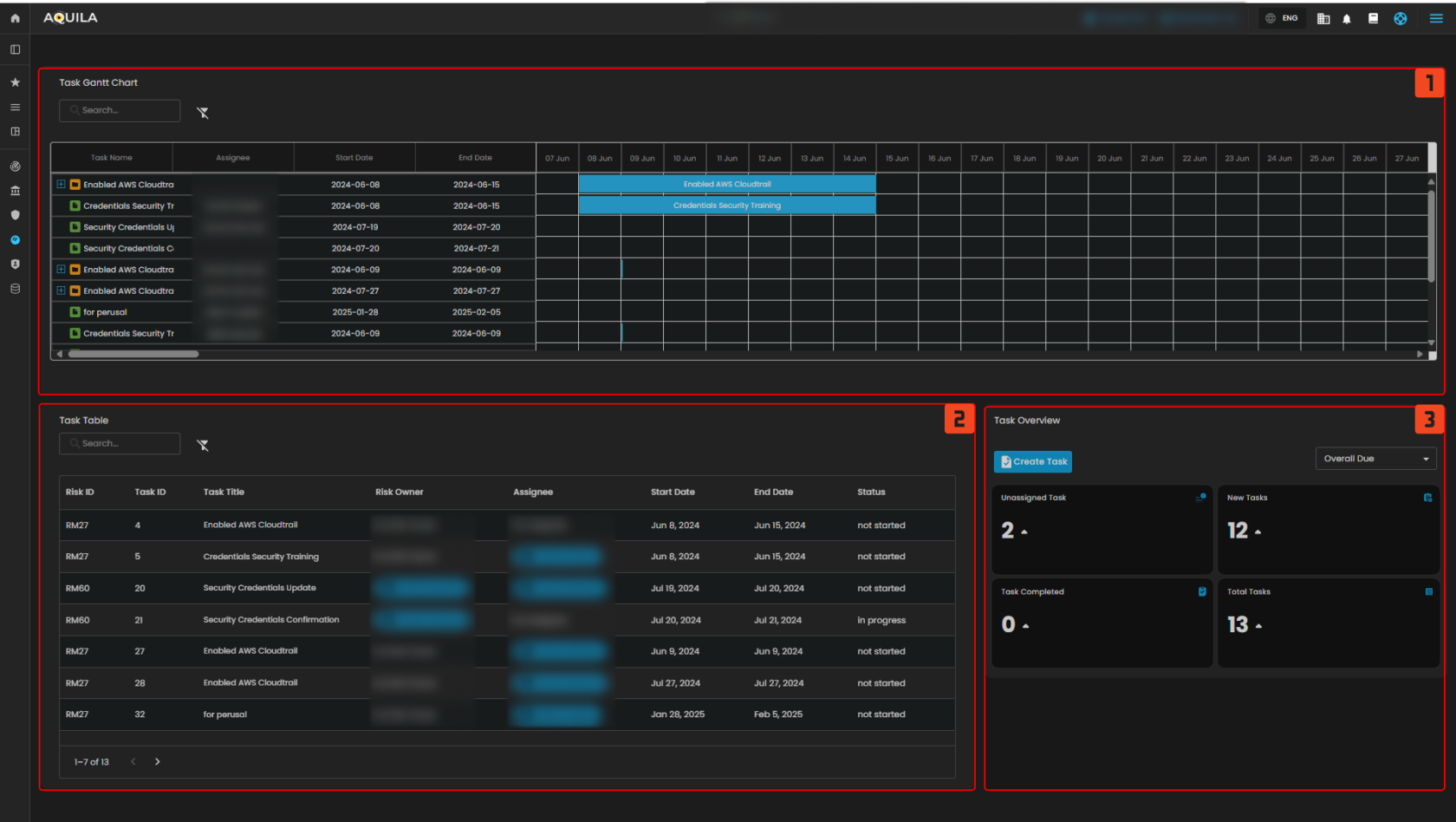](https://cytechint-docs-bookstack.s3.amazonaws.com/uploads/images/gallery/2025-10/qiBEqyTGVRq0yZey-test-11.png) *Figure 8 Cyber Security Risk Management (CSRM) - Task Management* - **Create Task** [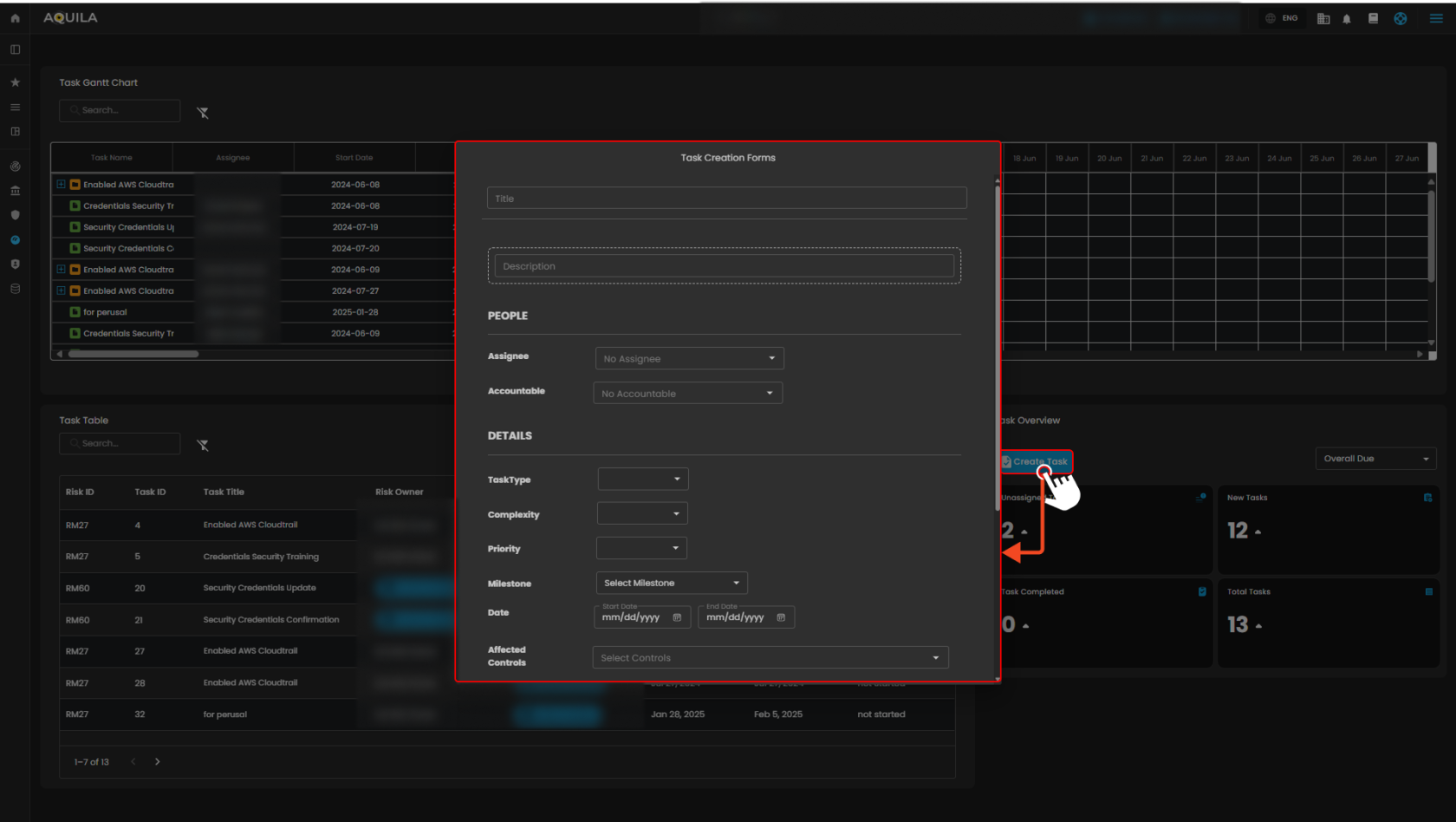](https://cytechint-docs-bookstack.s3.amazonaws.com/uploads/images/gallery/2025-10/zPazntpqxUcJa0mS-test-12.png) *Figure 8.1 Cyber Security Risk Management (CSRM) - Task Management / Create Task* #### **Cyber Security Risk Management (CSRM): Geo Location** The **Geographic Map** module provides a **visual representation of global market cybersecurity indicators**, allowing users to analyze risk exposure, vulnerability, and resiliency by geographic region. This feature supports **data-driven decision-making** by correlating regional cybersecurity performance metrics with global threat intelligence. #### **World Map Visualization** - The central panel displays a **world map** highlighting different regions or countries. - When a region is selected (e.g., *Japan*), it is visually emphasized on the map. - The system retrieves and displays region-specific cybersecurity metrics on the right-hand side. #### **Regional Metrics** Four key indicators are shown for the selected region: - **Market Cyber Resiliency** – Indicates the overall ability of the market to withstand and recover from cyber threats. A higher percentage represents stronger resilience. - **Market Vulnerability Level** – Reflects the percentage of potential weaknesses or exposure within the market’s cybersecurity posture. - **Market Threat Level** – Shows the current assessed intensity of cyber threats targeting the market. - **Market Impact Level** – Represents the estimated effect or disruption that a successful cyber incident could have within the region. #### **Region Selection and Configuration** - Use the **Select Region** dropdown menu to choose a country or area of interest. - After selection, the associated data is automatically updated on the display. - Click **Save Changes** to confirm the selected region or update monitoring parameters. - The **Clear Selection** option resets the map and clears any chosen region. [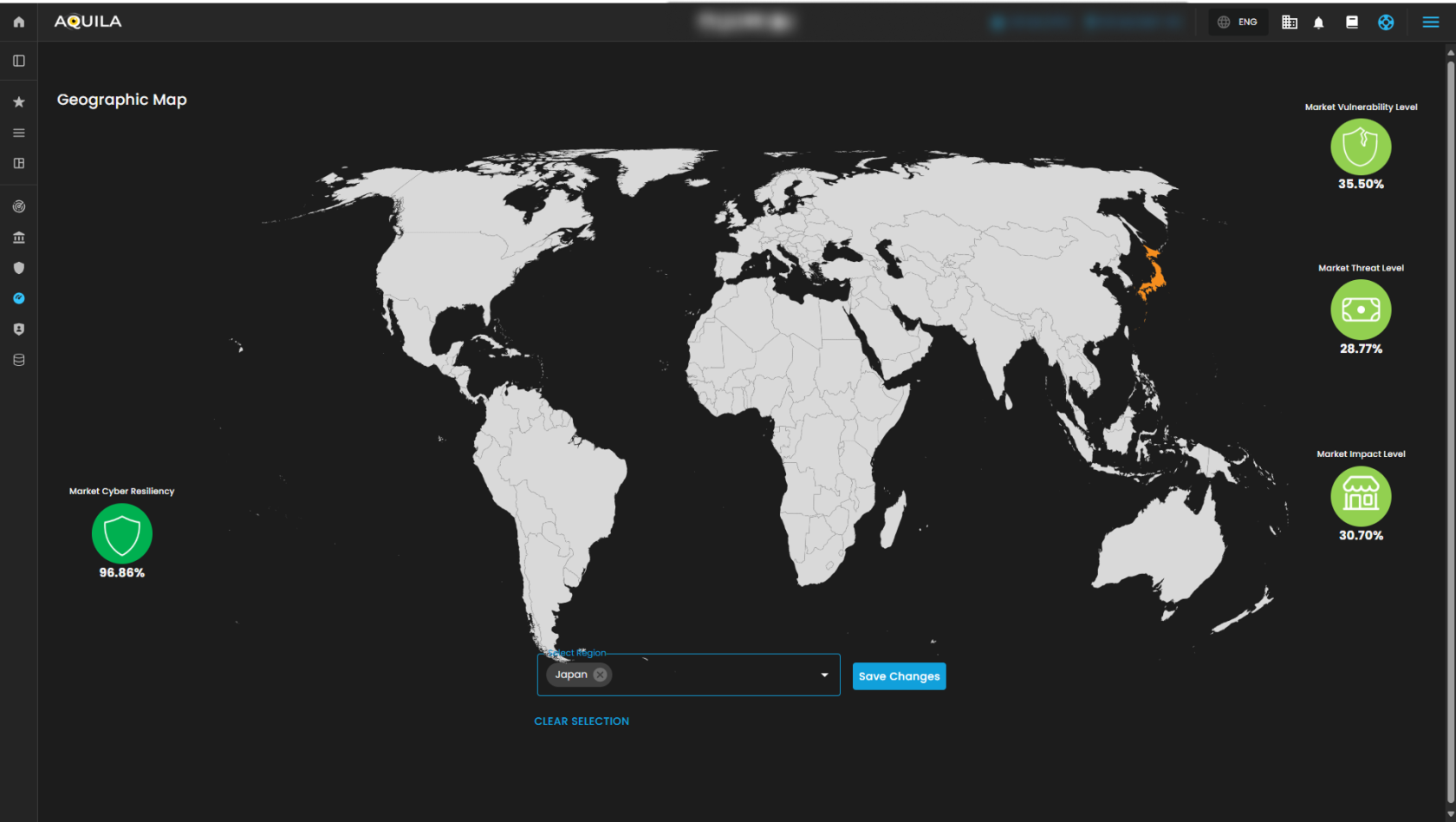](https://cytechint-docs-bookstack.s3.amazonaws.com/uploads/images/gallery/2025-10/mGGfqSNsDgpZvXL5-test-13.png) *Figure 9 Cyber Security Risk Management (CSRM) - Geographic Location*