# CyTech AQUILA - Cloud Security Posture Management (CSPM)

##### <span style="color: rgb(53, 152, 219);">**Overview:**</span>

<span style="color: rgb(0, 0, 0);">CSPM helps secure your cloud infrastructure by discovering and evaluating cloud services (e.g., storage, compute, IAM) against CIS benchmarks to identify and remediate configuration risks that may affect data confidentiality, integrity, and availability.</span>

##### <span style="color: rgb(53, 152, 219);">**Key Features:**</span>

- <span style="color: rgb(0, 0, 0);">**Cloud Provider Support:** Compatible with **AWS**, **GCP**, and **Microsoft Azure**.</span>
- <span style="color: rgb(0, 0, 0);">**Evaluation Frequency:** Resources are evaluated every **24 hours** using **read-only credentials**.</span>
- <span style="color: rgb(0, 0, 0);">**Findings &amp; Dashboards:**</span>
    
    
    - <span style="color: rgb(0, 0, 0);">High-level insights in the **Cloud Security Posture dashboard**.</span>
    - <span style="color: rgb(0, 0, 0);">Detailed findings available on the **Findings page**.</span>

#### <span style="color: rgb(53, 152, 219);">**Pre-requisites**</span>

1. <span style="color: rgb(0, 0, 0);">**Access to CyTech - AQUILA**</span>
    - <span style="color: rgb(0, 0, 0);">Only users assigned the **"Owner"** or **"Admin"** role can access the Log Collector installation resources within the platform.</span>

<p class="callout success"><span style="color: rgb(53, 152, 219);">**To navigate to CSPM Module please follow the instructions below:**</span></p>

<div class="x_elementToProof" id="bkmrk-step1%3A-log-in-to-cyt"><span style="color: rgb(0, 0, 0);">**Step 1: Log in to CyTech - AQUILA.** *click here --&gt;* **[usdc.cytechint.io](https://usdc.cytechint.io/)**</span></div><div class="x_elementToProof" id="bkmrk-step2%3A-click-on-cybe"><span style="color: rgb(0, 0, 0);">**Step 2: Click on Cyber Monitoring.**</span></div><div class="x_elementToProof" id="bkmrk-step3%3A-choose-cloud-"></div>[![Test (32).png](https://cytechint-docs-bookstack.s3.amazonaws.com/uploads/images/gallery/2025-10/scaled-1680-/CZmFB8T63ycEYv0N-test-32.png)](https://cytechint-docs-bookstack.s3.amazonaws.com/uploads/images/gallery/2025-10/CZmFB8T63ycEYv0N-test-32.png)

<span style="color: rgb(0, 0, 0);">**Step 3: Choose Cloud Security Posture Management (CSPM).**</span>

[![Test (33).png](https://cytechint-docs-bookstack.s3.amazonaws.com/uploads/images/gallery/2025-10/scaled-1680-/65dRaxLMLswRocwc-test-33.png)](https://cytechint-docs-bookstack.s3.amazonaws.com/uploads/images/gallery/2025-10/65dRaxLMLswRocwc-test-33.png)

<span style="color: rgb(0, 0, 0);">**Step 4: Hover into leftmost panel to view all the CSPM sections.**</span>

[![Test (34).png](https://cytechint-docs-bookstack.s3.amazonaws.com/uploads/images/gallery/2025-10/scaled-1680-/G40h0u4zmaK3PpmH-test-34.png)](https://cytechint-docs-bookstack.s3.amazonaws.com/uploads/images/gallery/2025-10/G40h0u4zmaK3PpmH-test-34.png)

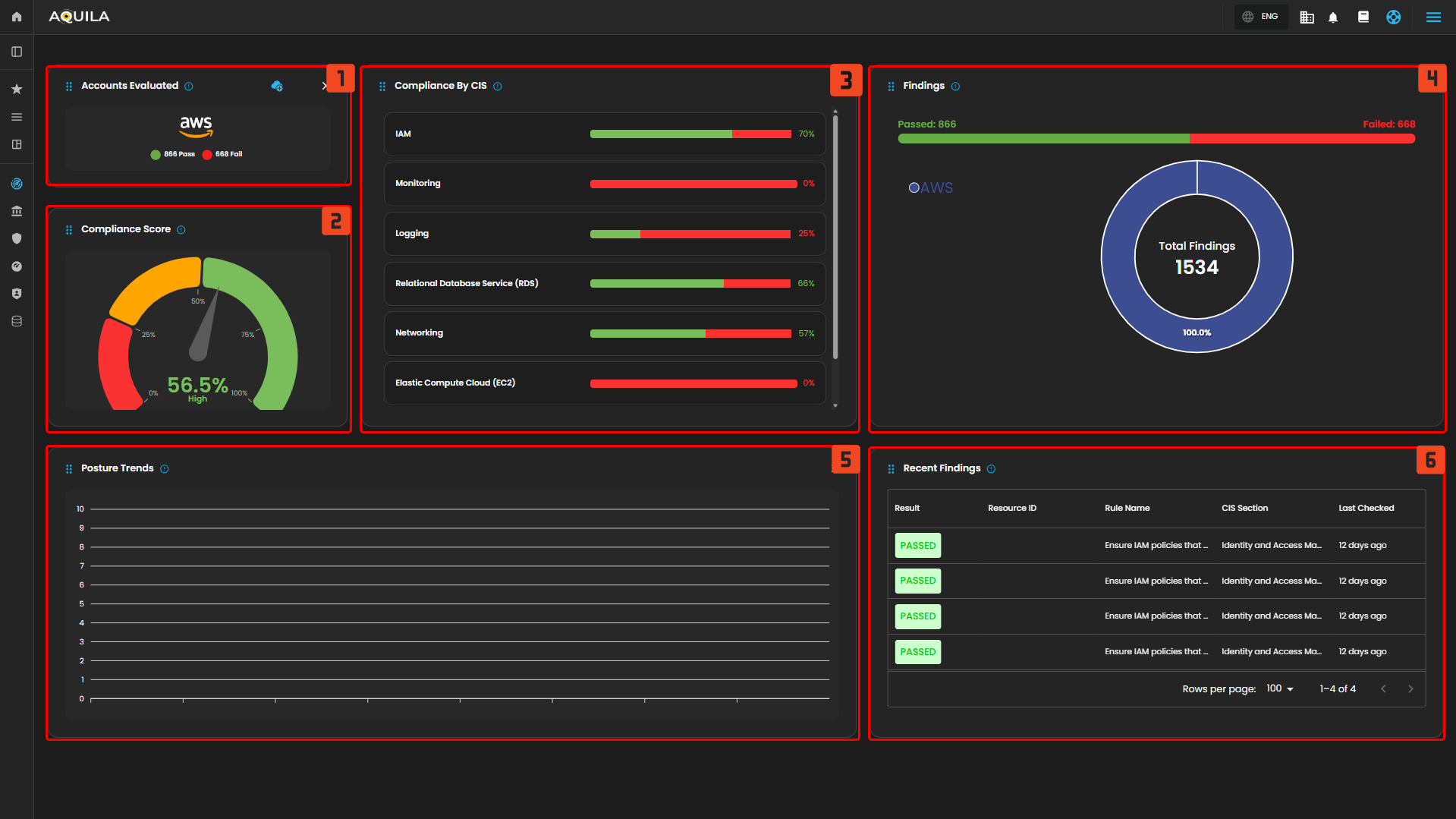
<p class="callout success"><span style="color: rgb(53, 152, 219);">**Here in the CSPM Dashboard you can view all the evaluations. Such as Account Evaluated, Compliance Score, Compliance by Center in Internet Security (CIS), Findings and Posture Trends.**</span></p>

[![HEHE.png](https://cytechint-docs-bookstack.s3.amazonaws.com/uploads/images/gallery/2026-02/scaled-1680-/kqYqDCFc3sVBulOQ-hehe.png)](https://cytechint-docs-bookstack.s3.amazonaws.com/uploads/images/gallery/2026-02/kqYqDCFc3sVBulOQ-hehe.png)

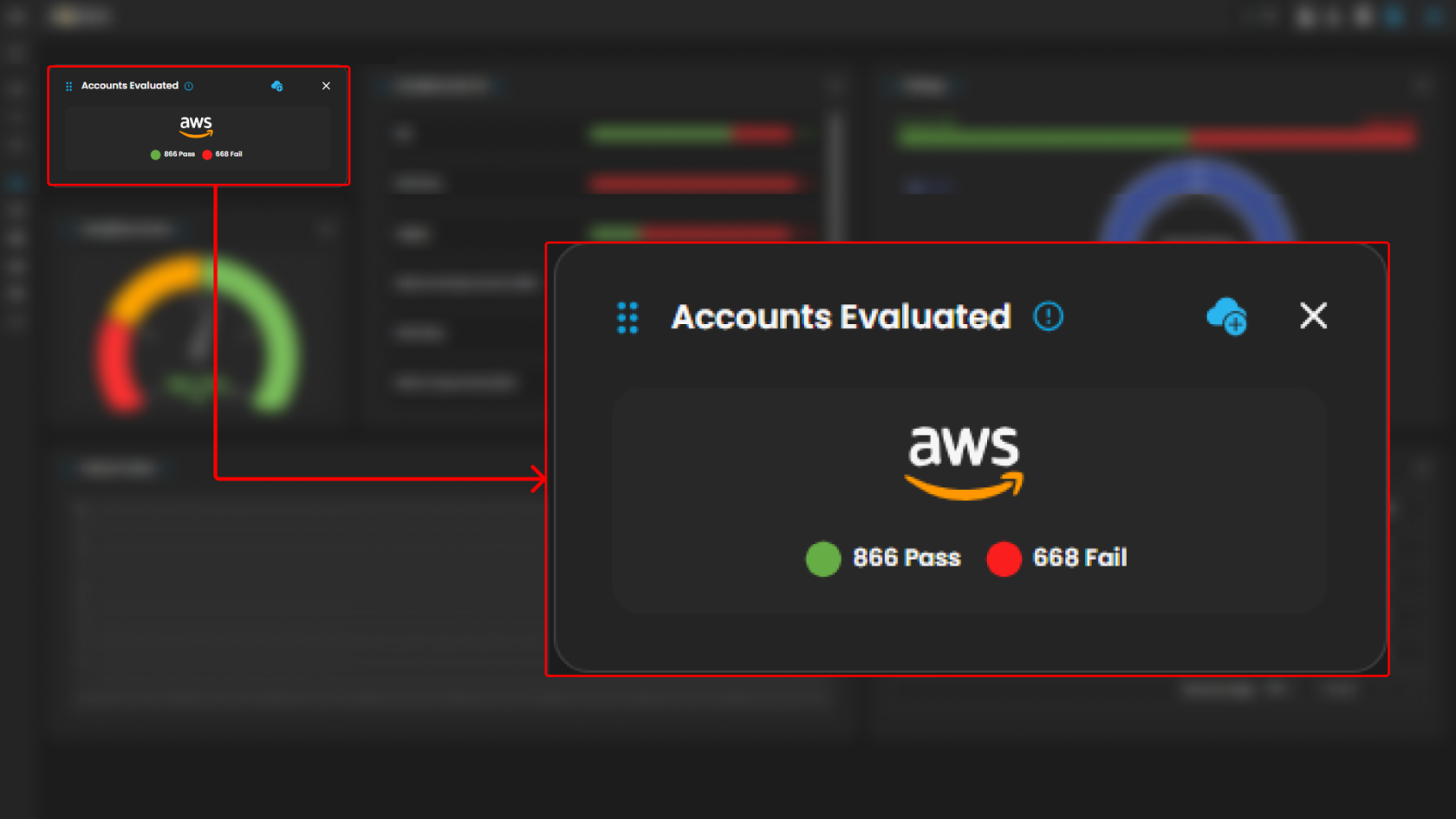
1. <span style="color: rgb(0, 0, 0);">**Account Evaluated:**</span>
    - <span style="color: rgb(0, 0, 0);">This refers to the specific cloud accounts that have been assessed for security compliance. An "account" in this context typically represents a collection of cloud resources under a single administrative domain within a cloud service provider (e.g., an AWS account, an Azure subscription). Evaluating an account involves checking its resources and configurations against security benchmarks.</span>[![HEHE (1).png](https://cytechint-docs-bookstack.s3.amazonaws.com/uploads/images/gallery/2026-02/scaled-1680-/wN4YGsoHTNLPts6I-hehe-1.png)](https://cytechint-docs-bookstack.s3.amazonaws.com/uploads/images/gallery/2026-02/wN4YGsoHTNLPts6I-hehe-1.png)
        
        <span style="color: rgb(0, 0, 0);">  
        </span>
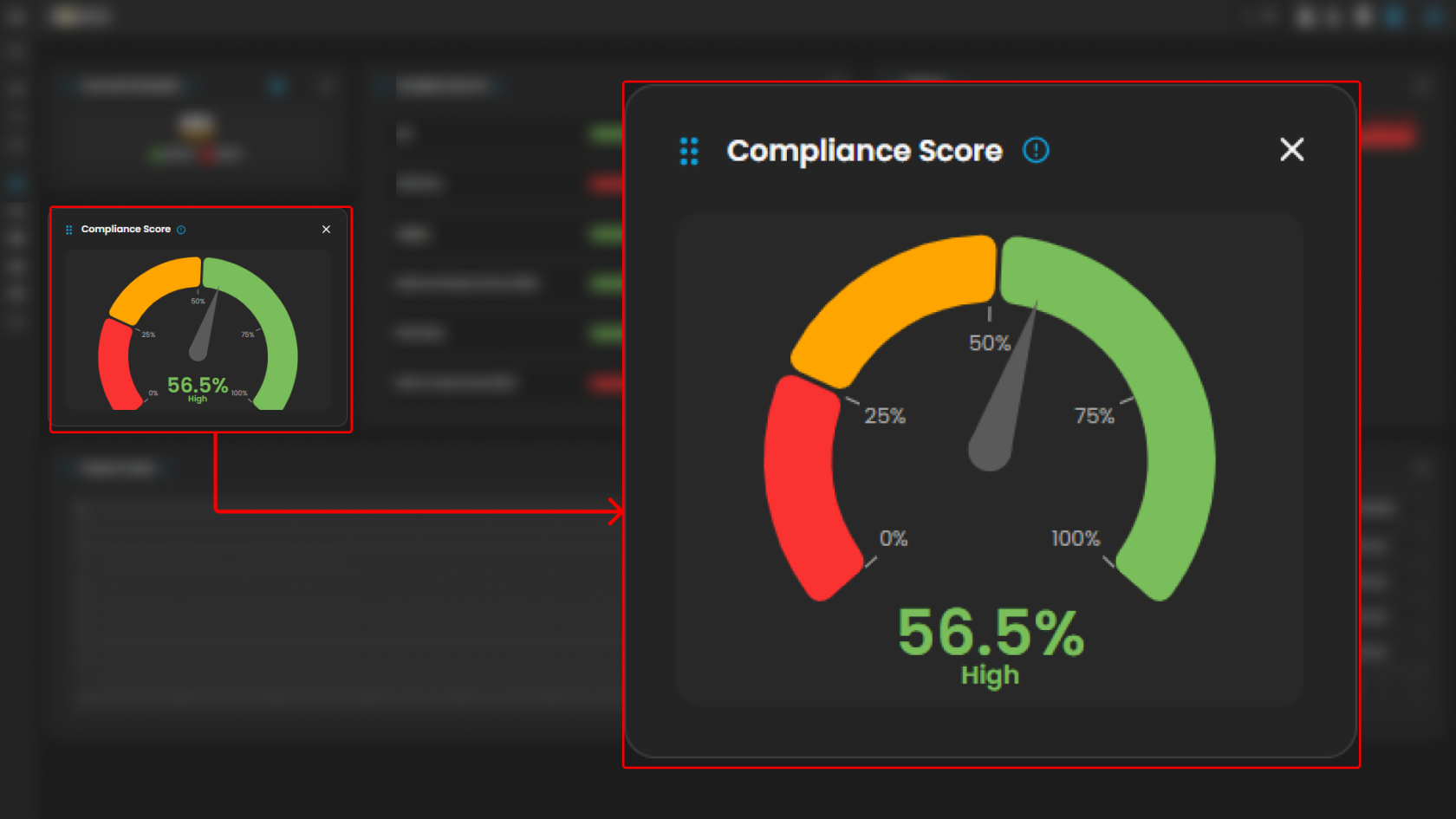
2. **<span style="color: rgb(0, 0, 0);">Compliance Score:</span>**
    - <span style="color: rgb(0, 0, 0);">The compliance score is a metric that indicates how well a cloud account or resource adheres to predefined security benchmarks, such as those set by the Center for Internet Security (CIS). It is usually expressed as a percentage, with a higher score indicating better compliance. This score helps organizations quickly assess their security posture and identify areas needing improvement.  
        </span>[![HEHE (2).png](https://cytechint-docs-bookstack.s3.amazonaws.com/uploads/images/gallery/2026-02/scaled-1680-/ZGbE2YMpZMWUJLAQ-hehe-2.png)](https://cytechint-docs-bookstack.s3.amazonaws.com/uploads/images/gallery/2026-02/ZGbE2YMpZMWUJLAQ-hehe-2.png)
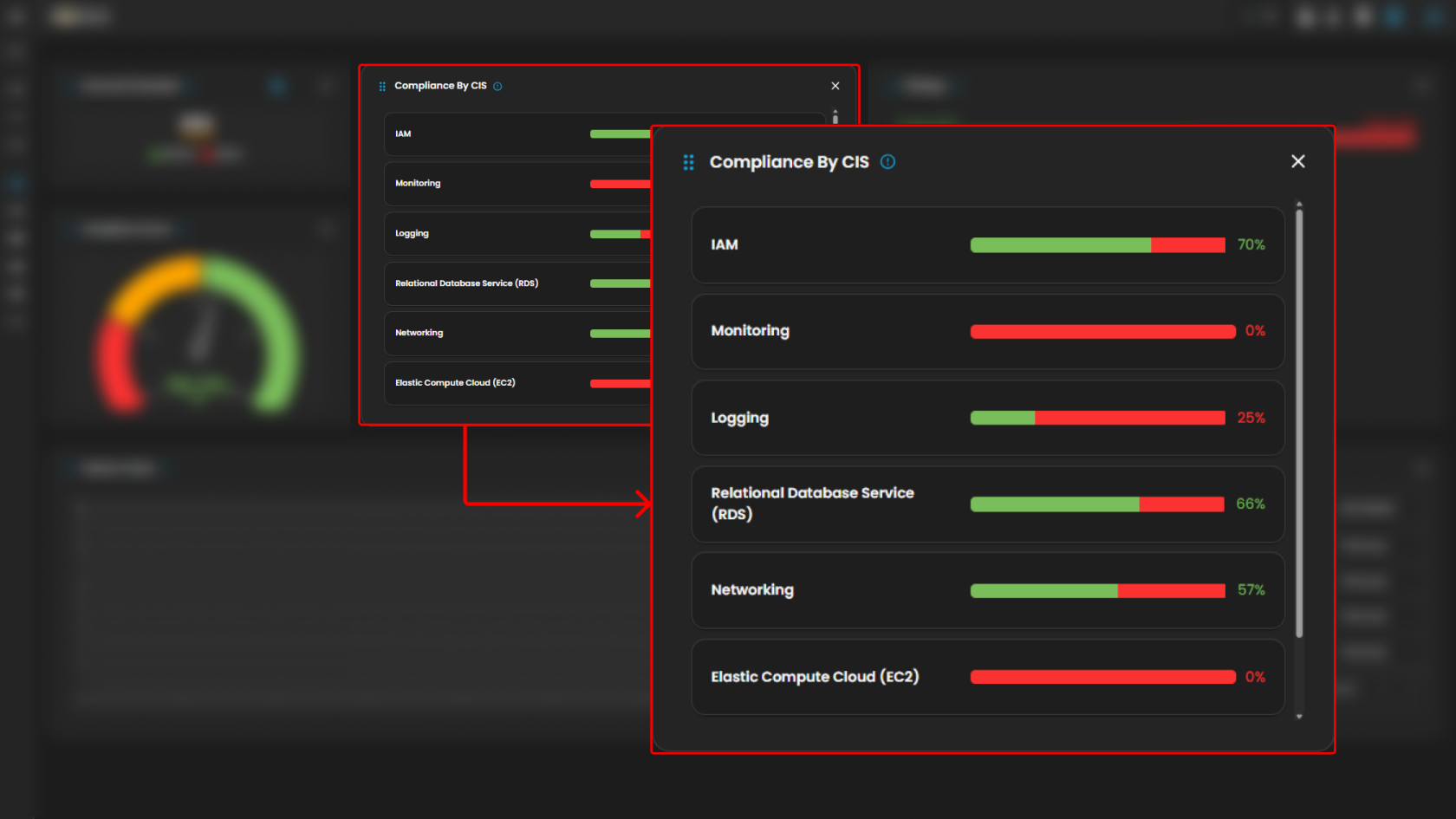
3. **<span style="color: rgb(0, 0, 0);">Compliance by Center for Internet Security (CIS):</span>**
    
    
    - <span style="color: rgb(0, 0, 0);">This refers to the evaluation of cloud resources against the security guidelines and best practices defined by the CIS benchmarks. These benchmarks provide a set of controls and recommendations to secure cloud environments. Compliance by CIS helps organizations ensure their configurations align with industry standards for security.  
        </span>[![HEHE (3).png](https://cytechint-docs-bookstack.s3.amazonaws.com/uploads/images/gallery/2026-02/scaled-1680-/XHCf6UMEinLTKUJ4-hehe-3.png)](https://cytechint-docs-bookstack.s3.amazonaws.com/uploads/images/gallery/2026-02/XHCf6UMEinLTKUJ4-hehe-3.png)
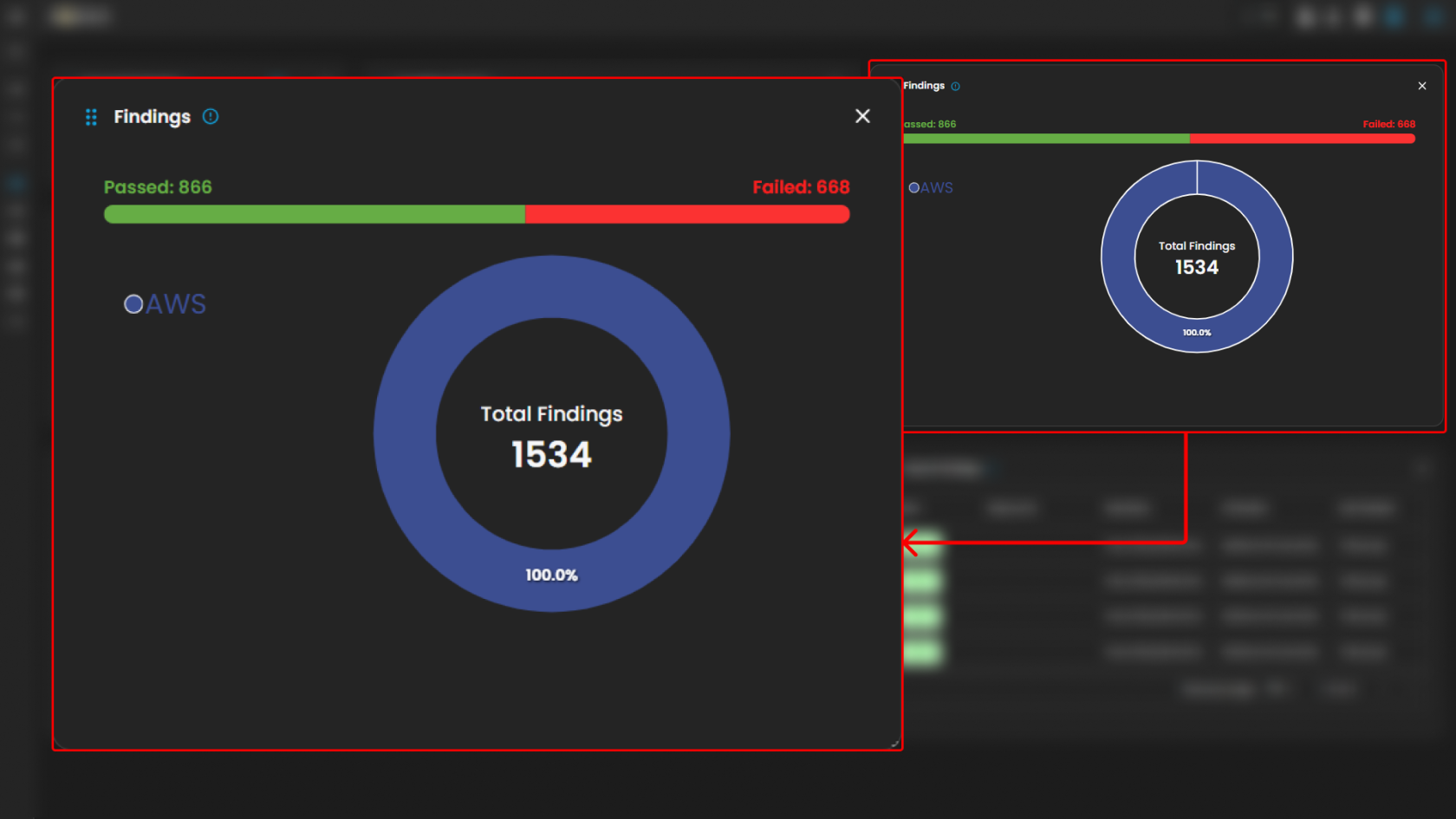
4. **<span style="color: rgb(0, 0, 0);">Findings:</span>**
    - <span style="color: rgb(0, 0, 0);">Findings are the results of the security assessments conducted by the CSPM module. They detail specific issues or misconfigurations identified during the evaluation process. Each finding typically includes information about the affected resource, the nature of the issue, its severity, and recommended remediation steps.  
        </span>[![HEHE (4).png](https://cytechint-docs-bookstack.s3.amazonaws.com/uploads/images/gallery/2026-02/scaled-1680-/wg3Z3cGt0TKZqMPL-hehe-4.png)](https://cytechint-docs-bookstack.s3.amazonaws.com/uploads/images/gallery/2026-02/wg3Z3cGt0TKZqMPL-hehe-4.png)
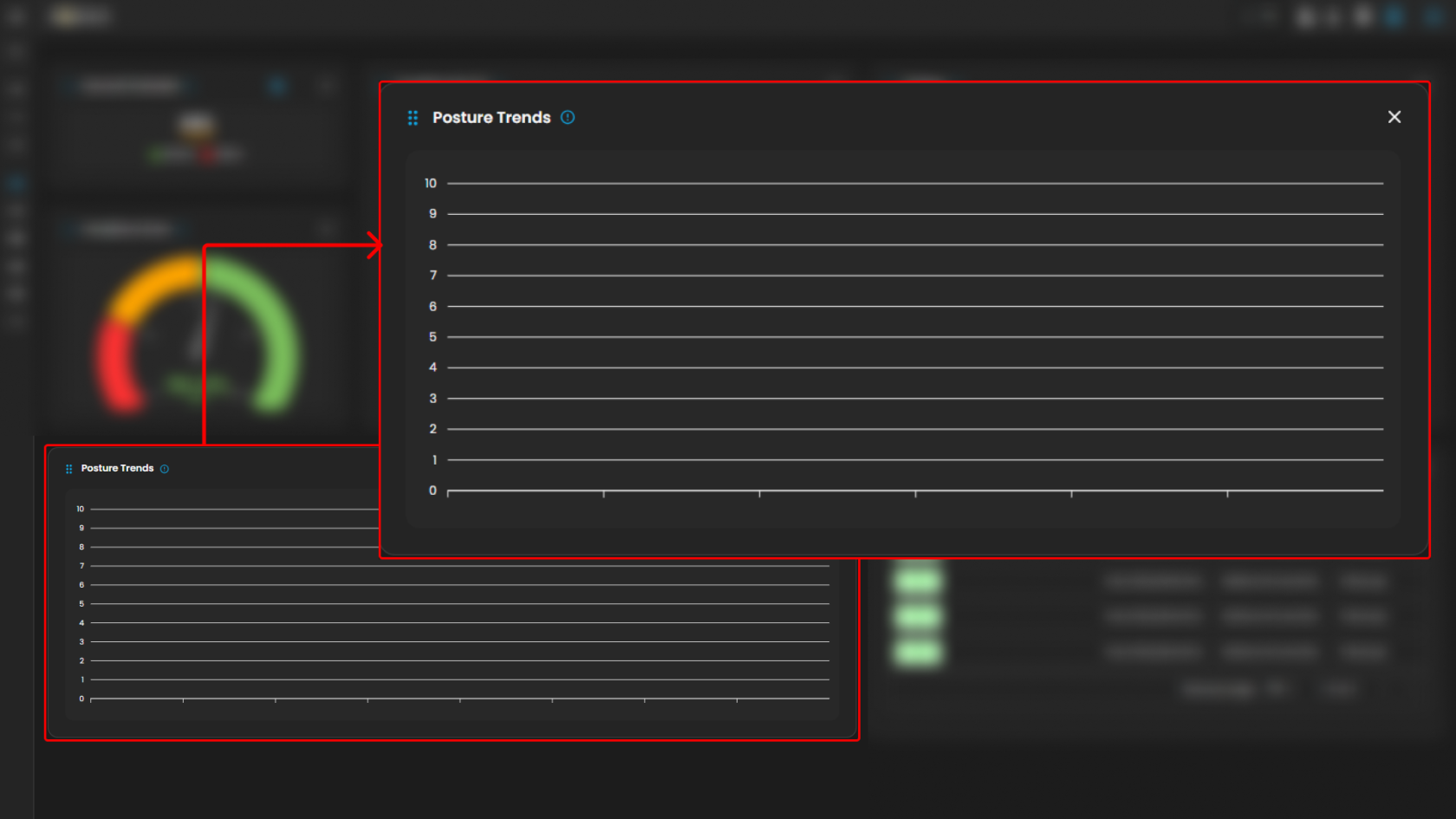
5. **<span style="color: rgb(0, 0, 0);">Posture Trends:</span>**
    - <span style="color: rgb(0, 0, 0);">Posture trends refer to the analysis of changes in security posture over time. This involves tracking improvements or regressions in compliance scores and findings. Understanding posture trends helps organizations identify patterns, measure the effectiveness of their security initiatives, and make informed decisions about future security strategies.  
        </span>[![HEHE (5).png](https://cytechint-docs-bookstack.s3.amazonaws.com/uploads/images/gallery/2026-02/scaled-1680-/8gcw9dM62E3IXbM2-hehe-5.png)](https://cytechint-docs-bookstack.s3.amazonaws.com/uploads/images/gallery/2026-02/8gcw9dM62E3IXbM2-hehe-5.png)
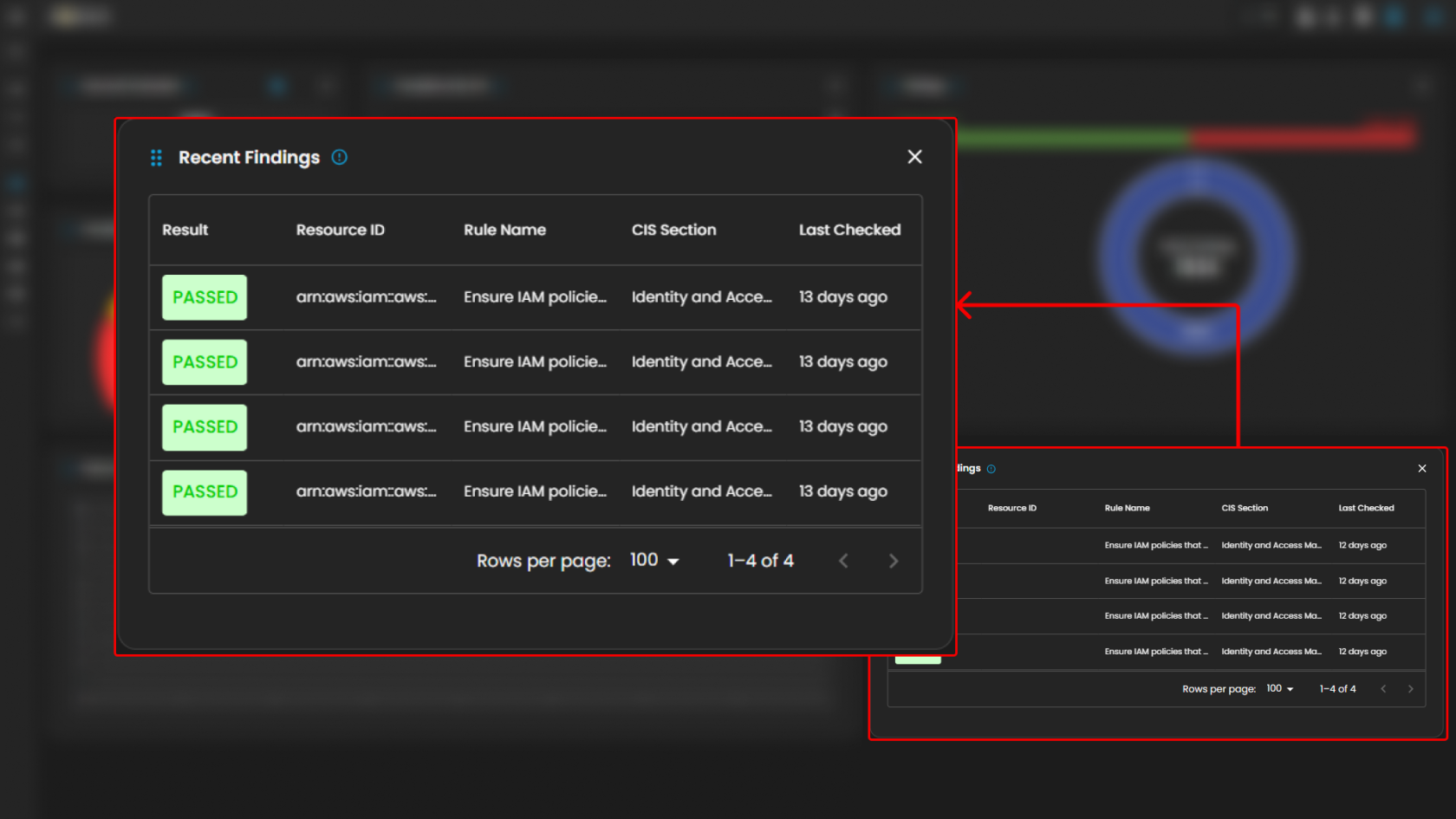
6. <span style="color: rgb(0, 0, 0);">**Recent Findings:**  
    </span>
    - <span style="color: rgb(0, 0, 0);">In this section, a list of recent findings can be found below with their details. Such as **Result**, **Resource ID,** **Rule Name**, **Cis Section**, and **Last Checked.** </span>[![HEHE (6).png](https://cytechint-docs-bookstack.s3.amazonaws.com/uploads/images/gallery/2026-02/scaled-1680-/L21RftqRaLSsDiRT-hehe-6.png)](https://cytechint-docs-bookstack.s3.amazonaws.com/uploads/images/gallery/2026-02/L21RftqRaLSsDiRT-hehe-6.png)

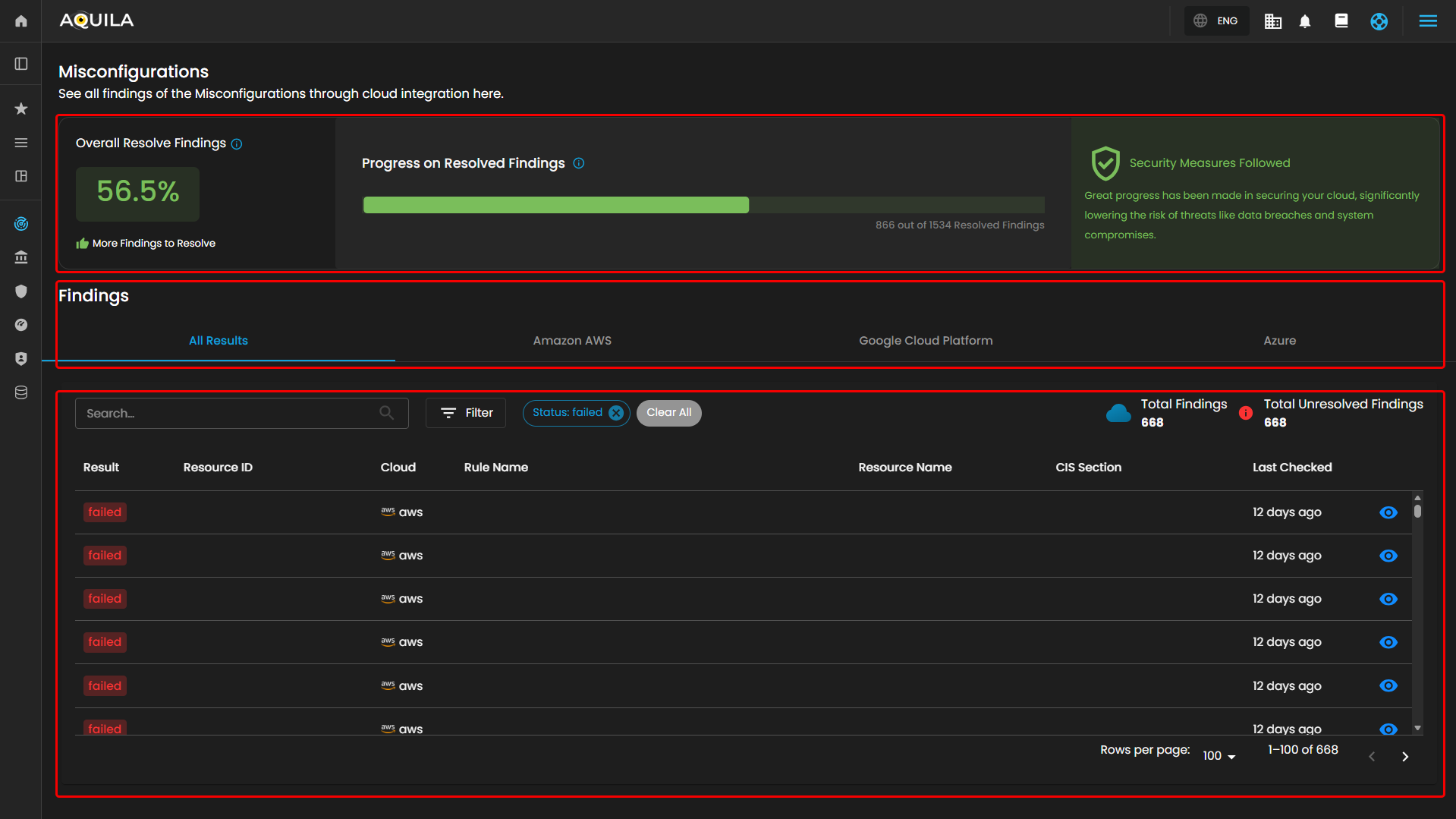
<p class="callout success"><span style="color: rgb(53, 152, 219);">**In the Findings Dashboard - it shows you all the detailed misconfigurations evaluated by our CSPM Module. Here you view the Result, Resource ID, Resource Name, Resource Type, Rule Number, Rule Name, CIS Section, Last Checked and Cloud.**</span></p>

##### <span style="color: rgb(0, 0, 0);">**Misconfigurations**</span>

- <span style="color: rgb(0, 0, 0);">This section gives an overview of all misconfiguration findings detected from cloud integrations across AWS, GCP, and Azure.</span>
    - <span style="color: rgb(0, 0, 0);">**Overall Resolve Findings**</span>
        - <span style="color: rgb(0, 0, 0);">Displays the percentage of resolved vs. unresolved misconfigurations. It includes a progress bar and a warning message urging users to follow remediation steps to maintain cloud security.</span>

[![HEHE (5).png](https://cytechint-docs-bookstack.s3.amazonaws.com/uploads/images/gallery/2026-02/scaled-1680-/uj4dOXxgl6SFzxF5-hehe-5.png)](https://cytechint-docs-bookstack.s3.amazonaws.com/uploads/images/gallery/2026-02/uj4dOXxgl6SFzxF5-hehe-5.png)

##### <span style="color: rgb(0, 0, 0);">**Findings Tab**</span>

- <span style="color: rgb(0, 0, 0);">**All Results Tab**</span>
- <span style="color: rgb(0, 0, 0);">Lists all misconfiguration findings from all cloud providers in one consolidated view.</span>
- <span style="color: rgb(0, 0, 0);">**Amazon AWS Tab**</span>
- <span style="color: rgb(0, 0, 0);">Filters the findings to only show results from Amazon Web Services (AWS).</span>
- <span style="color: rgb(0, 0, 0);">**Google Cloud Platform Tab**</span>
- <span style="color: rgb(0, 0, 0);">Shows findings that pertain exclusively to GCP (Google Cloud Platform) assets.</span>
- <span style="color: rgb(0, 0, 0);">**Azure Tab**</span>
- <span style="color: rgb(0, 0, 0);">Filters results to display only Azure-related misconfiguration findings.</span>

---

##### <span style="color: rgb(0, 0, 0);">**Lists of Findings**</span>

- <span style="color: rgb(0, 0, 0);">**Search &amp; Filter Function**</span>
    - <span style="color: rgb(0, 0, 0);">**Search Bar**: Quickly locate specific misconfiguration results by keyword.</span>
    - <span style="color: rgb(0, 0, 0);">**Filter Button**: Apply advanced filters (e.g., cloud type, severity, category) to narrow down the displayed results.</span>

- <span style="color: rgb(0, 0, 0);">**<span class="TextRun SCXW229061559 BCX0" data-contrast="auto" lang="EN-US" xml:lang="EN-US"><span class="NormalTextRun SCXW229061559 BCX0">Result:</span></span>** </span><span class="TextRun SCXW229061559 BCX0" data-contrast="auto" lang="EN-US" style="color: rgb(0, 0, 0);" xml:lang="EN-US"><span class="NormalTextRun SCXW229061559 BCX0">The result </span><span class="NormalTextRun SCXW229061559 BCX0">indicates</span><span class="NormalTextRun SCXW229061559 BCX0"> the outcome of a security assessment for a specific rule or check. It typically shows whether the resource passed or failed the evaluation based on compliance with the security benchmark.</span></span>
- **<span class="NormalTextRun SCXW229061559 BCX0" style="color: rgb(0, 0, 0);">Resource ID: </span>**<span style="color: rgb(0, 0, 0);"><span class="TextRun SCXW229061559 BCX0" data-contrast="auto" lang="EN-US" xml:lang="EN-US"><span class="NormalTextRun SCXW229061559 BCX0">This is a unique identifier assigned to a specific cloud resource within an account. The Resource ID helps in precisely </span><span class="NormalTextRun SCXW229061559 BCX0">identifying</span><span class="NormalTextRun SCXW229061559 BCX0"> and referencing the resource in security assessments and reports.</span></span> </span>
- **<span class="NormalTextRun SCXW229061559 BCX0" style="color: rgb(0, 0, 0);">Resource Name: </span>**<span style="color: rgb(0, 0, 0);"><span class="NormalTextRun SCXW229061559 BCX0">The resource name is the human-readable name assigned to a cloud resource. It helps users easily </span><span class="NormalTextRun SCXW229061559 BCX0">identify</span><span class="NormalTextRun SCXW229061559 BCX0"> and manage resources within their cloud environment.</span></span>
- <span style="color: rgb(0, 0, 0);"><span class="NormalTextRun SCXW229061559 BCX0">**Resource Type:**</span> </span><span style="color: rgb(0, 0, 0);"><span class="NormalTextRun SCXW229061559 BCX0">This refers to the category or kind of cloud resource being evaluated, such as a virtual machine, storage bucket, database instance, etc. Understanding the resource type is crucial for applying the correct security checks and benchmarks.</span> </span>
- <span style="color: rgb(0, 0, 0);">**<span class="NormalTextRun SCXW229061559 BCX0">Rule Number:</span>** </span><span style="color: rgb(0, 0, 0);"><span class="NormalTextRun SCXW229061559 BCX0">The rule number is a unique identifier for a specific security rule or check within a benchmark. It helps users quickly reference and </span><span class="NormalTextRun SCXW229061559 BCX0">locate</span><span class="NormalTextRun SCXW229061559 BCX0"> the </span><span class="NormalTextRun ContextualSpellingAndGrammarErrorV2Themed SCXW229061559 BCX0">rule</span><span class="NormalTextRun SCXW229061559 BCX0"> in documentation or reports.</span> </span>
- <span style="color: rgb(0, 0, 0);">**<span class="NormalTextRun SCXW229061559 BCX0">Rule Name:</span>** </span><span style="color: rgb(0, 0, 0);"><span class="NormalTextRun SCXW229061559 BCX0">The rule name provides a descriptive title for a security rule or check. It summarizes the purpose or focuses of the rule, such as "Ensure encryption is enabled for storage buckets."</span> </span>
- <span style="color: rgb(0, 0, 0);"><span class="NormalTextRun SCXW229061559 BCX0">**CIS Section:**</span> </span><span style="color: rgb(0, 0, 0);"><span class="NormalTextRun SCXW229061559 BCX0">CIS Sections refer to categories of security best practices defined by the Center for Internet Security (CIS) benchmarks. These sections group related security controls and guidelines that help ensure cloud resources are configured securely.</span> </span>
- **<span class="NormalTextRun SCXW229061559 BCX0" style="color: rgb(0, 0, 0);">Last Checked: </span>**<span style="color: rgb(0, 0, 0);"><span class="NormalTextRun SCXW229061559 BCX0">This </span><span class="NormalTextRun SCXW229061559 BCX0">indicates</span><span class="NormalTextRun SCXW229061559 BCX0"> the most recent time when a particular resource or configuration was assessed for compliance with security benchmarks. It helps users understand how up to date the security posture information is.</span></span>
- **<span class="NormalTextRun SCXW229061559 BCX0" style="color: rgb(0, 0, 0);">Cloud: </span>**<span style="color: rgb(0, 0, 0);"><span class="NormalTextRun SCXW229061559 BCX0">In CSPM, "Cloud" refers to the specific cloud service provider or environment being assessed. This could include platforms like AWS, Azure, or Google Cloud. The CSPM module evaluates resources within these cloud environments against security benchmarks.</span><span class="EOP SCXW229061559 BCX0" data-ccp-props="{"134233118":false,"335559685":0,"335559739":0}"> </span></span>

---

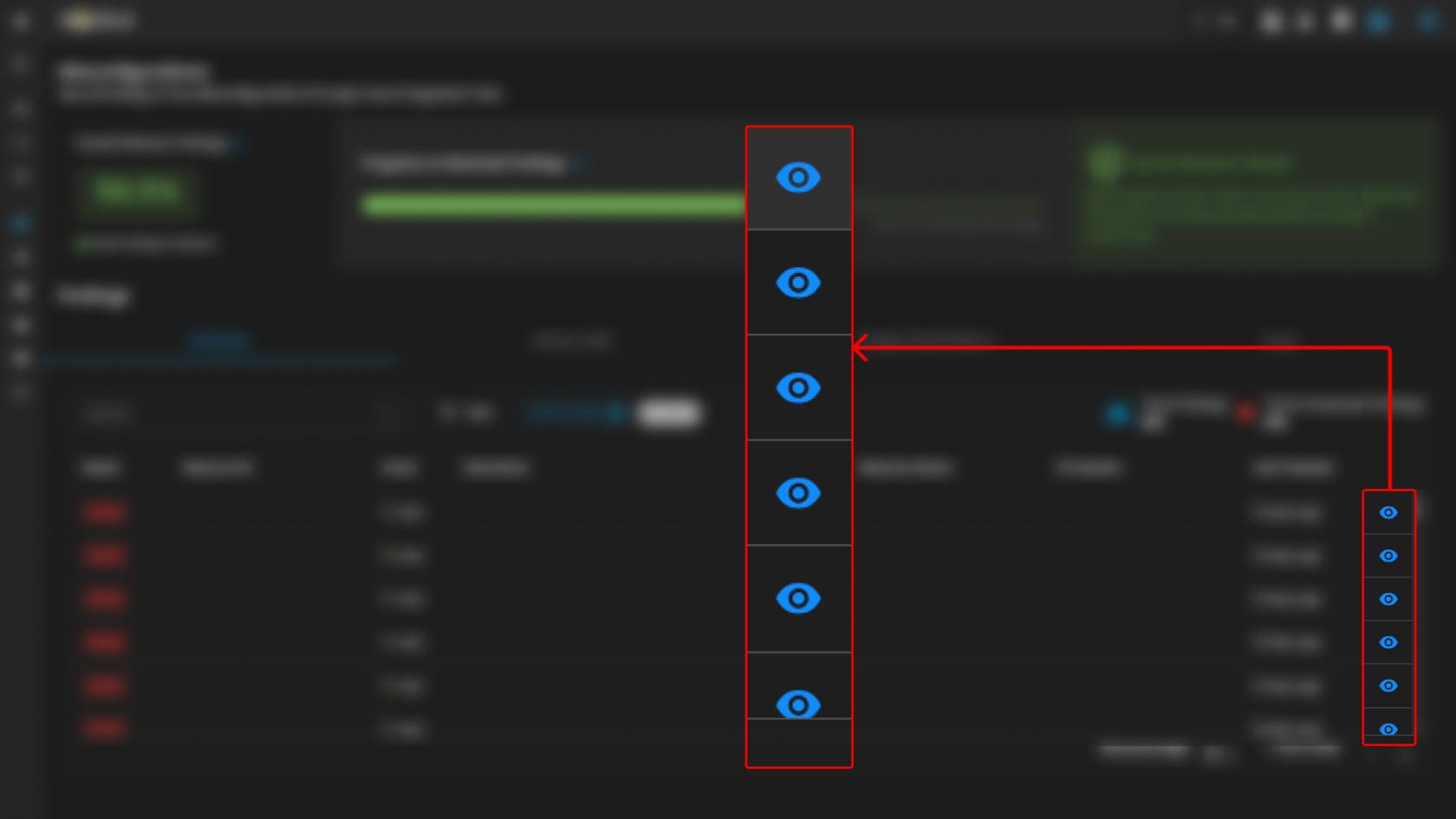
**By clicking each of the misconfigurations [![image.png](https://cytechint-docs-bookstack.s3.amazonaws.com/uploads/images/gallery/2025-06/scaled-1680-/3jGSao8KjNrrIgU6-image.png)](https://cytechint-docs-bookstack.s3.amazonaws.com/uploads/images/gallery/2025-06/3jGSao8KjNrrIgU6-image.png), it will show you all the details such as Evidence, Remediation and Rule Info.**

<p class="callout info"><span style="color: rgb(53, 152, 219);">**Note: The [![image.png](https://cytechint-docs-bookstack.s3.amazonaws.com/uploads/images/gallery/2025-06/scaled-1680-/3jGSao8KjNrrIgU6-image.png)](https://cytechint-docs-bookstack.s3.amazonaws.com/uploads/images/gallery/2025-06/3jGSao8KjNrrIgU6-image.png) icon is only clickable on failed results, pressing on a successful result does not open a pop up window.**</span></p>

[![HEHE (6).png](https://cytechint-docs-bookstack.s3.amazonaws.com/uploads/images/gallery/2026-02/scaled-1680-/LeIEQegvPGPJjvwT-hehe-6.png)](https://cytechint-docs-bookstack.s3.amazonaws.com/uploads/images/gallery/2026-02/LeIEQegvPGPJjvwT-hehe-6.png)

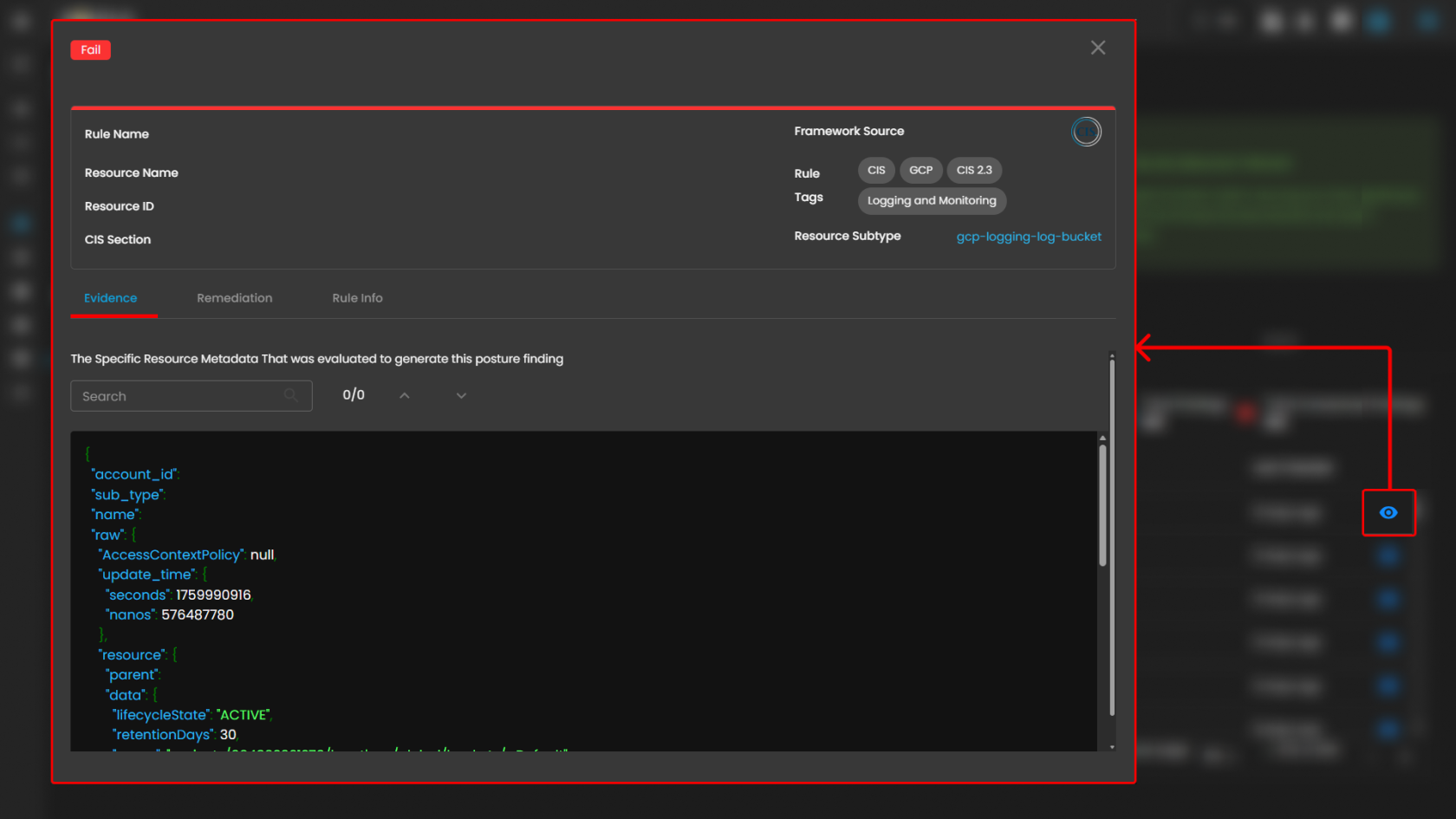
<span style="color: rgb(0, 0, 0);">In the evidence tab, it will give you the details of information that supports the misconfiguration.</span>

[![HEHE (8).png](https://cytechint-docs-bookstack.s3.amazonaws.com/uploads/images/gallery/2026-02/scaled-1680-/sAlgvcB8trFvUsCU-hehe-8.png)](https://cytechint-docs-bookstack.s3.amazonaws.com/uploads/images/gallery/2026-02/sAlgvcB8trFvUsCU-hehe-8.png)

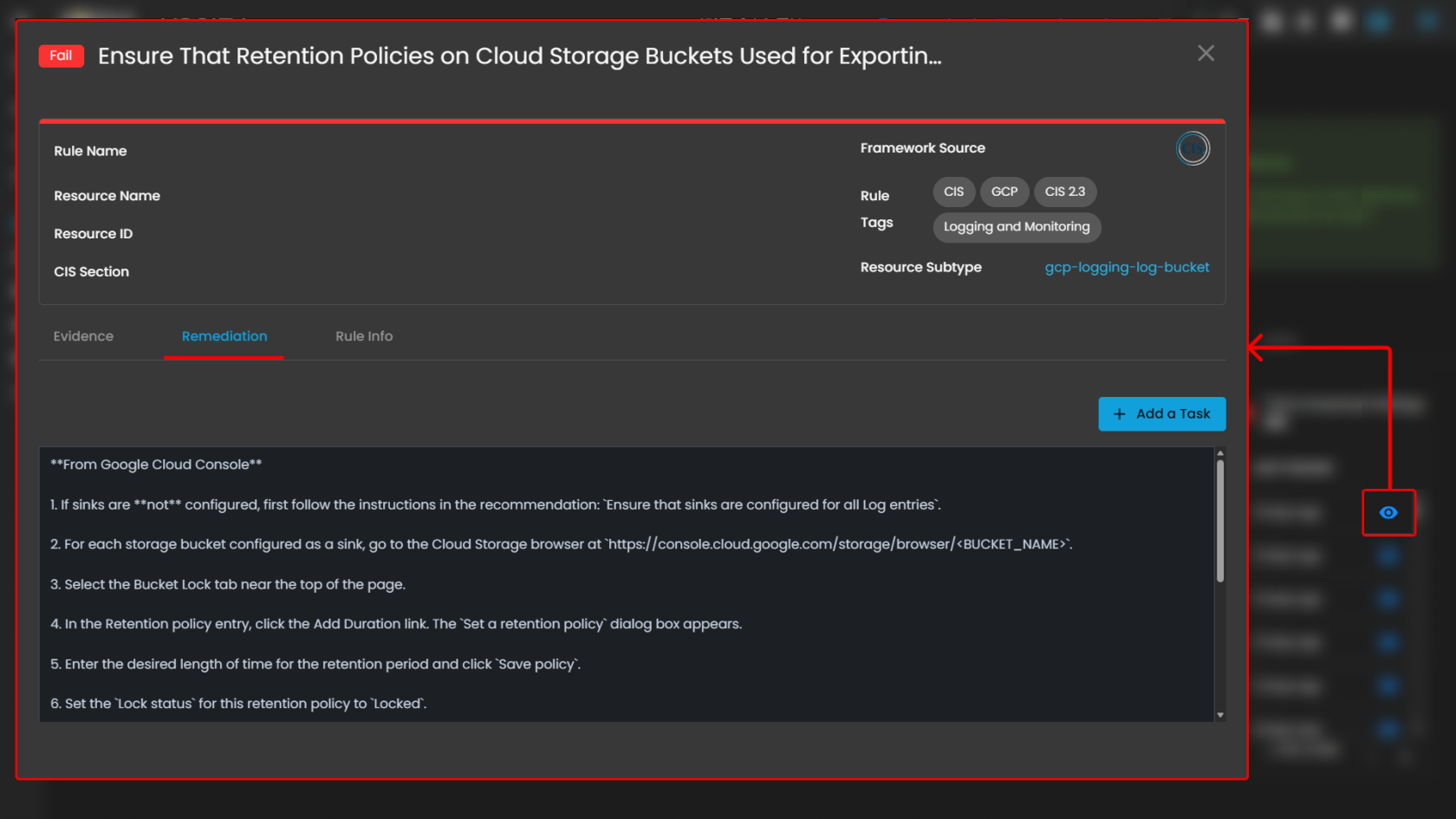
<span style="color: rgb(0, 0, 0);">Remediation tab shows all the needed instructions to resolve the misconfigurations, and you can also "Add a Task" function.</span>

[![HEHE (9).png](https://cytechint-docs-bookstack.s3.amazonaws.com/uploads/images/gallery/2026-02/scaled-1680-/1z4Zjrwrq58yOwwe-hehe-9.png)](https://cytechint-docs-bookstack.s3.amazonaws.com/uploads/images/gallery/2026-02/1z4Zjrwrq58yOwwe-hehe-9.png)

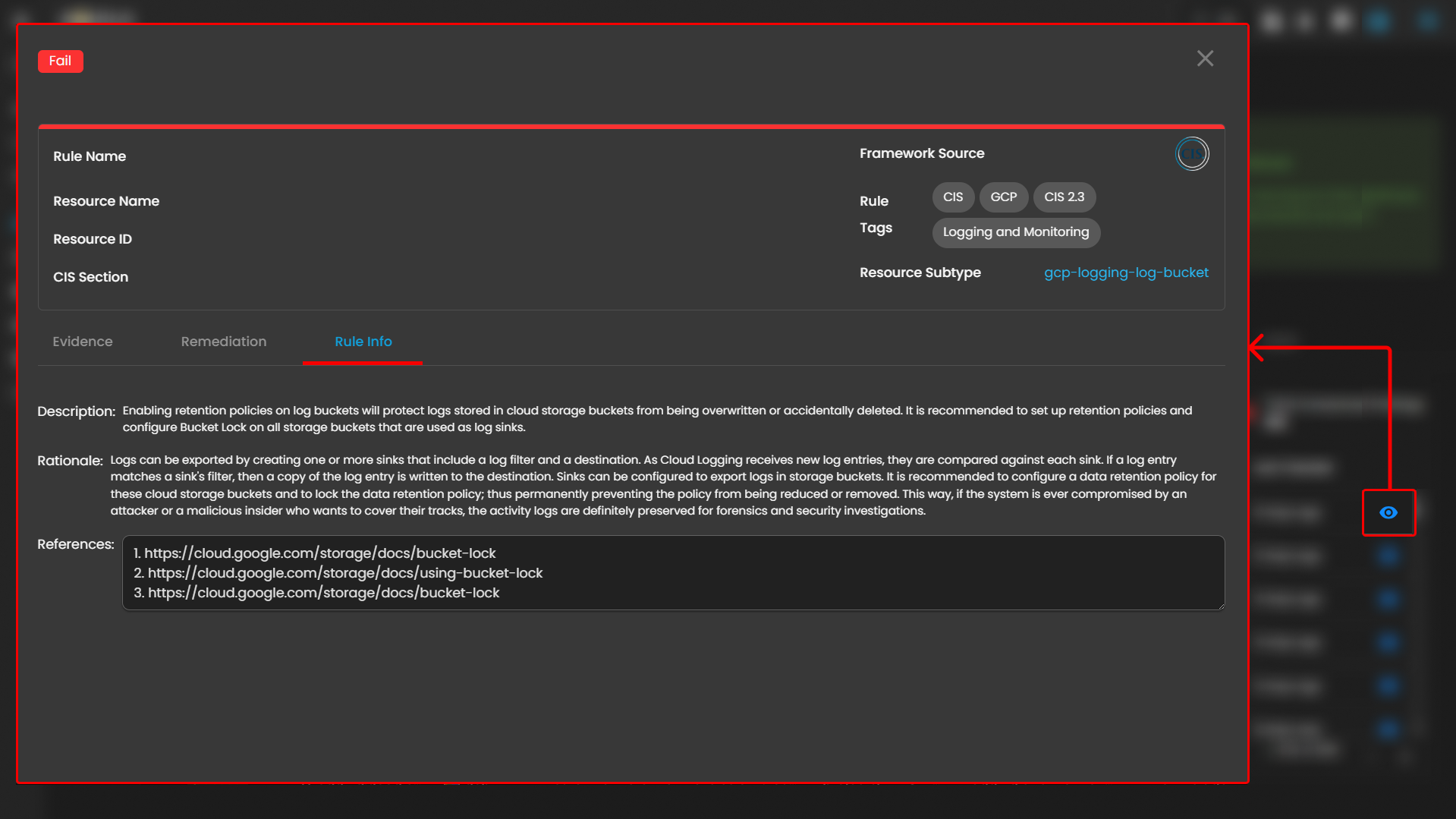
<span style="color: rgb(0, 0, 0);">Rule info tab shows the full details such as Description, Rationale, and References.</span>

[![HEHE (10).png](https://cytechint-docs-bookstack.s3.amazonaws.com/uploads/images/gallery/2026-02/scaled-1680-/tQqYt9iybbAfzmuc-hehe-10.png)](https://cytechint-docs-bookstack.s3.amazonaws.com/uploads/images/gallery/2026-02/tQqYt9iybbAfzmuc-hehe-10.png)

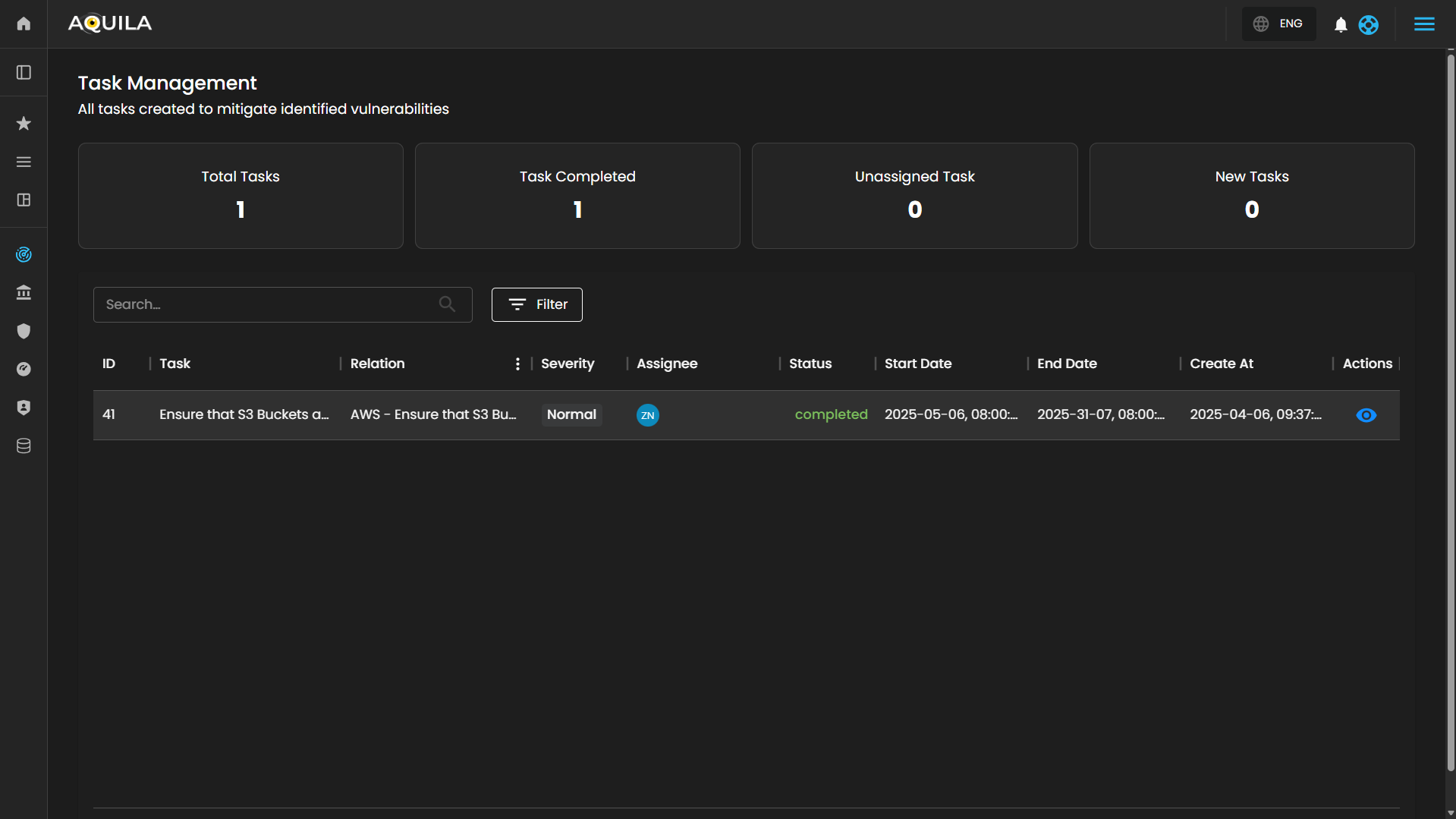
<span style="color: rgb(0, 0, 0);">Task Management Section- Displays all tasks created to mitigate identified vulnerabilities from cloud security findings.</span>

[![HEHE (11).png](https://cytechint-docs-bookstack.s3.amazonaws.com/uploads/images/gallery/2026-02/scaled-1680-/5tg8Qb9Zxnh5QU8U-hehe-11.png)](https://cytechint-docs-bookstack.s3.amazonaws.com/uploads/images/gallery/2026-02/5tg8Qb9Zxnh5QU8U-hehe-11.png)

- <span style="color: rgb(0, 0, 0);">**Search &amp; Filter Function**</span>
    - <span style="color: rgb(0, 0, 0);">**Search Bar**: Allows quick lookup of specific tasks by keyword.</span>
    - <span style="color: rgb(0, 0, 0);">**Filter Button**: Opens advanced filtering options (e.g., severity, assignee, status).</span>

---

- <span style="color: rgb(0, 0, 0);">**Task Table**</span>
- <span style="color: rgb(0, 0, 0);">Displays task details including:</span>
    - <span style="color: rgb(0, 0, 0);">**ID**: Unique identifier for each task</span>
    - <span style="color: rgb(0, 0, 0);">**Task Name**</span>
    - <span style="color: rgb(0, 0, 0);">**Relation**: Link to associated misconfiguration or finding</span>
    - <span style="color: rgb(0, 0, 0);">**Severity**: Impact level of the issue</span>
    - <span style="color: rgb(0, 0, 0);">**Assignee**: Person responsible for the task</span>
    - <span style="color: rgb(0, 0, 0);">**Status**: Current progress (e.g., new, in progress, completed)</span>
    - <span style="color: rgb(0, 0, 0);">**Start/End Date, Created At**: Timeline info for tracking progress</span>
    - <span style="color: rgb(0, 0, 0);">**Actions**: Manage or update the task</span>

---

#### <span style="color: rgb(53, 152, 219);">**<span class="TextRun SCXW45827853 BCX0" data-contrast="none" lang="EN-US" xml:lang="EN-US"><span class="NormalTextRun SCXW45827853 BCX0">Reports Section </span></span>**</span>

In this section, users can View and Manage their Test Report.

[![HEHE (12).png](https://cytechint-docs-bookstack.s3.amazonaws.com/uploads/images/gallery/2026-02/scaled-1680-/d5OGRROfFDbmGYpp-hehe-12.png)](https://cytechint-docs-bookstack.s3.amazonaws.com/uploads/images/gallery/2026-02/d5OGRROfFDbmGYpp-hehe-12.png)
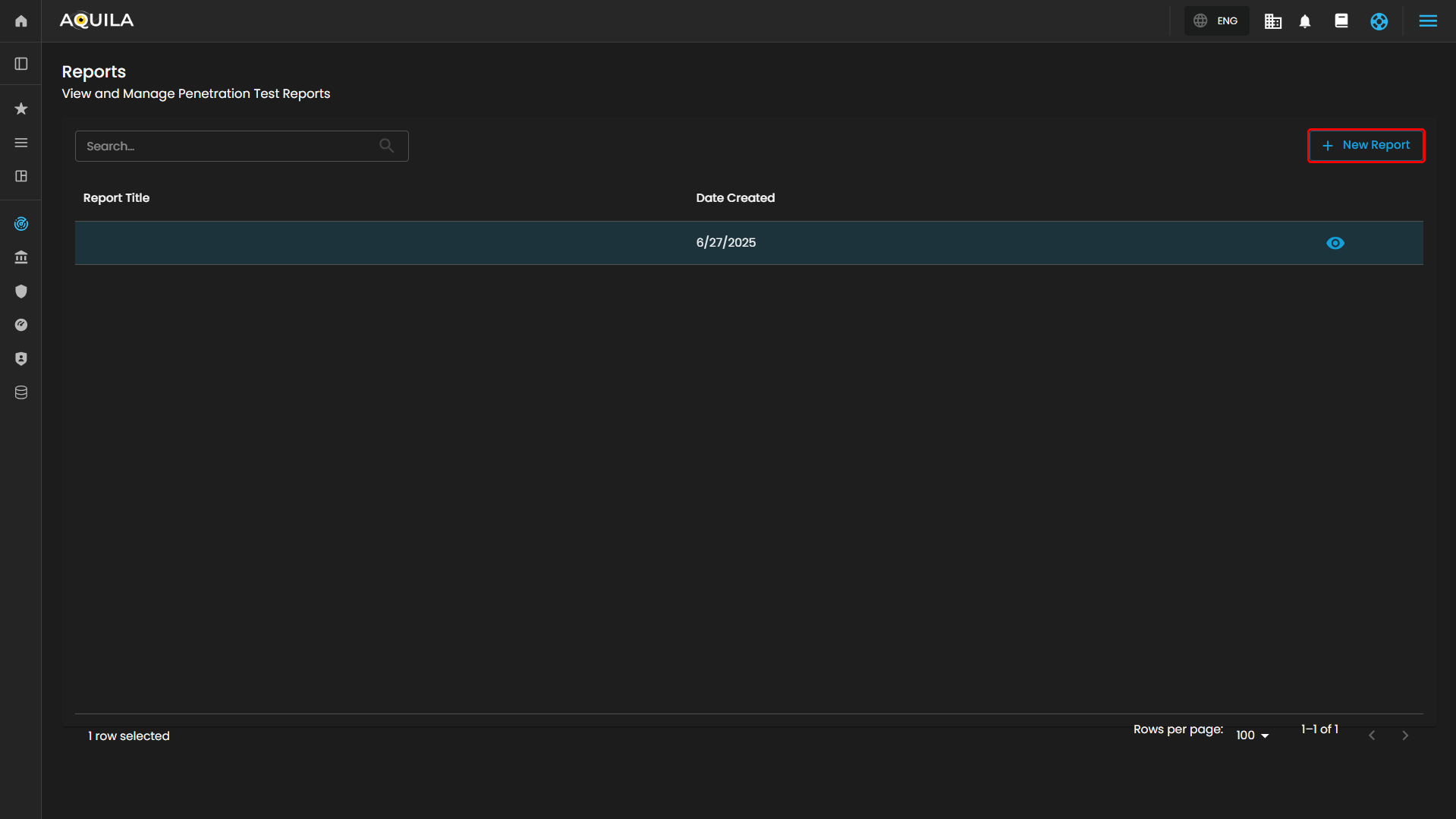
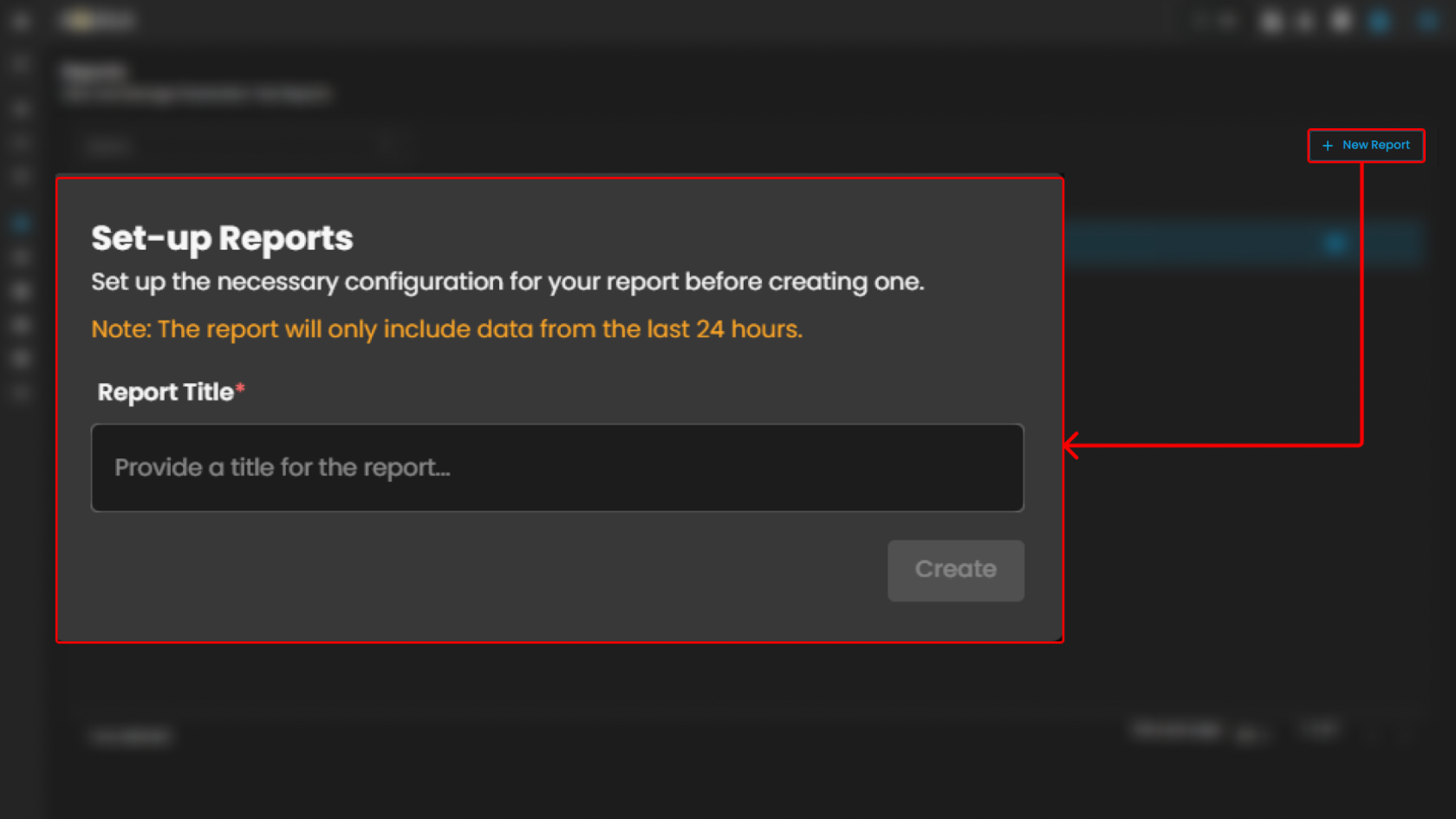
<span style="color: rgb(0, 0, 0);"><span class="TextRun SCXW45827853 BCX0" data-contrast="none" lang="EN-US" xml:lang="EN-US"><span class="NormalTextRun SCXW45827853 BCX0">The user can add new reports by pressing the "**+ New Report Button".** After providing the title for the report, it will automatically generate a report. </span></span></span>

[![HEHE (13).png](https://cytechint-docs-bookstack.s3.amazonaws.com/uploads/images/gallery/2026-02/scaled-1680-/8HLnlfIXTZcIDJhu-hehe-13.png)](https://cytechint-docs-bookstack.s3.amazonaws.com/uploads/images/gallery/2026-02/8HLnlfIXTZcIDJhu-hehe-13.png)

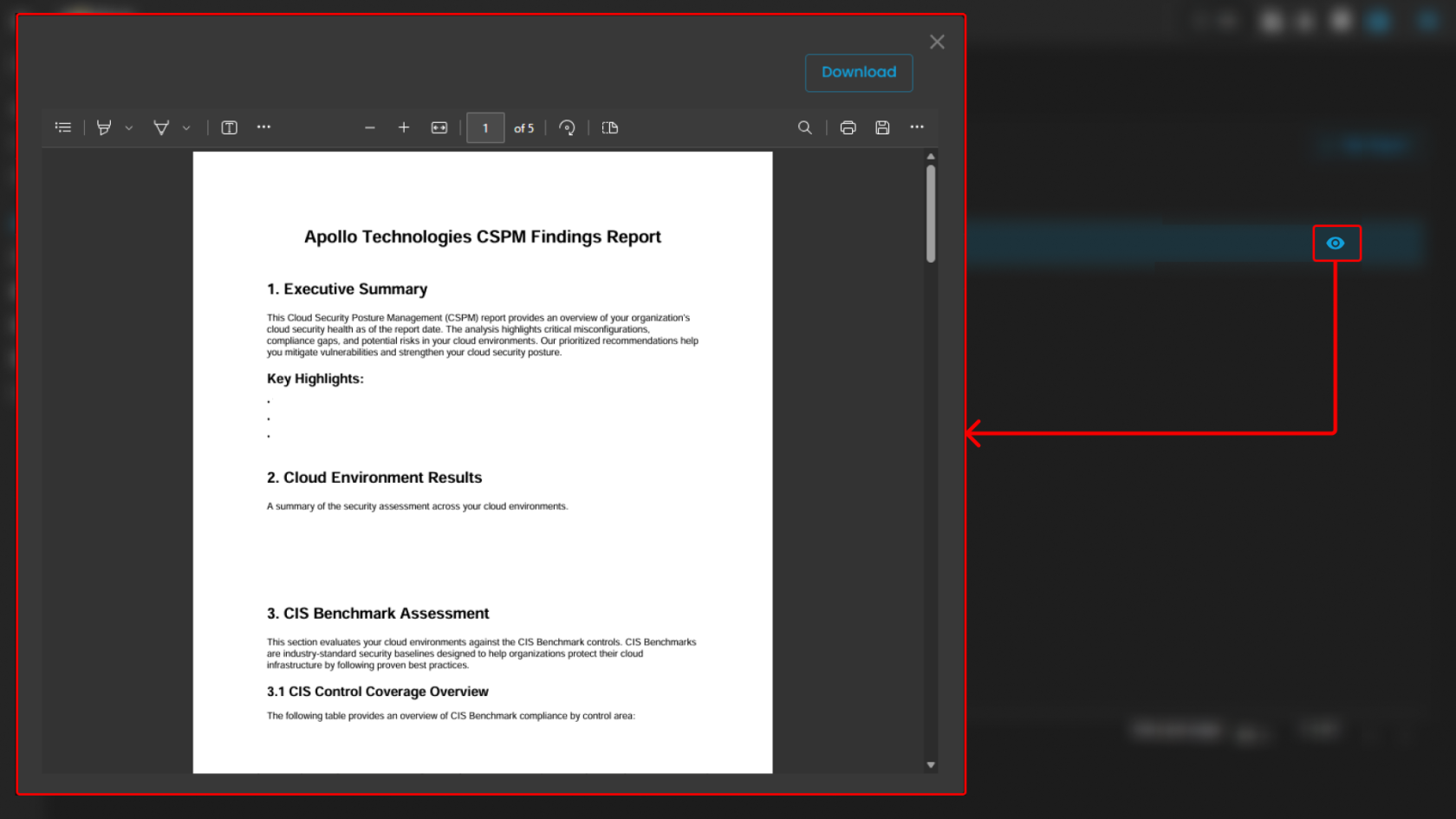
After setting up the report, the user can access it by pressing the "👁️" emoji. Users can also download it by pressing the download button at the top right of the pop-up window.

[![HEHE (14).png](https://cytechint-docs-bookstack.s3.amazonaws.com/uploads/images/gallery/2026-02/scaled-1680-/aYaUMiqTFHbjbZxd-hehe-14.png)](https://cytechint-docs-bookstack.s3.amazonaws.com/uploads/images/gallery/2026-02/aYaUMiqTFHbjbZxd-hehe-14.png)
#### <span style="color: rgb(53, 152, 219);">**Conclusion**:</span>

The Cloud Security Posture Management (CSPM) module monitors user-owned cloud applications to detect malicious behavior and identify risks from improper cloud service implementations. By continuously scanning cloud environments and providing real-time threat detection, the module ensures compliance with industry standards, identifies misconfigurations, and delivers actionable remediation guidance. This proactive approach helps organizations maintain a strong security posture, reduce vulnerabilities, and protect sensitive data across their entire cloud infrastructure.

 *<span style="color: rgb(0, 0, 0);"> If you need further assistance, kindly contact our support at <span style="color: rgb(53, 152, 219);">**[support@cytechint.com](mailto:info@cytechint.com)**</span> for prompt assistance and guidance.</span>*