# Endpoint Detection and Response (EDR) - Manual Installation (OLD)

#### <span style="color: rgb(0, 0, 0);">Endpoint Detection and Response (EDR)</span>

<span style="color: rgb(0, 0, 0);">Endpoint Detection and Response (EDR), is a cybersecurity technology that focuses on detecting, investigating, and responding to suspicious activities and threats on endpoints, such as workstations, laptops, and servers. EDR solutions provide visibility into endpoint activities and help security teams identify and mitigate potential threats before they can cause significant harm.</span>


##### **Please follow the instructions below and refer to the images below:**

<p class="callout success">**<span style="color: rgb(0, 0, 0);">Step 1: Login to CyTech - Aquila "<span style="color: rgb(53, 152, 219);">[usdc.cytechint.io](https://usdc.cytechint.io/)</span>" and nagivate to Aquila Modules at leftmost corner of the dashboard. </span>**  </p>

<p class="callout success"><span style="color: rgb(0, 0, 0);">**Step 2: Go to Cyber Monitoring&gt; Endpoint Detection and Response (EDR, MDR).[![image.png](https://cytechint-docs-bookstack.s3.amazonaws.com/uploads/images/gallery/2025-05/scaled-1680-/W7310dZpcPSITvee-image.png)](https://cytechint-docs-bookstack.s3.amazonaws.com/uploads/images/gallery/2025-05/W7310dZpcPSITvee-image.png)**</span></p>

<p class="callout success"><span style="color: rgb(0, 0, 0);">**Step 4: Navigate through Control Panel&gt; Manage Endpoints&gt; Install Endpoint &gt; Choose Manual.[![image.png](https://cytechint-docs-bookstack.s3.amazonaws.com/uploads/images/gallery/2025-05/scaled-1680-/k2O3KtGPoy3RxjqL-image.png)](https://cytechint-docs-bookstack.s3.amazonaws.com/uploads/images/gallery/2025-05/k2O3KtGPoy3RxjqL-image.png)**</span></p>

<p class="callout success">**S<span style="color: rgb(0, 0, 0);">tep 8: Choose the correct Operating System for your endpoint. After choosing the type of your Operating System, the commands will display below needed for installing the EDR agent.[![image.png](https://cytechint-docs-bookstack.s3.amazonaws.com/uploads/images/gallery/2025-05/scaled-1680-/yftNuea1Nx2QDssx-image.png)](https://cytechint-docs-bookstack.s3.amazonaws.com/uploads/images/gallery/2025-05/yftNuea1Nx2QDssx-image.png)</span>**</p>

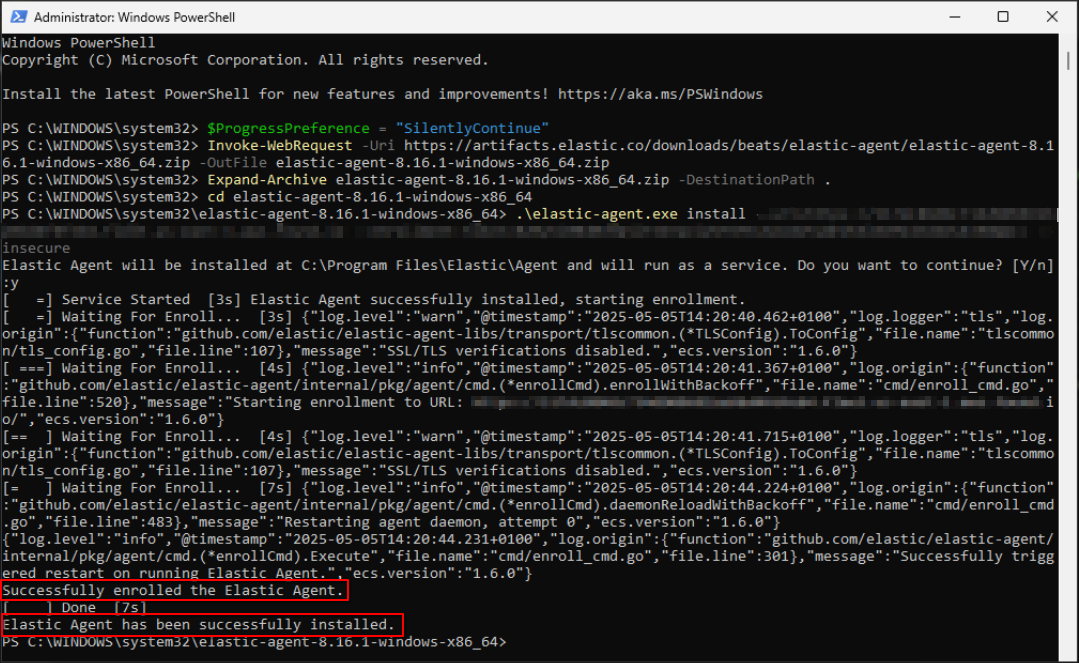
<p class="callout success"><span style="color: rgb(0, 0, 0);">**Step 9: Execute the command in your Endpoint environment using powershell or terminal under admin privilege. Once the commands are executed successfully, you should see an output similar to the example shown in the image below. Go back to Cytech - Aquila to finish manual installation. [![image.png](https://cytechint-docs-bookstack.s3.amazonaws.com/uploads/images/gallery/2025-05/scaled-1680-/ItyEDcd3n9c47yvj-image.png)](https://cytechint-docs-bookstack.s3.amazonaws.com/uploads/images/gallery/2025-05/ItyEDcd3n9c47yvj-image.png)**</span></p>
<p class="callout success"><span style="color: rgb(0, 0, 0);">**Step 10: Before you can proceed to the final installation set-up make sure you check off each steps required. Then you can click "Next".[![image.png](https://cytechint-docs-bookstack.s3.amazonaws.com/uploads/images/gallery/2025-05/scaled-1680-/28a7SRVoIeFoHEJC-image.png)](https://cytechint-docs-bookstack.s3.amazonaws.com/uploads/images/gallery/2025-05/28a7SRVoIeFoHEJC-image.png)**</span></p>

<p class="callout success"><span style="color: rgb(0, 0, 0);">**Step 11: A new window will appear and will check the log collector status and update the latest installation of EDR agent. Wait for it to finish and after successfull installation the endpoint will displayed in the dashboard. [![image.png](https://cytechint-docs-bookstack.s3.amazonaws.com/uploads/images/gallery/2025-04/scaled-1680-/IsvHFpr1T0tGHcjn-image.png)](https://cytechint-docs-bookstack.s3.amazonaws.com/uploads/images/gallery/2025-04/IsvHFpr1T0tGHcjn-image.png)**</span></p>

<p class="callout success"><span style="color: rgb(0, 0, 0);">Step 12: This step confirms the successful installation and enrollment of the **EDR Agent** with the fleet server. </span>[![image.png](https://cytechint-docs-bookstack.s3.amazonaws.com/uploads/images/gallery/2025-05/scaled-1680-/C7SUYEe4npzRa8Oj-image.png)](https://cytechint-docs-bookstack.s3.amazonaws.com/uploads/images/gallery/2025-05/C7SUYEe4npzRa8Oj-image.png)</p>