# AQUILA - EDR MSI Aquila Agent
# Aquila Agent MSI (EDR) - Manual Installation
#### Endpoint Detection and Response (EDR)
Endpoint Detection and Response (EDR), is a cybersecurity technology that focuses on detecting, investigating, and responding to suspicious activities and threats on endpoints, such as workstations, laptops, and servers. EDR solutions provide visibility into endpoint activities and help security teams identify and mitigate potential threats before they can cause significant harm.
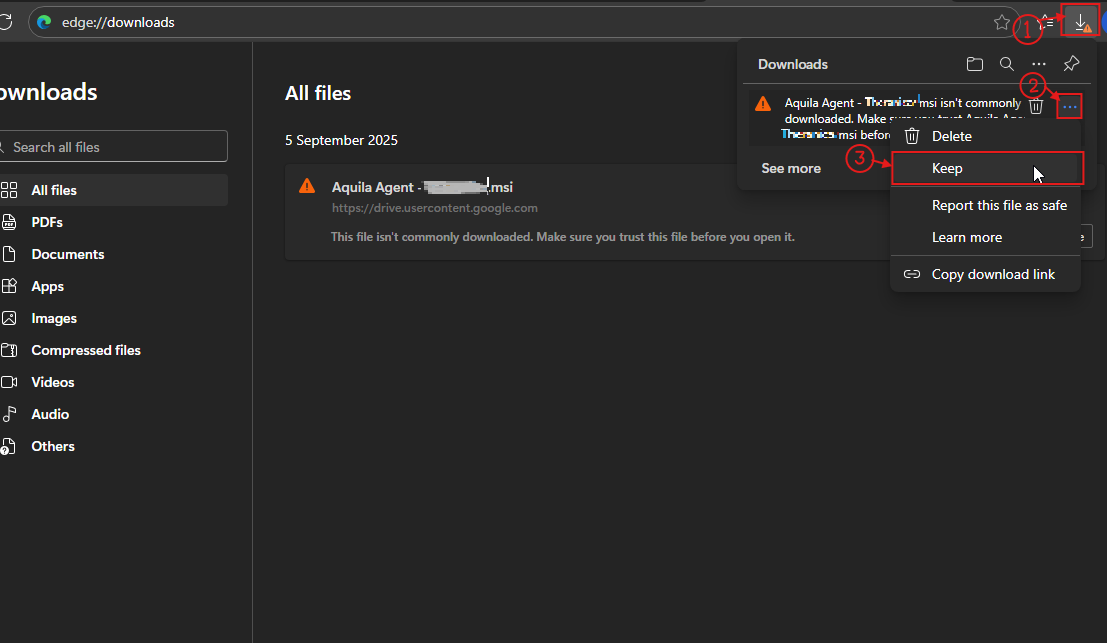
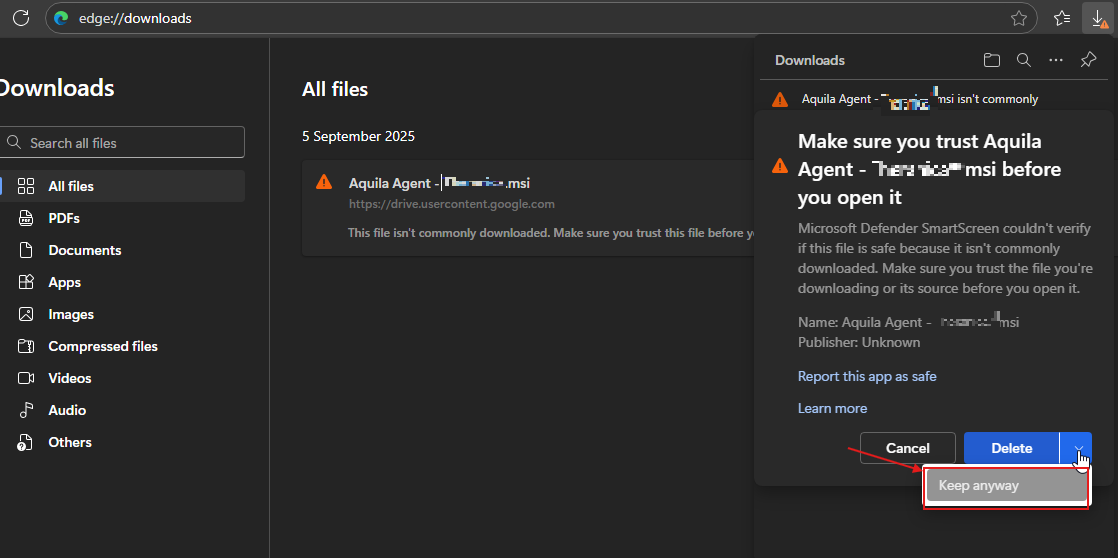
**Follow the number of steps to keep the AQUILA EDR installer.**
[](https://cytechint-docs-bookstack.s3.amazonaws.com/uploads/images/gallery/2026-01/ByvCQvJLDxfKu0B0-xdyw23ko.png)
[](https://cytechint-docs-bookstack.s3.amazonaws.com/uploads/images/gallery/2026-01/9rQimc4pAAC8H6yC-t2.png)
##### **Please follow the instructions below and refer to the images below:**
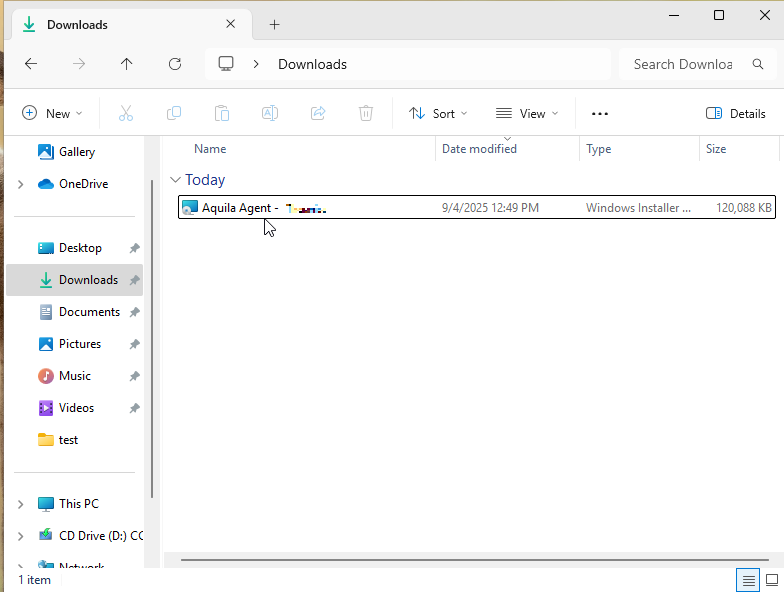
**Step 1:** After downloading the AQUILA Agent Setup installer. Run the setup file to start the installation wizard.
[](https://cytechint-docs-bookstack.s3.amazonaws.com/uploads/images/gallery/2026-01/ypIVWRpBvzd2eSPo-t3.png)
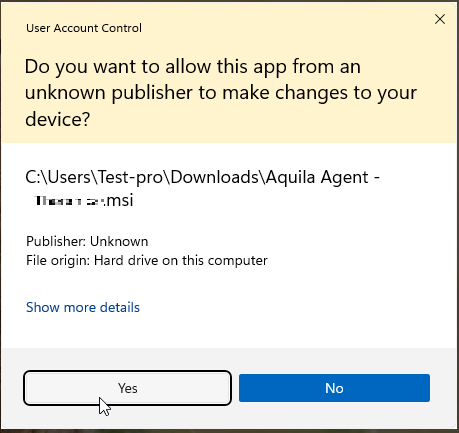
**Step 2:** If prompted with a User Account Control (UAC) dialog stating that the app is from an unknown publisher, click **‘Yes’** to allow the installer to make changes and proceed with the installation.
[](https://cytechint-docs-bookstack.s3.amazonaws.com/uploads/images/gallery/2026-01/8uJWOhbYPA1nkK4C-t4.png)
**Step 3:** Wait for a moment to install the Aquila Agent.
[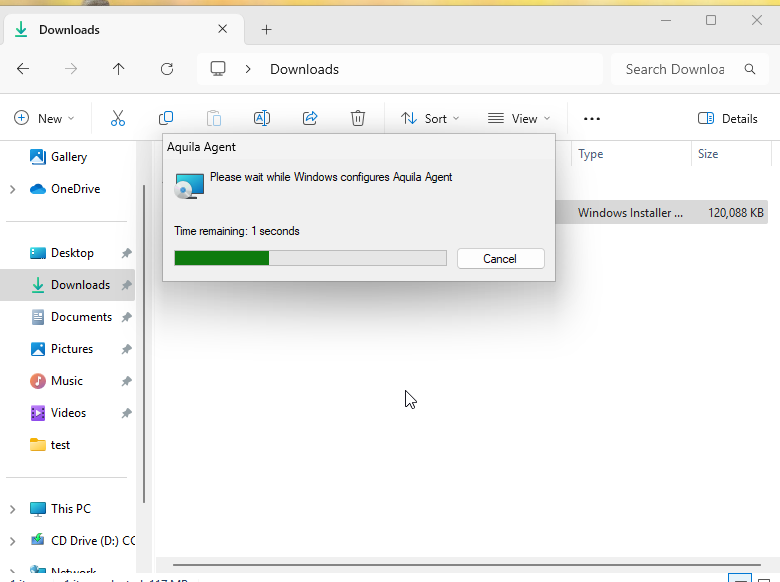](https://cytechint-docs-bookstack.s3.amazonaws.com/uploads/images/gallery/2025-09/ZVdGl18Seh4bRdZQ-image.png)
**Step 4:** After the installation finished, the AQUILA Agent would now be displayed on the Desktop,
[](https://cytechint-docs-bookstack.s3.amazonaws.com/uploads/images/gallery/2025-08/AMq60ycKzqggJhhj-image.png)
**Step 5:** Right click or click Mouse 2 on the AQUILA Agent then run it as Administrator.
[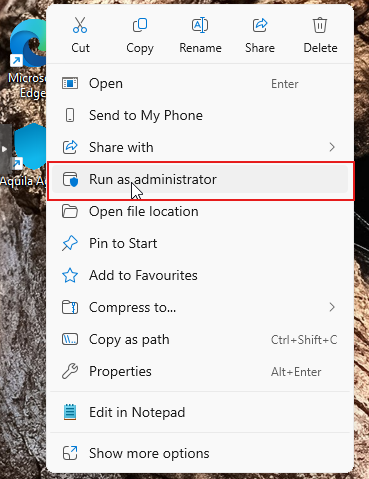](https://cytechint-docs-bookstack.s3.amazonaws.com/uploads/images/gallery/2025-08/J0VjddCPKqLhpYSn-image.png)
**Step 6:** If prompted with a User Account Control (UAC) dialog stating that the app is from an unknown publisher, click **‘Yes’** to allow the installer to make changes and proceed with the installation.
[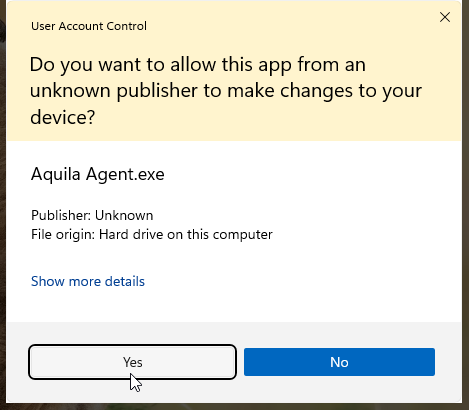](https://cytechint-docs-bookstack.s3.amazonaws.com/uploads/images/gallery/2025-09/raD6KMA4Nvl6CDgd-image.png)
**Step 7:** Proceed with the installation. Click "**Install Agent**" to proceed. Please wait a few minutes for the installation process to complete. This will automatically initiate enrollment into the CyTech - AQUILA platform.
[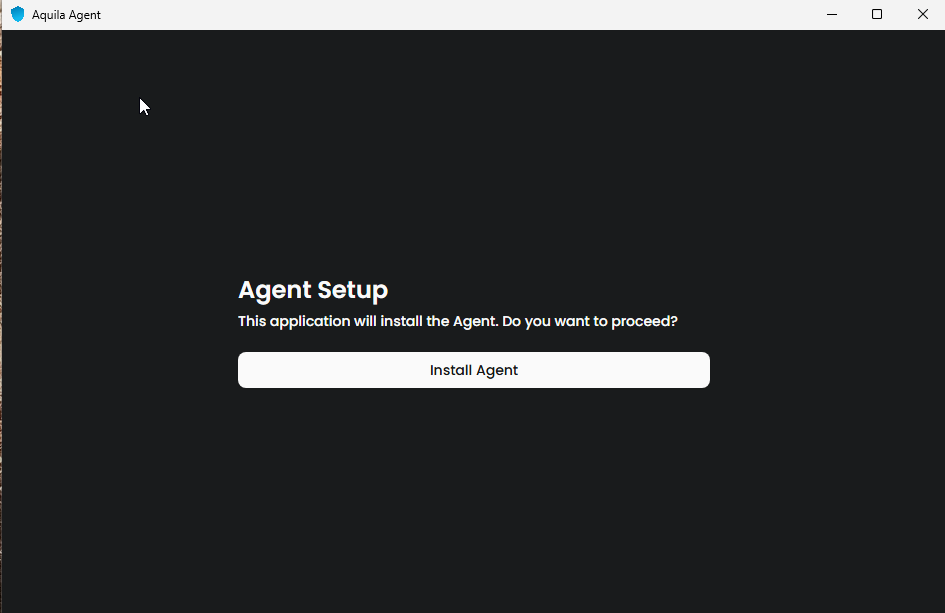](https://cytechint-docs-bookstack.s3.amazonaws.com/uploads/images/gallery/2025-08/8Xr6s80WmC5k2Rfy-image.png)
**Step 8:** After successful enrollment, an overview window will be displayed. Please note that it may take some time for the device to reflect an online status. Ensure the device remains connected to the network for the EDR policy to be properly applied.
[](https://cytechint-docs-bookstack.s3.amazonaws.com/uploads/images/gallery/2025-06/ln4ghMC9isi5CerI-image.png)
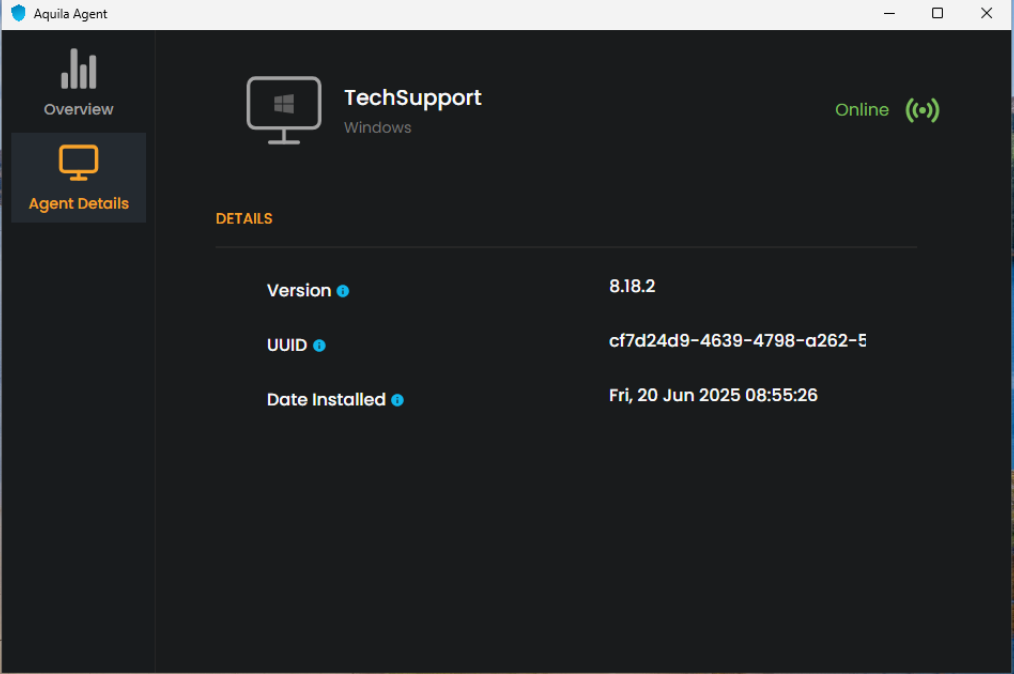
**Step 9:** The Agent Details panel allows you to verify the status and identity of your endpoint device.
[](https://cytechint-docs-bookstack.s3.amazonaws.com/uploads/images/gallery/2025-06/n5Jyu4liWfqQERlk-image.png)
**Step 10:** You may also access AQUILA Agent Secure through the Windows taskbar's side dock panel.
[](https://cytechint-docs-bookstack.s3.amazonaws.com/uploads/images/gallery/2025-06/JUUlbRcGAxMcwrI0-image.png)
**Step 11:** The Overview page provides a centralized dashboard displaying all recent detections related to your endpoint devices. This real-time monitoring allows security teams to quickly identify potential threats, analyze attack vectors, and prioritize response efforts based on severity and impact. By consolidating detection data, the Overview page supports proactive threat hunting and continuous endpoint security management as part of a comprehensive cybersecurity monitoring strategy.
[](https://cytechint-docs-bookstack.s3.amazonaws.com/uploads/images/gallery/2025-06/dU8R6czWUg0E8kGg-image.png)
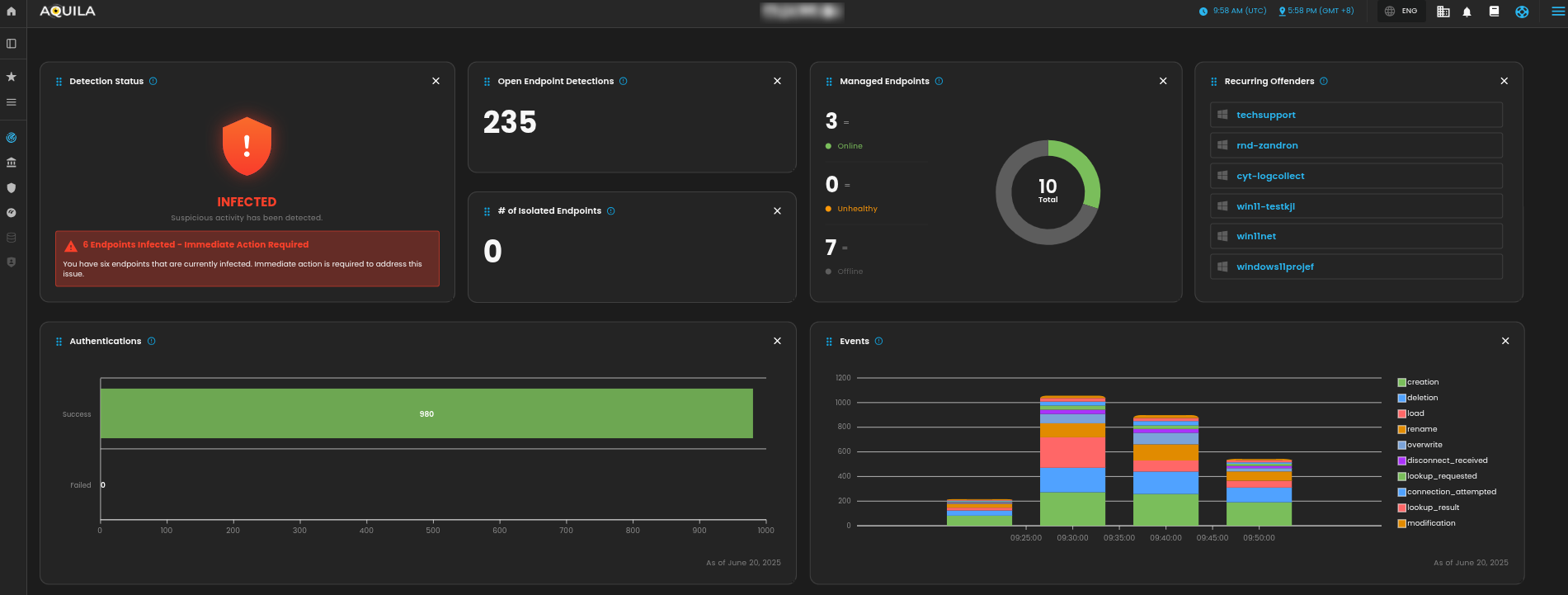
For a more detailed report and in-depth analysis, navigate to **CyTech - AQUILA > Cyber Monitoring > Endpoint Detection and Response(EDR)**. This section provides comprehensive visibility into endpoint activity, detection timelines, threat classifications, and response actions to support advanced threat analysis and incident investigation.
[](https://cytechint-docs-bookstack.s3.amazonaws.com/uploads/images/gallery/2025-06/JTplpsqWMr83Ufbi-image.png)
[](https://cytechint-docs-bookstack.s3.amazonaws.com/uploads/images/gallery/2025-06/jWMnSkzvcm89lb8x-image.png)
[](https://cytechint-docs-bookstack.s3.amazonaws.com/uploads/images/gallery/2025-06/YIdIVQT0fcq3P8IZ-image.png)
*If you need further assistance, kindly contact our technical support at **** for prompt assistance and guidance.*