# NG SIEM – LastPass Integration
#### **Overview**
The **LastPass Elastic Integration** allows the ingestion of data from the LastPass Admin Console for enhanced monitoring and reporting.
This integration collects three main data streams:
- **Detailed Shared Folder Data** – provides detailed information about shared folders, sites within them, and associated access permissions.
- **Event Report Logs** – captures audit events and activities within the organization’s LastPass Business account (logins, password changes, sharing actions, admin activities, etc.).
- **User Logs** – gathers data about user accounts, including profile information and status.
These logs help monitor password management activities, access permissions, and user behavior for compliance and auditing purposes.
#### **Prerequisites**
Before configuring the integration, ensure that the following components and credentials are available.
##### **LastPass Business Account**
A **LastPass Business account** is required to use this integration.
Free or personal accounts are not supported.
##### **Elastic Stack Requirements**
- **Elasticsearch** – Required to store and index collected data.
- **Kibana** – Required to visualize and manage data streams.
You can use Elastic Cloud (recommended) or a self-managed Elastic Stack deployment.
##### **API Credentials**
Two key credentials are required for Elastic to access the LastPass API:
1. **Account Number (CID)**
- Found in the **Admin Console → Dashboard tab**.
- Displayed at the top of the page, preceded by the label *“Account Number”*.[](https://cytechint-docs-bookstack.s3.amazonaws.com/uploads/images/gallery/2025-10/TmN30MHXhaoncBZc-image.png)
2. **Provisioning Hash**
- Go to **Admin Console → Advanced → Enterprise API**.
- If no hash exists: click **Create provisioning hash → OK**.
- If forgotten: click **Reset your provisioning hash → OK** to generate a new one.
- **Important:** Resetting invalidates the previous hash, requiring reconfiguration in all connected integrations. [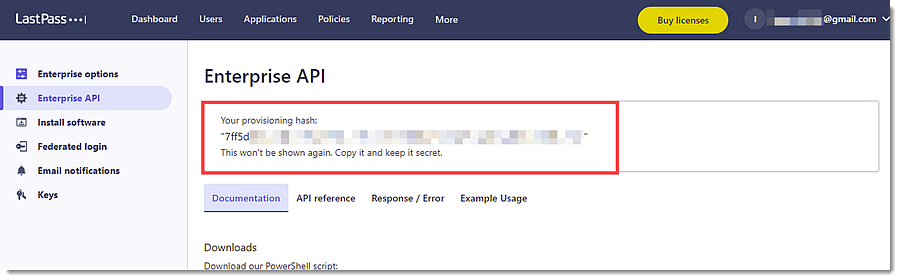](https://cytechint-docs-bookstack.s3.amazonaws.com/uploads/images/gallery/2025-10/Rcm5TC0r3OMfPJNn-image.png)
*Keep both the CID and Provisioning Hash secure. These credentials grant access to your organization’s LastPass data.*
#### **Integration Configuration**
##### **1. Access the Integrations Page**
1. Navigate to:
**Integrations → LastPass → Add LastPass**
2. Provide an identifiable integration name.
##### **2. Input Connection Settings**
Under **Configure integration**, fill in the required fields:
- ##### **Account Number:**
- Enter the LastPass Business Account Number (CID) found in your LastPass Admin Console → Dashboard tab, at the top of the page.
- ##### **Provisioning Hash:**
- Enter the Provisioning Hash generated in Admin Console → Advanced → Enterprise API. This serves as the API secret used for authentication.
- ##### **URL:**
- Default API endpoint for LastPass Enterprise integration. This is automatically pre-filled in most cases.
##### **3. Select Data Streams**
Enable the data streams you want to collect. It can be enabled or disable specific data streams based on visibility needs:
- **Detailed Shared Folder Data**
- **Event Report Logs**
- **User Logs**
##### **4. Save and Deploy**
Once all required fields are configured:
1. Click **Save and continue**
2. Assign the integration to your Elastic Agent policy
3. Confirm deployment
##### **Notes**
- The integration **only supports LastPass Business** accounts via the **Enterprise API**.
- The **Provisioning Hash** must be updated in Elastic whenever it is regenerated in LastPass.
- **Multifactor authentication** may be required to access the Admin Console.
- The **LastPass API** does not manage pre-configured SSO (Cloud) app groups, these remain outside integration scope.
*If you need further assistance, kindly contact* ***support@cytechint.com*** *for prompt assistance and guidance.*